

Recensione CloudBees 2026: Pro, Contro, Funzionalità e Prezzi
CloudBees si distingue per CI/CD di livello enterprise, offrendo robuste possibilità di personalizzazione e governance, ma può risultare complesso per i team più piccoli rispetto agli strumenti di delivery continua più semplici.

Recensiamo gli strumenti in modo indipendente e le commissioni ci aiutano a finanziare i nostri test. Consulta la nostra politica sulla trasparenza, la nostra metodologia, oppure suggerisci uno strumento.
CloudBees is a continuous delivery tool for enterprise engineering teams that need centralized pipeline management, compliance controls, and governance across large CI/CD environments. I'd mainly consider it if your org runs Jenkins at scale. It goes deeper on policy enforcement, audit trails, and role-based access controls than a platform like Harness typically does out of the box.
CloudBees Evaluation Summary

4.4/5
- Pricing upon request
- Free demo available
Perché fidarsi dei nostri consigli sui software
6,700+
Reviews
20
Industry experts
16+
Evaluation factors
14
Years
Il nostro team testa e recensisce software dal 2012. In quanto leader tecnologici noi stessi, sappiamo quanto sia difficile — e importante — scegliere il software giusto.
Per questa guida, abbiamo valutato gli strumenti attraverso test praticie ricerche indipendenti, assegnando un punteggio agli strumenti in base ai nostri criteri di selezione.
Le nostre recensioni riflettono il nostro giudizio editoriale umano, non un discorso di vendita.
Revisori esperti:
- Paulo Gardini MiguelDirettore tecnico
 Tim FisherVP dell'IA
 Gabriel RosasTech Lead e architetto software
 Christhian GruhnTech Lead e architetto della piattaforma

CloudBees Overview
CloudBees delivers enterprise-grade pipeline automation, granular governance, and deep integration options, making it a strong choice for organizations with complex compliance or scaling needs. Its pricing and advanced features may be more than smaller teams require, but for regulated industries or large-scale DevOps, the investment pays off in control and flexibility.
If you’re judging tools for auditability, custom workflows, or hybrid cloud support, CloudBees stands out—though its interface and setup may feel heavy compared to simpler solutions.
Pros
- CloudBees offers advanced CI/CD tools that enhance your team's deployment efficiency.
- Its intuitive interface helps your team manage complex workflows with ease.
- CloudBees provides excellent visibility into project progress, keeping your team aligned.
Cons
- The platform can have a steep learning curve for new users.
- Initial setup might be time-consuming for your team.
- Some users find the customization options overwhelming at first.
Is CloudBees Right For Your Needs?
Who Would be a Good Fit for CloudBees?
CloudBees is ideal for large enterprises and tech-savvy industries like finance, healthcare, and telecommunications, where complex software development and deployment are crucial. Your DevOps teams will benefit from CloudBees’s robust CI/CD tools, which streamline deployments and enhance collaboration. If your organization prioritizes efficient software delivery and needs a platform that offers excellent visibility and control over projects, CloudBees is a strong choice.
- Large EnterprisesCloudBees’s scalability and advanced features make it perfect for managing vast and complex projects.
- Finance IndustryIts robust security and compliance features are well-suited for financial institutions.
- Healthcare SectorCloudBees supports the stringent data handling and privacy requirements in healthcare.
- TelecommunicationsThe platform’s ability to handle large-scale deployments benefits telecom companies.
- DevOps TeamsYour DevOps team will appreciate the streamlined workflows and enhanced collaboration tools.
- Software Development FirmsCloudBees’s powerful CI/CD capabilities help development firms deliver projects more efficiently.
Who Would be a Bad Fit for CloudBees?
Small businesses and startups might find CloudBees overwhelming due to its complexity and extensive feature set. If your team lacks dedicated DevOps professionals or if you’re looking for a simple, quick-to-deploy solution, CloudBees might not be the best fit. The platform’s robust capabilities can be excessive for teams with straightforward needs or limited resources.
- Small StartupsThe platform’s complexity can be daunting for startups with limited resources.
- Non-Tech IndustriesIndustries with minimal tech demands might find CloudBees’s features unnecessary.
- FreelancersThe extensive capabilities of CloudBees may not be needed for individual projects.
- Simple ProjectsFor projects requiring basic CI/CD, CloudBees’s advanced tools might be overkill.
- Short-Term TeamsTemporary teams will face a steep learning curve with CloudBees’s detailed setup.
- Budget-Conscious CompaniesOrganizations with tight budgets might find the investment in CloudBees hard to justify.
La Nostra Metodologia di Recensione
Come Testiamo e Valutiamo gli Strumenti
Abbiamo trascorso anni a costruire, perfezionare e migliorare il nostro sistema di testing e valutazione del software. Il nostro schema è progettato per cogliere le sfumature della selezione software e cosa rende efficace uno strumento, focalizzandosi sugli aspetti critici del processo decisionale.
Di seguito, puoi vedere esattamente come funziona il nostro testing e punteggio su sette criteri. Ci permette di offrire una valutazione imparziale del software basata su funzionalità principali, caratteristiche distintive, facilità d’uso, onboarding, assistenza clienti, integrazioni, recensioni dei clienti e rapporto qualità-prezzo.
Funzionalità Principali (25% del punteggio finale)
Il punto di partenza della nostra valutazione è sempre la funzionalità principale dello strumento. Ha le funzioni e caratteristiche base che ci si aspetta? Alcune di queste caratteristiche sono limitate ai piani tariffari superiori? Fondamentalmente, ci aspettiamo che uno strumento regga il confronto rispetto alle capacità di base dei concorrenti.
Caratteristiche Distintive (25% del punteggio finale)
Successivamente, valutiamo le caratteristiche distintive e non comuni che vanno oltre la funzionalità base tipicamente trovata negli strumenti di questa categoria. Un punteggio alto riflette funzionalità specializzate o uniche che rendono il prodotto più veloce, efficiente o offrono ulteriore valore all’utente.
Valutiamo inoltre quanto sia semplice integrare altri strumenti tipicamente utilizzati nell’infrastruttura tecnologica per espandere la funzionalità e l’utilità del software. Gli strumenti che offrono numerose integrazioni native, connessioni di terze parti e accesso API per creare integrazioni personalizzate ottengono i punteggi migliori.
Facilità d’Uso (10% del punteggio finale)
Consideriamo quanto sia rapido e semplice svolgere i compiti definiti nella funzionalità principale utilizzando lo strumento. Il software con punteggio alto è ben progettato, intuitivo da usare, offre app mobili, fornisce modelli e rende semplici attività relativamente complesse.
Onboarding (10% del punteggio finale)
Sappiamo quanto sia importante l’adozione rapida da parte del team per una nuova piattaforma, quindi valutiamo quanto sia facile imparare e utilizzare uno strumento con formazione minima. Valutiamo quanto velocemente un membro del team possa iniziare a usare lo strumento anche senza esperienza. Soluzioni con punteggio alto indicano che sono richiesti pochi o nessun supporto.
Assistenza Clienti (10% del punteggio finale)
Esaminiamo quanto sia veloce e facile ricevere assistenza e risolvere problemi tramite telefono, live chat o knowledge base. Gli strumenti e le aziende che garantiscono supporto in tempo reale ottengono il miglior punteggio, mentre i chatbot ottengono il peggiore.
Recensioni dei Clienti (10% del punteggio finale)
Oltre ai nostri test e valutazioni, prendiamo in considerazione il net promoter score dei clienti attuali e passati. Valutiamo la probabilità che, data la scelta, selezionerebbero nuovamente lo strumento per la funzionalità principale. Un software con punteggio alto riflette un alto net promoter score da parte dei clienti attuali o passati.
Rapporto Qualità-Prezzo (10% del punteggio finale)
Infine, considerando tutti gli altri criteri, analizziamo il prezzo medio dei piani base rispetto alle funzionalità principali e consideriamo il valore degli altri criteri di valutazione. Il software che offre di più a meno otterrà un punteggio più alto.
Core Features
CI/CD Workflow Automation
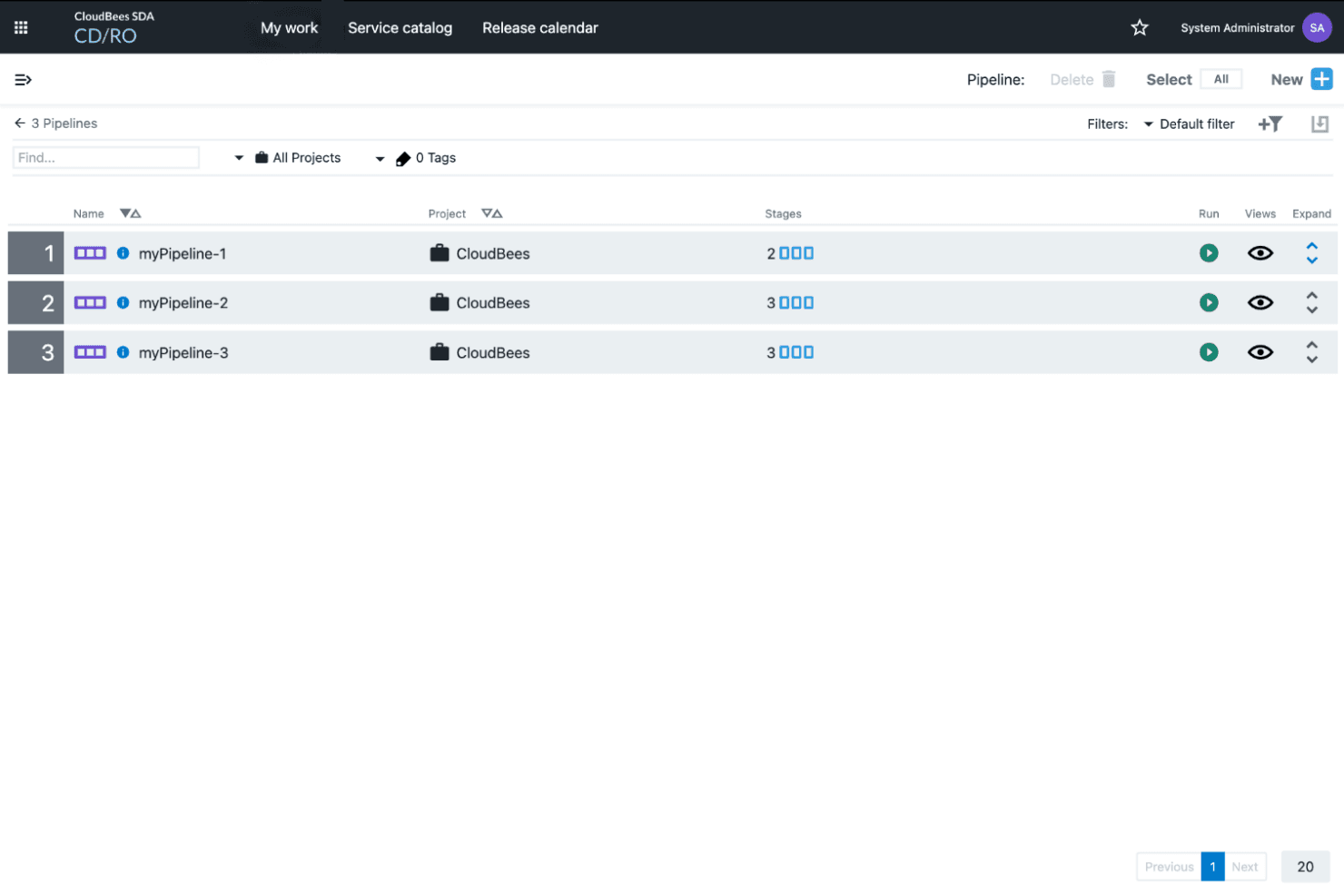
Automate build, test, and deployment pipelines for consistent, repeatable releases. Visual pipeline editors and policy controls help teams standardize delivery processes.
Security and Compliance Controls
Continuously assess security and compliance with policy-driven guardrails and audit trails. Built-in dashboards make it easy to monitor and enforce regulatory requirements.
Feature Management
Control feature rollouts with flags for safer, faster releases and targeted testing. Teams can enable or disable features in production without redeploying code.
AI-Driven Smart Tests
Use AI to prioritize and run the most relevant tests, reducing feedback cycles by up to 80%. This accelerates bug detection and improves developer productivity.
Release Orchestration
Coordinate complex releases across multiple teams and environments with centralized visibility. Automated approvals and status tracking reduce manual coordination.
Unified Analytics
Access a single source of truth for delivery metrics, pipeline health, and compliance status. Actionable insights help teams identify bottlenecks and optimize workflows.

Ease of Use
CloudBees offers a feature-rich platform, but its interface and setup process can feel overwhelming for new users or smaller teams. Many users report that configuring pipelines and governance policies requires a strong understanding of CI/CD concepts. However, the platform’s extensive documentation and responsive support help offset the complexity. Once configured, CloudBees provides powerful automation and visibility, making it well-suited for experienced teams managing large-scale or regulated delivery environments.
Integrations
CloudBees integrates with JFrog Artifactory, ServiceNow, CloudBees Feature Management, Docker, Kubernetes, GitHub, GitLab, Bitbucket, Jira, and Slack, among others.
CloudBees also offers a robust API and supports connections with third-party integration tools for custom workflows and automation.

CloudBees Specs
- A/B Testing: No
- API: Yes
- Automated Testing: No
- Browser Compatibility Testing: No
- Bug Tracking: No
- Calendar Management: No
- CI/CD Integration: No
- Dashboard: Yes
- Data Export: No
- Data Import: No
- Data Visualization: Yes
- Developer Tools: Yes
- External Integrations: Yes
- History/Version Control: No
- Manual Testing: No
- Multi-User: Yes
- Notifications: Yes
- Performance Testing: No
- Regression Testing: No
- Scheduling: Yes
- Status Notifications: No
- Third-Party Plugins/Add-Ons: Yes


