
Recensione di accessiBe: Pro, Contro, Funzionalità e Prezzi
accessiBe si distingue per la sua interfaccia intuitiva e il set di funzionalità robuste, che lo rendono una delle scelte migliori per le aziende in cerca di soluzioni di conformità efficaci.

Recensiamo gli strumenti in modo indipendente e le commissioni ci aiutano a finanziare i nostri test. Consulta la nostra politica sulla trasparenza, la nostra metodologia, oppure suggerisci uno strumento.
accessiBe is a CTO compliance software built specifically for web accessibility, helping teams meet WCAG and ADA standards through an AI-driven widget that runs on top of your existing site. I'd consider it if your team needs to close accessibility gaps without scoping out a full remediation project. Compared to AudioEye, which relies more heavily on a managed-service model with human auditors, accessiBe gives you faster deployment and a lower cost of entry—making it the better pick if you want automated coverage live quickly.
accessiBe Evaluation Summary
4.8/5
- From $490/year
- Free demo + 7-day free trial available
Perché fidarsi dei nostri consigli sui software
6,700+
Reviews
20
Industry experts
16+
Evaluation factors
14
Years
Il nostro team testa e recensisce software dal 2012. In quanto leader tecnologici noi stessi, sappiamo quanto sia difficile — e importante — scegliere il software giusto.
Per questa guida, abbiamo valutato gli strumenti attraverso test praticie ricerche indipendenti, assegnando un punteggio agli strumenti in base ai nostri criteri di selezione.
Le nostre recensioni riflettono il nostro giudizio editoriale umano, non un discorso di vendita.
Revisori esperti:
- Paulo Gardini MiguelDirettore tecnico
 Tim FisherVP dell'IA
 Gabriel RosasTech Lead e architetto software
 Christhian GruhnTech Lead e architetto della piattaforma

accessiBe Overview
In my opinion, accessiBe is a solid compliance software platform. It offers a good balance of features and ease of use, making it suitable for businesses focused on web accessibility. While it could improve in user interface intuitiveness, its automated tools for compliance are effective. Compared to other solutions, accessiBe mostly excels in providing a user-friendly experience and strong customer support. It’s best for organizations that prioritize accessible websites without needing complex integrations. The tool offers value across its pricing plans, especially for medium-sized companies looking to enhance website compliance.
Pros
- accessiBe provides automated tools that make it easy for your team to ensure website compliance.
- Its user-friendly interface helps you quickly understand and navigate accessibility features.
- Customer support is responsive, assisting you effectively when you need help.
Cons
- You might find the user interface less intuitive compared to other compliance tools.
- Some advanced features could be limited in customization for your specific needs.
- It may not fully replace manual accessibility checks required for complex sites.
Is accessiBe Right For Your Needs?
Who Would be a Good Fit for accessiBe?
accessiBe is a great fit for small to medium-sized businesses, especially those with limited resources for web compliance. Web developers or marketers can easily use accessiBe's automated tools to optimize a website for assistive tech, such as screen readers and keyboard navigation. It's also ideal for e-commerce sites needing quick compliance solutions to reduce legal risks. The platform's user-friendly interface and responsive customer support can help your team maintain accessibility standards efficiently.
- E-commerce SitesYour online store can benefit from accessiBe's automated tools and plugins to ensure accessibility compliance, keeping you legally protected.
- Legal FirmsLaw firms can use accessiBe to make sure their websites meet Americans with Disabilities Act (ADA) standards, reducing the risk of lawsuits.
- Marketing TeamsMarketing teams will find accessiBe helpful in enhancing website accessibility and improving user experience for all visitors.
- Small BusinessesIf you're a small business owner, accessiBe offers an affordable way to maintain compliance without extensive resources.
- Web DevelopersDevelopers can use accessiBe to quickly address accessibility issues, streamlining updates and maintenance.
- Educational InstitutionsSchools can rely on accessiBe to provide an accessibility interface for all students, meeting educational standards.
Who Would be a Bad Fit for accessiBe?
accessiBe might not be suitable for large enterprises needing highly customized compliance solutions. If your team requires complex integrations with existing systems, this tool may not be suitable. Also, industries with intricate accessibility needs, like healthcare, may need more comprehensive manual checks than accessiBe provides. If you rely heavily on personalization and customization, you could be limited by its features.
- Large EnterprisesBig companies often need more customization than accessiBe offers, especially when integrating with complex systems.
- Healthcare ProvidersHealthcare sites have specific accessibility needs that may require more detailed manual checks than accessiBe offers.
- Tech CompaniesTech firms needing deep integration with existing platforms might find accessiBe's capabilities limited.
- Custom Software TeamsTeams focusing on highly personalized solutions may find accessiBe's features too rigid for their needs.
- Financial InstitutionsBanks and financial services with strict compliance requirements might require more tailored solutions than accessiBe.
- Government AgenciesGovernment sites often need extensive customization that accessiBe's standard offerings can’t deliver.
La Nostra Metodologia di Recensione
Come Testiamo e Valutiamo gli Strumenti
Abbiamo trascorso anni a costruire, perfezionare e migliorare il nostro sistema di testing e valutazione del software. Il nostro schema è progettato per cogliere le sfumature della selezione software e cosa rende efficace uno strumento, focalizzandosi sugli aspetti critici del processo decisionale.
Di seguito, puoi vedere esattamente come funziona il nostro testing e punteggio su sette criteri. Ci permette di offrire una valutazione imparziale del software basata su funzionalità principali, caratteristiche distintive, facilità d’uso, onboarding, assistenza clienti, integrazioni, recensioni dei clienti e rapporto qualità-prezzo.
Funzionalità Principali (25% del punteggio finale)
Il punto di partenza della nostra valutazione è sempre la funzionalità principale dello strumento. Ha le funzioni e caratteristiche base che ci si aspetta? Alcune di queste caratteristiche sono limitate ai piani tariffari superiori? Fondamentalmente, ci aspettiamo che uno strumento regga il confronto rispetto alle capacità di base dei concorrenti.
Caratteristiche Distintive (25% del punteggio finale)
Successivamente, valutiamo le caratteristiche distintive e non comuni che vanno oltre la funzionalità base tipicamente trovata negli strumenti di questa categoria. Un punteggio alto riflette funzionalità specializzate o uniche che rendono il prodotto più veloce, efficiente o offrono ulteriore valore all’utente.
Valutiamo inoltre quanto sia semplice integrare altri strumenti tipicamente utilizzati nell’infrastruttura tecnologica per espandere la funzionalità e l’utilità del software. Gli strumenti che offrono numerose integrazioni native, connessioni di terze parti e accesso API per creare integrazioni personalizzate ottengono i punteggi migliori.
Facilità d’Uso (10% del punteggio finale)
Consideriamo quanto sia rapido e semplice svolgere i compiti definiti nella funzionalità principale utilizzando lo strumento. Il software con punteggio alto è ben progettato, intuitivo da usare, offre app mobili, fornisce modelli e rende semplici attività relativamente complesse.
Onboarding (10% del punteggio finale)
Sappiamo quanto sia importante l’adozione rapida da parte del team per una nuova piattaforma, quindi valutiamo quanto sia facile imparare e utilizzare uno strumento con formazione minima. Valutiamo quanto velocemente un membro del team possa iniziare a usare lo strumento anche senza esperienza. Soluzioni con punteggio alto indicano che sono richiesti pochi o nessun supporto.
Assistenza Clienti (10% del punteggio finale)
Esaminiamo quanto sia veloce e facile ricevere assistenza e risolvere problemi tramite telefono, live chat o knowledge base. Gli strumenti e le aziende che garantiscono supporto in tempo reale ottengono il miglior punteggio, mentre i chatbot ottengono il peggiore.
Recensioni dei Clienti (10% del punteggio finale)
Oltre ai nostri test e valutazioni, prendiamo in considerazione il net promoter score dei clienti attuali e passati. Valutiamo la probabilità che, data la scelta, selezionerebbero nuovamente lo strumento per la funzionalità principale. Un software con punteggio alto riflette un alto net promoter score da parte dei clienti attuali o passati.
Rapporto Qualità-Prezzo (10% del punteggio finale)
Infine, considerando tutti gli altri criteri, analizziamo il prezzo medio dei piani base rispetto alle funzionalità principali e consideriamo il valore degli altri criteri di valutazione. Il software che offre di più a meno otterrà un punteggio più alto.
Core Features
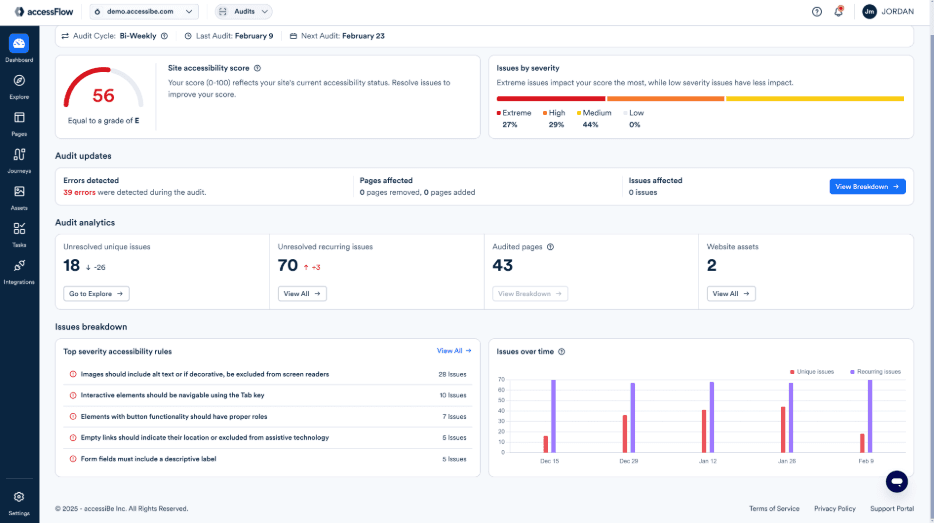
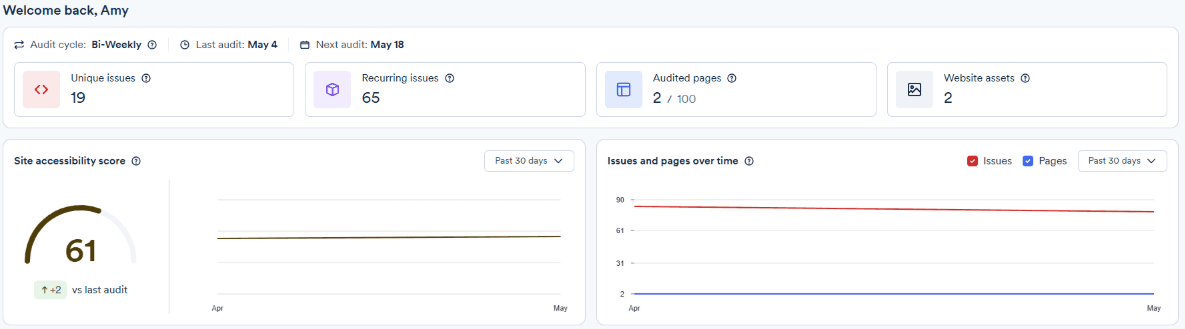
Automated Audits: accessiBe scans your site for accessibility issues, providing a detailed report on what needs fixing. Your team can refer to the highlighted problems to save audit time.
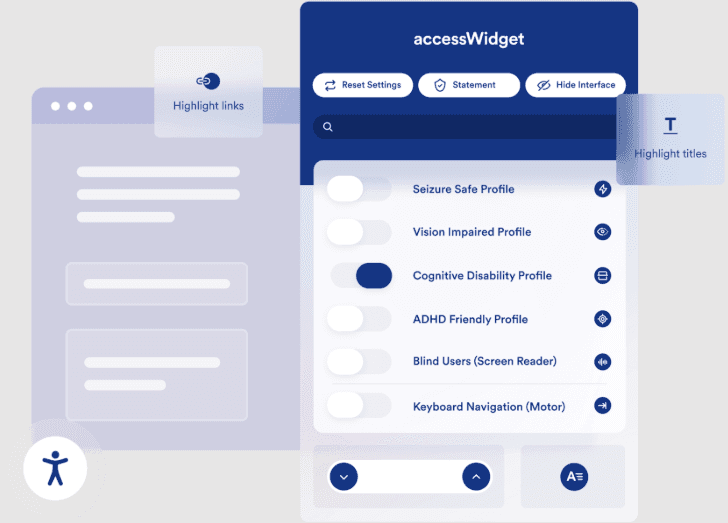
Accessibility Adjustments: The web accessibility tool to customize your website's accessibility functionalities, like altering text size and color contrast. It helps you cater to users who are visually impaired.
Compliance Monitoring: accessiBe’s solution keeps track of your site's compliance status continuously. You'll get alerts if anything falls out of line.
Monthly Reports: You'll receive monthly reports summarizing your site's accessibility status. This feature helps your team track progress and areas that need improvement.
User Interface Accessibility: accessiBe ensures your site's interface is easy to navigate for motor-impaired, visually impaired, and other specially-abled users. It takes considerably less effort to get familiarized with the platform.
Legal Support: It provides guidance and documentation to help you meet legal accessibility requirements. This is crucial for avoiding potential lawsuits.
Ease of Use
accessiBe is user-friendly, making it easy for your team to navigate its features without technical expertise. The interface is straightforward, but some users might find it less intuitive compared to other tools. Automated audits and real-time widgets simplify your work, though manual checks might still be needed for complex sites. Overall, accessiBe's simplicity benefits small teams looking for quick compliance solutions without deep customization.
Integrations
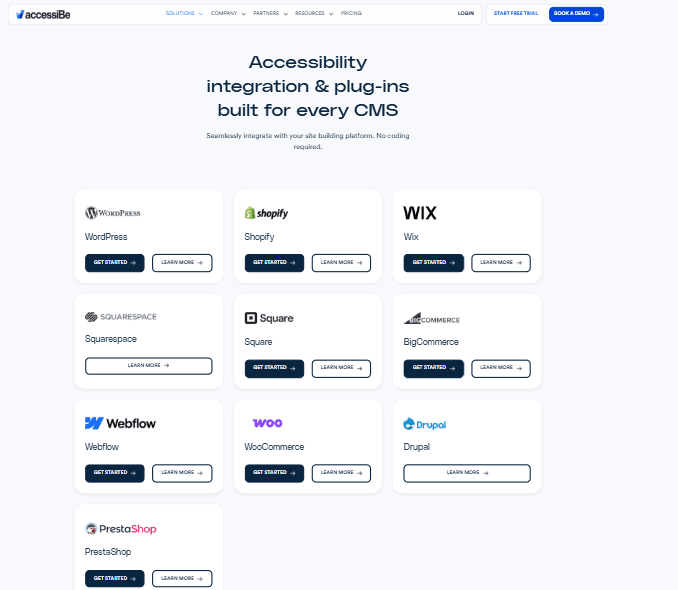
accessiBe integrates with WordPress, Shopify, BigCommerce, Wix, Webflow, WooCommerce, Squarespace, Adobe Commerce, nopCommerce, and Drupal.
accessiBe also offers an API and can connect with third-party integration tools like Google Tag Manager.
accessiBe Specs
- A/B Testing: Yes
- AI Integration: Yes
- Analytics: No
- API: Yes
- Calendar Management: No
- Comparative Reporting: Yes
- Custom Reports: Yes
- Dashboard: No
- Data Export: No
- Data Import: Yes
- Data Mining: Yes
- Data Visualization: Yes
- External Integrations: No
- Forecasting: No
- Historical Data Analysis: Yes
- Multi-User: No
- Notifications: No
- Process Reporting: Yes
- Real-time Alerts: Yes
- Scenario Planning: Yes
- Scheduling: No
- Sentiment Analysis: Yes
- SEO: No
- Time Series Modeling: Yes
- Workflow Management: Yes


