

Sei stanco di setacciare montagne di dati senza ottenere informazioni chiare? Il software per l'analisi dei processi potrebbe essere la risposta. Ti aiuta a individuare inefficienze e colli di bottiglia nelle tue operazioni, facendoti risparmiare tempo e risorse.
In base alla mia esperienza nel testare e recensire software, ho scoperto che gli strumenti giusti possono trasformare l'approccio del tuo team alla gestione dei processi. Ti guiderò attraverso le migliori soluzioni per l'analisi dei processi, condividendo informazioni imparziali per aiutarti a prendere decisioni consapevoli.
Scoprirai come questi strumenti possono adattarsi alle tue esigenze specifiche, sia che tu lavori in una piccola startup o in una grande azienda. Continua a leggere per un'analisi approfondita delle funzionalità, dei pro e dei contro e degli elementi che distinguono ciascuna opzione.
Perché fidarsi dei nostri consigli sui software
6,700+
Reviews
20
Industry experts
16+
Evaluation factors
14
Years
Il nostro team testa e recensisce software dal 2012. In quanto leader tecnologici noi stessi, sappiamo quanto sia difficile — e importante — scegliere il software giusto.
Per questa guida, abbiamo valutato gli strumenti attraverso test praticie ricerche indipendenti, assegnando un punteggio agli strumenti in base ai nostri criteri di selezione.
Le nostre recensioni riflettono il nostro giudizio editoriale umano, non un discorso di vendita.
Revisori esperti:
- Paulo Gardini MiguelDirettore tecnico
 Tim FisherVP dell'IA
 Gabriel RosasTech Lead e architetto software
 Christhian GruhnTech Lead e architetto della piattaforma

Tabella comparativa dei software per l'analisi dei processi
Questa tabella comparativa riassume i dettagli dei prezzi delle mie migliori selezioni di software per l’analisi dei processi:
| Tool | Best For | Trial Info | Price | ||
|---|---|---|---|---|---|
| 1 | Ideale per individuare opportunità di automazione | Demo gratuita disponibile | Prezzi su richiesta | Website | |
| 2 | Ideale per armonizzare RPA e process mining | Prova gratuita di 60 giorni + demo gratuita disponibile | Da $90/utente/mese | Website | |
| 3 | Ideale per approfondimenti sui processi guidati dall'IA | Piano gratuito + demo gratuita disponibile | Da $100/utente/mese | Website | |
| 4 | Ideale per connettere operazioni ed esperienze dei clienti | Prova gratuita + demo gratuita disponibile | Da $200/utente/mese | Website | |
| 5 | Ideale per l’analisi delle cause radice | Demo gratuita disponibile | Da $90/utente/mese (fatturazione annuale) | Website | |
| 6 | Ideale per integrare le informazioni finanziarie | Prezzo su richiesta | Website | ||
| 7 | Ideale per scalabilità e integrazione aziendale | Da $150/utente/mese (min 10 utenti) | Website | ||
| 8 | Ideale per combinare RPA e analisi dei processi | Da $750/utente/mese (fatturato annualmente) | Website | ||
| 9 | Ideale per la performance dei processi in tempo reale | Da $120/utente/mese | Website | ||
| 10 | Ideale per la scoperta rapida dei processi | Da $99/utente/mese (fatturazione annuale) | Website |


Recensioni dei migliori software per l'analisi dei processi
Di seguito trovi le mie sintesi dettagliate dei migliori software per l’analisi dei processi entrati nella mia selezione. Le mie recensioni offrono uno sguardo approfondito sulle funzionalità principali, sui pro & contro, sulle integrazioni e sui casi d’uso ideali di ogni strumento, per aiutarti a trovare quello più adatto a te.
 Ideale per individuare opportunità di automazione
- Demo gratuita disponibile
- Prezzi su richiesta
Visit WebsiteCustomer Rating:5/5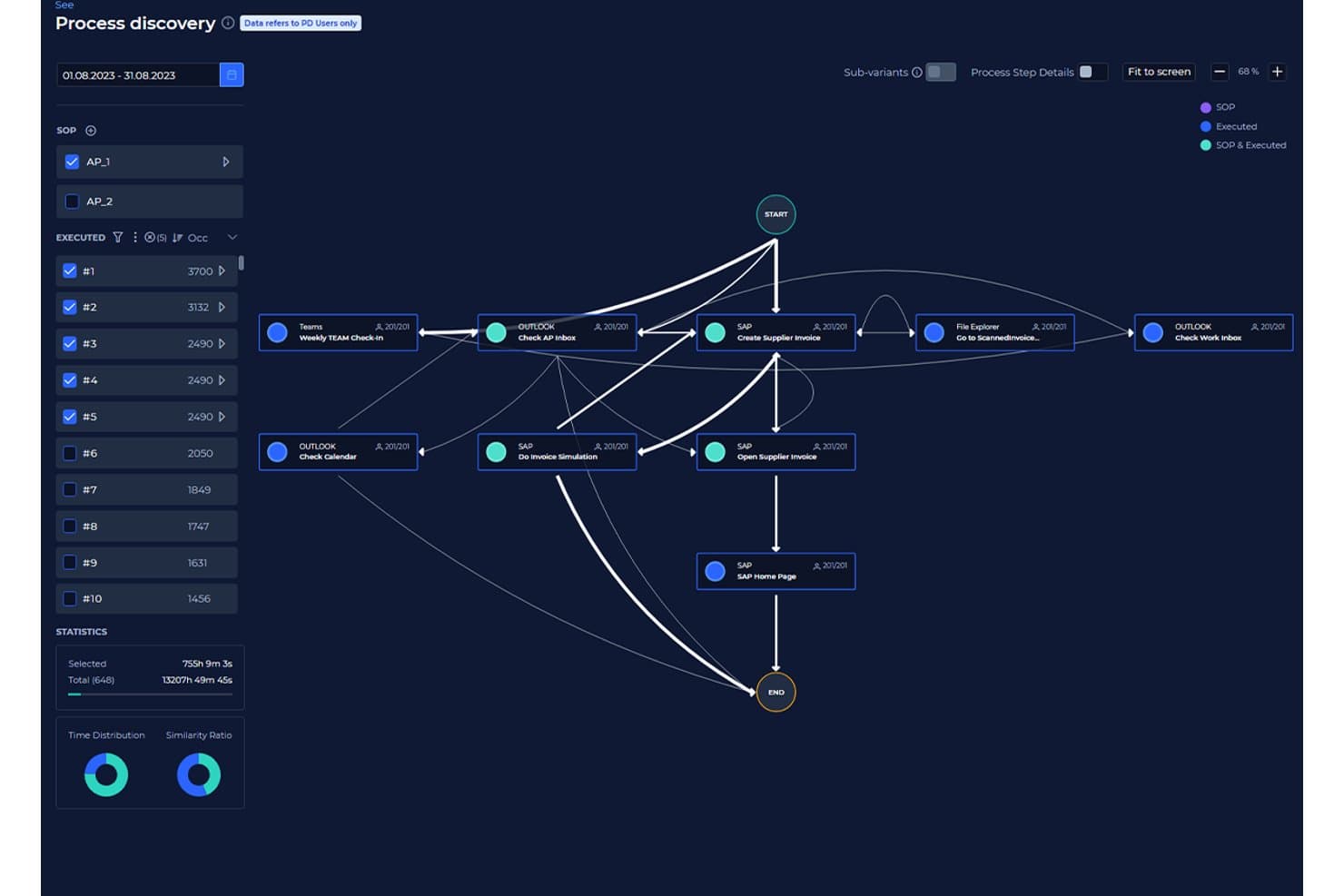
KYP.ai visualizza i flussi di processo per individuare i modelli di esecuzione. KYP.ai è una piattaforma di intelligence dei processi che acquisisce l'attività a livello desktop tra applicazioni e sistemi per ricostruire i flussi di processo, identificare le inefficienze e generare codice di automazione pronto per la produzione, senza ricorrere alla tradizionale estrazione dei log degli eventi.
Per chi è più indicato KYP.ai?
KYP.ai è particolarmente adatto ai team operativi e di automazione delle aziende BPO, dei servizi alle imprese e dei settori BFSI che devono identificare e stabilire le priorità delle opportunità di automazione nei flussi di lavoro desktop.
Perché ho scelto KYP.ai
Ho scelto KYP.ai perché porta alla luce opportunità di automazione che gli strumenti tradizionali di analisi dei processi non riescono assolutamente a rilevare. La maggior parte degli strumenti basati sui log degli eventi non riesce a vedere cosa accade nei fogli di calcolo, nelle conversazioni via e-mail o nei passaggi manuali tra sistemi, mentre KYP.ai acquisisce tutto a livello desktop. Apprezzo in particolare il fatto che non si limiti a identificare le inefficienze, ma calcoli il ROI dell'automazione per tipo di attività e generi poi codice agente pronto per la produzione per piattaforme come UiPath e Copilot Studio, eliminando così il divario tra individuazione ed esecuzione.
Funzionalità principali di KYP.ai
- Visione aziendale a 360°: Aggrega dati in tempo reale da desktop, applicazioni e sistemi per offrire una visione unificata delle attività dell'organizzazione.
- Monitoraggio della conformità: Acquisisce i passaggi normativi e segnala automaticamente le deviazioni dagli standard aziendali o dagli SLA.
- Dashboard di analisi delle prestazioni: Fornisce durate delle attività, distribuzioni dei carichi di lavoro e report sui colli di bottiglia con opzioni di filtraggio interattive.
- Base dati delle integrazioni: Combina i dati provenienti da sistemi aziendali, strumenti di BI e piattaforme per la gestione della forza lavoro per una maggiore visibilità sui processi.
Integrazioni di KYP.ai
KYP.ai offre integrazioni tramite la propria API e la base dati delle integrazioni, consentendo di connettersi a piattaforme come PowerBI, UiPath, SAP Joule e Copilot Studio. È disponibile un'API per le integrazioni personalizzate.
Pros and Cons
Pros:
- Acquisisce l'attività desktop che la tradizionale analisi dei processi basata sui log non rileva
- Genera automaticamente codice di automazione pronto per la distribuzione
- Quantificazione integrata del ROI per processo e attività
Cons:
- Nessun connettore ITSM o ServiceNow preconfigurato
- Poche recensioni pubbliche degli utenti per il confronto con prodotti simili
Learn more about KYP.ai: Ideale per armonizzare RPA e process mining
- Prova gratuita di 60 giorni + demo gratuita disponibile
- Da $90/utente/mese
Visit WebsiteCustomer Rating:4.6/5
Funzionalità drag-and-drop di UiPath Process Mining Software UiPath eccelle nel suo impegno a unire RPA (Robotic Process Automation) e process mining all'interno di un’unica piattaforma. Questa armonizzazione garantisce alle organizzazioni di automatizzare le attività ottenendo nello stesso tempo informazioni approfondite sui propri processi.
Perché ho scelto UiPath: UiPath ha attirato la mia attenzione grazie alla sua combinazione unica di RPA e process mining. Nel valutare le offerte di diversi strumenti, ho determinato che UiPath forniva una fusione armoniosa che non si trova comunemente altrove. È proprio questa sincronizzazione tra automazione e analisi a convincermi che sia “il migliore per armonizzare RPA e process mining”.
Caratteristiche distintive e integrazioni:
Elemento centrale dell’offerta di UiPath è il suo Orchestrator, una piattaforma che coordina i robot software assicurando che vengano impiegati dove sono più necessari. Inoltre, UiPath Studio permette agli utenti di creare flussi di lavoro personalizzati. Dal lato integrazioni, UiPath offre compatibilità con una vasta gamma di applicazioni, tra cui SAP, Oracle e Salesforce.
Pros and Cons
Pros:
- Una fusione unica di RPA e process mining
- Piattaforma Orchestrator per una distribuzione efficiente dei bot
- Creazione di flussi di lavoro personalizzati con UiPath Studio
Cons:
- Curva di apprendimento più ripida per chi è nuovo alla RPA
- Potrebbe essere eccessivo per operazioni di piccola scala
- Il modello di licensing può risultare complesso per alcuni utenti
Learn more about UiPath: Ideale per approfondimenti sui processi guidati dall'IA
- Piano gratuito + demo gratuita disponibile
- Da $100/utente/mese
Visit WebsiteCustomer Rating:4.5/5
Funzionalità di benchmarking del software di process mining Celonis Celonis si distingue come un faro per le organizzazioni che guardano al futuro, sfruttando la potenza dell'IA per ricavare approfondimenti approfonditi dai loro processi. Il nucleo di intelligenza artificiale di Celonis la differenzia, guidando decisioni di processo più intelligenti e strategie lungimiranti.
Perché ho scelto Celonis: La decisione di includere Celonis è nata dalla sua solida analisi basata sull'IA. Tra i numerosi strumenti disponibili, Celonis si è distinta in particolare per il suo nucleo IA, che ritengo sia fondamentale per le aziende pronte ad affrontare il futuro. È proprio questo approccio incentrato sull'IA che mi ha portato a considerarla 'la migliore per approfondimenti guidati dall'IA sui processi'.
Caratteristiche principali & Integrazioni:
Al centro di Celonis si trova il suo motore di IA che alimenta approfondimenti profondi sui processi, spingendo le aziende a ottimizzare ogni aspetto. La piattaforma supporta anche simulazioni di processo, consentendo test di scenari ipotetici. Sul fronte integrazioni, Celonis è versatile, interfacciandosi con una moltitudine di fonti dati da ERP a CRM.
Pros and Cons
Pros:
- Motore di IA per approfondimenti predittivi e approfonditi
- Simulazione dei processi per la pianificazione strategica
- Ampie capacità di integrazione con fonti dati eterogenee
Cons:
- Potrebbe richiedere un cambiamento di mentalità per sfruttare appieno i benefici dell'IA
- Le funzionalità avanzate possono scoraggiare i nuovi utenti
- Prezzo elevato per le piccole imprese
Learn more about Celonis: 4Ideale per connettere operazioni ed esperienze dei clienti
Pega
- Prova gratuita + demo gratuita disponibile
- Da $200/utente/mese
Visit WebsiteCustomer Rating:4.3/5
Funzionalità people hub del software di process mining App Studio di Pega Pega Platform si distingue non solo come uno strumento di process mining, ma come una piattaforma olistica che collega i processi operativi alle esperienze dei clienti. Quando l'obiettivo è vedere come le operazioni di backend influenzano le interazioni dei clienti sul front-end, Pega è la scelta ideale.
Perché ho scelto Pega Platform: La mia scelta di Pega è stata influenzata dal suo approccio unico nel fondere i processi operativi con l'esperienza del cliente. Diversamente da molti altri strumenti, Pega offre un ponte tra le operazioni di back-end e i punti di contatto dei clienti sul front-end. Questo doppio focus mi ha portato a sceglierlo come 'il migliore per connettere le operazioni alle esperienze dei clienti'.
Funzionalità principali e integrazioni:
Pega collega BPM, gestione dei casi e analisi in tempo reale. Questo trio garantisce alle aziende la possibilità di ottimizzare i processi in base ai feedback dei clienti in tempo reale. Per quanto riguarda le integrazioni, Pega dispone di connettori integrati per i principali strumenti CRM, ERP e di data warehousing.
Pros and Cons
Pros:
- Vista sincronizzata di operazioni ed esperienza cliente
- Analisi in tempo reale per decisioni rapide
- Connettori integrati per i principali strumenti aziendali
Cons:
- Prezzo più alto rispetto ad alcuni concorrenti
- Può risultare complesso per la moltitudine di funzionalità
- Richiede una formazione dedicata per sfruttarne appieno il potenziale
Learn more about Pega : Ideale per l’analisi delle cause radice
- Demo gratuita disponibile
- Da $90/utente/mese (fatturazione annuale)
Visit WebsiteCustomer Rating:4.5/5
dashboard leader di mercato del software di process mining QPR ProcessAnalyzer QPR ProcessAnalyzer si distingue come uno strumento che non si limita a mostrare i processi, ma analizza in profondità il 'perché' dei comportamenti dei processi. Per le organizzazioni che desiderano comprendere le cause principali delle variazioni di processo, QPR offre approfondimenti di grande valore.
Perché ho scelto QPR ProcessAnalyzer: Nel confrontare gli strumenti, l'efficacia di QPR ProcessAnalyzer nell'analisi delle cause radice è risultata evidente. Molti strumenti possono mostrare 'cosa' sta succedendo, ma pochi riescono costantemente a identificare 'perché' succede. Proprio questa capacità di determinazione delle cause principali mi ha portato a definirlo come 'il migliore per l’analisi delle cause radice'.
Caratteristiche e integrazioni principali:
Lo strumento è dotato di avanzati strumenti diagnostici, che rendono precisa l'analisi delle cause radice. Supporta anche previsioni basate su intelligenza artificiale per i risultati dei processi. In termini di integrazioni, QPR si sincronizza facilmente con la maggior parte dei principali ERP e data warehouse.
Pros and Cons
Pros:
- Precisione nell’analisi delle cause radice
- Previsioni basate su IA per una maggiore previsione
- Integrazione efficiente con i principali ERP
Cons:
- Può esserci una curva di apprendimento per gli utenti non tecnici
- Le previsioni IA richiedono dataset puliti per una maggiore accuratezza
- Alcune funzionalità potrebbero essere superflue per realtà più piccole
Learn more about QPR ProcessAnalyzer:

Report e dashboard di effort mining di PwC La soluzione di process mining di PwC è molto più di un semplice strumento di visualizzazione; colma il divario tra i processi e le informazioni finanziarie. Questa fusione tra dati di processo e analisi finanziarie rende PwC senza pari quando si tratta di process mining focalizzato sulla sfera finanziaria.
Perché ho scelto PwC: Nella mia analisi comparativa, ho notato una lacuna: pochi strumenti collegano efficacemente il process mining con le informazioni finanziarie. PwC ha riempito perfettamente questo vuoto. Ho scelto PwC come 'migliore per integrare le informazioni finanziarie' grazie alla sua competenza nel fondere i dati di processo con le metriche finanziarie, offrendo una visione olistica delle operazioni aziendali.
Caratteristiche distintive & integrazioni:
PwC offre funzionalità che collegano direttamente i processi operativi agli indicatori di performance finanziaria. Inoltre, dispone di strumenti di valutazione del rischio che collegano i rischi finanziari ai processi. Per quanto riguarda le integrazioni, lo strumento di PwC si integra con la maggior parte dei sistemi finanziari aziendali e degli ERP.
Pros and Cons
Pros:
- Integrazione profonda dei dati di processo con le informazioni finanziarie
- Funzionalità di valutazione del rischio collegate a metriche finanziarie
- Ampia compatibilità con i sistemi finanziari
Cons:
- Potrebbe essere eccessivo per le piccole imprese
- L'interfaccia può risultare complessa per i principianti
- Il modello di prezzo potrebbe essere elevato per alcuni
Learn more about PwC: Ideale per scalabilità e integrazione aziendale
- Da $150/utente/mese (min 10 utenti)

Dashboard di discovery dei processi del software di process mining IBM IBM Process Mining offre alle aziende una soluzione robusta per analizzare, monitorare e ottimizzare le proprie operazioni. Pensato per le grandi imprese, questo strumento si distingue per la sua scalabilità e le profonde capacità di integrazione.
Perché ho scelto IBM Process Mining:
Quando ho selezionato gli strumenti, la scalabilità e le capacità di integrazione di IBM Process Mining hanno attirato la mia attenzione. Considerando la consolidata reputazione di IBM nel settore enterprise, non sorprende che abbiano sviluppato uno strumento progettato con la scalabilità come elemento centrale.
È proprio questa attenzione alle operazioni su larga scala e alla compatibilità con le grandi aziende che mi ha fatto pensare che sia 'ideale per scalabilità e integrazione aziendale.'
Funzionalità principali e integrazioni:
Lo strumento di IBM offre una visione completa delle operazioni aziendali, fornendo approfondimenti basati su metriche. Include anche una funzione di simulazione, che permette l'analisi di scenari ipotetici. La piattaforma si integra con il vasto ecosistema IBM ma offre anche connettori ad altre soluzioni software di livello enterprise.
Pros and Cons
Pros:
- Progettato per le grandi imprese
- Approfondimenti guidati da metriche per decisioni basate sui dati
- Ampie capacità di integrazione con software aziendali
Cons:
- Potrebbe risultare eccessivo per le piccole imprese
- Richiede una comprensione approfondita per sfruttarne tutto il potenziale
- Il costo potrebbe essere proibitivo per alcune organizzazioni
Learn more about IBM Process Mining: Ideale per combinare RPA e analisi dei processi
- Da $750/utente/mese (fatturato annualmente)

Dashboard degli insight dei bot di Automation Anywhere Automation Anywhere unisce i mondi della Robotic Process Automation (RPA) con la dimensione analitica, offrendo uno strumento olistico per le aziende che desiderano automatizzare e analizzare contemporaneamente. La sua doppia capacità serve le organizzazioni che danno priorità sia all'automazione che agli insight derivanti dai loro processi.
Perché ho scelto Automation Anywhere: Quando ho valutato strumenti con il potenziale non solo di automatizzare ma anche di offrire insight sui processi, Automation Anywhere è emerso in cima alla mia lista. La maggior parte degli strumenti si specializza in uno o nell'altro, ma Automation Anywhere combina con successo entrambi, il che è una rarità. In base a questo approccio integrato, l'ho definito 'il migliore per combinare RPA e analisi dei processi'.
Caratteristiche principali e integrazioni:
Il punto di forza dello strumento risiede nella funzione Bot Insight, che presenta analisi in tempo reale direttamente dai bot. Inoltre, l'IQ Bot della piattaforma utilizza l'IA per apprendere dagli utenti umani e prendere decisioni basate su tale apprendimento. Per quanto riguarda le integrazioni, Automation Anywhere si interfaccia senza problemi con la maggior parte dei software aziendali, dagli ERP ai CRM.
Pros and Cons
Pros:
- Doppia funzionalità di RPA e analisi dei processi
- Insight in tempo reale grazie alla funzione Bot Insight
- Apprendimento AI adattivo con IQ Bot
Cons:
- Curva di apprendimento più ripida per i principianti
- Prezzo elevato per le piccole imprese
- Le funzionalità complete possono risultare complesse
Learn more about Automation Anywhere - RPA | Robotic Process Automation: Ideale per la performance dei processi in tempo reale
- Da $120/utente/mese

Funzione di sovrapposizione del modello di processo del software di process mining ARIS ARIS Process Mining analizza a fondo i processi, individuando inefficienze e offrendo visibilità in tempo reale su come stanno funzionando i processi. Il suo impegno per gli insight in tempo reale garantisce alle organizzazioni una visione sempre aggiornata delle proprie operazioni.
Perché ho scelto ARIS Process Mining: Ho scelto ARIS per la sua innegabile attenzione all'analisi dei processi in tempo reale. A mio avviso, avere una visibilità immediata sui processi è un valore inestimabile. Pertanto, vedendo la dedizione di ARIS nell'offrire insight in tempo reale, ho ritenuto meritasse l'etichetta di 'migliore per la performance dei processi in tempo reale.'
Funzionalità principali e integrazioni:
ARIS pone l'accento sulla scoperta dei processi in tempo reale, permettendo alle aziende di comprendere e adattare i processi in modo immediato. Il controllo di conformità assicura che i processi rispettino i modelli predefiniti. Per quanto riguarda le integrazioni, ARIS si collega in modo efficiente ai principali sistemi ERP e a varie altre fonti di dati.
Pros and Cons
Pros:
- Visibilità immediata sulle performance dei processi
- Controllo di conformità rispetto ai modelli impostati
- Integrazione efficiente con i principali sistemi ERP
Cons:
- Richiede una formazione adeguata per essere sfruttato appieno
- Può risultare complesso per utenti non tecnici
- Alcune funzionalità possono essere eccessive per operazioni più semplici
Learn more about ARIS Process Mining: Ideale per la scoperta rapida dei processi
- Da $99/utente/mese (fatturazione annuale)

Dashboard sandbox di Disco Disco di Fluxicon è uno strumento agile progettato per esplorare rapidamente i dati e mostrare i processi con un setup minimo. La sua velocità ed efficienza lo rendono la scelta ideale per le organizzazioni che puntano a una rapida scoperta dei processi.
Perché ho scelto Disco di Fluxicon: Nel valutare quale strumento potesse servire meglio le aziende alla ricerca di risultati immediati, Disco si è distinto. La sua efficienza nell'analizzare grandi volumi di dati senza compromessi sull'accuratezza è stata notevole. L'ho definito 'il migliore per la scoperta rapida dei processi' poiché la sua agilità consente alle aziende di ottenere insight utili in tempi record.
Caratteristiche e integrazioni principali:
Disco brilla per la sua velocità, in grado di analizzare immense quantità di dati in pochi istanti. I suoi strumenti di visualizzazione sono intuitivi, rendendo l'interpretazione semplice. Quanto alle integrazioni, Disco supporta una vasta gamma di formati dati e si collega facilmente ai principali ERP e sistemi IT.
Pros and Cons
Pros:
- Velocità eccezionale nell'analisi dei dati di processo
- Strumenti di visualizzazione intuitivi per un'interpretazione rapida
- Supporta numerosi formati dati per una facile integrazione
Cons:
- Manca di alcuni strumenti analitici avanzati presenti nei concorrenti
- Il prezzo può rappresentare una barriera per le aziende più piccole
- La fatturazione annuale potrebbe non essere ideale per tutte le organizzazioni
Learn more about Disco by Fluxicon:
Altri software per l'analisi dei processi
Ecco alcune opzioni aggiuntive di software per l’analisi dei processi che non sono entrate nella mia selezione, ma che vale comunque la pena valutare:
- 11iGrafx Process Explorer 360Ideale per la visualizzazione completa dei processi
- 12ApromoreIdeale per l'analisi dei processi open-source
- 13MinitIdeale per approfondimenti dettagliati sui processi
- 14Scout PlatformIdeale per l'automazione della scoperta dei processi
Come valuto il software di Process Mining
Divido la mia valutazione tra criteri di base, come la capacità di uno strumento di acquisire log di eventi da SAP o ServiceNow, e fattori differenzianti che separano le migliori opzioni dal resto.
Funzionalità di base (requisiti fondamentali per questa lista)
Quando seleziono gli strumenti per la mia lista, assegno a ciascuno un punteggio da 0 (non offre la funzionalità) a 5 (eccelle in quest'area) per ogni funzionalità di base elencata di seguito. Poi calcolo il punteggio totale dello strumento in percentuale. Ogni strumento deve raggiungere un punteggio minimo totale del 65% per essere considerato per l'inclusione.
- Ingestione dei log degli eventi: Esamino da quali formati e sistemi ogni strumento può estrarre dati sugli eventi, come l'importazione dei log del ciclo di vita dei ticket da ServiceNow o dei registri order-to-cash da SAP.
- Scoperta automatica dei processi: Ogni strumento dovrebbe generare mappe di processo visive direttamente dai log grezzi, quindi valuto quanto bene ricostruisce i percorsi di esecuzione reali senza modellazione manuale.
- Verifica di conformità: Controllo se lo strumento può sovrapporre i processi scoperti a un modello di riferimento ed evidenziare deviazioni, come approvazioni saltate in un flusso di gestione dei cambiamenti.
- Analisi delle prestazioni: I dashboard dovrebbero mostrare KPI come tempi di ciclo, localizzazione dei colli di bottiglia e throughput tra le varianti di processo, andando oltre il semplice conteggio statico dei casi.
- Analisi delle cause e delle varianti: È importante approfondire il motivo per cui alcuni ticket di incidente richiedono tre volte più tempo, quindi valuto quanto bene ogni strumento permette di filtrare le varianti e isolare i fattori che contribuiscono.
- Integrazioni e connettori di sistema: Cerco connettori predefiniti per i sistemi aziendali su cui i team IT fanno affidamento, come SAP, Oracle, Salesforce, Jira, ServiceNow, e verifico se le API aperte supportano fonti personalizzate.
Una volta che dispongo di una lista di strumenti che soddisfano questi criteri, considero cosa distingue ciascuna piattaforma.
Fattori di differenziazione (cosa distingue i fornitori)
Ecco come confronto e metto in contrasto i diversi fornitori:
Funzionalità distintive
Il task mining è un elemento fortemente differenziante; cerco strumenti che catturano le interazioni degli utenti a livello desktop per colmare le lacune che i log di sistema non coprono, come l'inserimento manuale di dati tra due app scollegate. Anche la simulazione dei processi è importante, perché modellare un cambiamento proposto prima dell'implementazione è meglio che andare per tentativi. Valuto anche quanto bene una piattaforma trasmette le informazioni raccolte a strumenti di automazione come UiPath o Power Automate, poiché scoprire un collo di bottiglia è utile solo se puoi agire di conseguenza.
Oltre le funzionalità
Certificazioni di sicurezza e conformità come SOC 2 e ISO 27001 sono importanti quando i tuoi dati di processo includono record ITSM sensibili o informazioni sui clienti; verifico cosa offre ciascun fornitore per il mascheramento dei dati e l'accesso basato sui ruoli. Anche la velocità di implementazione è un fattore che considero, soprattutto se una piattaforma include acceleratori predefiniti per flussi di lavoro IT comuni come la gestione degli incidenti. Considero anche la flessibilità di implementazione, dato che alcune organizzazioni necessitano di opzioni on-premise per soddisfare le politiche interne sulla residenza dei dati.
Come scegliere un software per l'analisi dei processi
È facile lasciarsi sopraffare da lunghi elenchi di funzionalità e strutture tariffarie complesse. Per aiutarti a rimanere concentrato mentre affronti il tuo processo di selezione del software, ecco una checklist dei fattori da tenere a mente:
| Fattore | Cosa considerare |
|---|---|
| FattoreScalabilità | Cosa considerareIl software crescerà insieme alla tua azienda? Verifica se è in grado di gestire un volume di dati e un carico di utenti maggiori senza problemi di prestazioni. |
| FattoreIntegrazioni | Cosa considerareSi collega ai sistemi esistenti? Cerca una facile integrazione con strumenti come ERP, CRM e database. |
| FattorePersonalizzazione | Cosa considerarePuoi adattarlo ai tuoi processi? Assicurati che il software consenta di modificare i flussi di lavoro in base alle tue esigenze. |
| FattoreFacilità d'uso | Cosa considerareÈ facile da usare per il tuo team? Considera la curva di apprendimento e se l'interfaccia è abbastanza intuitiva per l'uso quotidiano. |
| FattoreImplementazione e inserimento | Cosa considerareQuanto tempo sarà necessario per configurarlo? Valuta il tempo e le risorse necessari per l'implementazione, inclusi formazione e supporto. |
| FattoreCosto | Cosa considerareRientra nel tuo budget? Confronta i costi degli abbonamenti e quelli aggiuntivi e verifica se sono disponibili una prova gratuita o una demo. |
| FattoreMisure di sicurezza | Cosa considerareI tuoi dati sono protetti? Cerca la crittografia, la conformità alle normative sui dati e le certificazioni di sicurezza del fornitore. |
| FattoreDisponibilità del supporto | Cosa considerareL'assistenza è accessibile quando serve? Verifica la disponibilità di un supporto 24 ore su 24, 7 giorni su 7, i tempi di risposta e la qualità delle opzioni di assistenza clienti disponibili. |
Che cos'è il software di analisi dei processi?
Il software di analisi dei processi è uno strumento che analizza i processi aziendali per identificare inefficienze e colli di bottiglia. Professionisti come analisti aziendali, responsabili dei processi e specialisti IT utilizzano generalmente questi strumenti per ottenere informazioni utili e migliorare le operazioni. Le funzionalità di visualizzazione dei dati, rilevamento dei processi e analisi delle prestazioni aiutano a comprendere i flussi di lavoro e a ottimizzare i processi. Nel complesso, questi strumenti forniscono informazioni preziose che portano a operazioni più efficienti e convenienti.
Funzionalità
Quando scegli il software di analisi dei processi, presta attenzione alle seguenti funzionalità fondamentali:
- Rilevamento dei processi: mappa automaticamente i processi aziendali per facilitarne la comprensione e l'analisi.
- Verifica della conformità: confronta i processi attuali con i modelli desiderati per identificare le deviazioni.
- Analisi delle prestazioni: valuta l'efficienza e la velocità dei processi per individuare i colli di bottiglia.
- Visualizzazione dei dati: offre grafici e diagrammi chiari e interattivi per facilitare la comprensione dei dati.
- Funzionalità di integrazione: si collega senza problemi ai sistemi aziendali esistenti, come ERP e CRM.
- Cruscotti personalizzabili: consentono agli utenti di adattare viste e resoconti alle specifiche esigenze aziendali.
- Analisi predittiva: fornisce previsioni e informazioni utili per anticipare i risultati futuri dei processi.
- Monitoraggio in tempo reale: offre aggiornamenti in tempo reale per seguire i processi mentre si svolgono e ottenere informazioni immediate.
- Informazioni basate sull'IA: utilizza l'intelligenza artificiale per offrire analisi più approfondite e suggerimenti.
- Misure di sicurezza: garantisce la protezione dei dati attraverso la crittografia e la conformità alle normative.
Vantaggi
L'implementazione di un software di analisi dei processi offre diversi vantaggi al tuo team e alla tua azienda. Ecco alcuni dei benefici che puoi aspettarti:
- Maggiore efficienza: identifica colli di bottiglia e inefficienze, contribuendo ad accelerare i processi.
- Migliore processo decisionale: offre informazioni utili e visualizzazioni dei dati per supportare scelte consapevoli.
- Maggiore conformità: garantisce che i processi siano conformi alle normative attraverso la verifica della conformità.
- Risparmio sui costi: riduce gli sprechi e ottimizza l'uso delle risorse analizzando le prestazioni.
- Maggiore trasparenza: offre una visibilità chiara sui processi grazie al monitoraggio in tempo reale.
- Informazioni predittive: aiuta ad anticipare tendenze e risultati futuri grazie all'analisi predittiva.
- Personalizzazione: adatta cruscotti e resoconti alle specifiche esigenze aziendali, migliorandone l'utilizzabilità.
Costi e prezzi
La scelta di un software di analisi dei processi richiede la comprensione dei vari modelli di prezzo e dei piani disponibili. I costi variano in base alle funzionalità, alle dimensioni del team, agli extra e ad altri fattori. La tabella seguente riassume i piani più comuni, i relativi prezzi medi e le funzionalità tipicamente incluse nelle soluzioni di software di analisi dei processi:
Tabella di confronto dei piani per il software di analisi dei processi
| Tipo di piano | Prezzo medio | Funzionalità comuni |
|---|---|---|
| Tipo di pianoPiano gratuito | Prezzo medio$0 | Funzionalità comuniRilevamento di base dei processi, visualizzazione limitata dei dati e supporto della community. |
| Tipo di pianoPiano personale | Prezzo medio$10-$50/utente/mese | Funzionalità comuniRilevamento dei processi, analisi delle prestazioni e integrazione di base dei dati. |
| Tipo di pianoPiano aziendale | Prezzo medio$50-$150/utente/mese | Funzionalità comuniVisualizzazione avanzata dei dati, monitoraggio in tempo reale e dashboard personalizzabili. |
| Tipo di pianoPiano per grandi aziende | Prezzo medio$150+/utente/mese | Funzionalità comuniAnalisi predittiva, insight basati sull'intelligenza artificiale, supporto prioritario e funzionalità complete di integrazione. |
Domande frequenti sul software di process mining
Ecco alcune risposte alle domande comuni sul software di process mining:
Quali sono le difficoltà comuni nell'implementazione del software di process mining?
Le difficoltà comuni includono problemi di qualità dei dati, complessità dell’integrazione e resistenza al cambiamento all’interno dei team. Per superare questi ostacoli, è essenziale garantire una raccolta accurata dei dati e comunicare chiaramente al team i vantaggi del process mining.
In che modo il software di process mining supporta la conformità?
Il software di process mining supporta la conformità offrendo funzionalità di verifica della conformità. Queste funzionalità consentono di confrontare i processi attuali con gli standard normativi, aiutandoti a identificare e correggere eventuali deviazioni per mantenere la conformità alle normative del settore.
È possibile personalizzare il software di process mining per soddisfare esigenze specifiche?
Molti strumenti di process mining offrono opzioni di personalizzazione, come dashboard e report regolabili. Ciò consente di adattare il software ai processi e ai requisiti aziendali specifici, garantendo che soddisfi efficacemente le tue esigenze operative.