

Un acceleratore web è uno strumento progettato per consentire ai visitatori di caricare i siti web più rapidamente e senza intoppi. Quando un sito risponde più velocemente, è più probabile che le persone rimangano e apprezzino ciò che offre. Questo può essere particolarmente importante per i negozi online, le piattaforme di servizi o i siti con molti contenuti.
Utilizzando un acceleratore web, puoi aiutare il tuo sito a gestire i periodi di maggiore affluenza senza rallentamenti. Conoscere meglio gli acceleratori web può aiutarti a creare un'esperienza migliore e più affidabile per chiunque visiti il tuo sito.
Perché fidarsi dei nostri consigli sui software
6,700+
Reviews
20
Industry experts
16+
Evaluation factors
14
Years
Il nostro team testa e recensisce software dal 2012. In quanto leader tecnologici noi stessi, sappiamo quanto sia difficile — e importante — scegliere il software giusto.
Per questa guida, abbiamo valutato gli strumenti attraverso test praticie ricerche indipendenti, assegnando un punteggio agli strumenti in base ai nostri criteri di selezione.
Le nostre recensioni riflettono il nostro giudizio editoriale umano, non un discorso di vendita.
Revisori esperti:
- Paulo Gardini MiguelDirettore tecnico
 Tim FisherVP dell'IA
 Gabriel RosasTech Lead e architetto software
 Christhian GruhnTech Lead e architetto della piattaforma

Tabella di confronto degli acceleratori web
| Tool | Best For | Trial Info | Price | ||
|---|---|---|---|---|---|
| 1 | Ideale per la memorizzazione programmabile nella cache dei contenuti dinamici | Piano gratuito disponibile | A partire da $1,500/mese | Website | |
| 2 | Ideale per la distribuzione edge sovrana dell'UE con WAF incluso | Piano gratuito + prova gratuita di 14 giorni disponibile | A partire da $37/mese | Website | |
| 3 | Ideale per il controllo dell'ordine di caricamento degli script e-commerce | Piano gratuito disponibile | Prezzi su richiesta | Website | |
| 4 | Ideale per la distribuzione globale dei contenuti e la sicurezza | Prova gratuita disponibile | Prezzi su richiesta | Website | |
| 5 | Ideale per il caching all'edge a costi prevedibili su larga scala | Prova gratuita di 14 giorni | A partire da 1 $/mese | Website | |
| 6 | Ideale per la mitigazione degli attacchi DDoS su scala di rete | Piano gratuito + demo gratuita disponibile | A partire da $20/utente/mese (fatturato annualmente) | Website | |
| 7 | Ideale per l'accelerazione e la protezione delle API | Prova gratuita di 30 giorni + demo gratuita disponibile | Prezzi su richiesta | Website | |
| 8 | Ideale per l'accelerazione della cache del browser a più livelli | Demo gratuita disponibile | Prezzi su richiesta | Website | |
| 9 | Ideale per la distribuzione edge nativa AWS su larga scala | Piano gratuito disponibile | A partire da $15/mese | Website | |
| 10 | Ideale per incrementare le conversioni Shopify tramite la memorizzazione nella cache perimetrale | Piano gratuito + demo gratuita disponibili | A partire da $3,950/mese | Website |


Recensioni dei migliori acceleratori web
 Ideale per la memorizzazione programmabile nella cache dei contenuti dinamici
- Piano gratuito disponibile
- A partire da $1,500/mese
Visit WebsiteCustomer Rating:4.8/5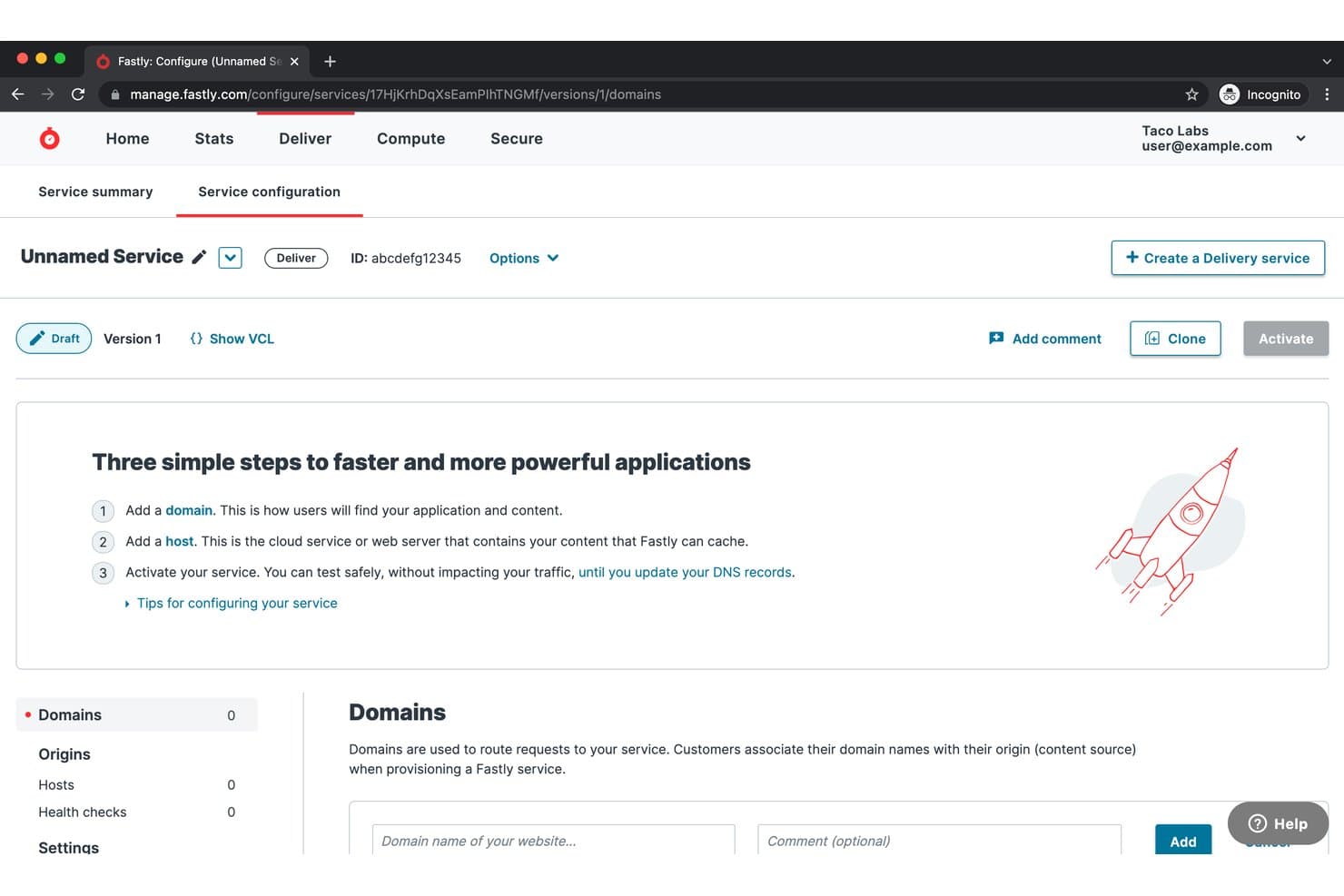
Fastly guida gli utenti nella configurazione del dominio e dell'host tramite una procedura guidata di configurazione in tre passaggi. Fastly è una piattaforma cloud edge programmabile che combina una CDN globale, la memorizzazione nella cache dei contenuti dinamici, l'elaborazione edge, l'ottimizzazione delle immagini e la sicurezza integrata in un'unica rete di distribuzione.
Per chi è più adatto Fastly?
Fastly è la soluzione adatta ai team DevOps e SRE di aziende di livello enterprise che necessitano di un controllo granulare e programmabile sulla modalità di memorizzazione nella cache e distribuzione dei contenuti dinamici all'edge.
Perché ho scelto Fastly
Fastly si è guadagnato un posto nella mia lista ristretta perché la sua tecnologia Instant Purge™ cambia davvero ciò che può essere memorizzato nella cache. Mi riferisco a conteggi dell'inventario in tempo reale, prezzi aggiornati in tempo reale e feed di notizie dell'ultima ora: contenuti che la maggior parte delle CDN obbliga a distribuire senza memorizzazione nella cache. Le operazioni di svuotamento della cache vengono completate a livello globale in meno di 150 ms e, abbinate alla logica programmabile della cache di VCL, consentono di memorizzare nella cache contenuti dinamici che altrimenti sottoporrebbero l'origine a richieste continue.
Funzionalità principali di Fastly
- Scudo dell'origine: un livello di memorizzazione nella cache secondario posizionato tra i PoP edge e il server di origine, che riduce il carico diretto sull'origine fino al 57%.
- Elaborazione edge basata su WebAssembly: Fastly Compute consente di distribuire funzioni JavaScript, Rust, Go o C++ all'edge, con avvii a freddo nell'ordine dei microsecondi simultaneamente su tutti i PoP.
- Streaming dei log in tempo reale: trasmette i log a livello di richiesta a oltre 30 provider esterni, tra cui Datadog, Splunk e New Relic, senza latenza aggiuntiva.
- Accelerazione dinamica del sito (DSA): termina le connessioni degli utenti finali presso il nodo edge più vicino e ottimizza il canale di ritorno verso l'origine, riducendo la latenza per i contenuti che non possono essere memorizzati nella cache.
Integrazioni di Fastly
Fastly supporta oltre 30 integrazioni per i log e l'osservabilità, tra cui Datadog, Splunk, New Relic, Honeycomb, Amazon S3, Google Cloud Storage e Azure Blob Storage, oltre ai flussi di lavoro AWS, GCP, Azure, GitHub Actions e Terraform. La sua API REST e la CLI supportano integrazioni personalizzate.
Pros and Cons
Pros:
- Instant Purge svuota la cache globale in 150 ms
- VCL programmabile che consente di definire una logica personalizzata per la cache
- Streaming dei log in tempo reale verso oltre 30 provider
Cons:
- Linguaggio di configurazione Varnish richiede competenze specialistiche
- Nessuna presenza CDN nella Cina continentale
Learn more about Fastly: Ideale per la distribuzione edge sovrana dell'UE con WAF incluso
- Piano gratuito + prova gratuita di 14 giorni disponibile
- A partire da $37/mese
Visit WebsiteCustomer Rating:4.8/5
Gcore consente agli utenti di gestire le policy WAF e le regole di protezione dai bot. Gcore è una piattaforma CDN e di accelerazione web che combina una rete edge globale con oltre 210 PoP, protezione DDoS integrata, WAF, ottimizzazione delle immagini e calcolo edge serverless tramite il suo runtime WebAssembly FastEdge.
Per chi è più adatto Gcore?
Gcore è una soluzione particolarmente adatta ai team europei responsabili dell'infrastruttura e della sicurezza che necessitano di distribuzione edge con protezione DDoS e WAF inclusi in tutti i livelli di piano, senza dover pagare separatamente per ciascun servizio.
Perché ho scelto Gcore
Gcore rientra nella mia rosa di candidati perché integra la protezione WAF e DDoS di livello L3/L4/L7 in ogni piano CDN, incluso il livello gratuito, una caratteristica rara in questo settore. Apprezzo in particolare la sua rete edge sovrana dell'UE: con sede centrale in Lussemburgo, certificata ISO 27001 e PCI DSS, offre opzioni di elaborazione dei dati conformi ai requisiti del GDPR senza instradare il traffico attraverso infrastrutture statunitensi. Il suo runtime WebAssembly FastEdge consente inoltre di eseguire logiche di personalizzazione o autenticazione all'edge su oltre 210 PoP, con avvii a freddo nell'ordine dei microsecondi.
Funzionalità principali di Gcore
- Protezione dell'origine: Un livello intermedio di caching si interpone tra i nodi edge e il server d'origine, riducendo le richieste dirette all'origine durante i picchi di traffico e gli eventi di mancato riscontro nella cache.
- Runtime WebAssembly FastEdge: Consente di distribuire funzioni JavaScript o Rust in oltre 210 località edge, con avvii a freddo nell'ordine dei microsecondi, per logiche come autenticazione, reindirizzamenti e manipolazione delle intestazioni.
- Ottimizzazione delle immagini al volo: Converte le immagini in WebP o AVIF e applica trasformazioni di ridimensionamento o ritaglio tramite parametri di query URL, senza modificare le risorse dell'origine.
- Provider Terraform: Un provider ufficiale consente di gestire le risorse CDN, le regole di eliminazione della cache e le configurazioni di sicurezza come codice insieme al resto dell'infrastruttura.
Integrazioni di Gcore
Gcore offre integrazioni con Terraform, Grafana, AWS S3, Google Cloud Storage, Cloudflare, WordPress, Magento, Joomla, PrestaShop e Django CMS. La sua API REST supporta flussi di lavoro personalizzati per CDN, sicurezza, eliminazione della cache e monitoraggio.
Pros and Cons
Pros:
- Funzionalità di sicurezza incluse in tutti i livelli di piano
- Oltre 210 PoP garantiscono una bassa latenza globale
- Il serverless FastEdge esegue rapidamente la logica edge
Cons:
- Nessuna distribuzione CDN nella Cina continentale
- Nessun monitoraggio nativo del RUM o dei Core Web Vitals
Learn more about Gcore: Ideale per il controllo dell'ordine di caricamento degli script e-commerce
- Piano gratuito disponibile
- Prezzi su richiesta
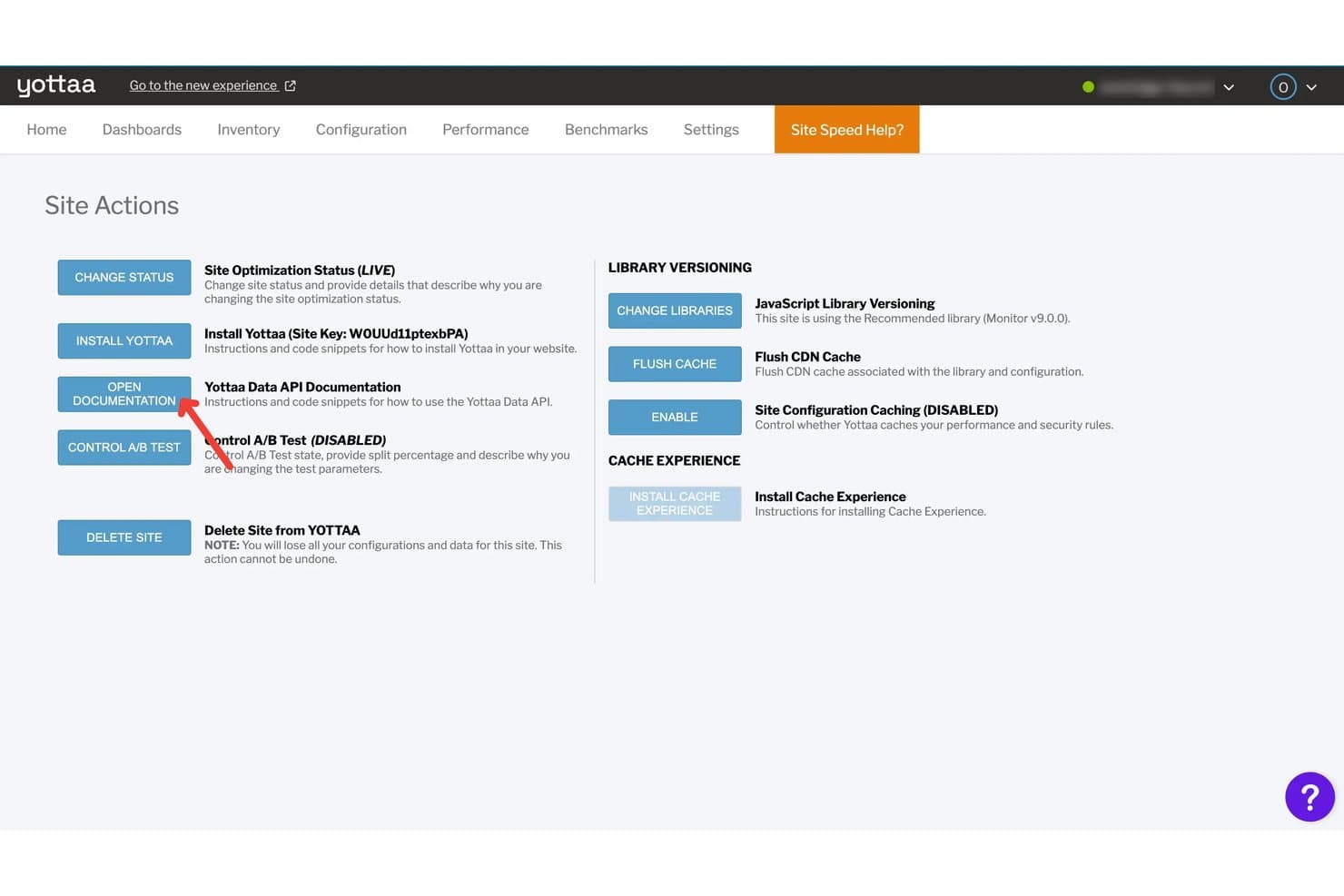
YOTTAA consente agli utenti di gestire l'ottimizzazione del sito, il caching e le impostazioni delle librerie. YOTTAA è una piattaforma di accelerazione web progettata specificamente per l'e-commerce che combina il brevettato Sequenziamento delle applicazioni, la suddivisione dinamica delle pagine InstantON, l'ottimizzazione lato client, il caching edge tramite la CDN di Fastly e il monitoraggio degli utenti reali con diagnostica delle metriche Core Web Vitals.
Per chi è più adatto YOTTAA?
YOTTAA è particolarmente adatto ai team e-commerce che gestiscono grandi volumi di script di terze parti e hanno bisogno di un controllo preciso sull'ordine di caricamento e sulle prestazioni delle pagine.
Perché ho scelto YOTTAA
Ho scelto YOTTAA come una delle soluzioni migliori perché il suo brevettato Sequenziamento delle applicazioni offre ai team e-commerce un controllo diretto sull'ordine di caricamento di oltre 25-40 script di terze parti per pagina, senza modificare una riga di codice né pubblicare una nuova versione del sito. Trovo inoltre InstantON davvero utile: suddivide le pagine in un involucro statico fornito in meno di 200 ms e frammenti dinamici recuperati in modo asincrono, migliorando direttamente LCP e TTFB sulle pagine personalizzate che il caching tradizionale non riesce a gestire.
Funzionalità principali di YOTTAA
- Monitoraggio degli utenti reali (RUM): Acquisisce il 100% delle sessioni degli acquirenti, incluso il traffico normalmente bloccato dai blocchi pubblicitari, con una conservazione dei dati fino a 13 mesi.
- Esperienza di caching: Configura regole di caching edge con manipolazione basata su area geografica e dispositivo, eccezioni RegExp, supporto per più origini e invalidazione della cache per URL o per l'intero sito.
- IA per le anomalie: Utilizza l'apprendimento automatico per rilevare anomalie nelle prestazioni rispetto a una linea di base mobile di due settimane e invia avvisi prioritari tramite pannello di controllo, e-mail o Slack.
- Analisi delle conversioni: Identifica l'intervallo di tempo di caricamento delle pagine in cui si verifica la maggior parte delle conversioni e quantifica l'impatto sul fatturato delle modifiche alle prestazioni.
Integrazioni di YOTTAA
YOTTAA si integra con Fastly, Adobe Commerce, Salesforce Commerce Cloud, Shopify, SAP Hybris, Sitecore, Google Analytics 4, Adobe Analytics e CrUX. Il server MCP supporta Claude Code, Cursor e VS Code, mentre le API REST supportano integrazioni personalizzate.
Pros and Cons
Pros:
- Eccelle nel controllo del caricamento degli script e-commerce
- InstantON brevettato accelera le pagine dinamiche
- Acquisisce il 100% dei dati delle sessioni degli acquirenti
Cons:
- Nessuna infrastruttura CDN proprietaria dal 2024
- Controlli autonomi limitati per protocolli e routing
Learn more about YOTTAA: Ideale per la distribuzione globale dei contenuti e la sicurezza
- Prova gratuita disponibile
- Prezzi su richiesta
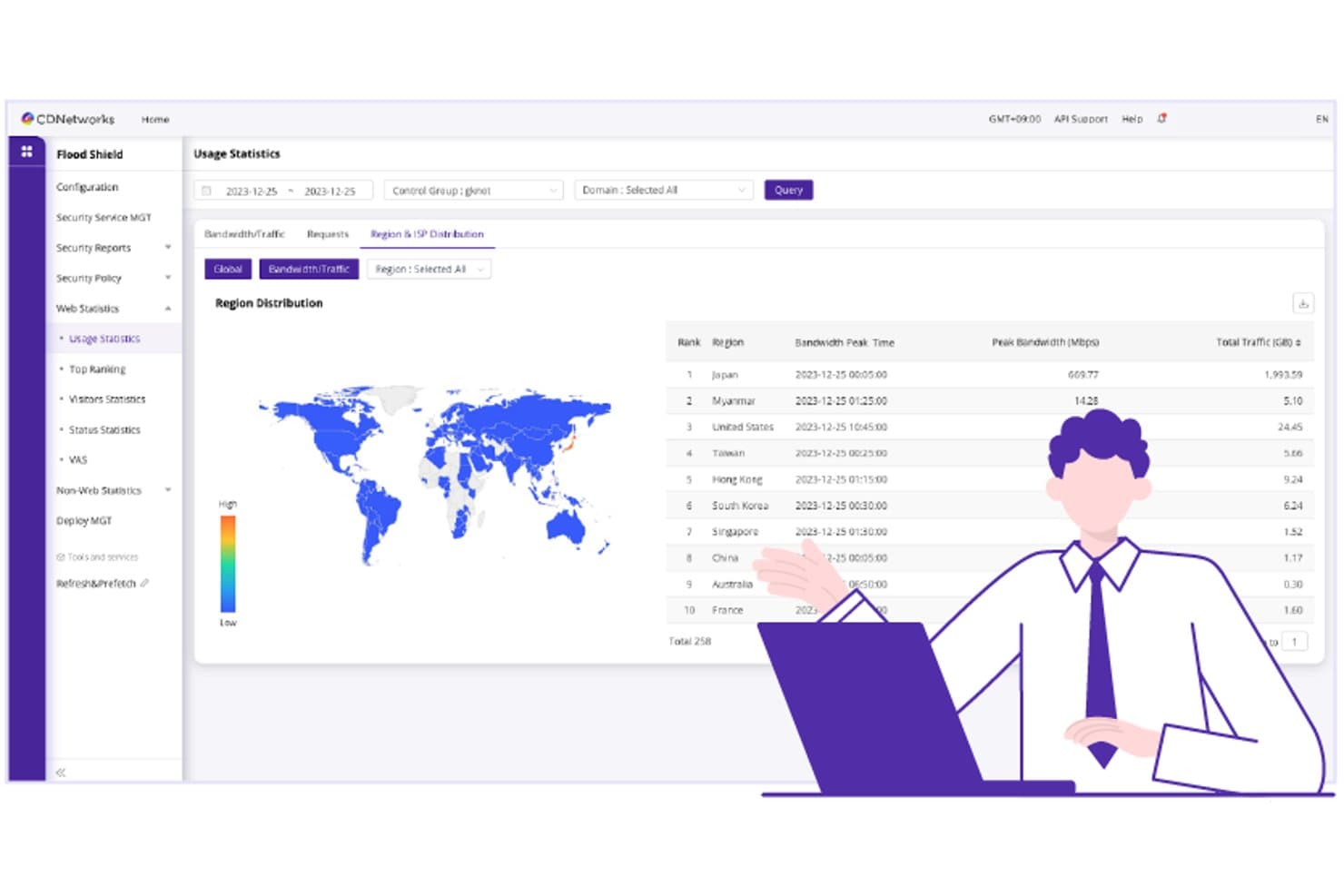
CDNetworks monitora l'utilizzo della larghezza di banda regionale nelle località di tutto il mondo. CDNetworks è una piattaforma di accelerazione web e distribuzione periferica che combina l'accelerazione dei contenuti dinamici, la memorizzazione nella cache su più livelli, la logica programmabile sui nodi periferici, la sicurezza WAAP integrata e il calcolo senza server sui nodi periferici attraverso una rete globale di oltre 3.000 PoP, con una copertura particolarmente capillare nell'area APAC e in Cina.
Per chi è più adatto CDNetworks?
CDNetworks è particolarmente adatto alle organizzazioni con una base utenti significativa nell'area Asia-Pacifico, soprattutto quando la portata sul mercato cinese o le prestazioni periferiche regionali sono requisiti imprescindibili.
Perché ho scelto CDNetworks
CDNetworks si è guadagnato un posto nella mia lista ristretta perché nessun altro CDN è paragonabile alla sua ampiezza di copertura nell'area Asia-Pacifico, inclusi mercati come la Cina, dove la maggior parte dei concorrenti semplicemente non ha una presenza significativa. Mi ha colpito in particolare il suo Protocollo di trasmissione ottimizzato proprietario, che accelera i contenuti dinamici non memorizzabili nella cache (come le sessioni autenticate e le API in tempo reale) dal 30% al 130% più velocemente rispetto al TCP standard. La sicurezza WAAP integrata, con una capacità di mitigazione DDoS di oltre 20 Tbps direttamente incorporata nel livello di distribuzione, elimina la necessità di integrare un fornitore di sicurezza separato per proteggere questo traffico.
Funzionalità principali di CDNetworks
- Invalidazione della cache basata su tag: invalida istantaneamente contenuti specifici memorizzati nella cache su tutti i PoP utilizzando i tag, senza cancellare l'intera cache.
- Archiviazione KV periferica: un archivio distribuito chiave-valore che si sincronizza globalmente tra i nodi periferici per le applicazioni senza server con gestione dello stato.
- Bilanciamento globale del carico dei server (GSLB): instrada le richieste in arrivo verso il PoP disponibile più vicino in base alle condizioni di rete in tempo reale e allo stato di salute dell'origine.
- Provider Terraform: un provider pubblicato nel registro Terraform consente di gestire la configurazione del CDN come codice all'interno dei flussi di lavoro infrastrutturali esistenti.
Integrazioni di CDNetworks
CDNetworks offre un provider Terraform, l'integrazione con Grafana, la connettività SIEM, Cloud DNS+ e la compatibilità con le origini AWS, Google Cloud e Azure. La sua API REST supporta integrazioni personalizzate e flussi di lavoro CI/CD; i plugin nativi per CMS e commercio elettronico non sono documentati in modo chiaro.
Pros and Cons
Pros:
- Portata periferica senza pari in tutta l'area Asia-Pacifico
- Sicurezza WAAP e DDoS integrata sui nodi periferici
- Nodi periferici senza server con isolati V8 programmabili
Cons:
- Integrazioni limitate con CMS e strumenti di osservabilità
- È necessario contattare il reparto vendite per conoscere i prezzi dell'accelerazione dinamica
Learn more about CDNetworks: Ideale per il caching all'edge a costi prevedibili su larga scala
- Prova gratuita di 14 giorni
- A partire da 1 $/mese
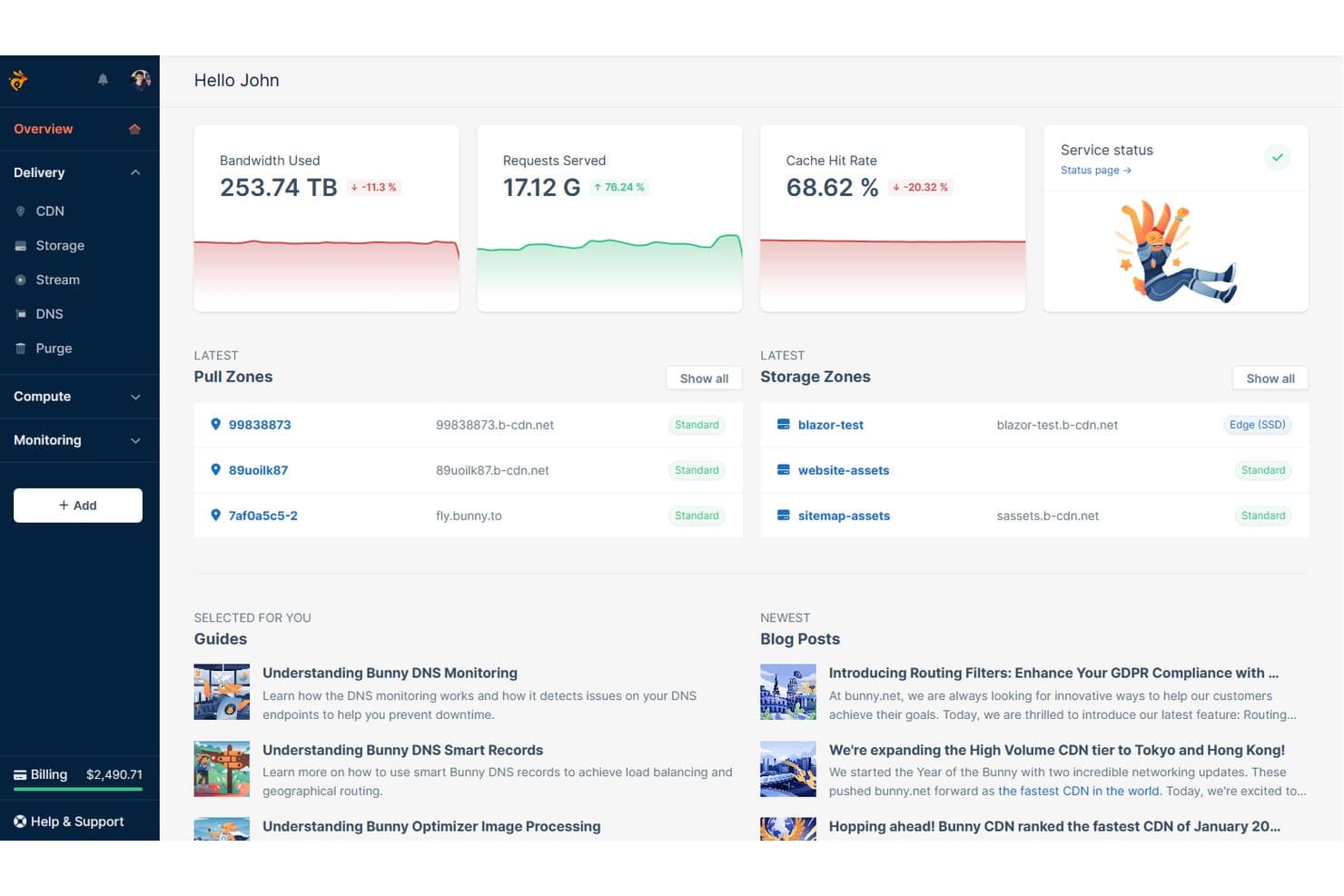
Il pannello di controllo di bunny.net offre una panoramica in tempo reale delle metriche delle prestazioni della CDN. bunny.net è una piattaforma di accelerazione web e CDN che combina il caching all'edge, l'instradamento intelligente del traffico, l'ottimizzazione di immagini e video, l'elaborazione serverless all'edge e la protezione WAF e DDoS integrata in 119 PoP globali.
Per chi è più adatto bunny.net?
bunny.net è ideale per i team di infrastruttura e DevOps che necessitano di caching globale all'edge a un costo prevedibile e contenuto, senza rinunciare alle prestazioni.
Perché ho scelto bunny.net
bunny.net si è guadagnato un posto nella mia rosa ristretta perché il suo modello di tariffazione è davvero diverso da quello della maggior parte dei provider CDN: offre un minimo di 1 $ al mese, protezione dai costi aggiuntivi tramite limiti di larghezza di banda configurabili e tariffe a partire da soli 0,01 $/GB per l'Europa e il Nord America. Sono particolarmente colpito da Perma-Cache, che archivia permanentemente i file sull'edge per garantire un rapporto HIT della cache del 100% sulle risorse archiviate. In combinazione con l'instradamento SmartEdge, che seleziona dinamicamente tra percorsi basati su Anycast, GeoDNS e latenza per ciascun tipo di contenuto, offre prestazioni costanti senza costi imprevedibili.
Funzionalità principali di bunny.net
- Protezione dell'origine: Un livello di caching intermedio che si trova tra i PoP edge e il server di origine, assorbendo il traffico CDN e riducendo il carico sull'origine fino al 30%.
- Scripting all'edge di Bunny: Una piattaforma di elaborazione serverless che esegue Deno in tutti i 119 PoP e supporta TypeScript, moduli npm e WebAssembly per la logica personalizzata all'edge.
- Firewall WAF Bunny Shield: Un firewall per applicazioni web di nuova generazione con suggerimenti di regole basati sull'IA, registri degli attacchi in tempo reale e protezione dalle vulnerabilità OWASP Top 10.
- Provider Terraform: Un provider ufficiale e open source di HashiCorp Terraform per gestire risorse CDN, DNS, di archiviazione e di streaming tramite flussi di lavoro infrastrutturali basati sul codice.
Integrazioni di bunny.net
bunny.net offre integrazioni documentate con WordPress, Drupal, Magento, Shopware, Joomla, Amazon S3, Azure Blob Storage, Backblaze B2 e DigitalOcean Spaces. Supporta inoltre Terraform, le distribuzioni di scripting all'edge basate su GitHub, i flussi di lavoro tramite CLI e integrazioni personalizzate attraverso la sua API REST.
Pros and Cons
Pros:
- Perma-Cache offre l'archiviazione permanente delle risorse sull'edge
- Prezzi prevedibili con protezione dai costi aggiuntivi
- Ottimizzazione integrata di immagini, video e font
Cons:
- Nessuna API compatibile con S3 per l'archiviazione
- Nessuna integrazione nativa preconfigurata per l'osservabilità
Learn more about bunny.net: Ideale per la mitigazione degli attacchi DDoS su scala di rete
- Piano gratuito + demo gratuita disponibile
- A partire da $20/utente/mese (fatturato annualmente)
Visit WebsiteCustomer Rating:4.5/5
Con la sicurezza integrata di Cloudflare, gli utenti possono creare regole firewall per applicazioni web direttamente nel sito, impedendo al traffico sospetto di compromettere il proprio sito web. Cloudflare è una piattaforma di accelerazione web e sicurezza che combina una CDN globale, la mitigazione degli attacchi DDoS, il calcolo edge tramite Workers, l'instradamento intelligente del traffico e la memorizzazione nella cache integrata in un'unica rete di reverse proxy.
Per chi è più adatto Cloudflare?
Cloudflare è particolarmente adatto ai team responsabili dell'infrastruttura e della sicurezza che devono assorbire attacchi DDoS su larga scala senza sacrificare la velocità di distribuzione per una base di utenti globale.
Perché ho scelto Cloudflare
Cloudflare è entrato nella mia lista ristretta perché nessun altro acceleratore web eguaglia la sua capacità di mitigazione degli attacchi DDoS: oltre 500 Tbps di capacità di rete, disponibili in ogni piano, incluso quello gratuito. Ho visto team assorbire attacchi volumetrici da record senza apportare modifiche alla configurazione all'origine, effettuando semplicemente uno scambio DNS. L'instradamento intelligente Argo rafforza ulteriormente il caso, riducendo la latenza in media del 30% grazie all'instradamento del traffico intorno alla congestione in tempo reale attraverso la rete Cloudflare, presente in 348 città.
Funzionalità principali di Cloudflare
- Cache a livelli: un'architettura gerarchica di memorizzazione nella cache che instrada le richieste attraverso i data center del livello superiore prima di raggiungere l'origine, aumentando significativamente i rapporti di riscontri nella cache.
- Cloudflare Workers: funzioni serverless eseguite in tutte le località edge senza avvii a freddo, con supporto per JavaScript, TypeScript, Python e Rust per la logica edge dinamica.
- Cloudflare Observatory: uno strumento di monitoraggio delle prestazioni tutto-in-uno che combina il monitoraggio degli utenti reali, i punteggi di Google Lighthouse e i test sintetici regionali in un'unica dashboard.
- Bilanciamento del carico: distribuisce il traffico tra server, data center e ambienti cloud con instradamento geografico, failover attivo/passivo e controlli di integrità da punti globali.
Integrazioni di Cloudflare
Cloudflare offre integrazioni con AWS, Google Cloud, Microsoft Azure, WordPress, GitHub, GitLab, Datadog, New Relic, Grafana e Splunk. Le sue API REST e GraphQL, il provider Terraform, Logpush e il supporto all'esportazione OpenTelemetry consentono connettività personalizzata e flussi di lavoro CI/CD.
Pros and Cons
Pros:
- Assorbe automaticamente gli attacchi DDoS multi-terabit
- La cache a livelli aumenta i rapporti di riscontri nella cache
- Workers abilita il calcolo edge dinamico ovunque
Cons:
- La configurazione delle funzionalità avanzate richiede molto tempo
- La terminazione SSL solleva problemi di privacy per alcuni utenti
 Ideale per l'accelerazione e la protezione delle API
- Prova gratuita di 30 giorni + demo gratuita disponibile
- Prezzi su richiesta
Visit WebsiteCustomer Rating:4/5
Questa è una schermata della dashboard di configurazione della sicurezza di Akamai. Akamai è una piattaforma di distribuzione edge e accelerazione web che combina CDN, accelerazione dei contenuti dinamici, instradamento intelligente del traffico, ottimizzazione di immagini e video, elaborazione serverless all'edge tramite EdgeWorkers e sicurezza integrata per API e applicazioni.
Per chi è più indicato Akamai?
Akamai è particolarmente adatto ai team aziendali che devono accelerare e proteggere API e contenuti dinamici su scala globale, soprattutto nei settori regolamentati, dove la conformità e la disponibilità continua non sono negoziabili.
Perché ho scelto Akamai
Akamai è entrato nella mia rosa di candidati perché nessun'altra piattaforma combina accelerazione e protezione delle API su questa scala. Sono particolarmente colpito dall'acceleratore di siti dinamici abbinato a SureRoute, che identifica continuamente in tempo reale i percorsi a latenza più bassa per il traffico API non memorizzabile nella cache. Inoltre, il prodotto dedicato alla sicurezza delle API offre funzionalità di rilevamento e protezione in fase di esecuzione per endpoint GenAI e LLM, un ambito che la maggior parte dei concorrenti non ha ancora affrontato.
Funzionalità principali di Akamai
- Gestore di immagini e video: Ottimizza automaticamente immagini e video in tempo reale, selezionando il formato (WebP, AVIF, HEIF) e la qualità migliori in base al dispositivo e alle condizioni della rete.
- EdgeWorkers: Esegue JavaScript all'edge su migliaia di PoP globali, consentendo di applicare logiche di instradamento personalizzate, test A/B e manipolazione delle richieste senza raggiungere l'origine.
- Monitoraggio degli utenti reali con mPulse: Raccoglie oltre 200 metriche sulle prestazioni dalle sessioni degli utenti reali, inclusi pannelli di attribuzione dei Core Web Vitals per la diagnostica di CLS, INP e LCP.
- Gestione globale del traffico: Una soluzione di bilanciamento del carico basata su criteri, con sei metodi di instradamento, monitoraggio dell'integrità in tempo reale, supporto multi-cloud e un SLA di disponibilità del 100%.
Integrazioni di Akamai
Akamai supporta integrazioni con Splunk, Datadog, New Relic, Google Cloud, Terraform e GitHub Actions. Le sue API REST e Akamai CLI supportano integrazioni personalizzate e flussi di lavoro CI/CD.
Pros and Cons
Pros:
- Eccelle nell'accelerazione e nella sicurezza delle API
- Dashboard di attribuzione dei Core Web Vitals in tempo reale
- La vasta rete edge globale riduce al minimo la latenza
Cons:
- Nessuna registrazione autonoma né prezzi pubblici
- Processo di configurazione e onboarding complesso
Learn more about Akamai: Ideale per l'accelerazione della cache del browser a più livelli
- Demo gratuita disponibile
- Prezzi su richiesta

Speed Kit monitora in tempo reale le visualizzazioni delle pagine e le stime di fatturazione. Speed Kit è una piattaforma di accelerazione web che aggiunge caching dinamico multilivello, precaricamento predittivo basato sull'IA, ottimizzazione della compressione e monitoraggio degli utenti reali alla CDN e allo stack tecnologico esistenti.
Per chi è più adatto Speed Kit?
Speed Kit è particolarmente adatto agli ingegneri delle prestazioni web e ai team frontend di aziende di e-commerce del mercato medio e aziendale che desiderano accelerare pagine dinamiche e personalizzate senza riprogettare lo stack esistente.
Perché ho scelto Speed Kit
Speed Kit si è guadagnato un posto nella mia selezione perché risolve un problema di caching che la maggior parte degli acceleratori web semplicemente ignora: l'HTML dinamico e personalizzato. La sua architettura di cache del browser a più livelli combina il caching backend, edge e del worker di servizio, così anche le pagine specifiche della sessione vengono caricate dalla cache anziché dall'origine. Sono inoltre colpito dal suo precaricamento predittivo basato sull'IA, che utilizza il comportamento reale degli utenti per pre-renderizzare la pagina successiva più probabile prima che un visitatore faccia clic, raggiungendo costantemente un LCP inferiore a 300 ms.
Funzionalità principali di Speed Kit
- Caching del guscio HTML dinamico: Memorizza nella cache istantanee HTML anonimizzate e prive di cookie delle pagine personalizzate, così i contenuti dinamici vengono caricati dalla cache anziché dall'origine.
- API di aggiornamento: Consente di eliminare o aggiornare a livello di codice pagine e risorse specifiche dalla dashboard o tramite una chiamata API.
- Accelerazione delle risorse di terze parti: Instrada le richieste di terze parti autorizzate attraverso un'unica connessione HTTP/3 persistente, memorizzando nella cache script, font e CSS all'edge.
- Test A/B della velocità in tempo reale per migliorarne le prestazioni: Esegue esperimenti simultanei sulla velocità sul traffico reale e collega direttamente i risultati a indicatori chiave delle prestazioni aziendali come il tasso di conversione e i ricavi.
Integrazioni di Speed Kit
Speed Kit si integra con Shopify, Akamai, Cloudflare, Fastly, AWS CloudFront, Google Tag Manager e Akamai Bot Manager. Fornisce inoltre un'API di aggiornamento per flussi di lavoro personalizzati di eliminazione e aggiornamento della cache.
Pros and Cons
Pros:
- Caching dinamico per pagine di e-commerce personalizzate
- Il precaricamento predittivo garantisce un LCP inferiore a 300 ms
- L'integrazione non richiede modifiche all'infrastruttura
Cons:
- Nessuna CDN proprietaria o funzionalità di sicurezza
- Il pre-rendering è limitato ai browser Chromium
Learn more about Speed Kit: Ideale per la distribuzione edge nativa AWS su larga scala
- Piano gratuito disponibile
- A partire da $15/mese
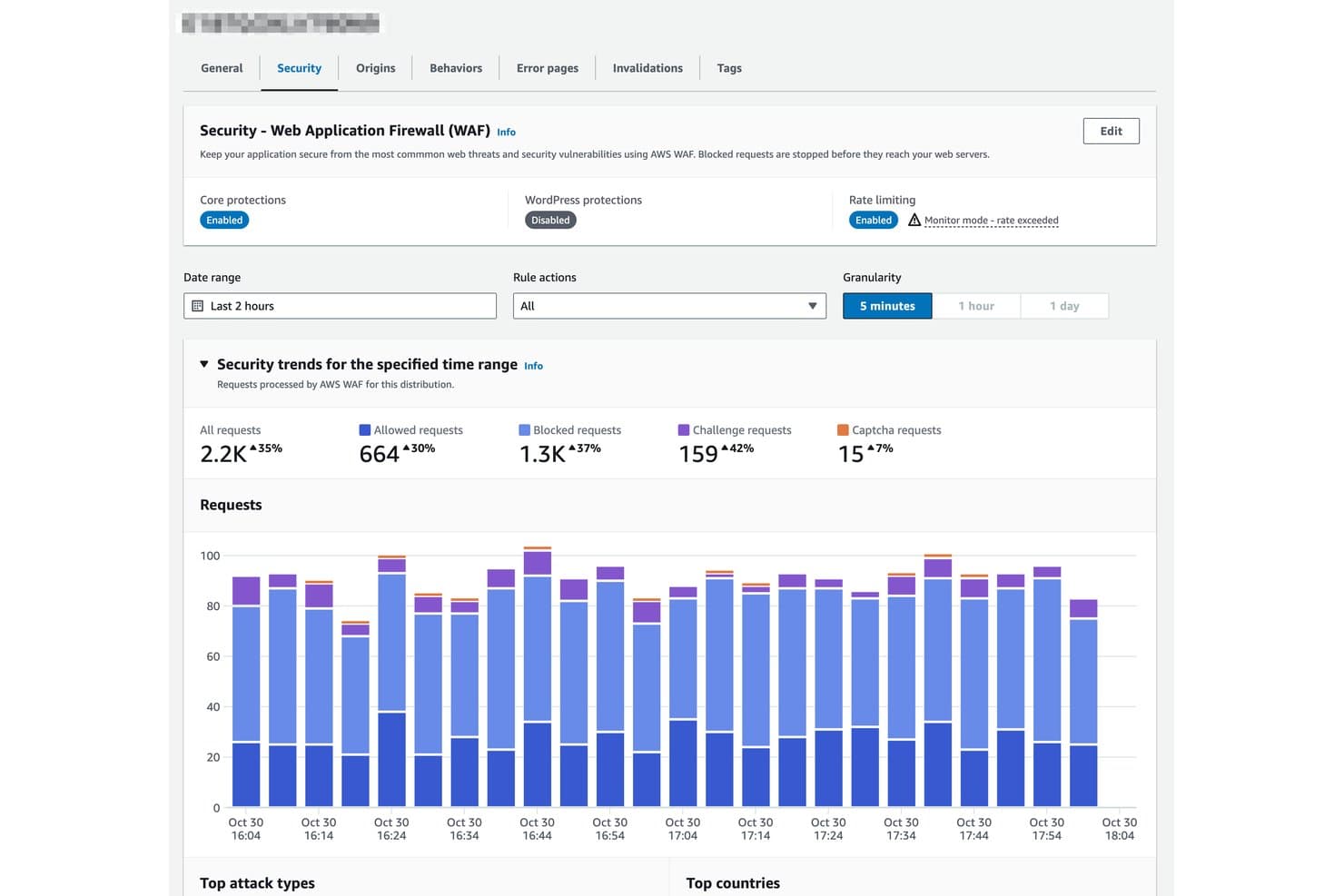
Amazon CloudFront monitora le richieste bloccate, consentite e sottoposte a verifica tramite WAF. Amazon CloudFront è un acceleratore web e una CDN basata sulla rete edge globale di AWS, che offre caching dei contenuti multilivello, distribuzione di contenuti dinamici e statici, edge computing tramite CloudFront Functions e Lambda@Edge, nonché protezione DDoS e WAF integrata.
Per chi è più adatto Amazon CloudFront?
Amazon CloudFront è la scelta ideale per i team di ingegneria che gestiscono già l'infrastruttura su AWS e necessitano di una distribuzione edge su scala aziendale senza dover gestire un fornitore CDN separato.
Perché ho scelto Amazon CloudFront
Amazon CloudFront si è guadagnato un posto nella mia selezione ristretta perché è integrato direttamente nell'infrastruttura AWS. Ciò significa che, se il tuo stack funziona già su EC2, S3 o API Gateway, non sostieni alcun costo di uscita tra la tua origine e l'edge. Sono particolarmente colpito da Origin Shield, un livello di caching intermedio che raggruppa le richieste ridondanti all'origine in una sola, riducendo drasticamente il carico sull'origine nelle implementazioni multiregione. Abbinato a oltre 750 PoP e a oltre 1.140 PoP ISP integrati per la distribuzione dell'ultimo miglio, CloudFront è davvero difficile da battere per i team nativi AWS che operano su larga scala.
Funzionalità principali di Amazon CloudFront
- CloudFront Functions: Un runtime JavaScript leggero che viene eseguito all'edge in meno di un millisecondo e gestisce su larga scala la riscrittura degli URL, la manipolazione delle intestazioni e la normalizzazione delle chiavi di cache.
- Lambda@Edge: Un runtime completo per Node.js e Python in esecuzione nelle cache edge regionali, che consente il rendering lato server, l'autenticazione degli utenti e la personalizzazione dei contenuti in tempo reale.
- Streaming dei log in tempo reale: I log per ogni richiesta vengono trasmessi ad Amazon Kinesis Data Streams entro pochi secondi, con frequenze di campionamento configurabili per l'analisi del traffico ad alto volume.
- Crittografia a livello di campo: Crittografa specifici campi POST end-to-end dall'edge all'origine, mantenendo protetti i dati sensibili anche all'interno di una sessione HTTPS.
Integrazioni di Amazon CloudFront
Amazon CloudFront offre integrazioni native con Amazon S3, Amazon EC2, Elastic Load Balancing, API Gateway, AWS WAF, AWS Shield, AWS Certificate Manager, Route 53, CloudWatch e Lambda. Supporta CloudFormation, AWS CDK, Terraform, CLI, SDK e integrazioni personalizzate basate su API.
Pros and Cons
Pros:
- Nessun costo di uscita dalle origini AWS
- Rete globale edge e ISP PoP di enormi dimensioni
- Due runtime edge per la logica edge personalizzata
Cons:
- Nessuna ottimizzazione nativa di immagini o risorse
- Configurazione iniziale complessa per i nuovi utenti
Learn more about Amazon CloudFront: 10Ideale per incrementare le conversioni Shopify tramite la memorizzazione nella cache perimetrale
Edgemesh
- Piano gratuito + demo gratuita disponibili
- A partire da $3,950/mese

Edgemesh monitora l'efficienza della cache di terze parti e i tempi di risposta per ogni origine. Edgemesh è una piattaforma di accelerazione web nativa per Shopify che combina la memorizzazione nella cache perimetrale, la composizione ibrida di pagine statiche e dinamiche, il filtraggio dei bot, il monitoraggio delle prestazioni degli utenti reali e l'analisi proprietaria lato server.
Per chi è più adatto Edgemesh?
Edgemesh è particolarmente adatto ai marchi Shopify e Shopify Plus con volumi di vendita elevati che necessitano di incrementi misurabili delle conversioni grazie ai miglioramenti delle prestazioni perimetrali.
Perché ho scelto Edgemesh
Edgemesh si è guadagnato un posto nella mia lista ristretta perché il suo modello di composizione ibrida delle pagine mira direttamente al collo di bottiglia delle prestazioni che fa perdere conversioni ai negozi Shopify. Mi piace il modo in cui distribuisce il guscio dell'applicazione memorizzato nella cache perimetrale in circa 90ms, recuperando dinamicamente prezzi e disponibilità in tempo reale, così gli acquirenti non visualizzano mai dati obsoleti. Il suo test con suddivisione 50/50 del traffico reale mi permette di convalidare l'impatto sulle conversioni con visitatori reali, non con benchmark sintetici, e i casi di studio pubblicati lo confermano con incrementi delle conversioni del 14–16%.
Funzionalità principali di Edgemesh
- Filtraggio dei bot e del traffico non valido: assegna un punteggio a ogni richiesta sulla rete perimetrale in tempo reale utilizzando la reputazione dell'IP, il comportamento del dispositivo e la sequenza degli eventi, per distinguere gli acquirenti legittimi dai bot prima che raggiungano il tuo negozio online.
- Invalidazione della cache attivata da notifiche webhook: consente di invalidare programmaticamente i contenuti memorizzati nella cache tramite API o notifiche webhook, in modo che le pagine dei prodotti si aggiornino automaticamente quando cambiano le disponibilità o il tema.
- Analisi proprietaria lato server: acquisisce i dati sul percorso di conversione e sull'attribuzione a livello infrastrutturale, aggirando i blocchi pubblicitari e le restrizioni sulla privacy dei browser per ottenere dati non campionati al 100%.
- Continuità in caso di indisponibilità: continua a fornire ai visitatori il negozio memorizzato nella cache se l'origine Shopify va offline, mantenendo il negozio accessibile durante le interruzioni della piattaforma.
Integrazioni di Edgemesh
Edgemesh si integra con Shopify, Shopify Plus, Meta, Google Ads, Layers, Claude, Cursor e Gemini tramite MCP. Offre inoltre un'API REST e notifiche webhook per la gestione personalizzata della cache e della connettività.
Pros and Cons
Pros:
- La memorizzazione nella cache ibrida mantiene sempre aggiornati i dati Shopify
- I test con suddivisione 50/50 convalidano l'impatto reale sull'attività
- L'analisi degli utenti reali aggira completamente i blocchi pubblicitari
Cons:
- Adatto principalmente a casi d'uso esclusivi di Shopify
- La trasparenza sui protocolli e sulla rete è limitata
Learn more about Edgemesh:
Altri acceleratori web
Di seguito è riportato un elenco di ulteriori acceleratori web che ho selezionato, ma che non sono entrati nella top 10. Vale sicuramente la pena prenderli in considerazione.
- 11Microsoft Azure Front DoorIdeale per distribuzione e sicurezza unificate native di Azure
- 12Google Cloud CDNIdeale per la memorizzazione nella cache e la distribuzione ai margini native di GCP
- 13CDN77Ideale per la distribuzione dei contenuti su una rete privata
- 14F5 NGINXIdeale per il bilanciamento dei carichi ad alte prestazioni
- 15Varnish SoftwareIdeale per il controllo della cache HTTP basato su VCL
- 16KeyCDNIdeale per la distribuzione globale ai margini con pagamento a consumo
- 17Imperva Secure CDNIdeale per la distribuzione tramite CDN integrata con la sicurezza
- 18QUIC.cloudIdeale per il caching dinamico edge di WordPress tramite HTTP/3
- 19W3 Total CacheIdeale per l'ottimizzazione della memorizzazione nella cache multilivello di WordPress
Recensioni correlate di software per server web
Come Valuto gli Acceleratori Web
Divido la mia valutazione in requisiti di base—come la cache periferica e la copertura dei PoP—e fattori differenzianti come il calcolo su edge e i modelli di prezzo che distinguono gli strumenti eccellenti da quelli semplicemente adeguati.
Funzionalità di Base (Requisiti Fondamentali per Questa Lista)
Quando seleziono gli strumenti per la mia lista, valuto ciascuno su una scala da 0 (non offre la funzionalità) a 5 (eccelle in quest'area) per ogni funzionalità di base elencata di seguito. Calcolo poi il punteggio totale dello strumento in percentuale. Ogni strumento deve raggiungere un punteggio minimo totale del 65% per essere preso in considerazione.
- Caching dei Contenuti: Valuto la granularità della cache, la velocità di purga e il supporto per la cache di contenuti dinamici—come servire pagine prodotto personalizzate direttamente dalla cache periferica invece di richiedere il server di origine ad ogni richiesta.
- Copertura Globale della Rete Edge: Il numero di PoP da solo non racconta l'intera storia, quindi verifico la distribuzione geografica e se la rete copre le regioni dove si trovano effettivamente i tuoi utenti.
- Compressione e Ottimizzazione dei Contenuti: Cerco la compressione Brotli automatica, la minimizzazione degli asset e la conversione del formato immagine (WebP, AVIF) che riducono la dimensione dei dati senza modifiche manuali nei processi di build.
- Ottimizzazione di Protocollo e Connessioni: Qui conta il supporto per HTTP/3, QUIC e TLS 1.3—soprattutto per utenti mobile su connessioni instabili, dove le strette di mano TCP tradizionali aggiungono latenza visibile.
- Ottimizzazione del Routing e del Traffico: Un instradamento intelligente che si adatta alla congestione in tempo reale e supporta il failover multi-origin è ciò che distingue un CDN da un vero acceleratore, quindi qui presto particolare attenzione.
- Analytics e Monitoraggio delle Prestazioni: Le dashboard devono mostrare il rapporto di hit della cache, la latenza per PoP e le metriche reali degli utenti in modo da poter collegare direttamente gli sforzi di accelerazione ai miglioramenti dei Core Web Vitals.
Una volta che ho una lista di strumenti che soddisfano questi criteri, considero cosa distingue ciascuna piattaforma.
Fattori Differenzianti (Cosa Distingue i Fornitori)
Ecco come confronto e metto a confronto i diversi fornitori:
Funzionalità Distintive
Il calcolo su edge è un importante fattore differenziante—verifico se una piattaforma consente di eseguire logiche personalizzate come reindirizzamenti per localizzazione geografica o A/B test direttamente sull'edge senza dover tornare al server di origine. Anche la sicurezza integrata è importante perché un WAF e la protezione DDoS operativi in linea sull’edge aggiungono difesa senza aggiungere latenza. La strumentazione per sviluppatori è l’ambito in cui vedo le maggiori differenze fra i fornitori; provider per Terraform, accesso CLI, e API adatte a CI/CD fanno davvero la differenza quando il tuo team gestisce configurazioni come codice su ambienti di test e produzione.
Oltre le Funzionalità
La trasparenza del modello di prezzo è una delle prime cose che valuto: la fatturazione basata sulla larghezza di banda può far crescere i costi durante i picchi di traffico, quindi verifico se i fornitori offrono opzioni a tariffa fissa o a uso garantito, in modo da mantenere i costi prevedibili. Anche le integrazioni con origini e stack influenzano la mia valutazione; il supporto nativo per i principali cloud provider e piattaforme CMS come WordPress o Magento significa un onboarding più rapido. Per i team che gestiscono carichi di lavoro regolamentati, controllo la presenza di certificazioni SOC 2, PCI DSS e controlli sulla residenza dei dati, perché scegliere un fornitore senza le certificazioni adeguate può bloccare completamente il deployment.
Come scegliere un acceleratore web
È facile perdersi in lunghi elenchi di funzionalità e strutture tariffarie complesse. Per aiutarti a rimanere concentrato mentre affronti il tuo specifico processo di selezione del software, ecco un elenco di fattori da tenere a mente:
| Fattore | Cosa considerare |
|---|---|
| FattoreScalabilità | Cosa considerareLo strumento è in grado di gestire la crescita prevista? Verifica se può supportare l'aumento del traffico e dei dati senza influire sulle prestazioni. Cerca soluzioni che offrano opzioni di scalabilità flessibili. |
| FattoreIntegrazioni | Cosa considerareSi integra con i sistemi esistenti? Verifica la compatibilità con il tuo attuale stack tecnologico per garantire un flusso dei dati fluido e l'allineamento dei processi. |
| FattorePersonalizzazione | Cosa considerarePuoi adattare lo strumento alle tue esigenze? Valuta se la soluzione consente modifiche per soddisfare requisiti aziendali specifici senza ricorrere a un'attività di programmazione estesa. |
| FattoreSemplicità d'uso | Cosa considerareL'interfaccia è intuitiva per il tuo team? Considera la curva di apprendimento e se il tuo team può adottare rapidamente lo strumento senza una formazione approfondita. |
| FattoreImplementazione e inserimento | Cosa considerareQuanto tempo serve per essere operativi? Esamina il processo di configurazione e le risorse disponibili, come tutorial o assistenza, per ridurre al minimo i tempi di inattività durante la transizione. |
| FattoreCosto | Cosa considerareIl prezzo rientra nel tuo budget? Confronta il costo con il tuo budget e valuta il ritorno sull'investimento. Fai attenzione ai costi nascosti o ai livelli tariffari complessi. |
| FattoreMisure di sicurezza | Cosa considerareI tuoi dati e le informazioni degli utenti sono protetti? Assicurati che lo strumento offra solide funzionalità di sicurezza, come la crittografia e la conformità agli standard del settore. |
| FattoreDisponibilità dell'assistenza | Cosa considerareQuanto è accessibile l'assistenza clienti? Verifica se il fornitore offre un'assistenza affidabile e tempestiva tramite vari canali per risolvere rapidamente i problemi. |
Che cos'è un acceleratore web?
Un acceleratore web è uno strumento progettato per migliorare le prestazioni dei siti web velocizzando la distribuzione dei contenuti e riducendo i tempi di caricamento. Questi strumenti vengono generalmente utilizzati da professionisti IT, sviluppatori web e responsabili dell'e-commerce per migliorare l'esperienza degli utenti e sostenere l'efficienza aziendale. Le funzionalità di memorizzazione nella cache, reti per la distribuzione dei contenuti (CDN) e bilanciamento del carico aiutano a ottimizzare le prestazioni del sito e a gestire il traffico. Nel complesso, questi strumenti garantiscono agli utenti un accesso ai contenuti web più rapido e affidabile.
Funzionalità
Quando selezioni un acceleratore web, presta attenzione alle seguenti funzionalità principali:
- Memorizzazione nella cache: Memorizza i dati consultati frequentemente per ridurre i tempi di caricamento e il carico sui server, rendendo i siti web più veloci ed efficienti.
- Rete per la distribuzione dei contenuti (CDN): Distribuisce i contenuti su più server in tutto il mondo per ridurre al minimo la latenza e migliorare l'esperienza dell'utente.
- Bilanciamento del carico: Distribuisce il traffico in entrata su più server per evitare che un singolo server venga sovraccaricato, mantenendo prestazioni ottimali.
- Analisi in tempo reale: Fornisce informazioni sulle prestazioni del sito web e sulle interazioni degli utenti, contribuendo a identificare le aree da migliorare.
- Misure di sicurezza: Offre protezione contro minacce come gli attacchi DDoS, garantendo la sicurezza dei dati e delle informazioni degli utenti.
- Personalizzazione: Consente di apportare modifiche per soddisfare esigenze aziendali specifiche senza ricorrere a una programmazione estesa, offrendo flessibilità nell'implementazione.
- Facilità d'uso: Dispone di un'interfaccia intuitiva che riduce la curva di apprendimento e aiuta i team ad adottare rapidamente lo strumento.
- Ridimensionamento automatico: Regola le risorse in risposta alle variazioni del traffico, garantendo prestazioni costanti durante i picchi di carico.
- Funzionalità di integrazione: Si connette perfettamente ai sistemi esistenti per garantire un flusso di dati fluido e l'allineamento dei processi.
- Instradamento del traffico: Ottimizza il percorso per la distribuzione dei dati, riducendo la latenza e migliorando la velocità di distribuzione dei contenuti agli utenti.
Vantaggi
L'implementazione di un acceleratore web offre diversi vantaggi al tuo team e alla tua azienda. Ecco alcuni dei benefici che puoi aspettarti:
- Tempi di caricamento più rapidi: La memorizzazione nella cache e le CDN riducono i tempi di caricamento delle pagine, migliorando l'esperienza e la soddisfazione degli utenti.
- Maggiore coinvolgimento degli utenti: I siti web più veloci mantengono gli utenti sul sito più a lungo, aumentando le probabilità di conversione e interazione.
- Sicurezza avanzata: Funzionalità come la protezione DDoS e la crittografia SSL proteggono i dati e mantengono la fiducia degli utenti.
- Gestione efficiente delle risorse: Il bilanciamento del carico e il ridimensionamento automatico aiutano a ottimizzare l'utilizzo dei server, riducendo i costi e prevenendo i tempi di inattività.
- Maggiore affidabilità: L'instradamento del traffico e le funzionalità di alta disponibilità garantiscono prestazioni costanti, anche nei periodi di traffico elevato.
- Informazioni utili: L'analisi in tempo reale fornisce dati sulle prestazioni e sul comportamento degli utenti, aiutandoti a prendere decisioni consapevoli.
- Integrazione flessibile: Si connette facilmente ai sistemi esistenti, consentendo una transizione più fluida e un flusso di lavoro coerente.
Costi e prezzi
La scelta di un acceleratore web richiede la comprensione dei vari modelli di prezzo e dei piani disponibili. I costi variano in base alle funzionalità, alle dimensioni del team, agli elementi aggiuntivi e ad altro ancora. La tabella seguente riassume i piani più comuni, i relativi prezzi medi e le funzionalità tipicamente incluse nelle soluzioni di accelerazione web:
Tabella comparativa dei piani per l'acceleratore web
| Tipo di piano | Prezzo medio | Funzionalità comuni |
|---|---|---|
| Tipo di pianoPiano gratuito | Prezzo medio$0 | Funzionalità comuniMemorizzazione nella cache di base, accesso limitato alla CDN e funzionalità di sicurezza essenziali. |
| Tipo di pianoPiano personale | Prezzo medio$5-$25/utente/mese | Funzionalità comuniMemorizzazione nella cache avanzata, analisi di base e protezioni di sicurezza standard. |
| Tipo di pianoPiano aziendale | Prezzo medio$50-$150/utente/mese | Funzionalità comuniCDN avanzata, analisi in tempo reale, impostazioni di sicurezza personalizzate e bilanciamento del carico. |
| Tipo di pianoPiano aziendale avanzato | Prezzo medio$200+/utente/mese | Funzionalità comuniSet completo di funzionalità, assistenza dedicata, supporto multi-regione e analisi complete. |
Domande frequenti sugli acceleratori web
Ecco alcune domande comuni sugli acceleratori web e sul loro funzionamento:
In che modo un acceleratore web si differenzia da una CDN?
Un acceleratore web ottimizza le risposte del server e riduce la latenza, mentre una CDN distribuisce i contenuti da più posizioni per raggiungere più rapidamente gli utenti. Molti strumenti utilizzano entrambi per una distribuzione dei dati più fluida.
In che modo un acceleratore web gestisce volumi elevati di traffico?
Gestisce il traffico intenso tramite il bilanciamento del carico e la memorizzazione nella cache, distribuendo le richieste tra diversi server per mantenere prestazioni costanti.
Gli acceleratori web funzionano con tutte le piattaforme di hosting?
La maggior parte degli acceleratori moderni è compatibile con i principali provider di hosting e cloud, come AWS, Azure e Google Cloud. La compatibilità dipende dall’infrastruttura e dalla configurazione esistenti.
Come posso capire se il mio acceleratore web funziona in modo efficace?
Puoi monitorare metriche delle prestazioni come il tempo di caricamento della pagina, la velocità di risposta e il tempo di attività. La maggior parte delle piattaforme include pannelli di controllo o strumenti di analisi per monitorare questi risultati.
Come viene generalmente implementato un acceleratore web?
L’implementazione può variare: alcuni acceleratori sono servizi basati sul cloud, mentre altri vengono installati localmente o integrati tramite API. L’opzione giusta dipende dalla configurazione della tua organizzazione e dalla scala del traffico.