


Hiver vs. HelpDesk: Confronto e Recensioni degli Esperti per il 2026



Hiver offre al tuo team uno spazio di lavoro per l’assistenza clienti facile da usare che aiuta a restare organizzati, rispondere più rapidamente e ridurre le attività ripetitive che rallentano la giornata. HelpDesk propone un sistema strutturato di gestione dei ticket progettato per gestire grandi volumi, automatizzare i compiti di routine e mantenere ogni richiesta sotto controllo. Se stai cercando di risolvere problemi come messaggi persi, tempi di risposta lunghi e flussi di lavoro disordinati, questi strumenti adottano approcci differenti che vale la pena comprendere. In questo articolo confronterò entrambe le piattaforme e ti guiderò tra funzionalità, punti di forza, punti deboli, modelli di prezzo e come si posizionano come software per service desk.
Hiver vs. HelpDesk: An Overview
Hiver
HelpDesk


Perché fidarsi dei nostri consigli sui software
Il nostro team testa e recensisce software dal 2012. In quanto leader tecnologici noi stessi, sappiamo quanto sia difficile — e importante — scegliere il software giusto.
Per questa guida, abbiamo valutato gli strumenti attraverso test praticie ricerche indipendenti, assegnando un punteggio agli strumenti in base ai nostri criteri di selezione.
Le nostre recensioni riflettono il nostro giudizio editoriale umano, non un discorso di vendita.
Revisori esperti:
Hiver vs. HelpDesk Pricing Comparison
| Hiver | HelpDesk | |
|---|---|---|
| Free Trial | Free plan available | Free plan + free demo available |
| Pricing | From $35/user/month | From $29/user/month |
Prezzi e costi nascosti di Hiver vs. HelpDesk
Il modello di prezzo di Hiver è strutturato su diversi livelli che crescono in base alle funzionalità e alla dimensione del team — da un piano gratuito che supporta funzionalità di base di inbox, chat e ticketing, fino a piani superiori che aggiungono SLA, automazioni e analisi. HelpDesk adotta un modello di abbonamento per utente: si paga per ogni agente in diversi piani (Team, Business, Enterprise) e ogni piano prevede limiti specifici su modelli, indirizzi di inoltro, regole e campi personalizzati; passando a piani superiori si sbloccano limiti maggiori e più funzionalità.
Un buon modo per scegliere tra i due è confrontare la dimensione del team e i piani di crescita: se hai un team piccolo o in crescita, il piano gratuito o intermedio di Hiver può essere più flessibile, mentre se prevedi un alto volume di ticket, automazioni e molti agenti, il prezzo per utente di HelpDesk permette una crescita più chiara — basta abbinare il numero di utenti e il carico di ticket previsti ai limiti di ciascun piano.
Hiver vs. HelpDesk Feature Comparison
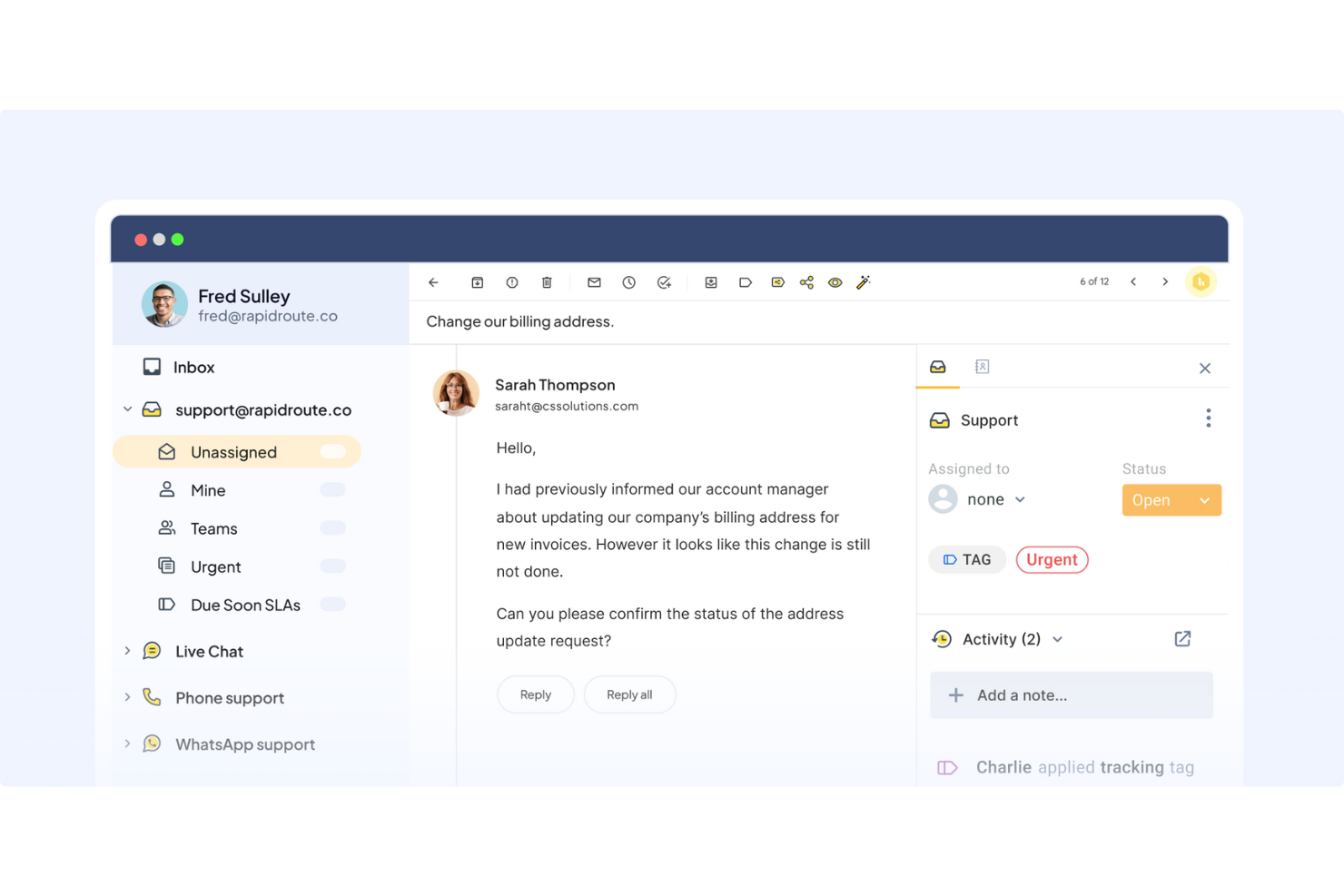
Con la inbox omnicanale di Hiver puoi gestire email, chat, WhatsApp, chiamate vocali e messaggi dal portale tutto in un’unica schermata, così il tuo team non deve cambiare strumento se l’afflusso di richieste aumenta improvvisamente. Con il sistema di ticketing e le regole di automazione di HelpDesk puoi assegnare, prioritizzare e monitorare i casi di assistenza in modo sistematico: una soluzione ideale se cerchi flussi di lavoro chiari e una risoluzione guidata da SLA.
| Hiver | HelpDesk | |
|---|---|---|
| API | ||
| Analytics | ||
| Batch Permissions & Access | ||
| CRM Integration | ||
| Call Integration | ||
| Chat | ||
| Contact Management | ||
| Contact Sharing | ||
| Customer Management | ||
| Customer Service | ||
| Dashboard | ||
| Data Export | ||
| Data Import | ||
| Data Visualization | ||
| Email Integration | ||
| Escalation Management | ||
| External Integrations | ||
| Instant Chat Integration | ||
| Knowledge Base | ||
| Lead Management | ||
| Lead Scoring | ||
| Multi-User | ||
| Notifications | ||
| Real-time Alerts | ||
| Scheduling | ||
| Self-service Portal | ||
| Social Media Integration | ||
| Support Forum | ||
| Third-Party Plugins/Add-Ons | ||
| Ticket Management | ||
| Workflow Management |
Integrazioni Hiver vs. HelpDesk
| Integrazione | Hiver | HelpDesk |
| Salesforce | ✅ | ✅ |
| HubSpot | ✅ | ✅ |
| Shopify | ✅ | ✅ |
| Netsuite | ✅ | ❌ |
| Zapier | ✅ | ✅ |
| Asana | ✅ | ❌ |
| Jira | ✅ | ✅ |
| Pipedrive | ✅ | ❌ |
| Aircall | ✅ | ❌ |
| Slack | ✅ | ✅ |
| API | ✅ | ✅ |
Sia Hiver che HelpDesk si integrano con i principali CRM, strumenti ecommerce, sistemi di comunicazione e app per il workflow, ma Hiver offre generalmente una copertura più ampia sugli strumenti operativi e focalizzati sulla voce. In base alla tua infrastruttura tecnologica, entrambe le soluzioni possono integrarsi nel flusso di lavoro quotidiano, ma la varietà e la profondità delle integrazioni possono essere rilevanti se il tuo team si affida molto a sistemi esterni.
Sicurezza, conformità e affidabilità Hiver vs. HelpDesk
| Fattore | Hiver | HelpDesk |
| Crittografia dati | Usa TLS/SSL (128 bit e standard di crittografia elevati) e hosting sicuro AWS. | Usa connessione SSL sicura a 256 bit e archiviazione sicura dei messaggi. |
| Standard di conformità | Conformità ISO 27001, SOC 2 Type II, GDPR, CCPA. | Conformità GDPR, certificazione Privacy Shield, controllo accessi basato sui ruoli. |
| Controllo accessi & ruoli | Offre ruoli personalizzati, opzioni SSO e rigide policy di accesso. | Fornisce controllo degli accessi basato sui ruoli, ruoli admin/agent/viewer e registro audit. |
| Registrazione dati & audit | Registra accessi, monitora i server di produzione, supporta audit e archiviazione sicura. | Offre log delle attività degli utenti e tracciamento della cronologia dei messaggi. |
In quanto a sicurezza e conformità, entrambi gli strumenti prendono molto sul serio la protezione. Se per te la sicurezza è prioritaria, ti consiglio di confrontare attentamente la documentazione di conformità e i controlli di accesso per verificare che rispecchino le tue policy sui dati e i requisiti normativi.
Hiver vs. HelpDesk Facilità d'Uso
| Fattore | Hiver | HelpDesk |
| Interfaccia Utente | UI moderna e intuitiva che aiuta i team a lavorare velocemente con il minimo ingombro. | UI incentrata sui ticket, chiara e organizzata — ideale per workflow strutturati. |
| Velocità di Onboarding | Facile da configurare; i canali possono essere collegati in pochi minuti; funzionalità AI opzionali e introdotte gradualmente. | L’installazione è semplice ma può richiedere la configurazione di regole di automazione e workflow. |
| Chiarezza del Workflow | Ottimo per i team che gestiscono canali misti e supporto conversazionale. | Ideale per i team che necessitano di chiara assegnazione dei ticket, priorità e tracciamento dei casi. |
| Complessità Automazione | Supporta automazione basata su regole e tagging/riassunti avanzati con l’IA. | Offre ricche regole di automazione, macro, tagging, campi personalizzati e modelli. |
L'interfaccia moderna di Hiver riduce le difficoltà e aiuta il tuo team ad adattarsi rapidamente — soluzione ideale se desideri un’adozione rapida e workflow di supporto informali. HelpDesk dà una sensazione più strutturata e formale, utile se il volume di richieste è elevato e hai bisogno di instradamento rigoroso dei ticket, auditing e reportistica dettagliata.
Hiver vs HelpDesk: Pros & Cons
Hiver
- Hiver AI reduces manual effort by drafting responses, auto-tagging conversations, and summarizing threads in seconds
- You deliver human-like, personalized responses without switching tabs or sounding robotic.
- Your team stays aligned with shared drafts, notes, collision alerts, and clear ownership.
- No advanced help desk forecasting, capacity planning, or predictive SLA breach modeling.
- Complex enterprise workflows may require more customization than Hiver currently offers.
- Teams with support channels outside of chat, email, and call (like social channels), may find the platform lacks features.
HelpDesk
- HelpDesk offers a user-friendly interface that makes it easy for your team to navigate and manage tasks.
- It provides robust customer support, ensuring your team gets quick assistance when needed.
- HelpDesk's customizable features allow your team to tailor the software to fit specific workflow needs.
- Some users find the initial setup process requires a bit more time and effort.
- The reporting features may not be as advanced as some other help desk software options.
- Scalability can be an issue for larger organizations with complex needs.
Best Use Cases for Hiver and HelpDesk
Hiver
- Small Support Teams The interface is simple enough that your team can start resolving issues within hours.
- E-Commerce Businesses You can access customer and order context quickly, making it easier to handle common inquiries.
- IT Help Desks SLA tracking, automations, and routing help you manage internal requests smoothly.
- Logistics & Operations Shared inboxes and clear workloads help you stay organized across high message volumes.
- Travel & Hospitality Natural, friendly replies help maintain strong relationships with customers and travelers.
- AI-Driven Teams AI Copilot removes manual effort so your team can focus on higher-value tasks.
HelpDesk
- Remote Work Teams HelpDesk’s cloud-based platform allows your team to coordinate and manage support tasks from anywhere, keeping operations smooth.
- Education Institutions Your administrative staff can streamline communication with students and parents using HelpDesk’s organized support system.
- Small Business Owners HelpDesk offers a customizable platform that fits your specific workflow needs, making it easy to manage customer interactions.
- IT Support Departments With HelpDesk, your team can effectively prioritize and resolve technical issues, enhancing overall productivity.
- Healthcare Customer Service Your team can efficiently handle sensitive patient inquiries, thanks to HelpDesk’s secure and organized ticketing system.
- Retail Support Teams HelpDesk helps your team manage high volumes of customer inquiries with ease, ensuring quick response times.
Chi dovrebbe usare Hiver e chi dovrebbe usare HelpDesk?
Hiver è perfetto se gestisci un piccolo o medio team di supporto, vuoi un setup rapido, il supporto avviene soprattutto tramite email, chat o conversazioni multicanale, e apprezzi risposte amichevoli e simili a quelle umane, assistite dall'AI. Viceversa, penso che HelpDesk sia più indicato se il tuo team gestisce grandi volumi di ticket, necessita di workflow formali, automazione dettagliata e tracciamento strutturato dei casi — soprattutto in organizzazioni dove SLA, priorità e possibilità di audit sono rilevanti.
Differences Between Hiver and HelpDesk
| Hiver | HelpDesk | |
|---|---|---|
| Ease of Use | Very easy for teams to set up with minimal context switching and a familiar interface. | May have steeper setup depending on workflows, but built for ticket-based support and scale. |
| Reporting & Analytics | Hiver provides dashboard-based insights into performance and SLAs | HelpDesk offers detailed reports, exports, and weekly summaries geared toward data-driven teams. |
| Ticketing Approach | Supports basic ticketing-style workflows (emails as tasks), but optimized around a centralized inbox rather than heavy ticket-tracking. | More robust ticket-based system: tickets from many channels, with full tracking, assignment, prioritization, and reporting capabilities. |
| User Interface | Modern and intuitive, helping teams move fast. | Ticket-based, formal help desk layout. |
| Workflows | Flexible, conversational, suitable for dynamic support. | Rigorous, structured, good for high-volume or compliance-sensitive environments. |
| Visit HiverOpens new window | Read HelpDesk ReviewOpens new window |
Similarities Between Hiver and HelpDesk
| Automation | Both leverage automation and AI to speed up ticket handling, tagging, summarizing, and response drafting to reduce manual work. |
|---|---|
| Collaboration | Both offer team workflow features: shared views or inboxes, assignment, team roles, and shared ticket handling to prevent overlaps. |
| Multichannel Support | Both platforms let you handle messages from email, chat, e-commerce, and other channels — giving you flexibility in how customers reach out. |
| Scalability | Both tools offer tiered plans or user-based pricing so you can scale as your team or ticket volume grows. |
| Security | Both commit to data encryption, role-based access, and compliance standards suitable for businesses concerned with privacy and data safety. |
| Visit HiverOpens new window Read HelpDesk ReviewOpens new window | |