
Picking the right IT management software is harder than it looks. Each type solves a different problem—IT Service Management (ITSM) handles tickets and service delivery, while IT Asset Management (ITAM) tracks what you own and what it costs.
Use the wrong tool for the job, and you're either paying for features you don't need or patching gaps with manual work. This guide breaks down eight software categories, what each one does, and how to tell which ones actually fit your environment.
What Is IT Management Software?
IT management software is a category of tools that helps teams monitor, maintain, and support an organization’s technology. Different types handle specific work, such as service requests, asset records, endpoint devices, networks, cloud resources, and SaaS applications.
8 Types of IT Management Software
Each category covers a different part of your technology environment, from handling service requests to tracking cloud resources and SaaS subscriptions:
1. IT Service Management (ITSM)
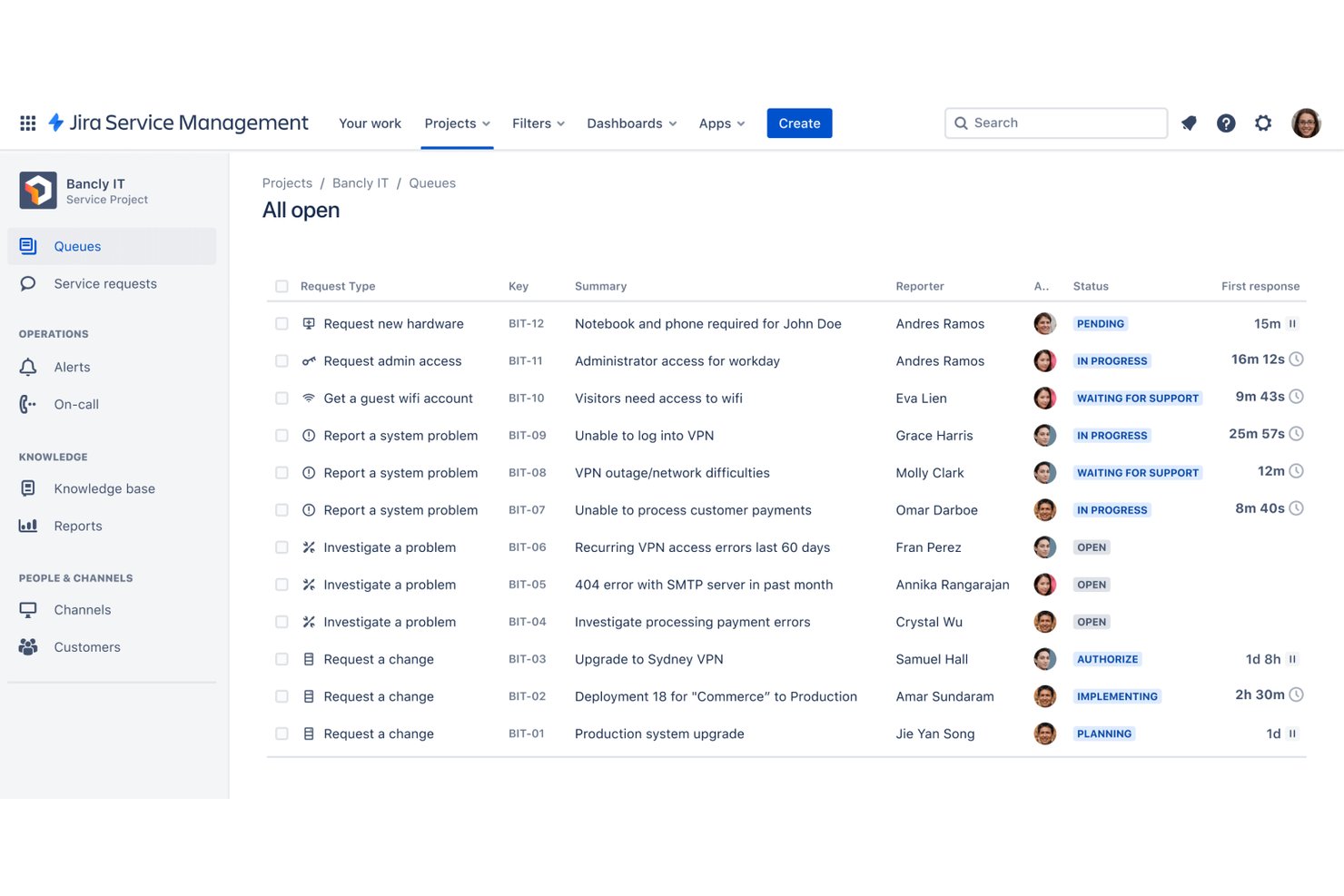
From my experience, ITSM software is what keeps help desks and IT support teams organized—it handles ticket intake, routing, escalation, and resolution tracking all in one place. IT teams use it to manage service requests, incidents, and change workflows, so nothing slips through the cracks when users need support.
Benefits
Ticket routing, escalation rules, and SLA tracking—these are the features that actually keep support queues from turning into chaos. Tools like ServiceNow and Jira Service Management give your team a single system of record, so everyone knows who owns what and where a request stands at any given moment.
In my experience, that visibility alone cuts down on the back-and-forth that burns time for both IT staff and end users.
Features
ITSM tools tend to share a common core, but the depth of each feature varies significantly across platforms like ServiceNow, Jira Service Management, and Freshservice:
- Incident management: Log, categorize, and route incidents to the right team automatically. Good incident management keeps resolution times visible and accountable, so SLA breaches don't sneak up on you.
- Service request catalog: Give end users a self-service portal to submit common requests—password resets, software access, hardware orders—without opening a ticket manually. I've seen this alone reduce repetitive queue volume noticeably.
- Change management: Track change requests through approval workflows before anything gets pushed to production. This is the feature that keeps unplanned outages from stemming from internal changes.
- SLA tracking and escalation rules: Set response and resolution time targets, then let the system escalate automatically when those targets are at risk. Without this, priority tickets get buried in the queue alongside low-urgency requests.
- Knowledge base: Store documented solutions, runbooks, and FAQs that agents and end users can search before submitting tickets. In my experience, a well-maintained knowledge base deflects a surprising number of repeat requests.
- Reporting and dashboards: Pull ticket volume, resolution times, agent workload, and SLA compliance into visual reports. This is what makes the case to leadership when you need more headcount or tooling budget.
- Integrations with monitoring and DevOps tools: Connect your ITSM platform to alerting tools like PagerDuty or infrastructure monitoring so incidents can be created automatically when something breaks, rather than waiting for a user to report it.
2. IT Asset Management (ITAM)
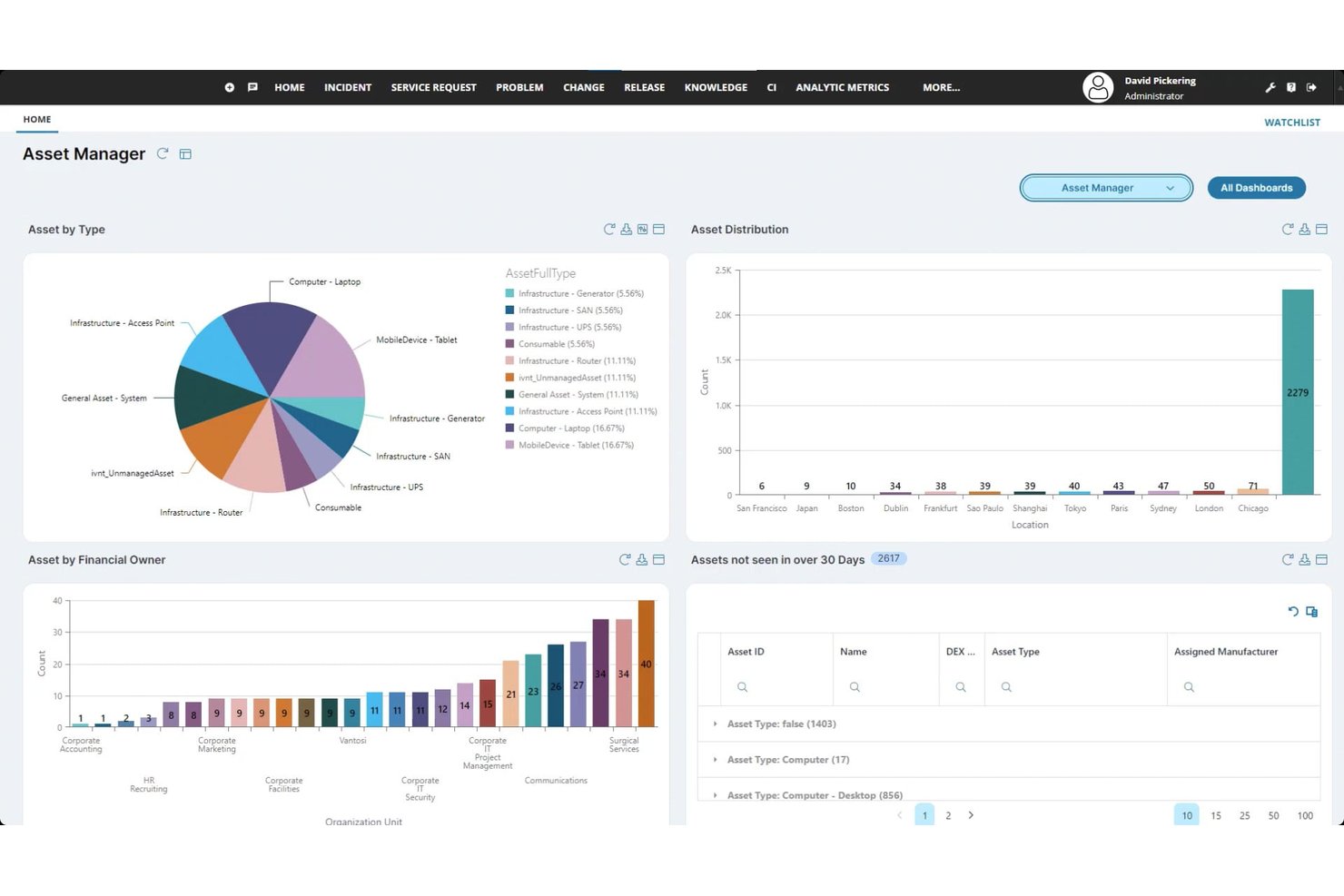
Keeping tabs on every device, license, and contract across your environment is where ITAM software earns its place—it gives IT teams a centralized inventory of hardware and software assets, along with lifecycle and cost tracking.
In my experience, it's the tool that finally answers "what do we own, where is it, and what are we paying for it?"
Have an account? Log In
Benefits
Knowing exactly what hardware and software you own—and what it's costing you—takes a lot of guesswork out of IT planning. Tools like ServiceNow ITAM and Lansweeper give you a live inventory tied to lifecycle status and contract data, so you're not scrambling when a renewal deadline hits or an audit comes around.
In my experience, that level of visibility also surfaces redundant licenses and underused assets, which often translates directly into budget recovered.
Features
ITAM tools vary more than you'd expect once you get past the basic inventory list—here's what the category actually covers across platforms like ServiceNow ITAM, Lansweeper, and Freshservice:
- Hardware inventory discovery: Automatically scan your network to find and catalog every physical device, including endpoints, servers, and networking equipment. Without automated discovery, your inventory is only as accurate as the last person who remembered to update it.
- Software license management: Track which licenses you own, how many seats are in use, and when renewals are due. I've seen teams recover significant budget just by identifying unused licenses that were still being paid for.
- Asset lifecycle tracking: Record each asset's status from procurement through retirement, including purchase date, depreciation, warranty expiration, and disposal. This keeps you from refreshing hardware reactively rather than on a planned schedule.
- Contract and vendor management: Store vendor agreements, maintenance contracts, and renewal dates in one place, tied directly to the relevant assets. Missing a renewal deadline because the information lived in someone's inbox is an avoidable problem.
- Audit and compliance reporting: Generate reports that map your owned licenses to actual installations, which is what auditors ask for when a software vendor comes knocking. Tools like Snow License Manager are built specifically around this use case.
- Financial and cost tracking: Assign cost data to individual assets and aggregate spend by department, location, or asset type. This is what gives IT leadership real numbers when budget conversations happen.
- Integration with ITSM platforms: Connect your asset records to your service desk so technicians can see full asset history directly on a ticket. In my experience, this context cuts troubleshooting time noticeably when a device has a recurring fault history.
3. Endpoint Management
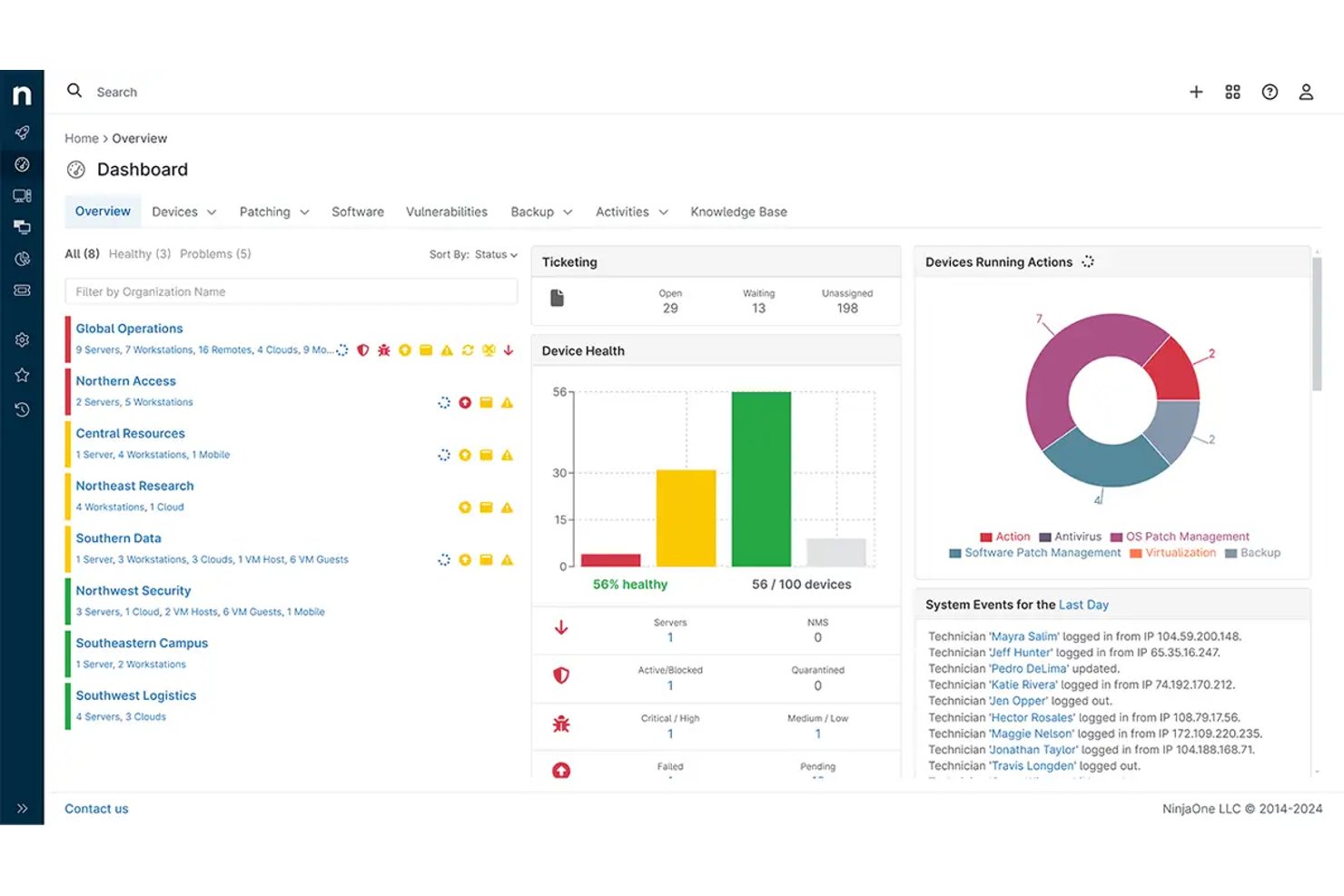
Managing every laptop, mobile device, and workstation across your environment is exactly what endpoint management software is built for—it gives IT teams centralized control over device configuration, patch deployment, and policy enforcement.
In my experience, it's the tool that keeps your fleet consistent and your exposure to unpatched vulnerabilities low.
Benefits
Keeping every endpoint in your environment consistently configured and patched is what tools like Microsoft Intune and Jamf actually make possible at scale.
In my experience, the real payoff is in patch compliance reporting—you can see exactly which devices are running outdated software and push updates remotely before a vulnerability becomes an incident.
That centralized control also cuts the time your team spends on repetitive per-device configuration work, since policy enforcement handles it automatically across the fleet.
Features
Endpoint management tools do more than push updates—here's what they actually give you control over across platforms like Microsoft Intune, Jamf, and ManageEngine Endpoint Central:
- Device enrollment and provisioning: Automatically enroll new devices into your management platform the moment they connect, then push configurations, apps, and policies without touching the device manually. This is what makes onboarding at scale manageable.
- Patch management: Deploy OS and application patches across your entire fleet on a schedule or on demand. In my experience, the patch compliance dashboards in tools like Intune are where you'll spend most of your time—they tell you exactly which devices are exposed.
- Configuration and policy enforcement: Define security baselines, firewall settings, and software restrictions at the policy level, then enforce them consistently across every device in scope. Without this, configuration drift becomes a real problem.
- Remote access and control: Connect to endpoints remotely to troubleshoot issues without dispatching a technician. This matters especially when your fleet is distributed across offices or remote workers.
- Mobile device management (MDM): Extend the same enrollment, policy, and wipe capabilities to smartphones and tablets. Jamf handles Apple devices particularly well here, while Intune gives you cross-platform coverage.
- Application management: Deploy, update, and remove software across endpoints from a central console. This keeps unauthorized applications off devices and ensures everyone's running the same approved versions.
- Compliance reporting: Generate reports showing which devices meet your security policies and which fall outside acceptable thresholds. This is what gives you evidence when an audit or incident review asks how well-managed your endpoints were.
4. Network and Infrastructure Monitoring
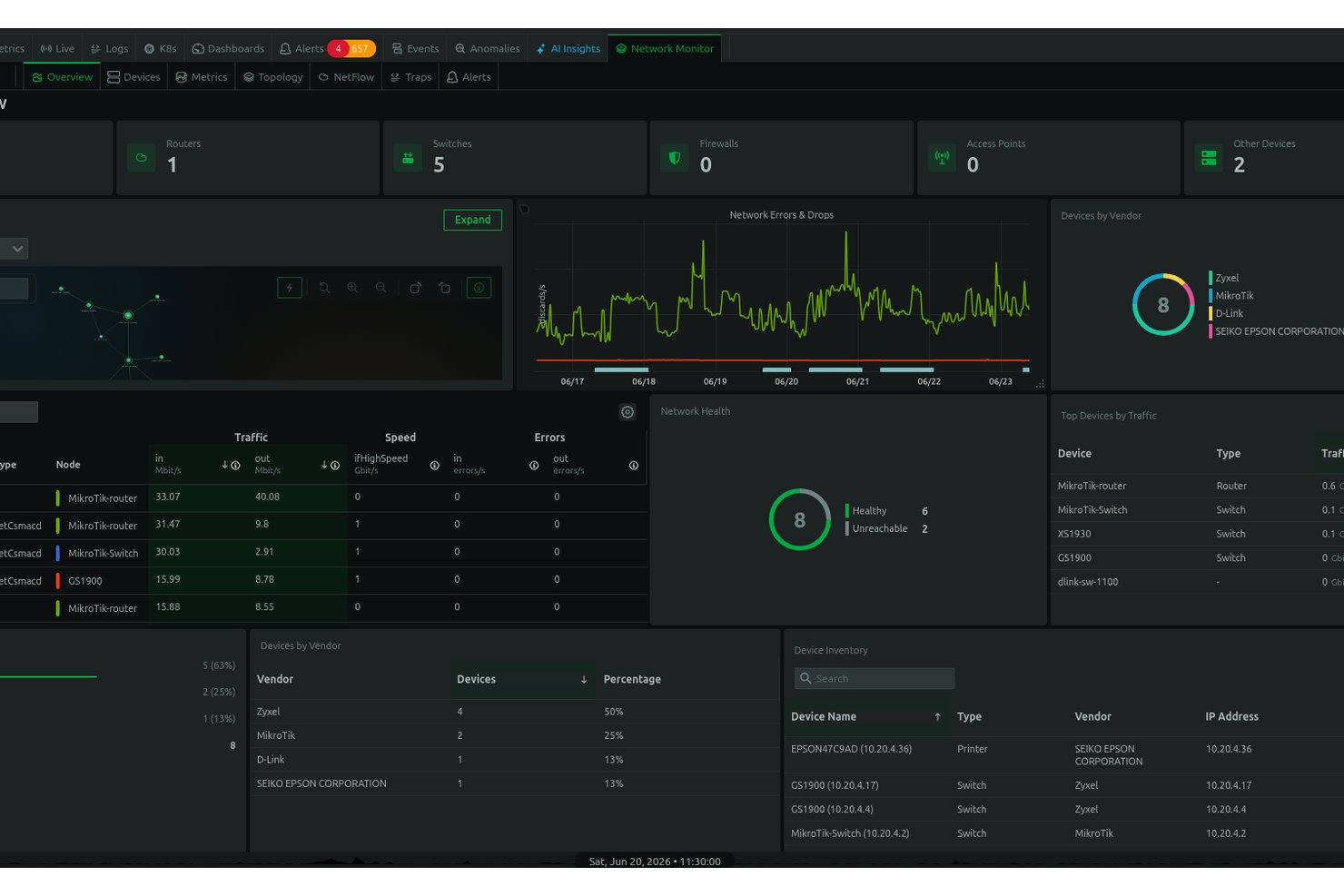
Keeping your network, servers, and infrastructure visible in real time is what this category of IT management software is built for—platforms like Datadog, Zabbix, and PRTG continuously collect performance metrics and trigger alerts when something falls outside acceptable thresholds.
In my experience, that early warning capability is what separates teams that catch issues before users notice from teams that learn about outages from a help desk ticket.
Benefits
Real-time visibility into your network and infrastructure is what separates a proactive team from one that's always reacting. In my experience, tools like Datadog and PRTG give you the alerting depth to catch performance degradation—a spiking CPU, a saturated link—before it cascades into an outage your users notice first.
That early warning loop, tied to historical metrics and threshold-based alerting, is where I've seen the most time saved across incident response cycles.
Features
Network and infrastructure monitoring tools go well beyond uptime checks—here's what they actually give you visibility and control over across platforms like Datadog, Zabbix, and PRTG:
- Real-time performance monitoring: Continuously collect metrics from servers, network devices, and applications, then surface them in a live dashboard. This is where you'll catch a spiking CPU or memory leak before it becomes an outage.
- Threshold-based alerting: Define acceptable performance ranges and get notified the moment a metric crosses them. In my experience, tuning these thresholds carefully is what separates useful alerts from alert fatigue.
- Network traffic analysis: Monitor bandwidth usage, identify congested links, and trace traffic flows across your infrastructure. PRTG handles this particularly well with its sensor-based model.
- Infrastructure topology mapping: Automatically discover and visualize how your devices, services, and dependencies connect. This context is what makes incident triage faster when something goes wrong upstream.
- Historical metrics and trend reporting: Store performance data over time so you can identify recurring patterns, plan capacity, and report on SLA compliance. Datadog's dashboarding tools make this kind of analysis straightforward to build and share.
- Log aggregation and correlation: Pull logs from across your environment into a single view and correlate them with performance events. This is what gives you the full picture when an alert fires and you need to understand why.
- Distributed and cloud infrastructure monitoring: Extend visibility into cloud environments, containers, and hybrid setups alongside your on-premises infrastructure. Tools like Zabbix can be configured to cover a wide range of environments, though that flexibility does come with setup complexity.
5. Remote Monitoring and Management (RMM)
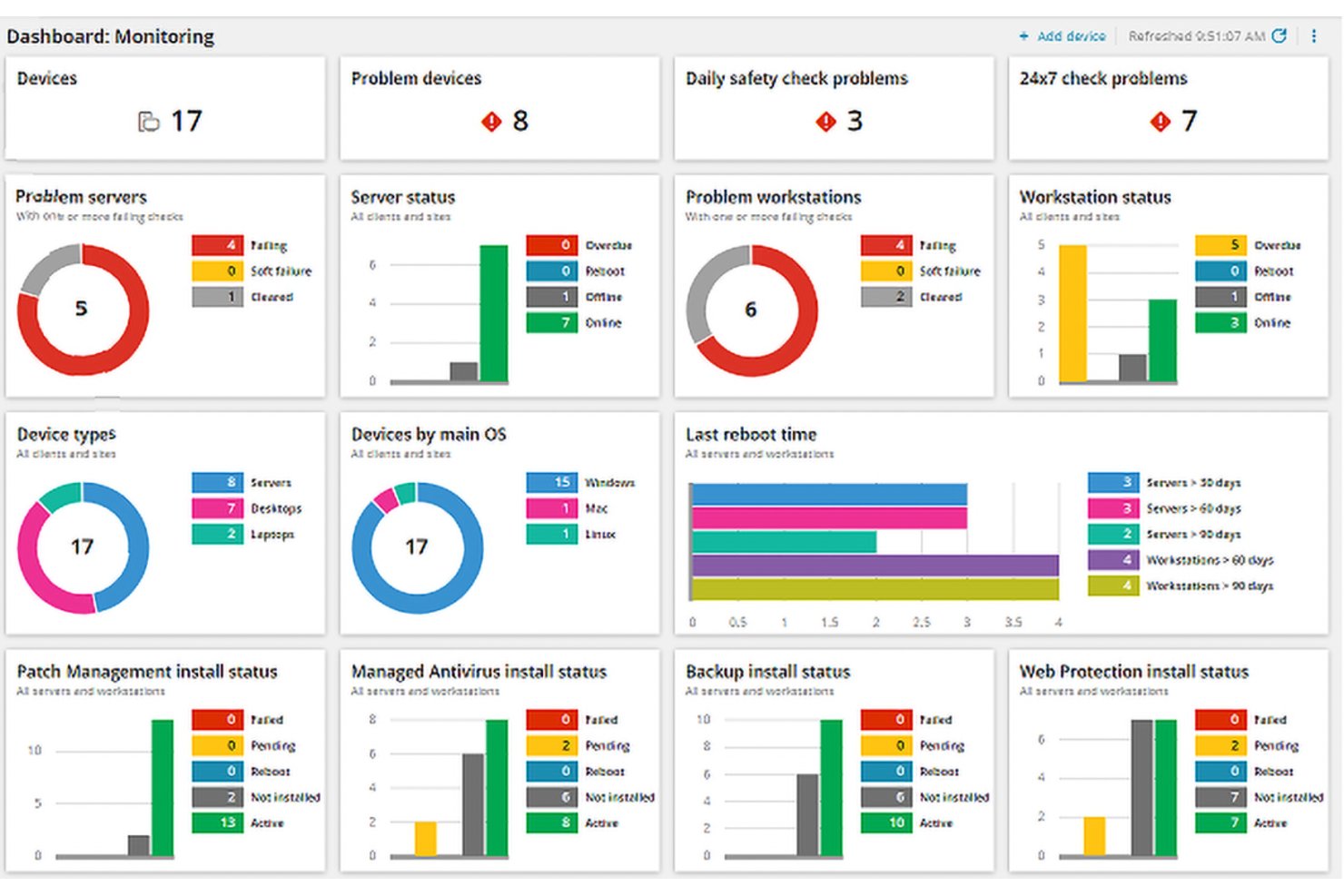
Managed service providers and internal IT teams use RMM tools—like NinjaOne and ConnectWise Automate—to monitor endpoints, run automated maintenance tasks, and deploy fixes across distributed environments from a single console.
In my experience, the ability to detect and remediate issues on a remote device without ever touching it is where RMM earns its place in an IT toolkit.
Benefits
The biggest advantage I've seen with RMM tools like NinjaOne and ConnectWise Automate is the ability to catch and fix issues on remote endpoints without ever needing physical access to the device.
Automated maintenance tasks—patch deployment, script execution, health checks—run in the background across your entire fleet, so your team isn't stuck doing repetitive manual work device by device.
That combination of proactive monitoring and remote remediation is what keeps distributed environments manageable without scaling headcount alongside your device count.
Features
RMM tools give IT teams and MSPs a single pane of glass to monitor, maintain, and fix distributed endpoints without being on-site—here's what that actually looks like in practice:
- Continuous endpoint monitoring: Track device health metrics—CPU, memory, disk, and connectivity—across every managed endpoint in real time. In my experience, this is where you catch a failing drive or runaway process before a user ever files a ticket.
- Automated patch deployment: Schedule and push OS and application patches to endpoints across your fleet without manual intervention. NinjaOne handles this particularly well, letting you define maintenance windows and approval workflows so patches go out without disrupting working hours.
- Remote access and remediation: Connect directly to any managed endpoint to run diagnostics, execute fixes, or reconfigure settings without dispatching anyone. This is what makes distributed fleet management viable at scale.
- Script and task automation: Deploy scripts across groups of devices to handle repetitive maintenance tasks—clearing temp files, resetting services, enforcing settings. ConnectWise Automate gives you a solid scripting engine for this kind of work.
- Alerting and incident escalation: Set thresholds for device health metrics and get notified when something falls outside acceptable ranges. The key here is building alert logic that's specific enough to be actionable, not just noisy.
- Asset inventory and reporting: Maintain an up-to-date record of every device under management, including hardware specs, installed software, and policy compliance status. This is what gives you an accurate picture of your environment when leadership asks or an audit lands.
- Policy and configuration management: Define standard configurations and enforce them across device groups, so new endpoints come online already aligned with your baseline instead of requiring manual setup.
6. Patch Management
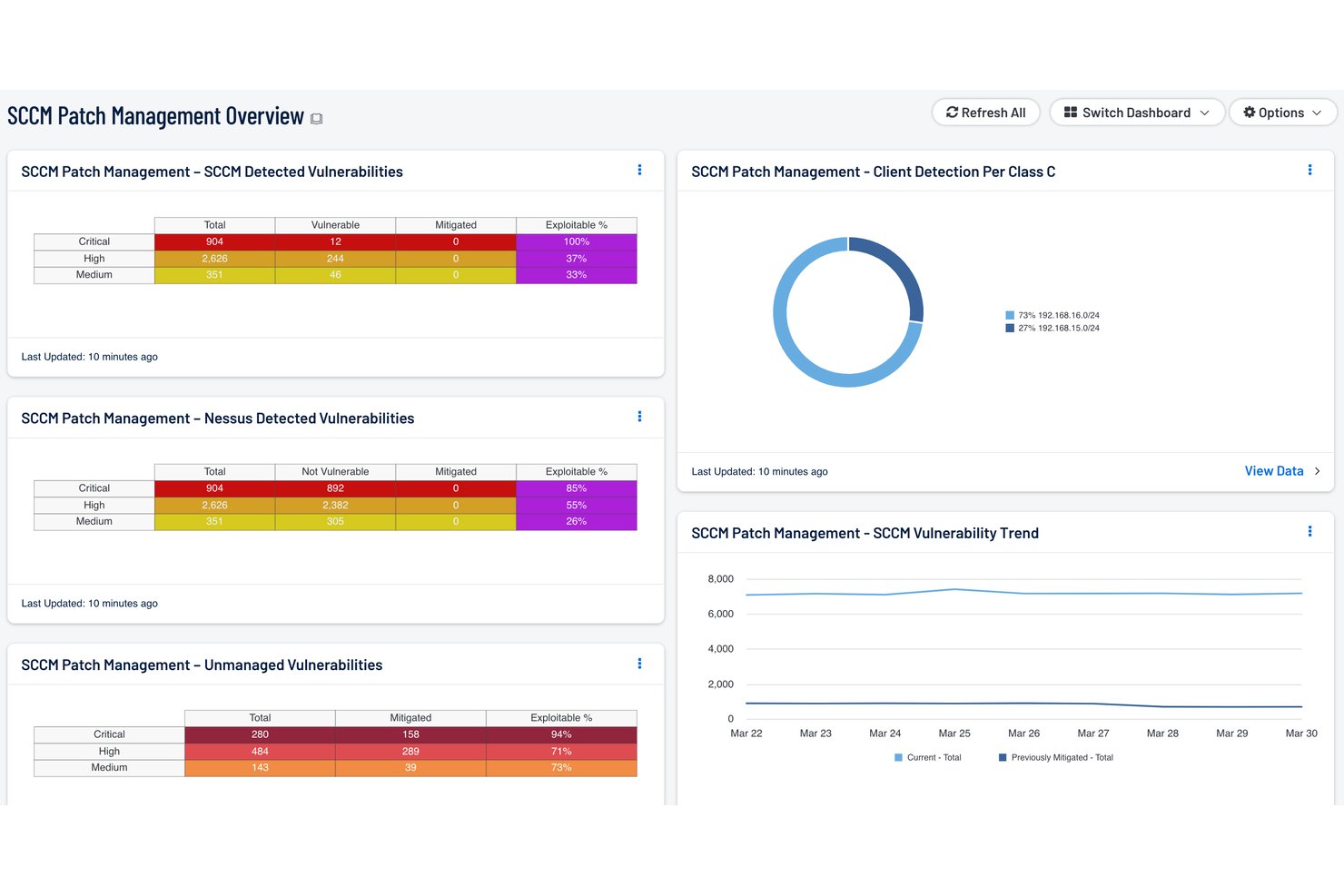
Keeping your systems current is one of the most direct ways IT teams reduce exposure to known vulnerabilities—patch management software automates the discovery, testing, and deployment of updates across your OS and application fleet.
In my experience, the compliance dashboards are where you'll spend most of your time, showing you exactly which devices are exposed before a vulnerability becomes an incident.
Benefits
Automating patch discovery and deployment across your OS and application fleet is where tools like Ivanti and ManageEngine Patch Manager Plus earn their place—you're no longer relying on manual processes that miss devices or fall behind on release cycles.
In my experience, the compliance dashboards are the most valuable feature day to day, giving you a clear picture of which endpoints are exposed before that vulnerability becomes an active incident.
That visibility alone is what shifts patch management from a reactive scramble into a scheduled, auditable process your team can actually stay ahead of.
Features
Patch management tools handle the full update lifecycle—from discovery to deployment to verification—so your team isn't manually tracking which devices are running outdated software:
- Automated patch discovery: Continuously scan your environment to identify missing OS and application patches across every managed endpoint. In my experience, this is where you stop relying on assumptions and start working from an accurate picture of your exposure.
- Patch testing and staging: Test updates in a controlled group before rolling them out fleet-wide. Ivanti handles this well, letting you define test rings so a bad patch doesn't take down production systems.
- Scheduled deployment and maintenance windows: Define exactly when patches go out so updates don't interrupt business hours or critical workloads. This is the feature that makes automated patching practical rather than disruptive.
- Multi-platform coverage: Apply patches across Windows, macOS, Linux, and third-party applications from a single console. ManageEngine Patch Manager Plus covers a wide range of application vendors, which matters when your environment runs more than just OS-level software.
- Compliance dashboards and reporting: Get a real-time view of which devices are patched, which are pending, and which are non-compliant. I'd say this is the most-used feature day to day—it's what you pull up when leadership asks about vulnerability exposure.
- Rollback and remediation: Revert a problematic patch without having to manually intervene on each affected device. Having that fallback built in is what makes automated deployment a low-risk operation rather than a gamble.
- Patch prioritization by severity: Rank patches by criticality—based on CVE scores or vendor advisories—so your team addresses high-risk vulnerabilities before routine updates.
7. Cloud Management Platforms
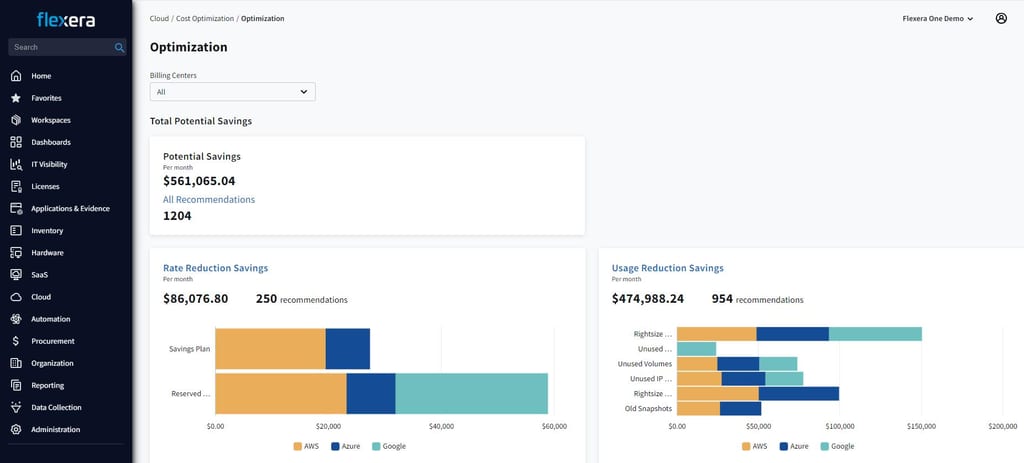
Managing cloud resources across AWS, Azure, or Google Cloud Platform without a dedicated platform means you're flying blind on cost, usage, and governance.
In my experience, cloud management platforms give IT teams the visibility to track resource allocation, enforce access policies, and control spend before it gets out of hand.
Benefits
Getting visibility into your cloud resource allocation, spend, and access policies from a single console is what makes tools like AWS Management Console and Azure Arc genuinely worth the setup time.
In my experience, the cost management features are where you'll see the most immediate value—being able to spot and kill idle or over-provisioned resources before they inflate your monthly bill is the kind of proactive control that manual tracking just can't give you.
That same visibility also makes governance much easier to enforce, since you're setting and monitoring access policies from one place instead of jumping between provider dashboards.
Features
Cloud management platforms bring together the visibility and control that's otherwise scattered across individual provider consoles—here's what that looks like in practice:
- Resource monitoring and visibility: Track utilization, availability, and performance across cloud resources in real time. In my experience, this is where you spot over-provisioned instances and idle resources before they show up as line items on your bill.
- Cost management and spend controls: Set budgets, track spend by team or project, and get alerts when usage trends toward overage. AWS Management Console handles this well with its Cost Explorer, giving you granular breakdowns without needing a separate FinOps tool.
- Access and identity governance: Define and enforce who can access which cloud resources, and audit that access from a central policy layer. Azure Arc makes this particularly manageable in hybrid environments where on-premises and cloud resources coexist.
- Multi-cloud and hybrid resource management: Manage workloads across AWS, Azure, and Google Cloud Platform from a single interface instead of switching between provider dashboards constantly.
- Automated provisioning and scaling: Spin up or tear down resources based on demand without manual intervention. This is what keeps your environment responsive without someone babysitting resource allocation around the clock.
- Compliance and policy enforcement: Apply governance policies across your cloud environment and get continuous feedback on where your configuration drifts from your defined baseline. This is the feature I'd point to when audit prep comes up.
- Incident alerting and diagnostics: Get notified when resource health degrades and trace the issue back to its source without jumping between dashboards.
More Articles
8. SaaS Management Platforms
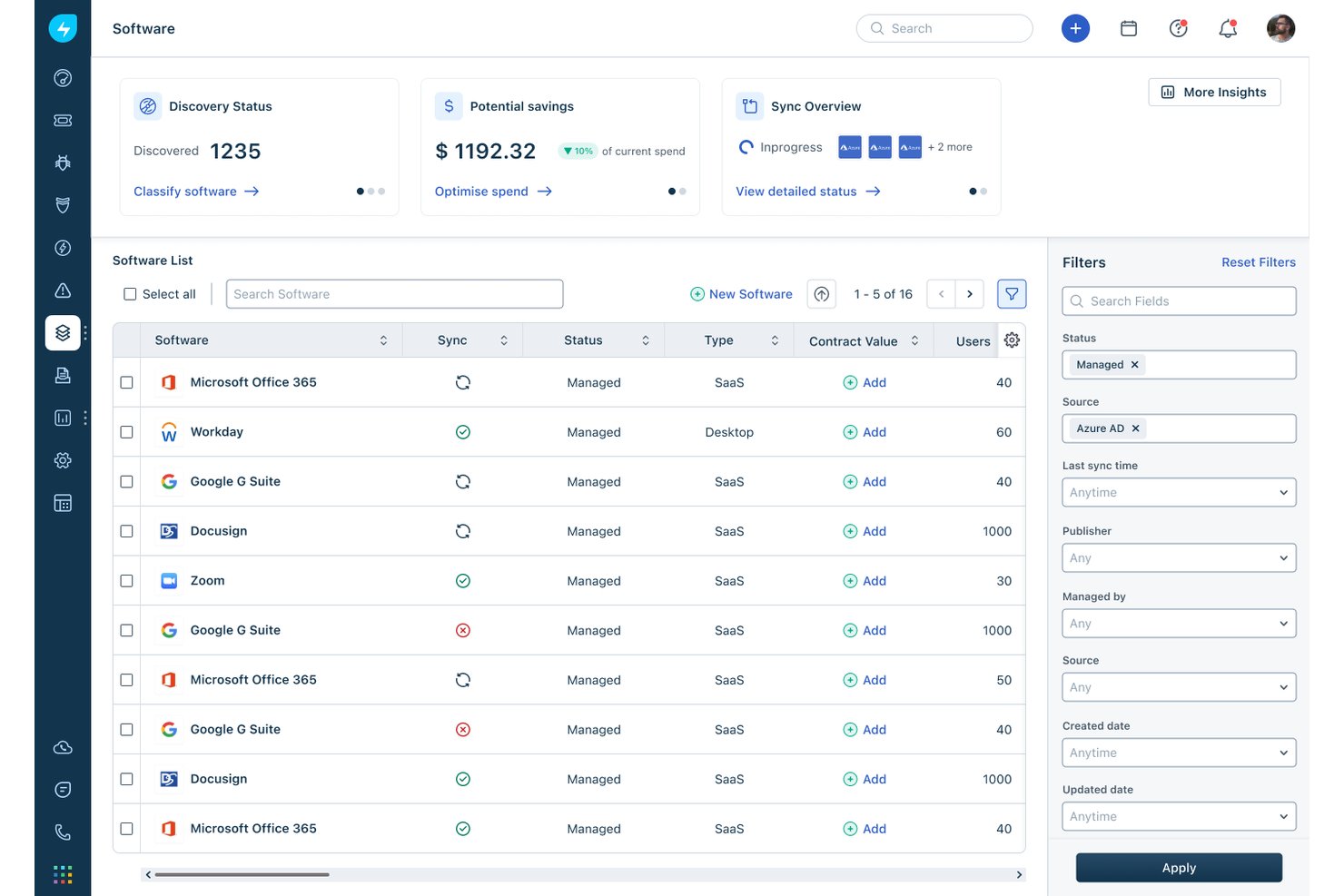
Keeping track of every application your organization subscribes to gets out of hand fast—SaaS management platforms give IT teams centralized visibility into software licenses, usage, and spend across your entire app stack.
In my experience, the license reclamation features alone pay for the tool, letting you identify and cut unused seats before the next renewal cycle hits.
Benefits
Centralizing your SaaS visibility into a single console is what turns a chaotic app stack into something you can actually manage—tools like Torii and BetterCloud let you see every subscription, seat count, and usage metric in one place.
In my experience, the license reclamation features are where you'll see the fastest return: identifying unused seats before renewal cycles hit is the kind of cost control that manual spreadsheet tracking simply can't deliver at scale.
That visibility also makes onboarding and offboarding cleaner, since you're provisioning and deprovisioning app access from one workflow instead of chasing down individual admin panels.
Features
Here's what SaaS management platforms actually surface that your IT team would otherwise have to piece together manually:
- App discovery and inventory: Automatically detect every SaaS application in use across your organization, including shadow IT that never went through a formal procurement process. Torii does this well, pulling in app data from SSO, finance systems, and browser extensions.
- License and seat management: Track how many licenses you're paying for versus how many are actively used. This is the feature that makes the platform worth it—I've seen teams reclaim hundreds of unused seats simply by having this visibility.
- Usage analytics: See how frequently each application is being accessed and by whom. When renewal time comes, you're negotiating from data, not assumptions.
- Spend and contract tracking: Centralize subscription costs, renewal dates, and contract terms in one place. Without this, renewals sneak up on you and you're locked in for another year before you've had a chance to evaluate whether you still need the tool.
- Automated onboarding and offboarding: Provision and deprovision app access through defined workflows instead of chasing down individual admin panels. BetterCloud handles this well, letting you trigger access changes based on HR events.
- Security and compliance monitoring: Flag applications that don't meet your organization's security standards or that employees have authorized with excessive permissions. This is the feature I'd prioritize if data governance is a concern for your team.
Find the Right Tools for Your IT Environment
Understanding the different types of IT management software is the first step. The next is finding tools that address your team's needs without adding unnecessary complexity. Explore our best IT operations management software guide to compare platforms for monitoring, automation, incident management, and cloud operations.