Choosing MDM software comes down to one question: does it actually fit how your team works? I've seen organizations get distracted by feature lists and miss the fundamentals—platform compatibility, enrollment workflows, and policy enforcement that maps to real security requirements.
This guide walks you through the criteria I use when evaluating MDM tools: device and OS coverage, deployment model, security controls, and total cost. By the end, you'll have a clear framework to match the right solution to your environment.
4 Things to Look for When Choosing MDM Software
In my evaluations, I focus on the factors that determine whether an MDM platform fits your environment and stays manageable as it grows:
1. Cross-Platform and OS Compatibility
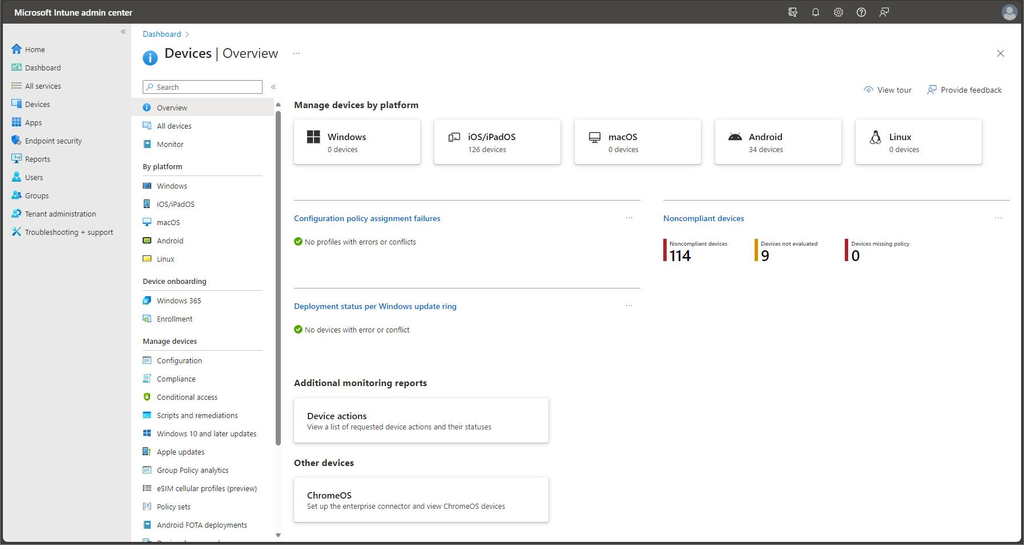
Cross-platform compatibility means managing your organization’s devices across operating systems and versions from one MDM platform.
Check support for your actual device mix and whether key policies work consistently across platforms, since management capabilities can differ by OS. Ask vendors to demonstrate enrollment and policy enforcement on the specific devices and OS versions your team uses.
2. Integration With Your IT Stack
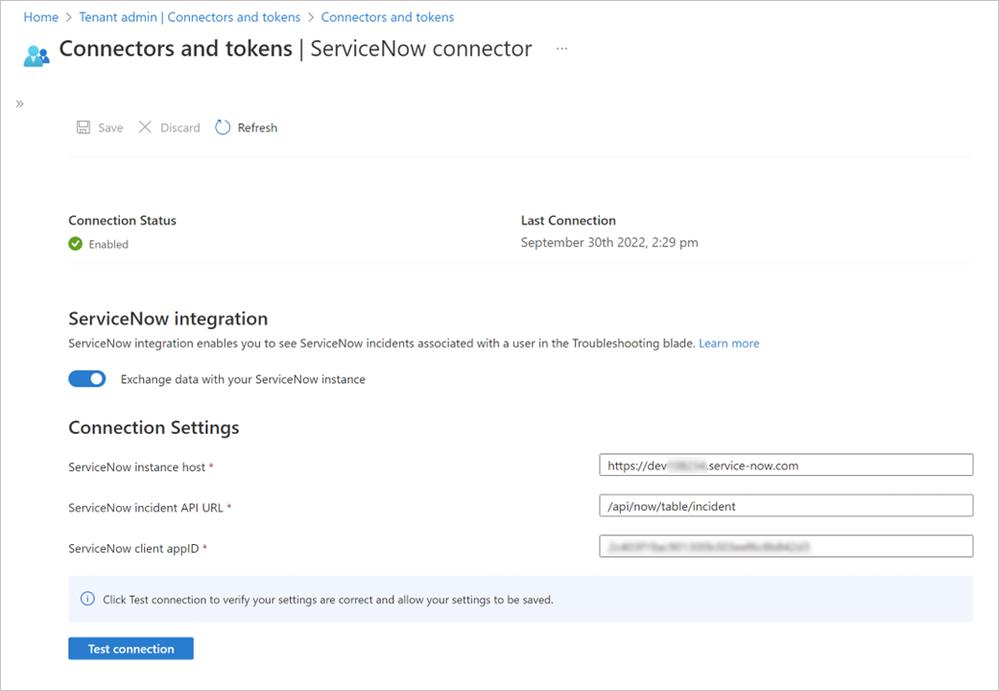
Integration with your IT stack means connecting MDM to identity providers, ticketing systems, and security tools your team already uses.
These connections can shape enrollment, access control, and incident response, so verify which workflows the product supports and avoid relying on custom connectors without clear maintenance plans. Which systems must exchange device or user data on day one, and can the vendor demonstrate those workflows?
Have an account? Log In
3. Industry-Specific Compliance Support
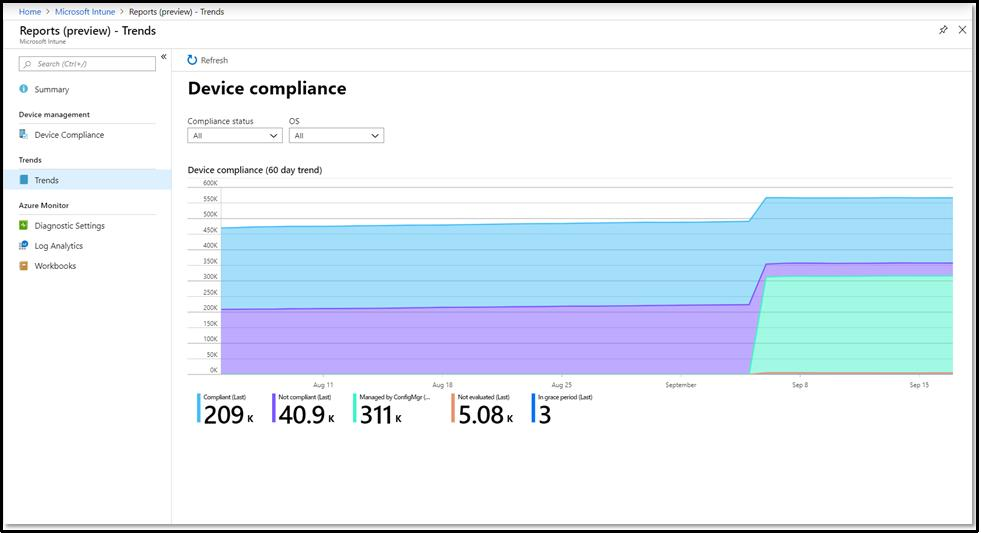
Industry-specific compliance support means MDM controls and audit records that help your team meet applicable requirements. It matters when devices access regulated data, since a compliance badge alone doesn’t prove the controls fit your obligations.
Ask vendors to demonstrate how enrollment restrictions, encryption settings, and audit logs support your requirements, and clarify what remains your team’s responsibility.
4. Vendor Scalability and Pricing Model
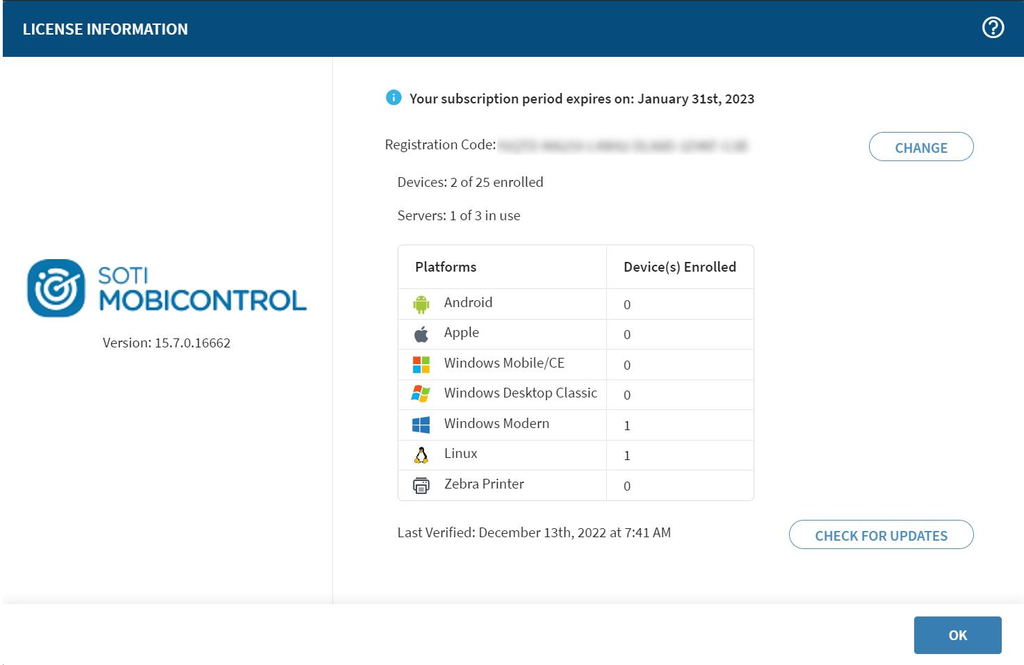
Vendor scalability and pricing describe how the MDM provider supports growth and charges as your device count or needs change. Tier limits, per-device fees, and add-ons can make expansion costly or force a platform change, so look for transparent pricing with room to scale.
Ask the vendor to price your current fleet and a realistic growth scenario, including support and required features.
How to Choose MDM Software: A 5-Step Framework
Use these five steps to compare MDM platforms against your device fleet, security requirements, rollout needs, and budget:
Step 1: Identify Your Needs
Before you open a single vendor comparison page, map what you're actually managing. I've watched teams skip this step and spend weeks evaluating tools that never had a chance of working in their environment.
Start by pulling a current inventory of your device fleet. You need to know device types, OS versions, ownership models (corporate-owned vs. BYOD), and how those devices connect to your network. That data shapes every requirement that follows.
Then talk to the right people. The IT team can describe what breaks today, but the full picture comes from elsewhere:
- IT administrators: What enrollment, policy enforcement, and remote wipe workflows do you need?
- Security team: Which compliance frameworks apply, and what controls are non-negotiable?
- End users or team leads: What do workers actually do on their devices, and where does management friction create problems?
- Finance or procurement: What's the budget ceiling, and are there existing vendor contracts to consider?
Once you've had those conversations, use the answers to build your requirements list. I find it helps to separate needs from preferences early:
| Requirement Type | Examples |
|---|---|
| Requirement TypeMust-have | ExamplesiOS and Android support, SCIM provisioning, remote wipe |
| Requirement TypeImportant but flexible | ExamplesCustom app catalog, geofencing, kiosk mode |
| Requirement TypeNice to have | ExamplesAdvanced reporting dashboards, patch scheduling |
As you gather input, keep these questions in front of you:
- Device mix: Which OS platforms and versions does your fleet include today, and what might you add in the next 12–18 months?
- Ownership model: Are devices corporate-owned, employee-owned, or a mix? This affects enrollment options significantly.
- Compliance scope: Do any devices touch regulated data under HIPAA, GDPR, or similar frameworks?
- IT capacity: How many administrators will manage the platform, and what's their experience level?
- Integration dependencies: Which identity providers, ticketing tools, or security platforms must connect on day one?
The output of this step isn't a wish list—it's a prioritized requirements document you can put directly in front of vendors. That document is what keeps your evaluation honest.
Step 2: Research MDM Software Vendors
Once you have a prioritized requirements document, you're ready to start researching vendors—but I'd push back on the instinct to open a browser and start clicking through vendor websites first.
That approach buries you in marketing copy. I've found you get better signal from peer sources before you ever visit a product page.
Start your research in the places where real practitioners share honest feedback:
- Peer communities: IT forums, subreddits, and Slack communities surface complaints and workarounds that vendors won't mention. Search for threads about specific pain points, not just tool names.
- Review platforms: Look at reviewer profiles, not just scores. Reviews from admins managing fleet sizes similar to yours are more useful than aggregate ratings.
- Analyst reports: Independent analysts publish evaluations that benchmark vendors against each other on deployment complexity, support quality, and scalability. These are worth reading alongside peer reviews.
- Vendor documentation: Public knowledge bases and release notes tell you more about a product's maturity than any sales deck. Sparse documentation is a red flag.
- Job boards: Search for MDM-related IT roles at companies in your industry. The tools listed in job postings reflect what organizations are actually running in production.
As you research, track what you find against your requirements. Use a simple table to stay organized:
| Research Source | What It's Good For | Watch Out For |
|---|---|---|
| Research SourcePeer reviews | What It's Good ForReal-world pain points and workarounds | Watch Out ForRecency—check the review date |
| Research SourceAnalyst reports | What It's Good ForSide-by-side vendor benchmarking | Watch Out ForVendor sponsorship or bias |
| Research SourceVendor documentation | What It's Good ForProduct maturity and update cadence | Watch Out ForGaps that suggest limited support |
| Research SourceCommunity forums | What It's Good ForEdge cases and integration gotchas | Watch Out ForAnecdotal or outdated posts |
| Research SourceJob postings | What It's Good ForWhat tools are running in production | Watch Out ForMay reflect legacy tech debt |
The goal at this stage isn't to pick a winner. It's to build an informed long list of vendors that could plausibly fit your environment.
By the time you finish this step, you should understand each candidate's general approach to the capabilities on your requirements list—and have a few pointed questions ready for vendor conversations.
Top MDM Software to Consider
Here's my shortlist of the best MDM software solutions:
Clicks on the links below may earn a commission, which supports our independent testing and review of software and services. Learn more about how we stay transparent.
Step 3: Make an MDM Software Shortlist
Your long list from Step 2 probably has more vendors on it than you can realistically evaluate. This step is about cutting it down to three to five candidates worth your time—and knowing exactly when to pick up the phone and call a vendor.
I'd start by running every candidate on your long list through a hard filter. If a vendor can't meet your must-have requirements from Step 1, they're off the list immediately. No exceptions, no "we can work around it." Use this filter pass to cut, not to negotiate:
- Platform coverage: Does it manage every OS and device type in your current fleet?
- Deployment model: Does it match your environment—cloud, on-premises, or hybrid?
- Compliance controls: Does it support the specific frameworks your security team identified?
- Integration support: Does it connect natively to your identity provider and core IT tools?
- Pricing fit: Does the pricing model work at your current fleet size and your 18-month growth projection?
Anything that fails even one of these filters gets dropped. What's left is your working shortlist.
Once you're down to three to five vendors, rank them against your "important but flexible" requirements. This is where the real differentiation shows up. I find a simple scoring table keeps the evaluation honest and easier to defend to stakeholders:
| Evaluation Criterion | Weight | Vendor A | Vendor B | Vendor C |
|---|---|---|---|---|
| Evaluation CriterionCross-platform support | WeightHigh | Vendor A | Vendor B | Vendor C |
| Evaluation CriterionIdentity provider integration | WeightHigh | Vendor A | Vendor B | Vendor C |
| Evaluation CriterionCompliance reporting | WeightMedium | Vendor A | Vendor B | Vendor C |
| Evaluation CriterionEnrollment workflow flexibility | WeightMedium | Vendor A | Vendor B | Vendor C |
| Evaluation CriterionAdmin UI and usability | WeightLow | Vendor A | Vendor B | Vendor C |
| Evaluation CriterionSupport tier and SLA | WeightMedium | Vendor A | Vendor B | Vendor C |
Fill this in using what you've already gathered from peer reviews, documentation, and analyst reports. Only reach out to vendors once you've done this pre-work—you'll ask sharper questions and waste less time in demos.
When to contact a vendor: Once a candidate clears your must-have filter and scores reasonably well on your weighted criteria, that's your trigger to book a demo.
I'd recommend requesting a technical demo specifically, not a sales walkthrough. Ask them to demonstrate enrollment and policy enforcement on your actual device types. That's the moment where shortlisted vendors either confirm their fit or disqualify themselves.
By the end of this step, you should have three to five vendors you're genuinely considering, ranked by fit, with specific questions ready for each one.
More Articles
Step 4: Build the Business Case
A business case is what turns your shortlist into a decision your organization can act on. In my experience, this step is where MDM evaluations either move forward or stall indefinitely—usually because someone skips it and shows up to a budget conversation unprepared.
Your goal here isn't a lengthy document. It's a clear, defensible argument that connects MDM investment to outcomes your stakeholders actually care about.
Build your business case around three components:
- ROI and expected outcomes: Quantify what MDM addresses. Think about IT hours spent on manual device provisioning, incident response time for lost or compromised devices, and audit prep work your team does today.
Even rough estimates carry weight. If your team spends 10 hours a week on tasks MDM would automate, that's real cost you can put a number on. - Cost and timeline estimates: Pull vendor pricing from your shortlist conversations. Build two scenarios: your current fleet size, and a realistic 18-month growth projection.
Include implementation time, any required IT training, and ongoing per-device or per-admin fees. I'd recommend presenting a range rather than a single number—it shows you've thought through uncertainty. - Risk analysis: Identify what happens if you don't move forward. Unmanaged devices, compliance gaps, and slow incident response all carry cost. Put those in front of stakeholders alongside the investment ask.
Use this table to organize your business case before presenting it:
| Business Case Component | What to Include | Common Mistake |
|---|---|---|
| Business Case ComponentROI summary | What to IncludeTime savings, risk reduction, compliance cost avoidance | Common MistakeUsing only optimistic estimates |
| Business Case ComponentCost estimate | What to IncludeLicensing, implementation, training, ongoing support | Common MistakeForgetting 18-month growth scenario |
| Business Case ComponentImplementation timeline | What to IncludePhased rollout milestones, IT resource requirements | Common MistakeAssuming full deployment happens immediately |
| Business Case ComponentRisk of inaction | What to IncludeCurrent exposure: unmanaged devices, compliance gaps | Common MistakeLeaving this section out entirely |
One thing I'd flag: don't oversell the numbers. Stakeholders who've seen inflated ROI projections before will push back hard, and it undermines everything else in your case. Present conservative estimates and explain your assumptions. That approach tends to build more trust than a flashy projection.
By the end of this step, you should have a one- to two-page summary you can walk any stakeholder through—finance, security leadership, or executive sponsors—without needing to explain the full evaluation from scratch.
Step 5: Implement Your MDM Software and Onboard Your Users
A signed contract isn't a finished deployment. I've seen MDM rollouts go sideways at this stage more than any other—not because the tool was wrong, but because the implementation was treated as an IT-only event.
Users found out about new device policies when enforcement kicked in, not before. That's a trust problem you don't want to create.
The goal of this step is a stable, enforced deployment with users who understand what changed and why. Here's how I'd approach it:
Communicate before you configure:
- Announce early: Tell users what's changing, when it's happening, and what it means for their devices before you touch anything.
- Set expectations clearly: Explain what IT will and won't be able to see or control, especially for BYOD devices.
- Name a point of contact: Give users someone to reach out to with questions before and during rollout.
Assign ownership before go-live:
- Designate a deployment lead: One person should own the rollout timeline and be accountable for each phase.
- Define admin responsibilities: Clarify who handles enrollment issues, policy changes, and ongoing device management.
- Stage your rollout: Start with a pilot group before full deployment. I'd recommend starting with IT staff, then expanding in phases.
Use this table to structure your rollout in phases before scaling to the full fleet:
| Phase | Scope | Goal |
|---|---|---|
| PhasePilot | ScopeIT team or small test group | GoalCatch enrollment issues and policy gaps |
| PhaseLimited rollout | ScopeOne department or device type | GoalValidate workflows at small scale |
| PhaseFull deployment | ScopeRemaining fleet | GoalComplete enforcement and compliance |
| PhasePost-deployment review | ScopeAll users and admins | GoalConfirm stability and address gaps |
Build feedback loops from day one:
- Create a simple feedback channel: A shared inbox or ticketing category for MDM issues keeps problems visible and trackable.
- Schedule a 30-day review: Pull enrollment data, support ticket volume, and any policy conflicts after the first month.
- Iterate on training: If the same questions keep coming up, the documentation needs updating—not the users.
The output of this step is an enforced, stable deployment that your team actually understands. Done well, you'll have a clear record of enrolled devices, documented policies, and a feedback loop that catches issues before they become incidents.
Ready to Explore More MDM Solutions?
Even after narrowing your options, it's worth checking how other platforms handle device management, security, and scalability. Our enterprise mobility management software reviews cover additional solutions to help you compare capabilities and confirm you've chosen the right fit for your organization.