Key Takeaways
SIEM Tool Basics: A SIEM tool collects and analyzes security data across environments, helping teams detect and respond to threats efficiently.
Target Users: SIEM tools are used by enterprise security teams, cloud operators, compliance-driven industries, MSSPs, and government IT departments.
Core Features: Key SIEM tool features include centralized log collection, threat detection, incident automation, behavior analytics, and compliance reporting.
Business Impact: Adopting a SIEM tool can reduce risks and response times, but requires investment, ongoing tuning, and dedicated expertise.
Selecting SIEM Tools: When evaluating what is SIEM tool, consider integration needs, automation, reporting, and whether a managed or traditional solution fits best.
SIEM tools give your security team a single place to collect, correlate, and act on threat data across your entire environment. Without one, you're piecing together alerts from a dozen disconnected sources—and attackers count on that gap.
I've seen firsthand how quickly an unmonitored blind spot turns into an incident. This guide covers key features, real use cases, and what to look for when evaluating options, so you can make a confident, informed decision about which solution fits your stack.
What Is a SIEM Tool?
A Security Information and Event Management (SIEM) tool is software that collects, centralizes, and analyzes log and event data from across your tech environment. Using built-in rules and automation, SIEM tools detect threats, track security events, and help your team investigate incidents faster.
Security teams rely on SIEM tools to simplify event monitoring, strengthen investigation workflows, and keep pace with compliance requirements across their data and systems.
SIEM combines two earlier security functions: security information management (SIM) and security event management (SEM). SIM focuses on collecting, storing, and analyzing security data over time, while SEM focuses on monitoring events in real time and flagging suspicious activity.
Together, they give security teams both historical context and real-time visibility across their environment.
How Does a SIEM Tool Work?
A SIEM tool works by pulling security logs and event data from across your IT environment into one centralized system. That can include endpoints, servers, firewalls, network devices, cloud services, applications, and identity platforms.
Once the data enters the SIEM, the platform organizes and normalizes it so events from different systems can be analyzed together. It then applies correlation rules, analytics, behavioral baselines, and, depending on the platform, machine learning or threat intelligence feeds to identify activity that may indicate a security threat.
A typical SIEM workflow looks like this:
- Collect security data: The SIEM continuously gathers logs and events from systems across your infrastructure.
- Normalize and aggregate events: Data from different sources is converted into a consistent format so it can be searched and compared.
- Correlate suspicious activity: The platform connects related events that might look harmless individually but could signal an attack when viewed together.
- Generate and prioritize alerts: When activity matches a detection rule, abnormal behavior pattern, or known indicator of compromise, the SIEM creates an alert for the security team to investigate.
- Support investigation and response: Analysts can trace activity across systems, review historical events, and determine the scope and cause of an incident. Modern SIEM tools may also trigger automated actions directly or integrate with SOAR platforms for more advanced response workflows.
Because the SIEM keeps security data in one searchable location, teams can also use historical logs for forensic investigations, threat hunting, compliance reporting, and identifying patterns that would be difficult to spot across disconnected tools.
Examples of SIEM Tools
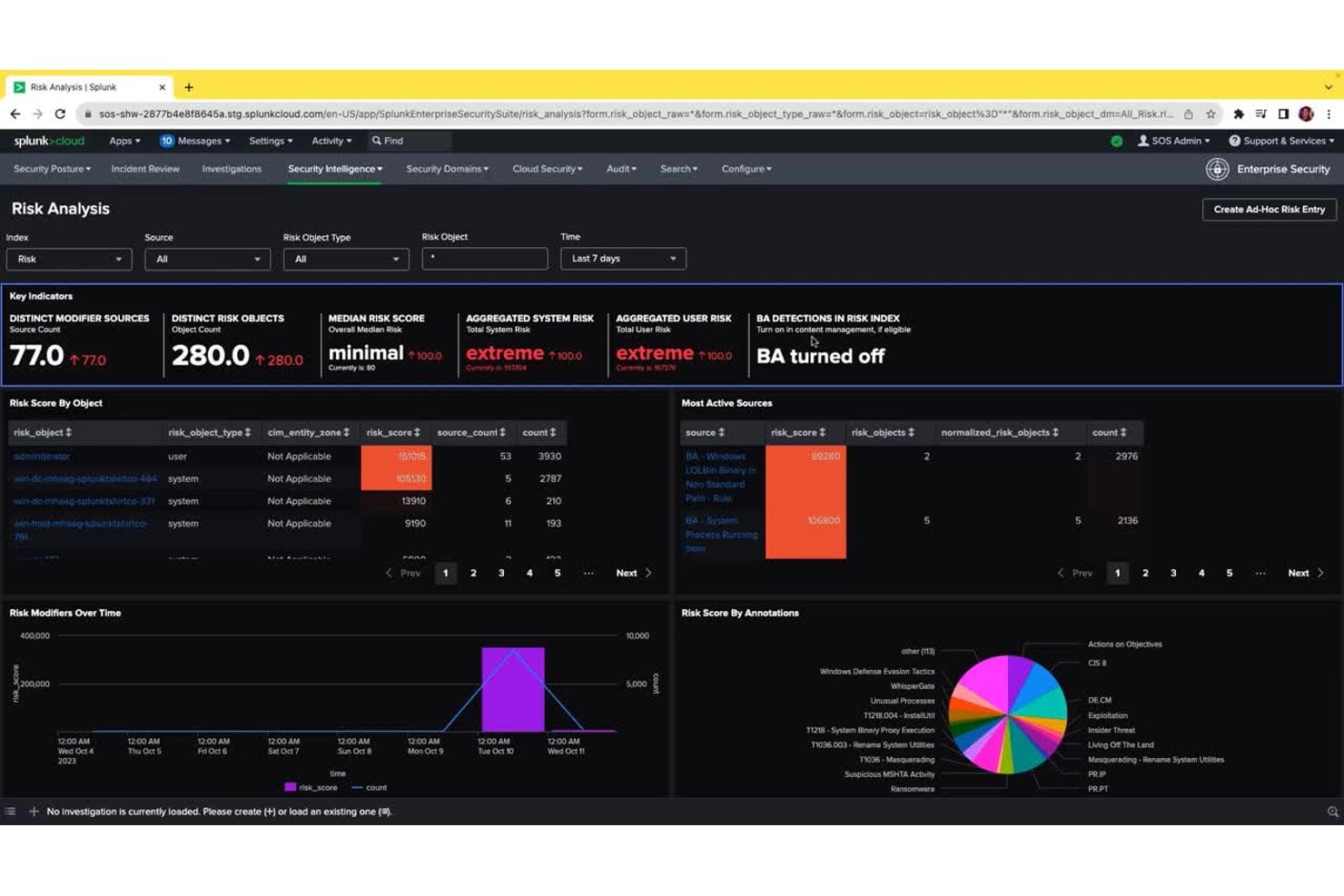
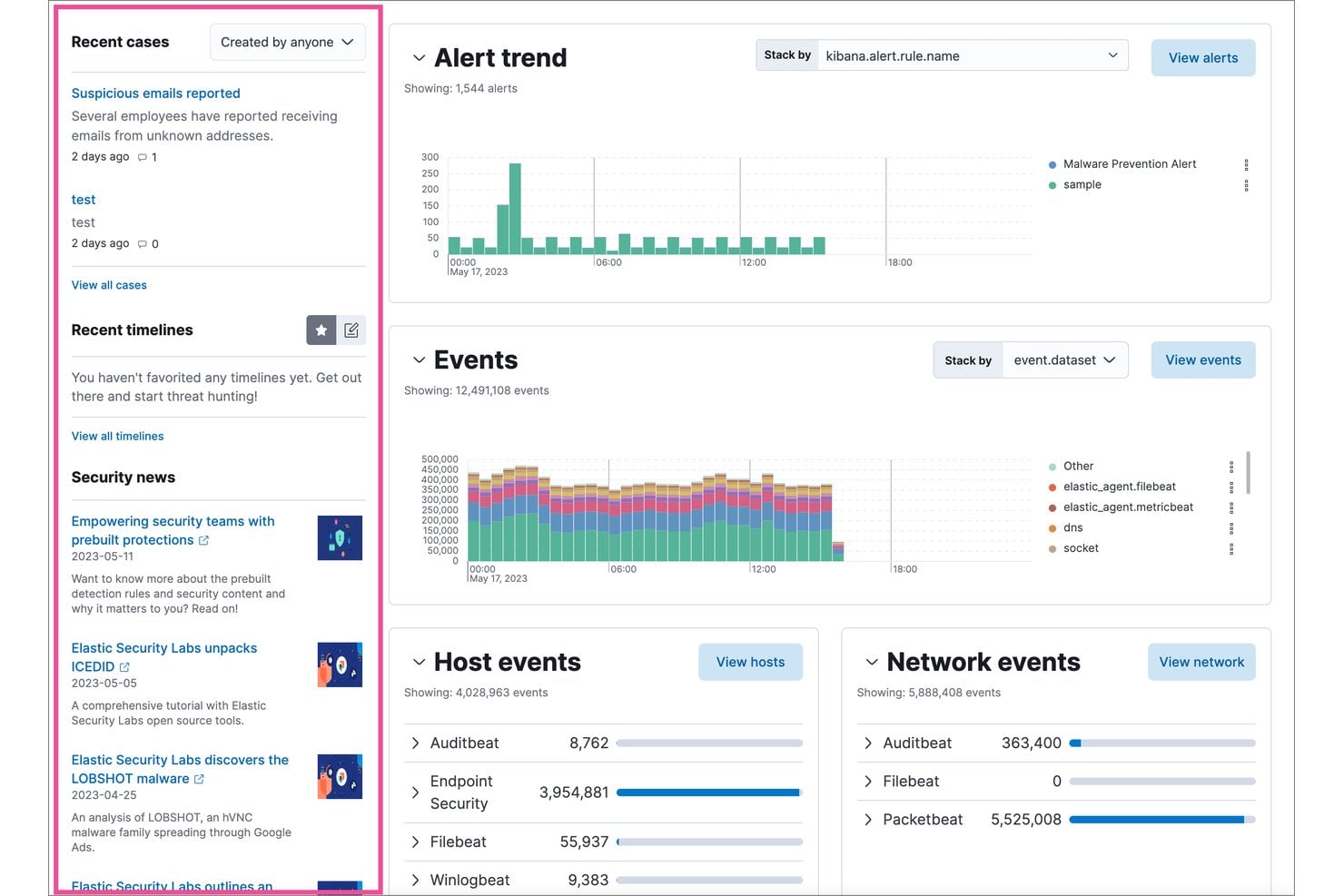
Here are a few visual examples of what SIEM tool interfaces look like in practice:
Have an account? Log In
Top SIEM Tools to Consider
Here's my shortlist of the best SIEM tools solutions:
Who Uses SIEM Tools?
Here are the types of teams and organizations that rely on SIEM tools for security monitoring and incident response:
- Enterprise security teams: Oversee security operations for large, complex organizations with extensive infrastructure.
- Managed security service providers (MSSPs): Deliver outsourced monitoring and threat detection for client environments.
- Cloud infrastructure teams: Monitor activity, audit access, and detect threats across cloud-native and hybrid systems.
- Regulated industries: Financial services, healthcare, and utilities teams must meet strict compliance and reporting requirements.
- Government and public sector IT departments: Protect critical systems and sensitive data from targeted threats and cyber attacks.
Key SIEM Tools Benefits & Potential Business Impacts
SIEM tools help you reduce risks, respond faster to incidents, support compliance, and keep your environment running smoothly—which can directly affect uptime and business reputation.
Keep in mind that these solutions tend to be a significant investment, and a poorly managed deployment can introduce new complexity or gaps in visibility.
Use this table to weigh the key benefits and risks of adopting a SIEM tool:
| Benefits | Risks |
|---|---|
| BenefitsFaster incident detection and response | RisksHigh upfront deployment and licensing costs |
| BenefitsCentralized visibility across all environments | RisksComplexity can cause configuration gaps |
| BenefitsImproved threat hunting and investigation | RisksFalse positives may cause alert fatigue |
| BenefitsEnhanced support for compliance requirements | RisksRequires ongoing tuning and dedicated technical expertise |
| BenefitsAccelerates root cause analysis after incidents | RisksData privacy issues if logs are mishandled |
| BenefitsSimplifies reporting and audit preparation | RisksVendor lock-in or migration challenges |
| BenefitsCorrelation of signals from multiple sources | RisksResource drain on storage and compute infrastructure |
SIEM Tools Case Studies
See how real teams changed their security outcomes with SIEM tools. These case studies show the difference SIEM can make before and after deployment.
Case Study: Askari Bank's Implementation of IBM Security QRadar SIEM
Askari Bank, a Pakistan-based commercial bank with 560 branches and 7,500 employees, built its security operations center (SOC) from scratch using IBM Security QRadar SIEM, QRadar SOAR, and a User Behavior Analytics add-on.
Implemented with IBM Business Partner SPS, the platform aggregated logs across banking systems, automated incident response via playbooks, and enabled 24/7 insider threat detection.
Here are the results of Askari Bank's implementation of SIEM tools:
- Drastic false positive reduction: Security incidents dropped from approximately 700 per day to fewer than 20, giving the SOC team high-fidelity, actionable alerts.
- Faster incident remediation: Remediation time fell from around 30 minutes to just 5 minutes through SOAR playbook automation.
- Rapid team growth: The SOC team scaled to 20+ specialists in under three years, supported by automation taking over routine triage tasks.
- Regulatory compliance: Askari Bank achieved full compliance with Pakistan's Cyber Security Policy 2021, a national mandate requiring banks to operate 24/7 automated security operations centers.
Case Study: Carrefour's Implementation of Splunk Cloud Platform
Carrefour, one of the world's largest retailers, adopted Splunk Cloud Platform to consolidate its security operations across a global, multi-channel environment.
The platform unified antivirus, endpoint detection, and response logs into a single system and automated alerting, ticketing, and SOC notifications—removing the infrastructure management overhead that had been pulling analysts away from actual security work.
Here are the results of Carrefour's implementation of SIEM tools:
- 3x faster threat response: Using real-time insights from Splunk, Carrefour now responds to security threats three times faster than before.
- Refocused SOC operations: The security team shifted from infrastructure management to high-value tasks including application management, threat analysis, and active security investigations.
- Broader analyst accessibility: Both technical analysts and business users can independently investigate and raise alerts during security events, expanding the team's overall response capacity.
- Safer product launches: The platform gives Carrefour's teams the visibility needed to safely launch new features and services, reducing the risk that new digital capabilities introduce security gaps.
Core Features & Capabilities of SIEM Tools
Here are the key features you should look for when evaluating SIEM tools for your environment:
- Centralized Log Collection: Bring together event data from servers, cloud services, endpoints, and network devices in one searchable platform.
- Real-Time Threat Detection: Use built-in rules and analytics to spot suspicious activity and alert the team as incidents unfold.
- Automated Incident Response: Trigger playbooks or workflows that guide or execute response steps—reducing manual effort for frequent scenarios.
- Correlation Across Data Sources: Connect events from different systems (firewalls, endpoints, cloud, etc.) to build a complete picture of complex attacks.
- User and Entity Behavior Analytics (UEBA): Detect insider threats or compromised accounts by flagging unusual user or device activities.
- Compliance Reporting: Generate reports mapped to common regulations and frameworks, making audits and policy enforcement easier.
- Dashboards and Visualizations: Access customizable dashboards that provide high-level status and trend insights tailored to your team’s priorities.
- Integration and API Support: Connect the SIEM to your broader security stack (ticketing, threat intel, orchestration tools) for smoother operations.
SIEM Tools Use Cases: Typical Processes & Workflows
SIEM tools give you a central place to collect, analyze, and act on security events across your systems. You can automate key workflows like monitoring threats, investigating incidents, and generating compliance reports—freeing up your team to focus on deeper analysis and decision-making.
By connecting signals from all your environments, SIEM tools help you spot threats faster and reduce manual steps in day-to-day security work.
Use this table to see how SIEM tools support crucial IT and executive security processes:
| Process | Description | How Software Helps |
|---|---|---|
| ProcessThreat Detection | DescriptionIdentify suspicious activity or threats across your IT environment. | How Software HelpsCorrelates events from multiple sources to surface real threats and reduce noise from false positives. |
| ProcessIncident Response | DescriptionManage and resolve security incidents quickly after they’re detected. | How Software HelpsAutomates playbooks and workflows so response steps happen faster and require less manual intervention. |
| ProcessCompliance Reporting | DescriptionPrepare documentation and evidence for audits and regulatory reviews. | How Software HelpsGenerates reports mapped to compliance frameworks, pulling from logs and events collected across systems. |
| ProcessRoot Cause Analysis | DescriptionInvestigate the origin and impact of security breaches or incidents. | How Software HelpsAggregates and visualizes historical log data, letting teams trace events and pinpoint vulnerabilities. |
| ProcessUser Activity Monitoring | DescriptionTrack user actions to detect insider threats or risky behavior. | How Software HelpsUses behavior analytics to flag deviations from baseline activity so you can investigate potential threats. |
More Articles
Types of SIEM Tools & Similar Tools
SIEM tools come in a few distinct flavors, and there are several closely related security tools that often get grouped in the same conversation:
Use this table to understand what sets each type apart:
| Type | Differentiator |
|---|---|
| TypeTraditional SIEM | DifferentiatorRules-based correlation and log aggregation without AI-driven analytics |
| TypeNext-gen SIEM | DifferentiatorUses AI and machine learning to automate threat detection and reduce manual tuning |
| TypeManaged SIEM | DifferentiatorOperated by a third-party vendor or MSSP, removing the burden of in-house management |
| Type(SOAR) Security orchestration, automation, and response | DifferentiatorFocuses on automating incident response workflows rather than log collection and detection |
| Type(XDR) Extended detection and response | DifferentiatorIntegrates detection across endpoints, identity, and cloud layers without centering on log management |
| TypeLog management | DifferentiatorCollects and stores logs for search and audit, but lacks built-in security analytics and correlation |
What to Look for in a SIEM Tool
The right SIEM tool should fit your existing infrastructure, security workflows, and data volume without creating more complexity than your team can manage.
When comparing options, focus on how well each platform supports the systems you already use and the way your security team actually investigates and responds to threats.
Use these factors to evaluate which SIEM tool is the best fit for your environment:
- Data source coverage: Make sure the SIEM can collect logs and events from the systems your team actually uses, including endpoints, servers, firewalls, cloud services, and identity platforms.
- Detection and correlation quality: Look for strong event correlation, behavioral analytics, and threat intelligence capabilities that help surface meaningful threats without creating excessive false positives.
- Scalability: Check whether the platform can handle your current log volume and continue performing as your infrastructure and security data grow.
- Deployment fit: Consider whether a cloud-native, on-premise, or hybrid SIEM best matches your environment, security requirements, and internal resources.
- Total cost and management effort: Compare more than the license price. Log ingestion, storage, retention, tuning, implementation, and staffing can all affect the long-term cost of running the platform.
Turn SIEM Insights Into Action
A SIEM can provide the detection and visibility your security team needs, but some organizations also need stronger automation once a threat is identified. If reducing manual response work is a priority, the best SOAR platforms can complement your SIEM by orchestrating and automating incident response workflows.