
NETSCOUT-arvostelu 2026: hyvät ja huonot puolet, ominaisuudet ja hinnoittelu
NETSCOUT erottuu edukseen kattavalla verkkonäkyvyydellään ja reaaliaikaisella analytiikallaan, mikä tekee siitä ihanteellisen suurille yrityksille, jotka tarvitsevat tehokasta ja skaalautuvaa suorituskyvyn hallintaa.

We review tools independently, and commissions help fund our testing. See our transparency policy, our methodology, or suggest a tool.
NETSCOUT is a cybersecurity software built around network visibility, DDoS protection, and threat detection for enterprise and service provider environments. I'd consider it if your team needs deep packet inspection and real-time traffic analysis across high-volume, distributed networks. It's particularly useful when you need to trace threats at the packet level or defend against large-scale DDoS attacks. Compared to Darktrace, NETSCOUT gives you purpose-built DDoS mitigation and network-layer forensics that behavioral AI detection alone doesn't cover.
NETSCOUT Evaluation Summary
4.5/5
- Pricing upon request
- Free demo available
Why Trust Our Software Recommendations
6,700+
Reviews
20
Industry experts
16+
Evaluation factors
14
Years
Our team has been testing and reviewing software since 2012. As tech leaders ourselves, we know how difficult—and important—it is to choose the right software.
For this guide, we evaluated tools using hands-on testing and independent research, scoring tools using our selection criteria.
Our reviews reflect our human editorial judgment, not a sales pitch.
Expert reviewers:
- Paulo Gardini MiguelTech Director
 Tim FisherVP of AI
 Gabriel RosasTech Lead & Software Architect
 Christhian GruhnTech Lead & Platform Architect

NETSCOUT Overview
When judging NETSCOUT as a performance management platform, its real-time analytics, deep packet inspection, and scalable architecture set it apart for large, distributed enterprises. The interface is technical but thorough, and onboarding requires network expertise. Pricing is premium, reflecting its advanced capabilities and strong support.
Compared to others, NETSCOUT excels in hybrid cloud visibility and integration with existing monitoring tools, but may feel complex for smaller teams or those seeking a simpler setup. If you’re selecting a solution for mission-critical, high-traffic environments, NETSCOUT’s depth and reliability make it a top contender.
Pros
- Strong DDoS protection trusted by large enterprises.
- Real-time visibility across hybrid and multi-cloud environments.
- Deep packet inspection enables granular network analysis.
Cons
- Occasional code bugs reported in recent user reviews.
- Premium pricing may not suit smaller organizations.
- Interface complexity requires advanced network expertise.
Is NETSCOUT Right For Your Needs?
Who Would be a Good Fit for NETSCOUT?
NETSCOUT is best suited for organizations with complex, high-traffic networks that demand real-time visibility and advanced threat detection. Large enterprises, service providers, and regulated industries benefit from its deep packet inspection, hybrid cloud monitoring, and DDoS protection.
Teams with dedicated network engineers and security specialists will find its technical depth valuable for maintaining uptime and compliance.
- Cloud InfrastructureTeams Hybrid and multi-cloud monitoring aligns with complex cloud strategies.
- Security OperationsAdvanced DDoS mitigation and threat intelligence aid SOC teams.
- Healthcare ITDeep visibility helps protect sensitive patient data and ensure uptime.
- Telecom ProvidersReal-time analytics and packet inspection support carrier-grade reliability.
- Financial ServicesIts compliance features and threat detection meet strict regulatory needs.
- Large EnterprisesNETSCOUT scales to support thousands of endpoints and global sites.
Who Would be a Bad Fit for NETSCOUT?
NETSCOUT is less suitable for smaller organizations, teams with limited IT resources, or those seeking a lightweight, easy-to-deploy solution. Its technical interface and premium pricing can be excessive for basic monitoring needs or environments with minimal network complexity.
- Nonprofit OrganizationsBudget constraints and simple IT needs make NETSCOUT impractical.
- Remote-Only TeamsDistributed, low-traffic environments don’t require deep packet inspection.
- Retail ChainsBasic uptime monitoring may be more cost-effective elsewhere.
- Marketing DepartmentsNetwork-level monitoring is unnecessary for non-technical teams.
- StartupsStartups rarely need enterprise-grade analytics or DDoS protection.
- Small BusinessesThe platform’s cost and complexity exceed typical SMB requirements.
Our Review Methodology
How We Test & Score Tools
We’ve spent years building, refining, and improving our software testing and scoring system. The rubric is designed to capture the nuances of software selection and what makes a tool effective, focusing on critical aspects of the decision-making process.
Below, you can see exactly how our testing and scoring works across seven criteria. It allows us to provide an unbiased evaluation of the software based on core functionality, standout features, ease of use, onboarding, customer support, integrations, customer reviews, and value for money.
Core Functionality (25% of final scoring)
The starting point of our evaluation is always the core functionality of the tool. Does it have the basic features and functions that a user would expect to see? Are any of those core features locked to higher-tiered pricing plans? At its core, we expect a tool to stand up against the baseline capabilities of its competitors.
Standout Features (25% of final scoring)
Next, we evaluate uncommon standout features that go above and beyond the core functionality typically found in tools of its kind. A high score reflects specialized or unique features that make the product faster, more efficient, or offer additional value to the user.
We also evaluate how easy it is to integrate with other tools typically found in the tech stack to expand the functionality and utility of the software. Tools offering plentiful native integrations, 3rd party connections, and API access to build custom integrations score best.
Ease of Use (10% of final scoring)
We consider how quick and easy it is to execute the tasks defined in the core functionality using the tool. High scoring software is well designed, intuitive to use, offers mobile apps, provides templates, and makes relatively complex tasks seem simple.
Onboarding (10% of final scoring)
We know how important rapid team adoption is for a new platform, so we evaluate how easy it is to learn and use a tool with minimal training. We evaluate how quickly a team member can get set up and start using the tool with no experience. High scoring solutions indicate little or no support is required.
Customer Support (10% of final scoring)
We review how quick and easy it is to get unstuck and find help by phone, live chat, or knowledge base. Tools and companies that provide real-time support score best, while chatbots score worst.
Customer Reviews (10% of final scoring)
Beyond our own testing and evaluation, we consider the net promoter score from current and past customers. We review their likelihood, given the option, to choose the tool again for the core functionality. A high scoring software reflects a high net promoter score from current or past customers.
Value for Money (10% of final scoring)
Lastly, in consideration of all the other criteria, we review the average price of entry level plans against the core features and consider the value of the other evaluation criteria. Software that delivers more, for less, will score higher.
Core Features
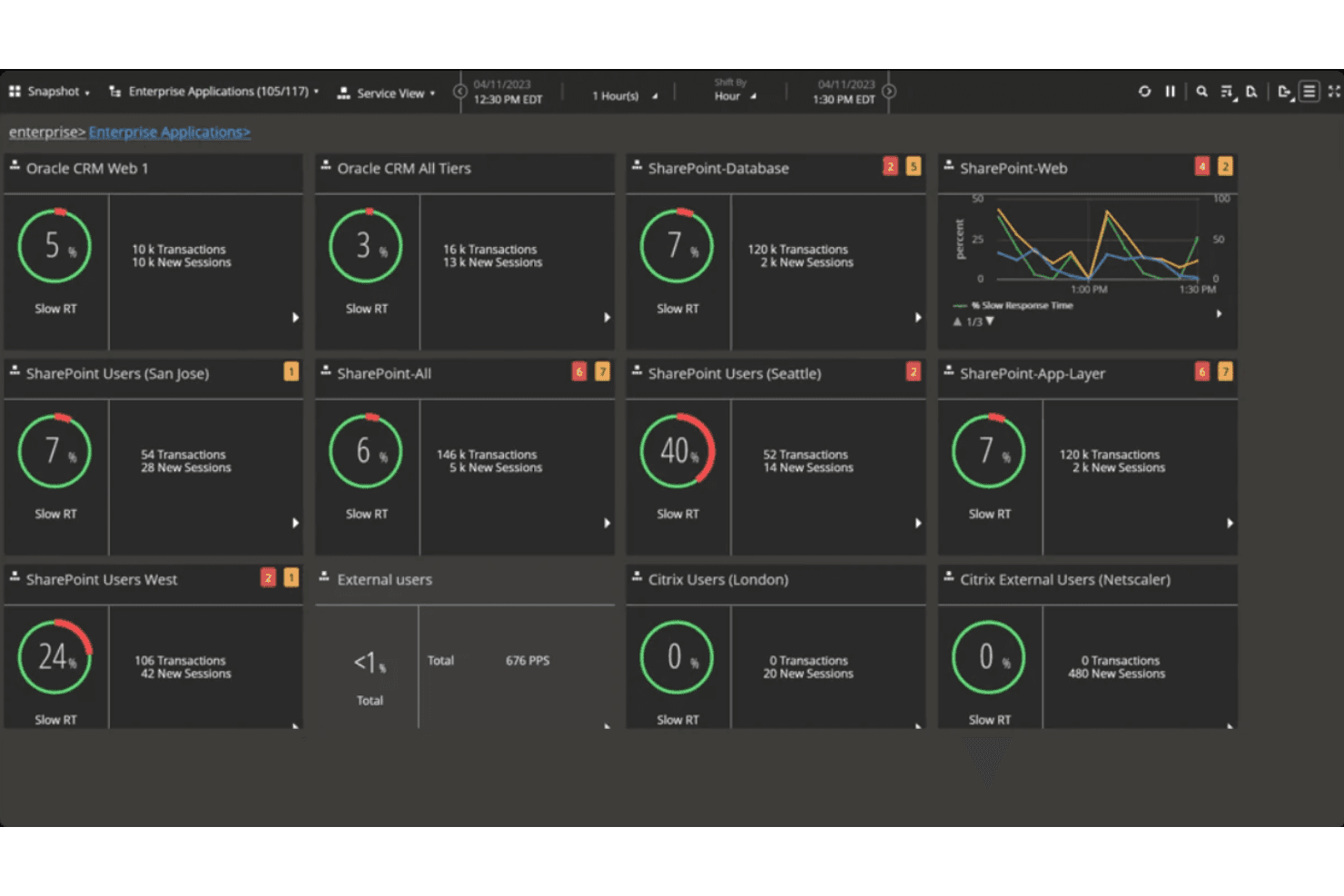
Real-Time Performance Analysis
Monitor network and application health with at-a-glance dashboards and customizable views for rapid troubleshooting.
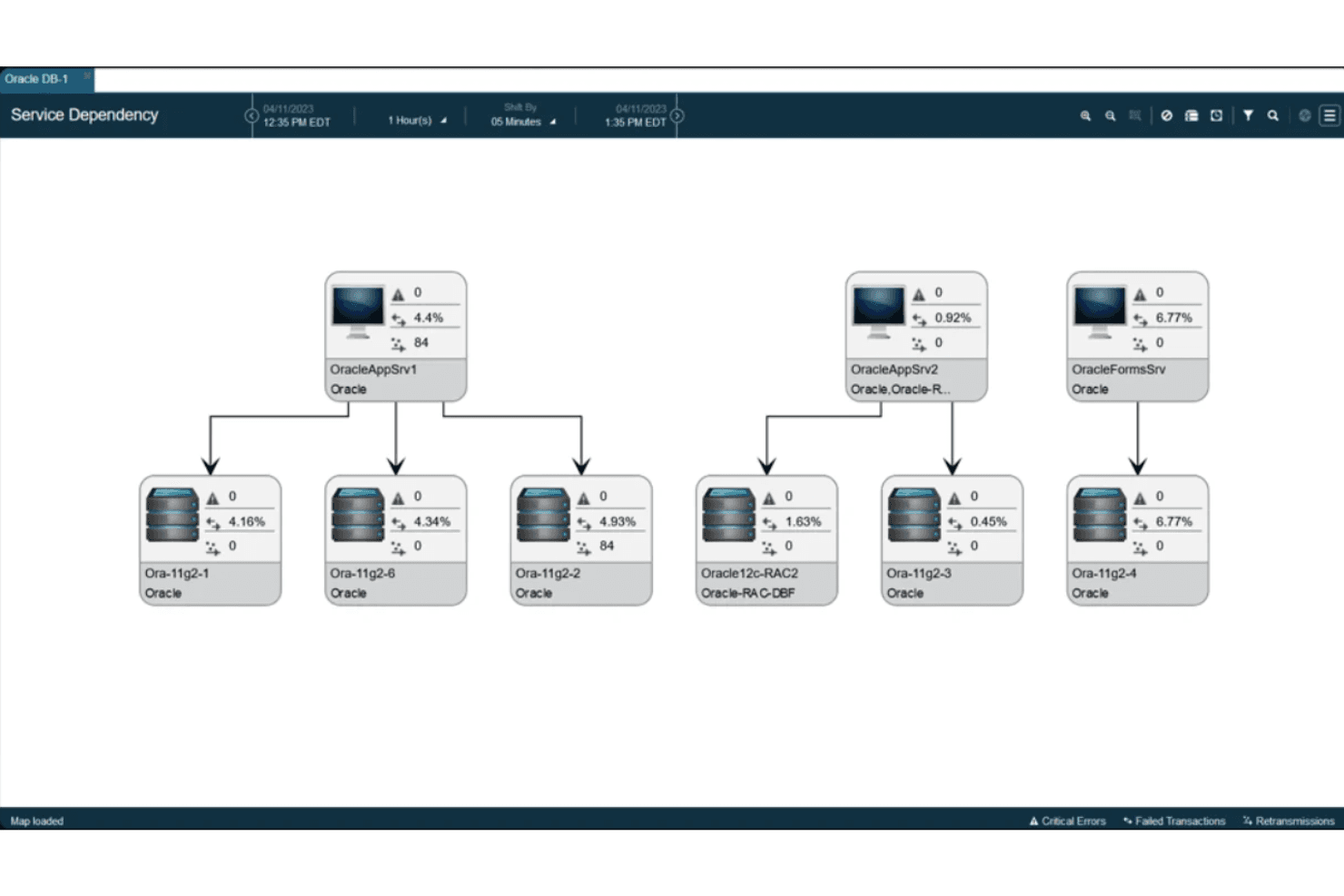
Service Dependency Mapping
Automatically discover and visualize client/server relationships to reduce migration risk and support data center or cloud transitions.
Session and Application Analysis
Drill into protocol-specific metrics and user sessions to pinpoint errors, latency, and performance degradations.
Synthetic Testing
Run business transaction tests to detect early signs of performance issues and alert IT before users are impacted.
Advanced Threat Detection
Leverage machine learning and behavioral analytics to identify and mitigate sophisticated cyber threats across all network layers.
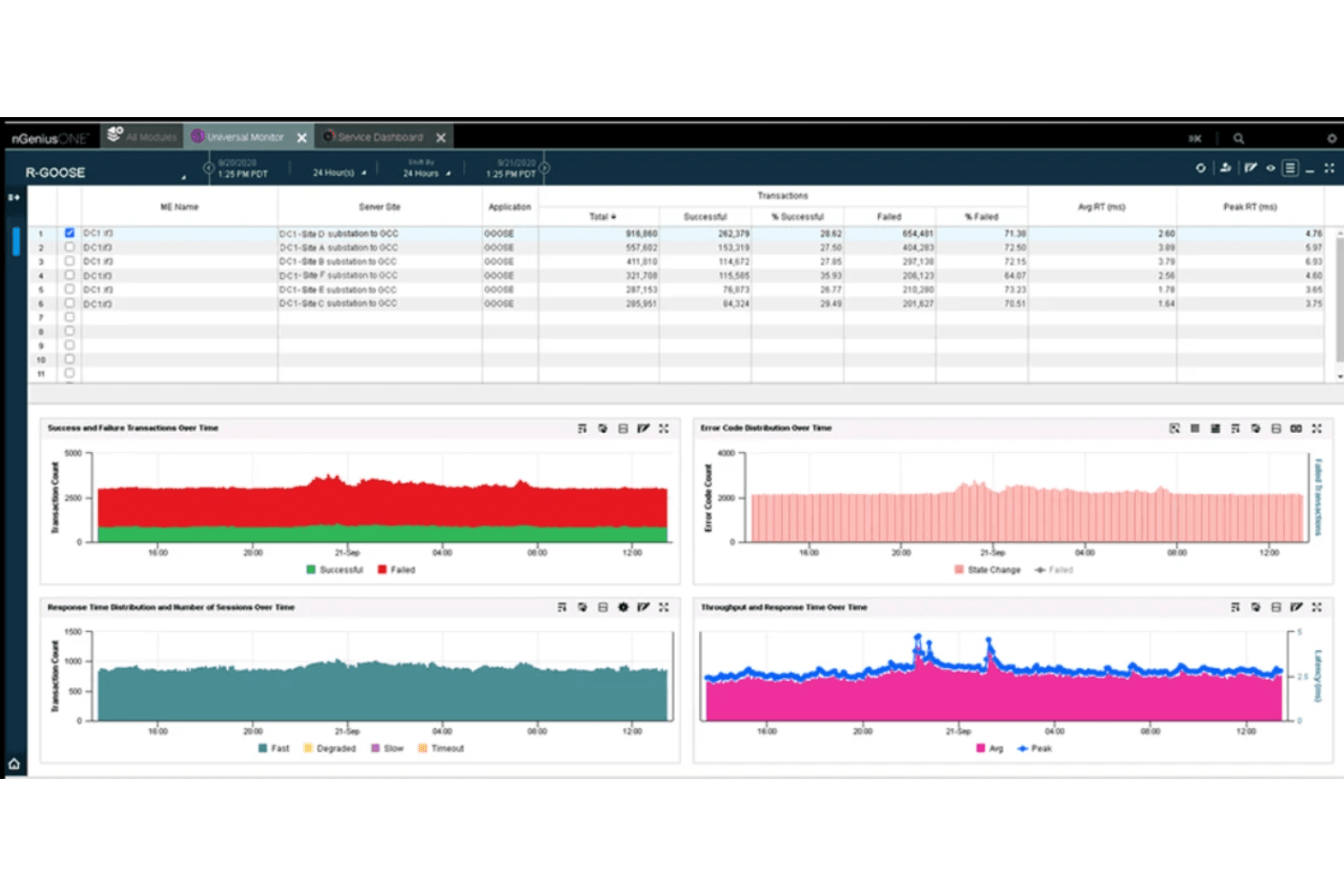
Comprehensive Traffic Analysis
Analyze network traffic in-depth to optimize performance, troubleshoot issues, and ensure compliance with organizational policies.
Ease of Use
NETSCOUT’s interface is designed for experienced network professionals, offering detailed dashboards and granular controls that can feel overwhelming to less technical users. Many reviewers note the steep learning curve but appreciate the depth of data and customization available.
While onboarding and configuration require significant expertise, the platform’s powerful analytics and real-time insights justify the complexity for teams managing large, mission-critical environments. Simpler environments may find the tool unnecessarily complex for their needs.
Integrations
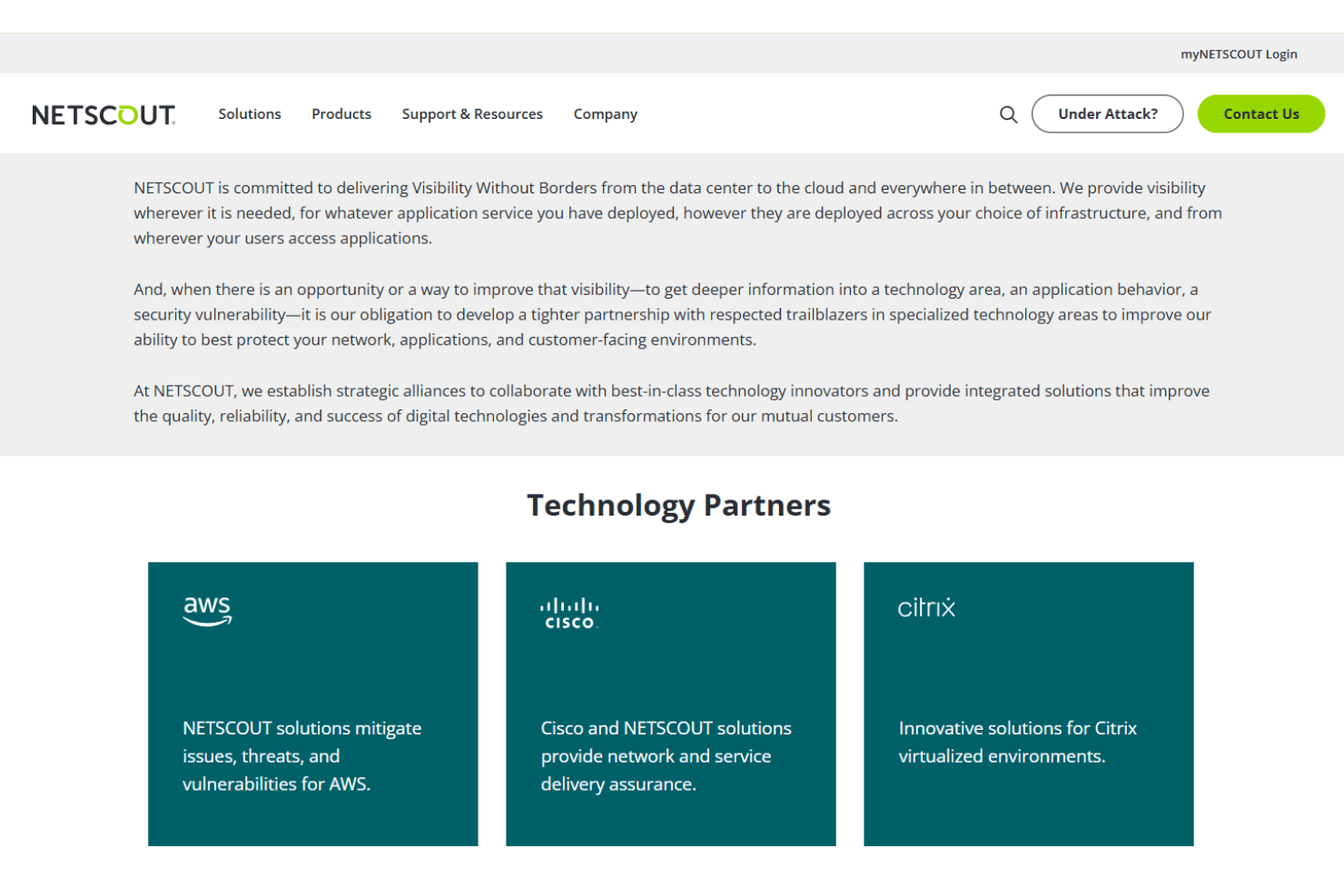
NETSCOUT integrates with AWS, Cisco Systems, Citrix, Dell Technologies, F5, Google Cloud, Microsoft, Oracle, Palo Alto Networks, and Red Hat, among others.
NETSCOUT also offers an API and supports connections with third-party integration tools for extended interoperability.
NETSCOUT Specs
- API: Yes
- Bug Tracking: No
- CI/CD Integration: Yes
- Cloud Deployment: No
- Code Review: No
- Code Transformation: No
- Collaboration Support: No
- Data Export: Yes
- Data Import: Yes
- Developer Tools: Yes
- External Integrations: Yes
- Git Integration: No
- History/Version Control: No
- IDE Plugins: No
- Local Deployment: No
- Multi-User: Yes
- Notifications: Yes
- Project Management: No
- Release Management: No
- Static Analysis: No
- Task Scheduling/Tracking: No
- Testing: No


