

Freshservice-arvostelu: hyvät ja huonot puolet, ominaisuudet ja hinnoittelu selitettynä
Freshservice yksinkertaistaa IT-palveluiden hallintaa intuitiivisilla ominaisuuksilla ja kilpailukykyisellä hinnoittelulla, joten se sopii erinomaisesti tiimisi työnkulun tehostamiseen.

We review tools independently, and commissions help fund our testing. See our transparency policy, our methodology, or suggest a tool.
Freshservice is a cloud-based IT service management (ITSM) platform developed by Freshworks to help IT teams manage incidents, service requests, assets, and changes from a unified service desk. For IT leaders under pressure to reduce downtime, improve employee support, and scale IT operations efficiently, Freshservice offers a modern approach that blends automation, self-service, and integrations across business tools.
This review examines Freshservice’s features, pricing, pros and cons, and best use cases so you can determine whether it fits your organization’s ITSM strategy.
Freshservice Evaluation Summary
4.6/5
- From $19/user/month (billed annually)
- 14-day free trial
Miksi luottaa ohjelmistosuosituksiimme
6,700+
Reviews
20
Industry experts
16+
Evaluation factors
14
Years
Tiimimme on testannut ja arvioinut ohjelmistoja vuodesta 2012 lähtien. Teknologiajohtajina tiedämme itse, kuinka vaikeaa — ja tärkeää — oikean ohjelmiston valitseminen on.
Tätä opasta varten arvioimme työkaluja käytännön testauksen ja itsenäisen tutkimuksen avulla, pisteyttäen työkalut valintakriteeriemme perusteella.
Arvostelumme perustuvat inhimilliseen toimitukselliseen harkintaamme, eivät myyntipuheeseen.
Asiantuntija-arvioijat:
- Paulo Gardini MiguelTech Director
 Tim FisherVP of AI
 Gabriel RosasTech Lead & Software Architect
 Christhian GruhnTech Lead & Platform Architect

Freshservice Overview
As an IT service management platform, Freshservice combines incident management, service requests, asset management, workflow automation, and IT operations management and enterprise service management capabilities in a single system. It also includes built-in IT asset management (ITAM) and a configuration management database (CMDB), giving IT teams visibility into assets, dependencies, and change impacts.
What sets Freshservice apart is its integrated AI and enterprise service management capabilities. Freddy AI helps automate ticket triage and support self-service, while features like Workspaces and Journeys allow organizations to extend service management beyond IT to teams such as HR and facilities. This makes Freshservice a practical option for organizations looking to modernize service delivery without the complexity of traditional enterprise ITSM tools.
Pros
- Fast setup and easy administration with strong out-of-the-box functionality.
- Built-in IT asset management with CMDB and deep cross-environment discovery.
- AI-powered automation and ticket assistance via Freddy AI.
Cons
- Many AI features are limited to higher-tier plans.
- Customization may be less flexible than some enterprise ITSM platforms.
- Reporting and analytics can be limited for advanced management reporting.
Is Freshservice Right For Your Needs?
Who Would be a Good Fit for Freshservice?
Freshservice is a strong choice for organizations that value automation, quick onboarding, and a modern interface in their ITSM tools. It works especially well for mid-market businesses and small, agile enterprises that need to manage assets and incidents without heavy customization. The platform’s AI ticketing, built-in asset management, and self-service portal make it ideal for teams seeking to reduce manual work and improve service delivery.
- Companies Implementing ITIL Best PracticesSupports ITIL-aligned processes such as incident, problem, change, and SLA management for structured service delivery.
- Lean ManagementIdeal for organizations that want powerful service management without needing large, specialized admin teams.
- Mid-Size to Enterprise OrganizationsProvides strong out-of-the-box ITSM capabilities and integrations without the implementation complexity of traditional enterprise service management platforms.
- Business Teams (HR, Facilities, Finance)Ideal for non-IT teams looking for an intuitive service management solution through enterprise service management capabilities.
- Multi-Tenant SaaS EnvironmentsDesigned for organizations that benefit from faster updates, lower maintenance overhead, and scalable cloud infrastructure.
- Organizations Looking for a Unified PlatformStrong fit for companies that want to manage assets, service management, and IT operations in a single platform.
Who Would be a Bad Fit for Freshservice?
Freshservice may not suit organizations with highly specialized workflows, strict on-premises deployment requirements, or extremely complex reporting needs. Teams requiring deep customization, legacy infrastructure integrations, or highly specialized compliance frameworks may find the platform limiting compared to larger enterprise ITSM solutions.
- Teams With Heavy Legacy System DependenciesOlder infrastructure and proprietary systems may require extensive custom integrations not easily supported.
- Advanced Reporting RequirementsTeams that depend heavily on complex reporting or custom analytics may find Freshservice’s native reporting tools limited compared to specialized BI or enterprise ITSM platforms.
- Large Global EnterprisesMassive service operations with extensive legacy integrations may exceed Freshservice’s intended mid-market complexity.
- Highly Regulated Government EnvironmentsStrict compliance frameworks and sovereign data requirements may exceed Freshservice’s standard configuration capabilities.
- Enterprises Requiring Deep CustomizationOrganizations needing highly customized workflows and modules may find Freshservice less flexible than larger ITSM platforms.
- Organizations Requiring On-Premises ITSMFreshservice is a cloud-native platform and may not meet requirements for on-premises or private infrastructure deployments.
Our Review Methodology
How We Test & Score Tools
We’ve spent years building, refining, and improving our software testing and scoring system. The rubric is designed to capture the nuances of software selection and what makes a tool effective, focusing on critical aspects of the decision-making process.
Below, you can see exactly how our testing and scoring works across seven criteria. It allows us to provide an unbiased evaluation of the software based on core functionality, standout features, ease of use, onboarding, customer support, integrations, customer reviews, and value for money.
Core Functionality (25% of final scoring)
The starting point of our evaluation is always the core functionality of the tool. Does it have the basic features and functions that a user would expect to see? Are any of those core features locked to higher-tiered pricing plans? At its core, we expect a tool to stand up against the baseline capabilities of its competitors.
Standout Features (25% of final scoring)
Next, we evaluate uncommon standout features that go above and beyond the core functionality typically found in tools of its kind. A high score reflects specialized or unique features that make the product faster, more efficient, or offer additional value to the user.
We also evaluate how easy it is to integrate with other tools typically found in the tech stack to expand the functionality and utility of the software. Tools offering plentiful native integrations, 3rd party connections, and API access to build custom integrations score best.
Ease of Use (10% of final scoring)
We consider how quick and easy it is to execute the tasks defined in the core functionality using the tool. High scoring software is well designed, intuitive to use, offers mobile apps, provides templates, and makes relatively complex tasks seem simple.
Onboarding (10% of final scoring)
We know how important rapid team adoption is for a new platform, so we evaluate how easy it is to learn and use a tool with minimal training. We evaluate how quickly a team member can get set up and start using the tool with no experience. High scoring solutions indicate little or no support is required.
Customer Support (10% of final scoring)
We review how quick and easy it is to get unstuck and find help by phone, live chat, or knowledge base. Tools and companies that provide real-time support score best, while chatbots score worst.
Customer Reviews (10% of final scoring)
Beyond our own testing and evaluation, we consider the net promoter score from current and past customers. We review their likelihood, given the option, to choose the tool again for the core functionality. A high scoring software reflects a high net promoter score from current or past customers.
Value for Money (10% of final scoring)
Lastly, in consideration of all the other criteria, we review the average price of entry level plans against the core features and consider the value of the other evaluation criteria. Software that delivers more, for less, will score higher.
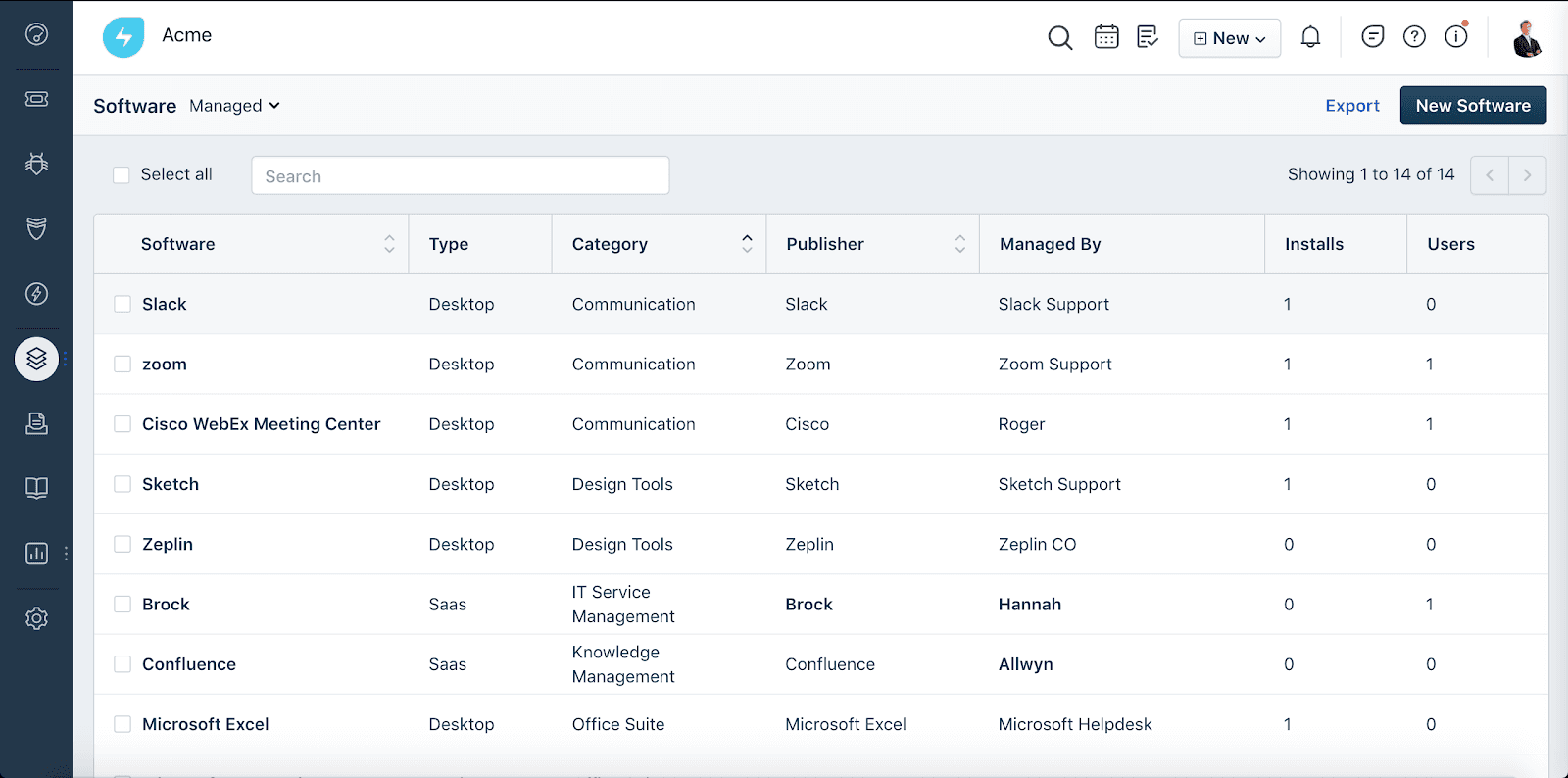
Core Features
IT Operations Management
Provides visibility into infrastructure, dependencies, and service health. Helps IT teams monitor environments, manage alerts, and understand the impact of incidents and changes across systems.
AI-Powered Ticketing
Uses AI-assisted suggestions and automation rules to help categorize, prioritize, and route tickets more efficiently.
Service Catalog
Lets users request IT and non-IT services through a customizable portal. Standardizes service delivery and improves request tracking for both IT and business teams.
Automated Workflow Engine
Automates repetitive tasks like approvals, escalations, and notifications. Users can build rule-based workflows to streamline incident and change management.
IT Asset Management
Tracks hardware, software, and contracts with automated discovery and CMDB updates. Helps maintain compliance and reduces asset-related incidents.
Change Management
Provides structured processes for planning, approving, and tracking changes. Built-in templates and automation reduce risk and ensure audit trails.
Self-Service Portal
Empowers end users to resolve common issues with a searchable knowledge base. Reduces ticket volume and improves user satisfaction with 24/7 access.
Problem Management
Helps teams track recurring incidents and identify root causes. By linking related incidents and assets, Freshservice supports proactive problem resolution and long-term service reliability.
Standout Features
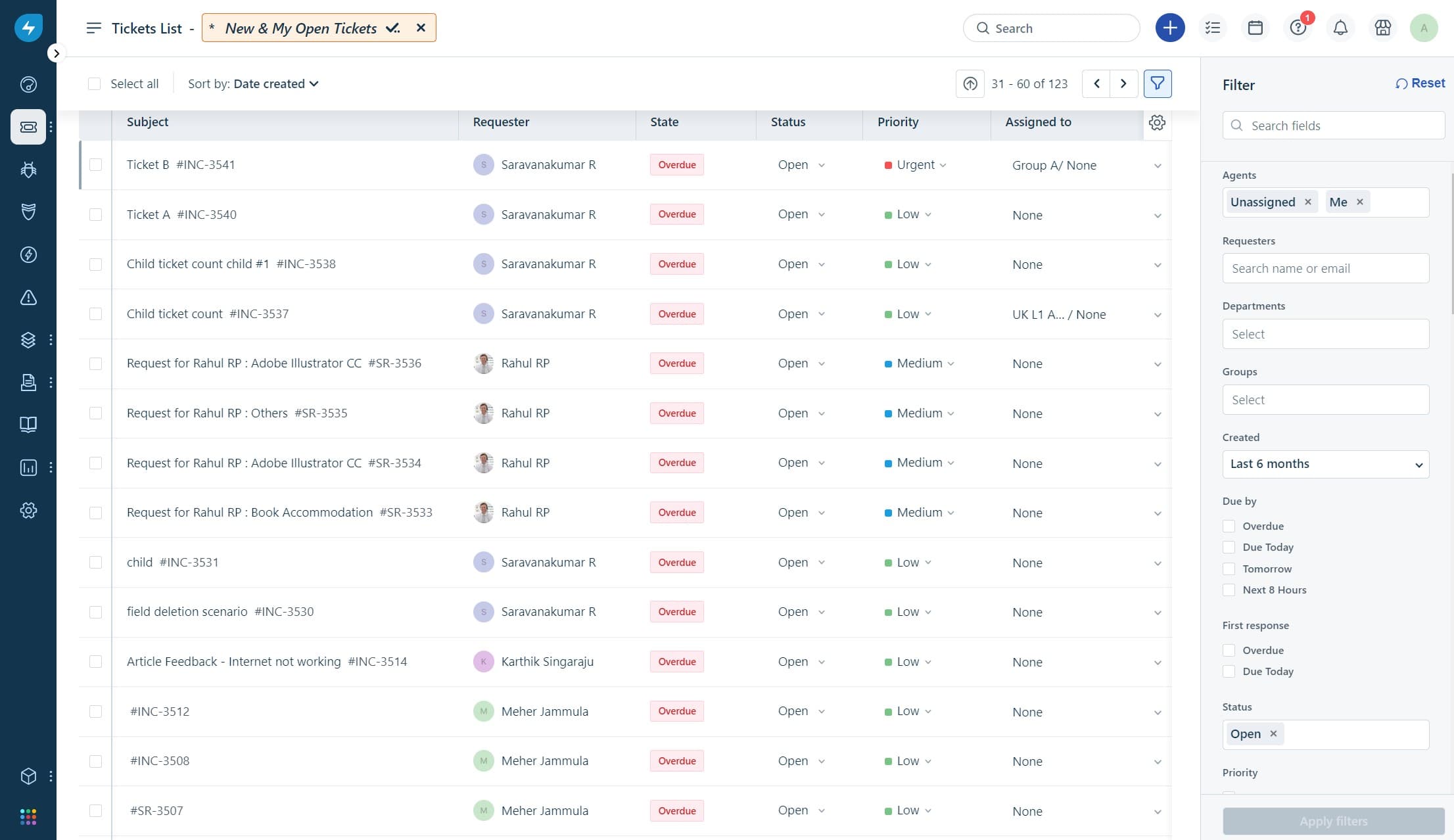
Freddy AI Virtual Agent
Freshservice’s Freddy AI virtual agent helps resolve common IT requests through conversational self-service. It can surface knowledge articles, automate routine tasks, and reduce ticket volume.
Workspaces for Enterprise Service Management
Freshservice Workspaces allow non-IT teams—such as HR, finance, or facilities—to run their own service workflows while remaining within the same platform. This enables organizations to expand service management beyond IT.
Ease of Use
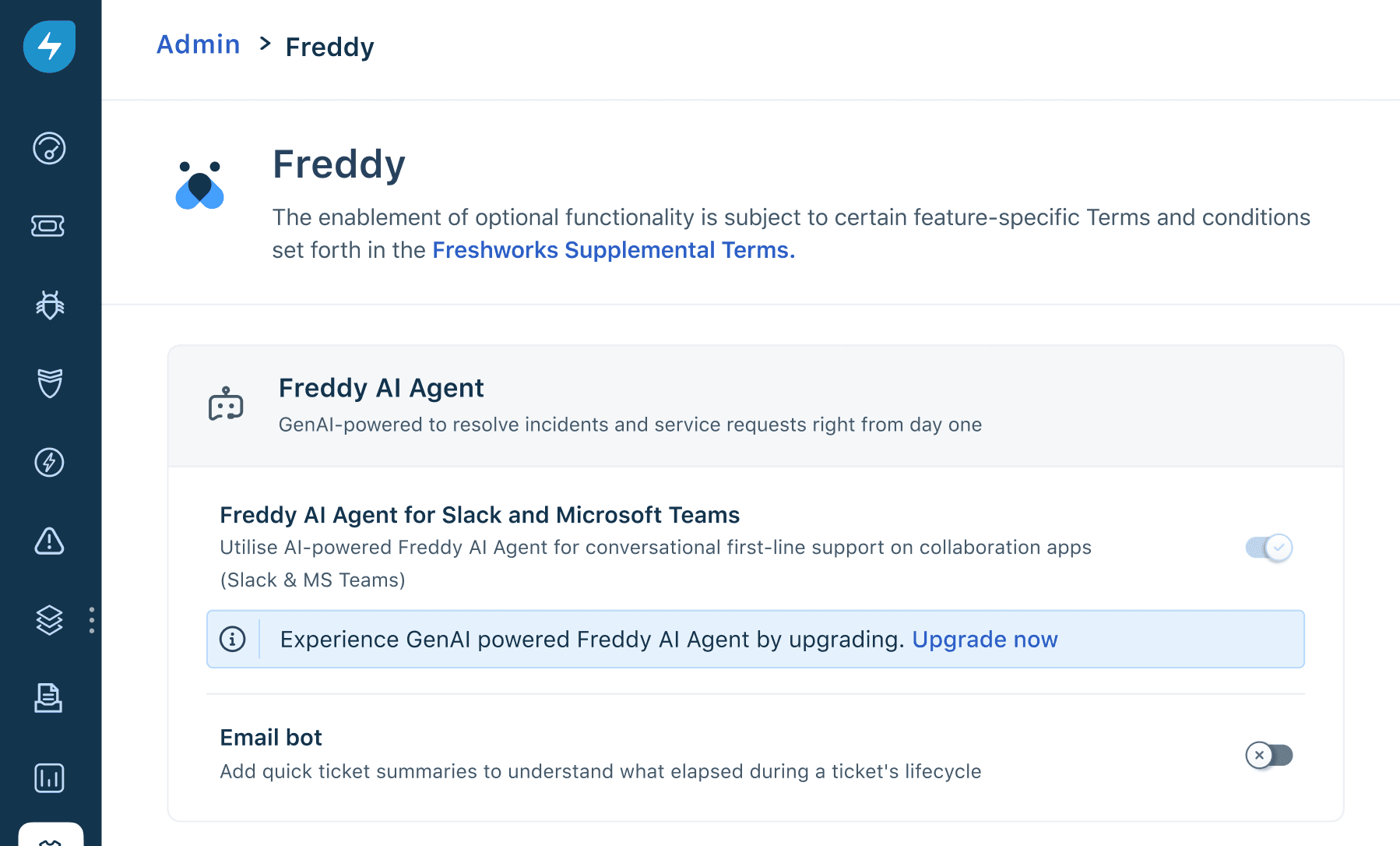
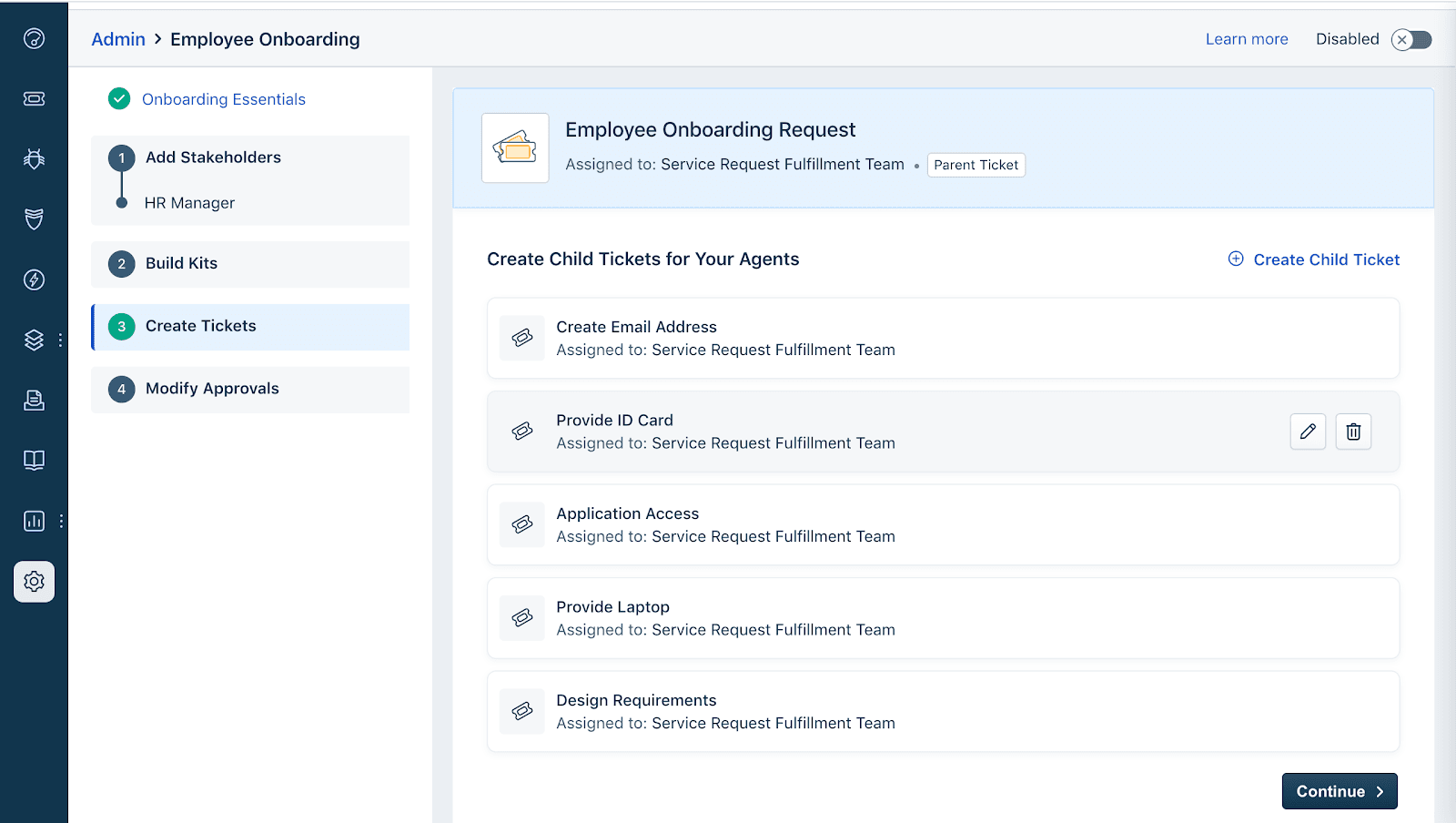
Freshservice offers a clean, intuitive interface and easy navigation, making it accessible even for teams new to ITSM tools. Users often highlight the drag-and-drop workflow builder and clear ticket views as standout features that simplify daily operations. The onboarding process is fast, with guided setup and in-app tips, so teams can get started quickly without extensive training. This focus on usability helps reduce friction and supports faster adoption across departments.
Onboarding
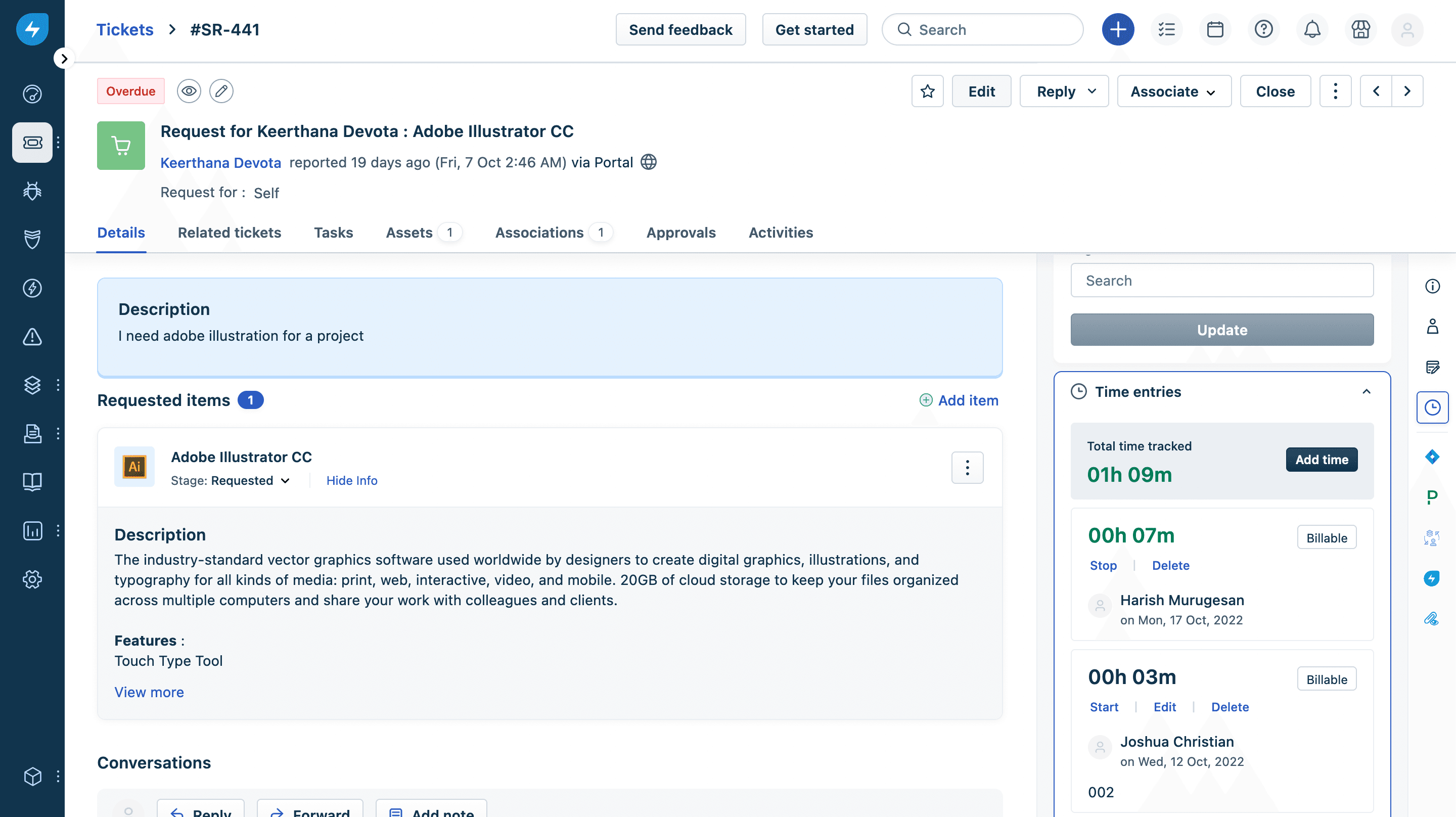
Freshservice offers a fast, guided onboarding experience with step-by-step setup wizards and contextual help throughout the platform. New users benefit from a robust knowledge base, video tutorials, and responsive chat support, which many reviewers say shortens the time to value. The platform’s clear documentation and in-app guidance help IT teams configure core modules and workflows quickly, making it easy to launch service management processes without heavy reliance on external consultants.
Customer Support
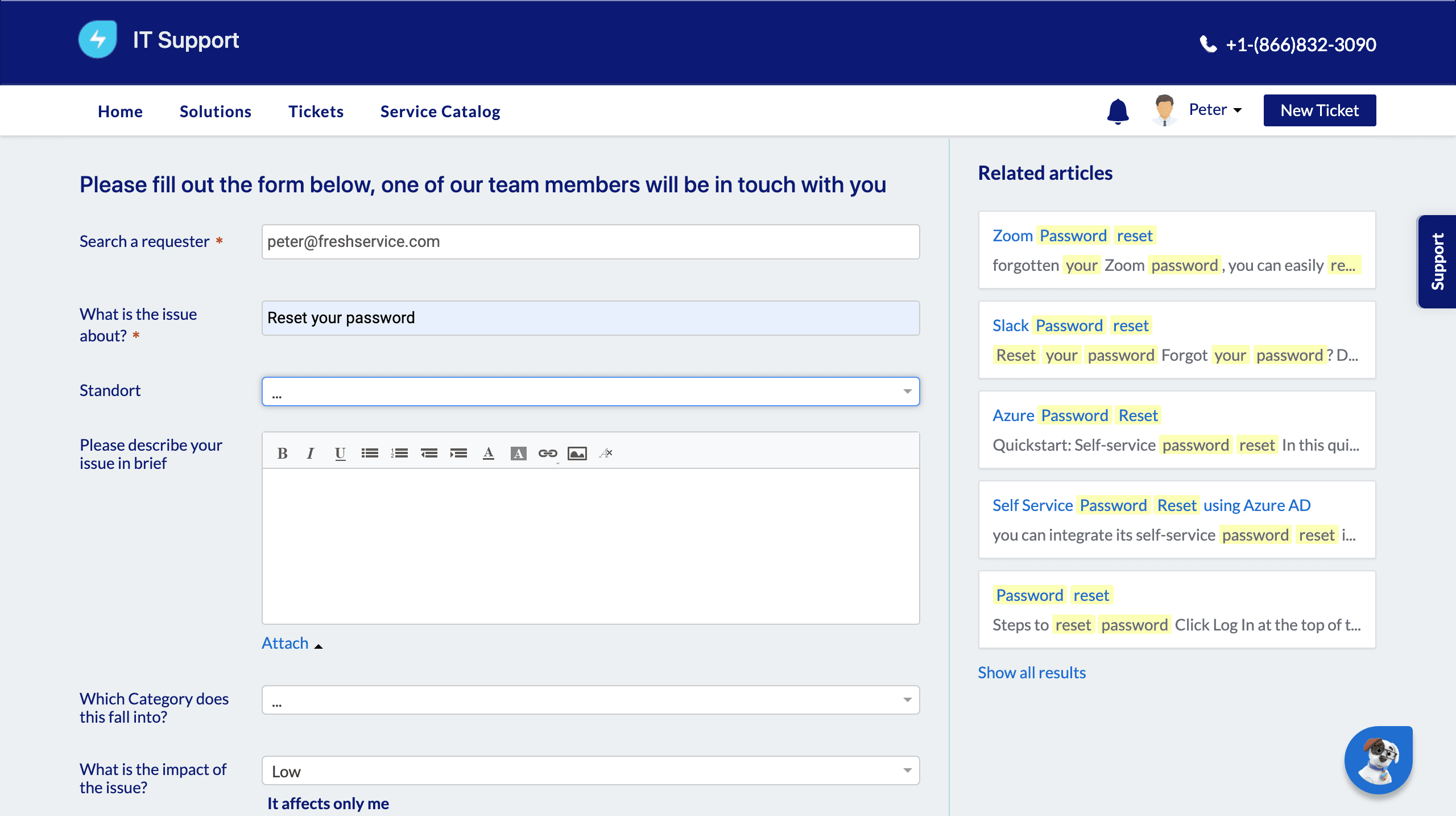
Freshservice provides multiple support channels, including a 24/5 real-time support with agents through email and chat. They also offer a chatbot (24/7). Many reviewers note that support agents are knowledgeable and resolve most queries quickly, though some mention occasional delays during peak times. The platform’s extensive help center and community forums offer additional self-service resources, making it easier for IT teams to troubleshoot and find answers without waiting for direct support.
Integrations
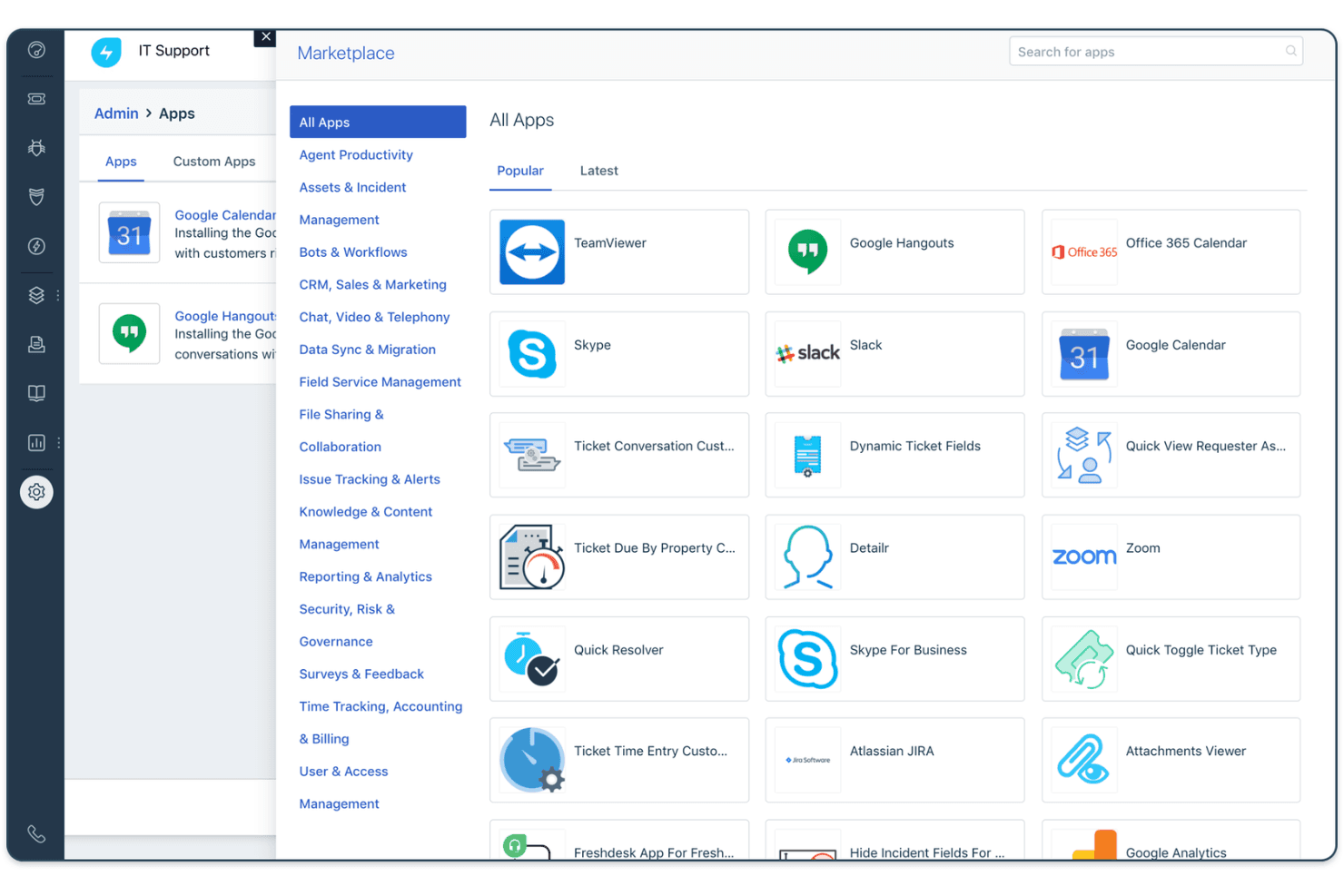
Freshservice offers 1,000+ ready-to-install integrations through the Freshworks Marketplace, including Microsoft Teams, Slack, Jira, Azure Active Directory, Google Workspace, Okta, Salesforce, Zoom, AWS, and Dropbox.
Freshservice also offers a REST API and connects with third-party integration tools like Zapier for broader automation and connectivity.
Value for Money
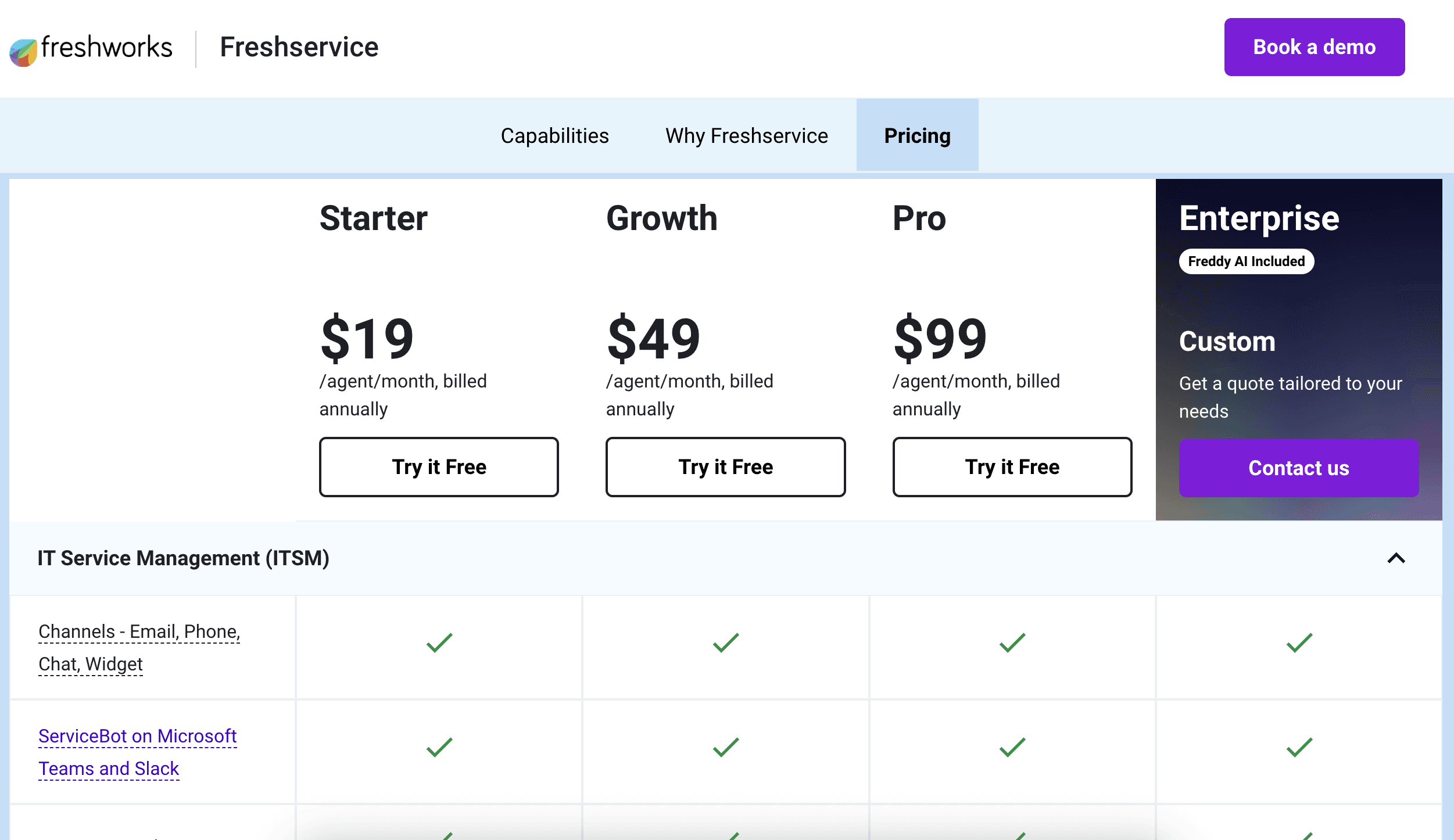
Freshservice is competitively priced for the features it delivers, especially for mid-sized teams seeking automation and asset management. Users appreciate the transparent pricing tiers and the ability to scale up as needs grow, with each plan adding meaningful capabilities like advanced analytics or project management.
- Starter: Basic ticketing, knowledge base, and service desk tools.
- Growth: Adds workflow automation, SLA management, and asset discovery.
- Pro: Adds advanced ITSM capabilities such as change management, orchestration, and deeper analytics.
- Enterprise: Adds advanced governance, sandbox environments, and expanded AI capabilities.
New Product Updates from Freshservice
 Opens new window
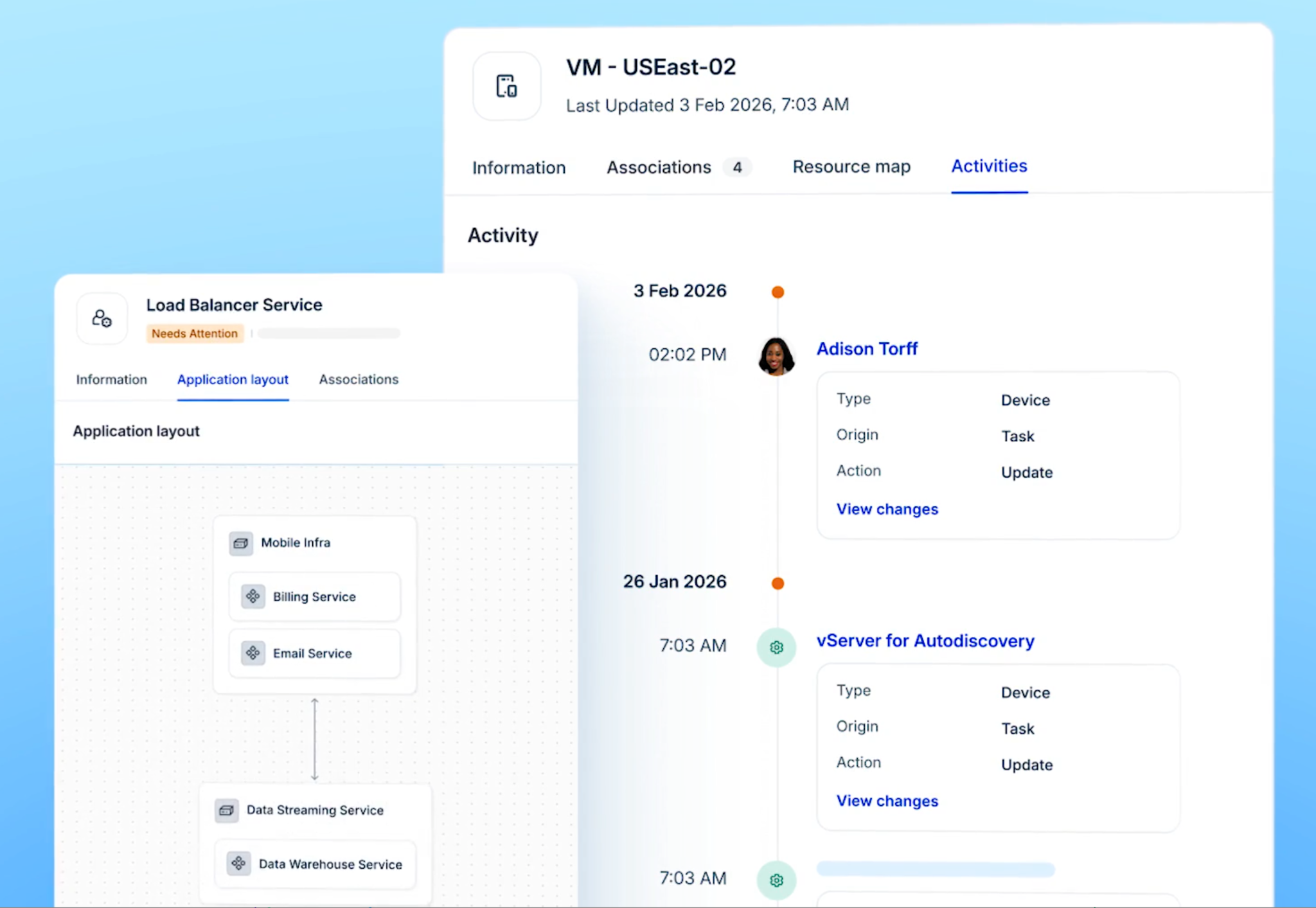
Freshservice Introduces a Reimagined IT Asset Management (ITAM) Experience
Freshservice introduces a reimagined IT Asset Management (ITAM) experience with expanded infrastructure discovery, dependency mapping, IPAM, and Software License Management capabilities. This update helps IT teams understand asset relationships, track resources, and improve service operations. Highlights include:
- Continuous Infrastructure Discovery: Automatically discover assets across cloud, hybrid, and on-premises environments for improved visibility.
- Application Dependency Mapping: Visualize relationships between infrastructure components and business services to understand potential impact.
- Software License Management: Track software usage and identify unused licenses to optimize costs.
Visit Freshservice’s official site for more details.
 Opens new window
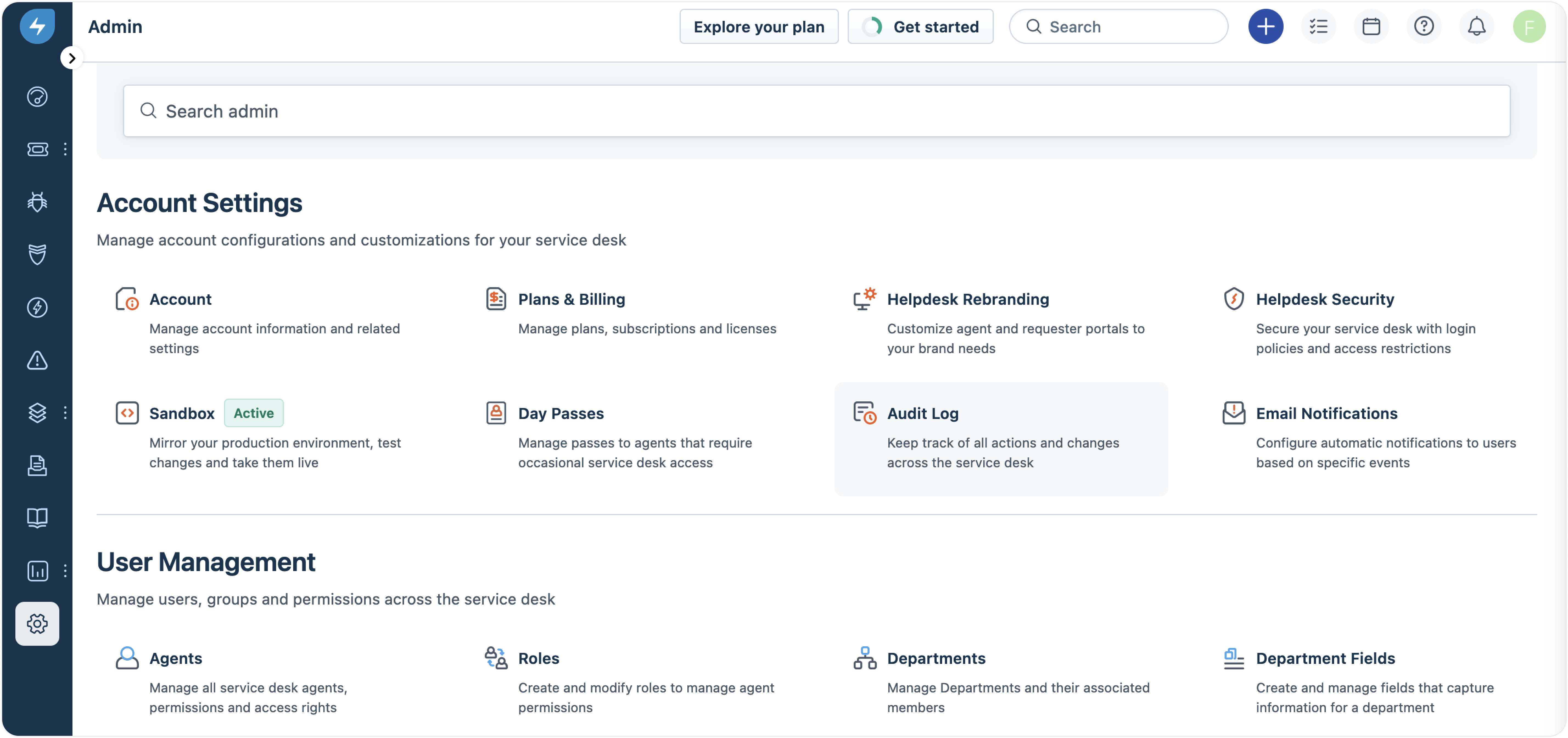
Freshservice Adds Email and Mailbox Audit Logs
Freshservice adds email and mailbox audit tracking to provide clearer visibility into configuration updates. This update helps admins monitor changes, review actions, and manage workspace email settings more effectively. Highlights include:
- Email Setting Logs: Track updates and actions made to email configurations.
- Mailbox Change Tracking: Monitor mailbox changes with detailed audit history.
- Workspace Visibility: View actions, changes, and timestamps across workspaces.
Visit Freshservice’s official site for more details.
 Opens new window
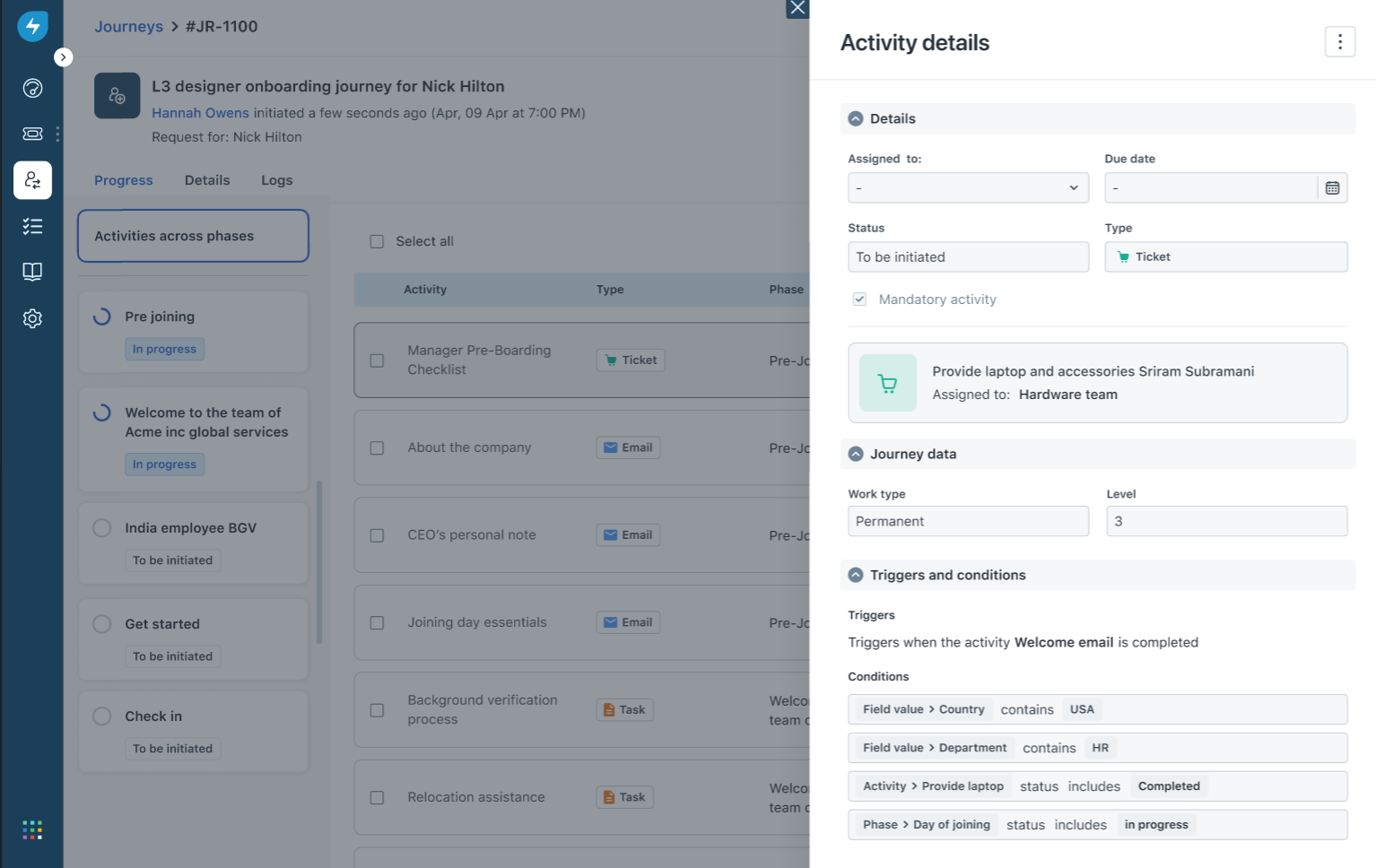
Freshservice Auto-Links Tickets to Journey Requests
Freshservice adds automatic ticket linking for Journey Requests to improve request tracking and agent visibility. This update helps teams access important journey information directly from related tickets. Highlights include:
- Automatic Ticket Linking: Connect tickets created from Journey Requests to their parent request.
- Journey Context Access: View journey details directly from linked tickets for faster review.
- Activity Tracking: Track ticket and request associations through system-logged updates.
Visit Freshservice’s official site for more details.
Freshservice Adds SharePoint Sync Insights
Freshservice introduces enhanced SharePoint sync visibility and troubleshooting tools for admins. The updates help teams monitor sync performance and identify document sync issues faster. Highlights include:
- Detailed SharePoint Sync Logs: Admins can now view detailed logs for SharePoint sync activity.
- Site-Level Monitoring: Logs display sync statuses, item counts, and overall sync activity across sites.
- File-Level Failure Visibility: Teams can identify unsynced files and view reasons for sync failures.
- CSV Error Export: Sync errors can now be downloaded as CSV files for easier troubleshooting and reporting.
Visit Freshservice’s official site for more details.
Freshservice Improves Alert Management and Status Pages
Freshservice introduces new alert management and incident communication improvements across the platform. The updates help teams prioritize operational issues faster and improve visibility during incidents. Highlights include:
- Suppression-Status Alert Filters: Teams can now filter alerts by Suppressed, Unsuppressed, or Any status for faster prioritization.
- Flexible Alert-to-Incident Linking: Alerts can now be linked or removed from incidents anytime, regardless of source.
- Improved Incident Noise Reduction: Teams can better manage irrelevant alerts and focus on active operational issues.
- Smarter Status Pages: Freshservice now supports audience-specific status views, API-based service discovery, and cleaner public page controls for clearer incident communication.
Visit Freshservice’s official site for more details.
Freshservice Adds Freddy AI Rollout Controls and Task Business Rules
Freshservice introduces new admin and workflow management enhancements to help teams control AI deployments and standardize task handling across service operations. Highlights include:
- Controlled Freddy AI Rollouts: Admins can enable Freddy AI Agent for selected requester groups and support portals before expanding organization-wide.
- Targeted AI Testing: Teams can evaluate AI usage, gather feedback, and manage phased rollouts more effectively.
- Configurable Task Business Rules: Admins can now control task fields, validations, auto-updates, and confirmation messages through Business Rules.
- Improved Task Visibility and Actions: Teams can manage task visibility and workflow actions across Tickets, Changes, and Problems.
Visit Freshservice’s official site for more details.
Freshservice Specs
- 2-Factor Authentication: Yes
- Analytics: Yes
- Anti-Virus: No
- API: Yes
- Batch Permissions & Access: Yes
- Bug Tracking: No
- Call Integration: Yes
- Chat: Yes
- Contact Management: Yes
- CRM Integration: Yes
- Customer Management: Yes
- Data Export: Yes
- Data Import: Yes
- Email Integration: Yes
- Escalation Management: Yes
- External Integrations: Yes
- Incident Management: Yes
- Instant Chat Integration: Yes
- Knowledge Base: Yes
- Malware Protection: No
- Multi-User: Yes
- Notifications: Yes
- Organization Management: No
- Password & Access Management: Yes
- Project Management: Yes
- Real-time Alerts: Yes
- SAP Integration: Yes
- Self-service Portal: Yes
- Social Media Integration: No
- Support Forum: Yes
- Ticket Management: Yes
- Workflow Management: Yes
Freshservice FAQs
Freshservice Company Overview & History
Freshservice is a cloud-based IT service management (ITSM) platform developed by Freshworks Inc., a global SaaS company headquartered in San Mateo, California. Freshworks owns a suite of business software products, including Freshdesk, Freshsales, Freshcaller, and Freshteam. Freshservice is trusted by over 74,000 businesses worldwide, with notable clients such as Marvel, University of Oxford, AMC Theatres, and Databricks. Freshworks is publicly traded (NASDAQ: FRSH), reported annual revenue of over $720 million in FY2024, and achieved profitability for the first time in 2025.
Freshservice Major Milestones
- 2010: Freshworks was founded by Girish Mathrubootham and Shan Krishnasamy.
- 2014: Freshservice product launched as part of the Freshworks suite.
- 2021: Freshworks goes public on NASDAQ under the ticker FRSH.
- 2024: Freshworks surpasses $720 million in annual revenue.
- 2025: Freshworks reports first full-year profitability and expands Freshservice with new AI and non-IT service management solutions.
Mitä seuraavaksi?
Vahvista SaaS-kasvuasi ja johtamistaitojasi. Tilaa uutiskirjeemme saadaksesi uusimmat näkemykset teknologiajohtajilta ja tulevilta teknologiajohtajilta. Autamme sinua kasvattamaan toimintaasi fiksummin ja johtamaan vahvemmin huippuasiantuntijoiden oppaiden, resurssien ja strategioiden avulla!