

Fivetran-arvostelu: hyvät puolet, huonot puolet, ominaisuudet ja hinnoittelu
Fivetran erottuu ETL-ratkaisujen joukosta helppokäyttöisyytensä ja kykynsä integroitua saumattomasti olemassa olevaan data-infrastruktuuriisi ansiosta.

We review tools independently, and commissions help fund our testing. See our transparency policy, our methodology, or suggest a tool.
Fivetran is an ETL tool built around fully managed, automated data pipelines that connect hundreds of SaaS apps, databases, and cloud sources to your data warehouse. It's a strong fit if your team needs to move data reliably without owning or maintaining pipeline infrastructure. If you've outgrown Stitch and need broader connector coverage with more dependable schema change handling, Fivetran is the more capable option.
Fivetran Evaluation Summary

0/5
- Pricing upon request
- 14-day free trial + free demo + free plan available
Miksi luottaa ohjelmistosuosituksiimme
6,700+
Reviews
20
Industry experts
16+
Evaluation factors
14
Years
Tiimimme on testannut ja arvioinut ohjelmistoja vuodesta 2012 lähtien. Teknologiajohtajina tiedämme itse, kuinka vaikeaa — ja tärkeää — oikean ohjelmiston valitseminen on.
Tätä opasta varten arvioimme työkaluja käytännön testauksen ja itsenäisen tutkimuksen avulla, pisteyttäen työkalut valintakriteeriemme perusteella.
Arvostelumme perustuvat inhimilliseen toimitukselliseen harkintaamme, eivät myyntipuheeseen.
Asiantuntija-arvioijat:
- Paulo Gardini MiguelTech Director
 Tim FisherVP of AI
 Gabriel RosasTech Lead & Software Architect
 Christhian GruhnTech Lead & Platform Architect

Fivetran Overview
In my opinion, Fivetran stands out for its automated data integration and wide range of connectors, making it a strong choice for data-centric teams. It's particularly effective for organizations that need quick, reliable data syncing without heavy manual intervention, though its pricing can be high. Compared to other ETL tools, Fivetran excels in ease of use and setup speed, but it may offer limited customization options. Your team will find it beneficial if you prioritize automated data workflows and have the budget for its premium features.
Pros
- Automated data syncing saves your team time and effort.
- Extensive connectors support various data sources for your work.
- Simple setup and management make it easy for your team to use.
Cons
- Its limited customization options might not suit your needs.
- Some users find the support response time slower than expected.
- It requires stable internet connectivity for optimal performance.
Is Fivetran Right For Your Needs?
Who Would be a Good Fit for Fivetran?
Fivetran is ideal for data-driven teams in tech and finance needing quick, automated data integration. It suits businesses with diverse data sources, as its extensive connectors simplify syncing. Analytics departments benefit from its ease of use, cutting manual effort and letting you focus on insights. Data engineers will appreciate its minimal setup and maintenance, allowing them to manage data pipelines efficiently.
- Tech StartupsFivetran's automated processes help your team manage data without needing a large IT department.
- Finance CompaniesThe tool's reliable data syncing supports your need for accurate, real-time financial data analysis.
- Data AnalystsFivetran simplifies data integration, letting you focus on deriving insights.
- Marketing TeamsIts wide range of connectors allows you to easily gather data from various marketing platforms.
- Large EnterprisesFivetran handles complex data environments, making it great for large-scale data operations.
- E-CommerceWith Fivetran, your team can efficiently sync sales and customer data for better business insights.
Who Would be a Bad Fit for Fivetran?
Fivetran may not suit small businesses or startups with tight budgets due to its pricing. If your team needs highly customized data transformations, Fivetran's limited customization options could be restrictive. Companies with unstable internet or those requiring on-premise solutions will face challenges since Fivetran relies on cloud connectivity. Additionally, if fast customer support is critical for your operations, the slower response times might not meet your needs.
- Small StartupsFivetran's pricing can be steep if you have a tight budget.
- Custom SolutionsIf your work demands extensive customization, Fivetran's options may seem limited.
- On-Premise NeedsFivetran relies on cloud infrastructure, making it unsuitable if your company needs on-premise solutions.
- Unstable InternetYour team will struggle if internet connectivity isn't reliable, as Fivetran requires stable access.
- Niche IndustriesHighly specialized industries needing unique data integrations might find Fivetran's offerings too generic.
- Fast Support NeedsIf quick customer support is crucial, Fivetran's slower response times could hinder your operations.
Our Review Methodology
How We Test & Score Tools
We’ve spent years building, refining, and improving our software testing and scoring system. The rubric is designed to capture the nuances of software selection and what makes a tool effective, focusing on critical aspects of the decision-making process.
Below, you can see exactly how our testing and scoring works across seven criteria. It allows us to provide an unbiased evaluation of the software based on core functionality, standout features, ease of use, onboarding, customer support, integrations, customer reviews, and value for money.
Core Functionality (25% of final scoring)
The starting point of our evaluation is always the core functionality of the tool. Does it have the basic features and functions that a user would expect to see? Are any of those core features locked to higher-tiered pricing plans? At its core, we expect a tool to stand up against the baseline capabilities of its competitors.
Standout Features (25% of final scoring)
Next, we evaluate uncommon standout features that go above and beyond the core functionality typically found in tools of its kind. A high score reflects specialized or unique features that make the product faster, more efficient, or offer additional value to the user.
We also evaluate how easy it is to integrate with other tools typically found in the tech stack to expand the functionality and utility of the software. Tools offering plentiful native integrations, 3rd party connections, and API access to build custom integrations score best.
Ease of Use (10% of final scoring)
We consider how quick and easy it is to execute the tasks defined in the core functionality using the tool. High scoring software is well designed, intuitive to use, offers mobile apps, provides templates, and makes relatively complex tasks seem simple.
Onboarding (10% of final scoring)
We know how important rapid team adoption is for a new platform, so we evaluate how easy it is to learn and use a tool with minimal training. We evaluate how quickly a team member can get set up and start using the tool with no experience. High scoring solutions indicate little or no support is required.
Customer Support (10% of final scoring)
We review how quick and easy it is to get unstuck and find help by phone, live chat, or knowledge base. Tools and companies that provide real-time support score best, while chatbots score worst.
Customer Reviews (10% of final scoring)
Beyond our own testing and evaluation, we consider the net promoter score from current and past customers. We review their likelihood, given the option, to choose the tool again for the core functionality. A high scoring software reflects a high net promoter score from current or past customers.
Value for Money (10% of final scoring)
Lastly, in consideration of all the other criteria, we review the average price of entry level plans against the core features and consider the value of the other evaluation criteria. Software that delivers more, for less, will score higher.
Core Features
Automated Data Syncing
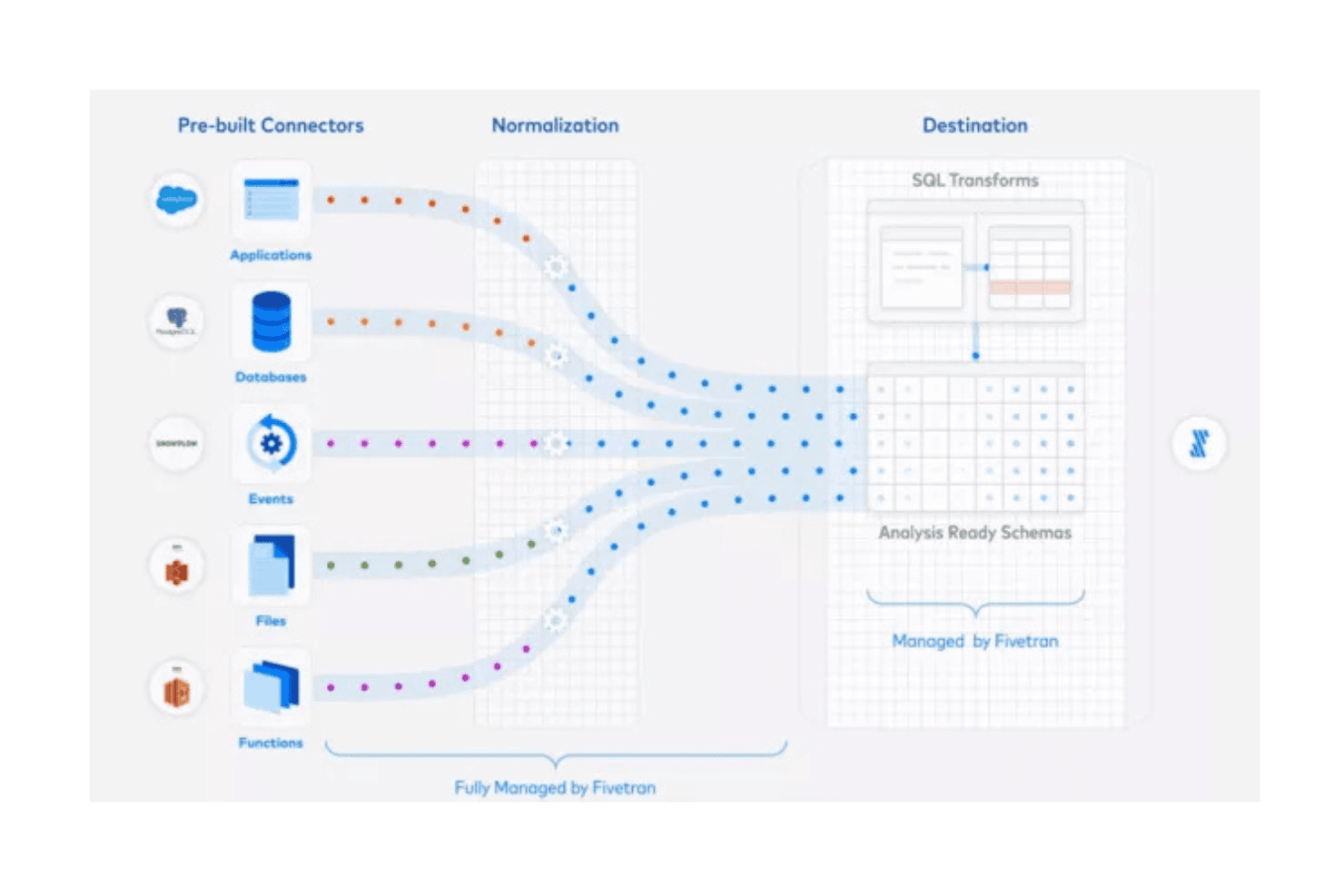
Fivetran automatically replicates data from various sources to your warehouse, reducing manual work for your team. This ensures your data is always up to date without constant monitoring.
Schema Management
You can use Fivetran for schema change automation, so your team doesn't have to worry about breaking data pipelines. This keeps your data movement smooth and consistent.
Data Transformation
Fivetran supports basic SQL transformations, allowing your team to refine data before analysis and simplifying your data preparation process.
Error Notifications
You'll get alerts if something goes wrong so you can address issues quickly. This minimizes downtime and ensures data accuracy.
Security Compliance
Fivetran adheres to industry security standards, keeping your data stacks safe and compliant. This gives your team peace of mind when handling sensitive information.
Ease of Use
Fivetran stands out for its user-friendly interface, making it easy for your team to manage your data models without extensive training. The intuitive dashboard simplifies monitoring and managing data sources, and automated processes reduce manual tasks. As a no-code ETL tool, users appreciate how quickly it can be set up. The ease of handling schema changes and receiving error notifications further enhances usability.
Integrations
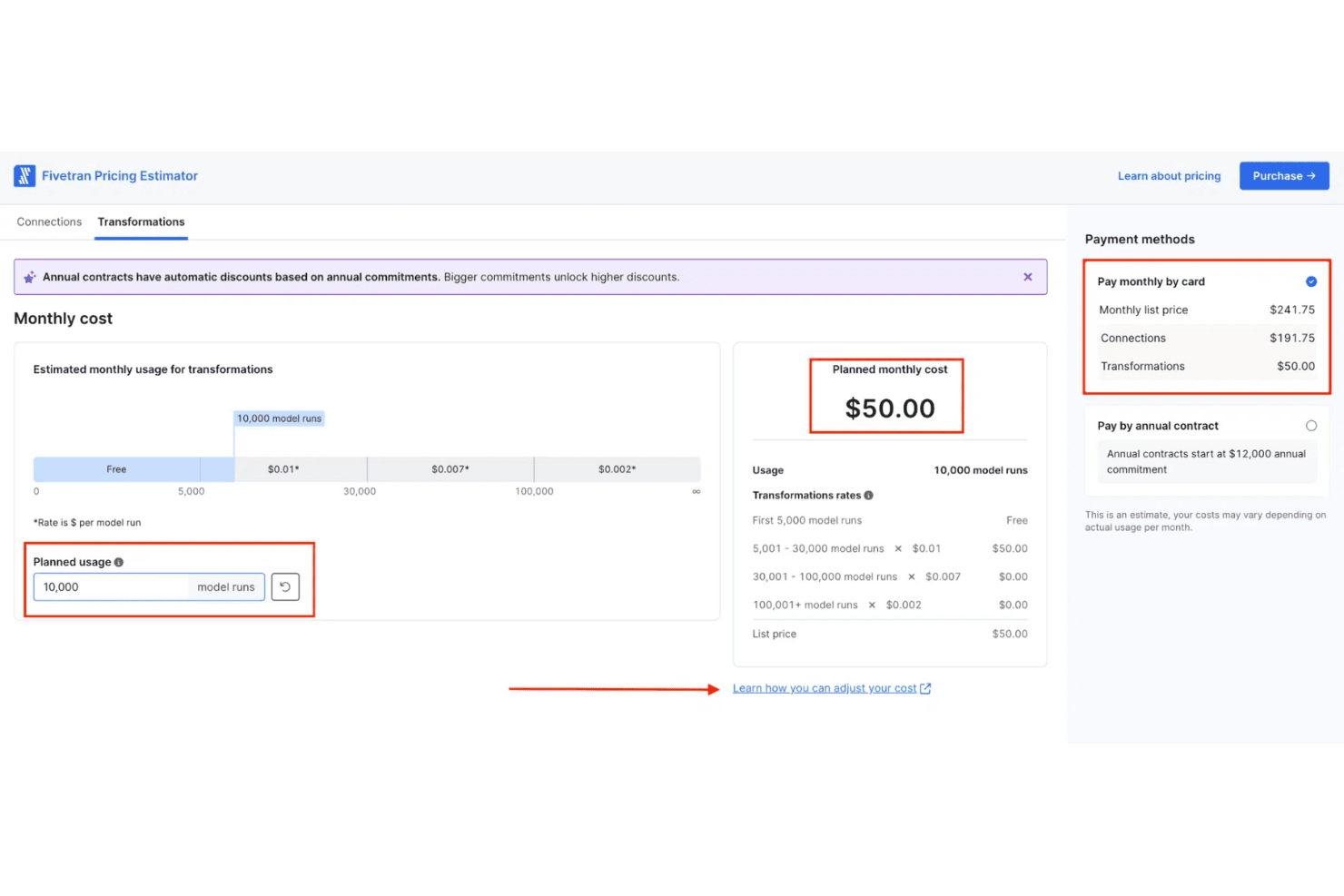
Fivetran integrates with dbt Core, RedShift, AWS, Salesforce, NetSuite, Google Ads, Snowflake, Shopify, HubSpot, Microsoft Dynamics 365 Finance, SAP ERP, Oracle Fusion, and Stripe. Fivetran also offers an API and supports building custom connectors through its Connector SDK, allowing for third-party integration.

Fivetran Specs
- 2-Factor Authentication: Yes
- Accounts Payable: Yes
- Accounts Receivable: Yes
- API: Yes
- Approval Workflows: Yes
- Balance Sheet: Yes
- Billing/Invoicing: Yes
- Budgeting: Yes
- Calendar Management: Yes
- Comparative Reporting: Yes
- CRM Integration: Yes
- Custom Reports: Yes
- Customer Management: Yes
- Dashboard: Yes
- Data Export: Yes
- Data Import: Yes
- Data Visualization: Yes
- Expense Tracking: Yes
- External Integrations: Yes
- Forecasting: Yes
- General Account Ledger: No
- Historical Data Analysis: Yes
- Inventory Tracking: No
- Multi-Currency: No
- Multi-User: Yes
- Notifications: Yes
- P&L: No
- Payroll: No
- Scenario Planning: No
- Scheduling: Yes
- Supplier Management: No
- Tax Management: Yes
- Time Management: Yes


