

Deepgram-arvostelu: hyvät ja huonot puolet, ominaisuudet ja hinnoittelu
Deepgram erottuu edukseen puheentunnistuksen tarkkuudella ja nopeudella myös meluisissa ympäristöissä, mikä tekee siitä erinomaisen valinnan tiimillesi.

We review tools independently, and commissions help fund our testing. See our transparency policy, our methodology, or suggest a tool.
Deepgram is an AI software built around speech recognition APIs, designed for teams that need fast, accurate audio transcription at scale. I'd consider it if your team is processing high volumes of audio or real-time voice data and needs developer-friendly API access without heavy latency. Compared to Google Speech-to-Text, Deepgram delivers faster inference speeds and more flexible pricing for high-volume workloads, which makes it a stronger fit for production-grade voice applications where throughput and cost-per-hour actually matter.
Deepgram Evaluation Summary
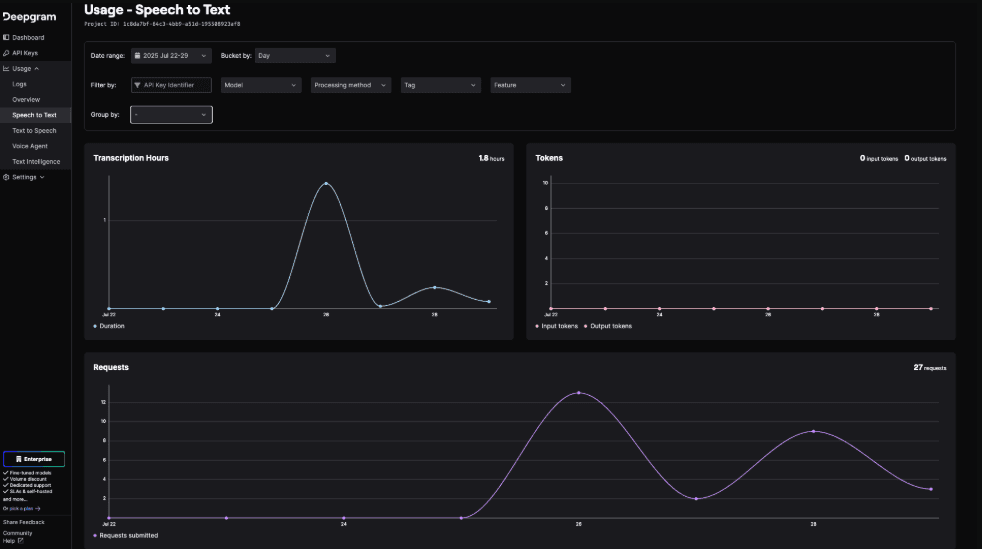
0/5
- Pay-as-you-go model
- Free demo available
Miksi luottaa ohjelmistosuosituksiimme
6,700+
Reviews
20
Industry experts
16+
Evaluation factors
14
Years
Tiimimme on testannut ja arvioinut ohjelmistoja vuodesta 2012 lähtien. Teknologiajohtajina tiedämme itse, kuinka vaikeaa — ja tärkeää — oikean ohjelmiston valitseminen on.
Tätä opasta varten arvioimme työkaluja käytännön testauksen ja itsenäisen tutkimuksen avulla, pisteyttäen työkalut valintakriteeriemme perusteella.
Arvostelumme perustuvat inhimilliseen toimitukselliseen harkintaamme, eivät myyntipuheeseen.
Asiantuntija-arvioijat:
- Paulo Gardini MiguelTech Director
 Tim FisherVP of AI
 Gabriel RosasTech Lead & Software Architect
 Christhian GruhnTech Lead & Platform Architect

Deepgram Overview
In my opinion, Deepgram stands out for its transcription accuracy and speed, particularly in noisy environments. It's a solid choice for tech and customer service teams needing reliable speech recognition. While it excels in core and standout features, its onboarding process and customer support could improve. Compared to other AI software, Deepgram offers good value for money, especially for businesses prioritizing high-quality transcription. However, teams seeking extensive customer support or those unfamiliar with AI tools might find the onboarding challenging. Overall, if you're weighing options for transcription needs, Deepgram deserves a spot on your shortlist.
Pros
- Delivers high transcription accuracy even in noisy environments.
- Processes audio quickly, saving your team time.
- Offers customizable models to fit your specific needs, including support for AI voice agents.
Cons
- Onboarding can be challenging for those new to AI tools.
- Customer support isn't as responsive as some users might like.
- The interface may feel less intuitive compared to other options.
Is Deepgram Right For Your Needs?
Who Would be a Good Fit for Deepgram?
Deepgram is a good fit for businesses in customer service, tech, and media, where fast and accurate transcription is key. If your team deals with large volumes of audio data, Deepgram's high accuracy and speed can significantly boost efficiency. Its customizable models make it ideal for industries with specific transcription needs, such as call centers or tech firms handling complex jargon and integrating TTS or LLM-based workflows.
- Customer ServiceDeepgram excels in transcribing customer interactions quickly, enabling your team to respond faster and more accurately.
- Tech CompaniesDeepgram's customizable models handle language detection and technical jargon well, making it perfect for your product development meetings or webinars.
- Media IndustryDeepgram processes large audio files quickly, supporting your content creation and editing processes efficiently.
- Call CentersThe software's accuracy in noisy environments ensures clear transcriptions for quality monitoring and training.
- Market ResearchDeepgram's speed in processing audio data aids your team in analyzing interviews and focus groups swiftly.
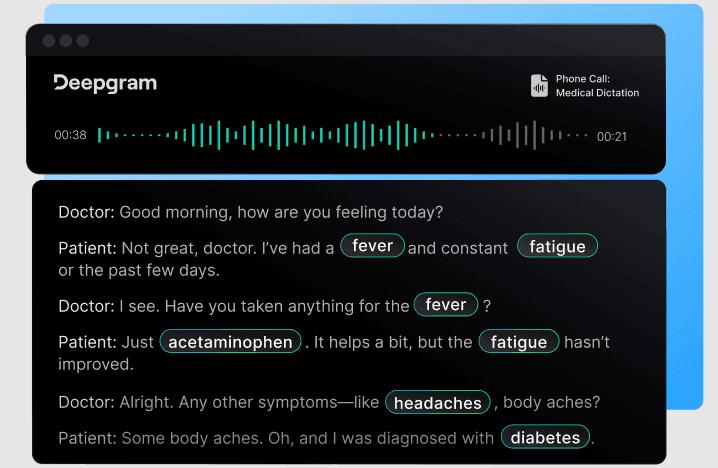
- HealthcareWith its high accuracy, Deepgram supports accurate transcription of medical dictations, assisting your team in maintaining precise records.
Who Would be a Bad Fit for Deepgram?
Deepgram might not be ideal for small businesses or teams with limited technical expertise due to its challenging onboarding process. If your team lacks experience with AI tools, you could find the setup and customization difficult. Additionally, organizations requiring extensive customer support may find Deepgram lacking, as support responsiveness isn't its strong suit.
- Small StartupsThe onboarding process can be too complex for your limited resources and technical experience.
- Non-Tech Savvy TeamsYour team might struggle with Deepgram's setup and customization without technical expertise.
- Budget-Conscious CompaniesIf your company needs extensive support and hand-holding, Deepgram's customer support may not meet expectations.
- Educational InstitutionsDeepgram's technical demands might overwhelm your administrative staff who aren't tech-oriented.
- FreelancersYou might find the software's setup and maintenance too time-consuming without a dedicated IT team.
- HR DepartmentsIf your department relies heavily on customer support, Deepgram's service might not suffice for your needs.
Our Review Methodology
How We Test & Score Tools
We’ve spent years building, refining, and improving our software testing and scoring system. The rubric is designed to capture the nuances of software selection and what makes a tool effective, focusing on critical aspects of the decision-making process.
Below, you can see exactly how our testing and scoring works across seven criteria. It allows us to provide an unbiased evaluation of the software based on core functionality, standout features, ease of use, onboarding, customer support, integrations, customer reviews, and value for money.
Core Functionality (25% of final scoring)
The starting point of our evaluation is always the core functionality of the tool. Does it have the basic features and functions that a user would expect to see? Are any of those core features locked to higher-tiered pricing plans? At its core, we expect a tool to stand up against the baseline capabilities of its competitors.
Standout Features (25% of final scoring)
Next, we evaluate uncommon standout features that go above and beyond the core functionality typically found in tools of its kind. A high score reflects specialized or unique features that make the product faster, more efficient, or offer additional value to the user.
We also evaluate how easy it is to integrate with other tools typically found in the tech stack to expand the functionality and utility of the software. Tools offering plentiful native integrations, 3rd party connections, and API access to build custom integrations score best.
Ease of Use (10% of final scoring)
We consider how quick and easy it is to execute the tasks defined in the core functionality using the tool. High scoring software is well designed, intuitive to use, offers mobile apps, provides templates, and makes relatively complex tasks seem simple.
Onboarding (10% of final scoring)
We know how important rapid team adoption is for a new platform, so we evaluate how easy it is to learn and use a tool with minimal training. We evaluate how quickly a team member can get set up and start using the tool with no experience. High scoring solutions indicate little or no support is required.
Customer Support (10% of final scoring)
We review how quick and easy it is to get unstuck and find help by phone, live chat, or knowledge base. Tools and companies that provide real-time support score best, while chatbots score worst.
Customer Reviews (10% of final scoring)
Beyond our own testing and evaluation, we consider the net promoter score from current and past customers. We review their likelihood, given the option, to choose the tool again for the core functionality. A high scoring software reflects a high net promoter score from current or past customers.
Value for Money (10% of final scoring)
Lastly, in consideration of all the other criteria, we review the average price of entry level plans against the core features and consider the value of the other evaluation criteria. Software that delivers more, for less, will score higher.
Core Features
Automatic Speech Recognition (ASR): Deepgram transcribes audio into text with high accuracy, saving your team time on manual transcription. It's particularly effective even in noisy environments.
Real-Time Processing: This feature allows you to receive transcriptions almost instantly, which is perfect for live events or quick turnaround needs.
Customizable Models: You can train Deepgram's models to understand specific jargon or accents unique to your industry, improving transcription quality.
Multi-Language Support: Deepgram supports multiple languages, helping your global team communicate and document effectively without language barriers.
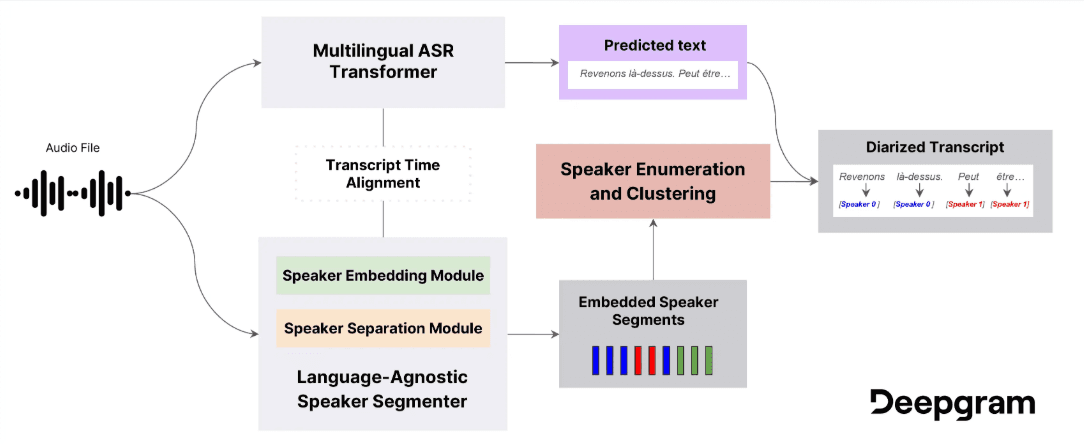
Speaker Diarization: This feature identifies different speakers in an audio file, making it easier for your team to follow conversations.
Audio File Compatibility: Deepgram works with various audio file formats, ensuring you can use existing recordings without conversion hassles.
Ease of Use
Deepgram's ease of use is moderate compared to other AI software. While its interface is functional, some users find it less intuitive, especially if you're new to AI tools. The customizable models offer flexibility, but setting them up might require a learning curve. If your team is tech-savvy, you'll likely navigate it without much trouble. However, those unfamiliar with AI technology might face challenges during onboarding.
Integrations
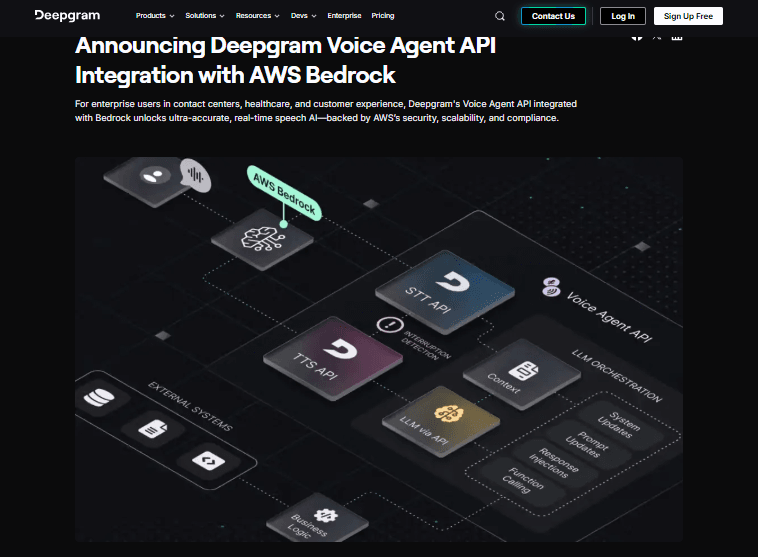
Deepgram integrates with AWS, Google Cloud, Five9, Vida, FreeSWITCH, and Porter.
Deepgram also provides an API, allowing you to connect with various third-party integration tools to enhance your work.
Deepgram Specs
- 2-Factor Authentication: Yes
- Access Management: Yes
- Anti-Virus: No
- API: Yes
- Audit Trail: Yes
- Bug Tracking: No
- Calendar Management: No
- Customer Management: No
- Dashboard: No
- Data Export: Yes
- Data Import: Yes
- Data Visualization: No
- Email Integration: No
- External Integrations: Yes
- File Sharing: No
- File Transfer: No
- Firewall: Yes
- Google Apps Integration: No
- Inventory Tracking: No
- Malware Protection: No
- Multi-User: Yes
- Network Device Performance Monitoring: No
- Network Traffic Monitoring: No
- Network Visualization: No
- Notifications: No
- Project Management: No
- Remote Access: No
- Risk Assessment: No
- SAP Integration: No
- Scheduling: No
- Software Integration: No
- Third-Party Plugins/Add-Ons: Yes
- Ticket Management: No


