

10 alternativas a MySQL Workbench para el modelado de datos en 2026

Lista de las mejores alternativas a MySQL Workbench


Una buena alternativa a MySQL Workbench ofrece una gestión fiable de bases de datos MySQL, edición intuitiva de consultas y compatibilidad flexible con distintos flujos de trabajo o plataformas. Si buscas una alternativa a MySQL Workbench, probablemente quieras herramientas que cubran carencias de usabilidad, compatibilidad o funciones avanzadas que MySQL Workbench quizá no incluya.
Muchos equipos evalúan opciones con una interfaz gráfica GUI, compatibilidad con la línea de comandos y comunidades de desarrollo activas en plataformas como GitHub, mientras que otros prefieren herramientas similares a MySQL Workbench Community Edition, pero con una experiencia más fácil de usar.
Esta guía compara las principales opciones para que puedas identificar rápidamente qué herramienta de gestión de bases de datos se adapta mejor a los requisitos técnicos, los sistemas operativos y las tareas diarias de tu equipo.
¿Qué es MySQL Workbench?
MySQL Workbench es una herramienta GUI para gestionar bases de datos MySQL que ofrece funciones de diseño de bases de datos, desarrollo de SQL y administración de servidores. Proporciona una interfaz visual para crear y editar esquemas, ejecutar consultas y gestionar usuarios o permisos. MySQL Workbench es ampliamente utilizado por administradores de bases de datos y desarrolladores que necesitan diseñar, mantener y solucionar problemas de bases de datos MySQL desde una única aplicación.
Tabla comparativa de alternativas a MySQL Workbench
Esta tabla comparativa resume los detalles de precios de mis principales alternativas seleccionadas a MySQL Workbench:
| Tool | Best For | Trial Info | Price | ||
|---|---|---|---|---|---|
| 1 | Ideal para herramientas avanzadas de desarrollo MySQL | Prueba gratuita de 30 días + demo gratuita disponible | Precio a consultar | Website | |
| 2 | Ideal para edición de bases de datos rápida e intuitiva | Prueba gratuita disponible | Desde $79/mes | Website | |
| 3 | Ideal para la gestión de bases de datos cruzadas en una sola interfaz | Prueba gratuita de 14 días disponible | Desde $25/mes | Website | |
| 4 | Ideal para autocompletado y análisis inteligente de código | Prueba gratuita de 30 días + plan gratuito + demo gratuita disponible | Desde $10.90/mes (facturado anualmente) | Website | |
| 5 | Ideal para flujos de trabajo de bases de datos enfocados en DevOps | Prueba gratuita disponible | Desde $265/usuario (facturado anualmente) | Website | |
| 6 | Ideal para edición SQL ligera en Windows | Plan gratuito disponible | Gratis para usar | Website | |
| 7 | Ideal para conectividad de bases de datos multiplataforma | Prueba gratuita de 14 días + demo gratis disponible | Precio bajo solicitud | Website | |
| 8 | Ideal para la creación visual de consultas y migración | Prueba gratuita de 15 días + demostración gratis disponible | Precios disponibles bajo solicitud | Website | |
| 9 | Ideal para cliente SQL de código abierto con interfaz moderna | Plan gratuito disponible y prueba gratuita de 14 días | Desde $9/usuario/mes (facturado anualmente) | Website | |
| 10 | Lo mejor para la administración nativa de bases de datos en macOS | Plan gratis para siempre disponible | De uso gratuito | Website |
Por qué confiar en nuestras recomendaciones de software
Nuestro equipo lleva probando y evaluando software desde 2012. Como líderes tecnológicos, sabemos lo difícil —y lo importante— que es elegir el software adecuado.
Para esta guía, evaluamos las herramientas mediante pruebas prácticas e investigación independiente, puntuando las herramientas según nuestros criterios de selección.
Nuestras reseñas reflejan nuestro criterio editorial humano, no un discurso de ventas.
Análisis de las mejores alternativas a MySQL Workbench
A continuación encontrarás mis resúmenes detallados de las alternativas a MySQL Workbench que llegaron a mi lista de selección. Mis análisis ofrecen una visión detallada de las funciones, los casos de uso más adecuados y las integraciones de cada herramienta para ayudarte a encontrar la mejor opción para ti.

Ideal para herramientas avanzadas de desarrollo MySQL

Si necesitas una alternativa a MySQL Workbench con funciones avanzadas de desarrollo, dbForge Studio for MySQL merece una mirada atenta. Esta herramienta está diseñada para desarrolladores, administradores y analistas de bases de datos que buscan un control completo sobre entornos MySQL y MariaDB. Destaca por su depurador integrado, comparación de esquemas y herramientas de autocompletado de código que van más allá de lo que la mayoría de soluciones básicas de escritorio o basadas en navegador ofrecen.
Por Qué dbForge Studio for MySQL Es una Buena Alternativa a MySQL Workbench
Para equipos que necesitan algo más que la gestión básica de bases de datos, dbForge Studio for MySQL ofrece un conjunto de herramientas avanzadas de desarrollo que lo distinguen de MySQL Workbench. Lo he elegido como alternativa porque incluye funciones como un depurador SQL integrado y un generador visual de consultas, lo que ayuda a simplificar tareas de desarrollo complejas. Las herramientas de comparación de esquemas y datos facilitan el seguimiento de cambios y la sincronización de bases de datos entre diferentes entornos. Estas capacidades son especialmente valiosas para profesionales de bases de datos que necesitan gestionar, optimizar y solucionar problemas de MySQL o MariaDB a un nivel más profundo.
Funciones Clave de dbForge Studio for MySQL
Otras funciones de dbForge Studio for MySQL lo convierten en una opción fuerte para usuarios avanzados:
- Diseñador de Diagramas de Base de Datos: Diseña y edita estructuras de bases de datos de forma visual utilizando herramientas de arrastrar y soltar.
- Generador de Datos: Crea grandes volúmenes de datos de prueba realistas para desarrollo y aseguramiento de calidad.
- Diseñador de Informes y Gráficos: Crea informes personalizados y visualizaciones de datos directamente en la plataforma.
- Formateador de Código: Da formato automáticamente al código SQL según los estándares del equipo o de la industria.
Integraciones de dbForge Studio for MySQL
Actualmente no se enumeran integraciones nativas.
Pros and Cons
Pros:
- Comparación de esquemas entre bases de datos
- Constructor visual crea consultas complejas
- Generador de datos crea conjuntos de prueba
Cons:
- Sin herramientas de colaboración integradas
- Alto consumo de recursos del sistema

Ideal para edición de bases de datos rápida e intuitiva
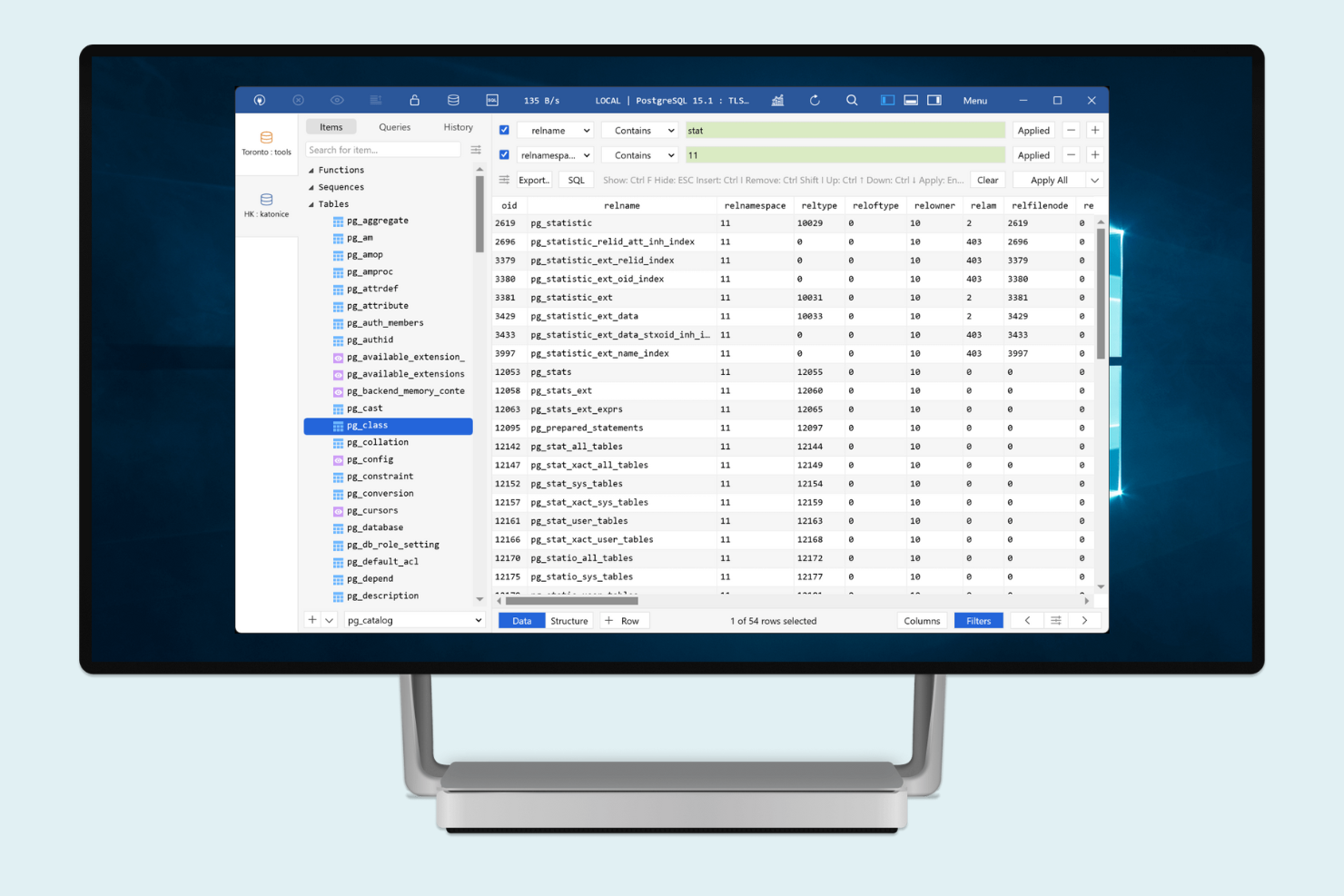
Para profesionales de bases de datos que buscan una alternativa rápida y moderna a MySQL Workbench, TablePlus ofrece una experiencia de edición simplificada. Está diseñado para desarrolladores, equipos de TI y analistas que necesitan ver, editar y gestionar datos rápidamente en varias bases de datos. TablePlus destaca por su interfaz minimalista y la rapidez en la edición de consultas, facilitando cambiar de tarea sin el desorden de las herramientas tradicionales de bases de datos.
Por qué TablePlus es una buena alternativa a MySQL Workbench
TablePlus es una excelente opción si buscas una herramienta enfocada en la edición de bases de datos rápida e intuitiva. Lo elegí porque su edición en línea te permite actualizar datos directamente en las vistas de tablas sin cuadros de diálogo ni pasos adicionales. El soporte para múltiples pestañas y ventanas te permite trabajar en varias bases de datos o consultas a la vez, lo cual es útil para quienes gestionan varios proyectos. Estas características hacen que TablePlus sea especialmente atractivo para desarrolladores y especialistas en TI que necesitan moverse rápidamente entre tareas.
Funciones clave de TablePlus
Otras funciones de TablePlus lo convierten en una opción flexible para la gestión de bases de datos:
- Compatibilidad nativa con múltiples bases de datos: Conéctate a MySQL, PostgreSQL, SQLite, SQL Server y más desde una sola aplicación.
- Editor SQL integrado con resaltado de sintaxis: Redacta y revisa consultas con sintaxis en colores y detección de errores.
- Modo seguro y revisión de código: Activa protecciones adicionales para evitar cambios accidentales de datos o consultas destructivas.
- Apariencia y atajos personalizables: Ajusta los temas y atajos de teclado según tus preferencias de trabajo.
Integraciones de TablePlus
Actualmente no se listan integraciones nativas.
Pros and Cons
Pros:
- Edición en línea de tablas para actualizar datos rápidamente
- El editor SQL incluye resaltado de sintaxis
- Múltiples pestañas para gestionar varias bases de datos
Cons:
- No incluye herramientas integradas de diagramas ER
- Sin funciones de colaboración en equipo

DBeaver
Ideal para la gestión de bases de datos cruzadas en una sola interfaz
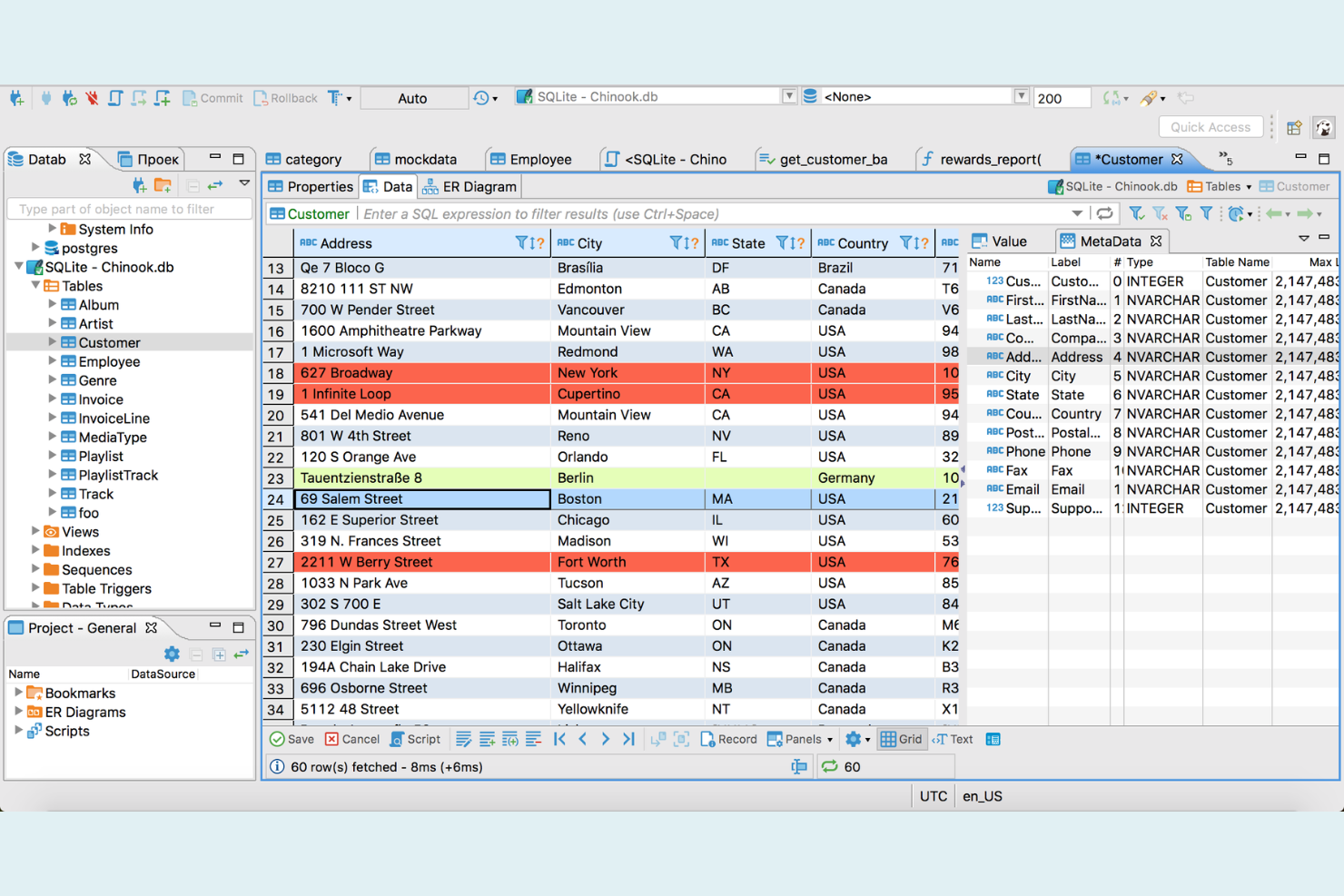
DBeaver es una herramienta de gestión de bases de datos diseñada para especialistas en TI que necesitan trabajar con múltiples sistemas de bases de datos, no solo MySQL. Destaca por su interfaz unificada que soporta una amplia gama de bases de datos, lo que la convierte en una opción ideal para equipos que gestionan entornos complejos y mixtos. Si buscas una alternativa a MySQL Workbench que simplifique los flujos de trabajo entre distintas bases de datos y centralice tus tareas SQL, DBeaver merece ser considerada. También funciona como un IDE de base de datos ligero y admite integraciones comúnmente utilizadas en entornos de desarrollo, incluyendo aquellos que trabajan con aplicaciones PHP.
Por qué DBeaver es una buena alternativa a MySQL Workbench
DBeaver destaca como alternativa a MySQL Workbench porque te permite gestionar múltiples tipos de bases de datos desde una sola interfaz. Lo seleccioné para equipos que necesitan cambiar entre MySQL, PostgreSQL, Oracle y otros sistemas sin tener que usar herramientas separadas. El editor SQL unificado de DBeaver y sus herramientas visuales de diagramas ER funcionan en todas las bases de datos compatibles, permitiendo estandarizar tu flujo de trabajo. Esta flexibilidad para trabajar entre bases de datos es especialmente útil si tu entorno incluye más que solo MySQL.
Características clave de DBeaver
Otras funcionalidades de DBeaver lo convierten en una opción versátil para profesionales de bases de datos:
- Asistente de migración de datos: Mueve datos entre distintos sistemas de bases de datos mediante un proceso guiado y paso a paso.
- Visor de planes de ejecución SQL: Analiza y optimiza el rendimiento de las consultas con planes de ejecución visuales.
- Cuadrícula de datos personalizable: Edita, filtra y ordena datos de tablas directamente en una interfaz de cuadrícula flexible.
- Gestión de conexiones de base de datos: Organiza y administra múltiples conexiones a bases de datos con carpetas, etiquetas y plantillas de conexión.
Integraciones de DBeaver
Las integraciones incluyen Microsoft Entra ID, AWS, Azure, Okta, Oracle Cloud, MongoDB, PostgreSQL, MariaDB, Docker, Kubernetes y más.
Pros and Cons
Pros:
- Soporta diversos sistemas de bases de datos
- Los diagramas ER visualizan las estructuras de las bases de datos
- Conecta múltiples bases de datos simultáneamente
Cons:
- Las funciones avanzadas requieren la versión de pago
- Algunos problemas de compatibilidad con los controladores de base de datos


Los desarrolladores y administradores de bases de datos que buscan asistencia avanzada para la escritura de código a menudo recurren a DataGrip como una alternativa a MySQL Workbench. Esta herramienta está diseñada para quienes desean autocompletado inteligente, análisis en tiempo real y soporte para refactorización en múltiples sistemas de bases de datos. DataGrip destaca por ayudar a los usuarios a detectar errores antes y escribir SQL más preciso, lo que lo hace especialmente útil para equipos que gestionan bases de datos complejas o críticas.
Por qué DataGrip es una buena alternativa a MySQL Workbench
Si necesitas una herramienta que vaya más allá de la simple edición de consultas, el autocompletado y análisis inteligentes de DataGrip lo diferencian de MySQL Workbench. Elegí DataGrip porque su autocompletado de código contextual te ayuda a escribir SQL preciso más rápido, incluso en varios tipos de bases de datos. La detección de errores en tiempo real y las sugerencias de corrección rápida identifican fallos antes de ejecutar consultas, lo cual es especialmente valioso en entornos complejos o de producción. Estas características hacen que DataGrip sea una excelente opción para especialistas en TI y desarrolladores que buscan reducir errores y mejorar la calidad del código en sus trabajos con bases de datos.
Funciones clave de DataGrip
Otras funciones de DataGrip lo convierten en una elección versátil para profesionales de bases de datos:
- Soporte para múltiples sistemas de bases de datos: Conéctate a MySQL, PostgreSQL, Oracle, SQL Server y más desde una sola interfaz.
- Integración con control de versiones: Trabaja con Git, Mercurial y otras herramientas VCS directamente dentro de la plataforma.
- Visualización de datos personalizable: Genera y ajusta vistas de tablas y resultados de acuerdo a tu flujo de trabajo.
- Navegación y búsqueda de esquemas: Localiza rápidamente tablas, columnas y procedimientos utilizando herramientas avanzadas de búsqueda y navegación.
Integraciones de DataGrip
Actualmente no se enumeran integraciones nativas.
Pros and Cons
Pros:
- Soporta múltiples sistemas de bases de datos
- Autocompletado contextual de código SQL
- Búsqueda avanzada para esquemas grandes
Cons:
- Consume más recursos que clientes más ligeros
- La configuración consume tiempo para los nuevos usuarios

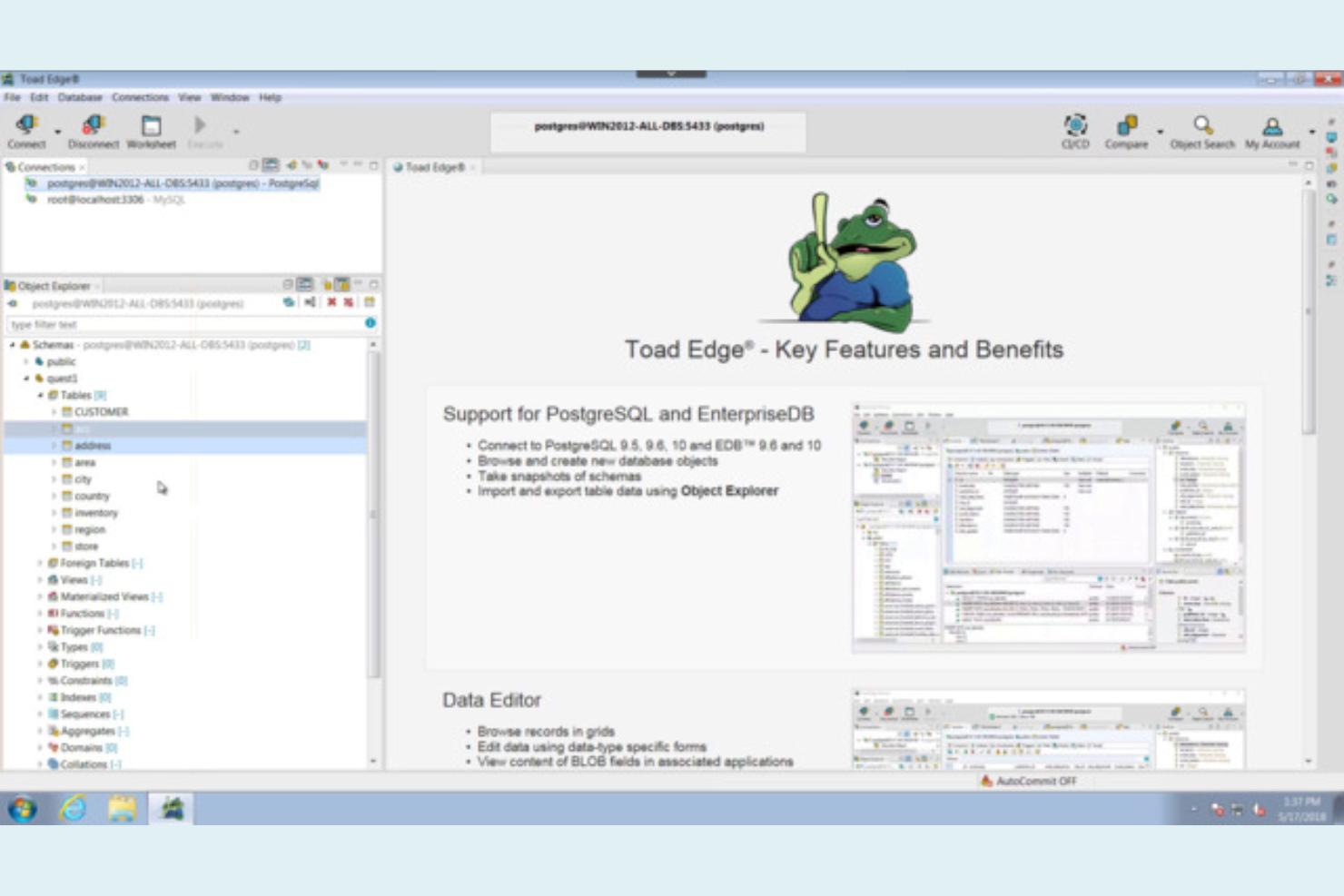
Para profesionales de bases de datos que necesitan flujos de trabajo compatibles con DevOps, Toad Edge ofrece una alternativa focalizada a MySQL Workbench. Esta herramienta está diseñada para equipos de TI, ingenieros DevOps y administradores de bases de datos que desean integrar el desarrollo y despliegue de bases de datos en sus procesos CI/CD. Toad Edge destaca por funciones de control de versiones, automatización y colaboración que respaldan las prácticas modernas de DevOps.
Por qué Toad Edge es una buena alternativa a MySQL Workbench
A diferencia de MySQL Workbench, Toad Edge está diseñado pensando en flujos de trabajo enfocados en DevOps, lo que lo convierte en una excelente opción para equipos que necesitan integrar la gestión de bases de datos en sus procesos CI/CD. Elegí Toad Edge porque admite integración con control de versiones, lo que permite rastrear y gestionar los cambios en el esquema junto con el código de la aplicación. La herramienta también ofrece funciones de automatización para el despliegue y reversión de bases de datos, ayudando a reducir errores manuales durante los lanzamientos. Para especialistas TI e ingenieros DevOps, estas capacidades hacen de Toad Edge una opción práctica para el desarrollo colaborativo y moderno de bases de datos.
Principales características de Toad Edge
Otras funciones de Toad Edge lo convierten en una opción versátil para equipos de bases de datos:
- Comparación y sincronización de esquemas: Identifica y sincroniza diferencias entre esquemas de bases de datos a través de distintos entornos.
- Comparación y sincronización de datos: Compara y actualiza datos entre bases de datos para garantizar la consistencia.
- Hoja de trabajo SQL con autocompletado: Escribe y ejecuta consultas SQL con resaltado de sintaxis y autocompletado.
- Soporte para bases de datos basadas en contenedores: Implementa y gestiona instancias de bases de datos en contenedores para desarrollo y pruebas.
Integraciones de Toad Edge.
Actualmente no se listan integraciones nativas.
Pros and Cons
Pros:
- Las instancias en contenedores soportan entornos de pruebas
- Los diagramas ER diseñan esquemas de bases de datos
- El editor SQL incluye autocompletado de código
Cons:
- Sin herramientas de análisis de rendimiento de consultas
- Problemas de estabilidad con bases de datos grandes


HeidiSQL es un editor SQL para Windows diseñado para administradores de bases de datos y desarrolladores que buscan una alternativa rápida y ligera a MySQL Workbench. Es especialmente útil para quienes necesitan gestionar bases de datos MySQL, MariaDB o PostgreSQL sin la sobrecarga de una herramienta más grande. Si buscas una manera sencilla de manejar tareas SQL en Windows, HeidiSQL mantiene todo eficiente y enfocado.
Por Qué HeidiSQL Es una Buena Alternativa a MySQL Workbench
Para cualquiera que necesite un editor SQL ligero en Windows, HeidiSQL ofrece una alternativa enfocada a MySQL Workbench. Lo elegí porque se instala rápidamente, funciona con recursos mínimos del sistema y no requiere dependencias adicionales. HeidiSQL permite conexiones directas a MySQL, MariaDB y PostgreSQL, lo que te permite gestionar varias bases de datos desde una sola ventana. Su versión portable es especialmente útil si quieres trabajar en diferentes equipos sin una instalación completa.
Funciones Clave de HeidiSQL
Otras funciones de HeidiSQL lo convierten en una opción práctica para el trabajo con bases de datos:
- Herramientas de Inserción y Exportación por Lotes: Importa y exporta datos en varios formatos, incluidos CSV, SQL y XML.
- Gestión de Sesiones: Guarda y organiza configuraciones de conexión para acceder rápidamente a múltiples servidores.
- Diseñador Visual de Tablas: Crea y modifica estructuras de tablas usando una interfaz gráfica.
- Panel de Historial de Consultas: Consulta y reutiliza consultas SQL previas desde una lista de historial con función de búsqueda.
Integraciones de HeidiSQL
Actualmente no se listan integraciones nativas.
Pros and Cons
Pros:
- Funciona sin problemas en equipos de bajos recursos
- Se conecta a múltiples sistemas de bases de datos
- Incluye herramientas de exportación e importación por lotes
Cons:
- No cuenta con herramientas avanzadas de modelado de bases de datos
- No tiene programador de copias de seguridad automáticas

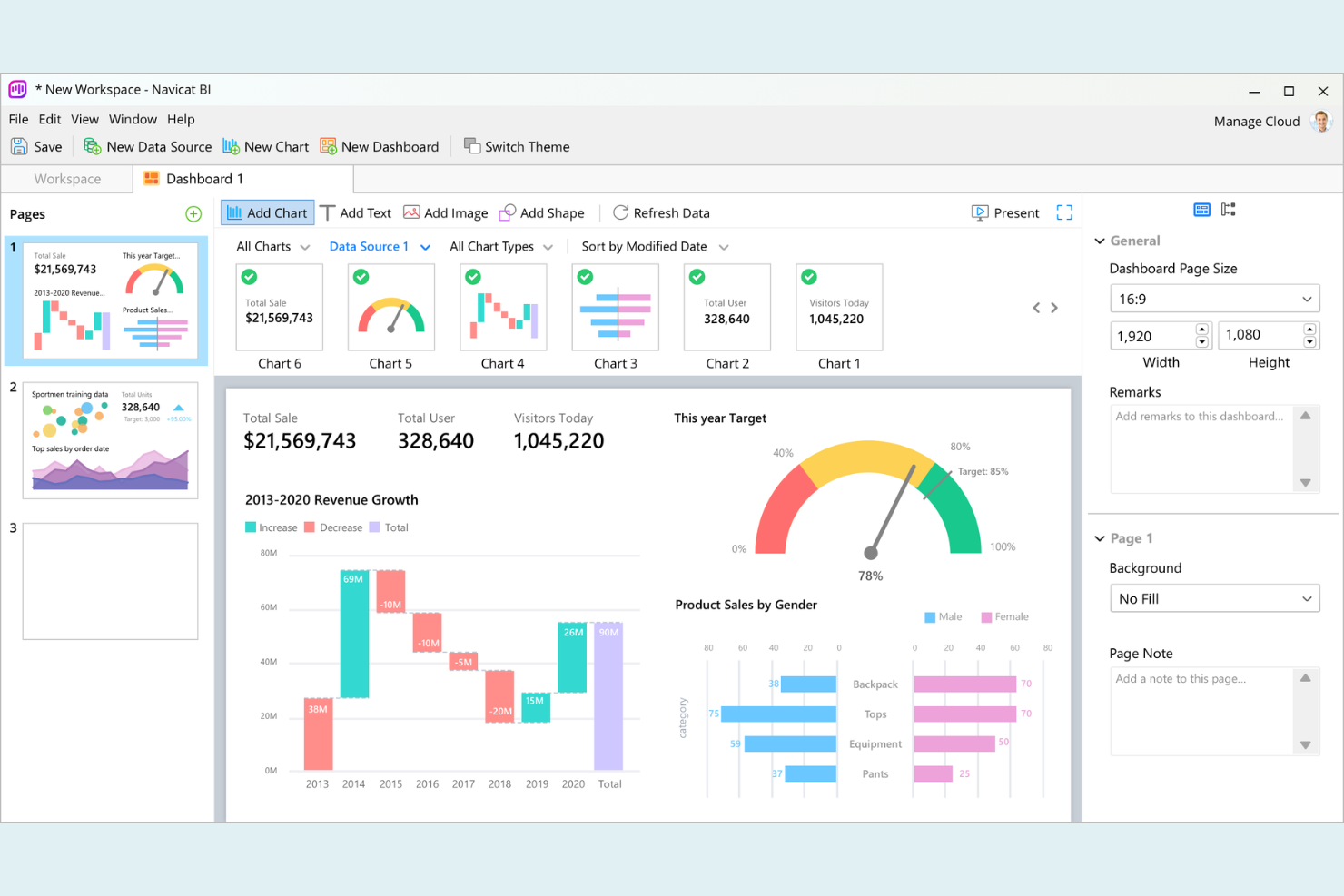
Navicat destaca para los profesionales de bases de datos que necesitan gestionar múltiples tipos de bases de datos a través de diferentes sistemas operativos. Está diseñado para equipos de TI, desarrolladores y analistas que trabajan con MySQL junto a otras bases de datos como PostgreSQL, Oracle y SQL Server. A diferencia de MySQL Workbench, Navicat te permite conectar, administrar y migrar datos entre varias plataformas desde una sola interfaz.
Por qué Navicat es una buena alternativa a MySQL Workbench
Si necesitas gestionar bases de datos en diferentes plataformas y sistemas operativos, Navicat es una excelente alternativa a MySQL Workbench. Lo elegí porque admite conexiones directas a MySQL, MariaDB, PostgreSQL, Oracle, SQL Server y más, todo desde una sola aplicación. Navicat también te permite migrar datos y sincronizar esquemas entre diferentes tipos de bases de datos, algo que MySQL Workbench no ofrece. Esta flexibilidad multiplataforma resulta especialmente útil para equipos de TI y desarrolladores que trabajan en entornos con bases de datos mixtas.
Funciones clave de Navicat
Otras características de Navicat lo convierten en una opción versátil para la gestión de bases de datos:
- Constructor visual de SQL: Crea y edita consultas SQL usando una interfaz de arrastrar y soltar.
- Herramienta de modelado de datos: Diseña y modifica estructuras de bases de datos visualmente con diagramas ER.
- Respaldo automatizado y programación: Configura copias de seguridad programadas y automatiza tareas rutinarias de bases de datos.
- Asistente de importación y exportación de datos: Transfiere datos entre bases de datos y formatos de archivo con instrucciones paso a paso.
Integraciones de Navicat
Actualmente no se encuentran integraciones nativas listadas.
Pros and Cons
Pros:
- Multiplataforma en Windows, macOS, Linux
- Constructor visual de SQL para crear consultas
- Programación de respaldos automatizados para tareas de bases de datos
Cons:
- Alto consumo de recursos en grandes operaciones
- Requiere licencia de pago sin versión gratuita

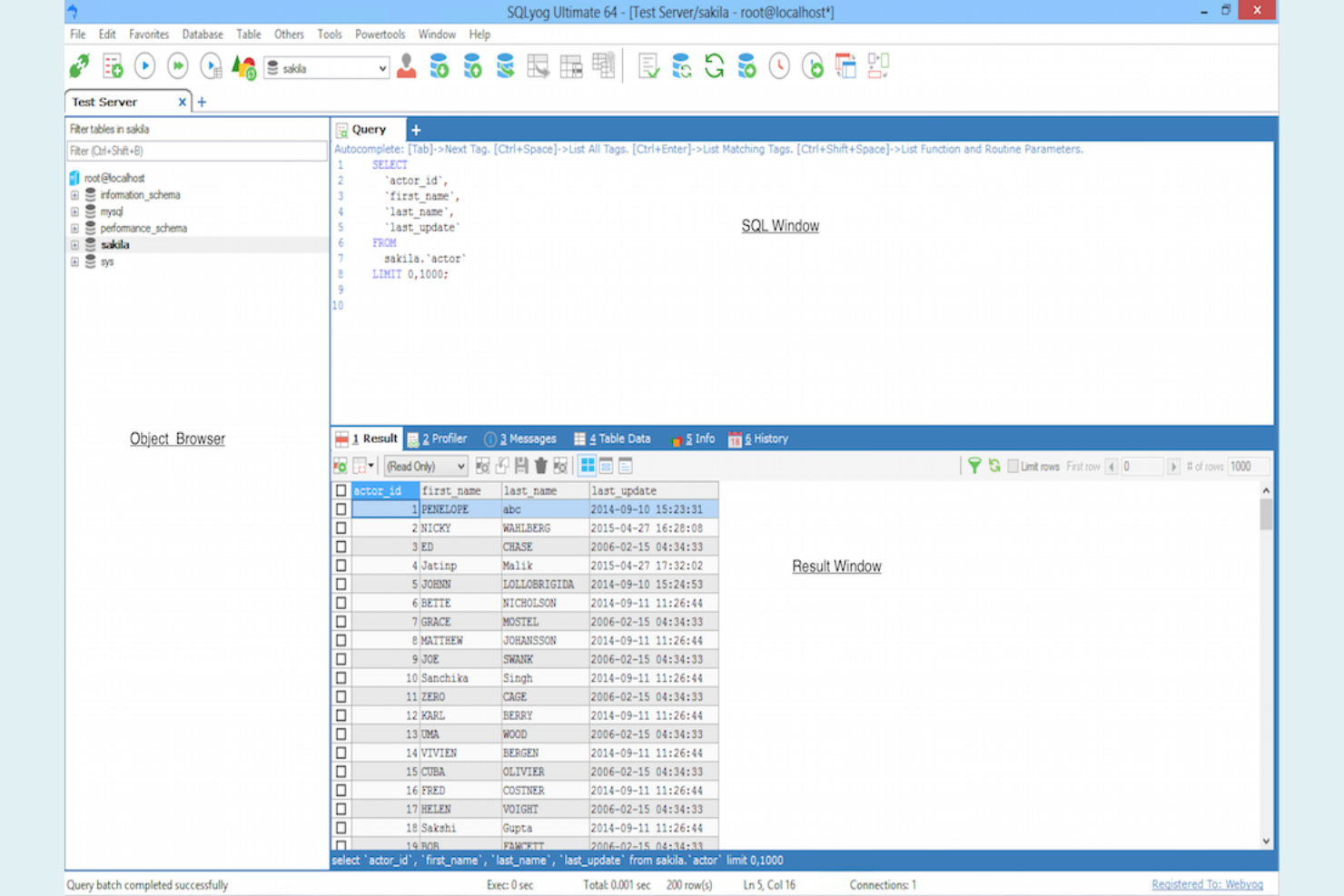
Para los profesionales de bases de datos que buscan un enfoque más visual para la creación de consultas y la migración, SQLyog ofrece una alternativa distinta a MySQL Workbench. Su generador de consultas con función de arrastrar y soltar, junto con sus herramientas de migración, están diseñados para usuarios que necesitan administrar y transferir datos sin escribir SQL complejo manualmente. SQLyog es especialmente útil para equipos de TI y administradores de bases de datos que manejan migraciones frecuentes o trabajan con entornos MySQL grandes y complejos.
Por qué SQLyog es una buena alternativa a MySQL Workbench
A diferencia de muchas otras herramientas de gestión de MySQL, SQLyog se destaca por sus capacidades visuales tanto en la creación de consultas como en la migración. Elegí SQLyog porque su generador de consultas con función de arrastrar y soltar te permite diseñar consultas complejas sin tener que escribir SQL de forma manual, lo cual es especialmente útil para equipos que desean reducir errores de codificación. El asistente de migración permite transferencias de datos directas entre servidores, facilitando el movimiento de bases de datos o la sincronización de entornos. Estas características hacen de SQLyog una opción sólida para especialistas de TI y administradores de bases de datos que buscan simplificar la creación de consultas y las tareas de migración.
Características principales de SQLyog
Otras funciones en SQLyog lo convierten en una opción práctica para la gestión de bases de datos:
- Copias de seguridad programadas: Automatiza las copias de seguridad regulares mediante herramientas de programación integradas.
- Sincronización de datos: Compara y sincroniza datos entre diferentes servidores o bases de datos MySQL.
- Perfilado de consultas: Analiza y optimiza el rendimiento de las consultas con herramientas de perfilado integradas.
- Túneles SSH y HTTP: Conéctate de forma segura a servidores MySQL remotos mediante túneles SSH o HTTP.
Integraciones de SQLyog
Actualmente no se listan integraciones nativas.
Pros and Cons
Pros:
- El asistente de migración facilita el traslado de bases de datos
- Las copias de seguridad programadas automatizan la protección de bases de datos
- La herramienta de sincronización compara datos de servidores
Cons:
- Solo disponible en Windows, sin soporte para macOS
- La interfaz parece anticuada frente a otras alternativas

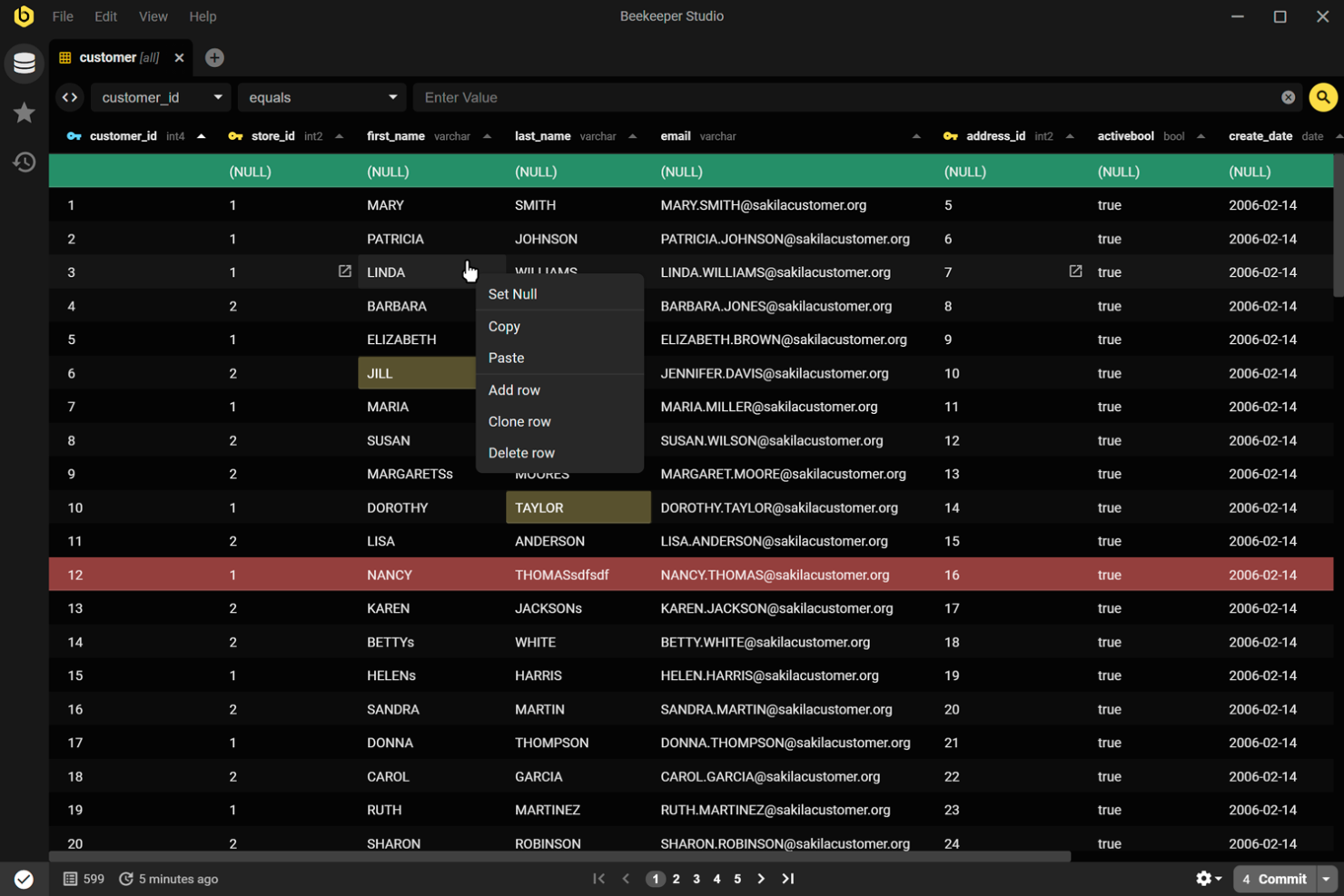
Si buscas un cliente SQL moderno y de código abierto que funcione en varias plataformas, Beekeeper Studio destaca. Está diseñado para profesionales de bases de datos y desarrolladores que desean una interfaz limpia e intuitiva sin sacrificar funciones avanzadas. Beekeeper Studio resulta especialmente atractivo si necesitas una alternativa a MySQL Workbench que sea de código abierto y esté centrada en la experiencia del usuario.
Por qué Beekeeper Studio es una buena alternativa a MySQL Workbench
A diferencia de muchos clientes SQL, Beekeeper Studio es completamente de código abierto y está construido con una interfaz moderna y visualmente atractiva. Lo elegí porque se ejecuta de forma nativa en Windows, macOS y Linux, lo que lo convierte en una opción flexible para equipos con entornos mixtos. El editor de consultas con pestañas y la función de auto-guardado te ayudan a gestionar múltiples sesiones de bases de datos sin perder tu trabajo. Su modo oscuro y temas personalizables también hacen que las largas sesiones de base de datos sean más cómodas para quienes valoran una interfaz pulida.
Funciones clave de Beekeeper Studio
Otras funciones de Beekeeper Studio lo convierten en una opción sólida para la gestión de bases de datos:
- Soporte para cifrado de conexiones: Protege tus conexiones de base de datos con SSL y tunelización SSH.
- Soporte multidatabase: Conéctate a MySQL, PostgreSQL, SQLite, SQL Server y más desde una sola interfaz.
- Edición de tablas de resultados: Edita los resultados de las consultas directamente en la cuadrícula antes de guardar los cambios.
- Biblioteca de consultas guardadas: Organiza y accede a las consultas SQL que usas con frecuencia desde una biblioteca incorporada.
Integraciones de Beekeeper Studio
Actualmente no se listan integraciones nativas.
Pros and Cons
Pros:
- Se ejecuta de forma nativa en Windows, macOS y Linux
- La licencia de código abierto garantiza transparencia
- Compatible con MySQL, PostgreSQL y SQLite
Cons:
- No cuenta con herramientas de modelado visual de bases de datos
- No tiene funciones de comparación de esquemas
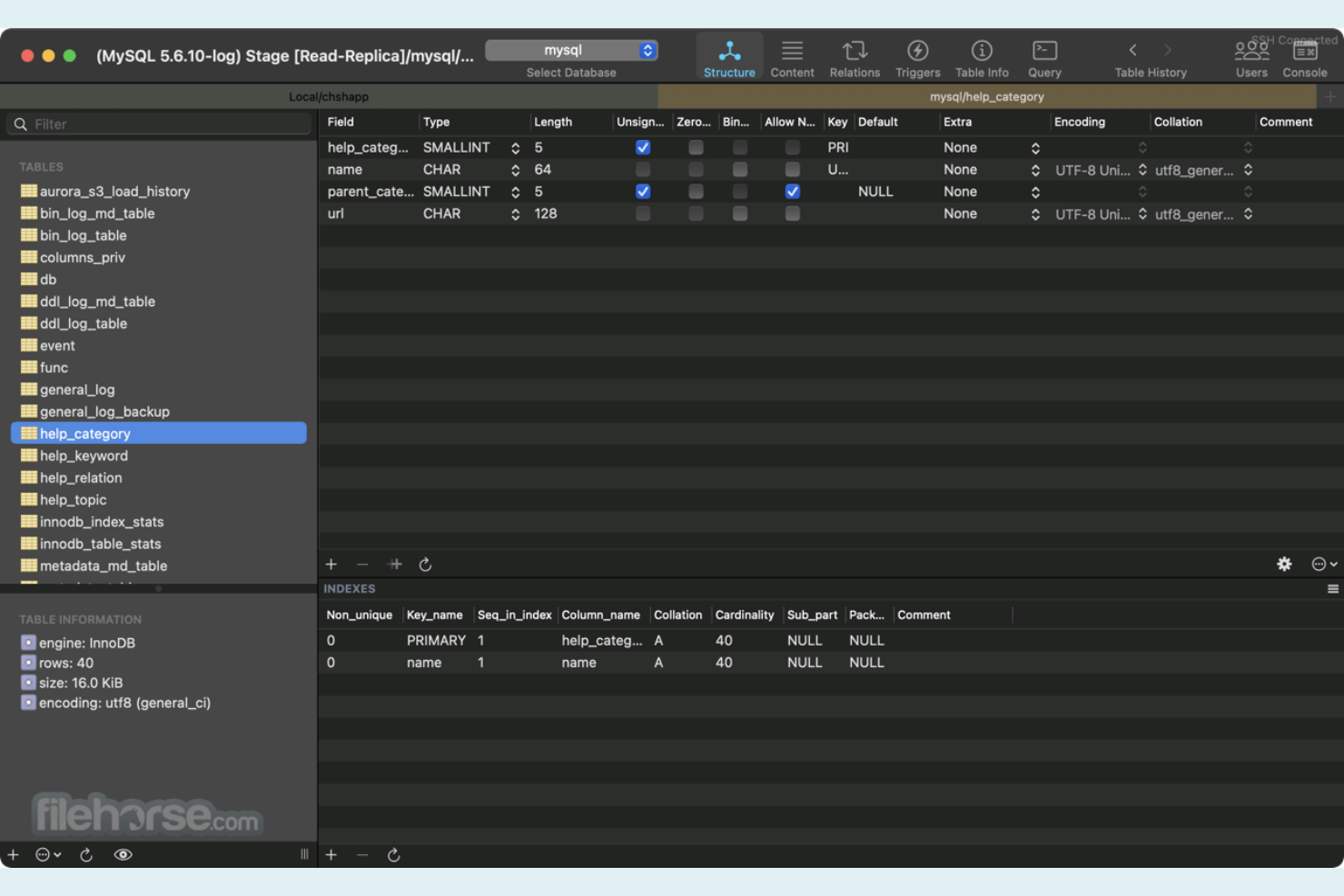
Para administradores de bases de datos y desarrolladores que trabajan exclusivamente en macOS, Sequel Ace ofrece una experiencia nativa que MySQL Workbench no puede igualar. Está construido específicamente para entornos Apple, lo que lo convierte en una excelente opción para equipos comprometidos con el ecosistema macOS. Sequel Ace es especialmente útil si buscas una gestión rápida y fiable de MySQL y MariaDB, con una interfaz de usuario que se integra perfectamente en tu Mac.
Por Qué Sequel Ace Es una Buena Alternativa a MySQL Workbench
Si buscas una alternativa a MySQL Workbench diseñada específicamente para macOS, Sequel Ace es una de las mejores opciones. Lo recomiendo porque aprovecha completamente las funciones nativas de macOS, incluyendo compatibilidad con la Touch Bar y notificaciones del sistema, características que no ofrecen las herramientas multiplataforma. Sequel Ace también ofrece una gestión de conexiones rápida y acceso directo a bases de datos MySQL y MariaDB, lo que lo hace ideal para usuarios de Mac que desean una experiencia ágil y centrada en Apple. Su interfaz se siente como una extensión natural del entorno macOS, lo que puede hacer que las tareas diarias de bases de datos sean más eficientes para equipos enfocados en Mac.
Funciones Destacadas de Sequel Ace
Otras funciones de Sequel Ace lo convierten en una opción robusta para profesionales de bases de datos:
- Historial de Consultas: Revisa y reutiliza consultas SQL anteriores desde un panel de historial organizado.
- Editor de Estructura de Tablas: Modifica columnas, índices y relaciones de tablas directamente en la aplicación.
- Herramientas de Importación y Exportación: Transfiere datos dentro y fuera de las bases de datos usando soporte de archivos CSV y SQL.
- Compatibilidad con Túnel SSH: Conéctate de forma segura a bases de datos remotas mediante túneles SSH integrados.
Integraciones de Sequel Ace
Actualmente no se enumeran integraciones nativas.
Pros and Cons
Pros:
- Conexiones directas y por SSH a bases de datos
- El historial de consultas permite acceder a sentencias previas
- El editor de tablas modifica esquemas dentro de la app
Cons:
- Gestión limitada de usuarios de bases de datos
- Las opciones de importación y exportación son limitadas
Otras alternativas a MySQL Workbench
Estas son algunas alternativas adicionales a MySQL Workbench que no llegaron a mi lista de selección, pero que aún merece la pena conocer:
- phpMyAdmin
Ideal para la administración de MySQL desde el navegador
- DbVisualizer
Ideal para compatibilidad universal de bases de datos
- DrawSQL
Ideal para compartir diagramas ER en equipo


Cómo Evalúo las Alternativas a MySQL Workbench
Analizo las alternativas a MySQL Workbench en dos niveles: los requisitos principales que una herramienta debe cumplir—soporte nativo para MySQL, un editor SQL real, modelado de esquemas—y los diferenciadores que determinan cuál es la mejor opción.
Funcionalidad Básica (Imprescindibles para Esta Lista)
Al seleccionar herramientas para mi lista, califico cada una en una escala del 0 (no ofrece la funcionalidad) al 5 (destaca en esta área) respecto a cada funcionalidad central que detallo a continuación. Después, calculo la puntuación total de la herramienta en un porcentaje. Cada herramienta necesita alcanzar una puntuación mínima total del 65% para ser considerada.
- Editor SQL y Ejecución de Consultas: Evalúo la profundidad del autocompletado, la precisión del resaltado de sintaxis y la gestión de la cuadrícula de resultados, cosas como ejecutar scripts de varias sentencias e inspeccionar grandes conjuntos de resultados en línea.
- Diseño y Modelado de Esquemas: Busco diagramación ER con ingeniería directa e inversa, similar a cómo se visualizan las relaciones entre tablas antes de escribir scripts de migración.
- Conectividad Nativa a MySQL: Cada herramienta debe conectarse de forma nativa a bases de datos MySQL con acceso completo de lectura y escritura, incluyendo soporte para túneles SSH y conexiones SSL a instancias remotas o en la nube.
- Herramientas de Administración de Bases de Datos: Administrar usuarios, asignar privilegios y monitorizar sesiones activas desde una interfaz gráfica es importante—especialmente cuando tienes que solucionar problemas en producción a las 2 a. m. y necesitas visibilidad rápida a nivel de servidor.
- Importación, Exportación y Migración de Datos: Reviso si la herramienta gestiona importación/exportación en múltiples formatos (volcados SQL, CSV, JSON) y si soporta flujos de trabajo de respaldo y restauración para mover datos entre entornos de pruebas y producción.
- Soporte para Múltiples Motores de Bases de Datos: Herramientas como DBeaver y DataGrip se conectan a PostgreSQL, SQL Server, Oracle y más junto con MySQL, así que evalúo cuántos motores soporta una herramienta y si la funcionalidad se mantiene en todos.
Una vez que tengo una lista de herramientas que cumplen estos criterios, considero lo que diferencia a cada plataforma.
Factores Diferenciadores (Qué Distingue a los Proveedores)
Así comparo y contrasto los diferentes proveedores:
Características Destacadas
La asistencia impulsada por IA para consultas es un verdadero diferenciador. Herramientas como DataGrip y DBeaver ofrecen funciones de lenguaje natural a SQL que te ayudan a escribir y optimizar consultas más rápido. Las conexiones compartidas y las bibliotecas de consultas guardadas son importantes para la colaboración en equipo. Verifico si varios DBA y desarrolladores pueden trabajar en el mismo entorno sin interferirse entre sí. El monitoreo del rendimiento y la visualización de planes de ejecución completan todo el conjunto, especialmente cuando necesitas identificar consultas lentas en bases de datos en producción.
Más Allá de la Funcionalidad
Los modelos de licenciamiento y despliegue varían mucho en este sector. Algunas herramientas como DBeaver y HeidiSQL ofrecen ediciones de código abierto, mientras que otras como DataGrip son solo comerciales. Evalúo si la estructura de licencias se adapta al crecimiento de tu equipo. La compatibilidad con bases de datos en la nube también es relevante—reviso el soporte nativo para servicios gestionados como AWS RDS, Aurora y Azure Database for MySQL. Finalmente, considero la estabilidad bajo cargas reales. Una herramienta que falla al devolver grandes conjuntos de resultados o se vuelve lenta con varias conexiones abiertas genera más problemas de los que resuelve.
¿Por qué buscar una alternativa a MySQL Workbench?
Aunque MySQL Workbench es una buena opción, hay varios motivos por los que algunos usuarios buscan soluciones alternativas. Es posible que busques una alternativa a MySQL Workbench porque…
- Necesitas compatibilidad integrada con DevOps o flujos de trabajo de CI/CD
- Quieres herramientas más avanzadas para comparar esquemas o datos
- Necesitas funciones de colaboración en equipo en tiempo real
- Trabajas con entornos de bases de datos en contenedores o nativos de la nube
- Necesitas compatibilidad con tipos de bases de datos adicionales, además de MySQL y MariaDB
- Quieres una interfaz de usuario más moderna o personalizable
Si alguno de estos puntos refleja tu situación, has llegado al lugar adecuado. Mi lista incluye varias alternativas a MySQL Workbench más adecuadas para equipos que afrontan estos desafíos con MySQL Workbench y buscan soluciones alternativas.
Funciones
Estas son algunas de las funciones principales de MySQL Workbench, para ayudarte a contrastar y comparar lo que ofrecen las soluciones alternativas:
- Diseño y modelado visual de esquemas de bases de datos
- Editor de consultas SQL con resaltado de sintaxis
- Ingeniería directa e inversa de bases de datos
- Herramientas de sincronización de esquemas y datos
- Generación y edición de diagramas entidad-relación
- Interfaz de gestión de usuarios y privilegios
- Panel de rendimiento y estadísticas de consultas
- Asistente de migración de datos para importar desde otras bases de datos
- Herramientas visuales para realizar copias de seguridad y restaurar bases de datos
- Compatibilidad con plugins y extensiones para añadir funcionalidades