
TinyMDM Bewertung 2026: Vorteile, Nachteile, Funktionen und Preise
I judge TinyMDM less by feature count than by fit: this review weighs its strengths, trade-offs, and pricing to help you decide if it suits your device fleet.

Wir bewerten Tools unabhängig; Provisionen helfen, unsere Tests zu finanzieren. Siehe unsere Transparenzrichtlinie und unsere Methodik.
TinyMDM is MDM software for managing Android devices from one console, suited to teams that need to secure and configure a company-owned or mixed-use fleet without a dedicated MDM team. If you’re comparing it with ManageEngine, TinyMDM is a good choice when you want Android-focused device controls through a simpler interface and straightforward per-device pricing.
TinyMDM Evaluation Summary
4.7/5
- From $2.40/device/year (billed annually)
- 30-day free trial
Warum Sie unseren Software-Empfehlungen vertrauen können
6,700+
Reviews
20
Industry experts
16+
Evaluation factors
14
Years
Unser Team testet und bewertet Software seit 2012. Als Tech-Führungskräfte wissen wir selbst, wie schwierig – und wichtig – es ist, die richtige Software auszuwählen.
Für diesen Leitfaden haben wir Tools mithilfe von praktischen Tests und unabhängiger Recherche bewertet und dabei unsere Bewertungskriterien angewendet.
Unsere Bewertungen spiegeln unser menschliches redaktionelles Urteilsvermögen wider, keine Verkaufsstrategie.
Expertenprüfer:
- Paulo Gardini MiguelTech-Direktor
 Tim FisherVP für KI
 Gabriel RosasTech Lead & Software-Architekt
 Christhian GruhnTech Lead & Plattform-Architekt

TinyMDM Overview
When choosing an MDM, I’d judge TinyMDM by its Android focus: it pairs app deployment, kiosk controls, remote lock and wipe, and device policies with a simpler interface than broad cross-platform suites A 30-day trial, zero-touch or Samsung KME enrollment, Microsoft Entra ID sync, and an API ease setup and integration. I’d select it for Android-only fleets and frontline or kiosk devices, but not mixed-OS environments that need one console for multiple platforms.
Pros
- Flat per-device pricing includes the full feature set.
- Kiosk controls and silent app deployment suit dedicated fleets.
- Reviewers praise responsive support and centralized device management.
Cons
- Android-only management excludes iOS and Windows fleets.
- Reviewers report slow policy updates and cumbersome app deployments.
- Managing large device lists can make the console unwieldy.
Is TinyMDM Right For Your Needs?
Who Would be a Good Fit for TinyMDM?
TinyMDM fits teams managing straightforward Android fleets that need app deployment, kiosk controls, and security policies in one focused console. Its per-device pricing and included features also suit smaller organizations that want predictable costs.
- Small BusinessesAt $2.40 per device monthly with annual billing, TinyMDM offers small businesses app deployment, security policies, and remote lock or wipe at a predictable price.
- Retail StoresRetail teams can use kiosk controls to restrict Android devices to the apps and functions needed for store tasks.
- Field ServiceField service teams can deploy apps and security policies to Android devices and remotely lock or wipe them if a device is lost.
- SchoolsSchools managing Android tablets can use app deployment and policy controls to configure devices for student or staff use.
- Clinic DevicesClinics with straightforward Android fleets can apply security policies and remotely lock or wipe devices, without relying on unverified healthcare compliance claims.
- Lean IT TeamsSmall IT teams can use TinyMDM’s setup guide, tutorials, and included support to manage Android enrollment, policies, and apps without a broad MDM suite.
Who Would be a Bad Fit for TinyMDM?
TinyMDM may not suit organizations that need broad platform coverage, complex integrations, or fast policy changes across very large fleets. Reviewers report cumbersome app deployments, slow policy updates, and an unwieldy console with large device lists. Fully managed deployments can also require factory-reset enrollment, adding a step for devices already in use.
- Mixed-OS FleetsOrganizations managing Android alongside other operating systems should look for broader platform coverage than TinyMDM’s Android-focused administration provides.
- Large FleetsIT teams managing large device lists may find the console unwieldy, and reviewers also report slow policy updates.
- Frequent App ChangesTeams that regularly push app updates across many devices may struggle with reviewer-reported cumbersome app deployments.
- Complex IntegrationsOrganizations that need many specified third-party connectors may find the listed options limited to Entra ID, Android Zero-Touch, Samsung enrollment, KSP, and an API.
- Active DevicesTeams enrolling fully managed devices that cannot be factory-reset should account for the added reset step in TinyMDM’s enrollment process.
- Rapid Policy ChangesOperations that depend on quick policy rollouts across a large fleet may be a poor fit given reports of slow policy updates.
Unsere Bewertungsmethodik
Wie wir Werkzeuge testen & bewerten
Wir haben Jahre damit verbracht, unser System zur Softwareprüfung und -bewertung aufzubauen, zu verfeinern und zu verbessern. Das Bewertungsraster ist darauf ausgelegt, die Feinheiten der Softwareauswahl und Effektivität eines Tools einzufangen, wobei wir uns auf kritische Aspekte des Entscheidungsprozesses konzentrieren.
Nachfolgend sehen Sie genau, wie unser Test- und Bewertungssystem anhand von sieben Kriterien funktioniert. Es ermöglicht uns eine unparteiische Bewertung der Software basierend auf Grundfunktionalität, besonderen Funktionen, Benutzerfreundlichkeit, Onboarding, Kundensupport, Integrationen, Kundenbewertungen und Preis-Leistungs-Verhältnis.
Grundfunktionalität (25 % der Endbewertung)
Der Ausgangspunkt unserer Bewertung ist immer die Grundfunktionalität des Werkzeugs. Verfügt es über die grundlegenden Funktionen und Merkmale, die ein Benutzer erwarten würde? Sind grundlegende Funktionen auf höherpreisige Tarife beschränkt? Im Kern erwarten wir, dass ein Tool den Basisfähigkeiten seiner Konkurrenten standhält.
Besondere Features (25 % der Endbewertung)
Anschließend bewerten wir ungewöhnliche, herausragende Funktionen, die über die typische Grundfunktionalität von Tools dieser Art hinausgehen. Eine hohe Bewertung zeigt spezialisierte oder einzigartige Eigenschaften, die das Produkt schneller, effizienter oder für den Nutzer wertvoller machen.
Wir bewerten außerdem, wie einfach sich das Tool mit anderen üblichen Werkzeugen im Technologie-Stack integrieren lässt, um die Funktionalität und den Nutzen der Software zu erweitern. Tools mit vielen nativen Integrationen, Drittanbieter-Anbindungen und API-Zugang zur Erstellung kundenspezifischer Integrationen erhalten die besten Bewertungen.
Benutzerfreundlichkeit (10 % der Endbewertung)
Wir betrachten, wie schnell und einfach Aufgaben aus dem Bereich der Grundfunktionalität mit dem Tool erledigt werden können. Gut bewertete Software ist durchdacht gestaltet, intuitiv bedienbar, bietet mobile Apps, Vorlagen und lässt relativ komplexe Aufgaben einfach erscheinen.
Onboarding (10 % der Endbewertung)
Wir wissen, wie wichtig die schnelle Einführung eines neuen Tools für das Team ist, daher bewerten wir, wie leicht sich ein Werkzeug mit minimalem Training erlernen und nutzen lässt. Wir bewerten, wie schnell ein Teammitglied ohne Vorerfahrung anfangen kann. Hoch bewertete Lösungen benötigen wenig bis gar keine Unterstützung.
Kundensupport (10 % der Endbewertung)
Wir prüfen, wie schnell und einfach man bei Problemen Hilfe per Telefon, Live-Chat oder Wissensdatenbank erhält. Tools und Anbieter mit Echtzeit-Support werden besser bewertet, während Chatbots schlechter abschneiden.
Kundenbewertungen (10 % der Endbewertung)
Neben unserer eigenen Prüfung beziehen wir den Net Promoter Score aktueller und ehemaliger Kunden mit ein. Wir bewerten, wie wahrscheinlich es ist, dass sie sich erneut für das Werkzeug entscheiden würden. Hoch bewertete Software weist einen hohen Net Promoter Score auf.
Preis-Leistungs-Verhältnis (10 % der Endbewertung)
Abschließend vergleichen wir unter Berücksichtigung aller Kriterien den durchschnittlichen Preis der Einstiegspakete mit den Grundfunktionen und bewerten den Mehrwert aus den anderen Bewertungsbereichen. Software, die mehr fürs gleiche Geld bietet, schneidet besser ab.
Core Features
Application Management
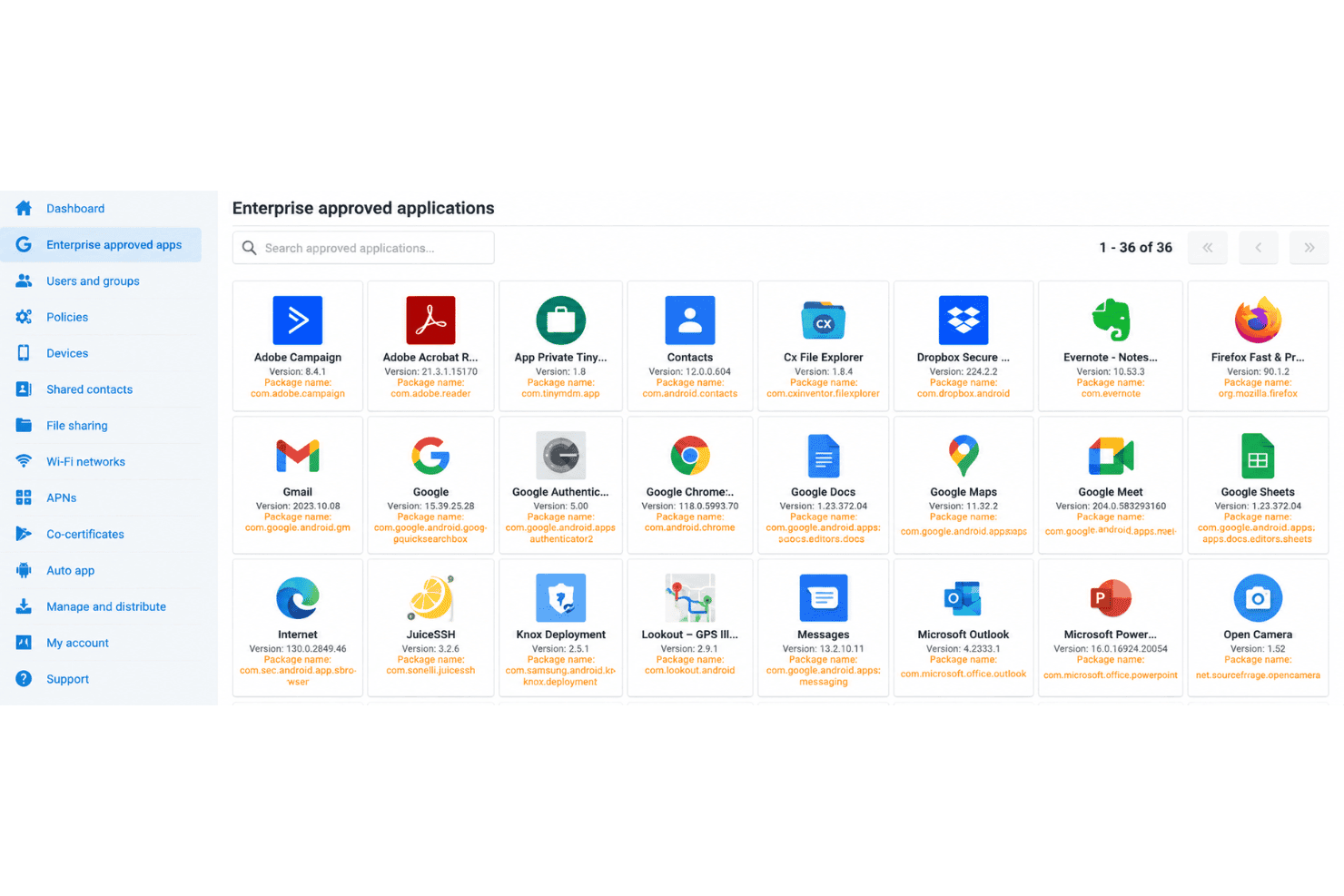
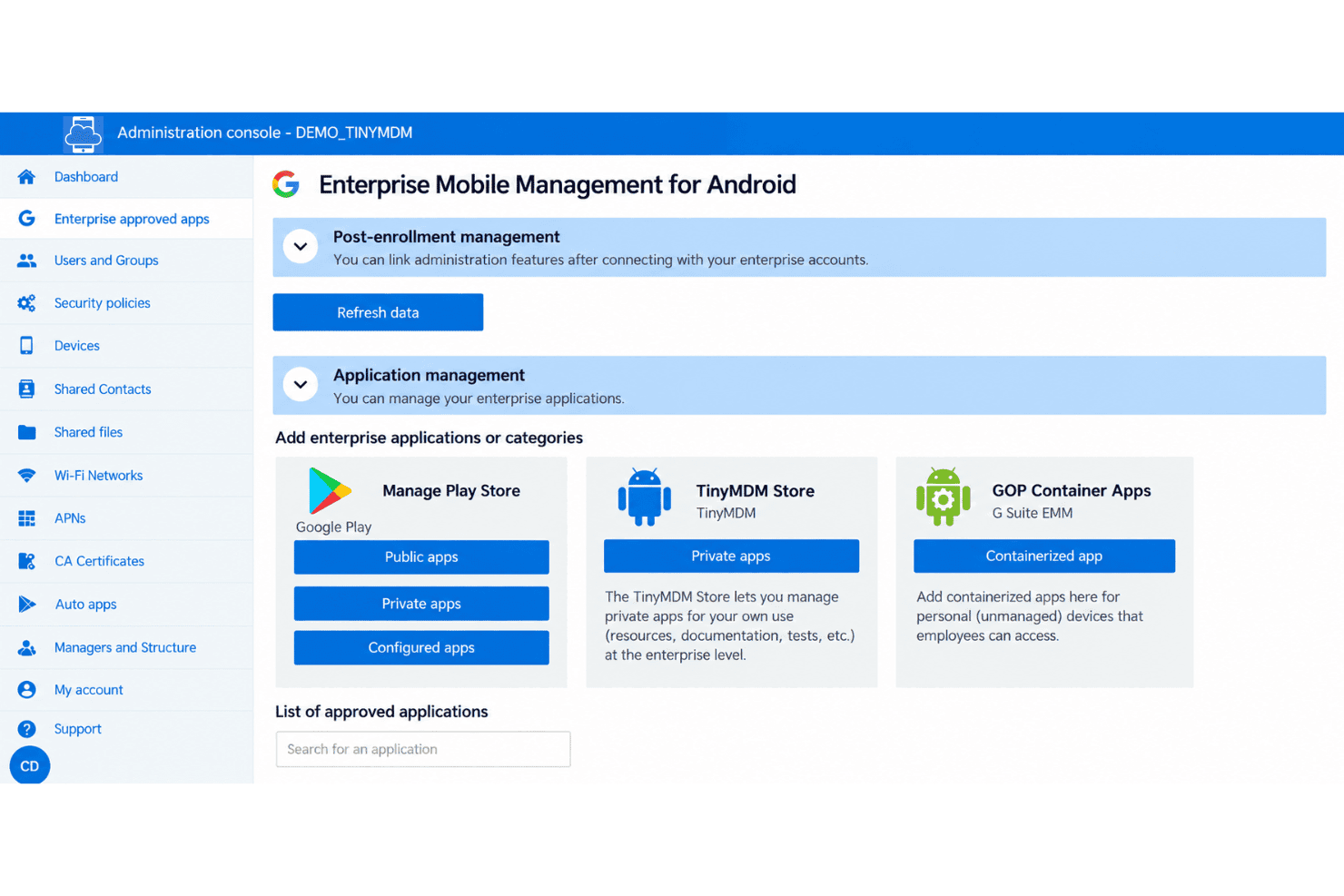
TinyMDM remotely installs, updates, and removes approved public, private, and web apps across Android devices. You can also set app configurations and permissions in advance, so, for example, a field app opens with the required settings already applied.
Kiosk Mode
Kiosk Mode locks a device to one app or a selected set of apps, blocking access to other apps and settings. It suits dedicated devices such as check-in kiosks or point-of-sale terminals where users should only access work tools.
Security Policies
TinyMDM lets admins set password requirements, manage OS updates, and remotely lock or wipe devices. If a company-owned phone is lost, you can lock it to block access or wipe it to remove its data.
Remote Control
Admins can view and control enrolled Android devices from the management console to troubleshoot issues remotely. Remote viewing works across device brands, while interactive control is available for supported manufacturer devices.
Location Tracking
Admins can view a managed device’s current location and up to three days of location history in the console. Tracking is disabled by default, intended for company-owned devices, and displays a notification when a device is geotagged.
Internet Filtering
TinyMDM applies web restrictions across Android browsers, with four restriction levels and website allowlists or blocklists. For example, you can limit a shared device to approved sites while blocking access to others.
Ease of Use
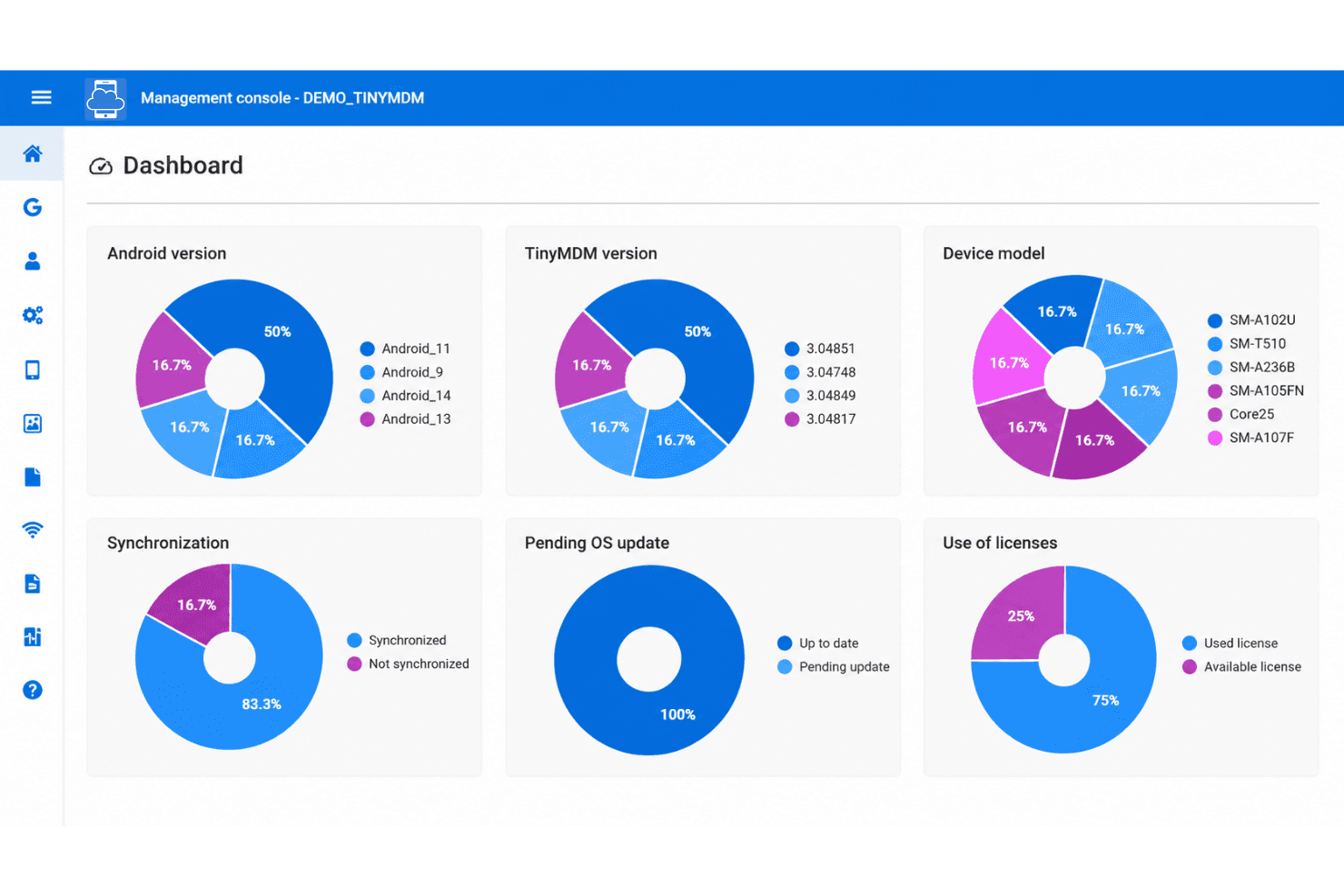
TinyMDM is easy to learn for Android administration, and reviewers praise its simple setup and day-to-day device management. Its focused console combines app deployment, kiosk controls, security policies, and remote lock or wipe without the complexity of a broad, multi-platform suite. Usability can suffer as fleets grow: reviewers report cumbersome app deployments, slow policy updates, and an unwieldy console with large device lists. I’d choose it for straightforward Android fleets, not complex, large-scale operations.
Integrations
TinyMDM integrates with Microsoft Entra ID, Android Zero-Touch Enrollment, Samsung Knox Mobile Enrollment, and Samsung Knox Service Plugin (KSP). It also provides a REST API for connecting TinyMDM with external applications, though no third-party integration platform is specified.
TinyMDM Specs
- 2-Factor Authentication: Yes
- Cloud Deployment: Yes
- Dashboard: Yes
- Data Export: Yes
- Data Import: Yes
- External Integrations: Yes
- Inventory Tracking: No
- Multi-User: Yes
- Network Device Performance Monitoring: No
- Notifications: Yes
- Password & Access Management: Yes
- Remote Access: Yes


