

SureMDM-Bewertung 2026: Vorteile, Nachteile, Funktionen und Preise
I judge SureMDM by how well it can bring order to a mixed-device fleet—not just by its feature list. This review weighs its strengths, trade-offs, and pricing to help you decide if it fits.

Wir bewerten Tools unabhängig; Provisionen helfen, unsere Tests zu finanzieren. Siehe unsere Transparenzrichtlinie und unsere Methodik.
SureMDM is MDM software from 42Gears for managing and securing devices across platforms. I’d consider it when your team needs one console for a mixed fleet, including mobile devices, computers, kiosks, wearables, or IoT endpoints. SureMDM is a stronger fit than Microsoft Intune when your fleet also includes ChromeOS, Wear OS, VR, or IoT devices, which SureMDM lists among its supported platforms.
SureMDM Evaluation Summary
4.8/5
- From $3.99/device/month (billed annually)
- 30-day free trial
Warum Sie unseren Software-Empfehlungen vertrauen können
6,700+
Reviews
20
Industry experts
16+
Evaluation factors
14
Years
Unser Team testet und bewertet Software seit 2012. Als Tech-Führungskräfte wissen wir selbst, wie schwierig – und wichtig – es ist, die richtige Software auszuwählen.
Für diesen Leitfaden haben wir Tools mithilfe von praktischen Tests und unabhängiger Recherche bewertet und dabei unsere Bewertungskriterien angewendet.
Unsere Bewertungen spiegeln unser menschliches redaktionelles Urteilsvermögen wider, keine Verkaufsstrategie.
Expertenprüfer:
- Paulo Gardini MiguelTech-Direktor
 Tim FisherVP für KI
 Gabriel RosasTech Lead & Software-Architekt
 Christhian GruhnTech Lead & Plattform-Architekt

SureMDM Overview
I’d choose SureMDM for a mixed fleet spanning phones, computers, kiosks, wearables, VR, and IoT devices. Zero-touch, Apple Business Manager, and QR enrollment support staged rollouts, while remote control, kiosk policies, app deployment, and remote wipe cover daily administration. Advanced reporting, identity management, certificate management, and SIEM integrations are available in higher tiers. The central console brings inventory and device controls together, though its broad feature set requires planning. 42Gears also offers 24/7 support. I’d select it for managing varied endpoints, with the right plan depending on the features and integrations required.
Pros
- Wide support spans mobile, desktop, ChromeOS, wearables, VR, and IoT.
- Users praise remote control, app deployment, and kiosk mode.
- Reviewers frequently commend responsive technical support.
Cons
- Reporting offers limited customization for operational views.
- Profile and policy changes become difficult to manage at scale.
- One administrator reported an outage leaving iOS devices unmanaged.
Is SureMDM Right For Your Needs?
Who Would be a Good Fit for SureMDM?
SureMDM suits teams managing varied devices or distributed endpoints that need enrollment, app deployment, and remote actions from one console. Its enrollment options, integrations, and REST API also fit IT teams connecting device management with existing systems.
- Mixed FleetsOrganizations managing varied device types can use SureMDM’s broad platform coverage and centralized enrollment, app deployment, lock, and wipe features.
- Zebra OperationsTeams managing Zebra devices can pair SureMDM with its Zebra LifeGuard integration for device-related workflows.
- Distributed TeamsIT departments supporting remote or dispersed workers can manage devices remotely and handle routine tasks from one console.
- New Device RolloutsDeployment teams can use zero-touch, QR-code, and Apple Business Manager enrollment to prepare devices for users.
- IT Support TeamsSupport staff can remotely lock or wipe devices and deploy apps without handling each endpoint in person.
- Connected IT OperationsIT teams using Microsoft 365, ServiceNow, Active Directory, or other listed integrations can connect SureMDM with existing systems, and use its REST API for external workflows.
Who Would be a Bad Fit for SureMDM?
SureMDM may be less suitable when device management needs are narrow or your team can’t spend time on configuration. Its advanced settings have a learning curve, and profile or policy changes can become harder to manage as deployments grow. Check connector availability before choosing it for a workflow that depends on a specific external application.
- Small Single-Platform FleetsTeams managing a small, uniform fleet may not need SureMDM’s broad platform coverage, which can add complexity beyond their routine requirements.
- No Admin CapacityOrganizations without an owner for setup and ongoing configuration may struggle with SureMDM’s learning curve around advanced settings.
- Frequent Policy ChangesTeams that regularly revise profiles and policies may find those changes harder to manage as their deployment grows.
- Complex RolloutsOrganizations planning large, mixed-fleet deployments should expect more configuration work than a small rollout, given SureMDM’s broad coverage and advanced settings.
- Unlisted IntegrationsTeams requiring a turnkey connector to an unlisted system should verify its availability first, since connecting external applications through the REST API may require additional work.
- Basic Device NeedsBusinesses that only need a narrow set of device-management tasks may find SureMDM’s broad platform coverage and configuration options more than they need.
Unsere Bewertungsmethodik
Wie wir Werkzeuge testen & bewerten
Wir haben Jahre damit verbracht, unser System zur Softwareprüfung und -bewertung aufzubauen, zu verfeinern und zu verbessern. Das Bewertungsraster ist darauf ausgelegt, die Feinheiten der Softwareauswahl und Effektivität eines Tools einzufangen, wobei wir uns auf kritische Aspekte des Entscheidungsprozesses konzentrieren.
Nachfolgend sehen Sie genau, wie unser Test- und Bewertungssystem anhand von sieben Kriterien funktioniert. Es ermöglicht uns eine unparteiische Bewertung der Software basierend auf Grundfunktionalität, besonderen Funktionen, Benutzerfreundlichkeit, Onboarding, Kundensupport, Integrationen, Kundenbewertungen und Preis-Leistungs-Verhältnis.
Grundfunktionalität (25 % der Endbewertung)
Der Ausgangspunkt unserer Bewertung ist immer die Grundfunktionalität des Werkzeugs. Verfügt es über die grundlegenden Funktionen und Merkmale, die ein Benutzer erwarten würde? Sind grundlegende Funktionen auf höherpreisige Tarife beschränkt? Im Kern erwarten wir, dass ein Tool den Basisfähigkeiten seiner Konkurrenten standhält.
Besondere Features (25 % der Endbewertung)
Anschließend bewerten wir ungewöhnliche, herausragende Funktionen, die über die typische Grundfunktionalität von Tools dieser Art hinausgehen. Eine hohe Bewertung zeigt spezialisierte oder einzigartige Eigenschaften, die das Produkt schneller, effizienter oder für den Nutzer wertvoller machen.
Wir bewerten außerdem, wie einfach sich das Tool mit anderen üblichen Werkzeugen im Technologie-Stack integrieren lässt, um die Funktionalität und den Nutzen der Software zu erweitern. Tools mit vielen nativen Integrationen, Drittanbieter-Anbindungen und API-Zugang zur Erstellung kundenspezifischer Integrationen erhalten die besten Bewertungen.
Benutzerfreundlichkeit (10 % der Endbewertung)
Wir betrachten, wie schnell und einfach Aufgaben aus dem Bereich der Grundfunktionalität mit dem Tool erledigt werden können. Gut bewertete Software ist durchdacht gestaltet, intuitiv bedienbar, bietet mobile Apps, Vorlagen und lässt relativ komplexe Aufgaben einfach erscheinen.
Onboarding (10 % der Endbewertung)
Wir wissen, wie wichtig die schnelle Einführung eines neuen Tools für das Team ist, daher bewerten wir, wie leicht sich ein Werkzeug mit minimalem Training erlernen und nutzen lässt. Wir bewerten, wie schnell ein Teammitglied ohne Vorerfahrung anfangen kann. Hoch bewertete Lösungen benötigen wenig bis gar keine Unterstützung.
Kundensupport (10 % der Endbewertung)
Wir prüfen, wie schnell und einfach man bei Problemen Hilfe per Telefon, Live-Chat oder Wissensdatenbank erhält. Tools und Anbieter mit Echtzeit-Support werden besser bewertet, während Chatbots schlechter abschneiden.
Kundenbewertungen (10 % der Endbewertung)
Neben unserer eigenen Prüfung beziehen wir den Net Promoter Score aktueller und ehemaliger Kunden mit ein. Wir bewerten, wie wahrscheinlich es ist, dass sie sich erneut für das Werkzeug entscheiden würden. Hoch bewertete Software weist einen hohen Net Promoter Score auf.
Preis-Leistungs-Verhältnis (10 % der Endbewertung)
Abschließend vergleichen wir unter Berücksichtigung aller Kriterien den durchschnittlichen Preis der Einstiegspakete mit den Grundfunktionen und bewerten den Mehrwert aus den anderen Bewertungsbereichen. Software, die mehr fürs gleiche Geld bietet, schneidet besser ab.
Core Features
Device Enrollment
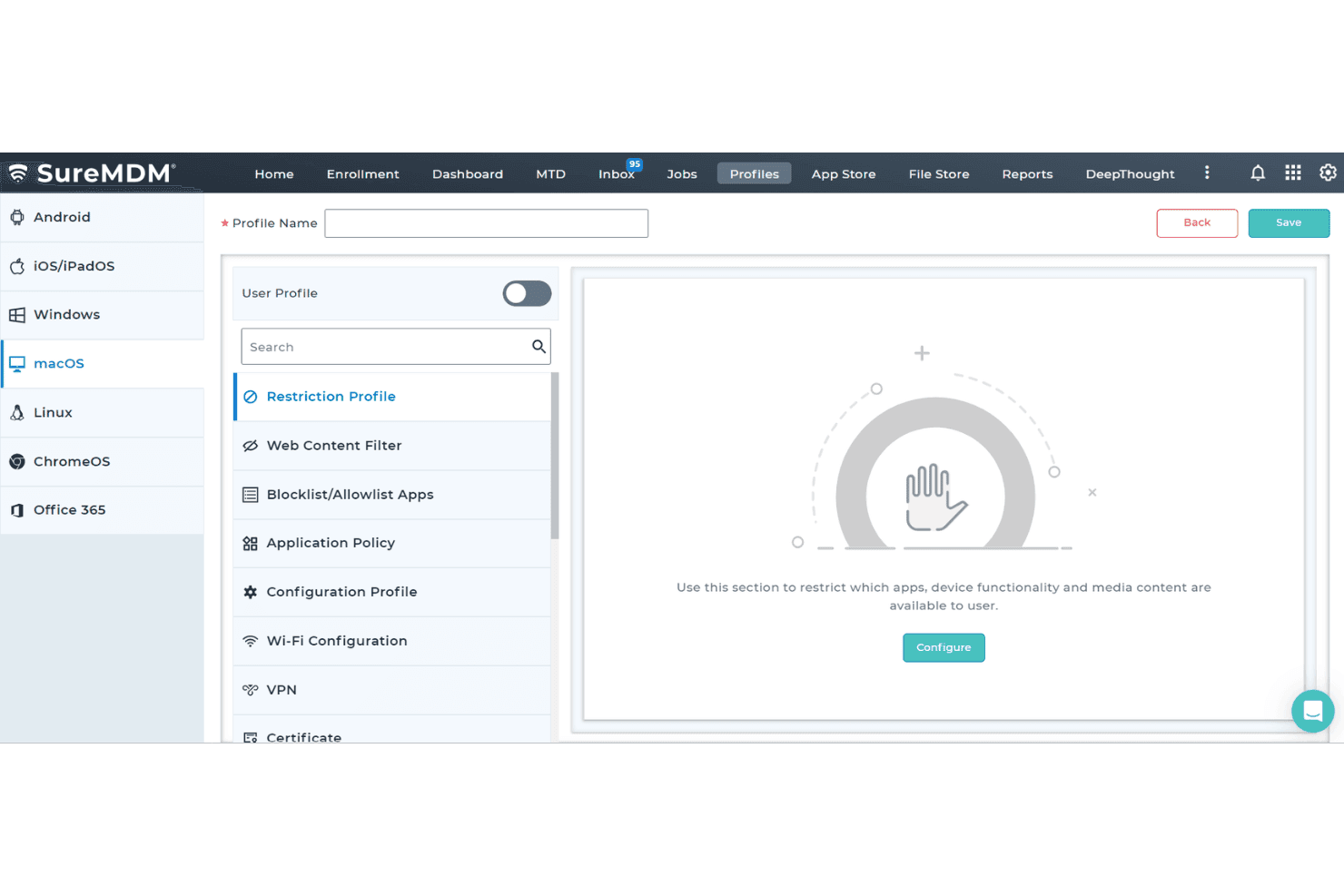
SureMDM enrolls devices through zero-touch, QR-code, Apple Business Manager, and manual methods. These options let your team prepare a batch of devices before rollout or enroll a BYOD device with Apple User Enrollment.
Configuration And Security Policies
Admins apply settings and security rules from the SureMDM console, including password requirements, network settings, and restrictions. Remote lock and wipe let your team respond to a lost device without retrieving it first.
App And Content Deployment
SureMDM pushes apps from sources such as Managed Google Play or an enterprise app store, and can install Android apps silently. Your team can also distribute files remotely, such as PDFs for field staff.
Kiosk Lockdown
Kiosk mode restricts a device to approved apps or websites, with options to block system settings and other apps. A retail tablet, for example, can stay locked to a checkout app; SureLock is included with all plans.
Remote Support
Admins can view and control supported device screens, transfer files, and troubleshoot from the console. That lets your support team diagnose a field device remotely instead of first arranging an on-site visit.
Device Inventory And Tracking
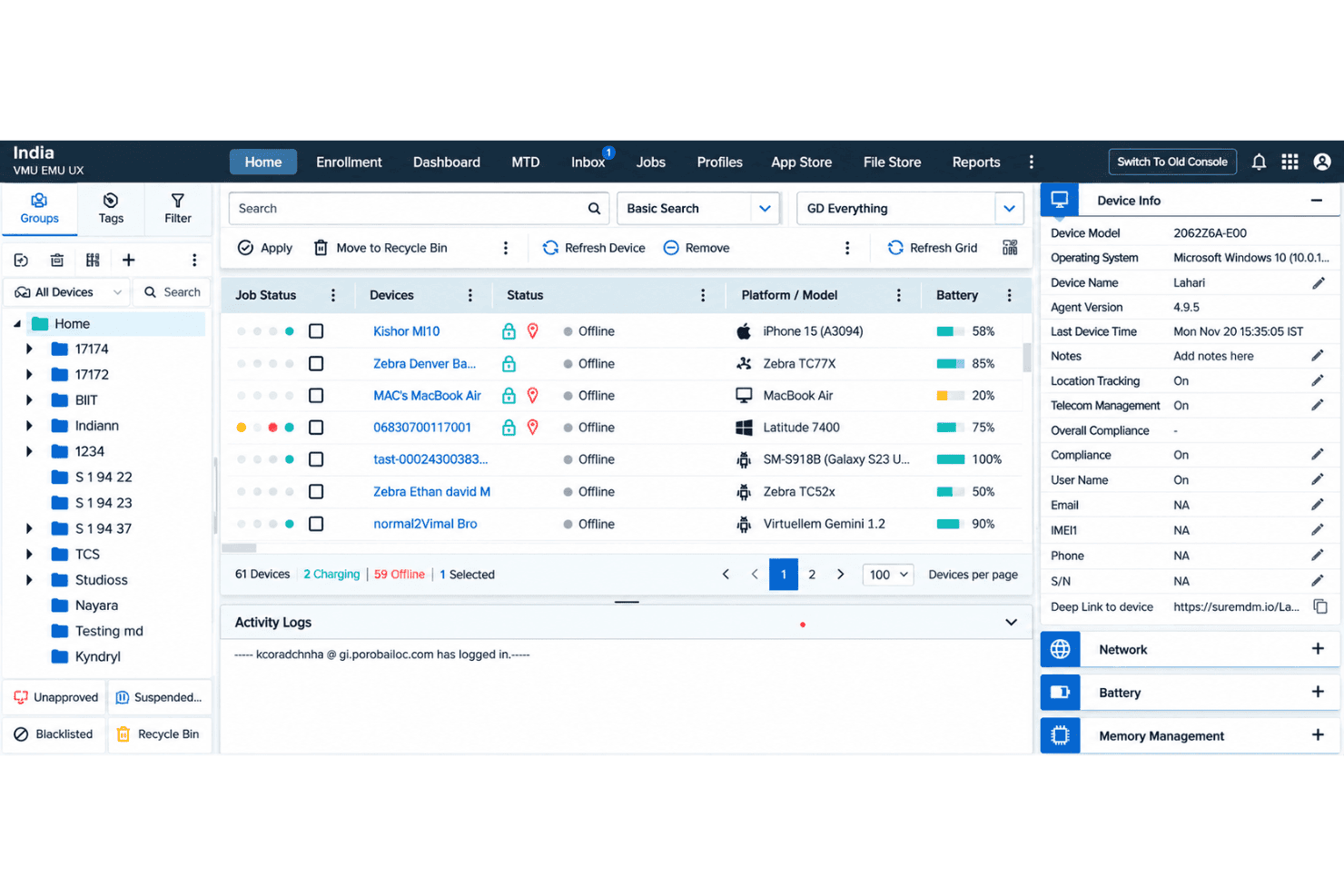
SureMDM records device and app inventory, and offers location tracking on supported devices, including real-time and historical GPS views for Android. Your team can check device status or locate a misplaced device before deciding whether to lock or wipe it.
Ease of Use
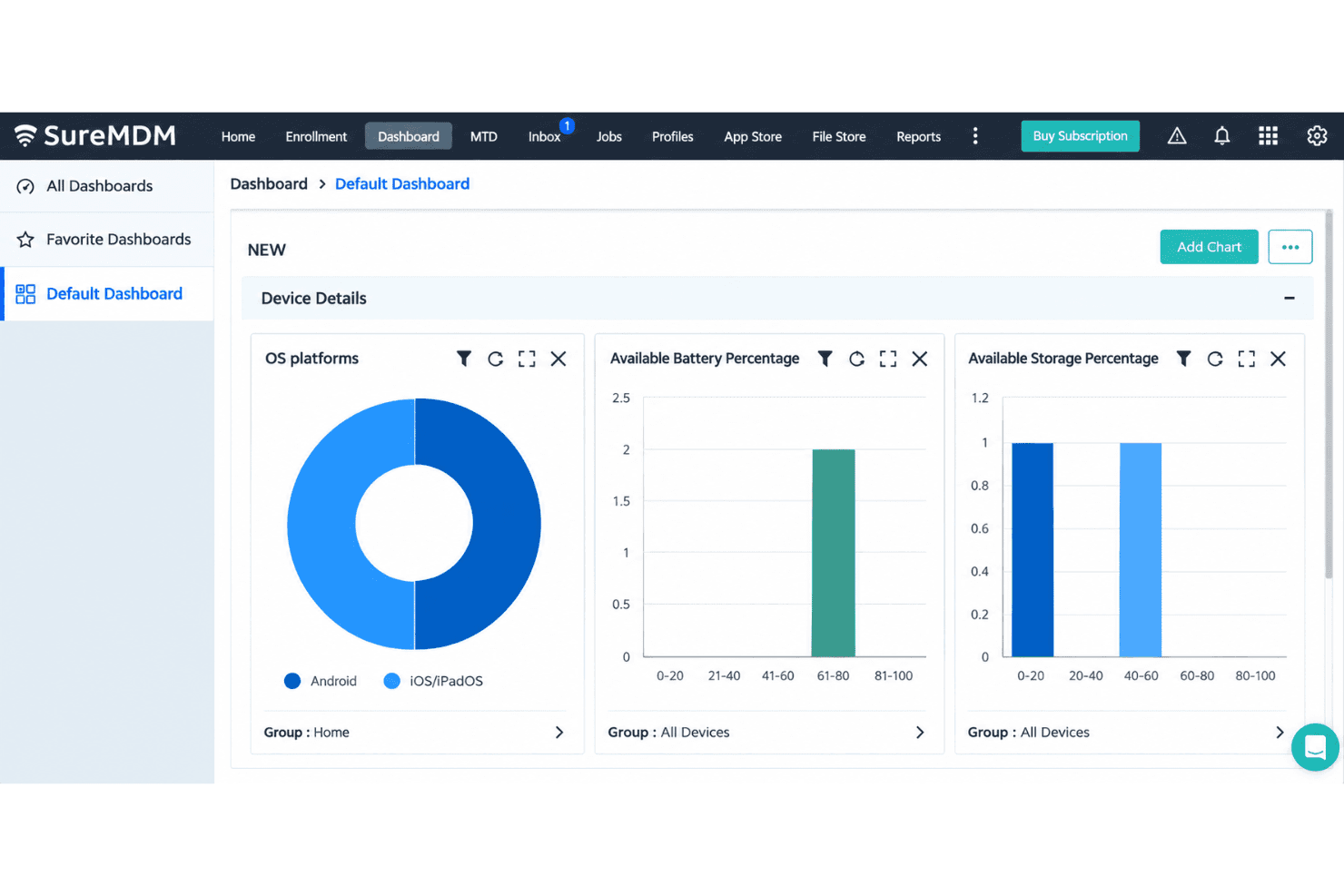
SureMDM is fairly easy to use for routine device work, but its broad platform coverage adds complexity as deployments grow. Reviewers praise the organized dashboard, straightforward setup, and remote management; enrollment options, app deployment, and remote lock or wipe keep common tasks in one console. The trade-off is a learning curve around advanced settings, and profile or policy changes can become harder to manage at scale. I’d favor it over narrower mobile-first tools for mixed fleets, provided you can invest time in configuration.
Integrations
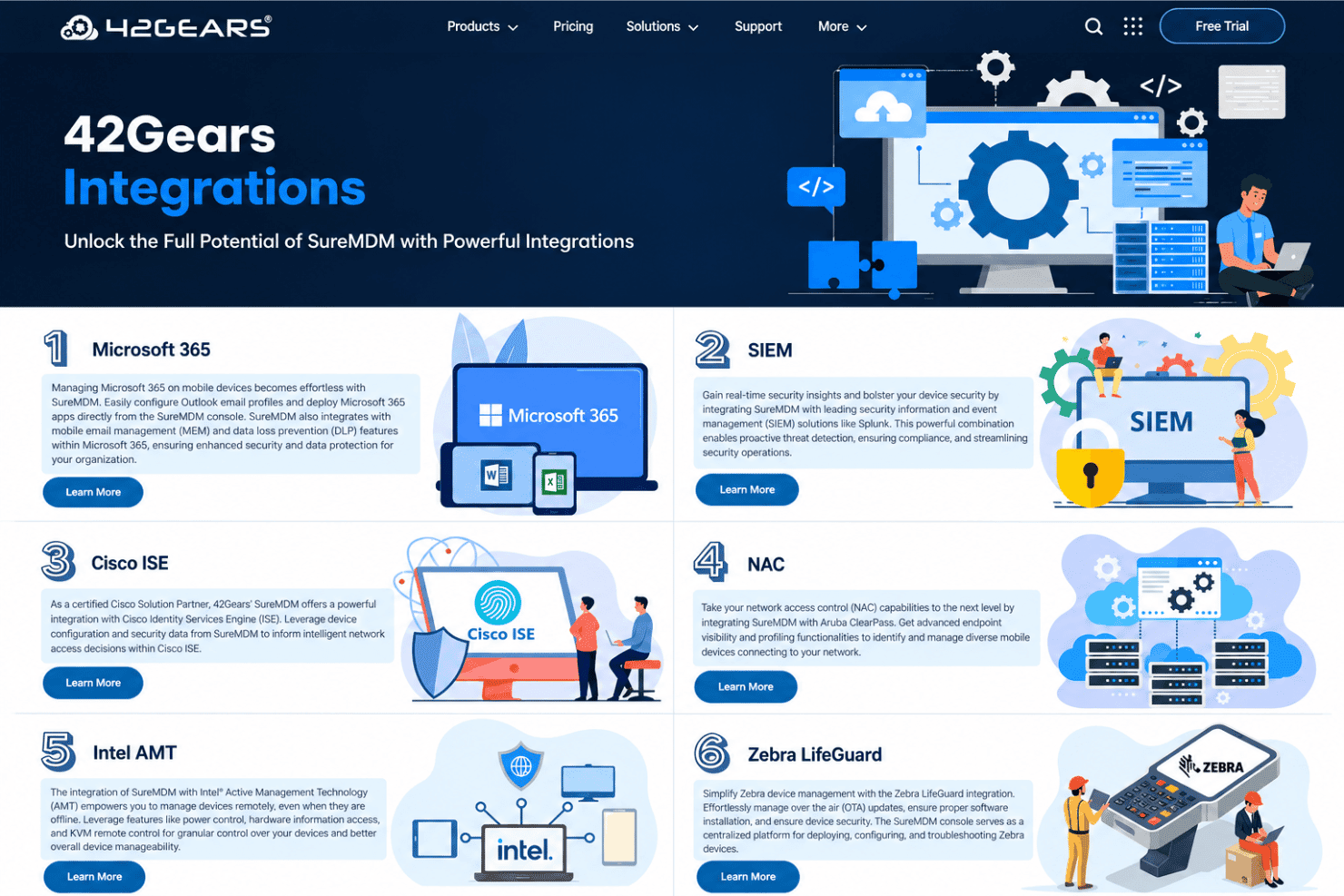
SureMDM integrates with Microsoft 365, Splunk, Cisco ISE, Aruba ClearPass, Intel AMT, Zebra LifeGuard, ServiceNow, Active Directory, and Google Workspace.
SureMDM also offers a REST API for custom integrations with external applications, dashboards, and workflows.
SureMDM Specs
- 2-Factor Authentication: Yes
- Cloud Deployment: Yes
- Dashboard: Yes
- Data Export: Yes
- Data Import: Yes
- External Integrations: Yes
- Inventory Tracking: Yes
- Multi-User: Yes
- Network Device Performance Monitoring: No
- Notifications: Yes
- Password & Access Management: Yes
- Remote Access: Yes


