

Az kodlu yapay zekâ uygulaması geliştirme araçları, ekiplerin görsel geliştirme ve yapay zekâ özellikleriyle daha az elle yazılmış kod kullanarak iş uygulamaları oluşturmasını sağlar. Doğru platform, ekibinize oluşturulan mantığı inceleme, veri erişimini yönetme ve entegrasyonları sürdürme olanakları sunarken teslimatı hızlandırabilir. Bu liste, geliştirme modeliniz ve denetim ihtiyaçlarınız için uygun seçeneği belirlemenize yardımcı olmak amacıyla önde gelen seçenekleri özelliklerine ve kullanım alanlarına göre karşılaştırır.
Why Trust Our Software Recommendations
6,700+
Reviews
20
Industry experts
16+
Evaluation factors
14
Years
Our team has been testing and reviewing software since 2012. As tech leaders ourselves, we know how difficult—and important—it is to choose the right software.
For this guide, we evaluated tools using hands-on testing and independent research, scoring tools using our selection criteria.
Our reviews reflect our human editorial judgment, not a sales pitch.
Expert reviewers:
- Paulo Gardini MiguelTech Director
 Tim FisherVP of AI
 Gabriel RosasTech Lead & Software Architect
 Christhian GruhnTech Lead & Platform Architect

Karşılaştırma Tablosu: Az Kodlu Yapay Zekâ Uygulaması Geliştirme Araçları
Kısa listeme giren az kodlu yapay zekâ uygulaması geliştirme araçlarının fiyatlarını ve teknik özelliklerini yan yana karşılaştırın.
Score legend (out of 5)
- Excellent4.5–5
- Good4–4.4
- Average3–3.9
- Below average2–2.9
- Poor1–1.9
Sorted by: Default
| Tool | Starting Price | Website | |||||||
|---|---|---|---|---|---|---|---|---|---|
Best for AI workflows with human oversight | 4.2 out of 5 | 4 | 4 | 4 | 4 | 5 | 4 | Pricing upon request Free plan + demo available | Website |
Best for shaping requirements before building | 3.8 out of 5 | 4 | 4 | 3 | 4 | 4 | 4 | $8/user/month Free plan + free demo + 15-day trial available | Website |
Best for turning business data into AI apps | 4.3 out of 5 | 5 | 4 | 4 | 5 | 4 | 4 | $10/builder/month Free plan + free trial + free demo available | Website |
Best for keeping coding-agent apps editable | 4.0 out of 5 | 4 | 3 | 4 | 5 | 4 | 4 | $23/builder/month Free plan + free trial + free demo available | Website |
Best for AI-built apps using business data | 3.7 out of 5 | 4 | 3 | 4 | 4 | 3 | 4 | $20/developer/month Free plan available | Website |
Best for governed app and agent delivery | 3.8 out of 5 | 4 | 3 | 3 | 5 | 4 | 4 | Pricing upon request Free plan + free demo available | Website |
Best for editable AI-generated app models | 4.0 out of 5 | 4 | 3 | 4 | 4 | 4 | 5 | $1,090/month Free plan + free demo available | Website |
Best for governed apps in the Microsoft stack | 3.8 out of 5 | 4 | 4 | 3 | 4 | 4 | 4 | $20/user/month Free plan + free trial available | Website |
Best for AI built into Salesforce workflows | 3.7 out of 5 | 4 | 3 | 3 | 4 | 4 | 4 | $25/user/month 30-day free trial available | Website |
Best for apps using ServiceNow data and rules | 3.7 out of 5 | 4 | 3 | 4 | 3 | 4 | 4 | Pricing upon request Free demo available | Website |


Az Kodlu Yapay Zekâ Uygulaması Geliştirme Araçları İncelemeleri
Aşağıda, kısa listeme giren en iyi az kodlu yapay zekâ uygulaması geliştirme araçlarına ilişkin ayrıntılı özetlerimi bulabilirsiniz. İncelemelerim, size en uygun seçeneği bulmanıza yardımcı olmak için her platformun özelliklerini ve kullanım alanlarını ele alır.
 Best for AI workflows with human oversight
- Free plan + demo available
- Pricing upon request
Visit WebsiteCustomer Rating:4.4/5
Appian lets users build document extraction models with guided steps. Appian is an enterprise low-code platform that combines visual application development, business process orchestration, AI agents, generative AI capabilities, and a data fabric for accessing information across connected systems.
Who Is Appian Best For?
Appian is best for enterprise IT teams, application developers, and business operations teams that manage complex workflows involving multiple systems, automated tasks, and human approvals.
Why I Picked Appian
I picked Appian for its process orchestration capabilities, which support workflows involving AI agents, automated tasks, and human approvals. I also like its Composer feature, which generates interfaces, record types, and process models from natural-language instructions. Its UX Preview lets teams review planned application screens before generating the underlying design objects.
Appian Key Features
- Data fabric: Access and update information across connected enterprise data sources through record types and data synchronization.
- Generative AI skills: Configure text classification, information extraction, summarization, and PII detection within process models.
- Process Intelligence: Analyze process performance, execution paths, and bottlenecks through Process HQ.
- Role-based access controls: Configure object-level permissions and record-level security rules for applications, processes, and data.
Appian Integrations
Appian provides prebuilt connectors for Salesforce, Google services, Microsoft SharePoint, DocuSign, and AWS services. It also supports REST, SOAP, and JDBC connectivity, along with Web APIs and an Integration SDK for custom integrations.
Pros and Cons
Pros:
- Process models coordinate people, bots, and AI
- Process mining identifies workflow bottlenecks
- AI decisions support human review workflows
Cons:
- Process-model access requires extra group membership
- Complex interfaces can lag during offline sync
Learn more about Appian: Best for shaping requirements before building
- Free plan + free demo + 15-day trial available
- From $8/user/month (billed annually)
Visit WebsiteCustomer Rating:4.3/5
Zoho Creator manages AI feature access with LLM provider controls. Zoho Creator is a low-code AI app development platform for building custom business applications, automated workflows, and AI agents using visual development tools, natural-language prompts, and Deluge scripting.
Who Is Zoho Creator Best For?
Zoho Creator is best for IT teams, application developers, and business users who need to define application requirements, review business processes, and build custom applications using low-code tools.
Why I Picked Zoho Creator
I picked Zoho Creator for its Zia App Builder Plan mode, which generates a Business Requirement Document (BRD) before application development. The BRD outlines objectives, user personas, business processes, and feature requirements based on natural-language prompts or uploaded files. Teams can review and refine these requirements through additional prompts before approving the plan and generating the application.
Zoho Creator Key Features
- Zia Build Agent: Add or modify application components using natural-language instructions, review proposed changes, and approve updates before they are applied.
- Embedded prediction fields: Add prediction fields to forms using trained AI models that estimate values based on existing records and supported field types.
- Development, Stage, and Production environments: Develop application changes, test them in staging, and publish approved versions to production while keeping environment data separate.
- Role-based access controls: Configure roles, permission sets, and data-sharing rules to manage access to applications, components, and records.
Zoho Creator Integrations
Zoho Creator supports integrations with SAP, Oracle, and Zoho applications through prebuilt connectors. It also supports OpenAI, Google, and Anthropic as configurable AI model providers for Zia. Additional integration options include custom connectors, REST APIs, custom APIs, and webhook-based connections.
Pros and Cons
Pros:
- Approval workflows support multistage decisions
- Forms and reports need less hand coding
- Plan mode creates reviewable requirements documents first
Cons:
- Published application versions cannot be rolled back
- Zoho GenAI Build mode requires manual workflows
Learn more about Zoho Creator: Best for turning business data into AI apps
- Free plan + free trial + free demo available
- From $10/builder/month (billed annually)
Visit WebsiteCustomer Rating:4.6/5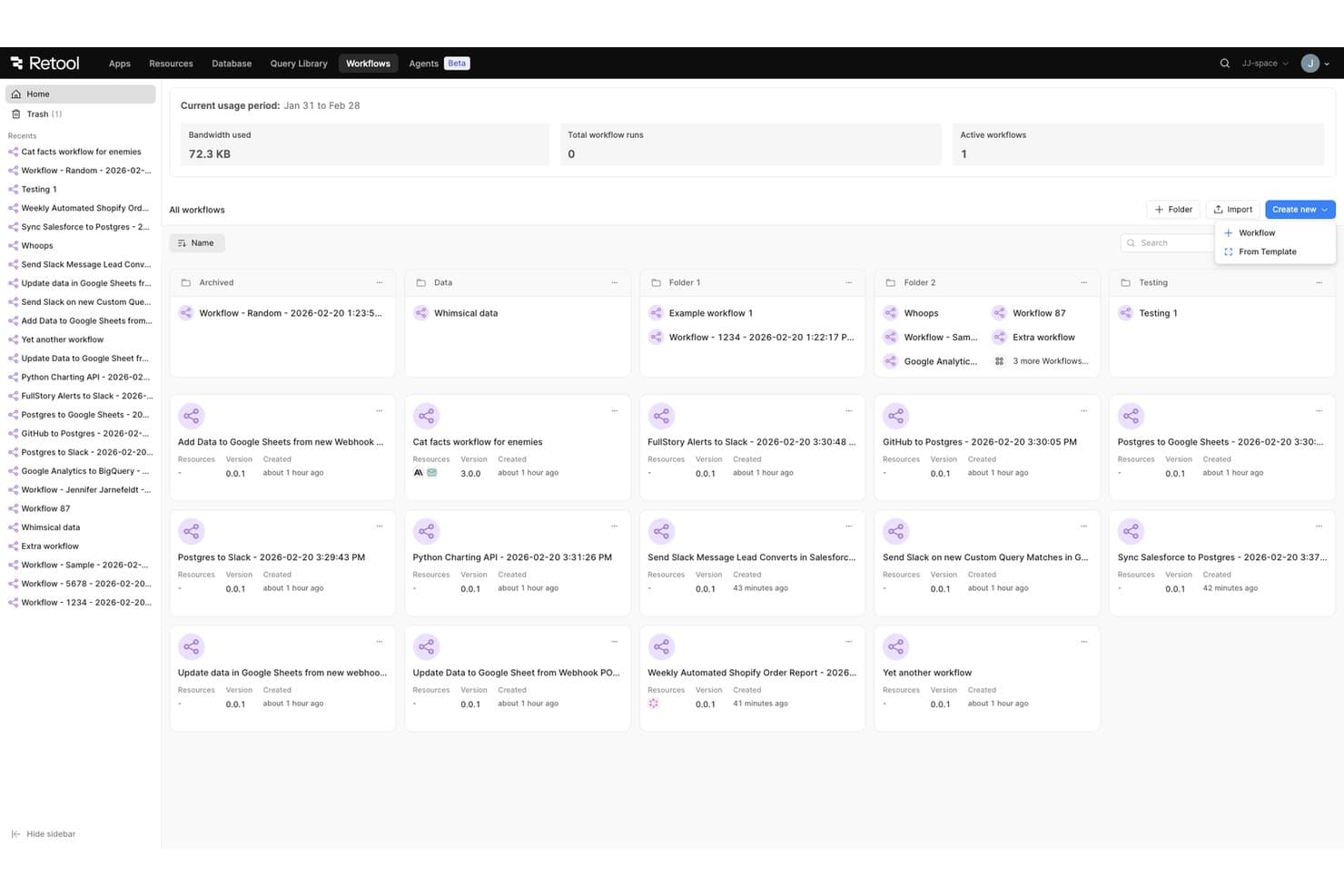
Retool Workflows lets users manage and organize automated workflows in one place. Retool is a low-code development platform for building internal applications, admin panels, and AI-powered tools. It combines a visual app builder with SQL, JavaScript, and AI-assisted app generation, with support for databases, APIs, and large language models.
Who Is Retool Best For?
Retool is best for IT, engineering, and operations teams building internal applications, admin panels, and operational workflows using existing business data.
Why I Picked Retool
I picked Retool for its AI-powered app builder, which generates React-based internal applications from natural-language prompts. I can connect generated apps to existing business data, edit the underlying code, and review changes through a live preview. Retool also supports AI models from providers such as OpenAI, Anthropic, and Google Gemini for building AI-powered application features.
Retool Key Features
- Git-based source control: Manage app changes through branches, pull requests, and version control on Enterprise plans.
- Mobile app builder: Create native mobile apps with photo capture, barcode scanning, and NFC reading for iOS and Android.
- Workflow scheduling and triggers: Run multi-step workflows through scheduled events, API calls, or webhooks, with branching and retry options.
- Role-based access controls: Configure app and resource permissions, with audit logs on Business and Enterprise plans and SSO/SCIM on Enterprise.
Retool Integrations
Retool supports prebuilt integrations with PostgreSQL, Google Sheets, Salesforce, OpenAI, Anthropic, Amazon Bedrock, and Google Gemini. It also supports GitHub for source control and provides generic REST API and GraphQL connections for additional data sources.
Pros and Cons
Pros:
- SQL and JavaScript support deeper app customization
- AI drafts pages, logic, and data connections
- Drag-and-drop dashboards connect business data
Cons:
- Mobile layouts require separate component arrangement
- Large classic apps may require restructuring
Learn more about Retool: Best for keeping coding-agent apps editable
- Free plan + free trial + free demo available
- From $23/builder/month

ToolJet's canvas lets users build apps by dragging and dropping components. ToolJet is an open-source, AI-powered low-code platform for building internal applications. It includes a drag-and-drop app builder, AI-assisted app and query generation, visual workflow automation, and connectors for databases, APIs, and third-party services.
Who Is ToolJet Best For?
ToolJet is best for software architects and engineering teams building internal applications with AI coding agents that require further customization through a visual app builder.
Why I Picked ToolJet
I picked ToolJet because its MCP server lets coding agents such as Claude Code, Codex, and Cursor create and modify internal applications within a ToolJet workspace. Generated components and queries remain editable through its visual builder. I also like that ToolJet AI supports targeting individual components or queries when making changes to an application.
ToolJet Key Features
- Visual workflow builder: Create automation workflows using triggers, conditional branches, loops, API calls, and database queries.
- ToolJet Database: Create and manage PostgreSQL-backed tables, configure relationships and constraints, and query data within applications.
- Multi-environment support: Manage application versions across Development, Staging, and Production environments with separate data-source configurations and constants.
- AI-assisted app generation: Generate application components, queries, and data bindings from text prompts, with options to modify generated elements in the visual builder.
ToolJet Integrations
ToolJet supports integrations with OpenAI, Anthropic, Google Sheets, PostgreSQL, Snowflake, Salesforce, and Slack. It also offers REST API, GraphQL, OpenAPI, and gRPC connectivity, alongside GitSync APIs for CI/CD workflows.
Pros and Cons
Pros:
- Scheduled workflows support cron-based triggers
- Prompt-generated apps include linked queries
- Coding-agent builds stay visually editable
Cons:
- Custom logic may require JavaScript or Python
- Generated changes need manual refinement
Learn more about Tooljet: Best for AI-built apps using business data
- Free plan available
- From $20/developer/month (billed annually)
Visit WebsiteCustomer Rating:4.9/5
UI Bakery lets users automate SQL queries on a scheduled basis. UI Bakery is a low-code platform for building internal applications. It combines a drag-and-drop visual editor with an AI app generator for creating data-connected dashboards, admin panels, and CRUD applications.
Who Is UI Bakery Best For?
UI Bakery is best for engineering teams, IT professionals, and developers building internal business applications, including admin panels, dashboards, and data management tools.
Why I Picked UI Bakery
I picked UI Bakery for its AI App Generator, which creates application layouts and logic from natural-language prompts. I can connect databases or APIs, adjust the generated components, and refine the app through its visual editor. The AI Assistant also supports SQL and JavaScript code generation for additional customization.
UI Bakery Key Features
- Drag-and-drop component library: Build app interfaces with prebuilt tables, charts, forms, and navigation elements.
- Git-based version control: Manage branches, pull requests, and app changes through GitHub, GitLab, or Bitbucket.
- Visual workflow builder: Create server-side automations with conditional logic, loops, and scheduled or webhook triggers.
- Role-based access control: Assign custom roles with permissions for apps, data sources, and environments.
UI Bakery Integrations
UI Bakery offers 45+ connectors, including PostgreSQL, MySQL, MongoDB, Snowflake, Salesforce, HubSpot, Slack, and Zapier. It also supports connections through HTTP APIs, GraphQL, OpenAPI, and MCP.
Pros and Cons
Pros:
- Supports cloud and self-hosted deployment
- Git supports branching and pull requests
- AI generates app layouts and logic
Cons:
- Git source control requires activation
- AI usage subject to credit limits
Learn more about UI Bakery: Best for governed app and agent delivery
- Free plan + free demo available
- Pricing upon request
Visit WebsiteCustomer Rating:4.6/5
OutSystems lets users select SAP entities and attributes for app integration. OutSystems is an enterprise low-code development platform that combines visual app development, AI-assisted app generation through Mentor, AI agent orchestration, workflow automation, and deployment governance. It supports enterprise applications across cloud and hybrid deployment environments.
Who Is OutSystems Best For?
OutSystems is best for enterprise IT teams, application developers, and software architects building business applications and AI agents that require deployment controls, role-based permissions, and security governance.
Why I Picked OutSystems
I picked OutSystems because it combines AI-assisted application development with governance controls for enterprise deployment. Its Agent Workbench supports multi-agent workflows, human-in-the-loop approvals, and configurable guardrails for agent behavior. I also like that OutSystems Developer Cloud includes isolated deployment stages, role-based permissions, and release history, allowing teams to review application changes before production deployment.
OutSystems Key Features
- Mentor Web app generation: Generate web applications with data models, screens, security roles, and CRUD logic from natural-language prompts or requirements files.
- Data Fabric virtual data layer: Access structured and unstructured enterprise data through a virtual layer without copying source data by default.
- Agent Workbench: Build and orchestrate AI agents with human-in-the-loop approvals, guardrails, and evaluation controls.
- Staged deployment environments: Deploy applications across isolated Development, non-production, and Production stages with revision history and rollback options.
OutSystems Integrations
OutSystems offers pre-built connectors to 400+ systems, including SAP, Salesforce, PostgreSQL, MongoDB, and PayPal. It also supports REST API integrations, external database connections, and private gateways for accessing on-premises systems. OutSystems 11 additionally supports SOAP web services.
Pros and Cons
Pros:
- Staged releases include revision history and rollback
- Mentor turns requirements into app scaffolds
- Data Fabric supports virtualized data access
Cons:
- Advanced app changes require ODC Studio
- Mentor generates up to 20 apps daily
Learn more about OutSystems: Best for editable AI-generated app models
- Free plan + free demo available
- From $1,090/month
Visit WebsiteCustomer Rating:4.4/5
Mendix lets users configure and preview app icons for iOS builds. Mendix is a Siemens-backed low-code platform for building and deploying enterprise web and mobile applications. It features a visual, model-driven development environment, workflow automation, and AI-assisted development through its Maia assistant.
Who Is Mendix Best For?
Mendix is best for enterprise development teams, business analysts, and citizen developers who collaborate on web and mobile applications using shared development tools and governance controls.
Why I Picked Mendix
I picked Mendix for its Start with Maia feature, which generates editable application models from text descriptions and optional PDF or image inputs. It can create domain models, data management pages, test data, and a homepage that I can review and modify in Studio Pro. I also like that Maia Make supports further changes to app models through natural-language prompts.
Mendix Key Features
- Maia Chat: An AI assistant in Studio Pro that answers development questions, explains app models, and provides contextual guidance.
- Mendix Connect Catalog: A catalog for discovering and reusing published data resources across applications and enterprise systems.
- Multi-profile mobile support: Build responsive web, native mobile, and progressive web applications using navigation profiles within a shared app model.
- Workflow drag-and-drop editor: Design workflows with user tasks, automated activities, approvals, and task assignments.
Mendix Integrations
Mendix supports integration with enterprise systems through connectors and APIs, including REST and OData services. Its integration capabilities also support data exchange between Mendix applications. Specific third-party connections depend on the available connector or implementation.
Pros and Cons
Pros:
- One app model supports web and mobile
- Maia generates editable app-model documents
- Visual workflows support task assignments and approvals
Cons:
- Maia usage is subject to monthly unit limits
- Custom styling may require SCSS or JavaScript
Learn more about Mendix: Best for governed apps in the Microsoft stack
- Free plan + free trial available
- From $20/user/month (billed annually)
Visit WebsiteCustomer Rating:4.3/5
Microsoft Power Apps embeds Copilot AI assistance directly in the canvas editor. Microsoft Power Apps is a low-code development platform for creating and managing custom business applications. It includes a drag-and-drop canvas editor, Copilot-assisted app creation, and AI Builder models for adding AI capabilities to applications.
Who Is Microsoft Power Apps Best For?
Microsoft Power Apps is best for enterprise IT teams, business analysts, and application makers building internal business applications within organizations that use Microsoft services and require managed access and governance controls.
Why I Picked Microsoft Power Apps
I picked Microsoft Power Apps for its low-code development tools and enterprise governance capabilities. It supports role-based access controls, data loss prevention policies, and managed environments for organizational applications. Power Platform pipelines also provide a structured approach to moving solutions between development, testing, and production environments.
Microsoft Power Apps Key Features
- Natural-language app generation: Describe data requirements in plain language to generate Dataverse tables and create a canvas app with Copilot assistance.
- AI Builder model library: Access prebuilt models for invoice processing, sentiment analysis, and entity extraction, or train custom models for prediction and document processing.
- Canvas-app coauthoring: Up to 10 makers can edit the same canvas app simultaneously and see each other's changes in real time.
- Microsoft Entra ID-based sharing controls: Share apps with individual users or security groups and assign Dataverse security roles when the required permissions are available.
Microsoft Power Apps Integrations
Microsoft Power Apps supports connections with SharePoint, Microsoft 365, Dynamics 365, SQL Server, and Microsoft Dataverse. It also supports Azure Functions and custom connectors for integrating external data sources and services.
Pros and Cons
Pros:
- Governance controls suit managed citizen development
- Copilot helps start and refine apps
- Drag-and-drop builds need little code
Cons:
- Nondelegable queries limit large-data processing
- Offline canvas apps exclude non-Dataverse connectors
Learn more about Microsoft Power Apps: Best for AI built into Salesforce workflows
- 30-day free trial available
- From $25/user/month (billed annually)

Salesforce Platform lets users build AI agents via chat interface. Salesforce Platform is a low-code and pro-code application development platform that supports custom app building, workflow automation, AI agent configuration, and data connectivity within the Salesforce ecosystem.
Who Is Salesforce Platform Best For?
Salesforce Platform is best for enterprise IT teams, application developers, and business analysts who work with Salesforce and need to build custom business applications, configure workflows, or manage application development within the Salesforce environment.
Why I Picked Salesforce Platform
I've included Salesforce Platform because it supports custom application development and AI configuration within existing Salesforce environments. Agentforce Builder supports agent actions that incorporate Salesforce Flow, Apex, and prompt templates, allowing teams to work with existing business logic. Prompt Builder also supports generative AI prompts grounded in CRM records and related data, providing additional context for AI-generated responses.
Salesforce Platform Key Features
- Salesforce Flow: Create record-triggered, scheduled, and interactive workflows with conditional logic, approvals, and automated actions through a visual builder.
- Sandboxes: Develop and test application changes in environments separate from production, with data masking options available for supported configurations.
- AppExchange: Browse and install partner applications and prebuilt solutions that extend Salesforce functionality.
- Salesforce Shield: Configure platform encryption, event monitoring, field audit history, and sensitive-data detection through an optional security suite.
Salesforce Platform Integrations
Salesforce Platform supports connections with Slack, Jira, QuickBooks, and ActiveCampaign through Salesforce integrations and third-party AppExchange applications. REST, SOAP, GraphQL, Streaming API, Pub/Sub API, and Platform Events support custom and event-driven integrations. Availability and configuration requirements vary by product, edition, and connector.
Pros and Cons
Pros:
- Sandboxes support isolated testing and releases
- AI prompts ground responses in CRM data
- Flow supports custom workflows with little code
Cons:
- Agentforce drafts approximately six flow elements
- Flow creation requires specific user permissions
Learn more about Salesforce Platform: Best for apps using ServiceNow data and rules
- Free demo available
- Pricing upon request

ServiceNow App Engine automates benchmark evaluations using flow logic. ServiceNow App Engine is a low-code application development platform built on the Now Platform that lets teams create, deploy, and manage custom workflow applications through visual development tools, AI-assisted generation, and governed deployment pipelines.
Who Is ServiceNow App Engine Best For?
ServiceNow App Engine is best for enterprise IT teams, business technologists, and application developers building custom workflow applications within an existing ServiceNow environment.
Why I Picked ServiceNow App Engine
I picked ServiceNow App Engine because it supports custom application development within an organization's existing ServiceNow environment. Its development tools work with ServiceNow data models and platform configurations, while delegated development lets authorized employees build applications under administrator-defined permissions. Build Agent supports natural-language generation of application components, workflows, and AI agents, and App Engine Management Center provides deployment pipelines with administrator review and approval.
ServiceNow App Engine Key Features
- Flow Designer: Create automated workflows using visual flow-building tools, triggers, actions, and conditions.
- Delegated Development: Allow designated employees to build applications with administrator-assigned development and deployment permissions.
- Otto for App Engine: Add AI capabilities such as record summarization, in-app guidance, and AI-assisted search to custom applications.
- CI/CD and Git source control: Manage application deployments through configured pipelines and maintain code versions using Git branches, commits, and tags.
ServiceNow App Engine Integrations
ServiceNow App Engine supports connections with Cursor, Lovable, and Claude Code through the Build Agent SDK. Build Agent also supports MCP-based access to Figma, GitHub, and Miro for design and development context. ServiceNow provides REST APIs and IntegrationHub capabilities for connecting applications with external systems.
Pros and Cons
Pros:
- Governance routes app releases through approvals
- Build Agent scaffolds workflows from plain language
- Reuses ServiceNow tables and business rules
Cons:
- Some development features require additional permissions
- Complex customization can require JavaScript expertise
Learn more about ServiceNow App Engine:
Diğer Az Kodlu Yapay Zekâ Uygulaması Geliştirme Araçları
Kısa listeme girmeyen ancak yine de göz atmaya değer birkaç ek seçenek şunlardır:
- 11QuickbaseBest for citizen-built apps with AI guardrails
- 12KissflowBest for business-led apps with IT oversight
- 13ZapierBest for AI workflows across existing apps
- 14AirtableBest for turning shared work data into apps
- 15CaspioBest for turning app ideas into governed data apps
- 16Betty BlocksBest for controlling where enterprise AI runs
- 17SoftrBest for AI-built, role-based business portals
- 18AppSheetBest for turning Workspace data into apps
- 19BubbleBest for teams needing dedicated AWS hosting
- 20Base44Best for AI agents that run app workflows
- 21SAP BuildBest for extending existing SAP workflows
- 22Pega PlatformBest for rules-heavy casework automation
- 23Oracle APEXBest for teams invested in Oracle Database
How I Evaluate Low-Code AI App Development Tools
To make this list, a tool’s AI needs to handle real business app work, like generating app logic and building UI components from prompts. From there, I evaluate three things. Core functionality carries the most weight, like connecting business data and deploying apps. Then I look at standout features, like governance guardrails, and what a tool offers beyond its feature set, like whether its security and data controls fit enterprise requirements.
Core Functionality (Table Stakes For This List)
When I'm selecting tools for my list, I score each one on a scale from 0 (does not offer the functionality) to 5 (excels in this area) for each core functionality listed below. I then convert the total into a percentage to help assess each tool's overall fit, with extra weight on any functionalities I’ve deemed essential.
- Visual App Builder (Essential): I look for visual tools to assemble multi-screen apps, reusable components, and business logic, such as an intake form linked to an approval flow.
- AI-Assisted Development (Essential): I assess how well prompts generate usable screens, data models, or workflows, and how easily builders can inspect and edit the results.
- Data Integration: I check for connectors and API options that let an app read and update business data, such as inventory records or customer details.
- Embedded AI Features: I look for configurable AI features, such as document extraction or chat, that teams can connect to app data and workflows.
- Deployment and Hosting: I evaluate publishing options, environment management, and app updates for web or mobile use across development and production.
- Workflow Automation: I assess support for multi-step rules, branching, and approvals, such as routing a service request based on its type and status.
Once I have a list of tools that meet the criteria, I consider what sets each platform apart.
Differentiating Factors (What Sets Vendors Apart)
Here's how I compare and contrast different vendors:
Standout Features
I look for governance controls that let IT monitor and approve citizen-built apps without blocking delivery—things like centralized app catalogs, role-based editing, and audit trails. Natural language app generation matters too, but I evaluate how editable the output is. A scaffolded data model you can't inspect is a liability. I also check whether prebuilt AI models, like document extraction, can be fine-tuned with your own data to reduce risk of inaccurate outputs in production.
Beyond Features
I check whether each platform isolates app data from the vendor's broader AI training sets, since tools like Salesforce Platform and Microsoft Power Apps handle this differently. Licensing models matter too—per-user, per-app, and per-workflow-run pricing all scale unpredictably when citizen-built apps gain traction. I also evaluate documentation quality and community depth, because business users building their first approval workflow shouldn't need to escalate to IT for every question.
Az Kodlu Yapay Zekâ Uygulaması Geliştirme Araçları Nasıl Seçilir?
Gerçek iş verileri ve kullanıcılar devreye girdiğinde oluşturulan uygulamaların incelenebilir ve yönetilebilir kalıp kalmadığını test ederek bir platform seçin.
| Önceliğiniz… | Şunları arayın… |
|---|---|
| Önceliğiniz…Düzenlenebilir yapay zekâ tarafından oluşturulan uygulamalar | Şunları arayın…Oluşturulan mantığı ve veri modellerini inceleyip değiştirebilme olanağı |
| Önceliğiniz…Kontrollü vatandaş geliştirici çalışmaları | Şunları arayın…Merkezi denetim, role dayalı izinler ve denetim kaydı |
| Önceliğiniz…Veri koruması | Şunları arayın…İstemlerin veya uygulama verilerinin paylaşılan yapay zekâ modellerini eğitmek için kullanılıp kullanılmadığını açıklayan yazılı koşullar |
| Önceliğiniz…Öngörülebilir ölçeklendirme maliyetleri | Şunları arayın…Kullanıcılar, uygulamalar ve iş akışı çalıştırmalarıyla ilişkilendirebileceğiniz bir fiyatlandırma modeli |
Kısa Listenizi Nasıl Değerlendirebilirsiniz?
- Tanımlı bir geliştirme denemesi gerçekleştirin: İki saatlik bir deneme içinde bir bilgi toplama formu ve onay akışı oluşturun; ardından bir geliştiricinin mantığını değiştirmesini ve nelerin düzenlenebilir kaldığını belgelemesini sağlayın.
- Yapay zekâ veri işleme koşullarını isteyin: İstemlerin, iş verilerinin ve oluşturulan çıktıların nasıl saklandığını ve kullanıldığını açıklayan güncel politikayı veya sözleşme maddesini edinin.
- Örnek bir rolle yönetişimi test edin: Deneme çalışma alanında bir iş kullanıcısı rolü oluşturun ve düzenlemeyi kısıtlayıp uygulama değişikliklerini bir denetim kaydında inceleyip inceleyemediğinizi doğrulayın.
- Maliyetleri büyüme senaryosuyla modelleyin: 100 kullanıcıyı, 10 uygulamayı ve yinelenen iş akışı çalıştırmalarını kapsayan yazılı bir tahmin isteyin; ardından hangi kullanım varsayımlarının fiyatı değiştirdiğini not edin.
- Kararı belirleyen ödünleşimi kullanın: İş ekiplerinin yineleme yapabilmek için hareket alanına ihtiyaç duyduğu durumlarda vatandaş geliştirici özerkliğini; uygulama değişikliklerinin yayımlanmadan önce merkezi inceleme gerektirdiği durumlarda ise daha sıkı BT denetimini tercih edin.
Az Kodlu Yapay Zekâ Uygulaması Geliştirme Araçları Nedir?
Az kodlu yapay zekâ uygulaması geliştirme araçları, ekiplerin daha az elle yazılmış kod kullanarak iş uygulamaları oluşturmasına yardımcı olmak için görsel uygulama oluşturucuları yapay zekâ özellikleriyle birleştiren platformlardır. İstemlerden ekranlar, veri modelleri veya iş akışları oluşturabilir ve geliştiriciler bunları inceleyip değiştirebilir. Ekipler bu araçları iş verilerini bağlamak, süreçleri otomatikleştirmek ve erişim, güvenlik ve sürekli bakım için denetimler uygularken uygulamaları kullanıma sunmak amacıyla kullanabilir.
Özellikler
Az kodlu yapay zekâ uygulaması geliştirme araçlarında aradığım başlıca özellikler şunlardır:
- Görsel uygulama oluşturucu: Ekranları, formları, yeniden kullanılabilir bileşenleri ve iş mantığını görsel bir düzenleyicide bir araya getirmenizi sağlar. Ekibiniz, her arayüz öğesini tek tek elle kodlamadan bir bilgi toplama formu veya kurum içi uygulama oluşturabilir.
- AI destekli geliştirme: Doğal dildeki komutlardan ekranlar, veri modelleri veya iş akışları oluşturur ve dağıtımdan önce oluşturulan çıktıyı inceleyip düzenleme seçenekleri sunar.
- Veri entegrasyonu: Yerleşik bağlayıcılar veya API'ler aracılığıyla uygulamaları iş verilerine bağlar. Böylece bir uygulama, müşteri bilgileri veya envanter gibi kayıtları okuyabilir ya da güncelleyebilir.
- İş akışı otomasyonu: Bundan sonra ne olacağını belirleyen kuralları, koşulları ve onay adımlarını tanımlar. Örneğin bir hizmet talebi, türüne veya durumuna göre farklı ekiplere yönlendirilebilir.
- Yerleşik AI özellikleri: Bir uygulamaya sohbet veya belge çıkarma gibi yapılandırılabilir özellikler ekler. Ekipler, gönderilen bir belgeyi özetleme gibi görevler için bu özellikleri ilgili verilere ve iş akışlarına bağlayabilir.
- Erişim ve yönetişim denetimleri: Uygulamaları kimlerin görüntüleyebileceğini, düzenleyebileceğini, yayımlayabileceğini veya onaylayabileceğini belirler. Rol tabanlı izinler ve denetim izleri, iş ekiplerine belirlenmiş sınırlar sunarken BT'nin değişiklikleri incelemesine yardımcı olur.
- Dağıtım yönetimi: Uygulamaları web veya mobil ortamlarda yayımlar ve geliştirme ile üretim ortamlarındaki güncellemeleri destekler. Ortam denetimleri, ekiplerin değişiklikleri kullanıma sunmadan önce test etmesine yardımcı olur.
- AI veri denetimleri: Komutların, uygulama verilerinin ve oluşturulan çıktıların nasıl depolandığını, saklandığını ve AI modeli eğitimi için nasıl kullanıldığını yöneten ayarlar veya politikalar sağlar.
Avantajlar
Düşük kodlu AI uygulama geliştirme araçlarından bekleyebileceğiniz bazı yaygın avantajlar şunlardır:
- Daha hızlı uygulama taslakları: AI, komutlardan ekranlar, veri modelleri veya iş akışları oluşturabilir ve ekibinize inceleyip geliştirebileceği bir başlangıç noktası sunabilir.
- Daha az elle yazılan kod: Görsel oluşturucular, her arayüz öğesini kodlamadan formları, yeniden kullanılabilir bileşenleri ve iş mantığını bir araya getirmenizi sağlar.
- Daha erişilebilir uygulama değişiklikleri: Düzenlenebilir, oluşturulmuş mantık ve veri modelleri, gereksinimler değiştikçe oluşturucuların uygulamayı yeniden düzenlemesine olanak tanır.
- Birbirine bağlı iş süreçleri: Veri bağlayıcıları, API'ler ve iş akışı kuralları, iş kayıtlarını onaylar ve talep yönlendirme gibi eylemlere bağlayabilir.
- Daha kontrollü vatandaş geliştirici çalışmaları: Rol tabanlı izinler, uygulama katalogları ve denetim izleri, BT'nin uygulamaları kimlerin düzenlediğini, incelediğini ve yayımladığını denetlemesine yardımcı olabilir.
- Yönetilen sürümler: Dağıtım seçenekleri ve ortam denetimleri, ekiplerin uygulama değişikliklerini web veya mobil kullanıcılar için güncellemeleri yayımlamadan önce test etmesine olanak tanır.
Fiyatlandırma
Fiyatlandırma; özelliklere, ekip büyüklüğüne, kullanıma ve dağıtım gereksinimlerine göre değişir. Düşük kodlu AI uygulama geliştirme araçları için tipik fiyat aralıkları aşağıda verilmiştir.
Düşük Kodlu AI Uygulama Geliştirme Araçları için Plan Karşılaştırma Tablosu
| Plan Türü | Ortalama Fiyat | Yaygın Özellikler |
|---|---|---|
| Plan TürüÜcretsiz Plan | Ortalama Fiyat$0 | Yaygın ÖzelliklerKomut tabanlı uygulama oluşturma, görsel düzenleyici, sınırlı kullanıcı veya kayıt sayısı ve test amaçlı dağıtım. |
| Plan TürüKişisel Plan | Ortalama Fiyat$5–$25/kullanıcı/ay | Yaygın ÖzelliklerAI destekli ekranlar ve iş akışları, temel veri bağlantıları, uygulama yayımlama ve sınırlı kullanım. |
| Plan Türüİşletme Planı | Ortalama Fiyat$25–$100/kullanıcı/ay | Yaygın ÖzelliklerPaylaşılan çalışma alanları, rol tabanlı izinler, iş akışı otomasyonu, genişletilmiş entegrasyonlar ve üretim ortamına dağıtım. |
| Plan TürüKurumsal Plan | Ortalama Fiyat$100+/kullanıcı/ay veya özel fiyatlandırma | Yaygın ÖzelliklerTek oturum açma, denetim günlükleri, gelişmiş yönetişim, özel ortamlar, özel entegrasyonlar ve üzerinde anlaşmaya varılan destek. |
SSS
Düşük kodlu yapay zekâ uygulama geliştirme araçlarıyla ilgili sık sorulan soruların yanıtları:
Düşük kodlu bir yapay zekâ uygulama geliştirme aracı geliştiricilerin yerini alabilir mi?
Tamamen değil. Bu araçlar uygulama taslakları oluşturabilir ve iş ekiplerinin görsel bileşenleri düzenlemesine olanak tanıyabilir; ancak geliştiricilerin mimariyi, entegrasyonları, güvenliği ve sürüm süreçlerini yine de incelemesi gerekebilir. Örneğin bir geliştirici, onay akışının başarısız API çağrılarını veya yetkisiz erişimi doğru şekilde ele alıp almadığını kontrol edebilir. İş kullanıcılarının hangi değişiklikleri yapabileceğini ve hangilerinin teknik inceleme gerektirdiğini belirleyin. Bu, üretim uygulamalarının bakımından kimin sorumlu olduğunu netleştirmeye yardımcı olur.
Yapay zekâ tarafından oluşturulan uygulamalar üretime hazır mıdır?
Yapay zekâ tarafından oluşturulan uygulamalar, üretime dağıtılmadan önce genellikle test ve inceleme gerektirir. Oluşturulan ekranlar, veri modelleri ve iş akışları başlangıç noktalarıdır; bunların kalitesi isteme ve platforma göre değişebilir. Yayına almadan önce izinleri, girdi doğrulamasını, hata yönetimini ve veri akışlarını doğrulayın. Uygulamayı gerçekçi kayıtlar ve kullanıcı rolleriyle test edin, ardından güncellemelerin test ve üretim ortamları arasında nasıl taşındığını kontrol edin. İş süreçlerini veya bağlı sistemleri etkileyen sürümler için bir geri alma planı bulundurun.
Düşük kodlu yapay zekâ uygulamaları eski sistemlere bağlanabilir mi?
Çoğu zaman evet, ancak bu durum platforma ve sistemin kullanılabilir arabirimlerine bağlıdır. Kimlik doğrulama yönteminiz ve veri biçiminiz için destekle birlikte uygun bir bağlayıcı veya API seçeneği olup olmadığını kontrol edin. Kayıtları hem okumayı hem de yazmayı test edin; veri alabilen bir bağlantı güncellemeleri desteklemeyebilir. Kavram kanıtı çalışmasına hata yönetimini dâhil edin ve eski hizmet kullanılamadığında veya eksik veri döndürdüğünde uygulamanın nasıl davrandığını doğrulayın.
Bir platform seçmeden önce yapay zekâ verilerinin işlenmesiyle ilgili neleri kontrol etmelisiniz?
İstemler, uygulama verileri ve oluşturulan çıktılarla ilgili sağlayıcının güncel koşullarını ve ayarlarını inceleyin. Sağlayıcının bunlardan herhangi birini ortak yapay zekâ modellerini eğitmek için kullanıp kullanmadığını, ne kadar süreyle sakladığını ve bunları silip dışa aktarıp aktaramayacağınızı doğrulayın. Bu koşulların bağlı iş verileri ve üçüncü taraf yapay zekâ hizmetleri için nasıl geçerli olduğunu sorun. Hassas kayıtları girmeden veya bir uygulamayı üretime dağıtmadan önce güvenlik ve hukuk ekiplerinin yanıtları incelemesini sağlayın.