Building AI models is hard enough, and choosing between machine learning tools shouldn’t slow you down. If you’re trying to scale data labeling, improve annotation quality, manage complex datasets, or control costs, you’ve likely come across Roboflow and Labelbox. But figuring out which platform actually fits your workflow can feel overwhelming. Do you need end-to-end computer vision support or a robust enterprise-grade data labeling system? Are you optimizing for speed, governance, collaboration, or deployment?
In this article, I’ll break down Roboflow vs. Labelbox to help you make a confident decision. I’ll compare their core features, pricing structures, ideal use cases, and overall pros and cons, so you can determine which of these tools best aligns with your team’s goals, technical requirements, and budget.
Roboflow
Roboflow builds, trains, and deploys computer vision models end-to-end.
Our team has been testing and reviewing software since 2012. As tech leaders ourselves, we know how difficult—and important—it is to choose the right software.
Roboflow uses tiered pricing based on usage, dataset size, and advanced features, with costs increasing as training, storage, and inference grow. Labelbox, on the other hand, combines software subscriptions with optional data services, with pricing tied to users, annotation volume, and access to advanced labeling and evaluation tools. Extra costs for both may come from large-scale usage, storage, or premium support.
When deciding, estimate your data volume, team size, and workflow needs, then review what each plan includes and check for overage or service fees to understand your true long-term cost.
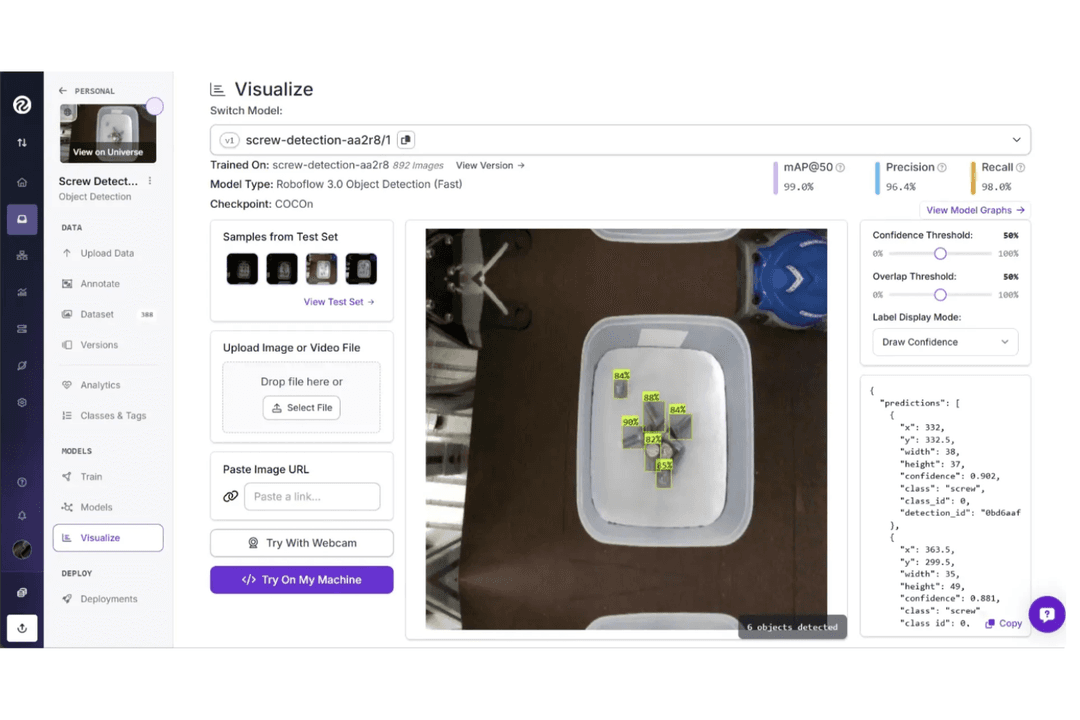
Roboflow offers a comprehensive set of features for building and deploying computer vision models, including dataset management, AI-assisted annotation, model training, and flexible deployment across cloud, edge, or on-premises environments. It supports the full workflow from data preparation to production and is designed for ease of use while still supporting enterprise-scale computer vision deployments.
Labelbox is built for teams that prioritize high-quality training data and structured annotation workflows. It provides tools for RL data generation, model evaluations, robotics-focused data workflows, off-the-shelf datasets, and access to an expert labeling network. These capabilities help teams manage large-scale data operations, maintain annotation quality, and support more complex machine learning pipelines.
*Framework = supported for dataset/model export or ML pipeline compatibility, not a native platform integration.
Both Roboflow and Labelbox integrate with major cloud storage providers and support machine learning frameworks such as TensorFlow and PyTorch through dataset export and pipeline compatibility. Roboflow emphasizes developer and workflow tools within an end-to-end ML environment that can support both small teams and enterprise computer vision pipelines, while Labelbox prioritizes integration with enterprise data platforms.
Factor
Roboflow
Labelbox
FactorData Privacy
RoboflowProvides workspace and project-level access controls for managing dataset visibility and collaboration.
LabelboxOffers granular user permissions and enterprise governance controls for managing data access.
FactorRegulatory Compliance
RoboflowMaintains SOC 2 Type II compliance and offers HIPAA-aligned infrastructure with BAA under agreement.
LabelboxMaintains SOC 2 and ISO 27001 certifications and supports GDPR-aligned data protection practices.
FactorEncryption
RoboflowEncrypts data in transit and at rest, with SSL transport rated A+ by Qualys.
LabelboxEncrypts data in transit (TLS 1.2+) and at rest using enterprise-grade security protocols.
FactorUptime & Reliability
RoboflowPublishes uptime status and may provide SLAs for enterprise customers.
LabelboxOffers high-availability infrastructure with enterprise support and incident management.
FactorAudit Logging
RoboflowTracks dataset changes and user activity for collaboration and traceability.
LabelboxProvides detailed audit logs and activity tracking for governance and compliance.
Both Roboflow and Labelbox provide core security features, including encryption in transit and at rest, as well as access controls to manage data and user permissions. Roboflow offers practical security and reliability for model development and production computer vision systems, including deployments used in enterprise environments. Labelbox emphasizes enterprise governance with detailed audit logging, granular permissions, and established compliance certifications.
Factor
Roboflow
Labelbox
FactorUser Interface
RoboflowFeatures a clean, intuitive dashboard with drag-and-drop dataset tools.
LabelboxOffers a modern, customizable workspace with annotation shortcuts.
FactorOnboarding
RoboflowProvides guided tutorials and sample projects for quick ramp-up.
LabelboxIncludes interactive walkthroughs and in-app tips for new users.
FactorSetup Process
RoboflowAllows fast project setup with prebuilt templates and import options.
LabelboxSupports flexible project configuration with detailed workflow settings.
FactorDocumentation
RoboflowMaintains a searchable help center and active community forum.
LabelboxDelivers comprehensive docs and responsive in-app support chat.
FactorSupport
RoboflowOffers email support, ticketing, in-app chat, and community Q&A for troubleshooting.
LabelboxProvides live chat and enterprise support during standard business hours.
Roboflow is easier for quick project starts and straightforward workflows, while Labelbox is positioned toward complex annotation projects that require deeper customization and structured review. Roboflow stands out for its intuitive interface and fast onboarding, and Labelbox is known for its flexible workspace and strong support, with both platforms offering responsive customer assistance.
Roboflow
Pros
AI-assisted annotation speeds up labeling large datasets.
Supports deployment to edge devices, cloud, or on-premises.
Offers open source tools and public datasets for experimentation.
Cons
Costs can scale quickly with high-volume training and inference.
Limited low-level customization compared to fully custom ML pipelines.
Performance and latency vary by deployment method.
Roboflow builds, trains, and deploys computer vision models end-to-end.
ManufacturingDeploy vision AI to automate quality inspections, detect defects, track inventory, and improve efficiency across modern manufacturing operations.
Industrial ManufacturingUse vision AI to monitor equipment performance, prevent downtime, automate inspections, and optimize complex industrial production environments at scale.
Healthcare & MedicineApply vision AI to analyze medical imagery, monitor patients, automate workflows, and improve diagnostic accuracy and healthcare outcomes.
AutomotiveEnhance automotive manufacturing with vision AI that detects defects, monitors assembly lines, optimizes processes, and prevents costly production downtime.
Aerospace & DefenseUse vision AI to inspect components, verify assembly accuracy, monitor safety compliance, and ensure quality across aerospace manufacturing operations.
Consumer GoodsProtect product quality and brand trust using vision AI to inspect packaging, verify labels, detect defects, and optimize production.
Labelbox
Labelbox manages data labeling and model evaluation workflows
Autonomous VehiclesLabelbox supports complex image and video annotation for training perception models.
Healthcare AIIts audit trails and data privacy controls help meet regulatory requirements.
Enterprise Data ScienceWorkflow management features enable large teams to coordinate labeling projects.
Agriculture AnalyticsLabelbox handles geospatial and satellite imagery annotation for crop monitoring.
Retail Computer VisionTeams can annotate product images at scale for inventory and checkout systems.
Research InstitutionsFlexible annotation tools support diverse academic computer vision projects.
Who Should Use Roboflow, and Who Should Use Labelbox?
If you want a platform that helps you move from raw images to deployed computer vision models with minimal setup, Roboflow is likely the better fit. It’s well-suited for enterprise teams building practical vision applications, such as detection, monitoring, or automation, because it combines dataset management, AI-assisted annotation, model training, and flexible deployment in one environment. This makes it appealing if you prefer an approachable, end-to-end workflow without managing complex machine learning infrastructure.
If your priority is building high-quality training data at scale with deeper control over annotation, evaluation, and human-in-the-loop workflows, Labelbox may suit you better. It’s commonly used by AI labs, enterprise teams, and research-focused organizations that need structured labeling pipelines, advanced review processes, and expert data services to support complex models, including multimodal, reinforcement learning, and large-scale AI systems.
Roboflow
Labelbox
Dataset Management
Roboflow
Centralizes image storage, dataset versioning, preprocessing, and augmentation.
Labelbox
Emphasizes structured labeling pipelines and quality control over preprocessing.
Deployment Options
Roboflow
Provides built-in model training, evaluation, and deployment across cloud, edge, and on-prem environments.
Labelbox
Primarily focuses on data labeling and evaluation, typically integrating with external platforms for model training and deployment.
Integrations
Roboflow
Integrates developer and deployment tools within an end-to-end ML workflow.
Labelbox
Prioritizes compatibility with enterprise data and ML platforms like Databricks.
Pricing Model
Roboflow
Usage-based tiers with a free plan for smaller projects.
Labelbox
Subscription and service-based pricing tied to users, volume, and enterprise needs.
Use Cases
Roboflow
Designed for end-to-end computer vision workflows from dataset preparation to production deployment.
Labelbox
Designed for large-scale data labeling, including computer vision, text, audio, and multimodal workflows, plus model evaluation and human-in-the-loop training for complex AI systems.




 Tim FisherVP of AI
 Gabriel RosasTech Lead & Software Architect
 Christhian GruhnTech Lead & Platform Architect