

OpenText Silk Central Review 2026: Pros, Cons, Features, and Pricing
OpenText Silk Central stands out as a test management software that helps teams manage test planning, execution, tracking, and reporting across complex QA environments.

We review tools independently, and commissions help fund our testing. See our transparency policy, our methodology, or suggest a tool.
OpenText Silk Central is a test management tool built for enterprise QA teams that need to connect requirements, test planning, execution, and reporting in a single environment. I'd consider it over something like TestRail if your team is operating at enterprise scale and needs deep requirements traceability built directly into the same system—rather than stitching that together across separate tools. It's a solid fit when test coverage needs to map clearly back to business requirements across large, complex projects.
OpenText Silk Central Evaluation Summary

0/5
- Pricing available upon request
- Free demo available
Why Trust Our Software Recommendations
6,700+
Reviews
20
Industry experts
16+
Evaluation factors
14
Years
Our team has been testing and reviewing software since 2012. As tech leaders ourselves, we know how difficult—and important—it is to choose the right software.
For this guide, we evaluated tools using hands-on testing and independent research, scoring tools using our selection criteria.
Our reviews reflect our human editorial judgment, not a sales pitch.
Expert reviewers:
- Paulo Gardini MiguelTech Director
 Tim FisherVP of AI
 Gabriel RosasTech Lead & Software Architect
 Christhian GruhnTech Lead & Platform Architect

OpenText Silk Central Overview
When judging test management platforms, I find OpenText Silk Central excels at handling complex, multi-app test initiatives thanks to its traceability, reporting, and integration depth. Its dashboard-driven interface is more enterprise-focused than user-friendly, making onboarding steeper for new teams, but I think the trade-off is worthwhile for environments with established QA processes.
The licensing model isn’t the lowest, but the rich automation and scheduling tools justify it for organizations managing hundreds of test cycles. I’d suggest Silk Central is best suited for large IT departments or regulated industries demanding audit-ready test documentation.
Pros
- Centralized dashboard simplifies tracking complex QA projects
- Supports risk-based testing and requirements traceability
- Comprehensive reporting automates audit preparation and compliance
Cons
- User interface feels dated compared to newer platforms
- Test execution speed is slow with large data volumes
- Limited native support for exploratory testing workflows
Is OpenText Silk Central Right For Your Needs?
Who Would be a Good Fit for OpenText Silk Central?
Silk Central is a strong fit for organizations with regulated environments, large QA teams, or those managing multi-layered test strategies across business units. I think industries like finance, healthcare, and telecom benefit from the compliance, traceability, and audit features. Enterprises with distributed teams and requirements-heavy projects will get the most value from Silk Central’s advanced reporting, automation, and versioning capabilities.
- Enterprise QA TeamsBenefit from advanced reporting, reusable assets, and strong user role controls for complex, multi-project work.
- Regulated IndustriesFeatures like requirements traceability and audit reporting directly support demands in sectors such as healthcare and banking.
- Global OrganizationsSupport for distributed teams, multi-language projects, and centralized oversight makes cross-region coordination easier.
- Test ManagersDashboard analytics, risk-based planning, and coverage analysis help managers justify effort and address gaps.
- Automation-Heavy EnvironmentsRich integration with tools like Jenkins and Selenium makes large-scale test automation projects easier to manage.
- IT and Telecom DepartmentsSilk Central handles system integration tests and requirements-driven workflows typically seen in enterprise IT or telecom projects.
Who Would be a Bad Fit for OpenText Silk Central?
Silk Central isn’t ideal for small teams, startups, or projects with limited budgets. The initial configuration, licensing model, and learning curve make it excessive for those who need lightweight, fast-to-deploy solutions. Companies focused on exploratory testing or without strong reporting and compliance needs could find Silk Central overwhelming and expensive for their requirements.
- Small StartupsInitial cost, infrastructure, and complexity far exceed needs for agile or fast-moving startups.
- Freelance TestersSolo testers will find the feature depth unnecessary and the software too heavy for individual projects.
- Non-Regulated SMBsSmaller teams in unregulated sectors don’t need advanced compliance or version control and could reduce costs elsewhere.
- Exploratory Testing TeamsLacks native support for the kind of rapid, unstructured test capture these teams often require.
- Non-Technical DepartmentsSteep learning curve and technical setup may frustrate business users or teams with limited QA experience.
- Schools and Training OrgsThe enterprise focus and pricing are unsuitable for educational settings or environments focused mainly on training.
Our Review Methodology
How We Test & Score Tools
We’ve spent years building, refining, and improving our software testing and scoring system. The rubric is designed to capture the nuances of software selection and what makes a tool effective, focusing on critical aspects of the decision-making process.
Below, you can see exactly how our testing and scoring works across seven criteria. It allows us to provide an unbiased evaluation of the software based on core functionality, standout features, ease of use, onboarding, customer support, integrations, customer reviews, and value for money.
Core Functionality (25% of final scoring)
The starting point of our evaluation is always the core functionality of the tool. Does it have the basic features and functions that a user would expect to see? Are any of those core features locked to higher-tiered pricing plans? At its core, we expect a tool to stand up against the baseline capabilities of its competitors.
Standout Features (25% of final scoring)
Next, we evaluate uncommon standout features that go above and beyond the core functionality typically found in tools of its kind. A high score reflects specialized or unique features that make the product faster, more efficient, or offer additional value to the user.
We also evaluate how easy it is to integrate with other tools typically found in the tech stack to expand the functionality and utility of the software. Tools offering plentiful native integrations, 3rd party connections, and API access to build custom integrations score best.
Ease of Use (10% of final scoring)
We consider how quick and easy it is to execute the tasks defined in the core functionality using the tool. High scoring software is well designed, intuitive to use, offers mobile apps, provides templates, and makes relatively complex tasks seem simple.
Onboarding (10% of final scoring)
We know how important rapid team adoption is for a new platform, so we evaluate how easy it is to learn and use a tool with minimal training. We evaluate how quickly a team member can get set up and start using the tool with no experience. High scoring solutions indicate little or no support is required.
Customer Support (10% of final scoring)
We review how quick and easy it is to get unstuck and find help by phone, live chat, or knowledge base. Tools and companies that provide real-time support score best, while chatbots score worst.
Customer Reviews (10% of final scoring)
Beyond our own testing and evaluation, we consider the net promoter score from current and past customers. We review their likelihood, given the option, to choose the tool again for the core functionality. A high scoring software reflects a high net promoter score from current or past customers.
Value for Money (10% of final scoring)
Lastly, in consideration of all the other criteria, we review the average price of entry level plans against the core features and consider the value of the other evaluation criteria. Software that delivers more, for less, will score higher.
Core Features
Centralized Test Repository
Store, organize, and reuse test assets in one location. This keeps your test cases and scripts accessible and standardized across teams.
Requirements Traceability
Link tests directly to business and technical requirements. Users get instant visibility into coverage gaps and compliance status.
Live Test Execution Management
Plan, schedule, and monitor test runs in real time from a unified dashboard. Teams quickly spot execution progress and bottlenecks.
Risk-Based Testing Support
Prioritize tests based on business impact and likelihood of failure. QA leaders can focus resources where they matter most.
Customizable Reporting and Analytics
Generate detailed, audit-ready reports on test cycles and results. Custom dashboards surface trends to support data-driven decision making.
Manual and Automated Test Coordination
Manage manual, automated, and hybrid tests through a single interface. This flexibility helps teams coordinate diverse QA workflows in complex environments.

Standout Features
Baseline and Version Control for Test Assets
Track changes to test cases over time with full version histories. This makes it easy to audit QA changes and roll back to previous baselines as needed.
Built-In Test Planning Wizards
Use step-by-step wizards to quickly build and optimize test plans. These tools guide users through risk assignment, sequencing, and resource allocation for large-scale projects.
Ease of Use
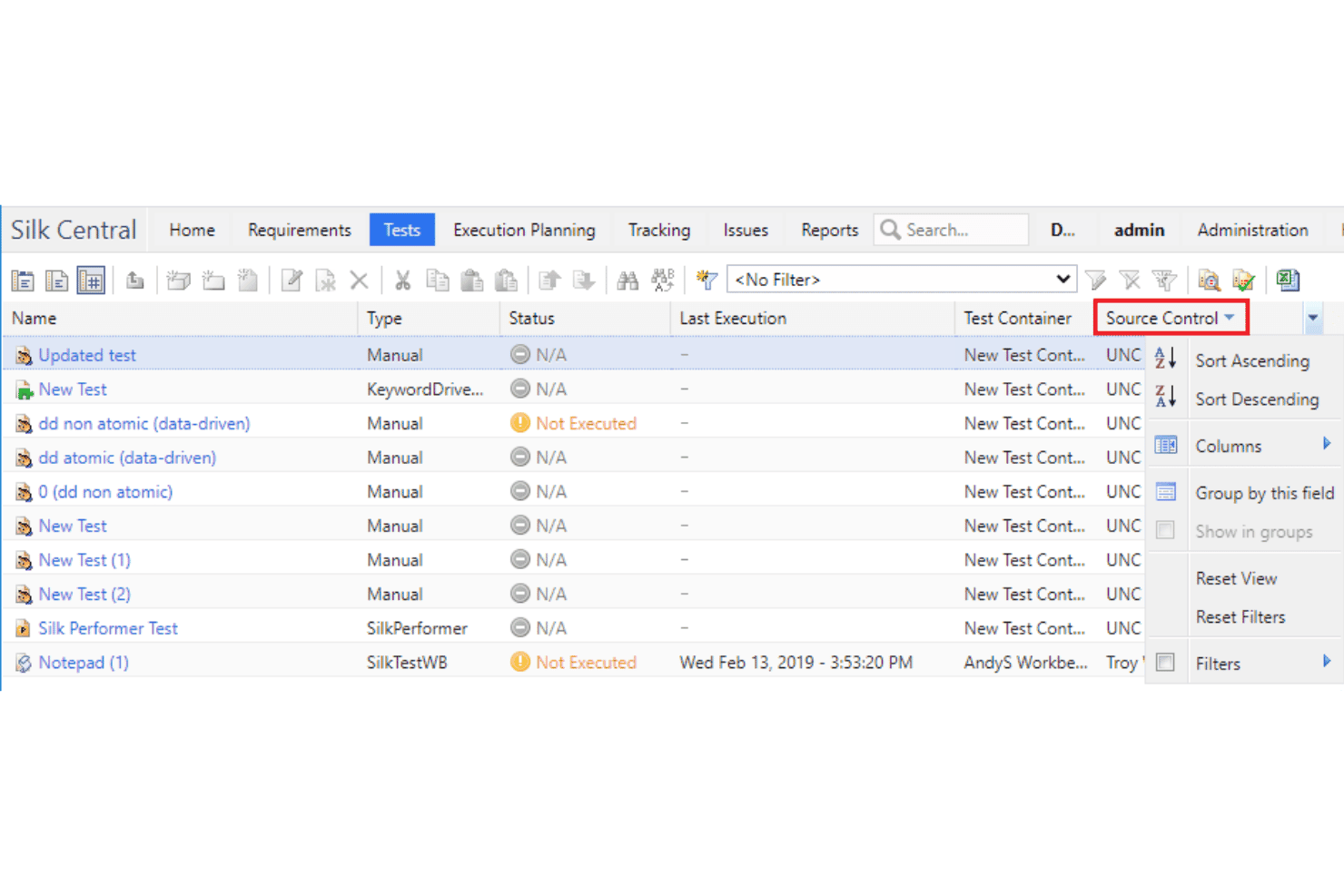
Silk Central’s interface favors depth over simplicity, so experienced QA teams gain strong control but first-time users may need extra ramp-up. Its dashboards and traceability tools are detailed and powerful, but workflow navigation sometimes feels complex and requires training to unlock full value.
User feedback often highlights setup time as a barrier, yet repeat users appreciate the customization and reporting once onboarded.

Onboarding
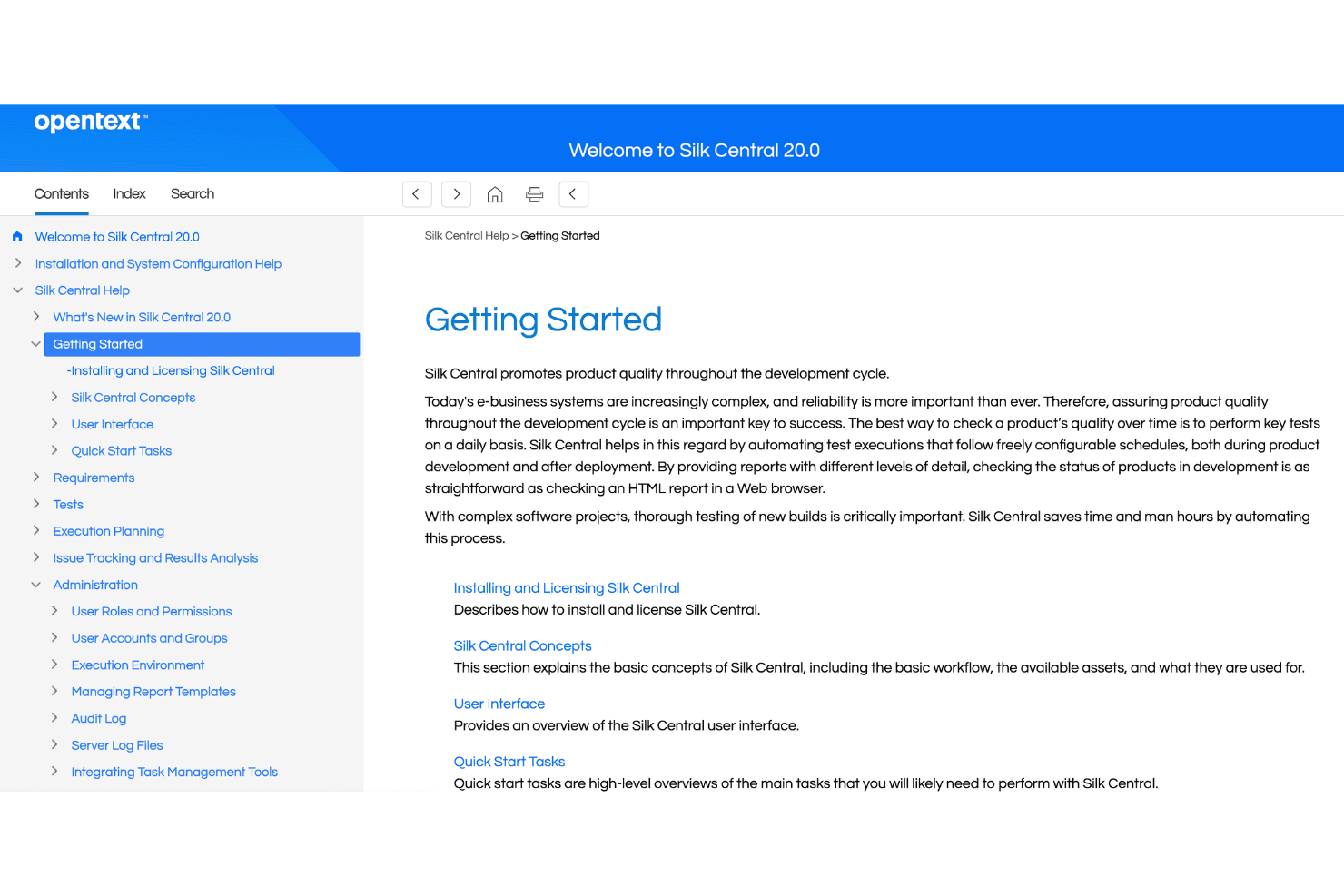
Onboarding with Silk Central can be slow for new teams, as initial setup and environment configuration are involved. While there’s a solid knowledge base and on-demand documentation, user reviews mention that live support and training options are sometimes key to achieving value quickly.
Frequent updates to documentation help, but the hands-on support available makes the biggest impact for complex environments.
Customer Support
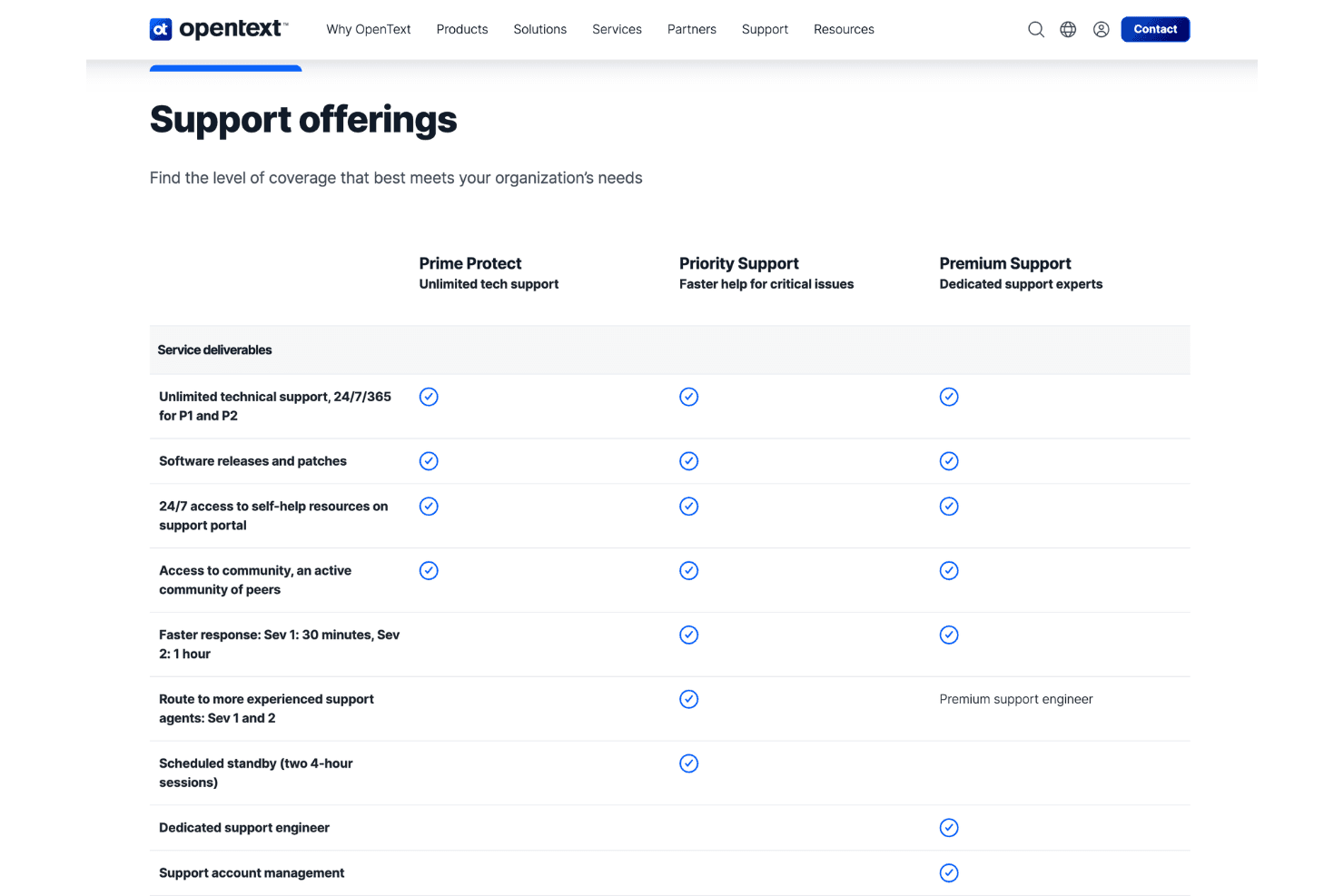
Silk Central offers responsive technical support with a strong reputation for resolving complex issues, according to user reviews. Many users appreciate access to dedicated account managers and knowledgeable agents, though some mention that turnaround times vary depending on ticket urgency and region.
The global support portal and frequent documentation updates help fill gaps between live interactions.
Integrations
OpenText Silk Central integrates with Jira, Jenkins, Micro Focus ALM/Quality Center, Selenium, SoapUI, IBM Rational Quality Manager, UFT, Eclipse, Visual Studio, and Subversion, among others.
Silk Central also provides a REST API and supports integration with third-party tools through connectors and plugins.
Value for Money
OpenText Silk Central uses a custom pricing model based on an organization’s requirements, deployment size, and testing needs. Pricing details are not publicly listed, so teams need to contact OpenText for a personalized quote.
Since it is built for enterprise test management, costs may vary depending on users, integrations, support needs, and implementation scope.
OpenText Silk Central Specs
- A/B Testing: No
- API: Yes
- Automated Testing: Yes
- Browser Compatibility Testing: Yes
- Bug Tracking: Yes
- Calendar Management: No
- CI/CD Integration: Yes
- Dashboard: Yes
- Data Export: Yes
- Data Import: Yes
- Data Visualization: Yes
- Developer Tools: Yes
- External Integrations: Yes
- History/Version Control: Yes
- Manual Testing: Yes
- Multi-User: Yes
- Notifications: Yes
- Performance Testing: Yes
- Regression Testing: Yes
- Scheduling: Yes
- Status Notifications: Yes
- Third-Party Plugins/Add-Ons: Yes
OpenText Silk Central FAQs
OpenText Silk Central Company Overview & History
OpenText Silk Central is an enterprise test management platform designed to help organizations plan, track, and manage software testing processes. Originally developed under Borland’s Silk product family, Silk Central later became part of Micro Focus before joining OpenText after its acquisition of Micro Focus in 2023.
OpenText is a global enterprise software company headquartered in Waterloo, Ontario, Canada. Its portfolio covers information management, IT operations, cybersecurity, and application delivery solutions for large organizations worldwide.
OpenText Silk Central Major Milestones
- 1991: Micro Focus founded the Silk product line predecessor through Segue Software, which developed Silk testing solutions.
- 2006: Borland acquired Segue Software, adding Silk testing products to its portfolio.
- 2009: Micro Focus acquired Borland, bringing Silk Central into its software quality and testing suite.
- 2023: OpenText completed its acquisition of Micro Focus, moving Silk Central under the OpenText portfolio.
- 2026: OpenText continues to support Silk Central as part of its application delivery management and testing solutions.