

nOps Review 2026: Pros, Cons, Features, and Pricing
nOps stands out for its automation and cost optimization, making it ideal for AWS users seeking efficiency, but may not suit teams needing deep multi-cloud support.

We review tools independently, and commissions help fund our testing. See our transparency policy, our methodology, or suggest a tool.
nOps is a cloud management platform built specifically for AWS cost optimization and commitment management. It's worth considering if your team manages significant AWS spend and wants automated Reserved Instance and Savings Plan purchasing rather than manually tracking commitments. Compared to something like CloudHealth, nOps goes further by actually automating the commitment lifecycle—not just reporting on it—which makes a real difference when you're trying to reduce cloud waste without adding analyst overhead.
nOps Evaluation Summary

4.6/5
- Pricing available upon request
- 14-day free trial
Why Trust Our Software Recommendations
6,700+
Reviews
20
Industry experts
16+
Evaluation factors
14
Years
Our team has been testing and reviewing software since 2012. As tech leaders ourselves, we know how difficult—and important—it is to choose the right software.
For this guide, we evaluated tools using hands-on testing and independent research, scoring tools using our selection criteria.
Our reviews reflect our human editorial judgment, not a sales pitch.
Expert reviewers:
- Paulo Gardini MiguelTech Director
 Tim FisherVP of AI
 Gabriel RosasTech Lead & Software Architect
 Christhian GruhnTech Lead & Platform Architect

nOps Overview
When judging nOps as a cloud management platform, its automated cost optimization and compliance features set it apart, especially for AWS-focused teams. The interface is intuitive, onboarding is quick, and integrations with AWS services are deep. While pricing is competitive, those needing extensive multi-cloud support may find it limiting. Support is responsive, and the documentation is thorough.
If you’re selecting a platform for real-time AWS governance and want actionable insights without a steep learning curve, nOps is a strong contender. For example, its automated resource right-sizing helps teams control spend with minimal manual intervention.
Pros
- It simplifies cloud cost management, helping your team save money.
- The platform provides real-time monitoring for better decision-making.
- It's scalable, growing with your team's needs.
Cons
- The user interface can feel cluttered in some areas.
- Learning all the features might take your team some time.
- Customizing reports can be less intuitive than expected.
Is nOps Right For Your Needs?
Who Would be a Good Fit for nOps?
nOps is a great fit for tech startups and large enterprises with dynamic cloud environments. If your team needs to monitor costs and optimize resources in real time, nOps offers the tools you need. DevOps teams in industries like finance and healthcare will appreciate its robust security features. The platform’s scalability also supports growing businesses, ensuring your cloud management evolves with your needs.
- Tech StartupsnOps helps your team manage rapid cloud growth without overspending.
- Large EnterprisesIt scales efficiently, making it ideal for managing vast cloud infrastructures.
- DevOps TeamsReal-time monitoring tools keep your cloud operations running smoothly.
- Finance IndustryIts security features protect sensitive data and ensure compliance.
- Healthcare SectornOps’s robust monitoring supports strict data management requirements.
- Growing BusinessesThe platform grows with your needs, keeping cloud costs in check.
Who Would be a Bad Fit for nOps?
Small businesses with limited cloud usage might find nOps overwhelming and unnecessary. If your team doesn’t need real-time monitoring or advanced cost management, nOps could be more than you need. Companies that rely on simple cloud setups or have static cloud environments may not benefit from the platform’s robust features and might find it too complex for their needs.
- Small BusinessesYour team might not need nOps’s advanced features for limited cloud resources.
- Static EnvironmentsIf your cloud setup rarely changes, nOps’s dynamic tools could be overkill.
- Basic UsersFor teams that only need basic cloud management, nOps might be too complex.
- Non-Tech IndustriesIndustries without heavy tech reliance may find nOps’s features excessive.
- Budget-Conscious TeamsIf cost is your main concern, nOps’s features might not justify the expense.
- Simple SetupsTeams with straightforward cloud architectures won’t need nOps’s advanced capabilities.
Our Review Methodology
How We Test & Score Tools
We’ve spent years building, refining, and improving our software testing and scoring system. The rubric is designed to capture the nuances of software selection and what makes a tool effective, focusing on critical aspects of the decision-making process.
Below, you can see exactly how our testing and scoring works across seven criteria. It allows us to provide an unbiased evaluation of the software based on core functionality, standout features, ease of use, onboarding, customer support, integrations, customer reviews, and value for money.
Core Functionality (25% of final scoring)
The starting point of our evaluation is always the core functionality of the tool. Does it have the basic features and functions that a user would expect to see? Are any of those core features locked to higher-tiered pricing plans? At its core, we expect a tool to stand up against the baseline capabilities of its competitors.
Standout Features (25% of final scoring)
Next, we evaluate uncommon standout features that go above and beyond the core functionality typically found in tools of its kind. A high score reflects specialized or unique features that make the product faster, more efficient, or offer additional value to the user.
We also evaluate how easy it is to integrate with other tools typically found in the tech stack to expand the functionality and utility of the software. Tools offering plentiful native integrations, 3rd party connections, and API access to build custom integrations score best.
Ease of Use (10% of final scoring)
We consider how quick and easy it is to execute the tasks defined in the core functionality using the tool. High scoring software is well designed, intuitive to use, offers mobile apps, provides templates, and makes relatively complex tasks seem simple.
Onboarding (10% of final scoring)
We know how important rapid team adoption is for a new platform, so we evaluate how easy it is to learn and use a tool with minimal training. We evaluate how quickly a team member can get set up and start using the tool with no experience. High scoring solutions indicate little or no support is required.
Customer Support (10% of final scoring)
We review how quick and easy it is to get unstuck and find help by phone, live chat, or knowledge base. Tools and companies that provide real-time support score best, while chatbots score worst.
Customer Reviews (10% of final scoring)
Beyond our own testing and evaluation, we consider the net promoter score from current and past customers. We review their likelihood, given the option, to choose the tool again for the core functionality. A high scoring software reflects a high net promoter score from current or past customers.
Value for Money (10% of final scoring)
Lastly, in consideration of all the other criteria, we review the average price of entry level plans against the core features and consider the value of the other evaluation criteria. Software that delivers more, for less, will score higher.
Core Features
Cost Management
This feature helps your team track and optimize cloud spending, ensuring you don't overspend. It provides detailed reports that make budget management straightforward.
Real-Time Monitoring
With this, you can watch your cloud operations as they happen, catching issues before they escalate. It keeps your infrastructure running smoothly.
Security Compliance
nOps ensures your cloud setup meets industry standards, which is crucial for sectors like finance and healthcare. It helps you avoid costly compliance breaches.
Scalability
As your team grows, nOps scales with you, handling increased cloud demands effortlessly. It supports your long-term growth.
Resource Optimization
This feature identifies underutilized resources, helping you make the most of what you have. It boosts efficiency across your cloud environment.
Automation
Automate routine tasks to save your team time and reduce human error. It allows you to focus on strategic initiatives.

Standout Features
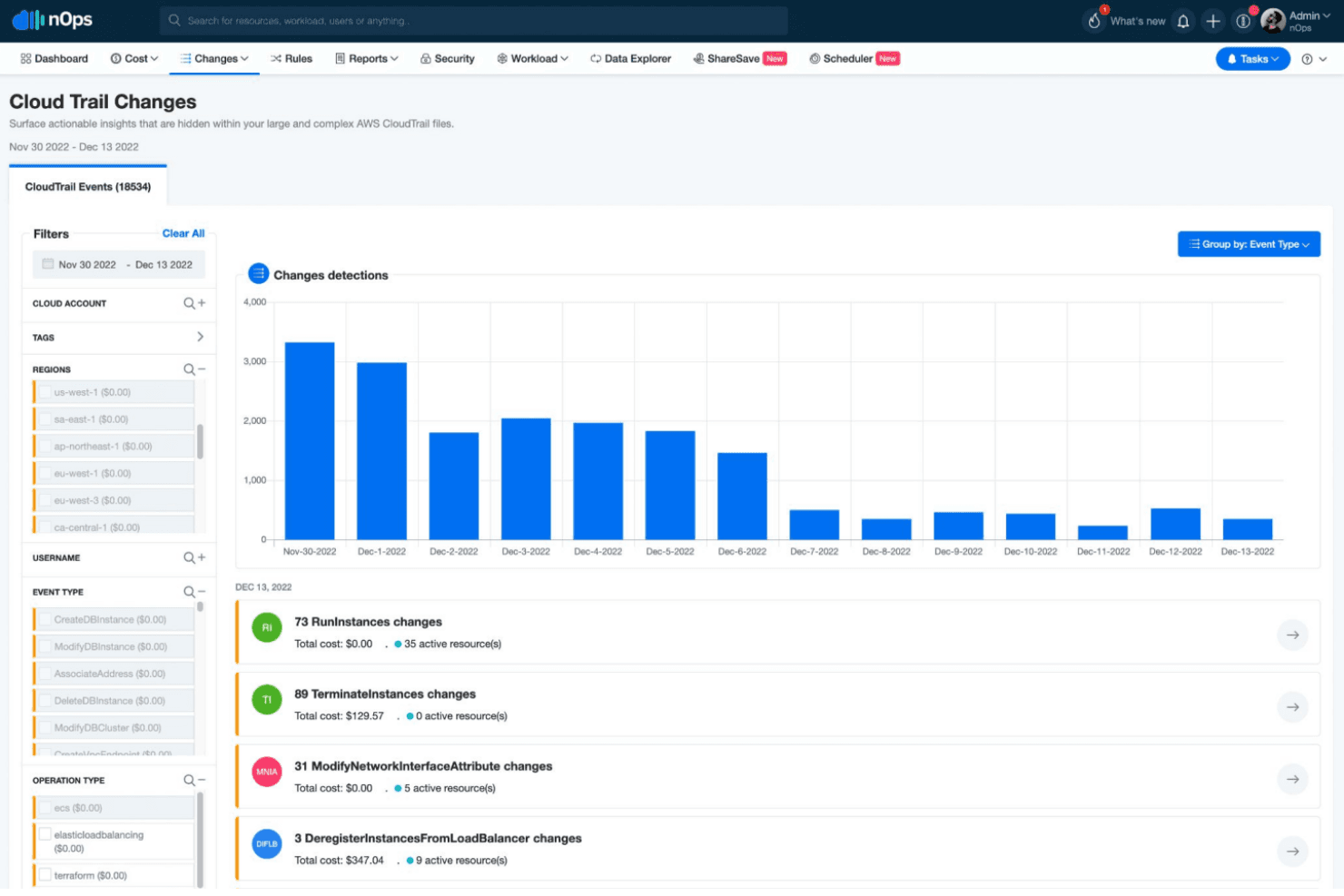
Change Management
nOps tracks changes in your cloud setup, providing insights into how these affect operations. It helps your team manage and plan changes effectively.
Anomaly Detection
This feature uses AI to spot unusual patterns in your cloud usage, alerting you to potential issues. It's like having an extra set of eyes on your operations.
Ease of Use
nOps is widely regarded as user-friendly, with a clean interface and intuitive navigation that make onboarding straightforward for most IT teams. Users appreciate the clear dashboards, actionable alerts, and guided workflows for cost and compliance management. Automated recommendations and real-time insights reduce manual effort, allowing teams to focus on higher-value tasks. Some users note that advanced features require initial setup, but overall, nOps simplifies complex cloud management tasks without overwhelming users.

Onboarding
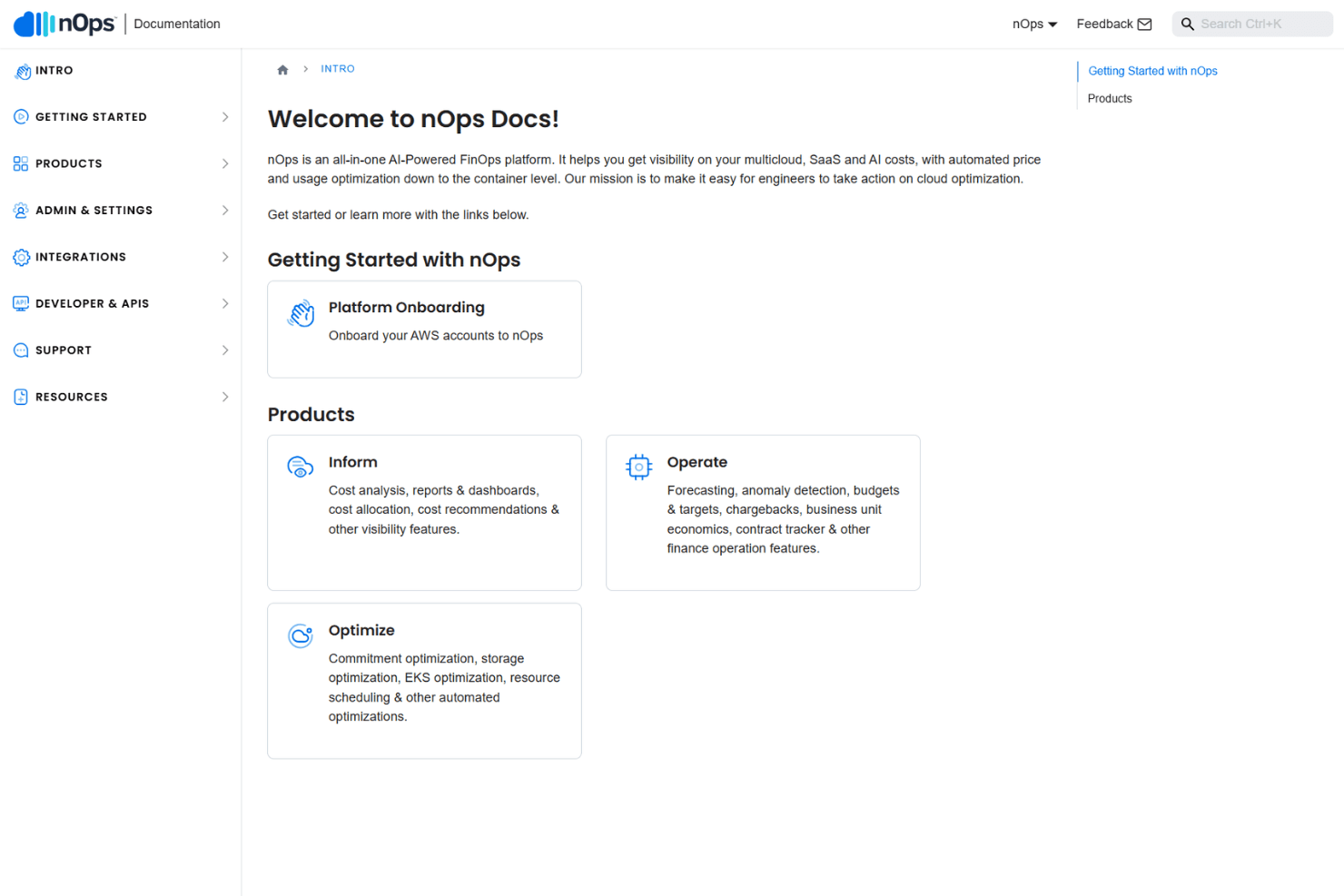
nOps offers a streamlined onboarding process, with most users reporting quick setup and fast time to value. The platform provides guided walkthroughs, detailed documentation, and responsive customer support to help new users get started. Many reviewers highlight the hands-on assistance from the nOps team during initial configuration and integration with AWS accounts. This proactive support and clear onboarding flow help teams realize benefits from nOps’s automation and insights soon after deployment.
Customer Support
nOps is frequently praised for its responsive and knowledgeable customer support team. Users report quick turnaround times on tickets and appreciate the personalized assistance during onboarding and troubleshooting. Support is available through multiple channels, including chat and email, with detailed documentation and a helpful knowledge base for self-service. This high level of support helps users resolve issues quickly and maximizes the value they get from the platform.

Integrations
nOps integrates with Microsoft Azure, Databricks, Datadog, Fastly, Google Cloud Platform, MongoDB Atlas, Snowflake, OpenAI, Anthropic, and Twilio, among others.
nOps also offers an API and supports management integrations like Slack, as well as SSO with major identity providers.

Value for Money
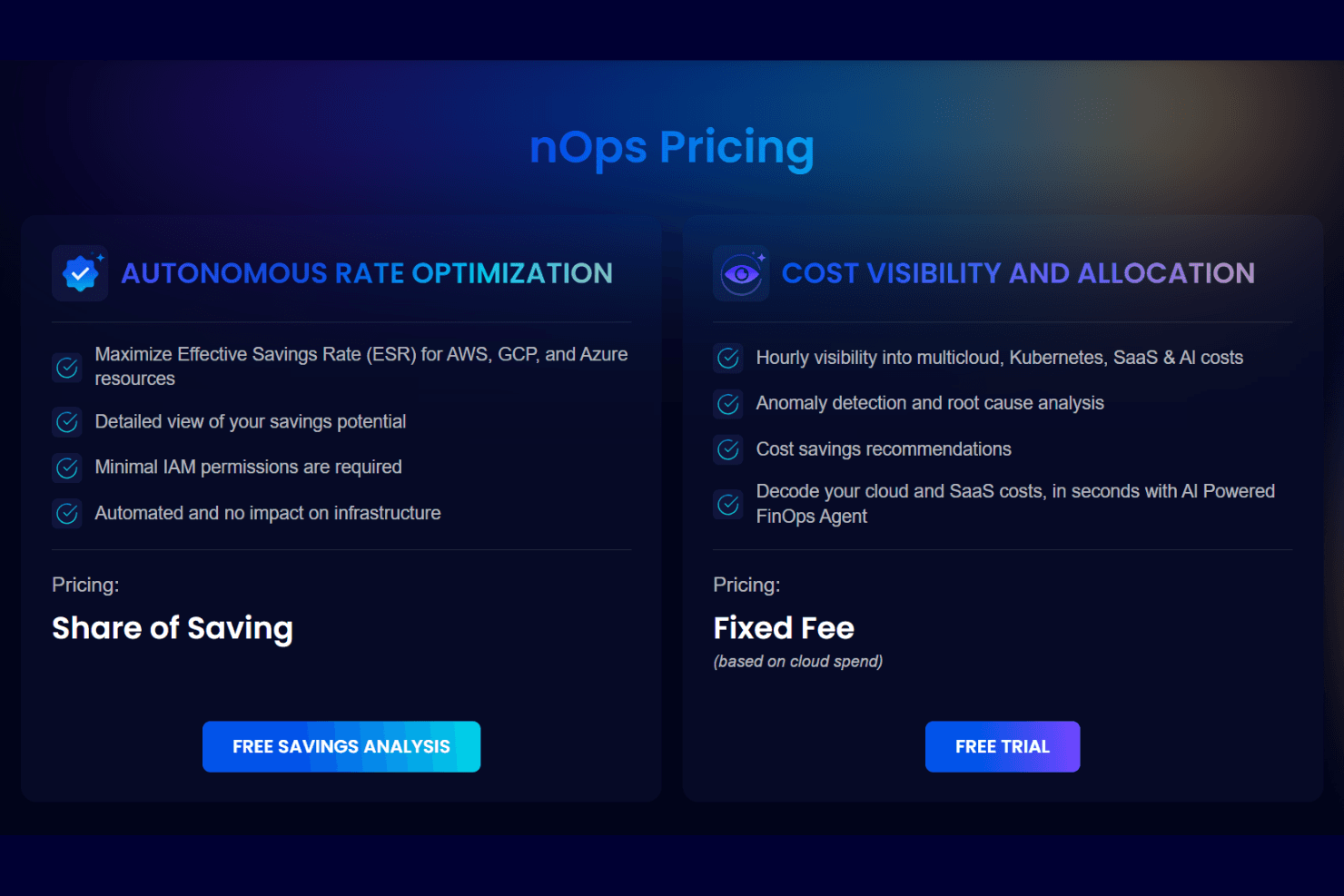
nOps ties cost directly to results with share-of-savings pricing for optimization and fixed fees for visibility. Users gain measurable savings through automation, anomaly detection, and hourly cost insights, making spend predictable while reducing waste across multicloud and Kubernetes setups.
- Autonomous Rate Optimization: Share of savings; automated ESR improvements and savings insights.
- Cost Visibility and Allocation: Fixed fee (based on cloud spend); adds anomaly detection, reporting, and AI-driven cost analysis.
nOps Specs
- 2-Factor Authentication: Yes
- Access Management: Yes
- Anti-Virus: No
- API: Yes
- Audit Trail: Yes
- Bug Tracking: No
- Calendar Management: No
- Customer Management: No
- Dashboard: Yes
- Data Export: Yes
- Data Import: No
- Data Visualization: Yes
- Email Integration: Yes
- External Integrations: Yes
- File Sharing: No
- File Transfer: No
- Firewall: No
- Google Apps Integration: No
- Inventory Tracking: No
- Malware Protection: No
- Multi-User: Yes
- Network Device Performance Monitoring: Yes
- Network Traffic Monitoring: Yes
- Network Visualization: Yes
- Notifications: Yes
- Project Management: No
- Remote Access: No
- Risk Assessment: Yes
- SAP Integration: No
- Scheduling: Yes
- Software Integration: Yes
- Third-Party Plugins/Add-Ons: Yes
- Ticket Management: No
nOps FAQs
nOps Company Overview & History
nOps is a cloud cost optimization and management platform headquartered in the United States. The company manages over $3 billion in annual AWS spend for a diverse client base, including startups and large enterprises. nOps is not publicly traded and focuses solely on its flagship platform, with no evidence of other owned products or major affiliations. Notable clients include CommentSold, Arlo, Vermeg, BENlabs, Efabless, CleanChoice Energy, and Modus.
nOps Major Milestones
- 2015: nOps was founded and launched its cloud management platform.
- 2024: Secured $30 million in Series A funding to accelerate growth and innovation.
- 2024: Reported $4.8 million in annual revenue and a workforce of approximately 96 employees.
- 2025-2026: Recognized as a leader in cloud cost management by industry analysts and review platforms.