

Appmachine Review: Pros, Cons, Features & Pricing
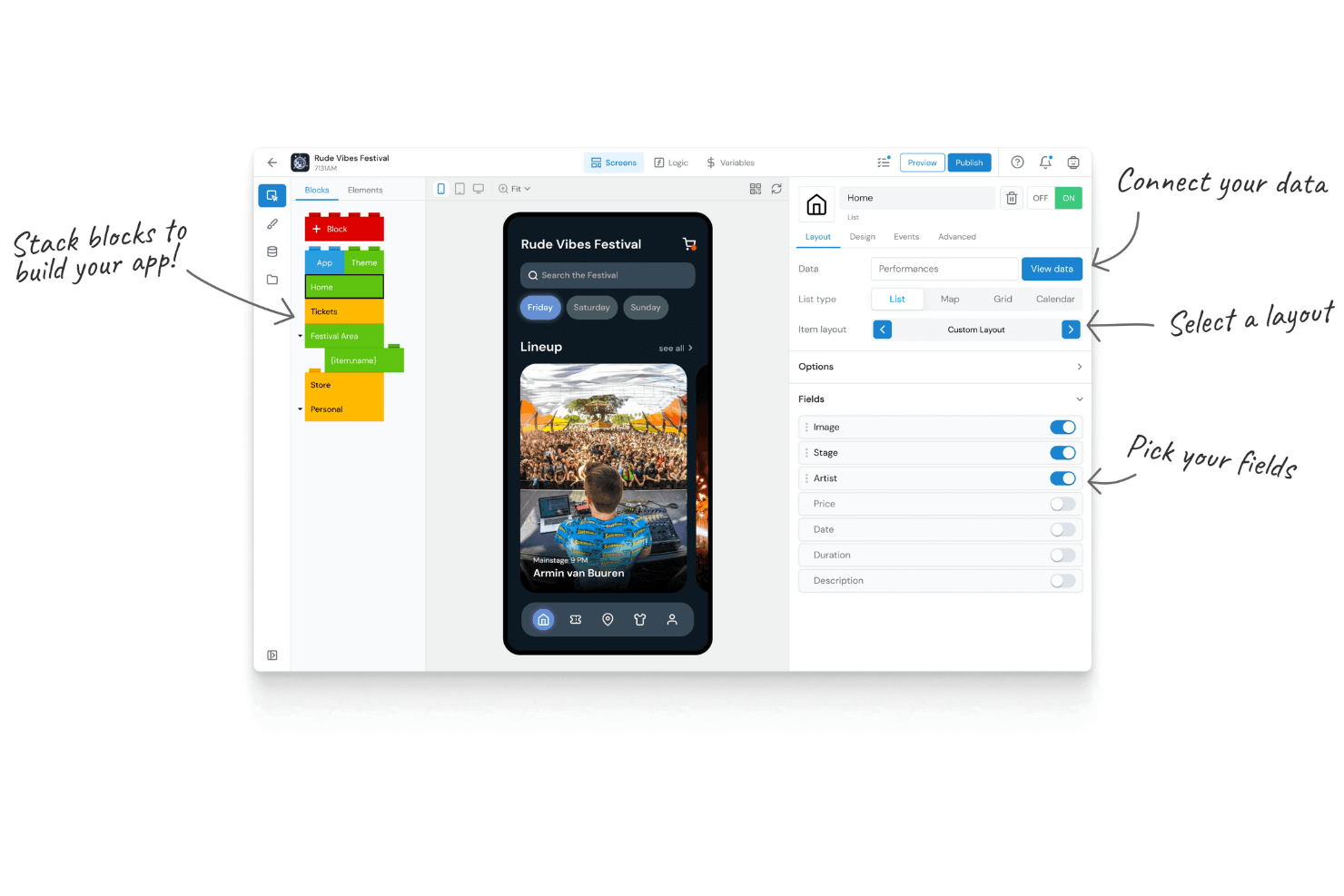
Appmachine stands out for its user-friendly interface, making it an excellent choice for those seeking to create simple apps without coding.

We review tools independently, and commissions help fund our testing. See our transparency policy, our methodology, or suggest a tool.
AppMachine is an application development software for teams that need to build mobile apps without writing custom code, using a block-based builder that handles both design and backend logic in one place. I'd consider it over something like AppGyver if your team wants a more guided, template-driven building experience rather than a blank-canvas approach that demands deeper technical setup.
AppMachine Evaluation Summary
0/5
- From 15/user/month (billed annually)
- Free trial available
Why Trust Our Software Recommendations
6,700+
Reviews
20
Industry experts
16+
Evaluation factors
14
Years
Our team has been testing and reviewing software since 2012. As tech leaders ourselves, we know how difficult—and important—it is to choose the right software.
For this guide, we evaluated tools using hands-on testing and independent research, scoring tools using our selection criteria.
Our reviews reflect our human editorial judgment, not a sales pitch.
Expert reviewers:
- Paulo Gardini MiguelTech Director
 Tim FisherVP of AI
 Gabriel RosasTech Lead & Software Architect
 Christhian GruhnTech Lead & Platform Architect

AppMachine Overview
In my opinion, Appmachine is a solid choice for those looking for an easy-to-use platform without coding requirements. It excels in user interface and simplicity but falls short in customer support and onboarding compared to competitors. It's best for small businesses and teams needing straightforward app development. If you're comparing options, consider whether its ease of use and cost align with your goals.
Pros
- You can build apps without knowing how to code.
- The interface is easy to use and navigate.
- It's great for creating simple apps quickly.
Cons
- Customer support can be slow and unresponsive.
- Onboarding lacks depth and guidance for new users.
- Advanced customization options are limited.
Is AppMachine Right For Your Needs?
Who Would be a Good Fit for AppMachine?
Small businesses and marketing teams would find Appmachine a good fit because of its straightforward app-building process. If your team needs to create simple, functional apps without coding expertise, Appmachine offers an intuitive interface and essential features that cater to these needs. Educational institutions looking to develop basic educational apps quickly can also benefit from its user-friendly design and ease of use.
- Small BusinessesYou can quickly create simple apps to engage customers without needing coding skills.
- Marketing TeamsAppmachine helps you design promotional apps, making it easier to reach your audience.
- Educational InstitutionsBuild basic educational apps for students with an easy-to-use interface.
- Non-Technical TeamsYou can develop apps without any coding knowledge, thanks to Appmachine's user-friendly tools.
- Event OrganizersCreate event-specific apps to share schedules and updates with attendees effortlessly.
- StartupsIf you're launching a product, Appmachine can help you make a basic app to showcase your offerings.
Who Would be a Bad Fit for AppMachine?
Large enterprises and tech-savvy teams looking for advanced customization might not find Appmachine suitable. If your work involves building complex apps with extensive features and integrations, Appmachine's limited customization options and basic feature set could be restrictive. Development teams needing deep coding capabilities and backend integrations would find it lacking in flexibility and depth.
- Enterprise-Level CorporationsYou need more advanced features and customizations that Appmachine doesn't offer.
- Tech StartupsIf you're building complex, innovative apps, you might find Appmachine's capabilities too basic.
- Software DevelopersYou'd miss the coding flexibility and advanced features found in other platforms.
- IT DepartmentsYour team requires deeper integrations and backend access than Appmachine provides.
- Gaming CompaniesAppmachine lacks the advanced functionalities needed for developing sophisticated gaming apps.
- E-commerce GiantsYou need robust e-commerce features that Appmachine's simple tools can't support.
Our Review Methodology
How We Test & Score Tools
We’ve spent years building, refining, and improving our software testing and scoring system. The rubric is designed to capture the nuances of software selection and what makes a tool effective, focusing on critical aspects of the decision-making process.
Below, you can see exactly how our testing and scoring works across seven criteria. It allows us to provide an unbiased evaluation of the software based on core functionality, standout features, ease of use, onboarding, customer support, integrations, customer reviews, and value for money.
Core Functionality (25% of final scoring)
The starting point of our evaluation is always the core functionality of the tool. Does it have the basic features and functions that a user would expect to see? Are any of those core features locked to higher-tiered pricing plans? At its core, we expect a tool to stand up against the baseline capabilities of its competitors.
Standout Features (25% of final scoring)
Next, we evaluate uncommon standout features that go above and beyond the core functionality typically found in tools of its kind. A high score reflects specialized or unique features that make the product faster, more efficient, or offer additional value to the user.
We also evaluate how easy it is to integrate with other tools typically found in the tech stack to expand the functionality and utility of the software. Tools offering plentiful native integrations, 3rd party connections, and API access to build custom integrations score best.
Ease of Use (10% of final scoring)
We consider how quick and easy it is to execute the tasks defined in the core functionality using the tool. High scoring software is well designed, intuitive to use, offers mobile apps, provides templates, and makes relatively complex tasks seem simple.
Onboarding (10% of final scoring)
We know how important rapid team adoption is for a new platform, so we evaluate how easy it is to learn and use a tool with minimal training. We evaluate how quickly a team member can get set up and start using the tool with no experience. High scoring solutions indicate little or no support is required.
Customer Support (10% of final scoring)
We review how quick and easy it is to get unstuck and find help by phone, live chat, or knowledge base. Tools and companies that provide real-time support score best, while chatbots score worst.
Customer Reviews (10% of final scoring)
Beyond our own testing and evaluation, we consider the net promoter score from current and past customers. We review their likelihood, given the option, to choose the tool again for the core functionality. A high scoring software reflects a high net promoter score from current or past customers.
Value for Money (10% of final scoring)
Lastly, in consideration of all the other criteria, we review the average price of entry level plans against the core features and consider the value of the other evaluation criteria. Software that delivers more, for less, will score higher.
Core Features
Drag-and-Drop Builder
You can easily create app layouts without coding by dragging elements into place. It's perfect for building simple apps quickly.
Pre-Built Templates
Choose from a variety of templates to jumpstart your app design. This saves you time and helps maintain a professional look.
Custom Branding
Add your logo and color scheme to make the app align with your brand. It ensures your app reflects your company's identity.
Real-Time Preview
See changes instantly as you build your app. This feature helps you make quick adjustments and ensures the design meets your expectations.
App Publishing
Directly publish your app to app stores from the platform. This simplifies the process of getting your app into users' hands.
Content Management
Easily manage and update the content within your app. It keeps your app relevant and up-to-date with minimal effort.
.png&w=3840&q=75)
Standout Features
Photo Recognition Module
This feature lets you integrate photo recognition capabilities into your app. It's great for apps that need to identify and interact with images.
Google Analytics Integration
Track user behavior and app performance through built-in Google Analytics support.

Ease of Use
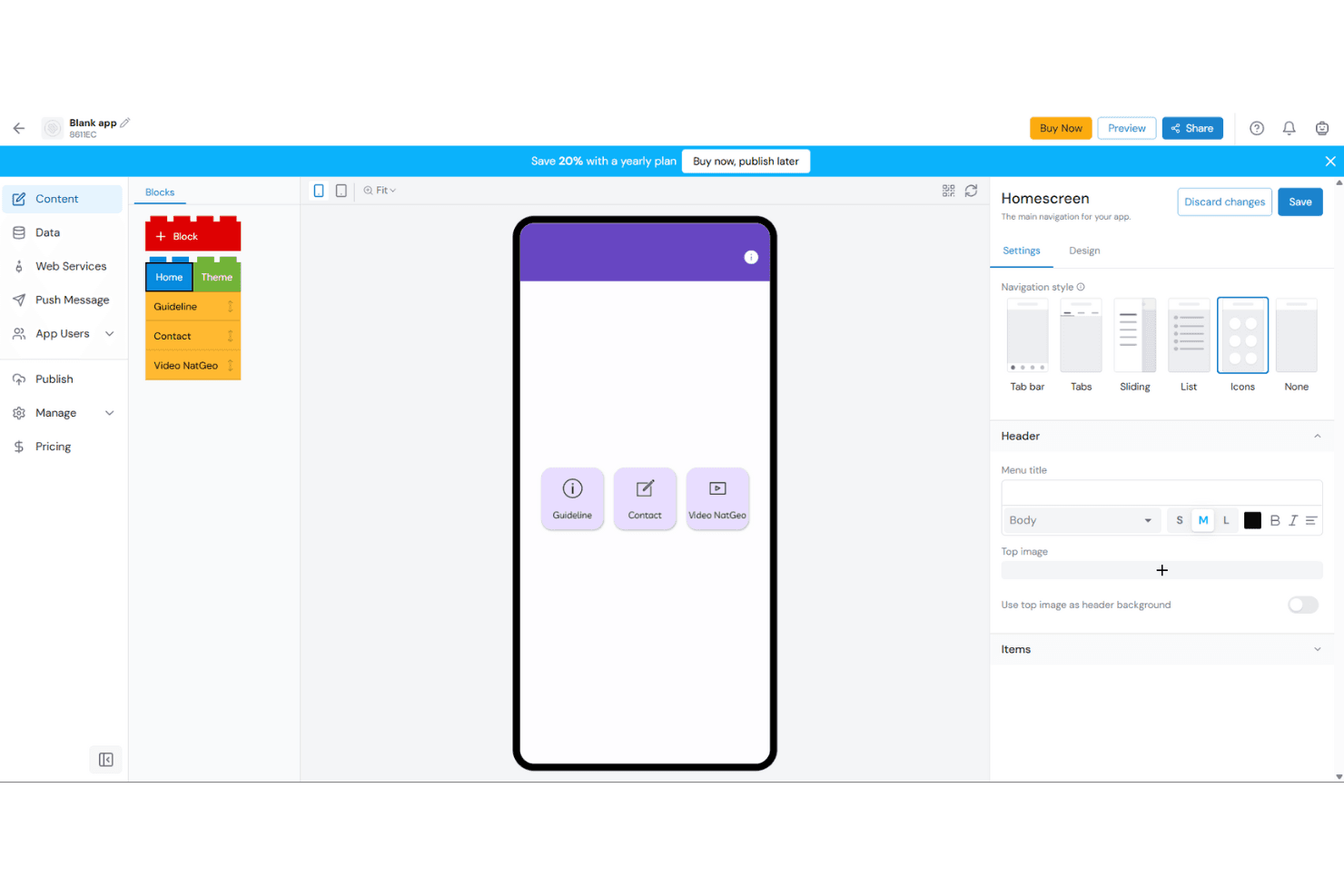
Appmachine is highly user-friendly, especially for those new to app development. You’ll appreciate the intuitive drag-and-drop interface that simplifies the building process. The real-time preview feature lets you see changes instantly, making it easy to adjust your design. Compared to other tools, it stands out for its simplicity and straightforwardness, allowing you to create functional apps without needing coding skills. It's an ideal choice for teams looking to build apps quickly and efficiently.
Onboarding
Appmachine's onboarding process is basic, which might leave new users wanting more guidance. You’ll find the initial setup straightforward, but the lack of detailed tutorials or resources can make it challenging for those unfamiliar with app development. While the interface is easy to navigate, the support options are limited, potentially slowing down your team's time to value. If you're new to app-building, you might need to spend extra time exploring features on your own.
Customer Support
Appmachine's customer support is somewhat lacking, which can be frustrating if you run into issues. You might find response times slow, and the available support resources limited. This can be a hurdle if your team relies on quick assistance. While the platform offers basic help, it doesn't match the depth of support some users expect, potentially leaving you to troubleshoot on your own. If immediate support is crucial for your work, this might be a consideration.
Integrations
Appmachine integrates with Facebook, Twitter/X, Instagram, YouTube, LinkedIn, SoundCloud, Flickr, and RSS Feeds. Appmachine also offers an API for custom integrations and connects with third-party web services.
Value for Money
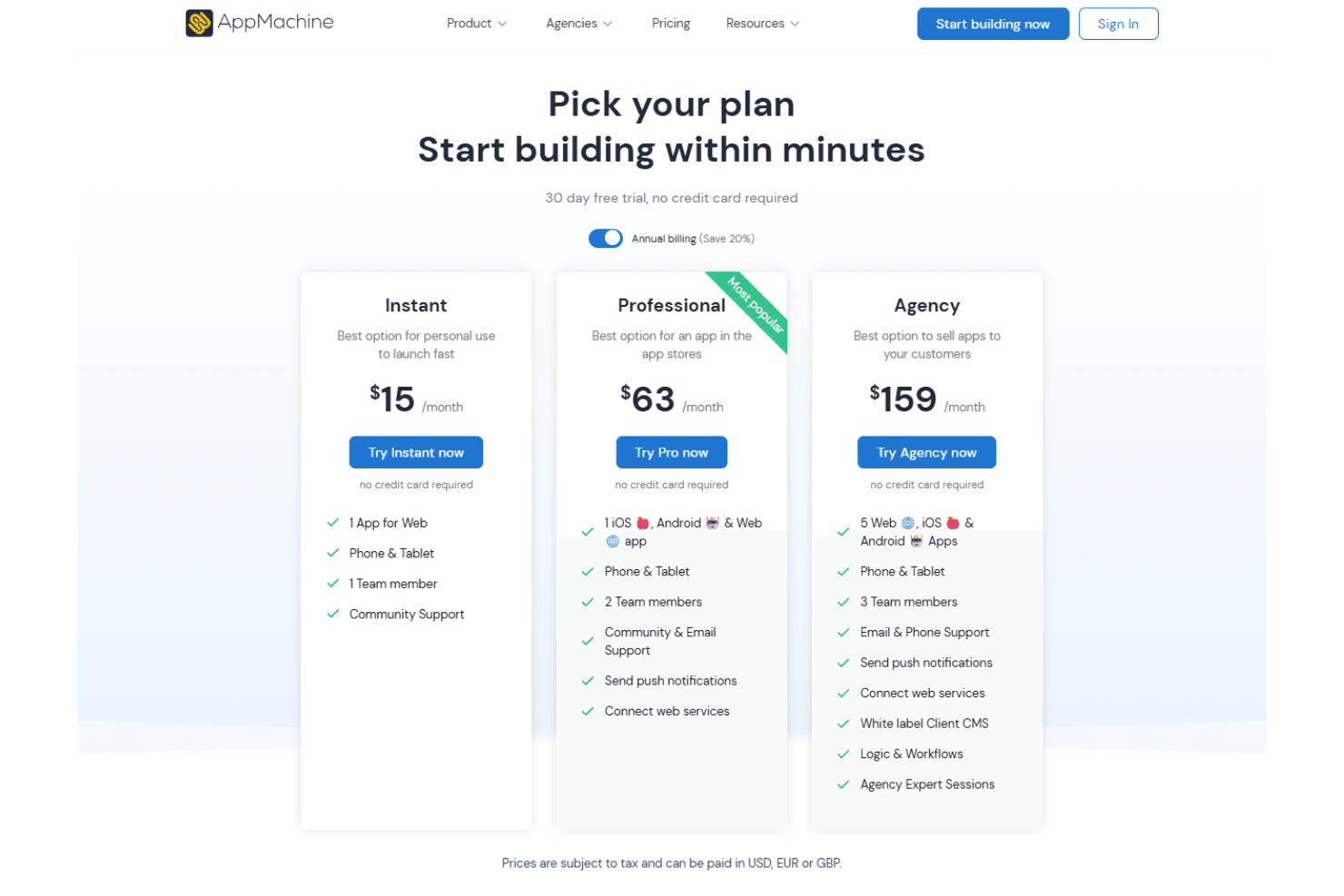
Appmachine offers good value for money with its easy-to-use features for simple app development. Though it may lack advanced functionalities, the platform's pricing aligns well with the features provided, making it suitable for small teams and businesses. Plans start at $15/month and go up to $159/month. A 30-day free trial is available, allowing your team to evaluate the software before committing to a purchase.
AppMachine Specs
- API: No
- Bug Tracking: No
- CI/CD Integration: No
- Cloud Deployment: No
- Code Review: No
- Code Transformation: No
- Collaboration Support: No
- Data Export: No
- Data Import: No
- Developer Tools: No
- External Integrations: No
- Git Integration: No
- History/Version Control: No
- IDE Plugins: No
- Local Deployment: No
- Multi-User: No
- Notifications: No
- Project Management: No
- Release Management: No
- Static Analysis: No
- Task Scheduling/Tracking: No
- Testing: No
AppMachine FAQs
AppMachine Company Overview & History
Appmachine, headquartered in Leeuwarden, Netherlands, was founded in 2011. The company specializes in no-code app development, allowing users to build apps for both iPhone and Android devices. Known for its innovative approach, Appmachine also launched DJ.Studio, showcasing its commitment to diverse tech solutions. The company is recognized for its commitment to making app development accessible to users with varying levels of technical expertise.
Appmachine Major Milestones
- 2011: Company founded with a focus on no-code app development.
- 2013: Official launch of the Appmachine platform.
- 2014: CEO Siebrand Dijkstra named CEO of the Year by Computable magazine.
- 2025: Continued development and innovation in app-building technology.