

Gestionarea accesului utilizatorilor poate fi o adevărată bătaie de cap pentru orice echipă tehnică. Trebuie să vă asigurați că toată lumea are permisiunile potrivite, fără a compromite securitatea. Aici intervine software-ul de furnizare a utilizatorilor. Acesta vă ajută să automatizați și să simplificați gestionarea utilizatorilor, economisind timpul echipei și reducând erorile.
Din experiența mea de testare și evaluare a acestor instrumente, am descoperit câteva opțiuni remarcabile care vă pot ușura munca. Am făcut cercetarea, astfel încât dumneavoastră să nu trebuiască să o faceți. Această listă vă va ghida prin cele mai bune software-uri de furnizare a utilizatorilor disponibile, evidențiind funcțiile, avantajele și dezavantajele.
Veți obține o perspectivă imparțială asupra fiecărui instrument, ceea ce vă va ajuta să faceți cea mai bună alegere pentru nevoile echipei dumneavoastră. Haideți să explorăm lumea software-urilor de furnizare a utilizatorilor și să găsim opțiunea potrivită pentru dumneavoastră.
Why Trust Our Software Recommendations
6,700+
Reviews
20
Industry experts
16+
Evaluation factors
14
Years
Our team has been testing and reviewing software since 2012. As tech leaders ourselves, we know how difficult—and important—it is to choose the right software.
For this guide, we evaluated tools using hands-on testing and independent research, scoring tools using our selection criteria.
Our reviews reflect our human editorial judgment, not a sales pitch.
Expert reviewers:
- Paulo Gardini MiguelTech Director
 Tim FisherVP of AI
 Gabriel RosasTech Lead & Software Architect
 Christhian GruhnTech Lead & Platform Architect

Tabel comparativ: software-uri de furnizare a utilizatorilor
Acest tabel comparativ rezumă detaliile privind prețurile pentru selecțiile mele de top de software-uri de furnizare a utilizatorilor.
Score legend (out of 5)
- Excellent4.5–5
- Good4–4.4
- Average3–3.9
- Below average2–2.9
- Poor1–1.9
Sorted by: Default
| Tool | Starting Price | Website | |||||||
|---|---|---|---|---|---|---|---|---|---|
Best for global user provisioning for physical assets | 2.8 out of 5 | 2 | 4 | 3 | 2 | 4 | 2 | $49/user/month Free demo available | Website |
Best for streamlined Active Directory management | 3.7 out of 5 | 5 | 4 | 2 | 4 | 4 | 3 | $7/user/month 30-day free trial | Website |
Best for directory-as-a-service capabilities | 3.7 out of 5 | 3 | 4 | 4 | 3 | 4 | 4 | $9/user/month 30-day free trial | Website |
Best for risk-based authentication | 3.8 out of 5 | 5 | 3 | 4 | 4 | 4 | 3 | Pricing upon request | Website |
Best for secure enterprise identity verification | 3.8 out of 5 | 2 | 4 | 4 | 4 | 4 | 5 | $7.00/user/month 30-day free trial | Website |
Best for adaptive workforce authentication | 4.3 out of 5 | 4 | 4 | 4 | 4 | 5 | 5 | $6/user/month 30-day free trial + free demo available | Website |
Best for open-source identity and access management | 2.8 out of 5 | 2 | 1 | 5 | 4 | 3 | 2 | $20/user/month | Website |
Best for SaaS operations management | 3.5 out of 5 | 4 | 4 | 2 | 3 | 5 | 3 | Pricing upon request Free demo available | Website |
Best for pre-built app and system connectors | Not rated | 4 | 3 | Not rated | 1 | 3 | 5 | Pricing upon request 30-day free trial available | Website |
Best for energy-efficient IT solutions | 4.2 out of 5 | 5 | 4 | 4 | 4 | 4 | 4 | Pricing upon request Free 7-day trial available | Website |


Evaluarea celor mai bune software-uri de furnizare a utilizatorilor
Mai jos sunt prezentate rezumatele mele detaliate ale celor mai bune software-uri de furnizare a utilizatorilor care au ajuns pe lista mea scurtă. Evaluările mele oferă o perspectivă detaliată asupra funcțiilor principale, avantajelor și dezavantajelor, integrărilor și cazurilor ideale de utilizare pentru fiecare instrument, pentru a vă ajuta să îl găsiți pe cel mai potrivit pentru dumneavoastră.
 Best for global user provisioning for physical assets
- Free demo available
- From $49/user/month
Visit WebsiteCustomer Rating:4.7/5
Deel offers provisioning of physical assets in over 130 countries, ideal for global workforces. Deel is a global leader in payroll, HR, and IT management, offering a wide range of solutions that empower businesses to manage distributed teams in over 130 countries. With a strong focus on supporting global operations, Deel provides tools for handling everything from equipment delivery to workforce management, ensuring compliance.
Why I Picked Deel: Deel IT automates key workflows, such as onboarding and offboarding, enabling businesses to set up new hires with pre-configured devices, complete with all necessary apps and security settings. The platform’s global reach ensures that the provisioning of physical assets is not limited by geographic barriers—equipment and user accounts can be activated quickly, no matter where your employee is located.
Standout features & integrations:
Other standout features include its 24/7 global support and real-time visibility into all IT assets, enabling businesses to track, update, and manage devices across different regions efficiently. The platform also supports device recovery and reuse, ensuring optimal use of physical resources. Deel integrates with systems like Apple Business Manager, Windows Autopilot, Okta, BambooHR, Rippling, and Workday.
Pros and Cons
Pros:
- Can combine HR and IT asset management in one
- Helps automate asset workflows
- Supports equipment deployment in over 130 countries
Cons:
- Doesn't offer features beyond device management, like network and server management
- May not be ideal for teams with very complex IT asset needs
Learn more about Deel IT: Best for streamlined Active Directory management
- 30-day free trial
- From $7/user/month (min 5 seats)
Visit WebsiteCustomer Rating:4.2/5
A photo focused on the reports tab of the user provisioning software tool ManageEngine ADManager Plus. ManageEngine ADManager Plus provides an extensive platform designed to manage and maintain Active Directory domains efficiently. Focusing on making Active Directory operations more intuitive, it ties directly into our rationale for being the best tool for streamlined Active Directory management.
Why I Picked ManageEngine ADManager Plus: I chose ManageEngine ADManager Plus after comparing various tools for Active Directory management. Its focus on providing a streamlined user experience and rich features made it stand out. When judging its ability to simplify complex AD tasks, it became evident that it truly was the best for those looking for a tool that offers a straightforward approach to Active Directory management.
Standout features & integrations:
ManageEngine ADManager Plus boasts an array of features catering to novice and expert administrators. Its bulk user management capabilities, combined with the detailed reports, make day-to-day operations efficient. Furthermore, it has vital integrations with various apps and on-premises systems, allowing for a more unified IT management experience.
Pros and Cons
Pros:
- Provides a self-service portal for end-users
- Integrated reporting system
- Comprehensive Active Directory management capabilities
Cons:
- Lacks some advanced automation features
- User interface could be more modern
- Steeper learning curve for beginners
Learn more about ManageEngine ADManager Plus: Best for directory-as-a-service capabilities
- 30-day free trial
- From $9/user/month (billed annually)
Visit WebsiteCustomer Rating:4.6/5
A screenshot focused on the users tab of the user provisioning software tool JumpCloud. JumpCloud provides a centralized platform to manage user identities across various IT resources. Businesses can achieve unified identity management through their directory-as-a-service capabilities, thus fulfilling complex access requests in today's heterogeneous IT environments.
Why I Picked JumpCloud: In the vast landscape of IT tools, selecting the right one often boils down to specific needs and standout features. When determining the best fit for directory services, JumpCloud immediately surfaced as a top contender due to its robust capabilities in handling user identities. I chose this tool because it effectively blends automated user processes with intricate directory functionalities, marking it as the best for directory-as-a-service capabilities.
Standout features & integrations:
JumpCloud excels in managing and automating user identities, ensuring that access requests are processed efficiently. The platform's comprehensive API further augments its directory functionalities, facilitating intricate integrations and custom workflows. As for integrations, JumpCloud has built partnerships with various IT platforms, allowing businesses to maintain cohesion in identity management across diverse ecosystems.
Pros and Cons
Pros:
- Efficient handling of access requests
- Advanced API for custom integrations and workflows
- Comprehensive management of user identities
Cons:
- Integrations, while vast, may not cover niche industry tools
- Some advanced features could require technical expertise
- Might be overwhelming for smaller organizations
Learn more about JumpCloud:

A screenshot displaying the applications tab of IBM security Verify. IBM Security Verify is a comprehensive access management solution emphasizing risk-based authentication, ensuring users are granted access based on contextual risks. This approach balances security and user convenience, aligning perfectly with the rising demands of modern digital businesses.
Why I Picked IBM Security Verify: In choosing and comparing various tools, IBM Security Verify particularly caught my attention due to its unique approach to authentication. The tool's emphasis on a risk-based method, which is different from traditional authentication strategies, piqued my interest. Hence, I am of the opinion that for organizations looking to pivot towards a more contextual and dynamic authentication system, IBM Security Verify is best for risk-based authentication.
Standout features & integrations:
IBM Security Verify is an account provisioning tool and a complete identity solution. Its risk-based authentication mechanism evaluates numerous parameters before granting access, adding an extra layer of security. Integration-wise, IBM Security Verify is compatible with various enterprise applications and systems, ensuring consistent identity practices regardless of the underlying platform.
Pros and Cons
Pros:
- Wide compatibility with numerous enterprise applications and systems.
- Comprehensive user provisioning tool ensuring efficient account management.
- Advanced risk-based authentication for improved security.
Cons:
- As with many IBM solutions, it may come with a steeper learning curve for some users
- Integration with certain legacy systems might require additional effort
- Might be perceived as complex for smaller organizations
Learn more about IBM Security Verify: Best for secure enterprise identity verification
- 30-day free trial
- From $7.00/user/month

A photo displaying the admin center built for the tool Microsoft Entra ID. Microsoft Entra ID is a tool designed to provide businesses with a robust mechanism for identity verification. As enterprises grow and navigate through complex hybrid environments, a secure and reliable identity verification becomes indispensable. Microsoft Entra ID squarely focuses on this, ensuring that enterprise identities are verified with utmost security.
Why I Picked Microsoft Entra ID: I picked Microsoft Entra ID as my top choice for identity verification tools. It's great for the enterprise sector, especially those in hybrid environments. After comparing it to other options, I found that it excels at providing secure identity verification. This makes it easy for the IT department to handle and authenticate users with confidence.
Standout features & integrations:
Microsoft Entra ID boasts of features that are tailored for today's complex business infrastructures. It's highly adaptive to hybrid environments, ensuring absolute identity verifications across both on-premise and cloud platforms. Furthermore, its deep integration with Microsoft 365 means that businesses can maintain a consistent identity verification method across the suite of Microsoft applications.
Pros and Cons
Pros:
- Deep integration with Microsoft 365 ensures a streamlined experience for the IT department.
- Extensive function in hybrid environments, balancing both on-premise and cloud.
- Tailored for enterprises, addressing specific challenges they face in identity verification.
Cons:
- The complexity may require dedicated IT personnel for setup and maintenance
- Businesses not invested in the Microsoft ecosystem might find some features redundant
- May be perceived as intricate for small businesses without hybrid infrastructures
Learn more about Microsoft Entra ID: Best for adaptive workforce authentication
- 30-day free trial + free demo available
- From $6/user/month (billed annually)

A sample of the mobile and desktop view of the interface for Okta Workforce Identity. Okta Workforce Identity is a renowned tool in the cybersecurity realm that focuses on providing robust identity solutions for the modern workforce. Its main thrust is adaptive authentication, tailoring access requirements based on varying user contexts and scenarios, which is essential for today's diverse and dynamic work environment.
Why I Picked Okta Workforce Identity: I have found that Okta Workforce Identity is a top choice for adaptive authentication. This tool stands out due to its ability to adjust access protocols based on user behavior and context. After comparing various options, I am confident that Okta Workforce Identity is the ideal solution for adaptive workforce authentication. It is particularly useful for businesses with constantly changing dynamics and security requirements.
Standout features & integrations:
Okta Workforce Identity is more than just an authentication tool. It offers advanced compliance reporting features, helping businesses meet their compliance requirements without hassles. Furthermore, Okta integrates with a multitude of enterprise applications, enhancing its adaptability and ensuring consistent identity practices across various platforms.
Pros and Cons
Pros:
- Extensive integrations with a myriad of enterprise tools, making it versatile in diverse IT environments.
- In-depth compliance reporting assists businesses in meeting stringent compliance requirements.
- Comprehensive adaptive authentication caters to varying workforce needs.
Cons:
- As a comprehensive tool, setup and initial configuration might be extensive
- Certain advanced features might require a steeper learning curve
- Might be perceived as overkill for very small businesses
Learn more about Okta Workforce Identity: Best for open-source identity and access management
- From $20/user/month (billed annually)

A photo focused on the different dashboards of the tool WSO2 Identity Server. WSO2 Identity Server offers a comprehensive solution for identity management, ensuring real-time and secure access to applications and services. As an open-source platform, it caters to organizations prioritizing flexibility, customization, and transparency in their identity and access management strategies.
Why I Picked WSO2 Identity Server: After evaluating various tools, I found that the open-source WSO2 Identity Server was the best option for identity and access management. Its transparency and flexibility make it the top choice.
Standout features & integrations:
WSO2 Identity Server prides itself on an efficient provisioning process, ensuring timely and accurate user data management. The platform supports Single Sign-On (SSO) and Multi-Factor Authentication (MFA) mechanisms, reinforcing its commitment to secure access. In integrations, WSO2 connects with a range of enterprise tools, ensuring consistent identity management across diverse business systems.
Pros and Cons
Pros:
- Wide-ranging integrations support uniform identity practices across tools.
- Efficient provisioning process enhances the user data management experience.
- Open-source nature ensures transparency and customization options.
Cons:
- Potential for complexities when integrating with proprietary systems
- Requires dedicated resources for optimal customization and deployment
- Might pose a steeper learning curve for those unfamiliar with open-source platforms
Learn more about WSO2 Identity Server:

A screenshot focused on the dashboard of BetterCloud. BetterCloud is a cloud-based platform tailor-made for IT professionals, offering extensive SaaS management tools to ensure efficient and secure operations. Its excellence in overseeing multiple SaaS environments ties in directly with our earlier declaration of its prowess in SaaS operations management.
Why I Picked BetterCloud: When selecting tools for the list, BetterCloud caught my attention because of its unique approach to managing diverse SaaS ecosystems. In comparing various platforms, it became evident that BetterCloud had a distinct edge, especially in centralizing the management of SaaS applications. Given its adeptness in offering granular controls over various SaaS apps, it is best for those keen on robust SaaS operations management.
Standout features & integrations:
BetterCloud flourishes with features such as advanced audit trails, multi-factor authentication, and automated deprovisioning to secure and optimize SaaS applications. Furthermore, it provides crucial integrations with prominent SaaS applications like Slack, Google Workspace, and Dropbox, making the management process coherent and integrated.
Pros and Cons
Pros:
- Efficient deprovisioning of user accounts
- Incorporates multi-factor authentication for added security
- Comprehensive cloud-based SaaS management tools
Cons:
- Pricing structure could be more transparent
- Might be overkill for small businesses
- Can be complex for beginners
Learn more about BetterCloud: Best for pre-built app and system connectors
- 30-day free trial available
- Pricing upon request
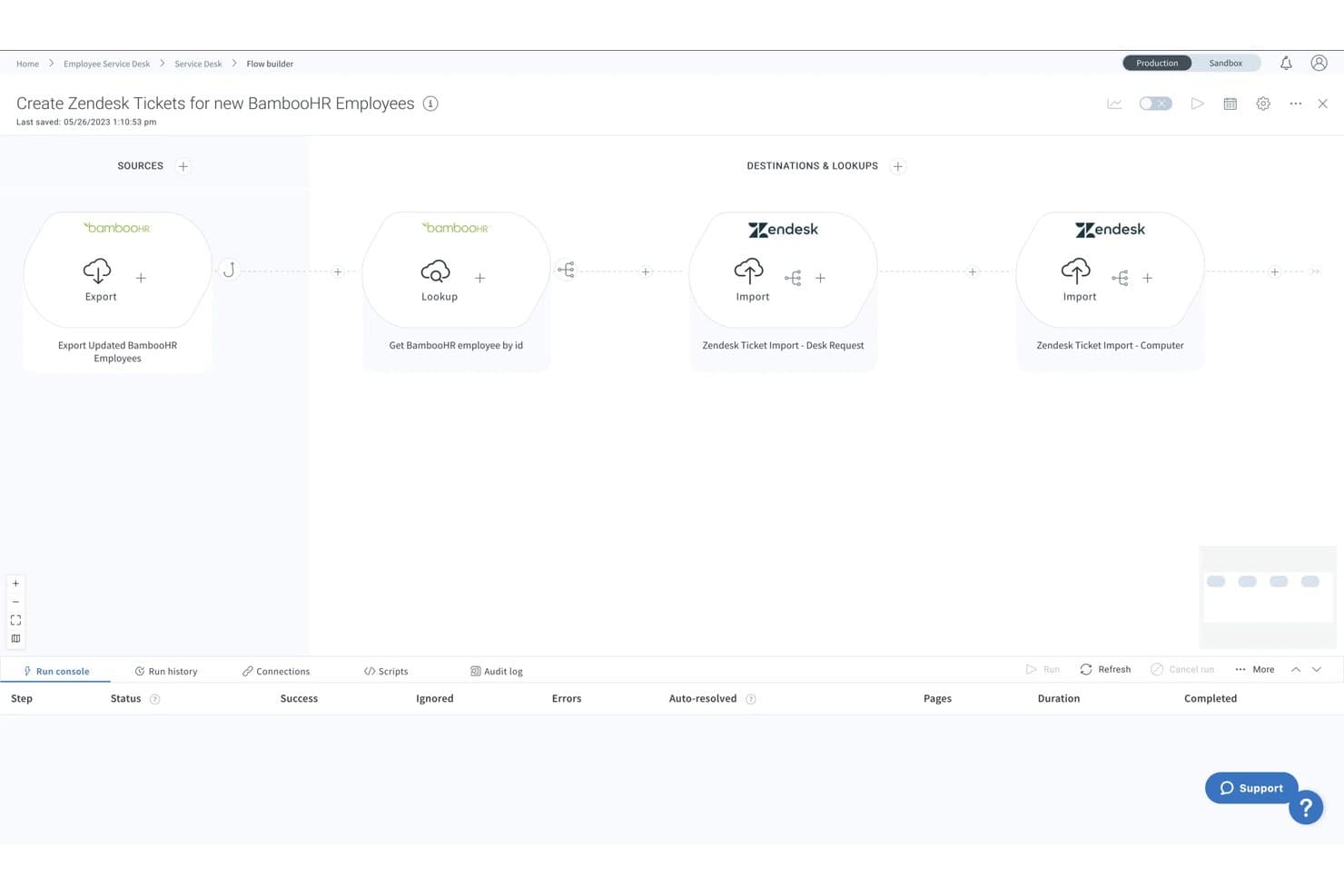
Celigo offers a visual flow builder that automates user provisioning workflows. Celigo is an iPaaS that automates user provisioning and deprovisioning by connecting HRIS platforms, directories, and SaaS applications through pre-built connectors and configurable workflow automation.
Who Is Celigo Best For?
IT teams at mid-market and enterprise organizations managing provisioning across a broad, mixed stack of SaaS, ERP, and HRIS platforms.
Why I Picked Celigo
Celigo earns its spot on my shortlist because of how it handles provisioning to long-tail apps that don't support SCIM. With 1,000+ pre-built connectors, I can extend provisioning to NetSuite, custom ERPs, or niche SaaS apps that a dedicated IAM tool simply can't reach. I also rely on its prebuilt SuccessFactors onboarding/offboarding flows, which automatically deprovision users across all connected apps when someone is marked inactive in HR.
Celigo Key Features
- Audit log and error management dashboard: Tracks all provisioning activity and highlights sync failures with detailed troubleshooting data.
- Role-based user access controls: Assigns granular permissions to Celigo users managing flows and integrations.
- Native SAML and SSO integrations: Supports secure authentication with SAML, Okta, and other identity providers for platform users.
- Custom flow builder with JavaScript editor: Lets IT teams create conditional provisioning workflows and data mappings without leaving the UI.
Celigo Integrations
Celigo offers 1,000+ native integrations, including NetSuite, SAP SuccessFactors, Workday, BambooHR, Okta, ServiceNow, Jira, Zendesk, Salesforce, and Microsoft 365. An API is available for custom integrations.
Pros and Cons
Pros:
- Conditional workflow logic handles complex provisioning
- Prebuilt HR onboarding flows reduce setup time
- Covers provisioning gaps for non-SCIM applications
Cons:
- Error debugging requires technical expertise
- Not purpose-built for identity governance
Learn more about Celigo:

A photo focused on the apps tab found inside the tool Lumos. Lumos is an avant-garde IT platform centered around delivering energy-efficient solutions. Its eco-friendly approach not only aids businesses in being environmentally responsible but also connects directly to its prowess in energy-efficient IT solutions.
Why I Picked Lumos: While evaluating numerous platforms, Lumos distinctly caught my eye due to its rare blend of IT capabilities, emphasizing energy efficiency. Lumos's commitment to combining lifecycle management with energy savings was unparalleled in determining and judging the tools. This, along with its facility to effortlessly handle new user integrations, made me confident in my opinion that Lumos truly stands out as the best for energy-conscious IT solutions.
Standout features & integrations:
Lumos offers a comprehensive lifecycle management feature, ensuring that every aspect of your IT resources is optimized for performance and energy consumption. Furthermore, its efficient single sign-on (SSO) capability streamlines access for new users, making onboarding swift and secure. For integrations, Lumos connects with many leading IT applications, ensuring a flow of information and a unified user experience.
Pros and Cons
Pros:
- Efficient single sign-on for new users
- Comprehensive lifecycle management capabilities
- Emphasis on energy-efficient IT solutions
Cons:
- Custom integrations might need additional setup
- Not as widely recognized as some competitors
- Might require a learning curve for some users
Learn more about Lumos:
Alte software-uri de furnizare a utilizatorilor
Iată câteva opțiuni suplimentare de software pentru furnizarea utilizatorilor care nu au ajuns pe lista mea scurtă, dar care merită totuși luate în considerare:
- 11ConductorOneBest for access rights orchestration
- 12GroupID By ImanamiBest for group lifecycle and automation
- 13RipplingBest for integrated HR and IT automation
- 14Rippling ITBest for automated user provisioning
- 15OneLoginGood for unified access management across devices
- 16HelloIDGood for streamlined identity management
- 17ZluriGood for SaaS application management
- 18UniqkeyGood for advanced password protection in EU
- 19Jamf connectBest for Apple device identity management
- 20SailPointGood for comprehensive identity governance
- 21Auth0Good for customizable identity authentication
- 22CyberArk IdentityGood for secure remote workforce connectivity
- 23CoreviewGood for Microsoft 365 management and insights
- 24FastpathGood for compliance and audit readiness
- 25Opal SecurityGood for API security and policy enforcement
- 26TeleportGood for secure infrastructure access
- 27PingFederateGood for scalable enterprise federation and single sign-on
How I Evaluate User Provisioning Software
I split my evaluation into baseline criteria—like automated lifecycle triggers and SCIM support—and differentiators that set tools apart for complex, multi-app environments.
Core Functionality (Table Stakes For This List)
When I'm selecting tools for my list, I rank each one on a scale from 0 (does not offer the functionality) to 5 (excels in this area) for each core functionality listed below. Then, I calculate the tool's total score into a percentage. Each tool needs to achieve a minimum total score of 65% to be considered for inclusion.
- Automated Account Lifecycle Management: I check whether the tool can trigger create, update, and deprovisioning actions automatically when someone joins, moves teams, or exits the org.
- App & Directory Integrations: The connector catalog matters. I evaluate how many SaaS apps and directories like Active Directory or Google Workspace sync natively out of the box.
- Role-Based Access Control: I look at how roles map to app entitlements, like whether a new sales hire automatically gets CRM and dialer access based on their group assignment.
- HRIS-Driven Provisioning: A solid tool should pull from your HRIS as the source of truth, so a status change in Workday or BambooHR kicks off provisioning workflows.
- SCIM & Standards Support: I evaluate whether each platform supports SCIM 2.0, SAML, and OIDC for interoperable provisioning across standards-compliant applications.
- Audit Logs & Reporting: Every provisioning event should be searchable and exportable. I look for tools that log who got access, when, and who approved it.
Once I have a list of tools that meet the criteria, I consider what sets each platform apart.
Differentiating Factors (What Sets Vendors Apart)
Here's how I compare and contrast different vendors:
Standout Features
Self-service access request portals save IT teams from fielding repetitive tickets every time someone needs a new app. I also look for access certification campaigns, where managers periodically confirm or revoke entitlements to keep your access posture clean between audits. A no-code workflow builder is another differentiator I value, especially for teams that need to design multi-step approval chains or conditional provisioning logic without writing scripts.
Beyond Features
Compliance certifications matter here. I check whether a vendor holds SOC 2 Type II and ISO 27001 at minimum, since provisioning tools handle sensitive identity data across your entire stack. Ecosystem depth is another factor I weigh—tools that plug into your existing SSO, MFA, and SIEM platforms reduce architectural gaps. I also evaluate time to value, especially how quickly you can complete your initial directory sync, map attributes, and go live with your first provisioning workflows.
Cum să alegeți software-ul de furnizare a utilizatorilor
Este ușor să vă pierdeți în liste lungi de funcții și structuri complexe de prețuri. Pentru a vă ajuta să rămâneți concentrat în timp ce parcurgeți procesul unic de selecție a software-ului, iată o listă de verificare a factorilor de care trebuie să țineți cont:
| Factor | Ce trebuie avut în vedere |
|---|---|
| FactorScalabilitate | Ce trebuie avut în vederePoate software-ul să se dezvolte odată cu organizația dumneavoastră? Luați în considerare nevoile viitoare și dacă instrumentul poate gestiona un număr mai mare de utilizatori fără costuri suplimentare sau probleme de performanță. |
| FactorIntegrări | Ce trebuie avut în vedereSe conectează la sistemele existente? Verificați compatibilitatea cu configurația tehnologică actuală pentru a evita soluțiile costisitoare de compromis sau limitările. |
| FactorPosibilități de personalizare | Ce trebuie avut în vederePuteți adapta instrumentul pentru a se potrivi fluxurilor dumneavoastră de lucru? Evaluați cât de ușor pot fi modificate setările și permisiunile pentru a corespunde proceselor dumneavoastră. |
| FactorUșurința utilizării | Ce trebuie avut în vedereEste interfața intuitivă pentru echipa dumneavoastră? Asigurați-vă că nu necesită instruire extinsă și nu încetinește operațiunile zilnice. |
| FactorImplementare și integrare inițială | Ce trebuie avut în vedereCât de repede puteți începe? Analizați procesul de configurare, resursele necesare și asistența oferită în timpul integrării inițiale pentru a evita întârzierile. |
| FactorCost | Ce trebuie avut în vedereCum se aliniază prețurile cu bugetul dumneavoastră? Comparați costurile cu funcțiile și scalabilitatea. Atenție la taxele ascunse sau la modelele de prețuri inflexibile. |
| FactorMăsuri de securitate | Ce trebuie avut în vedereSunt implementate măsuri de protecție a datelor? Evaluați criptarea, controalele de acces și conformitatea cu standardele industriei pentru a proteja informațiile sensibile. |
| FactorDisponibilitatea asistenței | Ce trebuie avut în vedereCe fel de asistență oferă furnizorul? Verificați disponibilitatea permanentă, timpii de răspuns și calitatea resurselor, precum ghidurile sau forumurile comunității, pentru a primi ajutor atunci când apar probleme. |
Ce este software-ul de furnizare a utilizatorilor?
Software-ul de furnizare a utilizatorilor este un instrument care ajută companiile să controleze cine poate accesa sistemele, aplicațiile și datele lor. Acesta menține totul organizat, asigurându-se că fiecare persoană are accesul potrivit pentru rolul său.
În loc să adauge sau să elimine manual utilizatori, software-ul gestionează automat aceste operațiuni atunci când cineva se alătură companiei, își schimbă poziția sau pleacă. Astfel, accesul rămâne actualizat și se previn greșelile.
Funcții
Atunci când selectați software-ul de furnizare a utilizatorilor, urmăriți următoarele funcții esențiale:
- Crearea automată a utilizatorilor: Configurează automat conturi de utilizator noi, economisind timp și reducând erorile din procesul de integrare.
- Gestionarea accesului: Controlează permisiunile utilizatorilor și nivelurile de acces pentru a asigura securitatea și conformitatea.
- Raportarea conformității: Generează rapoarte pentru a ajuta organizațiile să îndeplinească cerințele de reglementare și necesitățile de audit.
- Federarea identității: Conectează mai multe sisteme de identitate, permițând accesul fără întreruperi pe diferite platforme.
- Conectarea unică (SSO): Permite utilizatorilor să acceseze mai multe aplicații cu un singur set de acreditări, simplificând procesele de autentificare.
- Autentificarea multifactor: Adaugă un nivel suplimentar de securitate prin solicitarea unei verificări adiționale în afara parolelor.
- Gestionarea bazată pe politici: Aplică reguli pentru conturile de utilizatori și apartenența la grupuri, pentru a menține igiena directorului.
- Jurnale de audit: Urmărește activitățile utilizatorilor și modificările pentru a oferi transparență și a facilita depanarea.
- Fluxuri de lucru personalizabile: Permite organizațiilor să adapteze software-ul pentru a corespunde proceselor și necesităților lor specifice.
- Capacități de integrare: Se conectează la sistemele și aplicațiile existente pentru a îmbunătăți funcționalitatea și eficiența.
Beneficii
Implementarea unui software de asigurare a accesului utilizatorilor oferă mai multe beneficii pentru echipa și afacerea dumneavoastră. Iată câteva dintre acestea:
- Economie de timp: Automatizează configurarea utilizatorilor și gestionarea accesului, reducând munca manuală și accelerând procesul de integrare.
- Securitate îmbunătățită: Funcții precum autentificarea multifactor și controalele de acces contribuie la protejarea datelor sensibile împotriva accesului neautorizat.
- Asigurarea conformității: Generează rapoarte de conformitate și jurnale de audit, facilitând îndeplinirea cerințelor de reglementare.
- Precizie îmbunătățită: Automatizarea reduce erorile din procesul de asigurare a accesului utilizatorilor, garantând niveluri de acces și permisiuni corecte.
- Eficiență operațională: Capacitățile de integrare permit software-ului să funcționeze împreună cu sistemele existente, îmbunătățind fluxul de lucru general.
- Scalabilitate: Sprijină organizațiile în creștere prin gestionarea unui număr mai mare de utilizatori fără o sarcină administrativă suplimentară.
- Gestionare simplificată: Centralizează gestionarea utilizatorilor, facilitând supravegherea și ajustarea rolurilor și permisiunilor utilizatorilor.
Costuri și prețuri
Selectarea unui software de asigurare a accesului utilizatorilor necesită înțelegerea diverselor modele și planuri de preț disponibile. Costurile variază în funcție de funcții, dimensiunea echipei, modulele suplimentare și alți factori. Tabelul de mai jos rezumă planurile comune, prețurile medii ale acestora și funcțiile incluse de obicei în soluțiile software de asigurare a accesului utilizatorilor:
Tabel comparativ al planurilor pentru software-ul de asigurare a accesului utilizatorilor
| Tipul planului | Preț mediu | Funcții comune |
|---|---|---|
| Tipul planuluiPlan gratuit | Preț mediu$0 | Funcții comuneGestionarea de bază a utilizatorilor, integrări limitate și asistență din partea comunității. |
| Tipul planuluiPlan personal | Preț mediu$5-$25/utilizator/lună | Funcții comuneAsigurarea accesului utilizatorilor, raportare de bază și asistență prin e-mail. |
| Tipul planuluiPlan de afaceri | Preț mediu$25-$50/utilizator/lună | Funcții comuneIntegrări avansate, raportarea conformității și asistență telefonică. |
| Tipul planuluiPlan pentru întreprinderi | Preț mediu$50-$100/utilizator/lună | Funcții comuneFluxuri de lucru personalizate, manager de cont dedicat și servicii de asistență premium. |
Întrebări frecvente despre software-ul pentru gestionarea conturilor utilizatorilor
Iată câteva răspunsuri la întrebările frecvente despre software-ul pentru gestionarea conturilor și accesului utilizatorilor:
Care este diferența dintre configurarea accesului utilizatorilor și eliminarea acestuia?
Configurarea accesului utilizatorilor implică crearea conturilor și stabilirea permisiunilor atunci când o persoană se alătură organizației. Eliminarea accesului este procesul de retragere a permisiunilor atunci când aceasta pleacă. Ambele sunt esențiale pentru menținerea securității. Automatizarea acestor sarcini economisește timp și reduce erorile, asigurându-se că utilizatorii au accesul potrivit atunci când este necesar și niciun acces atunci când nu mai este necesar.
Se poate integra software-ul pentru gestionarea conturilor utilizatorilor cu sistemele IT existente?
Da, majoritatea soluțiilor software pentru gestionarea conturilor utilizatorilor se pot integra cu sistemele IT existente. Acestea includ directoare precum Active Directory și servicii cloud precum Google Workspace. Integrarea ajută la menținerea consecvenței între platforme, reducând necesitatea actualizărilor manuale. Verificați compatibilitatea cu sistemele actuale înainte de achiziție pentru a evita problemele.
Cum îmbunătățește software-ul pentru gestionarea conturilor utilizatorilor securitatea?
Software-ul pentru gestionarea conturilor utilizatorilor îmbunătățește securitatea prin automatizarea controalelor de acces și asigurarea conformității. Acesta contribuie la aplicarea politicilor de securitate, precum actualizarea parolelor și autentificarea multifactor. Prin menținerea unor date și permisiuni corecte ale utilizatorilor, reduce la minimum riscul accesului neautorizat. Auditurile și rapoartele periodice sprijină suplimentar eforturile de securitate.
Este necesară instruirea pentru utilizarea software-ului pentru gestionarea conturilor utilizatorilor?
Da, de obicei este necesară o anumită instruire pentru utilizarea eficientă a software-ului pentru gestionarea conturilor utilizatorilor. Nivelul de instruire depinde de complexitatea instrumentului. Mulți furnizori oferă resurse de instruire precum videoclipuri, seminare web și documentație. Investirea timpului în instruire vă ajută pe dumneavoastră și pe echipa dumneavoastră să utilizați pe deplin capacitățile software-ului, asigurând o implementare mai ușoară.