

Instrumentele de descoperire a activelor IT identifică și cataloghează automat fiecare dispozitiv, sistem și activ software din infrastructura IT a organizației dumneavoastră. Dacă evaluați aceste instrumente, știți cât de importantă este vizibilitatea în timp real pentru conformitate, securitate și evitarea proliferării activelor — mai ales pe măsură ce mediile hibride și adoptarea soluțiilor SaaS se extind.
În acest ghid, veți obține o imagine clară asupra opțiunilor pentru cartografierea activelor, integrarea procesului de descoperire cu sistemele actuale și gestionarea tuturor elementelor, de la servere locale până la dispozitive IoT și servicii cloud.
Why Trust Our Software Recommendations
6,700+
Reviews
20
Industry experts
16+
Evaluation factors
14
Years
Our team has been testing and reviewing software since 2012. As tech leaders ourselves, we know how difficult—and important—it is to choose the right software.
For this guide, we evaluated tools using hands-on testing and independent research, scoring tools using our selection criteria.
Our reviews reflect our human editorial judgment, not a sales pitch.
Expert reviewers:
- Paulo Gardini MiguelTech Director
 Tim FisherVP of AI
 Gabriel RosasTech Lead & Software Architect
 Christhian GruhnTech Lead & Platform Architect

Tabel comparativ: instrumente de descoperire a activelor IT
Comparați prețurile și specificațiile alăturat pentru instrumentele de descoperire a activelor IT care au ajuns pe lista mea scurtă.
Sorted by: Default
| Tool | Starting Price | Website | |
|---|---|---|---|
Best for quick ITSM workflow integration | 4.6 out of 5 | $19/agent/month Free trial + free demo available | Website |
Best for SaaS platform asset inventory | 4.4 out of 5 | $39/user/month Free demo available | Website |
Best for vulnerability exposure mapping | 4.3 out of 5 | Pricing upon request Free trial available | Website |
Best for browser-based inventory management | Not rated | Pricing upon request Free trial + free demo available | Website |
Best for integrations across IT and security tools | Not rated | Pricing upon request Free demo available | Website |
Best for automated infrastructure mapping | 4.8 out of 5 | Pricing upon request Free trial + free demo available | Website |
Best for agentless network-wide device scanning | 4.3 out of 5 | $239/month Free demo + 14-day free trial available | Website |
Best for integrated software license tracking | Not rated | Pricing upon request Free demo available | Website |
Best for CMDB native discovery and reconciliation | Not rated | Pricing upon request Free demo available | Website |
Best for cloud workload identification | Not rated | Pricing upon request Free demo available | Website |


Recenzii ale instrumentelor de descoperire a activelor IT
Mai jos sunt rezumatele mele detaliate ale celor mai bune instrumente de descoperire a activelor IT care au ajuns pe lista mea scurtă. Recenziile mele oferă o privire detaliată asupra capacităților, integrărilor și celor mai potrivite cazuri de utilizare pentru fiecare instrument, pentru a vă ajuta să îl găsiți pe cel mai potrivit pentru dumneavoastră.
 Best for quick ITSM workflow integration
- Free trial + free demo available
- From $19/agent/month (billed annually)
Visit WebsiteCustomer Rating:4.6/5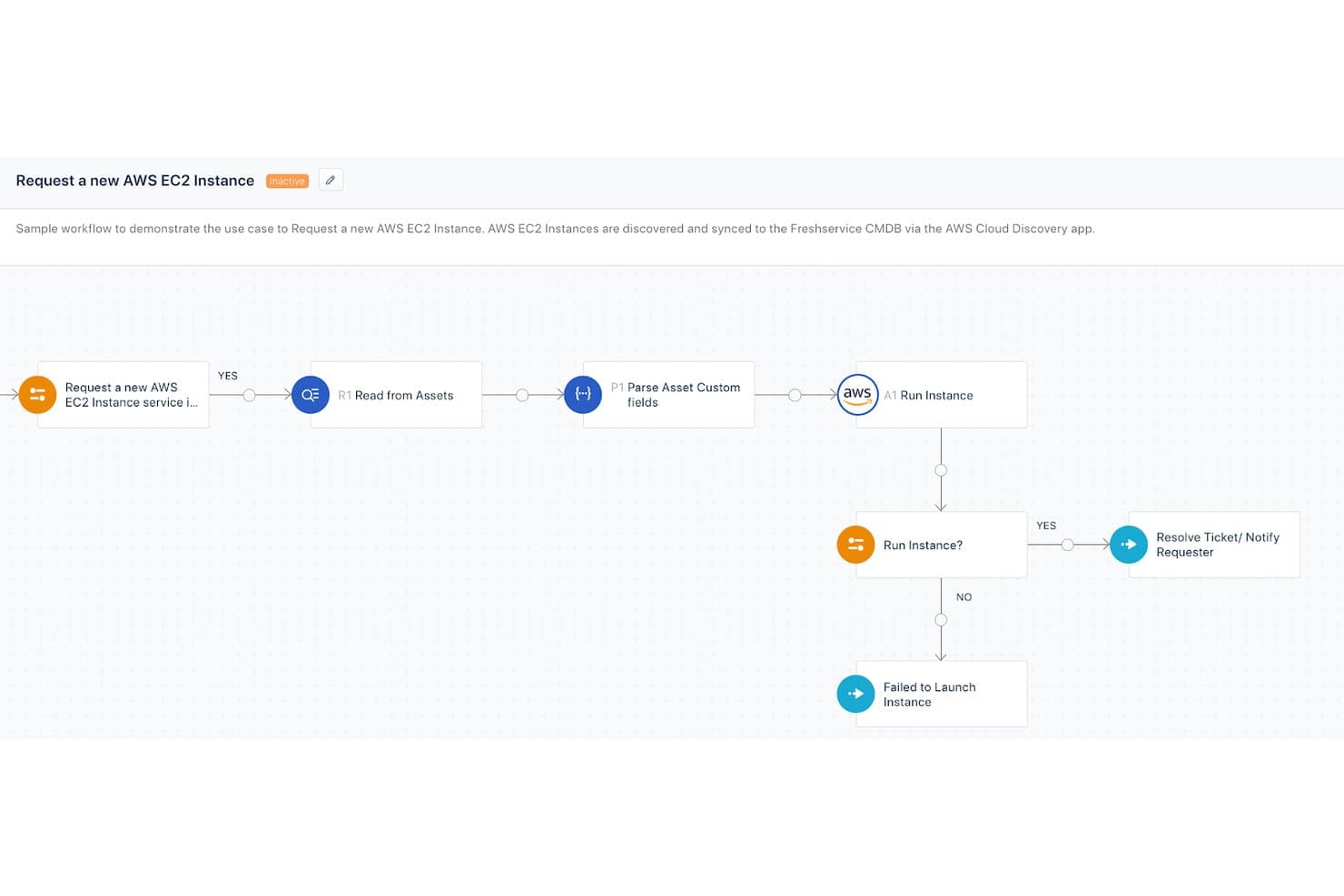
Freshservice by Freshworks automates AWS EC2 instance provisioning workflows. Freshservice is a cloud-based ITSM and IT asset management platform that combines automated asset discovery, agent and agentless scanning, a self-updating CMDB, and software license tracking across on-prem, cloud, and hybrid environments.
Who Is Freshservice by Freshworks Best For?
Freshservice is a strong fit for mid-market to enterprise IT operations teams that manage complex, multi-environment infrastructure and need asset discovery tightly connected to incident, change, and service management workflows.
Why I Picked Freshservice by Freshworks
I've included Freshservice in my top picks because its asset discovery feeds directly into the same platform where my team manages incidents, changes, and service requests. When a probe scans a new device and updates the CMDB, that asset record is immediately linkable to open tickets and change workflows, with no manual data transfer. I also like the dependency mapping feature, which shows how discovered assets connect to services, so my team can assess impact before making changes.
Freshservice by Freshworks Key Features
- Agentless network discovery: Scan networks for connected devices and endpoints using SNMP, WMI, and SSH without installing agents.
- Cloud infrastructure integrations: Connect directly with AWS, Azure, VMware, and GCP for cloud asset and virtual machine discovery.
- Software license management: Track installed software and manage entitlement and compliance data in one place.
- Real-time asset change tracking: Continuously updates asset records and logs any configuration or relationship changes as they happen.
Freshservice by Freshworks Integrations
Freshservice offers native integrations with ServiceNow, Jira, Azure Active Directory, AWS, Microsoft 365, Google Workspace, Jamf, Intune, and Slack. An API is available for custom integrations.
Pros and Cons
Pros:
- Asset records link directly to service tickets
- Agent and agentless discovery supported natively
- CMDB updates automatically after each discovery scan
Cons:
- Advanced reporting requires higher-tier plan upgrades
- Cloud-native SaaS discovery depth is limited
Learn more about Freshservice by Freshworks: Best for SaaS platform asset inventory
- Free demo available
- From $39/user/month (billed annually)
Visit WebsiteCustomer Rating:4.4/5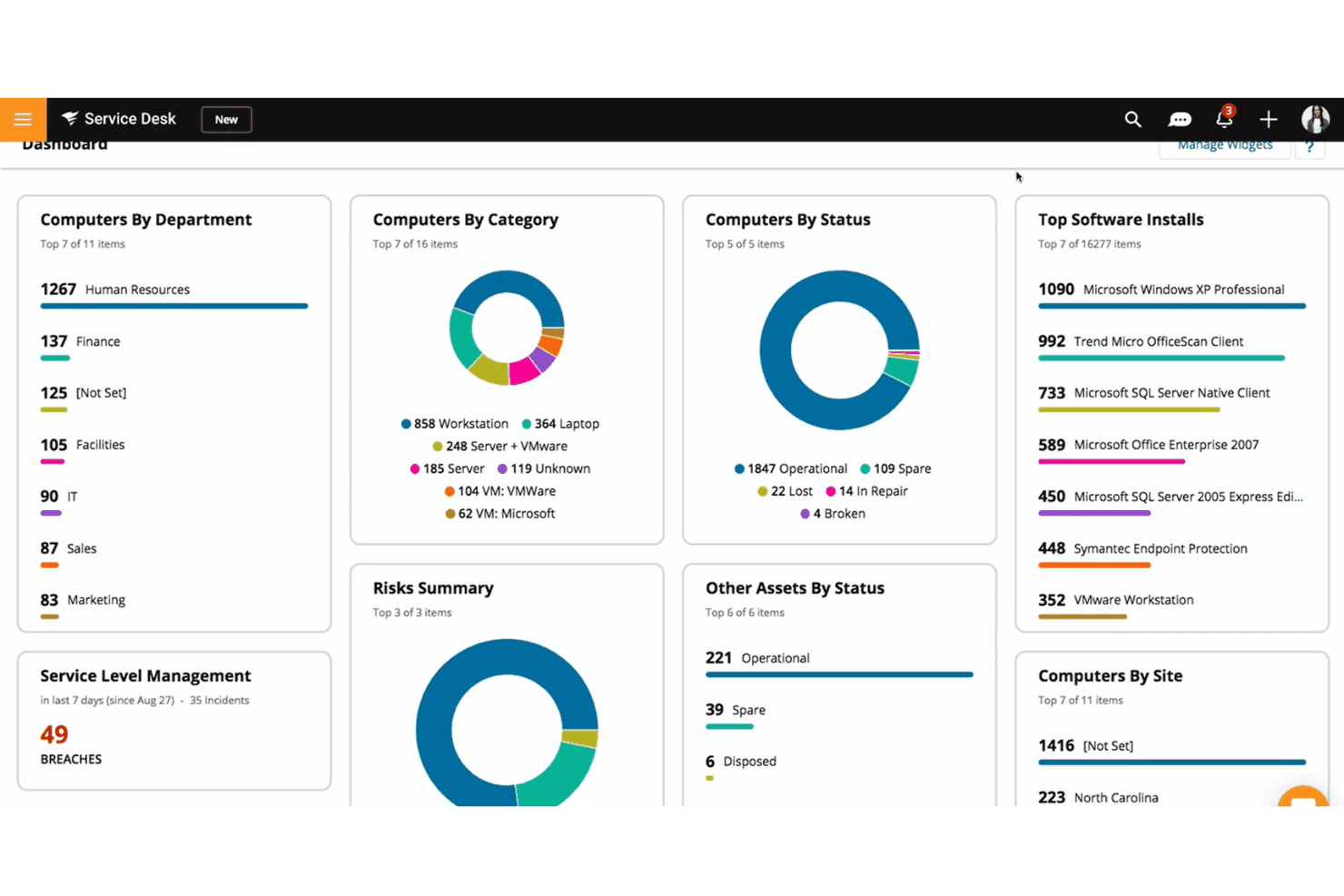
SolarWinds Service Desk provides a visual asset and IT management dashboard. SolarWinds Service Desk is a cloud-based ITSM platform with built-in IT asset discovery that combines agent-based and agentless network scanning, hardware and software inventory, CMDB population, and license compliance tracking.
Who Is SolarWinds Service Desk Best For?
It's a strong fit for mid-market and enterprise IT teams that want asset discovery, CMDB, and ITSM managed in a single SaaS platform.
Why I Picked SolarWinds Service Desk
I picked SolarWinds Service Desk because its SolarWinds Discovery feature handles both agent-based and agentless scanning natively inside a SaaS-delivered ITSM platform. I particularly like the Asset Map tool, which pinpoints device location, owner, IP address, and status across cloud environments like Azure, AWS, and Jamf. What sets it apart is that discovered asset data flows directly into the built-in CMDB, so my team isn't maintaining a separate inventory database alongside the service desk.
SolarWinds Service Desk Key Features
- Discovery scanner: Continuously scans your network for IP-connected devices using agentless technology.
- Visual CMDB and dependency mapping: Provides graphical views of asset dependencies and relationships.
- License compliance tracking: Monitors installed software and tracks usage to support audits and compliance.
- Audit history and data masking: Maintains detailed logs of asset changes and protects sensitive information in reports.
SolarWinds Service Desk Integrations
SolarWinds Service Desk has native integrations with Jira, Slack, Salesforce, Jamf, Intune, Microsoft Azure, and AWS. An API is available for custom integrations.
Pros and Cons
Pros:
- License compliance tracking built into the platform
- Discovers assets across AWS, Azure, and Jamf
- No on-prem infrastructure required for deployment
Cons:
- Discovery depth less than dedicated standalone tools
- Reporting customization is relatively limited
Learn more about SolarWinds Service Desk: Best for vulnerability exposure mapping
- Free trial available
- Pricing upon request
Visit WebsiteCustomer Rating:4.3/5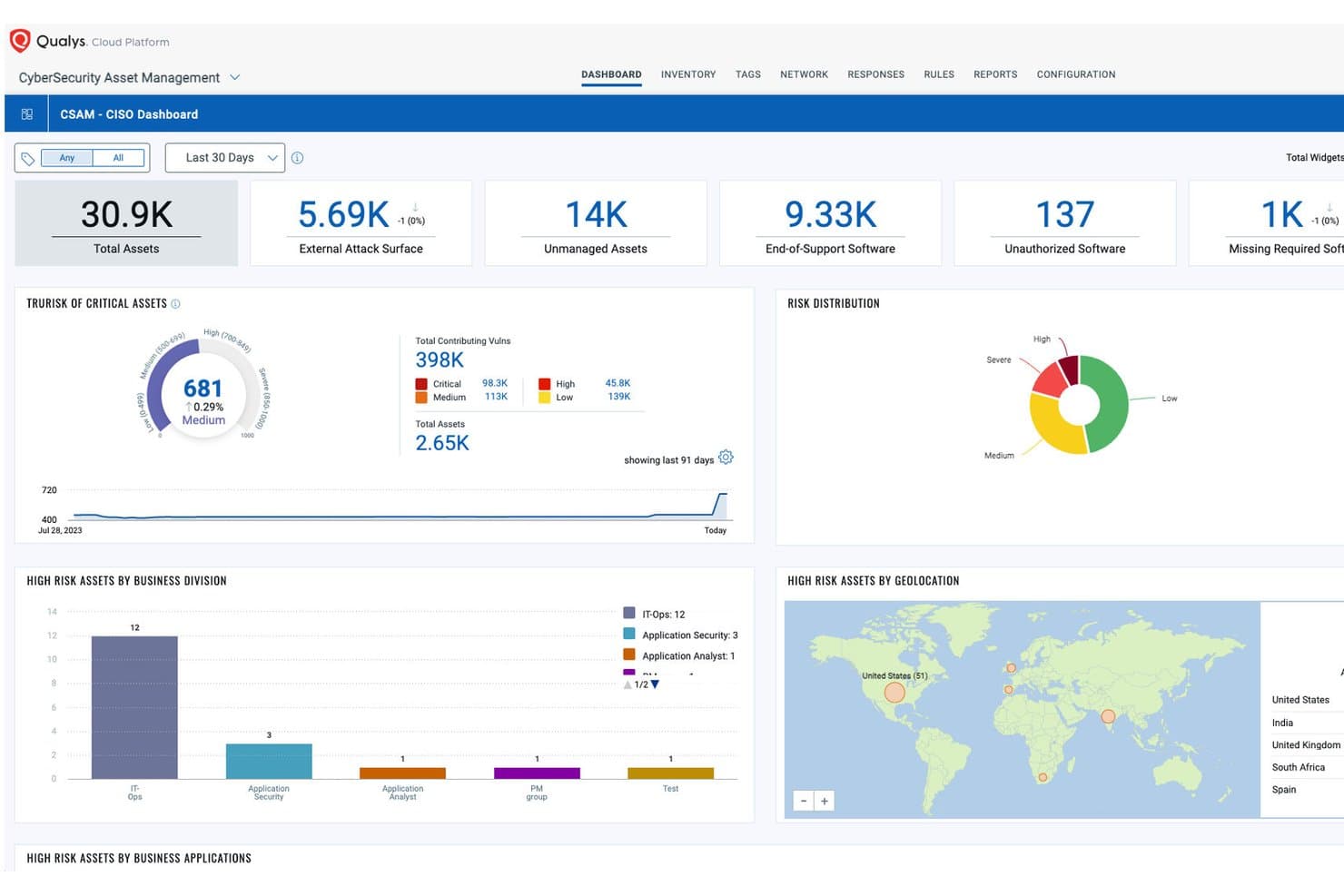
Qualys centralizes asset risk visibility across divisions and geolocations. Qualys Global AssetView is a cloud-native IT asset discovery and inventory platform that combines multi-sensor discovery (agents, scanners, passive sensors, and cloud connectors) with vulnerability context across on-prem, cloud, container, and OT/IoT environments.
Who Is Qualys Best For?
IT security and operations teams in mid-to-large enterprises that need asset inventory tightly coupled with vulnerability management workflows.
Why I Picked Qualys
Qualys earns its spot as one of the best on my shortlist because of how tightly asset discovery connects to vulnerability context. What I like most is the direct pipeline from Global AssetView into VMDR, where every discovered asset immediately becomes part of the vulnerability assessment scope. I also like the TruRisk scoring, which ranks assets by business impact so my team can prioritize remediation rather than chasing every CVE across a flat, unweighted list.
Qualys Key Features
- Multi-sensor asset discovery: Combine agent, agentless, API, and passive network sensors to capture assets across hybrid environments.
- Hardware and software normalization: Automatically standardize asset names, manufacturers, and software across the inventory for easier search and reporting.
- Product catalog enrichment: Enrich discovered assets with lifecycle data like warranty, end-of-life, and license category details.
- Custom tagging and hierarchical organization: Tag assets manually or dynamically and group them with flexible tag hierarchies to support reporting and access controls.
Qualys Integrations
Qualys offers native integrations with ServiceNow, Splunk, AWS, Azure, and Google Cloud Platform, and provides REST APIs for custom integrations.
Pros and Cons
Pros:
- TruRisk scoring prioritizes assets by business impact
- Multi-sensor coverage across hybrid environments
- Discovery feeds directly into vulnerability management
Cons:
- UI navigation across modules can feel fragmented
- Agent deployment adds setup complexity at scale
Learn more about Qualys: Best for browser-based inventory management
- Free trial + free demo available
- Pricing upon request
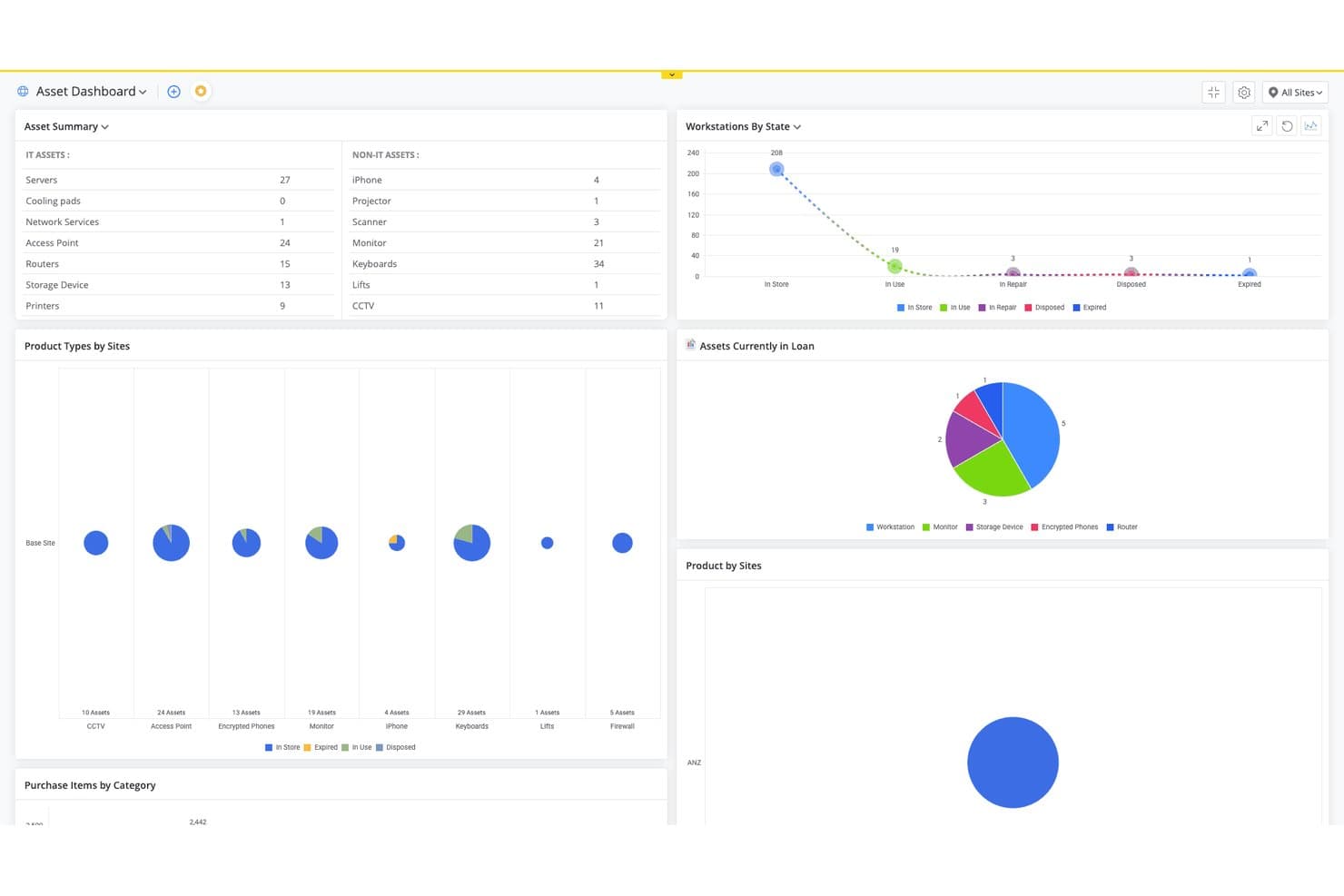
ManageEngine AssetExplorer tracks IT and non-IT assets across sites in one dashboard. ManageEngine AssetExplorer is a browser-based IT asset management platform that combines agent-based and agentless network discovery, hardware and software inventory, CMDB, and license compliance tracking across on-premises and cloud environments.
Who Is ManageEngine AssetExplorer Best For?
It's a strong fit for IT asset managers in mid-sized organizations who need structured lifecycle tracking across both hardware and software without enterprise-level complexity.
Why I Picked ManageEngine AssetExplorer
I picked ManageEngine AssetExplorer because the entire inventory workflow runs in a browser, with no thick client to install or maintain. What I particularly like is the drag-and-drop asset lifecycle canvas, which lets me visually map out procurement-to-disposal workflows per asset type. The agentless scanning also means I can pull full hardware and software inventory from desktops, servers, and switches without deploying agents across the estate.
ManageEngine AssetExplorer Key Features
- CMDB visualization: View relationships and dependencies among assets within a graphical CMDB interface.
- Software license compliance: Track entitlements, assignments, and usage across all managed assets in real time.
- Automated purchase order management: Generate, process, and track IT asset purchase orders directly in the platform.
- Role-based access controls: Assign granular permissions to users based on their responsibilities and organizational roles.
ManageEngine AssetExplorer Integrations
ManageEngine AssetExplorer offers native integrations with ManageEngine ServiceDesk Plus, Endpoint Central, Zoho Analytics, Microsoft 365, SolarWinds, and Lansweeper, and provides an API for custom integrations.
Pros and Cons
Pros:
- Asset lifecycle management from procurement to disposal
- Built-in software license compliance tracking
- Agentless scanning covers unmanaged network devices
Cons:
- Cloud asset discovery lacks depth vs. competitors
- Reporting interface feels dated and inflexible
Learn more about ManageEngine AssetExplorer: Best for integrations across IT and security tools
- Free demo available
- Pricing upon request
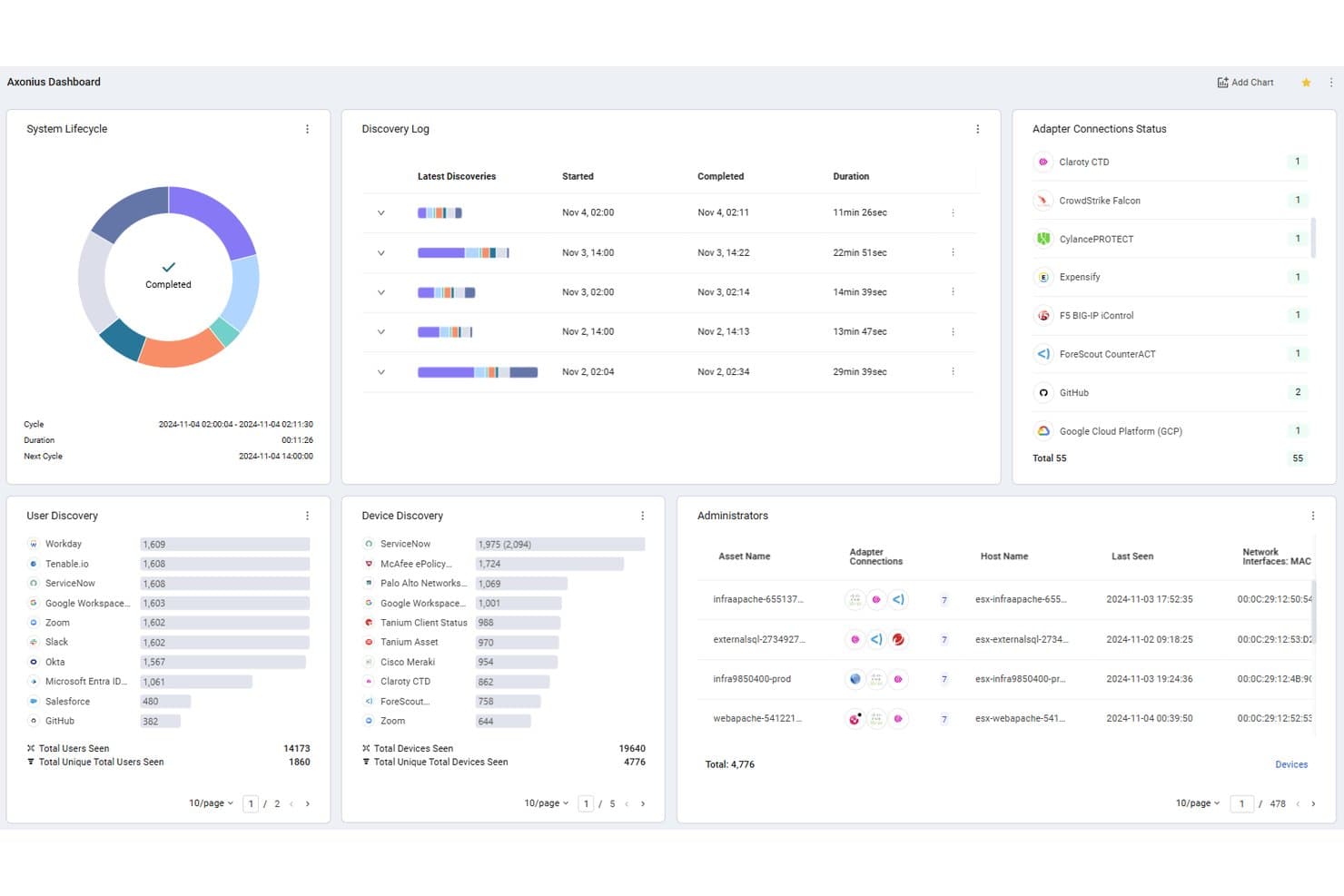
Axonius centralizes asset discovery across users, devices, and adapters. Axonius is a cybersecurity asset intelligence platform that aggregates and correlates asset data from 1,400+ adapters across endpoint agents, cloud providers, SaaS apps, and IAM solutions into a continuously reconciled inventory.
Who Is Axonius Best For?
Axonius is a strong fit for security and IT operations teams at mid-to-large enterprises that already run multiple endpoint, cloud, and identity tools across their environment.
Why I Picked Axonius
Axonius earns its spot as one of the best on my shortlist because of how it handles asset data spread across CrowdStrike, Tanium, Active Directory, and AWS, all giving a different answer. It pulls from all of those via API-based adapters, no scanners or agents required, and reconciles them into a single correlated asset record. What I like most is the Action Center: 600+ actions across those same adapters let me open a ServiceNow ticket or isolate a device without leaving the platform.
Axonius Key Features
- Continuous asset reconciliation: The inventory updates in near real time by pulling fresh data from connected adapters.
- Cloud and SaaS discovery: Native connectors map assets across AWS, Azure, Google Cloud, and major SaaS platforms.
- Policy enforcement center: Create and automate trigger-based actions for compliance and asset hygiene.
- Custom query builder: Powerful search filters let you identify asset conditions and export tailored asset lists.
Axonius Integrations
Axonius offers over 1,400 native integrations, including ServiceNow, CrowdStrike, Tanium, Microsoft 365, Okta, AWS, Google Cloud Platform, Azure, Palo Alto Networks, and Cisco. An API is available for custom integrations.
Pros and Cons
Pros:
- Identifies unmanaged and shadow IT devices automatically
- No agents needed for most asset discovery
- Discovers assets across cloud, SaaS, and on-prem simultaneously
Cons:
- Query language takes time to learn thoroughly
- Initial adapter configuration is time-consuming at scale
Learn more about Axonius: Best for automated infrastructure mapping
- Free trial + free demo available
- Pricing upon request
Visit WebsiteCustomer Rating:4.8/5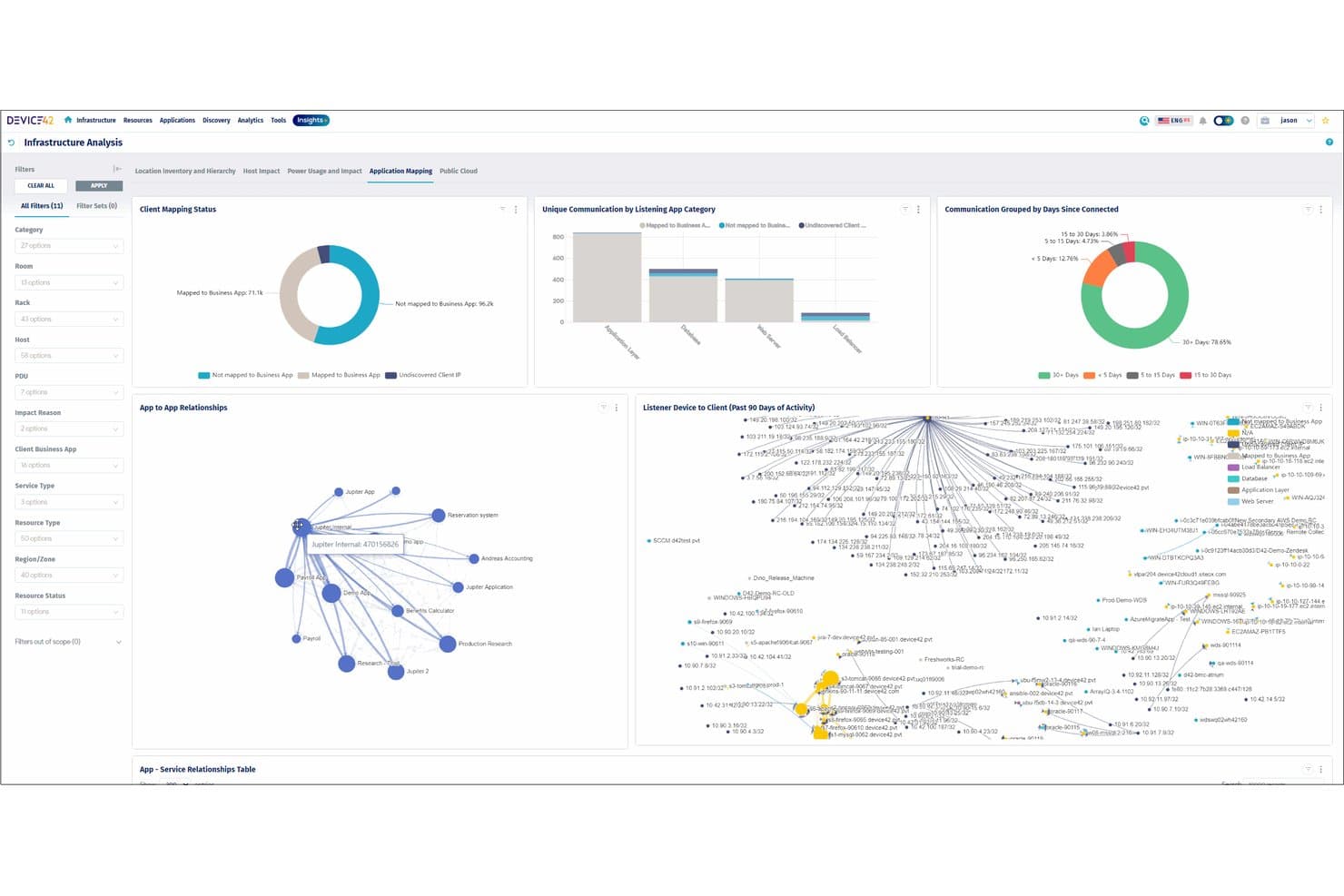
Device42 maps app-to-app relationships and client communication visually. Device42 is an agentless IT asset discovery and CMDB platform that scans physical, virtual, cloud, and hybrid environments using multi-protocol discovery to build a continuously updated inventory of hardware, software, and infrastructure dependencies.
Who Is Device42 Best For?
Device42 is a strong fit for IT operations and infrastructure teams at mid-to-large enterprises managing complex, multi-site environments across on-premises, cloud, and virtual systems.
Why I Picked Device42
Device42 earns its spot as one of the best on my shortlist because of how it handles infrastructure mapping at scale. I love that it uses multi-protocol agentless scanning (SNMP, WMI, SSH, IPMI) to automatically build dependency maps across physical servers, VMs, and cloud instances without manual configuration. Its Impact Charts trace relationships from blade chassis down to individual VMs and service connections, which I rely on when diagnosing cascading failures across a hybrid environment.
Device42 Key Features
- Software license metering: Tracks usage, entitlements, and compliance for user, device, and CPU licensing models.
- Automatic warranty lookups: Pulls warranty status directly from Dell, IBM, and Lenovo using vendor APIs.
- Prebuilt ITSM integrations: Connects natively with ServiceNow, Jira, Freshservice, Zendesk, and other platforms.
- Report scheduling and export: Allows on-demand or scheduled exports of asset health, inventory, and change history in .csv format.
Device42 Integrations
Device42 offers native integrations with ServiceNow, Jira, Freshservice, Zendesk, and PagerDuty, and provides an API for custom integrations.
Pros and Cons
Pros:
- Built-in CMDB with continuous auto-update
- Dependency maps trace relationships across infrastructure layers
- Agentless multi-protocol scanning across hybrid environments
Cons:
- UI feels dated compared to newer competitors
- Initial configuration requires significant network expertise
Learn more about Device42: Best for agentless network-wide device scanning
- Free demo + 14-day free trial available
- From $239/month (billed annually)
Visit WebsiteCustomer Rating:4.3/5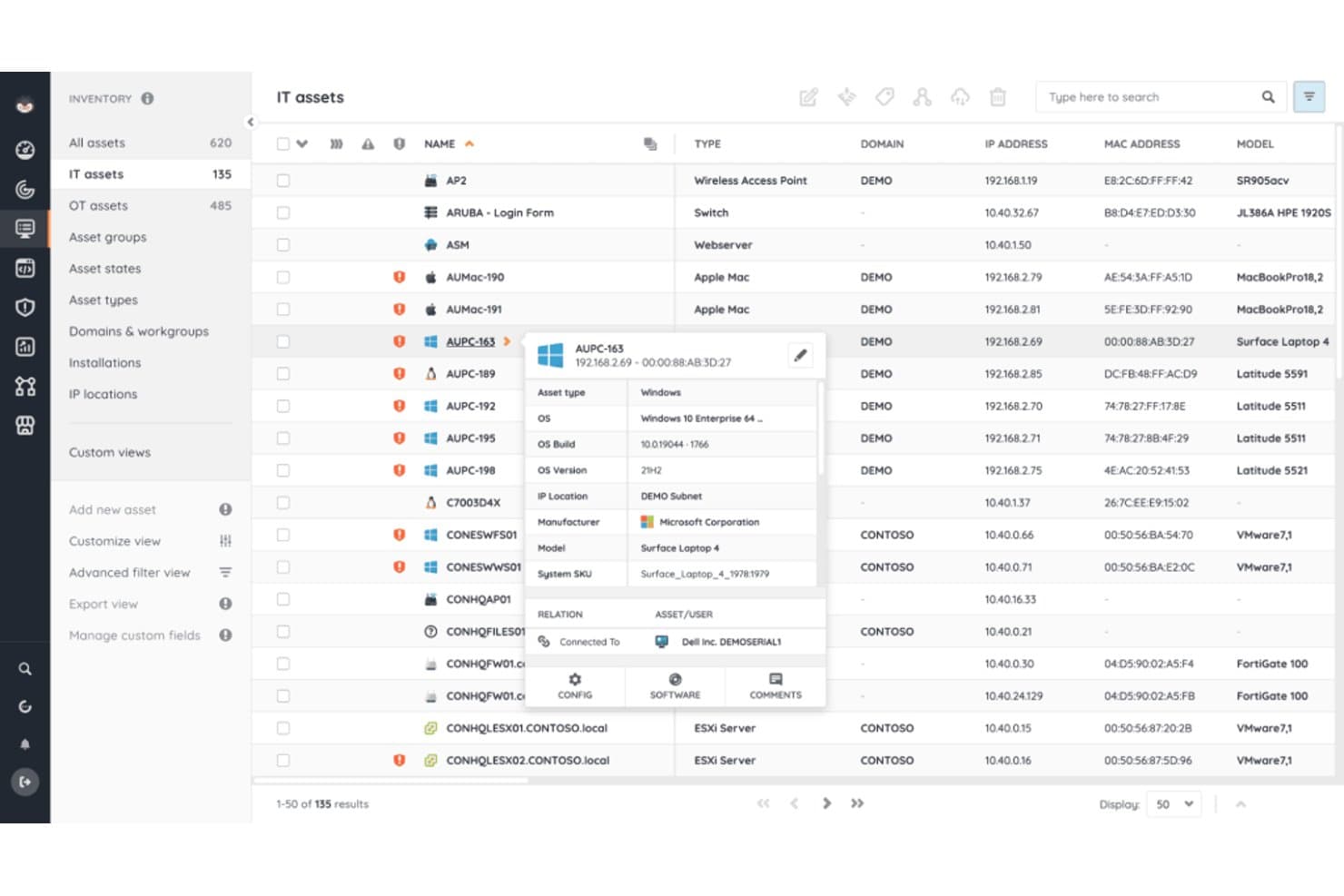
Lansweeper surfaces detailed asset profiles, OS, and hardware info. Lansweeper is an IT asset discovery and inventory platform that scans networks across IT, OT, IoT, and cloud environments using agentless, agent-based, and passive discovery methods to build a unified asset record.
Who Is Lansweeper Best For?
Lansweeper suits network and systems administrators in mid-size to large organizations managing complex, mixed-device environments that span physical, virtual, and cloud infrastructure.
Why I Picked Lansweeper
Lansweeper earns its spot on my shortlist because of how it handles agentless scanning at scale. Its Credential-Free Device Recognition (CDR) fingerprints devices without needing login credentials, so I'm not blocked by unmanaged or locked-down endpoints. The passive Traffic Sensor also catches devices that active scans miss by analyzing live network traffic, which is where a lot of shadow IT actually hides.
Lansweeper Key Features
- Cloud API integrations: Connects directly with AWS, Azure, and Google Cloud for asset discovery without local sensors.
- Vulnerability and lifecycle insights: Surfaces hardware and software vulnerabilities, plus end-of-life and end-of-support risks.
- Native ITSM integrations: Offers direct connectors for ServiceNow, Jira Service Management, and ConnectWise for asset data sharing.
- Custom report builder: Lets users create, schedule, and export detailed asset and inventory reports to support compliance and audits.
Lansweeper Integrations
Lansweeper offers native integrations with ServiceNow, Jira Service Management, Jira Assets, ConnectWise, HaloITSM, and HappyFox. An API is available for custom integrations.
Pros and Cons
Pros:
- Covers IT, OT, and IoT environments natively
- Passive sensor surfaces hidden shadow IT devices
- Agentless CDR scans without needing device credentials
Cons:
- Mobile device discovery coverage is relatively limited
- Initial scan configuration requires significant manual setup
Learn more about Lansweeper: Best for integrated software license tracking
- Free demo available
- Pricing upon request
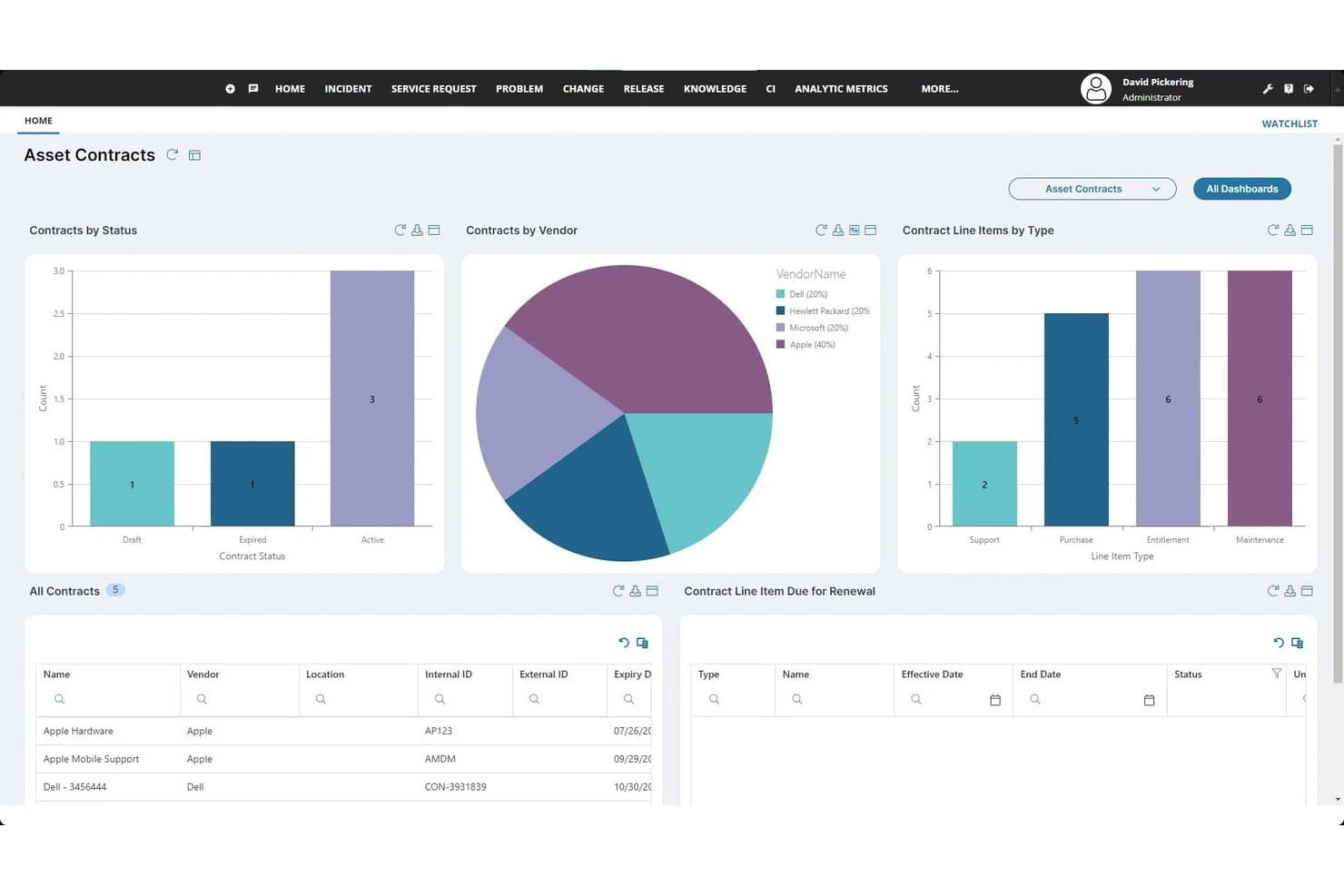
Ivanti ITSM tracks asset contracts by vendor, status, and renewal dates. Ivanti Neurons for Discovery is an enterprise IT asset discovery platform that continuously scans networks using active and passive techniques to inventory hardware, software, cloud, OT/IoT, and SaaS assets across multi-environment infrastructures.
Who Is Ivanti ITSM Best For?
It's a strong fit for mid-market and enterprise IT operations and asset management teams running complex, multi-environment infrastructures.
Why I Picked Ivanti ITSM
Ivanti Neurons for Discovery earns its spot on my shortlist because software license tracking is built directly into the discovery workflow, not added as a separate module. I like that my team can see which licenses are active, which contracts are approaching renewal, and where license spend is being wasted, without switching tools. The passive scanning also catches unmanaged devices, so I'm not working from an incomplete picture when it's time to run a software audit.
Ivanti ITSM Key Features
- Continuous passive and active discovery: Combine passive network listening with active scanning to find all connected devices as they join the network.
- Multi-environment asset coverage: Discover and inventory devices across on-premises, cloud, virtual, SaaS, and OT/IoT environments.
- CMDB and ITSM integration: Sync discovered asset data directly with Ivanti and third-party CMDB or ITSM platforms for workflow automation.
- Vulnerability data aggregation: Ingest and centralize findings from Tenable, Qualys, and Rapid7 into a unified exposure analysis dashboard.
Ivanti ITSM Integrations
Ivanti Neurons for Discovery offers native integrations with ServiceNow, Microsoft 365, Azure, Tenable, Rapid7, Qualys, Cisco, BMC, Okta, Zscaler, and CrowdStrike. An API is available for custom integrations.
Pros and Cons
Pros:
- Discovers assets across cloud, SaaS, and on-prem
- Built-in software license metering and reclaim
- Safely fingerprints OT and IoT devices passively
Cons:
- Reporting dashboards lack deep customization options
- Initial setup and tuning requires significant time
Learn more about Ivanti ITSM: Best for CMDB native discovery and reconciliation
- Free demo available
- Pricing upon request
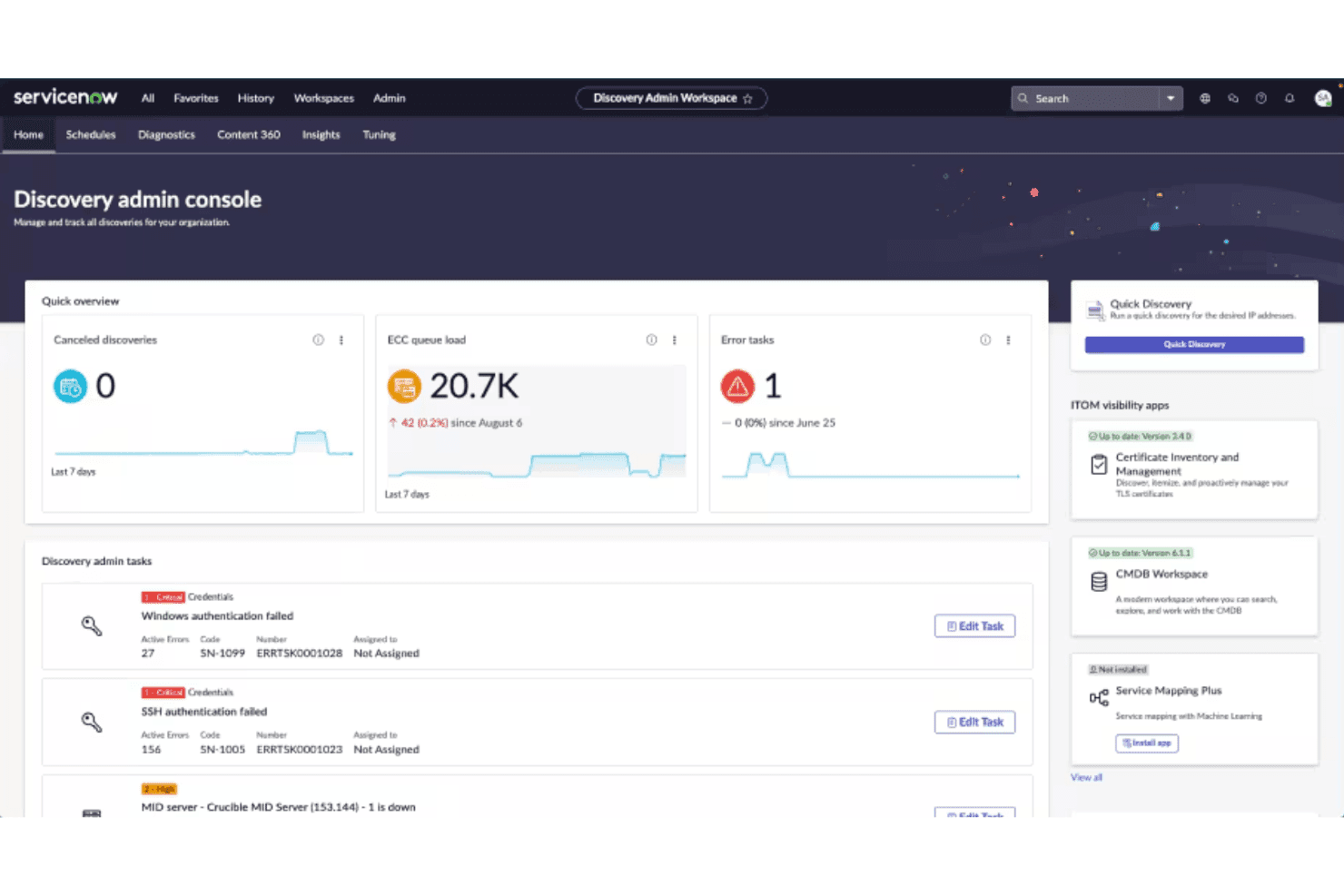
ServiceNow Discovery centralizes admin tasks, errors, and queue monitoring. ServiceNow Discovery is an IT asset discovery module within the ServiceNow ITOM suite that scans on-premises, cloud, containerized, and hybrid environments using agentless and agent-based methods to populate and reconcile a native CMDB.
Who Is ServiceNow Discovery Best For?
It's a strong fit for large enterprises with complex, hybrid infrastructure that need discovery tightly coupled to an existing ServiceNow ITSM or ITOM environment.
Why I Picked ServiceNow Discovery
ServiceNow Discovery earns its spot as one of the best on my shortlist because the Identification and Reconciliation Engine (IRE) is genuinely in a class of its own. When my team runs a discovery scan, the IRE automatically deduplicates and reconciles incoming CI data against existing CMDB records, eliminating ghost entries and conflicting asset records. I also like the event-driven discovery model, which captures configuration changes across cloud environments as they happen rather than waiting for the next scheduled scan.
ServiceNow Discovery Key Features
- Agent Client Collector: Collects asset data from endpoints and domain controllers, closing traditional agentless scanning gaps.
- Event-driven discovery: Receives real-time configuration events from cloud sources to maintain current asset data.
- Service Graph Connectors: Ingests and normalizes data from third-party cloud and infrastructure sources.
- Content Library: Uses AI-powered application fingerprints to identify and classify discovered software across environments.
ServiceNow Discovery Integrations
ServiceNow Discovery offers native integrations across the ServiceNow ecosystem and allows integration with third-party cloud platforms like AWS, Azure, Google Cloud Platform, Cisco ACI, and VMware vSphere. An API is available for custom integrations.
Pros and Cons
Pros:
- IRE deduplicates CI records automatically
- Covers cloud, on-prem, and containers natively
- Native CMDB reconciliation with zero manual cleanup
Cons:
- Requires full ServiceNow platform licensing
- Discovery tuning requires significant configuration effort
Learn more about ServiceNow Discovery: Best for cloud workload identification
- Free demo available
- Pricing upon request
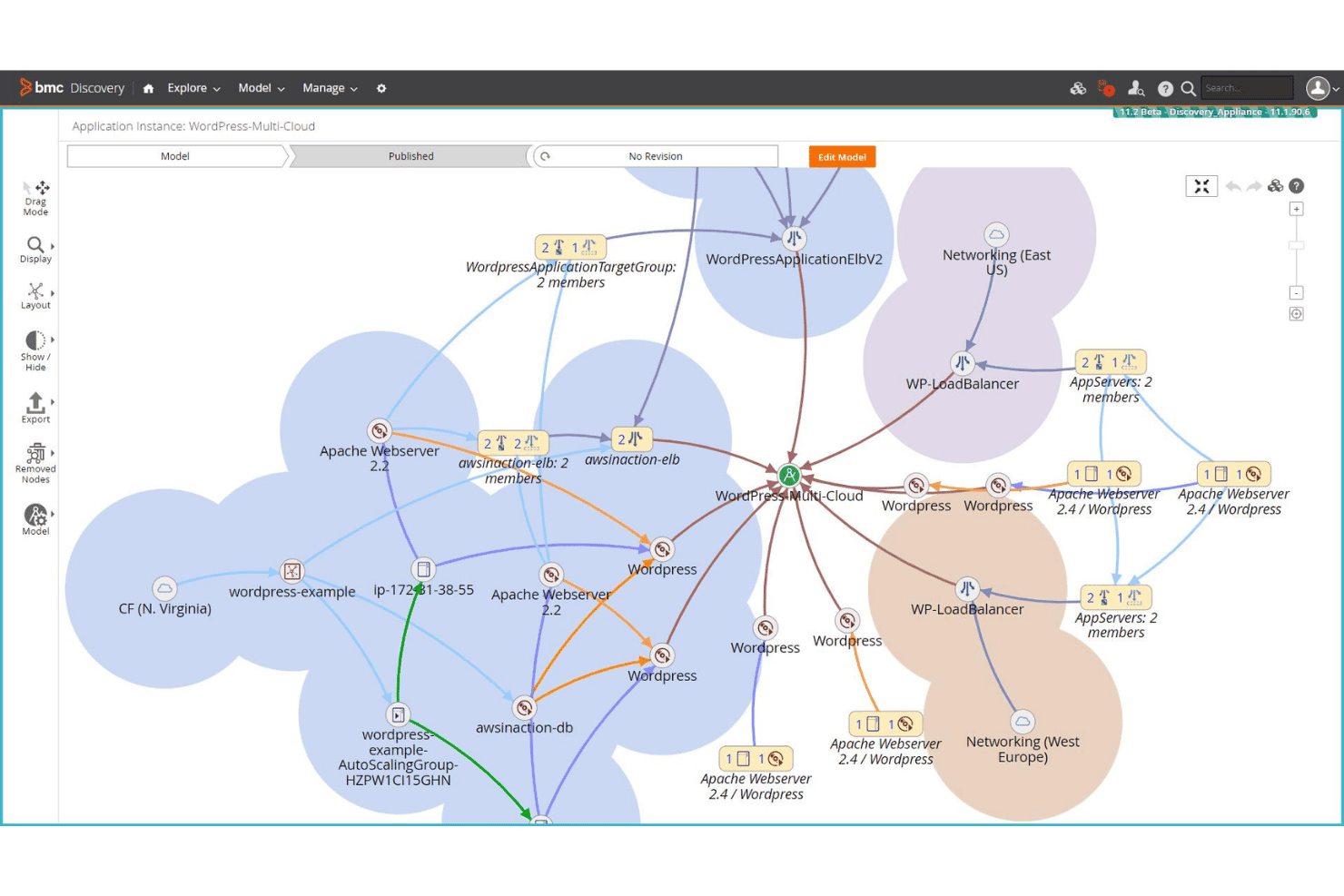
BMC Helix Discovery maps multi-cloud WordPress app dependencies visually. BMC Helix Discovery is an agentless IT asset discovery platform that automatically scans and maps hardware, software, and service dependencies across on-premises, multi-cloud, and containerized environments.
Who Is BMC Helix Discovery Best For?
It's a strong fit for enterprise IT operations and security teams managing large-scale hybrid or multi-cloud infrastructure.
Why I Picked BMC Helix Discovery
BMC Helix Discovery earns its spot on my shortlist because of how well it handles cloud workload identification at scale. Most discovery tools struggle to keep pace with dynamic cloud environments, but BMC Helix continuously scans AWS, Azure, and GCP workloads and maps their dependencies in real time. I particularly like Blueprint-Automated Service Modeling, which builds visual service maps showing exactly which cloud resources underpin a given business application.
BMC Helix Discovery Key Features
- Agentless scanning: Discovers IT assets across the network without requiring software installation on endpoints.
- Service-aware dependency mapping: Automatically visualizes relationships between discovered assets and mapped business services.
- CMDB integration: Synchronizes discovered asset and relationship data with ServiceNow, BMC Helix, or Remedy CMDB platforms.
- SSL/TLS certificate discovery: Identifies and inventories security certificates deployed across your IT infrastructure.
BMC Helix Discovery Integrations
BMC Helix Discovery offers native integrations with ServiceNow, BMC Helix ITSM, and Remedy CMDB platforms. An API is available for custom integrations.
Pros and Cons
Pros:
- Real-time change detection across hybrid environments
- Agentless scanning covers unmanaged network devices
- Deep multi-cloud workload dependency mapping
Cons:
- Reporting customization is relatively limited
- Complex initial setup for large deployments
Learn more about BMC Helix Discovery:
Alte instrumente de descoperire a activelor IT
Iată câteva instrumente suplimentare de descoperire a activelor IT care nu au ajuns pe lista mea scurtă, dar care merită totuși verificate:
- 11Tanium AssetBest for real-time asset visibility at scale
- 12ArmisBest for passive discovery of IoT and OT devices
- 13SecPod (Saner Platform)Best for security posture analytics
- 14InvGate AssetsBest for intuitive asset lifecycle reporting
- 15NinjaOneBest for fast remote asset auditing
- 16Flexera OneBest for hybrid cloud asset governance
- 17Open-AudITBest for open-source network discovery
- 18AssetSonarBest for SaaS subscription tracking
How I Evaluate IT Asset Discovery Tools
I evaluate these tools in two layers: baseline requirements like multi-environment scanning and CMDB integration, then differentiators like OT/IoT fingerprinting and license metering.
Core Functionality (Table Stakes For This List)
When I'm selecting tools for my list, I rank each one on a scale from 0 (does not offer the functionality) to 5 (excels in this area) for each core functionality listed below. I then calculate the tool's total score into a percentage, using 65% as a benchmark to help assess its overall fit for the list.
- Automated Network Discovery: I check whether the tool scans subnets using protocols like SNMP, WMI, and SSH rather than relying on manual asset entry.
- Hardware & Software Inventory: Each tool should capture detailed specs, installed software versions, and patch levels—not just device names or IP addresses.
- Agent & Agentless Scanning: I look for support of both methods so you can reach managed endpoints and unmanaged devices like contractor laptops or lab equipment.
- Multi-Environment Coverage: Discovery should span on-prem, cloud, virtual, and remote environments so nothing falls through the gaps during an audit.
- CMDB/ITSM Integration: I evaluate whether the tool feeds asset data into platforms like ServiceNow or Jira through native connectors or open APIs.
- Continuous Monitoring: I look for near real-time change detection that flags new devices, removals, or configuration drift without waiting for a scheduled scan.
Once I have a list of tools that meet the criteria, I consider what sets each platform apart.
Differentiating Factors (What Sets Vendors Apart)
Here's how I compare and contrast different vendors:
Standout Features
Cloud and SaaS discovery matters because environments change fast. Ephemeral instances spin up in AWS or Azure, and employees adopt unsanctioned apps that create shadow IT. I look for native connectors that surface those assets automatically. Software license metering is another differentiator, since it helps you spot unused installations and reclaim licenses before an audit catches over-deployment. For teams managing manufacturing floors or hospital networks, OT/IoT device fingerprinting using passive traffic analysis identifies connected devices without disrupting sensitive equipment.
Beyond Features
Deployment architecture is a big factor I evaluate. Multi-site teams need distributed collectors that can scan air-gapped or segmented networks, and SaaS vs. on-prem options affect data residency compliance. The integration ecosystem also matters—I check whether a tool can feed asset data into SIEM or SOAR platforms alongside ITSM connectors, since discovery data loses value if it stays siloed. Pricing model is worth close attention too, especially per-asset pricing that can spike when cloud workloads scale up seasonally.
Cum să alegeți instrumentele de descoperire a activelor IT
Când decideți ce instrumente de descoperire a activelor IT sunt potrivite pentru echipa dumneavoastră, începeți prin a corela prioritățile principale cu anumite funcții și factori de implementare care influențează direct pregătirea pentru audit, securitatea și transferurile operaționale:
| Dacă prioritatea dumneavoastră este | Căutați |
|---|---|
| Dacă prioritatea dumneavoastră esteCartografierea activelor cloud și SaaS | CăutațiConectori nativi pentru AWS, Azure și SaaS |
| Dacă prioritatea dumneavoastră esteIntegrarea rapidă în mai multe locații | CăutațiColectori distribuiți sau ușori |
| Dacă prioritatea dumneavoastră esteAlerte în timp real despre IT-ul din umbră | CăutațiMonitorizare continuă și pasivă a rețelei |
| Dacă prioritatea dumneavoastră esteReducerea importurilor CMDB eșuate | CăutațiIntegrări CMDB bidirecționale și normalizate |
| Dacă prioritatea dumneavoastră esteConformitatea licențelor și pregătirea pentru audit | CăutațiMăsurarea integrată a licențelor și rapoarte de utilizare |
Cum să evaluați lista scurtă
- Rulați o scanare de descoperire într-o subrețea de test: În prima săptămână, testați scanarea fără agent a instrumentului pentru toate activele hardware și virtuale.
- Exportați și transmiteți datele în CMDB: Solicitați o demonstrație nativă ServiceNow sau BMC și verificați dacă atributele activelor sunt mapate fără pierderi de date.
- Verificați măsurarea licențelor și acuratețea rapoartelor: Solicitați un audit sau export al licențelor care să acopere cel puțin trei titluri software importante pe care le utilizați.
- Solicitați documentația privind securitatea furnizorului: Cereți informații despre metodele actuale de criptare și atestările de conformitate (SOC 2, ISO 27001).
- Decideți: viteza unei soluții SaaS disponibile imediat sau acoperire mai extinsă pentru mediile locale și IoT — acordați prioritate în funcție de mediul dumneavoastră cel mai complex.
Ce sunt instrumentele de descoperire a activelor IT?
Instrumentele de descoperire a activelor IT sunt soluții software specializate care scanează și identifică automat toate dispozitivele hardware, software și conectate la rețea din mediile unei organizații. Acestea permit echipelor IT să mențină un inventar în timp real, să sprijine auditurile de securitate, să identifice activele negestionate sau neautorizate și să susțină fluxuri de lucru precum gestionarea licențelor sau evaluările vulnerabilităților. Aceste instrumente joacă un rol esențial în menținerea infrastructurii IT la zi, conformă și protejată împotriva riscurilor ascunse.
Funcții
Când selectați instrumente de descoperire a activelor IT, urmăriți următoarele funcții esențiale:
- Scanare automată a rețelei: Detectează toate dispozitivele și punctele finale conectate la rețea fără introducere manuală, asigurându-se că nimic nu este omis în timpul inventarierii.
- Inventarierea hardware-ului: Colectează informații detaliate despre specificațiile dispozitivelor, numerele de serie și înregistrările privind proprietatea în întreaga infrastructură.
- Inventarierea software-ului: Monitorizează toate programele instalate, numerele versiunilor, stările actualizărilor și utilizarea, pentru a vă ajuta să identificați vulnerabilitățile sau lipsurile privind licențele.
- Descoperire cu agenți și fără agenți: Oferă atât scanare bazată pe agenți, cât și scanare fără agenți, pentru a acoperi dispozitivele gestionate și punctele finale temporare sau negestionate.
- Compatibilitate cu mai multe medii: Descoperă activele din mediile locale, virtuale, cloud și la distanță, pentru o evidență unificată și actualizată a activelor.
- Detectarea modificărilor în timp real: Actualizează instantaneu înregistrările activelor atunci când dispozitivele sunt adăugate, modificate sau eliminate, ajutându-vă să reacționați rapid la activitățile neautorizate.
- Integrare cu CMDB și ITSM: Transferă sau sincronizează datele despre active direct în bazele de date pentru gestionarea configurațiilor sau în platformele de gestionare a serviciilor, pentru a susține operațiuni IT mai ample.
- Controale ale accesului bazate pe roluri: Vă permite să definiți rolurile și permisiunile utilizatorilor pentru a menține securitatea datelor, în special în scopuri de audit sau conformitate.
- Raportare personalizabilă: Generează rapoarte programate sau la cerere, care evidențiază modificările inventarului, utilizarea software-ului și activele care nu respectă cerințele de conformitate.
- Gestionarea conformității licențelor: Monitorizează drepturile de utilizare a software-ului în raport cu instalările, sprijinind auditurile și reducând cheltuielile excesive pentru licențe.
Soluțiile de instrumente pentru descoperirea activelor IT nu includ, de regulă, inteligența artificială în oferta lor de funcționalități.
Beneficii
Implementarea instrumentelor pentru descoperirea activelor IT oferă mai multe beneficii echipei și companiei dumneavoastră. Iată câteva dintre acestea:
- Vizibilitate completă asupra activelor: Obțineți un inventar precis, în timp real, al fiecărui activ hardware și software din toate mediile, cu ajutorul funcțiilor de scanare automată.
- Detectarea Shadow IT: Identificați rapid dispozitivele neautorizate și conturile cloud sau SaaS nesancționate, utilizând descoperirea fără agenți și descoperirea nativă în cloud.
- Pregătire pentru audit și conformitate: Mențineți înregistrări actualizate prin monitorizare continuă și integrare cu platformele CMDB sau ITSM, pentru audituri mai simple.
- Optimizarea licențelor: Monitorizați utilizarea software-ului și drepturile de utilizare, ajutând echipa să evite implementarea excesivă și să reducă costurile licențelor.
- Răspuns mai rapid la incidente: Permiteți echipelor de securitate și IT să localizeze prompt dispozitivele și să remedieze vulnerabilitățile înainte ca amenințările să se agraveze.
- Reducerea sarcinilor manuale: Eliminați activitățile repetitive de colectare a datelor prin fluxuri de lucru automatizate pentru inventariere, raportare și integrare.
- Gestionarea îmbunătățită a modificărilor: Identificați în timp real adăugările, eliminările sau abaterile de configurație, astfel încât modificările operaționale să nu treacă neobservate.
Costuri și prețuri
Selectarea instrumentelor pentru descoperirea activelor IT necesită înțelegerea diverselor modele de preț și planuri disponibile. Costurile variază în funcție de funcționalități, dimensiunea echipei, suplimente și alți factori. Tabelul de mai jos rezumă planurile uzuale, prețurile medii ale acestora și funcționalitățile incluse de obicei în soluțiile pentru descoperirea activelor IT:
Tabel comparativ al planurilor pentru instrumentele de descoperire a activelor IT
| Tipul planului | Preț mediu | Funcționalități uzuale |
|---|---|---|
| Tipul planuluiPlan gratuit | Preț mediu$0 | Funcționalități uzualeScanare de bază a rețelei, inventar limitat, raportare restricționată și asistență din partea comunității. |
| Tipul planuluiPlan personal | Preț mediu$10–$30/lună | Funcționalități uzualeAcces pentru un singur utilizator, raportare avansată, inventarierea software-ului și notificări prin e-mail. |
| Tipul planuluiPlan pentru companii | Preț mediu$50–$150/lună | Funcționalități uzualeAsistență pentru mai mulți utilizatori, descoperire automată, integrare cu sisteme CMDB/ITSM și scanări programate. |
| Tipul planuluiPlan pentru întreprinderi | Preț mediu$200–$500+/lună | Funcționalități uzualeOpțiuni de implementare personalizate, acces la API, active nelimitate, asistență premium și raportare privind conformitatea. |
Întrebări frecvente despre instrumentele pentru descoperirea activelor IT
Iată câteva răspunsuri la întrebările frecvente despre instrumentele pentru descoperirea activelor IT:
Cât de des ar trebui să executați scanări pentru descoperirea activelor?
Ar trebui să executați scanările de descoperire în mod regulat—multe echipe le programează zilnic sau săptămânal—pentru a menține actualizate datele de inventar și pentru a identifica rapid dispozitivele noi sau neautorizate.
Pot instrumentele pentru descoperirea activelor IT să găsească dispozitive negestionate sau necunoscute?
Da, majoritatea instrumentelor pot detecta dispozitivele negestionate sau necunoscute folosind scanarea rețelei și monitorizarea pasivă, ajutându-vă să abordați utilizarea nesupravegheată a tehnologiei informației și riscurile ascunse.
Acceptă aceste instrumente mediile în cloud și la distanță?
Da, multe instrumente pentru descoperirea activelor IT oferă conectori pentru AWS, Azure și aplicațiile SaaS și permit scanarea de la distanță, oferindu-vă vizibilitate asupra tuturor mediilor.
La ce măsuri de securitate ar trebui să vă așteptați de la instrumentele pentru descoperirea activelor?
Căutați controale de acces bazate pe roluri, stocarea și transmiterea criptată a datelor și înregistrarea jurnalelor de audit pentru a sprijini conformitatea și a proteja datele sensibile de inventar.
Cum se integrează instrumentele pentru descoperirea activelor IT cu sistemele ITSM sau CMDB existente?
Majoritatea soluțiilor oferă conectori predefiniți sau API-uri pentru a sincroniza activele descoperite direct cu platformele ITSM și bazele de date de gestionare a configurațiilor, simplificând fluxurile de lucru.