

Software-ul mobil pentru gestionarea activelor este o platformă mobilă pentru urmărirea echipamentelor, a lucrărilor de întreținere, a alocărilor, a locațiilor și a înregistrărilor privind ciclul de viață.
Cel mai bun software mobil pentru gestionarea activelor sprijină echipele din teren prin scanare, acces offline, inspecții, ordine de lucru și date sincronizate despre active. Acest ghid compară 12 instrumente în ceea ce privește întreținerea, gestionarea ciclului de viață al echipamentelor IT, predarea și preluarea, vizibilitatea în mai multe locații, integrările, permisiunile și prețurile.
Folosiți-l pentru a-l adapta modelului dumneavoastră operațional, mediului tehnic și cerințelor de urmărire a activelor.
Why Trust Our Software Recommendations
6,700+
Reviews
20
Industry experts
16+
Evaluation factors
14
Years
Our team has been testing and reviewing software since 2012. As tech leaders ourselves, we know how difficult—and important—it is to choose the right software.
For this guide, we evaluated tools using hands-on testing and independent research, scoring tools using our selection criteria.
Our reviews reflect our human editorial judgment, not a sales pitch.
Expert reviewers:
- Paulo Gardini MiguelTech Director
 Tim FisherVP of AI
 Gabriel RosasTech Lead & Software Architect
 Christhian GruhnTech Lead & Platform Architect

Tabel comparativ al soluțiilor software mobile pentru gestionarea activelor
Comparați prețurile și specificațiile, unul lângă altul, pentru soluțiile software mobile de gestionare a activelor incluse în lista mea scurtă.
Score legend (out of 5)
- Excellent4.5–5
- Good4–4.4
- Average3–3.9
- Below average2–2.9
- Poor1–1.9
Sorted by: Default
| Tool | Starting Price | Website | |||||||
|---|---|---|---|---|---|---|---|---|---|
Best for maintenance-driven field asset teams | 3.5 out of 5 | 3 | 4 | 4 | 4 | 3 | 3 | $20/user/month Free plan + free trial + free demo available | Website |
Best for offline-first PM and condition monitoring | 3.5 out of 5 | 3 | 4 | 5 | 5 | 2 | 2 | Pricing upon request Free demo available | Website |
Best for field teams tracking assets by scan | 3.3 out of 5 | 2 | 4 | 4 | 3 | 3 | 4 | $49/month Free plan available and 14-day free trial | Website |
Best for multi-site equipment and lifecycle tracking | 3.2 out of 5 | 4 | 4 | 1 | 3 | 3 | 4 | $108/month Free trial available; free 30-minute guided demo available | Website |
Best for unlimited-user, per-asset lifecycle tracking | 3.2 out of 5 | 4 | 4 | 1 | 3 | 3 | 4 | $20/month 30-day free trial | Website |
Best for QR, RFID, and GPS tracking on one plan | 3.5 out of 5 | 3 | 4 | 4 | 3 | 3 | 4 | £33.25/month 14-day free trial | Website |
Best for IT asset lifecycle and field check-out | 3.7 out of 5 | 4 | 5 | 3 | 3 | 3 | 4 | Pricing upon request 7-day free trial | Website |
Best for maintenance-led asset lifecycle tracking | 3.8 out of 5 | 4 | 5 | 3 | 4 | 3 | 4 | $24/user/month Free trial available | Website |
Best for AI-driven predictive maintenance at scale | 3.7 out of 5 | 4 | 4 | 3 | 5 | 3 | 3 | Pricing upon request Free demo available | Website |
Best for multi-site check-in/out without per-user fees | 3.5 out of 5 | 4 | 5 | 1 | 3 | 4 | 4 | $63.55/month 14-day free trial + free demo available | Website |


Recenzii ale soluțiilor software mobile pentru gestionarea activelor
Mai jos sunt rezumatele mele ale celor mai bune soluții software mobile pentru gestionarea activelor din lista mea scurtă. Recenziile mele analizează funcțiile, integrările și prețurile fiecărei platforme pentru a vă ajuta să găsiți opțiunea potrivită pentru echipa dumneavoastră.
 Best for maintenance-driven field asset teams
- Free plan + free trial + free demo available
- From $20/user/month (billed annually)
Visit WebsiteCustomer Rating:4.8/5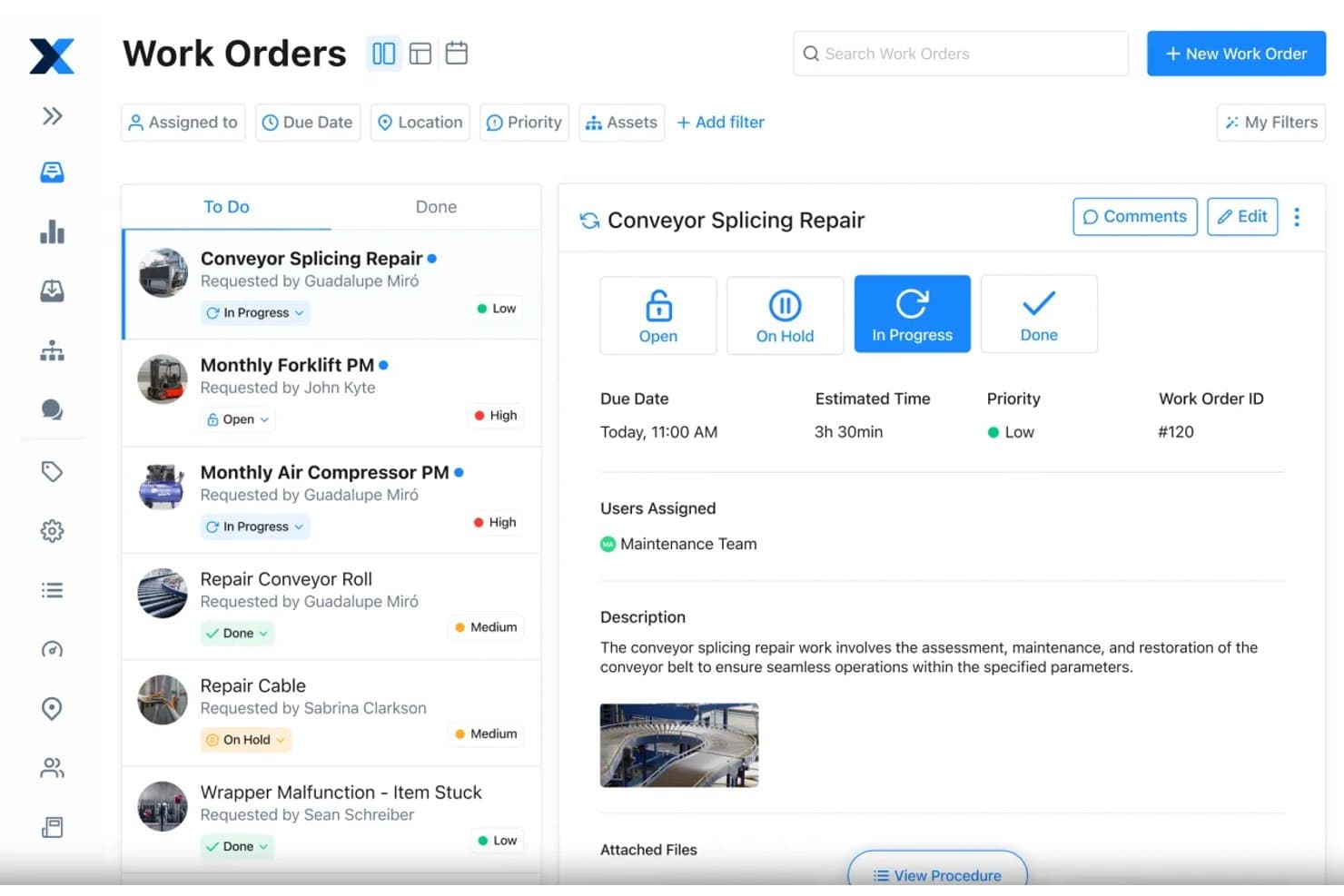
MaintainX lets users manage and track work orders on mobile. MaintainX is a maintenance management platform built around work orders, asset lifecycle tracking, preventive maintenance scheduling, and mobile-first field operations with barcode and QR scanning.
Who Is MaintainX Best For?
MaintainX is a strong fit for facilities and equipment teams that manage asset upkeep through work orders, preventive maintenance schedules, and field technician workflows.
Why I Picked MaintainX
MaintainX earns its spot on my shortlist because it's built from the ground up for maintenance-driven field teams, not adapted for them as an afterthought. I love how preventive maintenance scheduling pairs with meter-based triggers, so a technician's mobile app surfaces the right work order when equipment hits a specific runtime threshold. Offline mode syncs completed work orders automatically when connectivity returns, which means field techs keep working through dead zones without losing inspection data or asset history.
MaintainX Key Features
- Straight-line depreciation tracking: Records asset value over time so you can monitor financial lifecycle data alongside maintenance history.
- Purchase order management: Create, submit, and approve purchase orders directly in the platform, with approval workflows available on Premium plans and up.
- Inspection and procedure builder: Build multi-step procedures with conditional logic, signature capture, and pass/fail inspection checks attached to work orders.
- Requester portal access: Free requester accounts let non-licensed staff submit work orders by scanning a QR code, without needing a paid user seat.
MaintainX Integrations
MaintainX integrates with Samsara, Titan GPS, Oracle NetSuite, Xero, Microsoft Power BI, EBIS, Ignition, Kepware, and MQTT. It offers an open REST API on Premium and higher plans, plus Zapier.
Pros and Cons
Pros:
- Preventive maintenance uses meter-based triggers
- QR scanning updates assets, parts, locations
- Offline work orders sync after reconnection
Cons:
- No dedicated asset check-in workflow
- Native GPS tracking is unavailable
Learn more about MaintainX: Best for offline-first PM and condition monitoring
- Free demo available
- Pricing upon request
Visit WebsiteCustomer Rating:4.5/5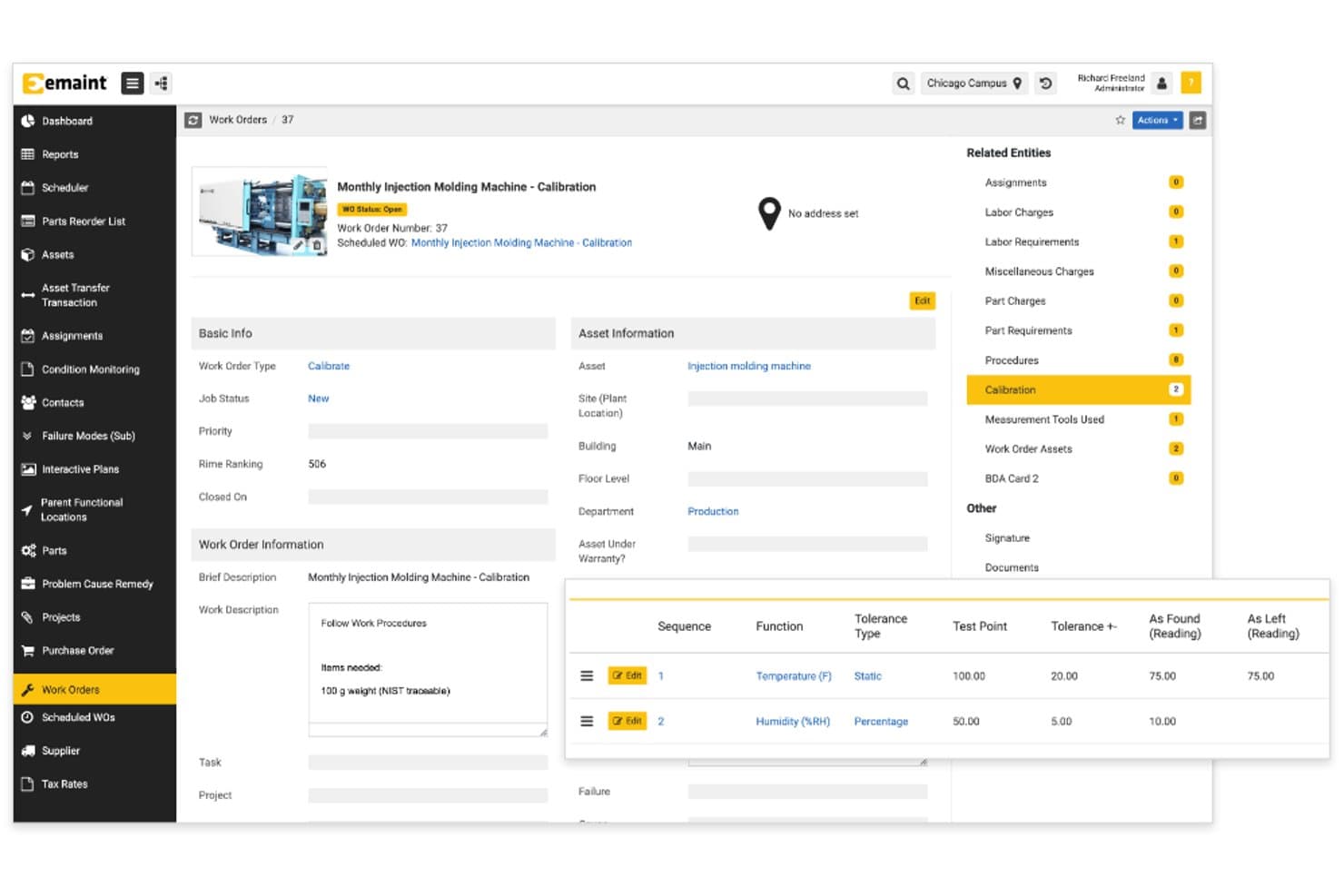
eMaint tracks calibration readings and tolerances within work orders. eMaint is a CMMS platform built on Fluke Reliability's condition monitoring technology, covering preventive maintenance scheduling, offline mobile work order management, asset lifecycle tracking, and inventory management.
Who Is eMaint Best For?
eMaint is a strong fit for facilities and equipment managers in manufacturing, healthcare, or regulated industries who need maintenance scheduling tied to real-time condition monitoring.
Why I Picked eMaint
I picked eMaint as one of the best because of how it handles offline-first PM alongside real-time condition monitoring from Fluke sensors. When my team is working in areas with no connectivity, the app lets us view and update work orders, attach photos, and scan assets, then syncs automatically once we're back online. Condition-based triggers tied directly to Fluke hardware mean PM schedules fire on actual equipment data, not just calendar intervals.
eMaint Key Features
- Asset hierarchy tracking: Build parent-child asset relationships and view full maintenance history and total cost of ownership for each asset.
- PM checklists and meter readings: Attach step-by-step checklists and meter-based triggers to recurring work orders to standardize technician workflows.
- Role-based access and field-level security: Control what each user can view or edit at the field level, with automatic audit trails logged on every action.
- Parts inventory and forecasting: Search and manage spare parts across your inventory, with cycle counts, requisitions, and parts forecasting built into the platform.
eMaint Integrations
eMaint’s named vendor integrations are not clearly documented. Enterprise plans support API integrations with ERP, BI, and SCADA systems, plus prebuilt ERP and third-party connectors; Professional includes limited API access.
Pros and Cons
Pros:
- Custom forms support varied asset workflows
- Condition triggers connect maintenance to sensor data
- Full offline work order access and syncing
Cons:
- Initial setup can require substantial onboarding
- No GPS or geofencing for location tracking
Learn more about eMaint: Best for field teams tracking assets by scan
- Free plan available and 14-day free trial
- From $49/month
Visit WebsiteCustomer Rating:4.4/5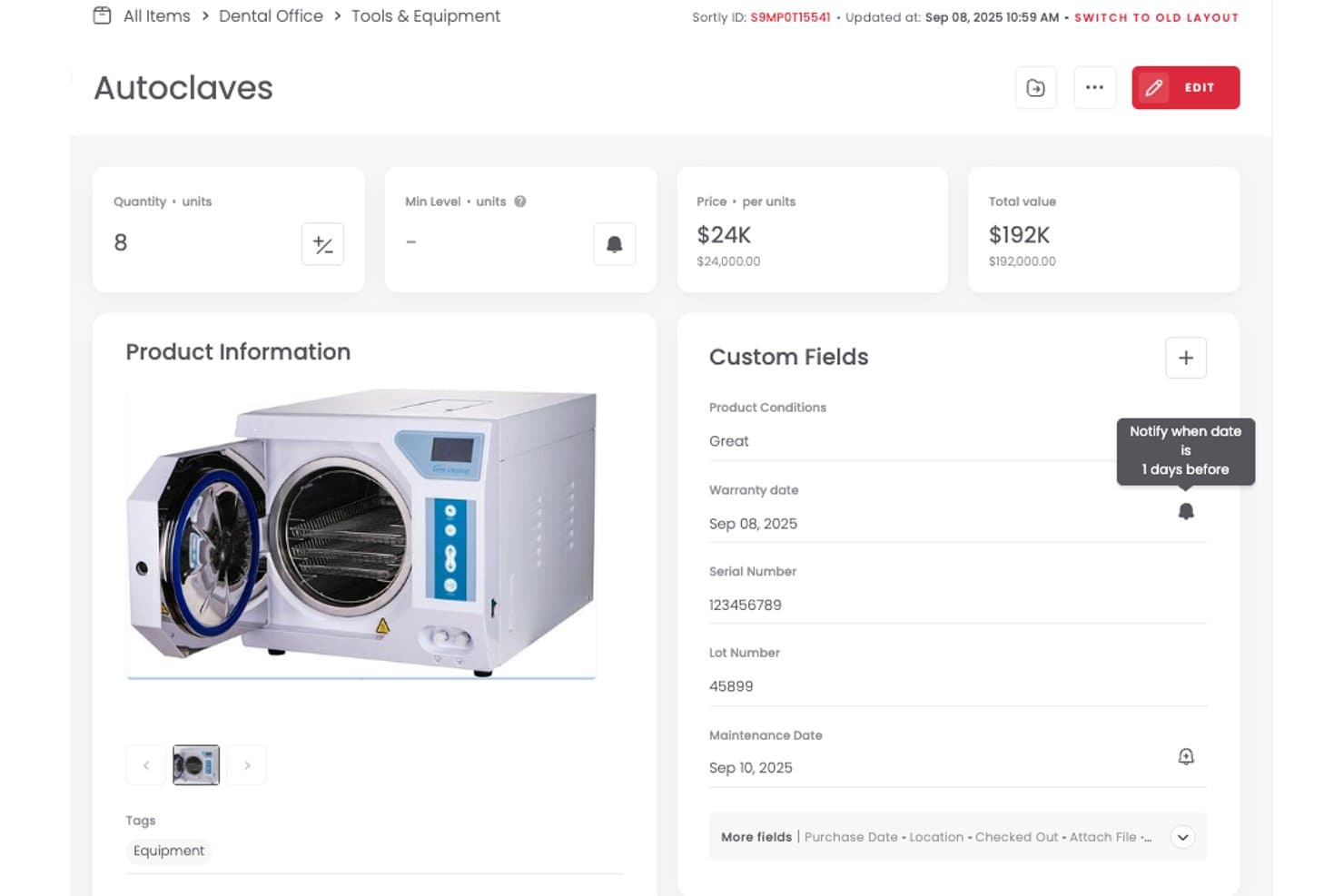
Sortly alerts users before warranty or maintenance dates expire. Sortly is a mobile asset tracking tool for managing equipment, tools, IT assets, and inventory through barcode and QR code scanning, offline mobile updates, and a centralized cloud-synced catalog.
Who Is Sortly Best For?
Sortly is a good fit for facilities and field operations teams that need scan-based asset tracking without technical complexity.
Why I Picked Sortly
I picked Sortly as one of the best because its offline mobile scanning is genuinely built for field conditions. Your team can scan barcodes or QR codes to update asset records, log check-ins and check-outs, and capture condition photos, all without a live connection. Changes sync automatically once they're back online. I also like that move summary reports create a clear trail of who moved what asset and when, which is exactly what distributed field teams need.
Sortly Key Features
- Custom fields and tags: Add custom fields to asset records to capture the specific details your team needs, with tagging to filter and search across your inventory.
- Maintenance date alerts: Set date-based reminders for scheduled maintenance or repairs, delivered via in-app notifications, email, Slack, or Microsoft Teams.
- Move summary reports: Generate reports that log every asset location change, including who moved the item and when, across your entire catalog.
- Spreadsheet import: Bring existing asset data into Sortly by importing spreadsheets directly, reducing manual entry when setting up your inventory.
Sortly Integrations
Sortly offers native integrations with QuickBooks Online, Slack, Microsoft Teams, Amazon Business US, and AppFolio Stack. Enterprise plans add webhooks and an API for custom integrations.
Pros and Cons
Pros:
- Photos make field inventory identification easier
- Move reports record asset location changes
- Offline scanning syncs after reconnection
Cons:
- Large inventories can experience sync delays
- Manual location updates lack GPS tracking
Learn more about Sortly: Best for multi-site equipment and lifecycle tracking
- Free trial available; free 30-minute guided demo available
- From $108/month (billed annually)
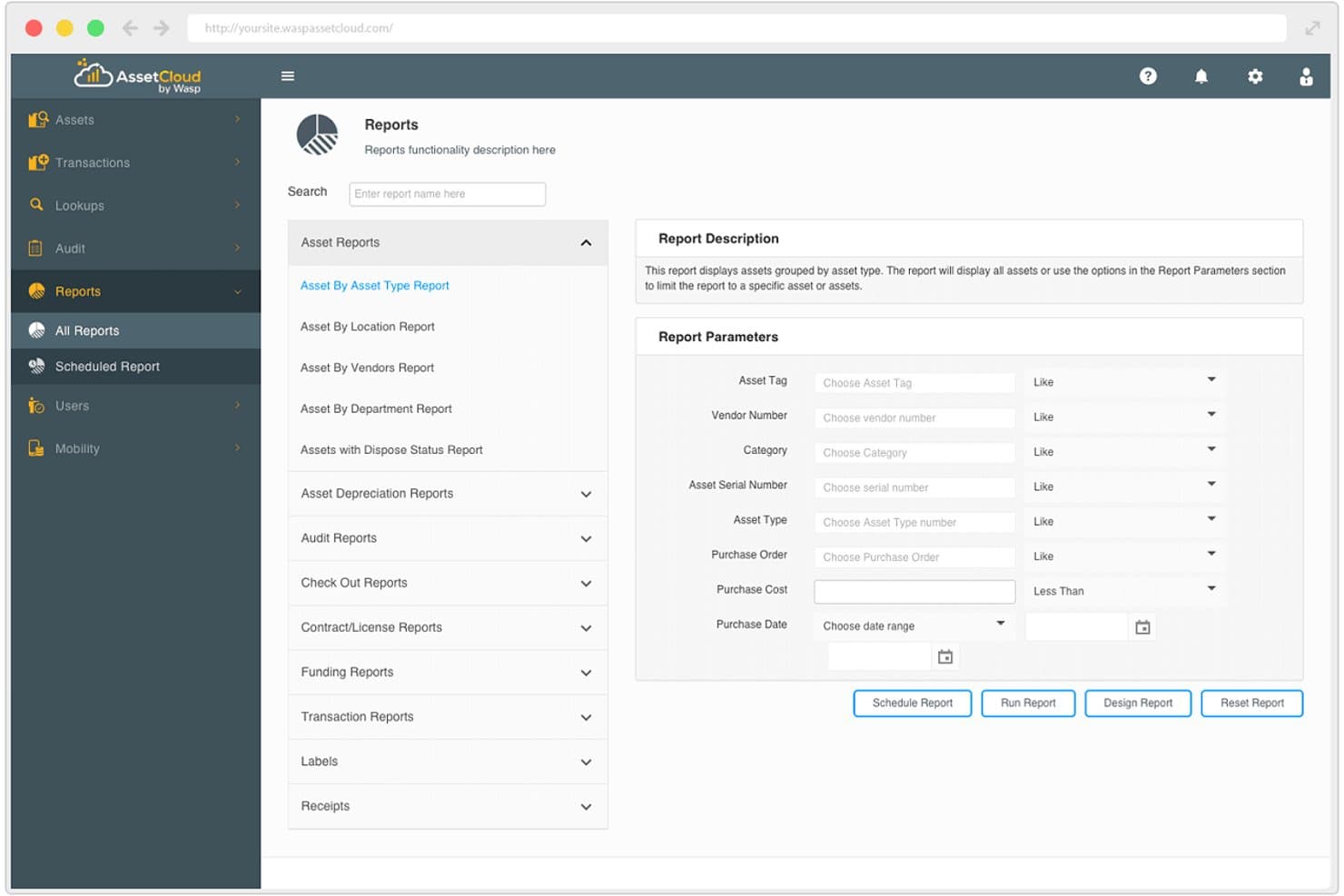
AssetCloud lets users run detailed asset reports with custom filters. AssetCloud is a cloud-based asset tracking platform from Wasp Barcode Technologies that covers barcode scanning, check-in/check-out, multi-site location tracking, depreciation, and lifecycle management across iOS and Android mobile apps.
Who Is AssetCloud Best For?
AssetCloud is a strong fit for facilities and equipment managers who need to track assets across multiple sites with detailed depreciation and lifecycle records.
Why I Picked AssetCloud
AssetCloud earns its spot on my shortlist because of how well it handles asset tracking across multiple sites and throughout the full asset lifecycle. I particularly like that every plan includes five depreciation methods and transaction history out of the box, so you're not piecing together financial records from a spreadsheet. When managing distributed equipment, the ability to define tiered locations and run barcode-based audits from the iOS or Android app keeps records accurate across every site without manual data entry.
AssetCloud Key Features
- Mobile check-in/check-out: Use the iOS or Android app to check assets in and out to employees, customers, or vendors directly from the field.
- Custom smart views: Build searchable saved views with filter conditions and share them across your organization for quick asset lookups.
- Role-based permissions: Assign fine-grained access controls and custom user roles to limit what each person can see or do in the system.
- Scheduled report delivery: Set up automated email delivery of reports from a library of 60+ templates, or build custom reports on Complete and higher plans.
AssetCloud Integrations
AssetCloud doesn't have any native integrations clearly documented. It supports CSV import and export on every plan, while a REST API for custom integrations is available only on Enterprise.
Pros and Cons
Pros:
- Multi-site locations support distributed equipment
- Five depreciation methods support lifecycle records
- Barcode audits update records onsite
Cons:
- Live location tracking isn't documented
- Offline mode lacks sync details
Learn more about AssetCloud: Best for unlimited-user, per-asset lifecycle tracking
- 30-day free trial
- From $20/month
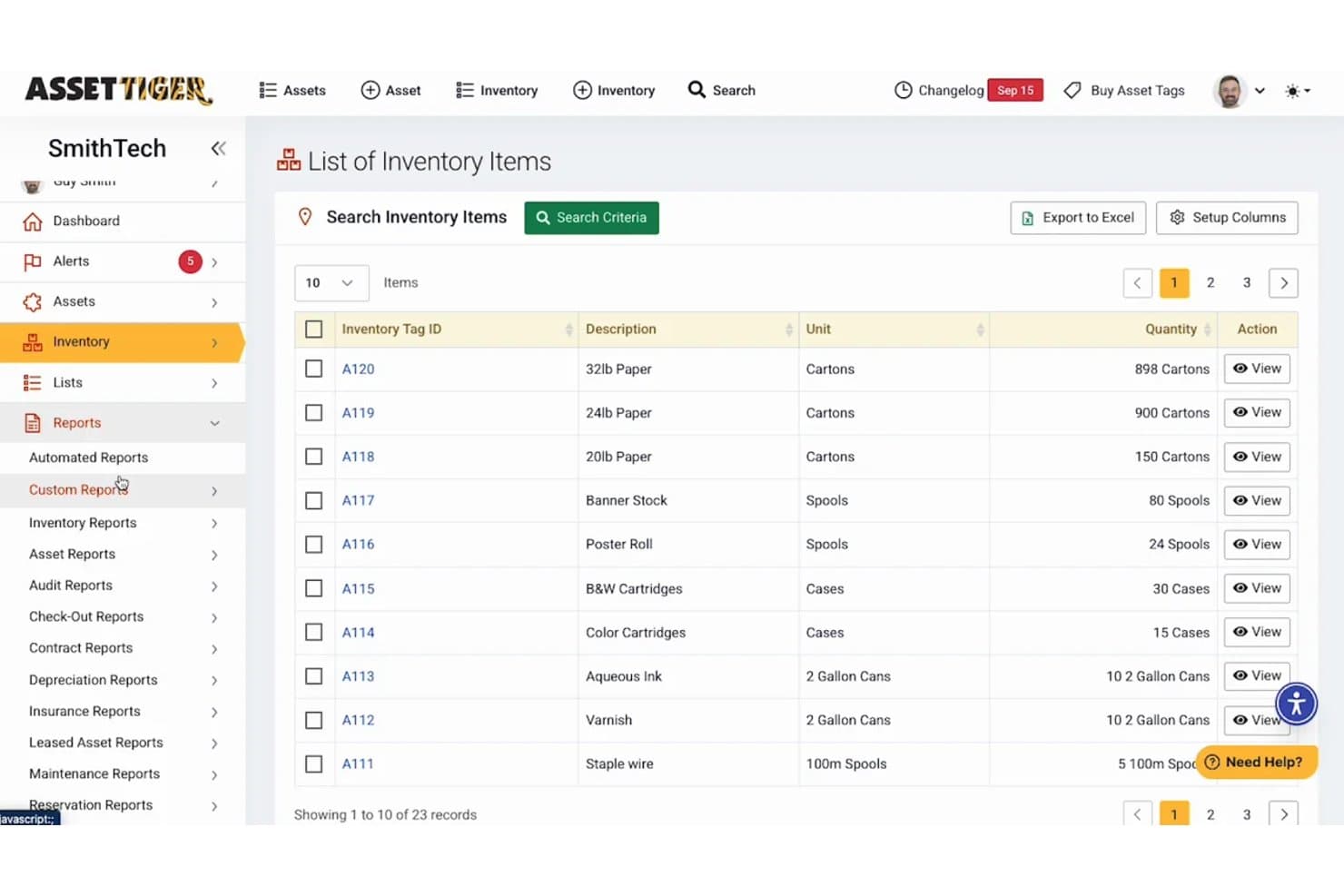
AssetTiger lets users browse and manage inventory items by tag, description, and quantity. AssetTiger is a cloud-based asset management platform that combines barcode and QR scanning, check-in/check-out tracking, lifecycle and depreciation management, maintenance scheduling, and audit reporting across web and mobile apps.
Who Is AssetTiger Best For?
AssetTiger is a strong fit for IT asset managers and facilities teams that need per-asset lifecycle tracking without paying per user.
Why I Picked AssetTiger
AssetTiger earns its spot on my shortlist because of how it handles per-asset lifecycle tracking without charging per user. I like that every paid plan includes unlimited users, so a school or facilities team with 50 staff scanning equipment doesn't face a ballooning user bill. Full custody history, three depreciation methods, and warranty expiry alerts give you a complete picture of each asset from acquisition to disposal, which is exactly what IT asset managers and facilities teams need from a mobile tool.
AssetTiger Key Features
- Barcode and QR label printing: Generate and print asset tags directly from the platform using a standard office or label printer, or order durable tags through MyAssetTag.com.
- 80+ built-in report types: Run depreciation, checkout history, maintenance cost, and audit reconciliation reports, with export options for CSV, PDF, or Excel.
- Role-based permission controls: Configure access across 120+ permission settings to manage what each user can view, edit, or action across your asset database.
- Preventive maintenance scheduling: Set maintenance tasks by date or recurring interval, with email alerts for overdue items and a logged history of technician, date, and cost.
AssetTiger Integrations
AssetTiger has 2 documented native integrations: Google Maps and Google Workspace for location mapping and sign-in. Paid plans include a REST API for custom integrations, plus CSV and Excel import and export.
Pros and Cons
Pros:
- Maintenance alerts include technician and cost logs
- Detailed custody and lifecycle histories
- Scan-driven check-in and audit workflows
Cons:
- Offline mobile behavior remains unclear
- No real-time GPS or geofencing
Learn more about AssetTiger: Best for QR, RFID, and GPS tracking on one plan
- 14-day free trial
- From £33.25/month (billed annually)
Visit WebsiteCustomer Rating:4.8/5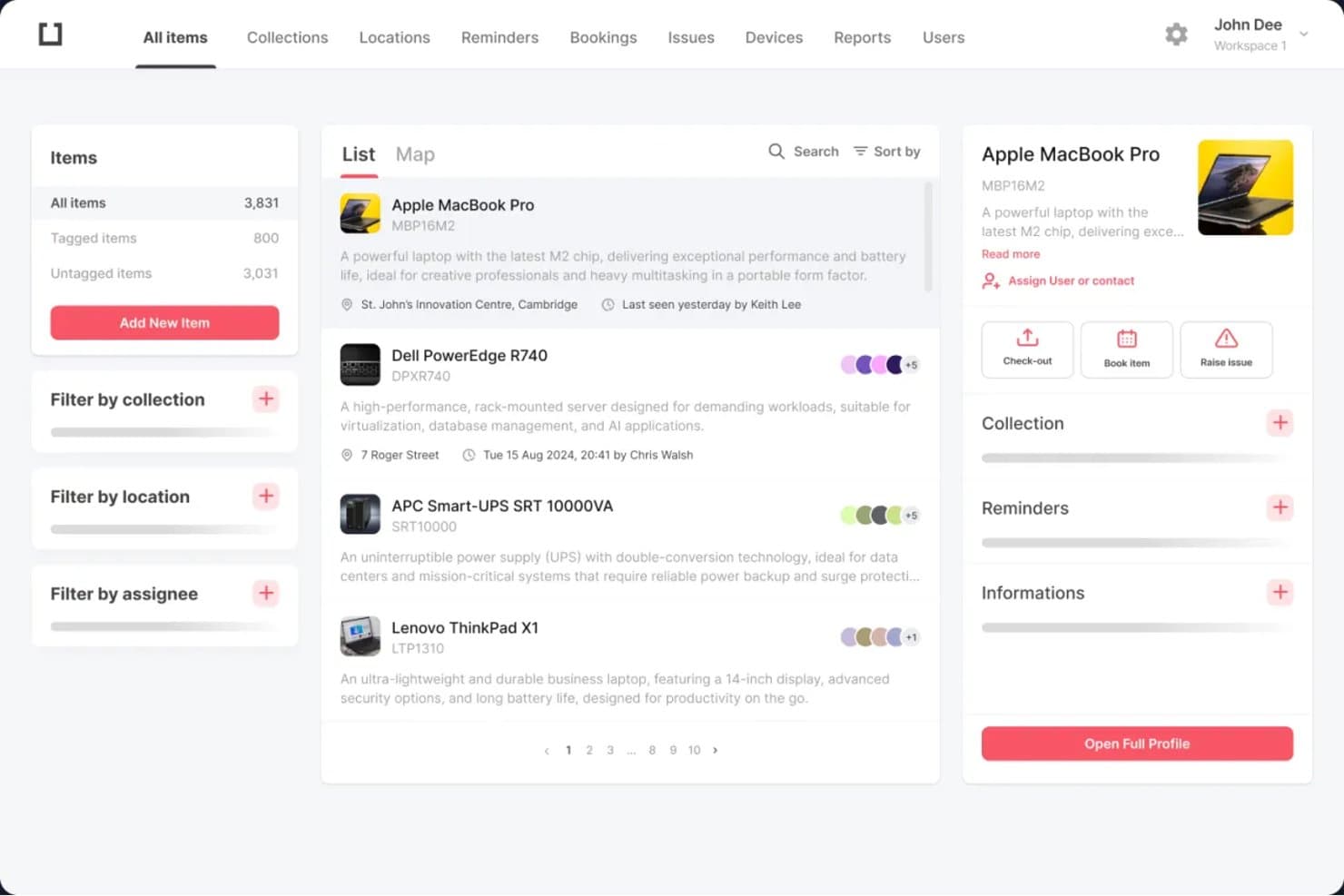
itemit lets users browse, filter, and manage all tracked assets in one place. itemit is a mobile asset management platform that combines QR code, barcode, RFID, and GPS tracking with check-in/check-out, maintenance reminders, audit trails, and depreciation reporting across a web dashboard and iOS/Android apps.
Who Is itemit Best For?
itemit is a good fit for IT asset managers and facilities teams that need QR, RFID, and GPS tracking under one plan without managing multiple tools or vendors.
Why I Picked itemit
itemit earns its spot on my shortlist because it's one of the few tools that puts QR, RFID, and GPS tracking under a single plan rather than treating them as separate products. I particularly like that fixed RFID readers can update asset locations automatically, while GPS trackers show live positions on a map. That combination means my team can track high-value equipment continuously and scan lower-priority assets on demand, all from the same iOS or Android app.
itemit Key Features
- Offline mobile scanning: The iOS and Android apps capture asset data without a connection and sync automatically when you're back online.
- Maintenance and compliance reminders: Set automated alerts for warranty expiry, PAT testing, insurance renewals, and scheduled maintenance.
- Collections and kitting: Group related assets together so your team can check them in or out as a single batch.
- Custom fields and attachments: Add your own data fields to asset records and store manuals, certificates, photos, and receipts directly on each asset.
itemit Integrations
itemit offers integrations with Xero, Slack, and Microsoft Active Directory. Its REST API supports custom integrations.
Pros and Cons
Pros:
- Automatic updates from fixed RFID readers
- Offline scanning syncs after reconnection
- QR, RFID, and GPS share one platform
Cons:
- Mobile app can lag on older devices
- QR assets show only last scan
Learn more about itemit: Best for IT asset lifecycle and field check-out
- 7-day free trial
- Pricing upon request
Visit WebsiteCustomer Rating:4.6/5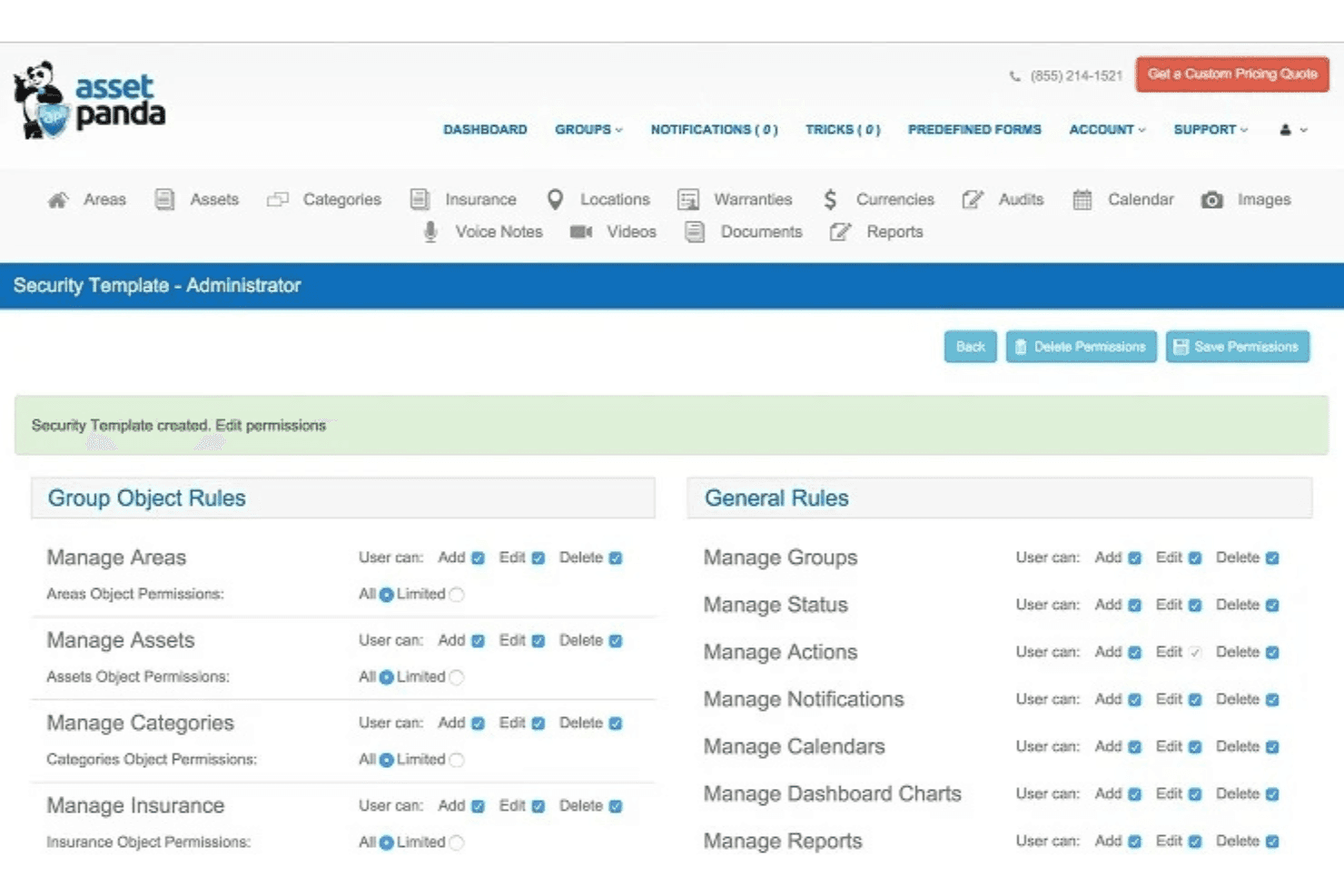
Asset Panda lets admins configure granular user permissions by role. Asset Panda is a cloud-based mobile asset management platform with barcode and QR scanning, asset lifecycle tracking, maintenance scheduling, and field check-in/check-out with signature capture.
Who Is Asset Panda Best For?
Asset Panda is a strong fit for IT teams and field operations managers who need to track asset lifecycles, manage check-in/check-out workflows, and maintain equipment across distributed locations.
Why I Picked Asset Panda
I picked Asset Panda as one of the best because it handles the full IT asset lifecycle without cutting corners on field workflows. When my team checks out equipment, the mobile app captures a signature and a GPS pindrop at scan time, so there's a clear record of who took what and from where. I also rely on the asset lifecycle history and contract expiration alerts to stay ahead of warranty deadlines and renewal windows before they slip past.
Asset Panda Key Features
- Barcode and QR code scanning: The mobile app's built-in scanner updates asset records on-site and supports bulk kitting and reallocation in a single pass.
- Maintenance scheduling: Create custom inspection checklists, track repairs with scheduled tickets, and receive alerts by email, push notification, Slack, or Microsoft Teams.
- Centralized inventory with custom fields: Build a fully searchable asset database with customizable fields, parent-child relationships, sortable views, and CSV/XLS/PDF export.
- Role-based access and multi-tenant setup: Set granular permissions per user and run separate accounts for each department, client, or location within one platform.
Asset Panda Integrations
Asset Panda offers 30+ native integrations, including ServiceNow, Jira ITSM, Freshservice, Microsoft Intune, Jamf Pro, QuickBooks Online, Xero, ArcGIS Online, Slack, and Microsoft Teams. It also supports webhooks, SFTP export, custom ERP integrations, and Zapier.
Pros and Cons
Pros:
- Custom lifecycle histories track asset ownership
- Offline workflows support field equipment handling
- Mobile check-outs capture signatures and GPS
Cons:
- Search can require exact asset names
- Scan-time GPS cannot provide continuous tracking
Learn more about Asset Panda: Best for maintenance-led asset lifecycle tracking
- Free trial available
- From $24/user/month
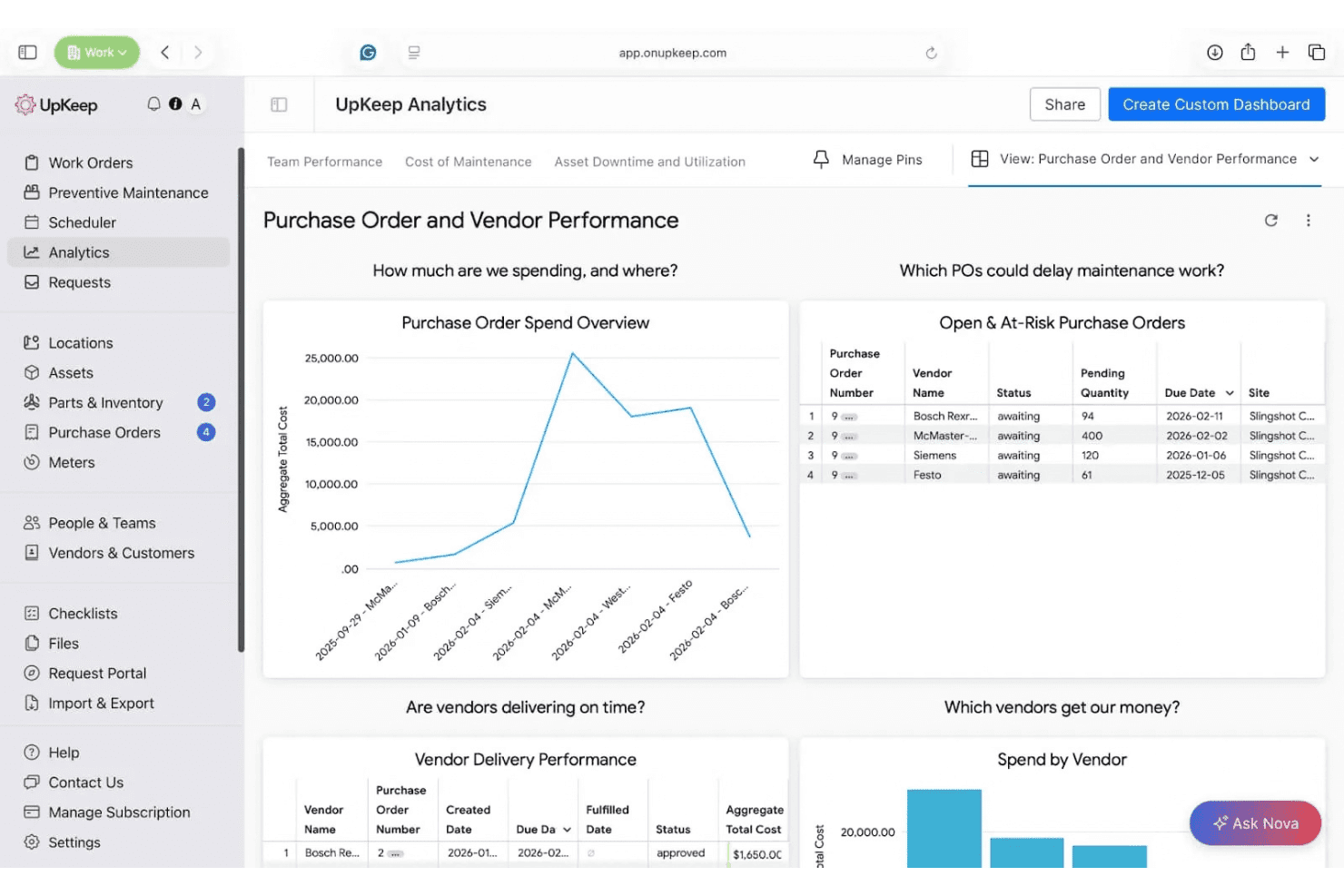
UpKeep tracks purchase orders and vendor performance in one dashboard. UpKeep is an asset operations management platform that combines CMMS-based maintenance scheduling, asset lifecycle tracking, MRO inventory management, and mobile QR scanning for field and facilities teams.
Who Is UpKeep Best For?
UpKeep is a strong fit for facilities and equipment teams that manage physical asset maintenance, parts inventory, and repair history across multiple sites.
Why I Picked UpKeep
UpKeep earns its spot on my shortlist because it builds maintenance history and asset lifecycle tracking directly into the same mobile workflow. I particularly like how replace-vs-repair alerts fire automatically when cumulative repair spend approaches an asset's replacement cost, which removes a genuinely hard judgment call from the field. Pair that with UpKeep Edge sensors triggering work orders the moment vibration or temperature readings go off-spec, and you get condition-based lifecycle decisions grounded in real data rather than guesswork.
UpKeep Key Features
- QR code asset lookup: Scan a QR sticker on any asset to instantly pull up specs, warranty details, repair history, and open work orders from your phone.
- Multi-storeroom inventory management: Track parts across storerooms, warehouses, and service trucks, each with its own stock levels, min/max thresholds, and logged transfers.
- Nova AI analytics: Built into every plan, Nova identifies which assets fail most frequently and why, and runs scheduled automated health audits.
- Automatic purchase order drafting: When parts stock drops below the minimum threshold, UpKeep auto-generates a draft purchase order and routes it through an approval workflow.
UpKeep Integrations
UpKeep supports integrations with SAP, Oracle, and NetSuite, plus Microsoft Dynamics data imports. It connects to 1,000+ systems through native integrations, Zapier, and its API, with API access available on Enterprise.
Pros and Cons
Pros:
- Depreciation and repair costs stay attached
- Sensor alerts trigger maintenance work orders
- Offline asset history supports field technicians
Cons:
- People-based asset checkout isn’t supported
- No GPS or geofencing for assets
Learn more about UpKeep: Best for AI-driven predictive maintenance at scale
- Free demo available
- Pricing upon request
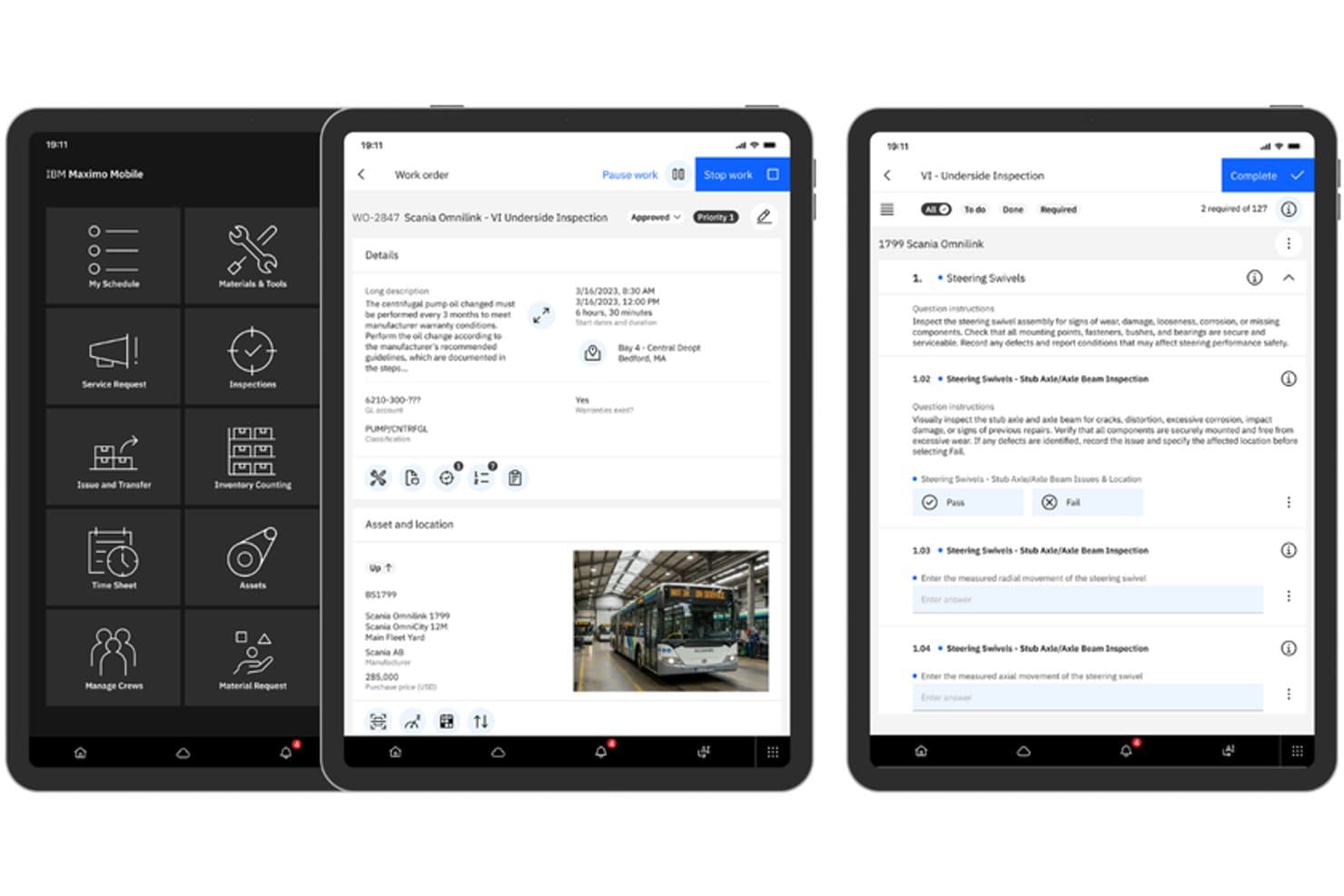
IBM Maximo Mobile lets users manage work orders and inspections on mobile devices. IBM Maximo Application Suite is an enterprise asset management platform that combines EAM, predictive maintenance, mobile work order management, inventory tracking, and AI-driven asset performance monitoring across a single suite.
Who Is IBM Maximo Application Suite Best For?
IBM Maximo Application Suite is a strong fit for large enterprises managing thousands of assets across multiple sites, particularly in energy, utilities, transportation, and facilities-heavy industries.
Why I Picked IBM Maximo Application Suite
IBM Maximo Application Suite earns its spot on my shortlist because of how deeply it integrates AI into predictive maintenance at enterprise scale. Maximo Predict and Maximo Monitor pull in real-time sensor data to flag asset degradation before failures occur, which means a technician can show up with the right parts before a turbine or HVAC unit goes offline. I also like that Maximo Mobile lets field teams record meter readings, complete inspections, and manage work orders across iOS and Android, with offline access for receiving and calibration tasks in disconnected environments.
IBM Maximo Application Suite Key Features
- Inventory counting: Run ad hoc, cycle, or scheduled counts of rotating assets across storerooms, with reconciliation tolerances and the ability to save and resume counts across devices.
- Issues and transfers: Issue reserved or non-reserved stock and transfer inventory between storerooms across sites, with the option to save an unfinished workflow and pick it up on another device.
- Asset lifecycle management: Track assets from acquisition through capital planning and replacement decisions using the Asset Investment Planning module, which links asset condition, risk, and financial impact.
- Multi-platform mobile app: Access work orders, asset records, inspections, and inventory tasks on iOS, Android, or Windows devices through the Maximo Mobile app.
IBM Maximo Application Suite Integrations
Native integrations are not clearly documented. IBM Maximo Application Suite includes IBM Cloud Pak for Data, Db2, Red Hat OpenShift, and WebSphere Application Server Liberty, with deployment options on AWS, Azure, and Google Cloud.
Pros and Cons
Pros:
- Mobile apps cover iOS, Android, Windows
- Cross-site transfers support distributed asset teams
- Predictive alerts connect sensors to maintenance
Cons:
- Mobile workflows can require many clicks
- No documented continuous GPS or geofencing
Learn more about IBM Maximo Application Suite: Best for multi-site check-in/out without per-user fees
- 14-day free trial + free demo available
- From $63.55/month
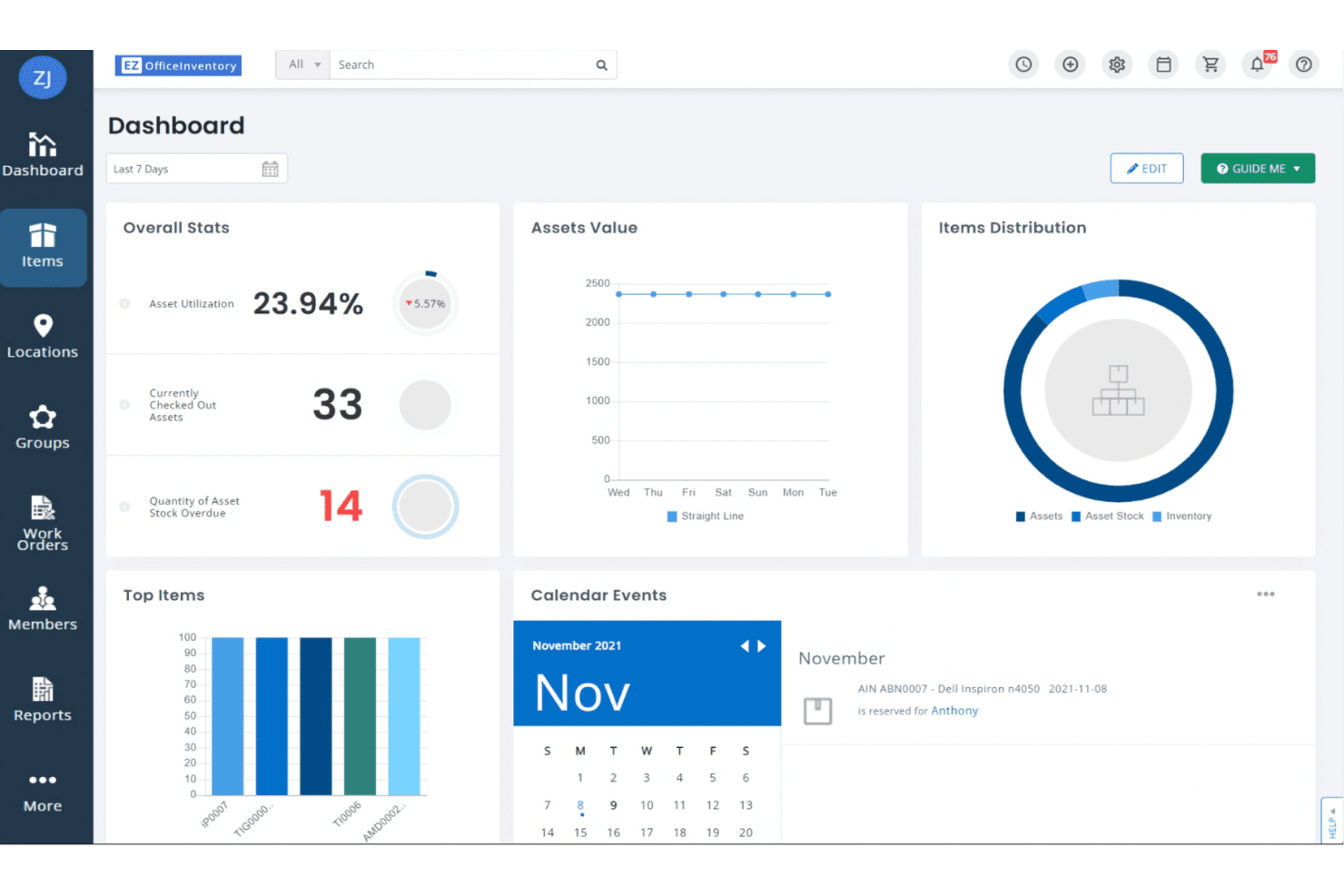
EZOfficeInventory's dashboard gives a real-time overview of asset activity. EZOfficeInventory is a mobile asset management platform that tracks assets across multiple sites with barcode, QR, and RFID scanning, check-in/out workflows, GPS integrations, and role-based access controls.
Who Is EZOfficeInventory Best For?
EZOfficeInventory is a strong fit for facilities and IT asset managers who need to track assets across multiple locations without paying per-seat licensing fees.
Why I Picked EZOfficeInventory
I picked EZOfficeInventory as one of the best because it prices by asset count, not user count, which means your whole team, from warehouse staff to site managers, can check assets in and out without driving up your monthly bill. I love how the mobile app handles multi-site audits: scan a QR code, confirm an item's location, and flag anything found at the wrong site, all from your phone. The role-specific dashboards also let each user see only what's relevant to their site or responsibility.
EZOfficeInventory Key Features
- Asset lifecycle tracking: Log each asset from procurement through disposal, with custody history, depreciation, condition flags, and repair records attached to every item.
- Role-based access controls: Assign user roles by site or responsibility so each team member sees only the assets, actions, and data relevant to their work.
- Automated approval workflows: Route check-out requests, transfers, and overdue check-in escalations through configurable multi-tier approval chains.
- AI co-pilot (Zoe): Use the built-in AI assistant to generate asset records, invoices, and reports directly within the platform.
EZOfficeInventory Integrations
EZOfficeInventory offers integrations with Zendesk, Jira, Okta, OneLogin, Azure AD, OneDrive, Dropbox, Samsara, Trackunit, John Deere, and Hapn. Custom integrations are available on the Enterprise plan.
Pros and Cons
Pros:
- Tracks custody, condition, and lifecycle history
- Mobile audits verify asset locations
- Supports multi-site check-in and checkout
Cons:
- Full maintenance workflows require an add-on
- Offline access is limited by plan
Learn more about EZOfficeInventory:
Alte soluții software mobile pentru gestionarea activelor
Iată câteva opțiuni suplimentare de software mobil pentru gestionarea activelor care nu au ajuns în lista mea scurtă, dar merită totuși analizate:
- 11GoCodesBest for field teams scanning assets without an app
- 12Asset EssentialsBest for maintenance-driven mobile field teams
- 13FiixBest for IoT-triggered maintenance on mobile
- 14Fracttal OneBest for maintenance-driven equipment management
- 15ReftabBest for IT asset check-in/out via mobile scan
- 16IFS UltimoBest for maintenance-led field asset teams
- 17SAP Asset ManagerBest for SAP-native field maintenance on mobile
How I Evaluate Mobile Asset Management Software
I split my evaluation into three parts: core functionality (tracking asset location and status from a mobile device, plus scanning barcodes or QR codes to update records in the field) carries the most weight. Then I look for standout features like geofencing alerts or GPS/IoT integration. Finally, I consider onboarding support and pricing value.
Core Functionality (Table Stakes For This List)
When I'm selecting tools for my list, I score each one on a scale from 0 (does not offer the functionality) to 5 (excels in this area) for each core functionality listed below. I then convert the total into a percentage to help assess each tool's overall fit, with extra weight on any functionalities I've deemed essential.
- Mobile Asset Tracking (Essential): I check whether field teams can view and update asset location and status from a phone or tablet, including GPS or geofencing alerts for movement.
- Barcode/QR/RFID Scanning (Essential): I evaluate how well the mobile app handles scan-based check-in, check-out, and bulk updates across formats like QR codes, barcodes, and RFID tags.
- Asset Lifecycle Management: Each tool should track assets from acquisition through depreciation and disposal, so I look for automated stage transitions and end-of-life reporting.
- Maintenance Scheduling and Alerts: Preventive maintenance calendars and condition-based reminders matter here, especially tools that tie alerts to usage data or inspection history.
- Offline Mobile Functionality: Field crews in warehouses or remote sites often lose connectivity, so I look for offline data entry that syncs without conflicts once a connection returns.
- Centralized Asset Inventory: I evaluate whether the platform consolidates all assets into one searchable, filterable view accessible across devices, locations, and user roles.
Once I have a list of tools that meet the criteria, I consider what sets each platform apart.
Differentiating Factors (What Sets Vendors Apart)
Here's how I compare and contrast different vendors:
Standout Features
I look for geofencing and alert capabilities that notify teams when assets leave defined zones—useful for preventing unauthorized removal of equipment across warehouses or job sites. GPS and IoT sensor integration matters too, since platforms like IBM Maximo and itemit can feed continuous location and condition data into maintenance decisions. I also evaluate multi-site role-based access, checking whether field techs only see their location's assets while admins get the full picture. Finally, built-in depreciation and financial reporting saves teams from reconciling asset values manually at audit time.
Beyond Features
I evaluate how each platform's integration ecosystem connects with existing ERP, CMMS, and helpdesk systems—duplicate data entry across ServiceNow and your asset register kills adoption fast. Scalability matters just as much, so I check whether licensing models and data structures hold up as you add sites, asset types, and field users. I also look at onboarding support, especially vendor-assisted migration from spreadsheets or legacy tools, since field crews need to be productive on day one without lengthy training.
Cum să alegeți software-ul mobil pentru gestionarea activelor.
Alegeți software-ul testând dacă fluxurile sale de lucru din teren păstrează înregistrări exacte ale activelor atunci când conectivitatea, responsabilitatea și condițiile de la locație se schimbă.
| Dacă prioritatea dumneavoastră este… | Căutați… |
|---|---|
| Dacă prioritatea dumneavoastră este…Înregistrări de teren fiabile | Căutați…Un proces documentat de sincronizare offline, cu gestionarea conflictelor |
| Dacă prioritatea dumneavoastră este…Istoric al activelor pregătit pentru audit | Căutați…Jurnale de modificări imuabile și un exemplu de export care acoperă ciclul de viață al unui activ |
| Dacă prioritatea dumneavoastră este…Înregistrări exacte ale responsabilității | Căutați…Reguli de aprobare configurabile pentru predare, preluare și transferuri |
| Dacă prioritatea dumneavoastră este…Lansare previzibilă | Căutați…Un plan de migrare cu maparea câmpurilor, pași de validare și rezultate livrabile clar atribuite |
Cum să vă evaluați lista scurtă
- Testați sincronizarea offline: În timpul unei perioade de testare de 30 de minute, actualizați cinci active fără conectivitate, reconectați-vă și comparați înregistrările rezultate cu comportamentul de sincronizare documentat de furnizor.
- Solicitați un artefact de audit: Cereți un exemplu de export al istoricului unui activ care să prezinte marcajele temporale, identitățile utilizatorilor, modificările de stare, transferurile și modul de gestionare a înregistrărilor șterse.
- Validați activitatea de migrare: Furnizați 20 de rânduri reprezentative dintr-o foaie de calcul și solicitați un document scris de mapare a câmpurilor în termen de cinci zile lucrătoare.
- Testați controalele responsabilității: Desfășurați un scenariu de transfer între trei persoane în timpul unui proiect-pilot de o săptămână, apoi verificați dacă fiecare predare înregistrează activul, destinatarul, marcajul temporal și starea aprobării.
- Alegeți compromisul: Decideți dacă prioritatea dumneavoastră este profunzimea funcțiilor de întreținere sau administrarea mai simplă a inventarului, deoarece un domeniu operațional mai larg implică adesea mai multă activitate de configurare.
Ce este software-ul mobil pentru gestionarea activelor?
Software-ul mobil pentru gestionarea activelor este o platformă care permite echipelor să urmărească echipamentele, locațiile, alocările, lucrările de întreținere și înregistrările privind ciclul de viață de pe telefoane sau tablete. Acesta include adesea scanarea codurilor de bare sau a codurilor QR, acces offline, inspecții, ordine de lucru și date sincronizate despre inventar. Echipele IT și cele din teren îl folosesc pentru a menține înregistrări exacte ale activelor în mai multe locații, pentru a monitoriza schimbările de responsabilitate și pentru a sprijini fluxurile de lucru pentru întreținere fără a depinde de accesul la un computer.
Caracteristicile software-ului mobil pentru gestionarea activelor
Atunci când selectați un software mobil pentru gestionarea activelor, urmăriți următoarele caracteristici esențiale:
Urmărirea activelor mobile: Permite utilizatorilor să vizualizeze și să actualizeze locațiile, stările, alocările și proprietarii activelor de pe telefoane sau tablete. Datele GPS și geofencing-ul pot semnala echipamentele care se deplasează în afara zonelor aprobate.
Scanarea codurilor de bare și a codurilor QR: Utilizează camera dispozitivului sau un scaner conectat pentru a identifica activele și a deschide înregistrările acestora. Echipele pot efectua predări, preluări, transferuri și actualizări ale inventarului fără a introduce manual numerele activelor.
Inventar centralizat al activelor: Stochează înregistrările echipamentelor într-o singură bază de date în care se poate efectua căutarea, pentru toate locațiile, departamentele și categoriile de active. Filtrele și câmpurile personalizate îi ajută pe utilizatori să găsească înregistrări după locație, stare, proprietar, număr de serie sau tip de activ.
Gestionarea ciclului de viață al activelor: Urmărește fiecare activ de la achiziție și implementare până la întreținere, realocare, amortizare și casare. Istoricul ciclului de viață oferă echipelor o evidență a schimbărilor de proprietar, costurilor, evenimentelor de service și deciziilor privind scoaterea din uz.
Programarea întreținerii: Creează planuri recurente de service pe baza datelor, citirilor de utilizare, inspecțiilor sau stării activelor. Mementourile automate și ordinele de lucru asociate îi ajută pe tehnicieni să înregistreze detaliile service-ului pentru echipamentul corect.
Acces mobil offline: Permite utilizatorilor să vizualizeze înregistrări, să efectueze inspecții și să înregistreze actualizări fără o conexiune activă. Aplicația sincronizează modificările stocate după reconectare, astfel încât echipele să poată lucra în depozite, locații izolate sau zone cu acoperire instabilă.
Inspecții și raportarea stării: Oferă formulare mobile pentru documentarea stării activelor, rezultatelor listelor de verificare, fotografiilor, citirilor și defectelor. Inspecțiile trimise pot declanșa sarcini ulterioare sau solicitări de întreținere atunci când un activ nu trece o verificare obligatorie.
Permisiuni bazate pe roluri și piste de audit: Controlează ce poate vizualiza, edita, aproba sau exporta fiecare utilizator. Jurnalele de audit înregistrează modificările împreună cu identitățile utilizatorilor și marcajele temporale, sprijinind verificările de custodie, evaluările interne și raportarea conformității.
Integrări și export de date: Conectează înregistrările activelor cu sisteme precum platformele de gestionare a serviciilor IT, planificare a resurselor întreprinderii, întreținere sau contabilitate. API-urile, importurile și exporturile contribuie la menținerea coerenței datelor despre active, utilizatori, date financiare și servicii între sisteme.
Beneficiile software-ului de gestionare mobilă a activelor
Implementarea software-ului de gestionare mobilă a activelor oferă mai multe beneficii pentru echipa și compania dumneavoastră. Iată câteva dintre acestea:
- Înregistrări precise pe teren: Actualizările mobile, datele GPS, alertele de geofencing și inventarul centralizat mențin actualizate locațiile, stările și alocările activelor.
- Actualizări mai rapide ale inventarului: Scanarea codurilor de bare, a codurilor QR și a RFID acceptă predările, preluările, transferurile și actualizările în masă ale înregistrărilor de pe dispozitive mobile.
- Vizibilitate mai clară asupra ciclului de viață al activelor: Înregistrările ciclului de viață conectează informațiile despre achiziție, implementare, întreținere, realocare, amortizare și casare.
- Planificare mai consecventă a întreținerii: Programele de întreținere preventivă, citirile de utilizare, rezultatele inspecțiilor, mementourile și ordinele de lucru asociate mențin activitățile de service legate de active specifice.
- Lucru continuu fără conectivitate: Accesul mobil offline permite echipelor să înregistreze inspecții și modificări ale activelor, apoi să sincronizeze actualizările după reconectare.
- Controale mai solide privind custodia și auditul: Permisiunile bazate pe roluri, fluxurile de aprobare, marcajele temporale, identitățile utilizatorilor și pistele de audit documentează accesul la active și schimbările de proprietar.
- Conectivitate mai bună între sisteme: Integrările, importurile, exporturile și API-urile conectează înregistrările activelor cu sistemele ERP, CMMS, de gestionare a serviciilor IT și de contabilitate.
Costurile și prețurile software-ului de gestionare mobilă a activelor
Alegerea software-ului de gestionare mobilă a activelor necesită înțelegerea modelelor și planurilor de preț disponibile. Costurile variază în funcție de caracteristici, dimensiunea echipei, modulele suplimentare și alți factori. Tabelul de mai jos rezumă planurile obișnuite, prețurile medii și caracteristicile tipice incluse în soluțiile software de gestionare mobilă a activelor.
Tabel comparativ al planurilor pentru software-ul de gestionare mobilă a activelor
| Tipul planului | Preț mediu | Caracteristici comune |
|---|---|---|
| Tipul planuluiPlan gratuit | Preț mediu$0/user/month | Caracteristici comuneÎnregistrări de bază ale activelor, scanarea codurilor de bare, utilizatori limitați și rapoarte simple. |
| Tipul planuluiPlan personal | Preț mediu$5-$25/user/month | Caracteristici comuneUrmărirea mobilă a activelor, scanarea codurilor QR, înregistrări ale alocărilor și mementouri de bază pentru întreținere. |
| Tipul planuluiPlan pentru companii | Preț mediu$25-$75/user/month | Caracteristici comuneInventar centralizat, acces mobil offline, urmărirea ciclului de viață, permisiuni bazate pe roluri și programarea întreținerii. |
| Tipul planuluiPlan pentru întreprinderi | Preț mediu$75-$200/user/month | Caracteristici comuneGestionarea mai multor locații, integrări avansate, piste de audit, GPS sau geofencing, fluxuri de lucru personalizate și asistență dedicată pentru integrare. |
Întrebări frecvente despre software-ul de gestionare a activelor mobile
Iată câteva răspunsuri la întrebările frecvente despre software-ul de gestionare a activelor mobile:
Software-ul de gestionare a activelor mobile funcționează offline?
Da, unele soluții software de gestionare a activelor mobile acceptă lucrul offline și sincronizarea ulterioară. Verificați dacă utilizatorii pot vizualiza înregistrări, scana active, efectua inspecții și salva actualizări fără conexiune. Întrebați furnizorii cum gestionează aplicația editările duplicate sau modificările contradictorii după reconectare. Testați acest flux de lucru cu mai multe active în timpul perioadei de testare. Comparați înregistrările sincronizate cu locațiile, stările, atribuirile și marcajele temporale așteptate înainte de a selecta o platformă.
Se poate integra software-ul de gestionare a activelor mobile cu sistemele IT și de afaceri?
Da, multe platforme se conectează la sisteme precum gestionarea serviciilor IT, ERP, CMMS și software de contabilitate. Verificați interfețele API disponibile, importurile, exporturile și conectorii preconfigurați. Confirmați ce sistem deține fiecare câmp de date, cum ar fi starea activului, detaliile angajatului sau costul de achiziție. Testați o integrare reprezentativă înainte de implementare. Acest lucru vă ajută să identificați înregistrările duplicate, câmpurile lipsă și limitele de sincronizare care ar putea afecta registrul activelor.
Cum sprijină software-ul de gestionare a activelor mobile custodia activelor?
Software-ul de gestionare a activelor mobile poate înregistra predările, primirile, transferurile, atribuirile și aprobările. Căutați fluxuri de lucru configurabile care să înregistreze activul, destinatarul, expeditorul, marcajul temporal și starea aprobării. Permisiunile bazate pe roluri ar trebui să limiteze persoanele care pot edita sau aproba modificările custodiei. Jurnalele de audit ar trebui să păstreze identitățile utilizatorilor și modificările istorice. Testați un scenariu de transfer între mai multe persoane înainte de lansare. Confirmați că transferurile respinse, anulate și întârziate rămân vizibile în istoric.
Ce ar trebui să testați înainte de a alege un software de gestionare a activelor mobile?
Testați fluxurile de lucru pe care echipele dumneavoastră din teren le vor efectua cel mai des. Scanați coduri de bare sau coduri QR reprezentative, actualizați locațiile, efectuați o inspecție și transferați un activ între utilizatori. Repetați aceste sarcini cu o conexiune slabă sau indisponibilă. Verificați înregistrările rezultate pentru marcaje temporale, identități ale utilizatorilor, fotografii și modificări ale stării. De asemenea, ar trebui să solicitați un exemplu de export al ciclului de viață și un plan de migrare scris pentru datele existente din foi de calcul sau din sistemele vechi.