

O software de reserva de secretárias flexíveis com AI utiliza inteligência artificial para automatizar e otimizar a forma como a sua equipa reserva secretárias em espaços de trabalho partilhados. Se está à procura da melhor forma de gerir horários híbridos, reduzir conflitos de reservas e utilizar melhor o seu escritório, está no sítio certo. Neste guia, encontrará as principais plataformas de reserva de secretárias com tecnologia AI, os aspetos que tornam cada uma única e a forma como podem ajudá-lo a manter o seu local de trabalho flexível e eficiente em 2026.
Why Trust Our Software Recommendations
6,700+
Reviews
20
Industry experts
16+
Evaluation factors
14
Years
Our team has been testing and reviewing software since 2012. As tech leaders ourselves, we know how difficult—and important—it is to choose the right software.
For this guide, we evaluated tools using hands-on testing and independent research, scoring tools using our selection criteria.
Our reviews reflect our human editorial judgment, not a sales pitch.
Expert reviewers:
- Paulo Gardini MiguelTech Director
 Tim FisherVP of AI
 Gabriel RosasTech Lead & Software Architect
 Christhian GruhnTech Lead & Platform Architect

Tabela comparativa de software de reserva de secretárias flexíveis com AI
Esta tabela comparativa resume os detalhes de preços das minhas principais escolhas de software de reserva de secretárias flexíveis com AI:
Sorted by: Default
| Tool | Starting Price | Website | |
|---|---|---|---|
Best for unified map-based resource booking | 4.7 out of 5 | €1.7/user/month Free plan available; 14-day free trial; free demo available | Website |
Best for desk booking and office operations | 4.7 out of 5 | $500/month Free demo available | Book Demo |
Best for AI-assisted workplace coordination | 4.3 out of 5 | Pricing upon request Free demo available | Website |
Best for real-time desk availability mapping | 4.8 out of 5 | $1.79/user/month 7-day free trial + free demo available | Website |
Best with advanced analytics for occupancy | 4.5 out of 5 | Pricing upon request Free demo available | Website |
Best for integrated carbon tracking | 4.5 out of 5 | $99/month Free demo available | Website |
Best for Microsoft 365 calendar integration | 4.7 out of 5 | $13.50/month 30-day free trial + free demo available | Website |
Best for privacy-focused desk reservations | 4.5 out of 5 | $51/month 30-day free trial available | Website |
Best for Slack-based desk booking | 5.0 out of 5 | $2.50/user/month Free trial + free demo available | Website |
Best for multi-location desk coordination | 5.0 out of 5 | €1.59/resource/month 30-day free trial available | Website |


Análises de software de reserva de secretárias flexíveis com AI
Segue-se o meu resumo detalhado do melhor software de reserva de secretárias flexíveis com AI que entrou na minha lista restrita. As minhas análises apresentam uma visão detalhada das funcionalidades, dos melhores casos de utilização e das integrações de cada plataforma, para o ajudar a encontrar a mais adequada para si.
 Best for unified map-based resource booking
- Free plan available; 14-day free trial; free demo available
- From €1.7/user/month (billed annually)
Visit WebsiteCustomer Rating:4.7/5
Dibsido manages desk booking with maps and automated space optimization. Dibsido is a workplace management platform designed for CTOs seeking AI-enabled hot desk booking software that unifies desk, meeting room, and parking reservations in one app.
Who Is Dibsido Best For?
Facilities teams and office managers at small to midsize organizations that need simple, unified booking for desks, rooms, and parking.
Why I Picked Dibsido
I picked Dibsido as one of the best because it lets my team manage desks, meeting rooms, and parking from a unified map-based interface. I like using a single tool to organize every shared workspace resource right inside the same app.
Dibsido Key Features
- AI floorplan enhancer: Automatically upgrades floor plans for easier space management and booking visualization.
- Advanced booking permissions: Set different access rights for user groups and manage resource control.
- Automated notifications: Sends booking reminders and updates through email or app push notifications.
- Analytics dashboard: Provides insights into office, desk, room, and parking space utilization.
Dibsido Integrations
Integrations include Slack, Microsoft 365, Google Workspace, two-way Google and Outlook Calendar sync, and SSO through Microsoft Entra ID, Google Workspace, and SAML.
Pros and Cons
Pros:
- Includes iOS and Android mobile apps on every plan
- Interactive floor plan maps streamline reservations
- Parking waitlist automatically assigns a spot when one frees up
Cons:
- Lacks advanced automation for large enterprises
- Analytics dashboard offers limited customization
Learn more about Dibsido: 2Best for desk booking and office operations
elia
- Free demo available
- From $500/month
Visit WebsiteCustomer Rating:4.7/5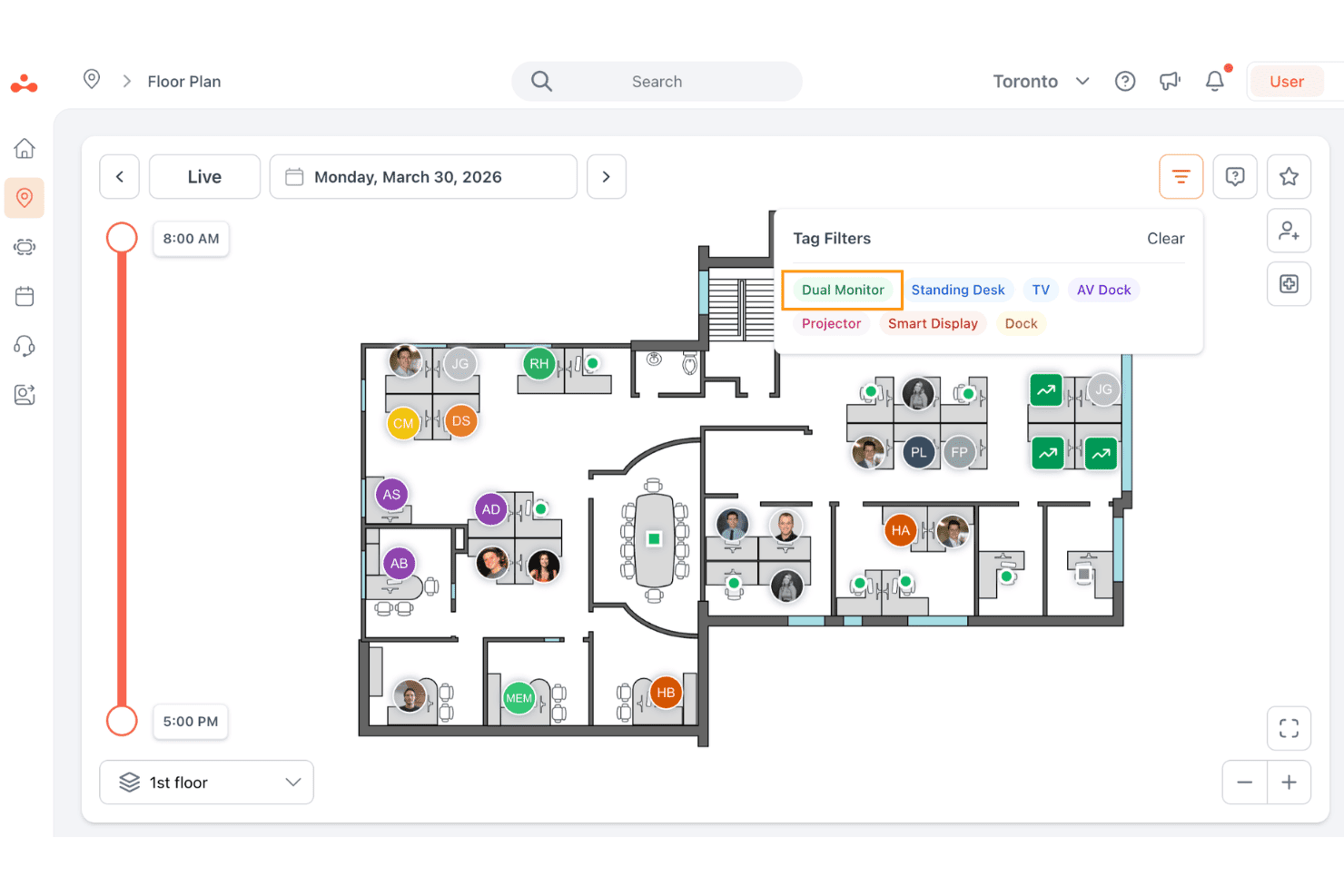
elia lets users filter available hot desks by amenity tags on a live floor plan. elia is a workplace operations platform that covers desk and room booking, visitor management, occupancy analytics, and service request tracking across a single interface.
Who Is elia Best For?
elia suits office operations and facilities teams that want desk booking, room reservations, visitor management, and occupancy analytics in one platform.
Why I Picked elia
I picked elia as one of the best because it goes beyond desk booking to cover the full scope of office operations in a single platform. I particularly like how the interactive floor plan lets employees browse real-time desk availability, filter by preference, and reserve a workspace before they arrive, without any guesswork. The occupancy analytics and heatmaps give operations teams concrete usage data to back space-planning decisions, like consolidating underused floors or reallocating neighbourhoods to growing teams.
elia Key Features
- Colleague visibility: Employees can see who's planning to come in and where they're sitting, so coordinating in-person collaboration takes less back-and-forth.
- Visitor management: Visitors check in at a self-service kiosk, and hosts get arrival notifications through email, Slack, or Microsoft Teams.
- Service request tracking: Employees submit and track IT, catering, or maintenance requests directly from the platform, with automated assignment and status updates.
- Workplace automation builder: Administrators configure custom triggers, conditions, and actions to automate recurring workflows like room cancellations, reminders, and task assignments.
elia Integrations
elia offers integrations with Microsoft 365, Google Workspace, Google Calendar, Microsoft Teams, Microsoft Outlook, and Slack. Enterprise includes API access for custom integrations, but the available API capabilities aren't specified.
Pros and Cons
Pros:
- Occupancy heatmaps inform space planning
- Colleague visibility helps coordinate office days
- Floor-plan desk selection clarifies availability
Cons:
- Sensor-based check-in; no-show release rules unclear
- AI recommendations are Enterprise-only and undefined
Learn more about elia: Best for AI-assisted workplace coordination
- Free demo available
- Pricing upon request
Visit WebsiteCustomer Rating:4.3/5
AI platform for booking desks, rooms, parking, and office resources. HybridHero is an AI-powered workplace management platform that helps hybrid teams book desks, meeting rooms, parking spaces, and other workplace resources through interactive floor plans, real-time availability, and intelligent booking assistance.
Who Is HybridHero Best For?
HybridHero is a strong fit for mid-sized organizations managing hybrid work schedules that want a smarter way to coordinate desk bookings, workplace attendance, and office utilization.
Why I Picked HybridHero
I picked HybridHero because it makes coordinating office attendance much easier for hybrid teams. Employees can use the AI assistant to book desks, find teammates, and reserve workspaces based on real-time availability, while managers gain visibility into office utilization through live analytics and occupancy data. I also like that QR check-ins and automatic desk releases help reduce unused reservations, making shared workspaces more efficient.
HybridHero Key Features
- HybridHero AI assistant: Book desks using natural language while checking live availability.
- Colleague finder: Locate teammates on interactive floor plans and reserve nearby desks.
- Utilization heat maps: Analyze occupancy trends to improve workplace planning.
- Calendar sync: Connect desk bookings with Microsoft Outlook, Microsoft Teams, and Google Workspace calendars.
HybridHero Integrations
HybridHero integrates with Microsoft Outlook, Microsoft Teams, Google Workspace, Active Directory, Okta, OpenID Connect, ADFS, and Slack. It also provides a REST API and webhooks for custom integrations with HR, access control, and workplace systems.
Pros and Cons
Pros:
- QR check-in with auto-release
- AI-powered desk booking
- Strong workplace analytics
Cons:
- Page loads can be slow
- Occasional mobile app bugs
Learn more about Hybrid Hero: Best for real-time desk availability mapping
- 7-day free trial + free demo available
- From $1.79/user/month (billed annually)
Visit WebsiteCustomer Rating:4.8/5
WornInSync offers desk booking, team calendars, and workplace scheduling. WorkInSync is an AI-powered desk booking software that provides real-time desk availability mapping, workspace scheduling, and centralized management for hybrid offices.
Who Is WorkInSync Best For?
WorkInSync is a good fit for facilities managers and IT teams in mid-size to large hybrid workplaces needing real-time desk mapping.
Why I Picked WorkInSync
I picked WorkInSync as one of the best because I can see real-time desk availability on an interactive floor map, which helps my team quickly find and book open workspaces. I like that I can set up neighborhood zones and manage bookings for different office locations from a single dashboard. My team also uses the mobile app to reserve desks and check in on the go.
WorkInSync Key Features
- AI-powered booking suggestions: Recommends desks based on user preferences and booking patterns.
- Contactless check-in: Lets users check in using QR codes or NFC.
- Automated sanitization workflows: Triggers cleaning requests after each desk booking.
- Integration with access control systems: Syncs desk bookings with physical entry permissions.
WorkInSync Integrations
Native integrations include Google Calendar, Microsoft Teams, Workday, SAP, and Oracle PeopleSoft. An API may be available for custom integrations.
Pros and Cons
Pros:
- Centralized management for multiple office locations
- Contactless check-in with QR code support
- Automated cleaning and sanitization workflows
Cons:
- Reporting features lack advanced customization
- Occasional sync issues with calendar systems
Learn more about WorkInSync: Best with advanced analytics for occupancy
- Free demo available
- Pricing upon request
Visit WebsiteCustomer Rating:4.5/5
Robin offers floor plans with desk booking, room labels, and live availability. Robin is a desk booking and workplace management platform that lets you manage desk reservations, interactive floor plans, occupancy analytics, and space usage policies for hybrid offices.
Who Is Robin Best For?
Workplace experience teams and facilities managers in mid-sized and large hybrid organizations who need detailed occupancy analytics.
Why I Picked Robin
I picked Robin as one of the best because I rely on its advanced analytics to track occupancy trends and desk usage patterns across multiple office locations. My team uses its real-time dashboards and custom reporting to make data-driven decisions about space allocation. I also like that Robin lets us visualize floor plans and monitor booking activity at a granular level.
Robin Key Features
- Interactive desk booking map: Users can reserve desks directly from a visual floor plan.
- Mobile app access: Book desks, check availability, and manage reservations from iOS and Android devices.
- Neighborhoods management: Group desks into zones for team-based booking and collaboration.
- Visitor management: Register guests and track visitor flow within the office.
Robin Integrations
Robin offers native integrations with Microsoft Outlook, Microsoft Teams, Google Workspace, Okta, and Slack, and provides an API for custom integrations.
Pros and Cons
Pros:
- Real-time updates reduce double-booking risk
- Automated desk assignments based on usage patterns
- Highlights occupancy and trends
Cons:
- Offline access is limited for mobile users
- Admin dashboard can feel cluttered initially
Learn more about Robin: Best for integrated carbon tracking
- Free demo available
- From $99/month
Visit WebsiteCustomer Rating:4.5/5
YAROOMS offers booking analytics, desk usage rates, and floor heatmaps. YAROOMS is a workplace management platform for AI-powered hot desk booking that includes desk reservations, space scheduling, occupancy analytics, and resource management features.
Who Is YAROOMS Best For?
Facilities and sustainability managers at mid-sized and large organizations who need integrated desk booking and carbon tracking.
Why I Picked YAROOMS
I picked YAROOMS as one of the best because I can track carbon emissions directly from workspace bookings, which is rare in this category. My team uses its built-in sustainability dashboard to monitor and report on our office’s environmental impact. I also like that I can set carbon reduction targets and see how our desk usage aligns with those goals.
YAROOMS Key Features
- Interactive floor plan booking: Users can select and reserve desks directly from a visual office map.
- Recurring desk reservations: Schedule repeating bookings for desks on a daily, weekly, or custom basis.
- Mobile app access: Book desks, view availability, and manage reservations from iOS and Android devices.
- Role-based access controls: Set permissions for booking, managing, or viewing desks based on user roles.
YAROOMS Integrations
YAROOMS offers native integrations with Microsoft 365, Google Workspace, Okta, and Azure Active Directory, and provides an API for custom integrations.
Pros and Cons
Pros:
- Supports recurring and team-based desk bookings
- Native Microsoft 365 integration
- Built-in carbon tracking for workspace usage
Cons:
- No AI-driven booking recommendations
- Limited visitor management capabilities
Learn more about YAROOMS: Best for Microsoft 365 calendar integration
- 30-day free trial + free demo available
- From $13.50/month (billed annually)
Visit WebsiteCustomer Rating:4.7/5
Clearooms offers floor plan hot desk booking with live desk availability. Clearooms is a desk and meeting room booking platform designed for businesses that want to manage workspace reservations, interactive floor plans, and resource scheduling in one system.
Who Is Clearooms Best For?
Clearooms is a strong fit for office administrators and IT teams in organizations that rely on Microsoft 365 for daily operations.
Why I Picked Clearooms
I picked Clearooms as one of the best because I can sync desk and meeting room bookings directly with Microsoft 365 calendars, so reservations show up instantly for everyone. My team uses the interactive floor plan to find and book available desks in real time. I also like that I can set up booking rules and manage resources from a single dashboard without switching between tools.
Clearooms Key Features
- Contactless check-in: Users can check in to desks using QR codes.
- Visitor management: Manage guest access and track visitor activity.
- Customizable booking permissions: Set who can book which desks or rooms.
- Desk utilization reporting: View analytics on workspace occupancy and booking trends.
Clearooms Integrations
Clearooms offers native integrations with Google Workspace, Jumpcloud, Microsoft 365, Microsoft Teams, and Azure Active Directory. An API is available for custom integrations.
Pros and Cons
Pros:
- Displays real-time desk availability
- Desk booking limits can be set by admin
- QR code check-in supports contactless workflows
Cons:
- Mobile app notifications can be inconsistent
- Limited analytics compared to other platforms
Learn more about Clearooms: 8Best for privacy-focused desk reservations
Joan
- 30-day free trial available
- From $51/month
Visit WebsiteCustomer Rating:4.5/5
Joan offers interactive floor plans, desk booking, and workspace management. Joan is an AI-powered hot desk booking system that lets you manage desk reservations, set workspace policies, and automate scheduling for flexible office environments.
Who Is Joan Best For?
Privacy-conscious organizations and IT teams that need secure, controlled desk booking in shared office spaces.
Why I Picked Joan
I picked Joan as one of the best because its privacy controls let my team restrict who can see and book desks, which is rare in this space. I like that I can set granular permissions for different departments and anonymize booking data to protect sensitive information. The platform also supports badge-based authentication, so only authorized users can access specific workstations.
Joan Key Features
- Interactive floor plan: Users can select and book desks directly from a visual office map.
- Mobile app booking: Reserve desks and manage bookings from iOS and Android devices.
- Calendar integration: Sync desk reservations with Google Calendar and Microsoft Outlook.
- Real-time availability: Instantly view which desks are open or occupied throughout the day.
Joan Integrations
Joan offers native integrations with Microsoft Active Directory, Google Calendar, Microsoft Teams, and Slack. An API is available for custom integrations.
Pros and Cons
Pros:
- Visual floor plan for intuitive desk selection
- Badge-based authentication for secure access
- Privacy controls for confidential desk bookings
Cons:
- Few native integrations beyond calendars
- Limited analytics for workspace utilization
Learn more about Joan: Best for Slack-based desk booking
- Free trial + free demo available
- From $2.50/user/month (billed annually)
Visit WebsiteCustomer Rating:5/5
Officely offers hot desk booking with floor plans and space reservations. Officely is a desk booking software solution that lets teams manage workspace reservations, office schedules, and desk assignments directly within Slack.
Who Is Officely Best For?
Officely is a great fit for hybrid teams and office managers who already use Slack as their main communication platform.
Why I Picked Officely
I picked Officely as one of the best because I can manage desk bookings, office attendance, and team schedules directly inside Slack without switching apps. My team uses the Slack bot to see who’s coming in, reserve desks, and coordinate in real time. I also like that Officely lets me set up office neighborhoods and manage recurring bookings, all from within our existing Slack workspace.
Officely Key Features
- Health surveys: Collect daily health status from employees before they book a desk.
- Capacity management: Set and enforce office capacity limits for each day.
- Desk check-in reminders: Send automated reminders to confirm desk bookings.
- Visitor management: Track and manage external guests entering the office.
Officely Integrations
Officely offers native integrations with Google Calendar, Microsoft Outlook, and Slack, and provides an API for custom integrations.
Pros and Cons
Pros:
- Supports recurring and group bookings
- Offers daily health check surveys
- Lets you manage office capacity limits
Cons:
- Basic visitor management features
- No mobile app for on-the-go booking
Learn more about Officely: 10Best for multi-location desk coordination
Flexopus
- 30-day free trial available
- From €1.59/resource/month (billed annually)
Visit WebsiteCustomer Rating:5/5
Flexopus offers floor plan desk booking with live availability and seat maps. Flexopus is a desk-sharing and AI-powered hot desk booking platform that lets you manage workspace reservations, interactive floor plans, and multi-location coordination from a single dashboard.
Who Is Flexopus Best For?
Flexopus is a good fit for facilities managers and IT teams coordinating desk bookings across multiple office locations.
Why I Picked Flexopus
I picked Flexopus as one of the best because I can coordinate desk bookings across several office locations from a single dashboard. I like that I can set up location-specific rules and permissions for each site. My team uses the interactive floor plans to visualize and manage workspace availability in real time.
Flexopus Key Features
- AI-powered desk assignment: Uses algorithms to suggest optimal desk placements for users.
- QR code desk check-in: Lets users check in to desks by scanning QR codes on-site.
- Calendar integration: Syncs desk bookings with Outlook and Google Calendar.
- Analytics dashboard: Provides workspace utilization and occupancy reports.
Flexopus Integrations
Flexopus offers native integrations with Microsoft 365, Outlook, Google Workspace, and Slack, and provides an API for custom integrations.
Pros and Cons
Pros:
- Provides parking space booking alongside desks
- Offers multilingual user interface
- Supports multiple locations
Cons:
- Lacks built-in facility move management
- No native passive sensor integrations
Learn more about Flexopus:
Outro software de reserva de secretárias flexíveis com AI
Eis algumas opções adicionais de software de reserva de secretárias flexíveis com AI que não entraram na minha lista restrita, mas que vale a pena consultar:
- 11annyBest for flexible booking permissions
- 12Eptura EngageBest for mobile-first workplace engagement
- 13desk.lyBest for customizable workspace rules
- 14EdenBest for automated check-in and check-out
- 15OfficeSpaceBest for interactive floor plan management
- 16SkeddaBest for granular access control settings
- 17deskbirdBest for employee self-service booking
- 18KadenceBest for automated neighborhood desk assignments
- 19TacticBest for interactive booking via floor plans
- 20ArchieBest for hybrid work scheduling tools
- 21EnvoyBest for visitor management integration
- 22DeskFlexBest for hardware device compatibility
- 23HybridHeroBest for occupancy threshold alerts
How I Evaluate AI Hot Desk Booking Software
Every tool here has to prove its AI does something real—like learning booking patterns to seat squads together or predicting no-shows to free up space. I break my evaluation into core functionality a platform must have to qualify and differentiating factors that set one vendor apart from the next.
Core Functionality (Table Stakes For This List)
When I'm selecting tools for my list, I rank each one on a scale from 0 (does not offer the functionality) to 5 (excels in this area) for each core functionality listed below. Then, I calculate the tool's total score into a percentage. Each tool needs to achieve a minimum total score of 65% to be considered for inclusion.
- AI-Driven Desk Recommendations: I look for platforms where the AI actually learns from booking history and team patterns—suggesting desks near collaborators rather than just listing open seats.
- Hot Desk Reservation Engine: Real-time booking across multiple offices matters here, including support for recurring reservations, auto-release on no-shows, and check-in workflows.
- Interactive Floor Plan Views: I evaluate whether maps are dynamic and filterable—showing amenities, neighborhoods, and live availability rather than a static image with pins.
- Predictive Occupancy Analytics: The platform should forecast demand and flag underused zones, giving workspace admins data to act on rather than just historical usage charts.
- Enterprise Tool Integrations: I check for native connections to calendar systems, Slack or Teams, and SSO providers like Okta or Azure AD—the tools IT teams already manage daily.
- Multi-Channel Booking Access: Users should be able to reserve a desk from a mobile app, web portal, calendar invite, or chat interface without losing functionality between channels.
Once I have a list of tools that meet the criteria, I consider what sets each platform apart.
Differentiating Factors (What Sets Vendors Apart)
Here's how I compare and contrast different vendors:
Standout Features
Smart team clustering is a big differentiator—I look for AI that seats sprint teams or project squads near each other based on shared calendars and collaboration signals, not just random open desks. IoT sensor integration adds another layer, letting platforms detect actual occupancy and auto-release desks when someone doesn't show up. I also evaluate automated policy enforcement, where the AI applies hybrid work rules and capacity limits without an admin manually configuring exceptions every week.
Beyond Features
Security and compliance matter a lot here because these platforms handle employee location data daily. I check for SOC 2 Type II certification, GDPR readiness, and data residency controls—especially for multi-region deployments. Deployment architecture is equally important; I evaluate whether a vendor offers open APIs and webhooks so IT teams can connect the platform to internal systems like ServiceNow or custom dashboards. I also consider implementation speed, including how quickly floor maps can be digitized and users provisioned in bulk.
Como escolher software de reserva de secretárias flexíveis com AI
É fácil ficar preso a listas extensas de funcionalidades e estruturas de preços complexas. Para o ajudar a manter o foco enquanto percorre o seu processo específico de seleção de software, segue-se uma lista de verificação dos fatores a ter em conta:
| Fator | O que deve considerar |
|---|---|
| FatorEscalabilidade | O que deve considerarO software irá suportar o número atual e futuro de colaboradores, as localizações e as alterações ao espaço de trabalho sem atualizações significativas? |
| FatorIntegrações | O que deve considerarEstabelece ligação nativa ao seu sistema de informação de recursos humanos, calendário, SSO e sistemas de acesso ao edifício, ou será necessário desenvolvimento personalizado? |
| FatorPersonalização | O que deve considerarPode adaptar as regras de reserva, as permissões e os fluxos de trabalho para corresponder às políticas e estruturas das equipas da sua organização? |
| FatorFacilidade de utilização | O que deve considerarOs colaboradores e administradores adotarão rapidamente a ferramenta ou será necessário investir em formação e suporte adicionais para promover a adoção? |
| FatorImplementação e integração inicial | O que deve considerarQuanto tempo será necessário para implementar a solução, migrar os dados e deixar os utilizadores preparados? Existem recursos ou serviços que ajudem na configuração? |
| FatorCusto | O que deve considerarOs níveis de preços são claros e previsíveis à medida que cresce? Tenha atenção a taxas ocultas, custos por utilizador ou complementos obrigatórios que aumentem os custos. |
| FatorMedidas de segurança | O que deve considerarA plataforma disponibiliza SSO, encriptação de dados e controlos de acesso que cumprem as normas de segurança e as necessidades de conformidade da sua organização? |
| FatorDisponibilidade do suporte | O que deve considerarTerá acesso a um suporte rápido durante o seu horário de funcionamento e estão os SLA ou os processos de escalamento claramente definidos? |
O que é o software de reserva de secretárias flexíveis com AI?
O software de reserva de secretárias flexíveis com AI é uma plataforma digital que utiliza inteligência artificial para automatizar e otimizar as reservas de espaços de trabalho em ambientes de escritório flexíveis. Ajuda as organizações a gerir a atribuição de secretárias, acompanhar a ocupação e aplicar políticas de reserva. Estas ferramentas incluem frequentemente funcionalidades como disponibilidade em tempo real, sugestões automáticas de secretárias e integração com calendários ou sistemas do edifício, para apoiar modelos de trabalho híbrido e baseados em atividades.
Funcionalidades do software de reserva de secretárias partilhadas com IA
Ao selecionar um software de reserva de secretárias partilhadas com IA, esteja atento às seguintes funcionalidades principais:
- Atribuição de secretárias com tecnologia de IA: Utiliza algoritmos para sugerir as secretárias ideais com base nas preferências dos utilizadores, na proximidade da equipa ou nos padrões de reserva.
- Plantas interativas: Permite aos utilizadores visualizar e selecionar secretárias disponíveis num mapa digital do espaço de trabalho.
- Acompanhamento da disponibilidade em tempo real: Atualiza instantaneamente o estado das secretárias à medida que as reservas são efetuadas, canceladas ou é efetuado o registo de entrada.
- Integração com calendários: Sincroniza as reservas de secretárias com ferramentas como o Outlook ou o Google Calendar para fins de agendamento.
- Fluxos de aprovação de reservas: Permite aos gestores analisar e aprovar reservas de secretárias para equipas específicas ou áreas com elevada procura.
- Registo de entrada e saída através de código QR: Permite confirmar sem contacto a utilização da secretária através da leitura de um código no espaço de trabalho.
- Análise e relatórios de utilização: Fornece informações sobre tendências de ocupação, utilização das secretárias e padrões de reserva para decisões baseadas em dados.
- Regras de reserva personalizáveis: Permite aos administradores definir restrições por grupo de utilizadores, departamento ou período de tempo, de modo a fazer cumprir as políticas do espaço de trabalho.
- Integração com sistemas do edifício: Liga-se a sistemas de controlo de acesso, fechaduras inteligentes ou controlos ambientais para proporcionar uma experiência de escritório unificada.
- Acesso através de aplicação móvel: Disponibiliza funcionalidades de reserva, notificações e registo de entrada em qualquer lugar através de uma aplicação móvel dedicada.
Vantagens do software de reserva de secretárias partilhadas com IA
A implementação de um software de reserva de secretárias partilhadas com IA proporciona várias vantagens à sua equipa e à sua empresa. Eis algumas das vantagens que pode esperar:
- Otimização da utilização do espaço de trabalho: As atribuições de secretárias orientadas por IA e o acompanhamento em tempo real ajudam a tirar o máximo partido do espaço de escritório disponível.
- Melhoria da experiência dos colaboradores: As plantas interativas e a reserva móvel facilitam a localização e a reserva do espaço de trabalho adequado por parte dos colaboradores.
- Maior cumprimento das políticas: As regras de reserva personalizáveis e os fluxos de aprovação garantem o cumprimento das políticas de espaço de trabalho da sua organização.
- Redução da carga de trabalho administrativa: O agendamento automatizado, a integração com calendários e as ferramentas de autosserviço minimizam a coordenação manual por parte das equipas responsáveis pelas instalações.
- Tomada de decisões baseada em dados: A análise e os relatórios de utilização fornecem informações acionáveis para o planeamento da disposição do escritório e das futuras necessidades de espaço.
- Maior flexibilidade no local de trabalho: A reserva a pedido e o acesso móvel apoiam o trabalho híbrido e a alteração dos horários das equipas.
- Maior segurança e conformidade: A integração com sistemas de controlo de acesso e o SSO ajudam a proteger dados sensíveis e a gerir o acesso ao espaço de trabalho.
Custos e preços do software de reserva de secretárias partilhadas com IA
A seleção de um software de reserva de secretárias partilhadas com IA requer uma compreensão dos vários modelos de preços e planos disponíveis. Os custos variam consoante as funcionalidades, a dimensão da equipa, os complementos e outros fatores. A tabela abaixo resume os planos mais comuns, os respetivos preços médios e as funcionalidades normalmente incluídas nas soluções de software de reserva de secretárias partilhadas com IA:
Tabela comparativa de planos para software de reserva de secretárias partilhadas com IA
| Tipo de plano | Preço médio | Funcionalidades comuns |
|---|---|---|
| Tipo de planoPlano gratuito | Preço médio$0 | Funcionalidades comunsReserva básica de secretárias, número limitado de utilizadores, visualização simples da planta e apoio por e-mail. |
| Tipo de planoPlano pessoal | Preço médio$5-$10/por utilizador/mês | Funcionalidades comunsReserva individual, integração com calendários, acesso à aplicação móvel e análise básica. |
| Tipo de planoPlano empresarial | Preço médio$10-$25/por utilizador/mês | Funcionalidades comunsReserva para equipas, plantas interativas, fluxos de aprovação, integrações com HRIS e relatórios de utilização. |
| Tipo de planoPlano empresarial avançado | Preço médio$25-$50/por utilizador/mês | Funcionalidades comunsSegurança avançada, SSO, fluxos de trabalho personalizados, acesso à API, apoio prioritário e integrações personalizadas. |
Perguntas frequentes sobre software de reserva de secretárias partilhadas com IA
Eis algumas respostas a perguntas frequentes sobre software de reserva de secretárias partilhadas com IA:
Como é que a IA melhora a reserva de secretárias partilhadas em comparação com os sistemas manuais?
A IA melhora a reserva de secretárias partilhadas ao sugerir automaticamente as secretárias ideais com base nas preferências dos utilizadores, na proximidade das equipas e nos padrões de utilização. Isto melhora a experiência do utilizador, eliminando a incerteza na procura de lugares flexíveis. Ao utilizar um assistente de IA, o sistema reduz conflitos, poupa tempo e ajuda as organizações a gerir o seu imobiliário e as suas necessidades no local de trabalho de forma mais eficiente do que um modelo de secretárias permanentes.
O software de reserva de secretárias partilhadas com IA pode integrar-se nos nossos sistemas informáticos existentes?
Sim, a maioria dos softwares de reserva de secretárias partilhadas com IA pode integrar-se com ferramentas como sistemas de informação de recursos humanos (HRIS), plataformas de calendário, SSO e sistemas de controlo de acesso a edifícios. Estas integrações apoiam uma estratégia de trabalho flexível e podem até ligar-se a software de agendamento de salas ou sinalética digital para fornecer atualizações em tempo real em todo o ambiente de trabalho. Verifique sempre as opções de integração para garantir a compatibilidade com a sua infraestrutura tecnológica atual.
Que medidas de segurança devo esperar destas plataformas?
Deve esperar funcionalidades como SSO, encriptação de dados, controlos de acesso baseados em funções e registos de auditoria. Estas salvaguardas ajudam a proteger dados sensíveis dos colaboradores e de ocupação, garantindo a conformidade com o RGPD e outras normas internas ou externas. Manter um ambiente seguro e fácil de utilizar é fundamental ao lidar com dados relacionados com a presença no escritório.
É possível personalizar as regras de reserva para diferentes equipas ou localizações?
Sim, a maioria das plataformas permite definir regras de reserva personalizadas por grupo de utilizadores, departamento ou localização. Esta flexibilidade permite gerir políticas de partilha de secretárias, aplicar regras específicas para o espaço de trabalho e adaptar-se aos diferentes requisitos das equipas. Também pode automatizar definições para lidar com uma ausência, libertando novamente a secretária para que outros a possam utilizar.
Como é que as aplicações móveis apoiam a reserva de secretárias partilhadas?
As aplicações móveis permitem aos utilizadores reservar secretárias, consultar a disponibilidade e fazer o registo de entrada ou saída a partir de qualquer lugar. Estas aplicações incluem frequentemente funcionalidades de orientação para ajudar os colaboradores a deslocarem-se pelo escritório e a encontrarem o seu lugar flexível atribuído. Isto apoia o trabalho híbrido e facilita a gestão das necessidades dos colaboradores no local de trabalho enquanto estão em movimento.
Que tipo de análises posso obter a partir de um software de reserva de secretárias partilhadas com IA?
Pode obter análises sobre a utilização das secretárias, tendências de ocupação, frequência das reservas e comportamento dos utilizadores. Estes dados fornecem uma visão clara da forma como o seu imobiliário está a ser utilizado, ajudando-o a tomar decisões informadas sobre a disposição dos escritórios e o planeamento futuro do espaço, de modo a apoiar melhor a colaboração no escritório.