

Os assistentes de código com IA são ferramentas de aprendizagem automática que ajudam a escrever, analisar e depurar código mais rapidamente. Se está à procura dos melhores assistentes de código com IA, provavelmente quer acelerar a programação, corrigir erros e acompanhar projetos complexos. Pela minha experiência, saber o que existe pode fazer toda a diferença no seu fluxo de trabalho — escolha o assistente certo e passará menos tempo bloqueado e mais tempo a criar código de qualidade. Neste guia, vou mostrar-lhe exatamente que assistentes deve considerar este 2026 e o que distingue cada ferramenta, para que possa encontrar aquela que melhor se adapta ao seu estilo e à sua pilha tecnológica.
Why Trust Our Software Recommendations
6,700+
Reviews
20
Industry experts
16+
Evaluation factors
14
Years
Our team has been testing and reviewing software since 2012. As tech leaders ourselves, we know how difficult—and important—it is to choose the right software.
For this guide, we evaluated tools using hands-on testing and independent research, scoring tools using our selection criteria.
Our reviews reflect our human editorial judgment, not a sales pitch.
Expert reviewers:
- Paulo Gardini MiguelTech Director
 Tim FisherVP of AI
 Gabriel RosasTech Lead & Software Architect
 Christhian GruhnTech Lead & Platform Architect

Tabela comparativa dos assistentes de código com IA
Esta tabela comparativa resume os detalhes de preços das minhas principais escolhas de assistentes de código com IA:
| Tool | Best For | Trial Info | Price | ||
|---|---|---|---|---|---|
| 1 | Best for private AI model deployment options | Free demo available | From $39/user/month (billed annually) | Website | |
| 2 | Best for large-scale codebase navigation | Free demo + free trial | From $16,000 | Website | |
| 3 | Best for multi-language code understanding | Free plan available | From $20/user/month (billed annually) | Website | |
| 4 | Best for collaborative team coding workflows | Free plan + free demo available | From $30/user/month (billed annually) | Website | |
| 5 | Best for integration with AWS development tools | Free tier (50 agentic requests/month) | Pro tier $19/month per user | Website | |
| 6 | Best for real-time code suggestions in editors | Free plan available | From $10/user/month | Website | |
| 7 | Best for natural language code generation | Free plan available, but Claude Code requires a paid plan | From $17/month billed annually ($20 monthly), Claude Code included in Pro | Website | |
| 8 | Best for autocomplete and in-depth code chat | Free plan available | From $8/month | Website | |
| 9 | Best for autonomous software development tasks | Free plan available | From $20/month (Pro) | Website | |
| 10 | Best for Google ecosystem code support | 30-day free trial | From $19/user/month (billed annually) | Website |


Avaliações dos melhores assistentes de código com IA
Seguem-se os meus resumos detalhados dos melhores assistentes de código com IA que chegaram à minha lista final. As minhas avaliações analisam detalhadamente as funcionalidades, capacidades e integrações de cada ferramenta para ajudar a encontrar a melhor opção para si.
 Best for private AI model deployment options
- Free demo available
- From $39/user/month (billed annually)
Visit WebsiteCustomer Rating:4.6/5
Tabnine offers an AI chat assistant within VS Code that refactors code and suggests type-safe reusable functions in real time. Tabnine is an enterprise-focused AI code assistant that delivers context-aware code completions, AI chat, and agentic workflows directly inside your IDE, with flexible deployment options including on-premises and air-gapped environments.
Who Is Tabnine Best For?
Tabnine is a strong fit for engineering teams in regulated or security-conscious industries where code privacy, compliance, and control over AI model deployment are non-negotiable.
Why I Picked Tabnine
I picked Tabnine as one of the best because no other AI code assistant gives you this level of control over where your code goes. You can deploy on-premises or in an air-gapped environment, and bring your own LLM instead of relying on Tabnine's hosted models. The Enterprise Context Engine indexes your full codebase locally, so every suggestion reflects your actual architecture without routing proprietary code to third-party servers.
Tabnine Key Features
- AI-powered chat: Interact with a context-aware AI assistant directly inside your IDE for support across the software development lifecycle.
- Multi-language support: Tabnine works with over 20 programming languages and frameworks including Python, JavaScript, Java, and Go.
- Agentic development workflows: Automate code changes, refactoring, and pull requests using autonomous agents within your own environment.
- Code quality awareness agent: Train a review agent on your organization’s code and pull requests to align AI suggestions with internal standards.
Tabnine Integrations
Tabnine offers native integrations with VS Code, JetBrains IDEs, GitHub, GitLab, Bitbucket, Jira, Confluence, and Perforce Helix Core, and provides an API for custom integrations.
Pros and Cons
Pros:
- Broad IDE and language coverage
- Agentic workflows automate code refactoring
- Private deployment in air-gapped environments
Cons:
- Requires higher local machine hardware
- Free tier limited to small pilots
Learn more about Tabnine:

Sourcegraph's Cody AI assistant generates test code in a split-editor view, showing both the source file and auto-generated unit tests side by side. Sourcegraph is a code intelligence platform with an AI coding assistant (Cody) that uses org-wide semantic code search to power context-aware completions, code generation, and chat across entire multi-repository codebases.
Who Is Sourcegraph Best For?
Sourcegraph is a strong fit for enterprise engineering teams managing large, distributed codebases across many repositories who need AI assistance that scales with that complexity.
Why I Picked Sourcegraph
I picked Sourcegraph as one of the best because Cody's context engine goes further than what most AI assistants can see. Where tools like Copilot work from open files, Cody uses Sourcegraph's org-wide code graph to pull relevant functions, types, and patterns from across hundreds of repositories. I've found this especially valuable on large distributed systems, where a suggestion that ignores how an API is used elsewhere can introduce breaking changes.
Sourcegraph Key Features
- Deep Search: Lets you use AI-powered natural language or regex queries to find code patterns across your organization.
- Batch Changes: Enables automated, multi-repo code modifications and migration management in a single workflow.
- Code Insights: Visualizes trends and tracks code health, migrations, and technical debt over time.
- IDE plugin support: Integrates directly with VS Code, JetBrains IDEs, and Neovim for in-editor AI assistance.
Sourcegraph Integrations
Sourcegraph offers native integrations with GitHub, GitLab, and Bitbucket, and provides a GraphQL API, REST API, and CLI for custom integrations.
Pros and Cons
Pros:
- Supports AI-assisted =test generation
- Shares context between separate projects
- Indexes and searches massive codebases quickly
Cons:
- Slower autocomplete latency
- No support for Visual Studio IDE
Learn more about Sourcegraph: Best for multi-language code understanding
- Free plan available
- From $20/user/month (billed annually)
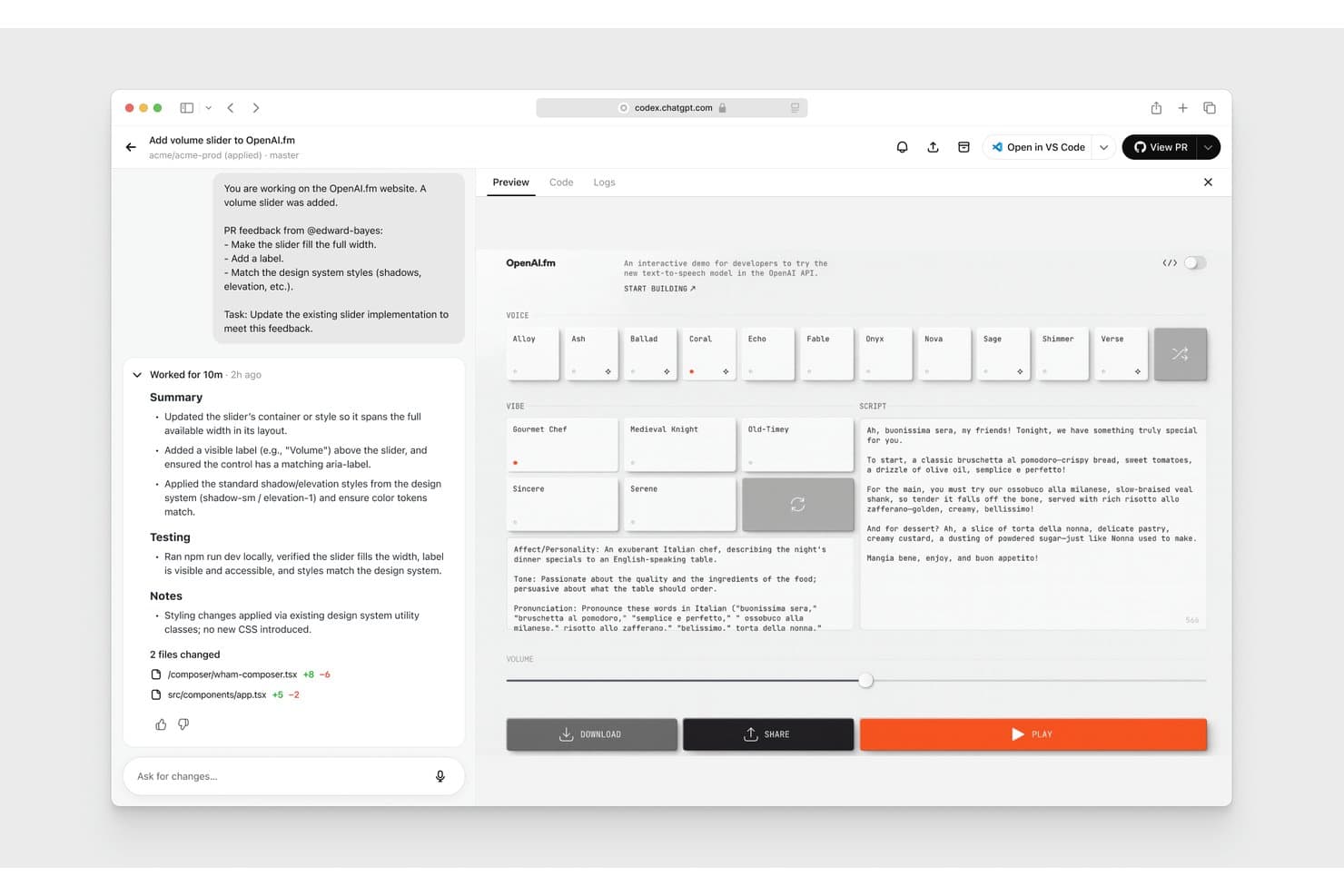
OpenAI Codex offers an AI-powered coding assistant that applies PR feedback, updates UI components, and previews live changes directly in the browser. OpenAI Codex is an agentic AI coding assistant that handles code generation, refactoring, code review, and test writing across 30+ programming languages directly within your IDE, CLI, or a dedicated cloud environment.
Who Is OpenAI Codex Best For?
It's a strong fit for engineering teams at growth-stage and enterprise companies managing large, multi-language codebases where consistent code standards and parallel development matter.
Why I Picked OpenAI Codex
OpenAI Codex earns its spot on my shortlist because of how well it understands code across 30+ languages at the full repository level, not just the open file. I use the Skills feature to encode my team's conventions, so Codex applies them consistently whether it's writing Python backend logic or TypeScript frontend components. In practice, that means it extends our Next.js patterns, respects our Tailwind classes, and maintains export conventions without needing to be reminded each session.
OpenAI Codex Key Features
- Multi-agent workflows: Run multiple agents in parallel across different projects or worktrees.
- Automated code review: Codex reviews pull requests, detects bugs, and highlights backward compatibility issues.
- CLI and IDE extension: Use Codex directly from your terminal or integrate with common developer environments.
- Automations for recurring tasks: Schedule routine work like issue triage, alert monitoring, or CI/CD triggers.
OpenAI Codex Integrations
OpenAI Codex offers native integrations with GitHub, Slack, Vercel, Netlify, Cloudflare, Figma, and Linear, and provides an API and SDK for custom integrations.
Pros and Cons
Pros:
- Automates code review with suggestions
- Supports over 30 languages and frameworks
- Handles large repositories with multi-file context
Cons:
- Can hit usage limits on lower tiers
- No dedicated desktop application
Learn more about OpenAI Codex: 4Best for collaborative team coding workflows
Qodo
- Free plan + free demo available
- From $30/user/month (billed annually)

Qodo provides automated code reviews that surface bugs, rule violations, and requirement gaps with categorized severity levels. Qodo is an AI code quality platform that combines automated PR review, unit test generation, and IDE-based code assistance with full-repository and cross-repo context awareness across the software development lifecycle.
Who Is Qodo Best For?
Qodo is a strong fit for engineering teams at mid-size to enterprise companies where code review quality, test coverage, and cross-team standards are active priorities.
Why I Picked Qodo
Qodo earns its spot as one of the best on my shortlist because its Living Rules system turns a team's own PR history into enforceable coding standards automatically. When my team opens a pull request, specialized agents simultaneously evaluate bugs, security vulnerabilities, quality, and test coverage gaps, posting line-level comments rather than low-signal noise. I also like the cross-repo context engine, which catches breaking changes across multiple repositories before they hit production.
Qodo Key Features
- Agentic PR code review: Provides line-level AI code review with context across files and repositories.
- IDE plugin support: Integrates natively with VS Code, JetBrains, and Visual Studio for code generation and review.
- Zero data retention mode: Analyzes code without retaining data, supporting SOC 2 Type II compliance.
- On-premises and BYOK deployment: Lets teams deploy on-prem or use their own large language model providers for strict control.
Qodo Integrations
Qodo offers native integrations with GitHub, GitLab, Bitbucket, Azure DevOps, Gerrit, VS Code, JetBrains IDEs, and Visual Studio. An API is available for custom integrations and CI/CD workflows.
Pros and Cons
Pros:
- Cross-repo change detection in reviews
- Team-defined coding standard enforcement
- Multi-agent PR analysis for bugs and quality
Cons:
- Lacks instant typing predictions
- Occasional false positives in code review
Learn more about Qodo: Best for integration with AWS development tools
- Free tier (50 agentic requests/month)
- Pro tier $19/month per user

Amazon Q Developer offers an automated code review feature that detects critical security vulnerabilities like unsanitized input execution (CWE-94) and suggests fixes directly in the IDE. Amazon Q Developer is an AI code assistant from AWS that combines inline code completions, agentic code generation, security scanning, and cloud-native development support across IDEs, CLI, and the AWS Management Console.
Who Is Amazon Q Developer Best For?
It's a natural fit for engineering teams that build, deploy, and operate on AWS and want an AI coding assistant that understands their cloud infrastructure.
Why I Picked Amazon Q Developer
Amazon Q Developer earns its spot on my shortlist because of how deeply it understands AWS services at the code level. When I'm writing a Lambda function or authoring a CloudFormation template, it generates contextually accurate suggestions that reflect real AWS service behavior, not just generic syntax. I also rely on its CLI support, which lets me ask natural language questions and get bash commands directly in the terminal without switching context.
Amazon Q Developer Key Features
- Agentic coding commands: Use slash commands in your IDE to trigger documentation, code reviews, and unit test generation directly from the editor.
- Project-wide security scanning: Analyze your codebase for vulnerabilities, secrets, and infrastructure-as-code issues using integrated SAST and rule-based checks.
- Codebase-aware suggestions: Get code completions and explanations that factor in the broader project context, not just the current file.
- Java and .NET transformations: Automate language upgrades like Java 8 to 17 or porting .NET applications from Windows to Linux.
Amazon Q Developer Integrations
Amazon Q Developer offers native integrations with Visual Studio Code, JetBrains IDEs, Visual Studio, Eclipse, GitHub, GitLab, Slack, Microsoft Teams, AWS Management Console, and JupyterLab. An API is available for custom integrations.
Pros and Cons
Pros:
- Strong security scanning and code review tools
- Project-wide agent tasks via slash commands
- Deep context with AWS infrastructure and APIs
Cons:
- Limited language support compared to some peers
- Occasional latency in code completions
Learn more about Amazon Q Developer: Best for real-time code suggestions in editors
- Free plan available
- From $10/user/month
Visit WebsiteCustomer Rating:4.8/5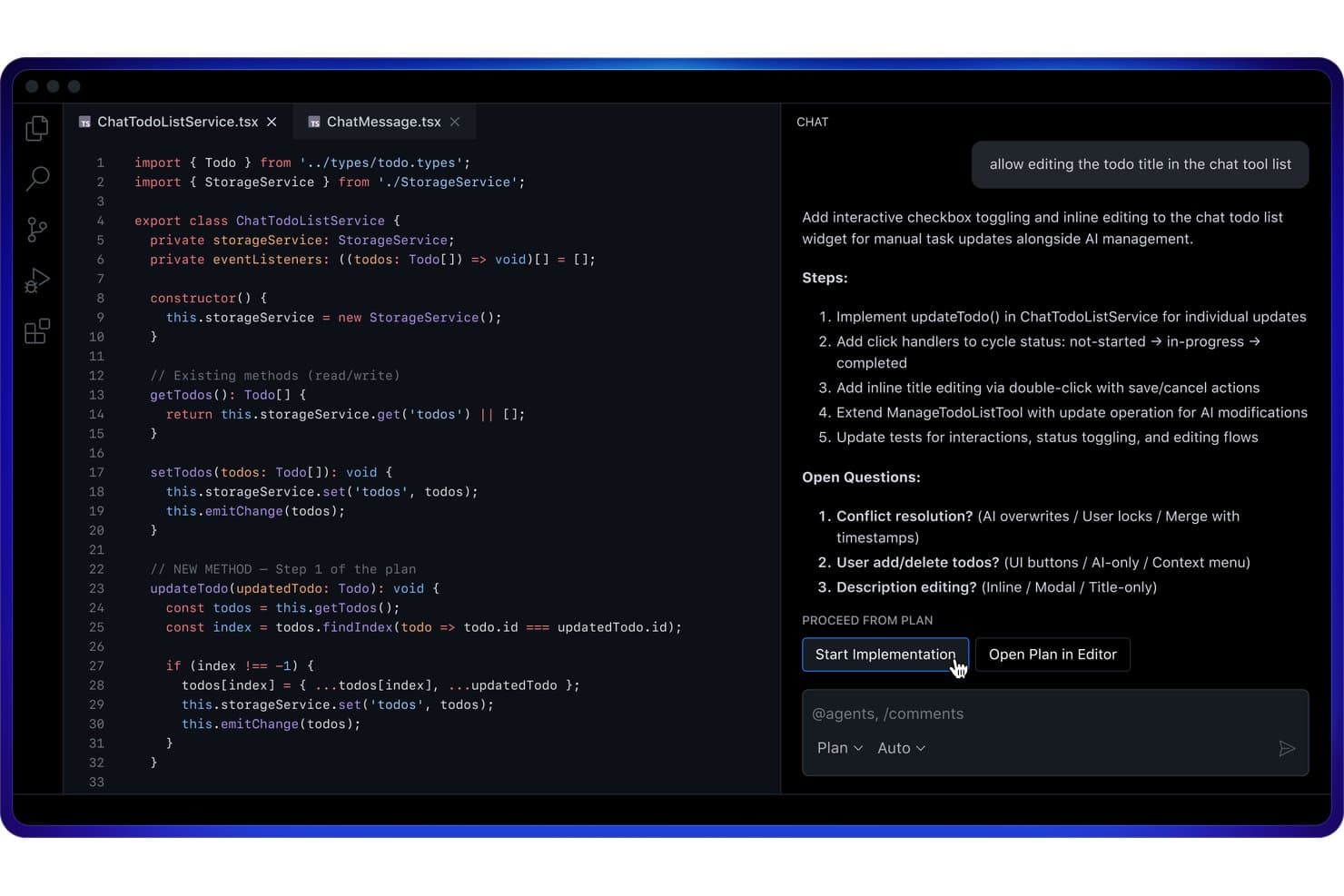
GitHub Copilot offers a Plan Mode in VS Code that outlines implementation steps and open questions before writing code. GitHub Copilot is an AI code assistant built by GitHub that delivers inline code completions, multi-model conversational chat, agentic coding workflows, and automated code review across major IDEs, the CLI, and GitHub.com.
Who Is GitHub Copilot Best For?
GitHub Copilot is a strong fit for individual developers and engineering teams already working within the GitHub ecosystem who want AI assistance embedded directly in their editor.
Why I Picked GitHub Copilot
GitHub Copilot earns its spot as one of the best on my shortlist because its inline completion engine is genuinely in a class of its own. I'm talking whole-function suggestions that appear as I type, with near-zero latency, directly inside VS Code or JetBrains. What really impresses me is the Next Edit Suggestions feature, which anticipates where I'm headed next in the file and surfaces completions proactively, not just at my cursor position.
GitHub Copilot Key Features
- Copilot Chat: Chat directly with the AI in your IDE or on GitHub.com for code explanation and modification.
- Code review agent: Automate pull request reviews and get inline suggestions for improvements across files.
- Multi-model selection: Choose from several AI models, including options from OpenAI, Anthropic, and Google.
- Copilot CLI: Use Copilot features from the command line for agent tasks and code generation beyond the editor.
GitHub Copilot Integrations
GitHub Copilot offers native integrations with Visual Studio Code, Visual Studio, JetBrains IDEs (like IntelliJ and PyCharm), Xcode, Neovim, Eclipse, Raycast, SQL Server Management Studio, Zed, and GitHub.com. An API is available for custom integrations.
Pros and Cons
Pros:
- Broad multi-language and IDE support
- Strong context awareness in large codebases
- Real-time suggestions as you type in editor
Cons:
- No native multi-file refactoring agents
- Lacks local network storage options
Learn more about GitHub Copilot: Best for natural language code generation
- Free plan available, but Claude Code requires a paid plan
- From $17/month billed annually ($20 monthly), Claude Code included in Pro
Visit WebsiteCustomer Rating:4.3/5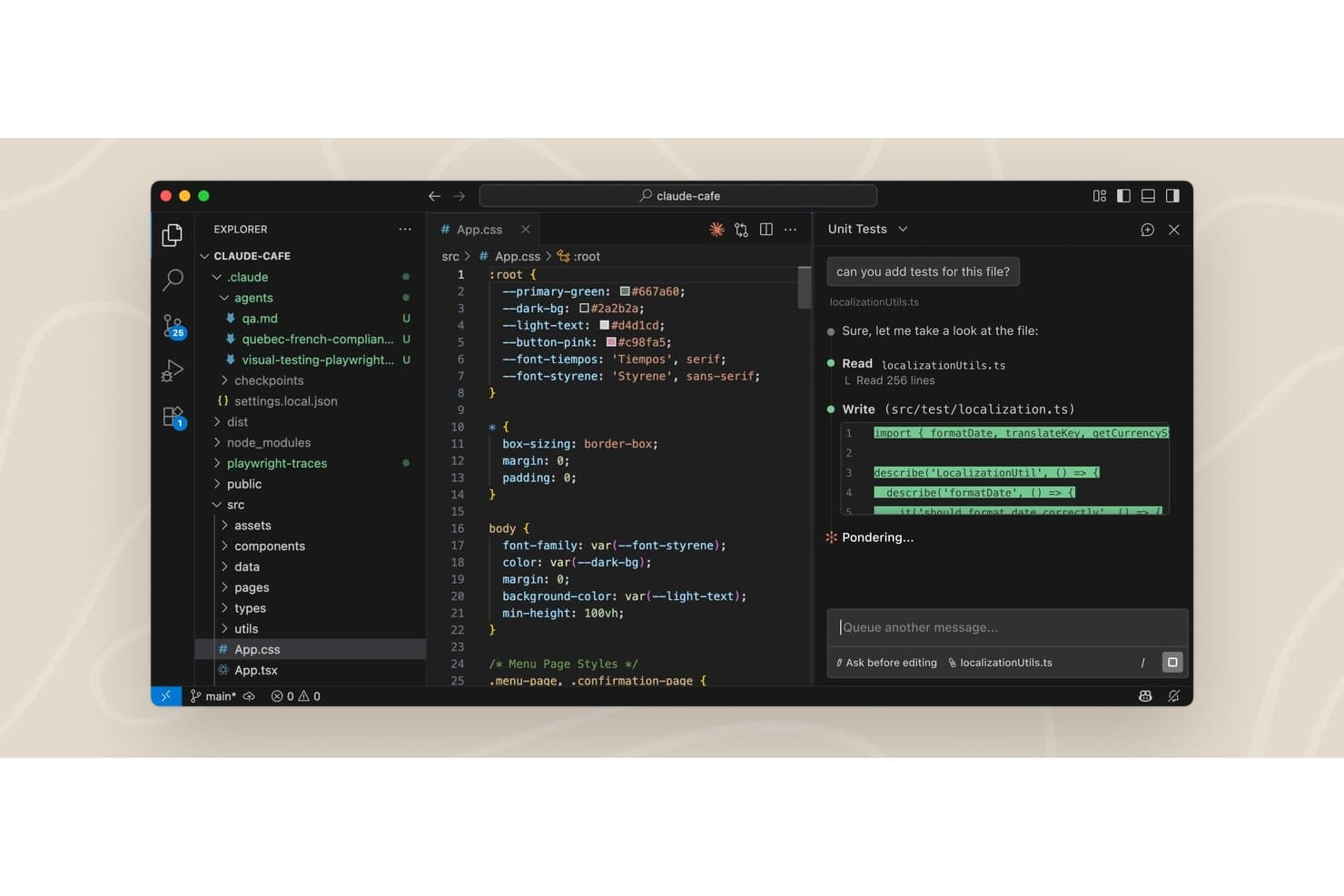
Claude Code offers a VS Code extension with an AI chat panel that reads files and writes unit tests directly in the editor. Claude Code is an agentic AI coding assistant that runs directly in your terminal and IDE, reading your full codebase, editing files across multiple locations, running commands, and submitting pull requests without manual context selection.
Who Is Claude Code Best For?
Claude Code is a strong fit for software engineers and engineering teams working on large, complex codebases where understanding project-wide context is as important as writing new code.
Why I Picked Claude Code
I picked Claude Code as one of the best because of how far its natural language generation actually goes. Describing a feature in plain English doesn't just produce a function: it maps dependencies, edits across multiple files, runs tests, and submits a PR. The codebase onboarding feature is something I use on unfamiliar repos to build a working mental model in seconds, not hours.
Claude Code Key Features
- Agent view: Manage all coding sessions in one interface for organized parallel work.
- Routines: Configure tasks to run on a schedule, via API call, or when events occur.
- Git worktree isolation: Provide isolated repo copies to each session and sub-agent to prevent conflicts.
- MCP connector support: Integrate with deployment, database, monitoring, and custom CLI tools through Model Context Protocol.
Claude Code Integrations
Claude Code offers native integrations with GitHub, Slack, and Chrome, while supporting extended tool connections and IDEs via the Model Context Protocol (MCP) and dedicated CLI platforms. An API is available for custom integrations.
Pros and Cons
Pros:
- Produces detailed code review comments
- Automatically compacts your conversation history
- Handles multi-file and cross-repo edits
Cons:
- Cannot adjust reasoning model thinking levels
- No standalone configuration interface
Learn more about Claude Code: Best for autocomplete and in-depth code chat
- Free plan available
- From $8/month
Visit WebsiteCustomer Rating:5/5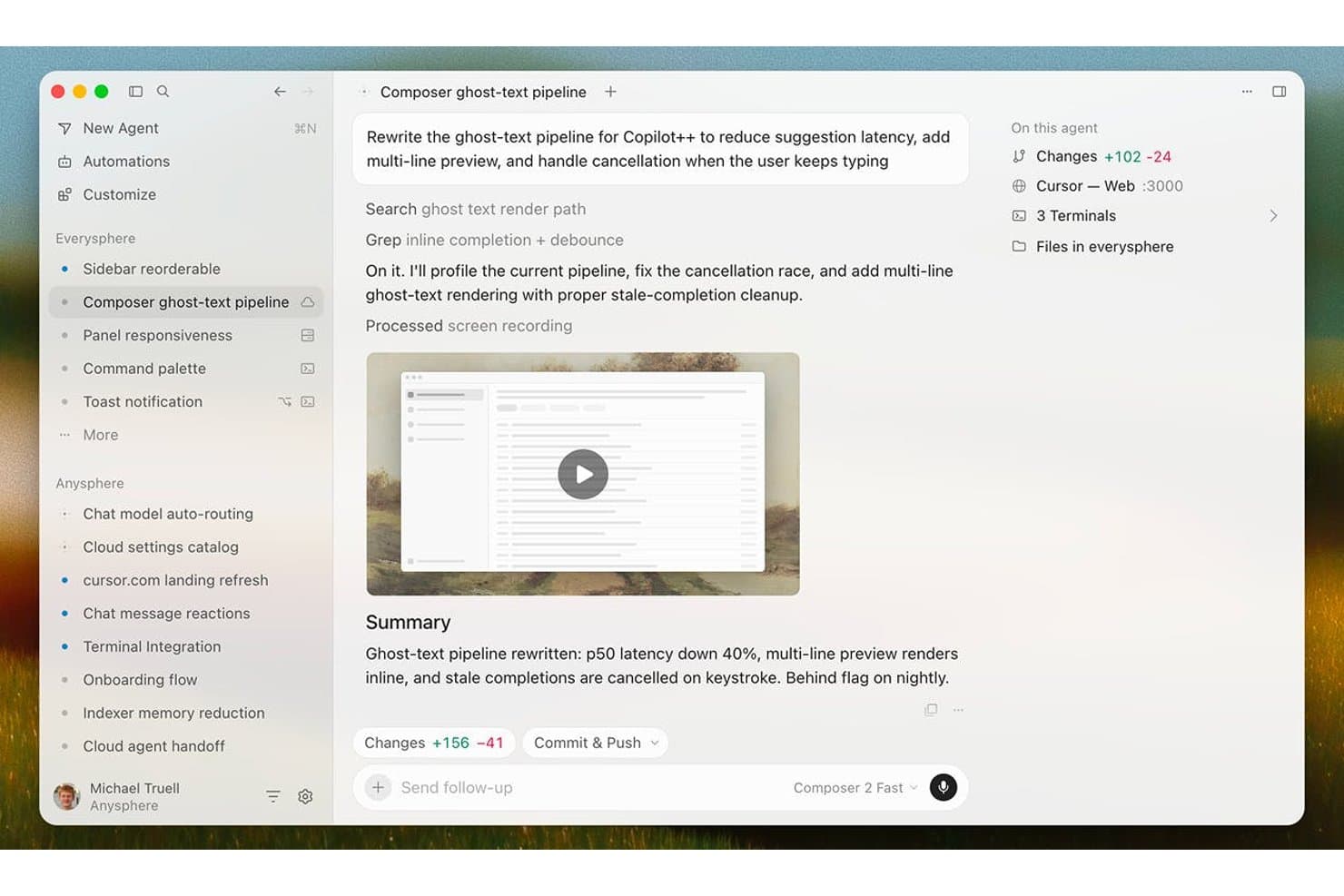
Cursor offers an AI agent interface that rewrites code pipelines, tracks file changes, and summarizes results with latency improvements. Cursor is an AI-native code editor built on VS Code that combines Tab autocomplete, multi-file code generation via Composer, codebase-aware chat, and autonomous coding agents into a single development environment.
Who Is Cursor Best For?
Cursor is a strong fit for software developers and engineering teams who want AI deeply integrated into their daily coding workflow rather than layered on as a separate tool.
Why I Picked Cursor
Cursor earns its spot on my shortlist because its Tab autocomplete is genuinely in a class of its own. Powered by the Supermaven engine, it predicts entire functions and cross-file import paths as you type, not just the next token. What I like even more is the codebase chat: you can ask Cursor why a particular service is structured the way it is, and it pulls context from across your entire indexed repo to give you a real answer.
Cursor Key Features
- Composer multi-file generation: Build out full frameworks and multiple files from natural language prompts inside the editor.
- Agentic code review with Bugbot: Automate pull request review and surface suggested improvements using integrated AI agents.
- MCP (Model Context Protocol) support: Connect to multiple AI models from top providers for flexible code generation and analysis.
- Cloud agents and automations: Deploy always-on agents to handle scheduled or triggered coding tasks directly in your workflow.
Cursor Integrations
Cursor offers native integrations with GitHub, Slack, Okta, Azure Active Directory, Google Workspace, and supports VS Code extensions. An API is available for custom integrations.
Pros and Cons
Pros:
- Deep project context understanding in chat
- Agentic pull request review and bug detection
- Cross-file code generation with Composer
Cons:
- Indexing speeds lower on large repositories
- Requires continuous internet access
Learn more about Cursor: Best for autonomous software development tasks
- Free plan available
- From $20/month (Pro)
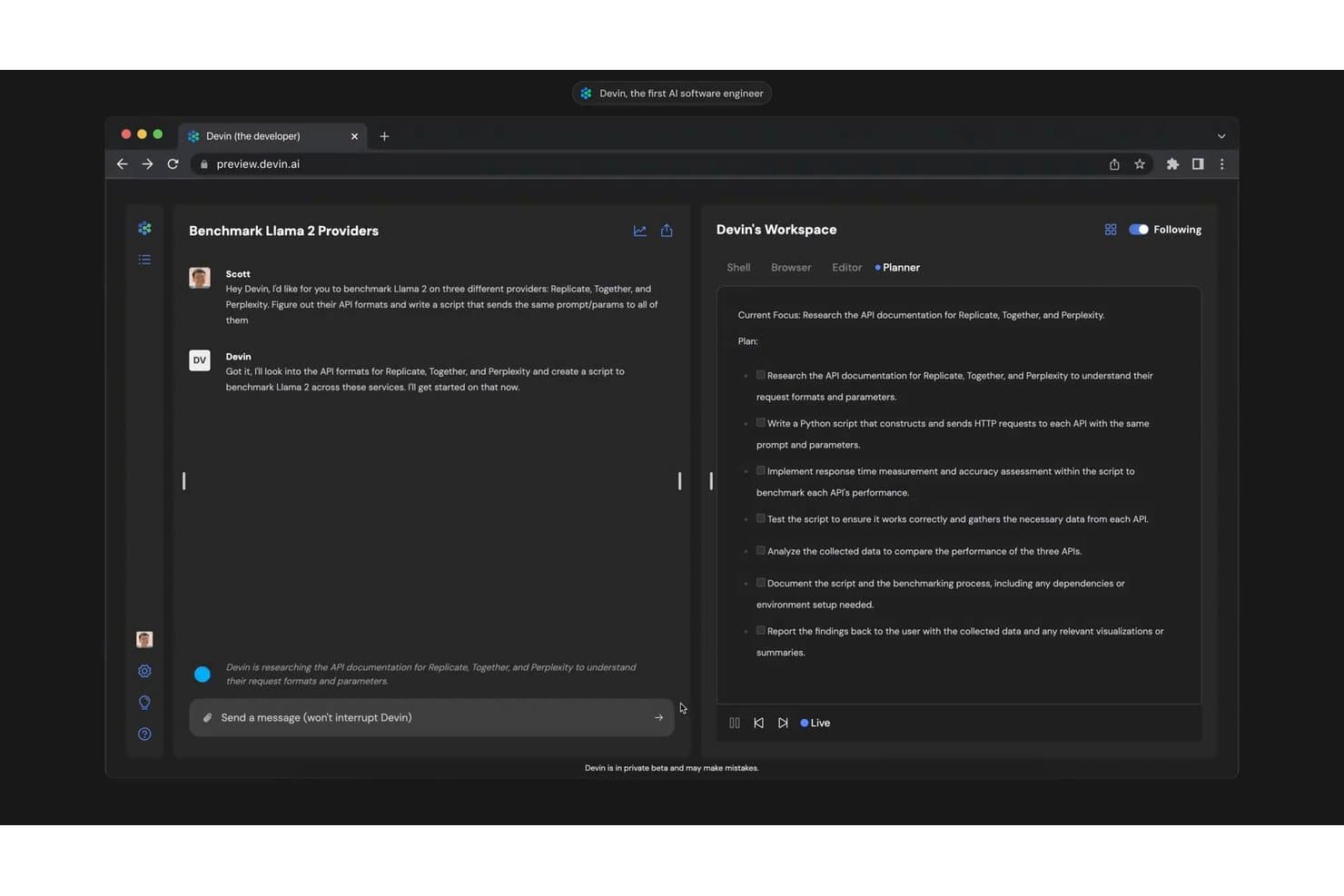
Devin autonomously plans and executes multi-step coding tasks, such as benchmarking Llama 2 across multiple AI providers. Devin is an autonomous AI coding agent that plans, writes, tests, and debugs code end-to-end in a sandboxed cloud environment, submitting pull requests without requiring developer supervision.
Who Is Devin Best For?
Devin is a strong fit for engineering teams at growth-stage and enterprise companies that need to offload repetitive, well-defined development tasks at scale.
Why I Picked Devin
Devin earns its spot as one of the best on my shortlist because it operates at a fundamentally different level than typical AI code assistants. Where most tools suggest the next line, I use Devin to assign an entire GitHub issue and get back a reviewed pull request. Its knowledge base learns my codebase's conventions over time, so output quality improves with repeated use. DeepWiki auto-indexes repositories and generates system diagrams, which I've found invaluable on legacy migration projects.
Devin Key Features
- Devin Cloud: Run autonomous coding agents in a persistent, sandboxed cloud environment.
- Devin Desktop: Use a dedicated desktop app for interacting with Devin’s features and code suggestions.
- Devin Review: Automate pull request reviews to surface code issues and visual QA results.
- Third-party integrations: Connect with tools like Slack, GitHub, Jira, and Linear for workflow automation.
Devin Integrations
Devin offers native integrations with GitHub, GitLab, Bitbucket, Linear, Jira, Notion, Slack, Microsoft Teams, Datadog, and AWS. An API is available for custom integrations.
Pros and Cons
Pros:
- Generates system diagrams and documentation
- Auto-reviews pull requests with AI QA
- Assigns and completes entire tickets autonomously
Cons:
- No offline execution mode
- Limited IDE plugin support compared to rivals
Learn more about Devin: Best for Google ecosystem code support
- 30-day free trial
- From $19/user/month (billed annually)

Gemini Code Assist offers an agent mode with an inline diff view in VS Code, allowing users to review, accept, or decline AI-suggested file changes directly in the editor. Gemini Code Assist is Google's AI code assistant built on the Gemini model family, offering inline code completion, natural language code generation, codebase-aware chat, and automated PR review across major IDEs and the Google Cloud ecosystem.
Who Is Gemini Code Assist Best For?
It's a natural fit for engineering teams already working within the Google Cloud ecosystem, including those building on Firebase, BigQuery, or GCP-hosted infrastructure.
Why I Picked Gemini Code Assist
I picked Gemini Code Assist as one of the best because of how deeply it's embedded in the Google developer surface. When I'm in Firebase, it handles code generation and Crashlytics-driven debugging right inside the console. On BigQuery projects, it generates queries from table metadata, cutting out manual schema lookups. It also connects into Apigee for API spec generation and mock proxy setup.
Gemini Code Assist Key Features
- Whole-function code completion: Delivers multi-line and block-level completions directly in major IDEs.
- IDE chat assistant: Offers natural language chat for code explanations, usage help, and troubleshooting in context.
- Automated pull request reviews: Uses AI agents to summarize and review GitHub pull requests with code suggestions.
- Gemini CLI agent: Provides AI-driven code understanding and task automation right from the command line.
Gemini Code Assist Integrations
Gemini Code Assist offers native integrations with Visual Studio Code, JetBrains IDEs, Android Studio, Cloud Workstations, Cloud Shell, GitHub, Firebase, BigQuery, Apigee, and Application Integration. An API is available for custom integrations.
Pros and Cons
Pros:
- GitHub PR review automations save manual effort
- Suggests code across multiple languages
- Deep understanding of Google Cloud projects
Cons:
- Some advanced features require Enterprise plan
- Code completions sometimes lag during peak hours
Learn more about Gemini Code Assist:
Outros assistentes de código com IA
Eis algumas opções adicionais de assistentes de código com IA que não chegaram à minha lista final, mas que vale a pena conhecer:
- 11ClineBest for natural language debugging support
- 12JetBrains AI in IDEsBest for IDE integration across JetBrains suite
- 13ReplitBest for instant cloud-based code execution
- 14ZedBest for multiplayer real-time code editing
- 15AiderBest for in-terminal conversational coding
- 16Augment CodeBest for AI-powered code test generation
- 17GitLab DuoBest for end-to-end DevOps workflow integration
- 18JetBrains JunieBest for AI-guided refactoring insights
How I Evaluate AI Code Assistants
Every tool on this list has to do more than autocomplete—it needs to help you ship better code, catch bugs, and navigate unfamiliar repos faster. I split my evaluation into core functionality every assistant must nail and differentiating factors that separate one tool from another.
Core Functionality (Table Stakes for This List)
When I'm selecting tools for my list, I rank each one on a scale from 0 (does not offer the functionality) to 5 (excels in this area) for each core functionality listed below. Then, I calculate the tool's total score as a percentage. Each tool needs to achieve a minimum total score of 75% to be considered for inclusion.
- Code Completion: I look for accurate, multi-line suggestions that appear in real time as you type—not just single-token predictions that barely save keystrokes.
- Natural Language Generation: Good tools let you describe a function in plain English and get usable code back, not just a rough skeleton you have to rewrite.
- IDE Integration: I check whether the assistant plugs into the IDEs your team actually uses, like VS Code, JetBrains, or Neovim, without a clunky setup.
- Multi-Language Support: I evaluate how well each tool handles the languages and frameworks in your stack, from Python and TypeScript to Go or Rust.
- Codebase Context Awareness: The best assistants index your full repo, so suggestions reflect your project's patterns, not just the file you have open.
- Code Explanation & Refactoring: I look for tools that can walk you through unfamiliar legacy code and suggest concrete refactors or flag potential bugs inline.
Once I have a list of tools that meet the criteria, I consider what sets each platform apart.
Differentiating Factors (What Sets Vendors Apart)
Here's how I compare and contrast different vendors:
Standout Features
Agentic task execution matters here—some assistants can plan and carry out multi-step refactors or bug fixes with minimal input from you, which saves serious time on large codebases. I also look at whether a tool lets you swap between underlying models based on your team's privacy, cost, or performance needs. Inline code review and test generation round things out, especially for teams that want automated PR feedback and vulnerability checks woven into their Git workflow.
Beyond Features
Data privacy is a big deal—I check whether your code is used for model training and if zero-retention or self-hosted deployment options exist for regulated environments. Admin controls and governance matter just as much, especially SSO, audit logs, and the ability to block suggestions that match public code to reduce IP risk. Pricing structure also shapes my evaluation, since per-seat costs can balloon fast on a growing team compared to usage-based models with free tiers for individual developers.
Como escolher assistentes de código com IA
É fácil ficar preso a listas intermináveis de funcionalidades e estruturas de preços complexas. Para o ajudar a manter-se concentrado enquanto analisa o seu processo específico de seleção de software, eis uma lista de verificação dos fatores a ter em conta:
| Fator | O que considerar |
|---|---|
| FatorEscalabilidade | O que considerarA ferramenta acompanhará o crescimento da sua equipa? Considere os modelos de licenciamento e se o preço continua razoável à medida que aumenta o número de colaboradores. |
| FatorIntegrações | O que considerarEstabelece ligação aos seus principais IDE, fornecedores de Git, CI/CD e outras ferramentas? As lacunas nesta área podem criar trabalho duplicado e limitar a adoção. |
| FatorPersonalização | O que considerarPode adaptar o comportamento, os controlos ou a seleção de modelos do assistente aos padrões de programação e às necessidades de privacidade de dados da sua equipa? |
| FatorFacilidade de utilização | O que considerarCom que rapidez podem os engenheiros obter valor da ferramenta? Configurações complicadas ou uma interface pouco intuitiva atrasam a integração e reduzem a adesão da equipa. |
| FatorImplementação e integração | O que considerarO que é necessário para a disponibilizar — desde as permissões de acesso aos scripts de configuração? Procure documentação clara e um tempo mínimo de engenharia para a implementação. |
| FatorCusto | O que considerarEstá a comparar planos por utilizador, baseados na utilização ou empresariais? Podem surgir custos inesperados à medida que a utilização aumenta, por isso esclareça desde cedo o custo total. |
| FatorMedidas de segurança | O que considerarA plataforma oferece controlos de retenção de código, permissões baseadas em funções e suporte para ambientes alojados internamente ou isolados? |
| FatorDisponibilidade do suporte | O que considerarQual é a capacidade de resposta do suporte se a sua equipa encontrar erros ou tiver dúvidas? Verifique se existem acordos de nível de serviço claros e cobertura regional/de fusos horários, se necessário. |
O que são os assistentes de código com IA?
Os assistentes de código com IA são ferramentas de software que utilizam aprendizagem automática para ajudar os programadores a escrever, compreender e melhorar código mais rapidamente. Oferecem funcionalidades como conclusão inteligente de código, geração de código a partir de instruções em linguagem natural, explicações automatizadas e sugestões para refatorizar ou corrigir erros. Estes assistentes integram-se nos IDE e nos fluxos de trabalho de desenvolvimento para acelerar as tarefas de programação diárias e contribuir para uma melhor qualidade do código em todas as equipas.
Funcionalidades dos assistentes de código com IA
Ao selecionar assistentes de código com IA, esteja atento às seguintes funcionalidades principais:
- Conclusão de código: Fornece sugestões sensíveis ao contexto à medida que escreve, ajudando-o a concluir rapidamente linhas ou blocos de código sem perder a concentração ou o contexto.
- Pedidos em linguagem natural: Permitem-lhe descrever em linguagem simples o código que pretende e gerar código ou funções funcionais com base nas suas instruções.
- Integração com IDE: Integra-se diretamente nos ambientes de desenvolvimento mais populares, permitindo-lhe utilizar funcionalidades de IA sem sair do seu fluxo de trabalho de programação.
- Suporte para várias linguagens: Abrange uma vasta gama de linguagens de programação e estruturas, sendo útil em diferentes projetos e conjuntos tecnológicos.
- Conhecimento do contexto da base de código: Compreende a estrutura e o histórico do seu projeto, permitindo-lhe gerar código ou sugestões adequados ao seu repositório específico.
- Refatorização automática: Identifica oportunidades para reestruturar ou melhorar o código existente, tornando-o mais legível, eficiente ou fácil de manter.
- Deteção de erros: Assinala problemas ou erros comuns no seu código enquanto trabalha, oferecendo recomendações para os corrigir antes de se tornarem problemas maiores.
- Explicação do código: Decompõe código desconhecido ou complexo, explicando a lógica e a estrutura para que os membros da equipa possam integrar-se e contribuir mais facilmente.
- Geração de testes unitários: Escreve automaticamente testes para verificar se as suas funções funcionam conforme previsto, acelerando a cobertura de testes e dando-lhe confiança na sua base de código.
- Revisão de pedidos de integração: Ajuda a rever alterações em pedidos de integração, identificando potenciais problemas e oferecendo feedback diretamente no seu fluxo de trabalho de revisão de código.
Vantagens dos assistentes de código com IA
A implementação de assistentes de código com IA proporciona várias vantagens à sua equipa e à sua empresa. Eis algumas das que pode esperar:
- Desenvolvimento acelerado: As funcionalidades de conclusão e geração de código ajudam a sua equipa a disponibilizar novas funcionalidades e a corrigir problemas mais rapidamente.
- Maior qualidade do código: As ferramentas automatizadas de deteção de erros, refatorização e revisão de código ajudam a garantir um código mais consistente e fácil de manter em todos os seus projetos.
- Integração mais rápida: A explicação do código e as sugestões sensíveis ao contexto permitem que os novos programadores se familiarizem mais rapidamente e contribuam com menos dificuldades.
- Redução do trabalho manual: Funcionalidades como a geração de testes unitários e a documentação automática eliminam tarefas repetitivas da carga de trabalho da sua equipa.
- Colaboração melhorada: A revisão de pedidos de integração e as capacidades de feedback integrado melhoram os ciclos de revisão e alinham os padrões da equipa.
- Maior flexibilidade entre linguagens: O suporte para várias linguagens facilita a gestão de projetos que abrangem diversos conjuntos tecnológicos ou a transição entre tecnologias.
- Segurança e conformidade reforçadas: As salvaguardas de segurança e os controlos de privacidade do código ajudam a manter a conformidade e a proteger dados sensíveis em ambientes regulamentados.
Custos e preços dos assistentes de código com IA
A seleção de assistentes de código com IA requer uma compreensão dos vários modelos de preços e planos disponíveis. Os custos variam consoante as funcionalidades, o tamanho da equipa, os complementos, entre outros fatores. A tabela abaixo resume os planos comuns, os seus preços médios e as funcionalidades normalmente incluídas nas soluções de assistentes de código com IA:
Tabela de comparação de planos para assistentes de código com IA
| Tipo de plano | Preço médio | Funcionalidades comuns |
|---|---|---|
| Tipo de planoPlano gratuito | Preço médio$0 | Funcionalidades comunsConclusão básica de código, suporte limitado para linguagens, integração básica com IDE e explicações básicas do código. |
| Tipo de planoPlano pessoal | Preço médio$5-$25/user/month | Funcionalidades comunsCobertura completa de linguagens, conclusões melhoradas, geração de testes unitários e deteção individual de erros. |
| Tipo de planoPlano empresarial | Preço médio$30-$60/user/month | Funcionalidades comunsFerramentas de colaboração em equipa, automatização da revisão de código, controlos administrativos e opções de segurança avançadas. |
| Tipo de planoPlano empresarial avançado | Preço médio$70-$150/user/month | Funcionalidades comunsIntegrações personalizadas, SSO/SAML, implementação local, análise de utilização e suporte dedicado. |
Perguntas frequentes sobre assistentes de programação com IA
Eis algumas respostas a perguntas comuns sobre assistentes de programação com IA:
Os assistentes de programação com IA conseguem trabalhar com bases de código privadas ou proprietárias?
Sim, muitos assistentes de programação com IA conseguem trabalhar com bases de código privadas ou proprietárias. Procure soluções que ofereçam políticas claras de privacidade de dados, controlos de retenção de código ou implementação autoalojada, para que o seu código existente nunca saia do seu ambiente. Este é um caso de utilização comum para equipas que trabalham sob diretrizes rigorosas de conformidade.
Os assistentes de programação com IA substituem a necessidade de revisões de código?
Não, os assistentes de programação com IA não substituem as revisões de código humanas, mas podem complementá-las. Automatizam verificações de rotina e destacam potenciais problemas, permitindo que a sua equipa se concentre na arquitetura e em comentários essenciais para o negócio. A utilização destas ferramentas de programação com IA ajuda a manter um estilo de programação consistente em toda a equipa, aumentando simultaneamente a produtividade geral dos programadores.
Como afetam os assistentes de programação com IA a integração de novos programadores?
Os assistentes de programação com IA podem acelerar a integração, uma vez que oferecem explicações sobre o código e sugestões sensíveis ao contexto. Um novo programador pode obter ajuda em tempo real para resolver problemas ou consultar excertos de código que lhe permitam aprender padrões normalizados, reduzindo a necessidade de apoio constante de um mentor e permitindo uma iteração mais rápida durante as tarefas ou a criação de protótipos iniciais.
Que linguagens de programação são suportadas pelos assistentes de programação com IA?
A maioria dos assistentes de programação com IA suporta as principais linguagens de programação, como Python, JavaScript, Java e TypeScript. Algumas soluções estão a expandir o suporte para linguagens ou estruturas de nicho, por isso verifique se a sua pilha tecnológica é totalmente suportada antes de escolher um editor de código para escrever código e otimizar o desempenho.
Existem riscos de exposição de dados sensíveis ou regulamentados?
Sim, existem riscos se o seu assistente de programação transmitir código-fonte externamente. Reveja sempre os termos de privacidade do fornecedor e procure opções como retenção zero de dados, processamento na região ou implementação no local para obter garantias adicionais. Muitas configurações modernas utilizam um LLM de código aberto localmente para garantir a segurança completa dos dados durante a geração de resultados de elevada qualidade para a depuração.