

Neste artigo, apresento-lhe a minha lista criteriosamente selecionada das melhores alternativas ao Jira para facilitar a gestão de projetos em todo o tipo de equipas.
Quer seja uma pequena equipa de desenvolvimento de software a acompanhar erros, quer seja uma agência de marketing global a simplificar conteúdos para vários clientes em todo o mundo, encontrará nesta lista uma ferramenta adequada para si.
Continue a ler para saber como cada ferramenta se compara com o Jira, que funcionalidades podem melhorar o seu negócio e quais são as vantagens e desvantagens que o ajudarão a avaliar cada opção.
Nas secções seguintes, partilharei as minhas opiniões sobre cada plataforma, detalhando as suas principais funcionalidades e abordando as possíveis desvantagens.
O que é o Jira?
O Jira é uma ferramenta de gestão de projetos concebida para ajudar as equipas a planear, acompanhar e gerir o seu trabalho. É utilizada sobretudo por programadores de software, equipas de produto e gestores de projetos que precisam de uma forma de organizar tarefas e fluxos de trabalho. Os quadros personalizados, o acompanhamento da lista de pendências e as funcionalidades de elaboração de relatórios ajudam a gerir projetos ágeis, ciclos de desenvolvimento e a colaboração entre equipas. De forma geral, o Jira ajuda a sua equipa a manter o controlo das tarefas, dos prazos e do progresso do trabalho.
Why Trust Our Software Recommendations
6,700+
Reviews
20
Industry experts
16+
Evaluation factors
14
Years
Our team has been testing and reviewing software since 2012. As tech leaders ourselves, we know how difficult—and important—it is to choose the right software.
For this guide, we evaluated tools using hands-on testing and independent research, scoring tools using our selection criteria.
Our reviews reflect our human editorial judgment, not a sales pitch.
Expert reviewers:
- Paulo Gardini MiguelTech Director
 Tim FisherVP of AI
 Gabriel RosasTech Lead & Software Architect
 Christhian GruhnTech Lead & Platform Architect

Tabela de comparação das alternativas ao Jira
Esta tabela de comparação resume os detalhes de preços das minhas principais alternativas ao Jira:
Score legend (out of 5)
- Excellent4.5–5
- Good4–4.4
- Average3–3.9
- Below average2–2.9
- Poor1–1.9
Sorted by: Default
| Tool | Starting Price | Website | |||||||
|---|---|---|---|---|---|---|---|---|---|
Best for customizable workflows and fields | 3.8 out of 5 | 4 | 3 | 4 | 4 | 4 | 4 | Pricing upon request Free plan + 15-day trial + demo available | Website |
Best for integrated issue tracking | 3.0 out of 5 | 4 | 2 | 4 | 3 | 2 | 3 | Pricing upon request Free plan + demo available | Website |
Best for visual Kanban organization within small teams | 3.2 out of 5 | 3 | 2 | 3 | 4 | 4 | 3 | $5/user/month Free plan + Free trial available | Website |
Best for versatile project management and time tracking | 4.2 out of 5 | 5 | 4 | 4 | 4 | 4 | 4 | $12/user/month Free plan + trial + demo available | Website |
Best for workspace flexibility and coordination | 3.7 out of 5 | 4 | 3 | 4 | 4 | 4 | 3 | $10/user/month Free plan + trial available | Website |
Best for team coordination with visual task management | 3.8 out of 5 | 4 | 2 | 4 | 5 | 4 | 4 | $10.99/user/month Free plan + trial + demo available | Website |
Best for bug tracking in software development | Not rated | 4 | Not rated | 4 | 2 | 2 | 3 | Pricing upon request Free plan available | Website |
Best for Kanban-style tracking and automation | 3.3 out of 5 | 4 | 3 | 4 | 3 | 3 | 3 | $8.50/user/month Free trial available | Website |
Best for prioritizing changes in Agile teams | 3.0 out of 5 | 4 | 4 | 1 | 3 | 3 | 3 | Pricing upon request Not available | Website |
Best for dynamic collaboration across project types | 3.3 out of 5 | 4 | 2 | 4 | 4 | 3 | 3 | $9/user/month Free plan + 14-day free trial available | Book Demo |


Análises das melhores alternativas ao Jira
Seguem-se os meus resumos detalhados das melhores alternativas ao Jira que entraram na minha lista resumida. As minhas análises apresentam uma visão detalhada das principais funcionalidades, vantagens e & desvantagens, integrações e casos de utilização ideais de cada ferramenta, para o ajudar a encontrar a melhor opção para si.
 Best for customizable workflows and fields
- Free plan + 15-day trial + demo available
- Pricing upon request
Visit WebsiteCustomer Rating:4.3/5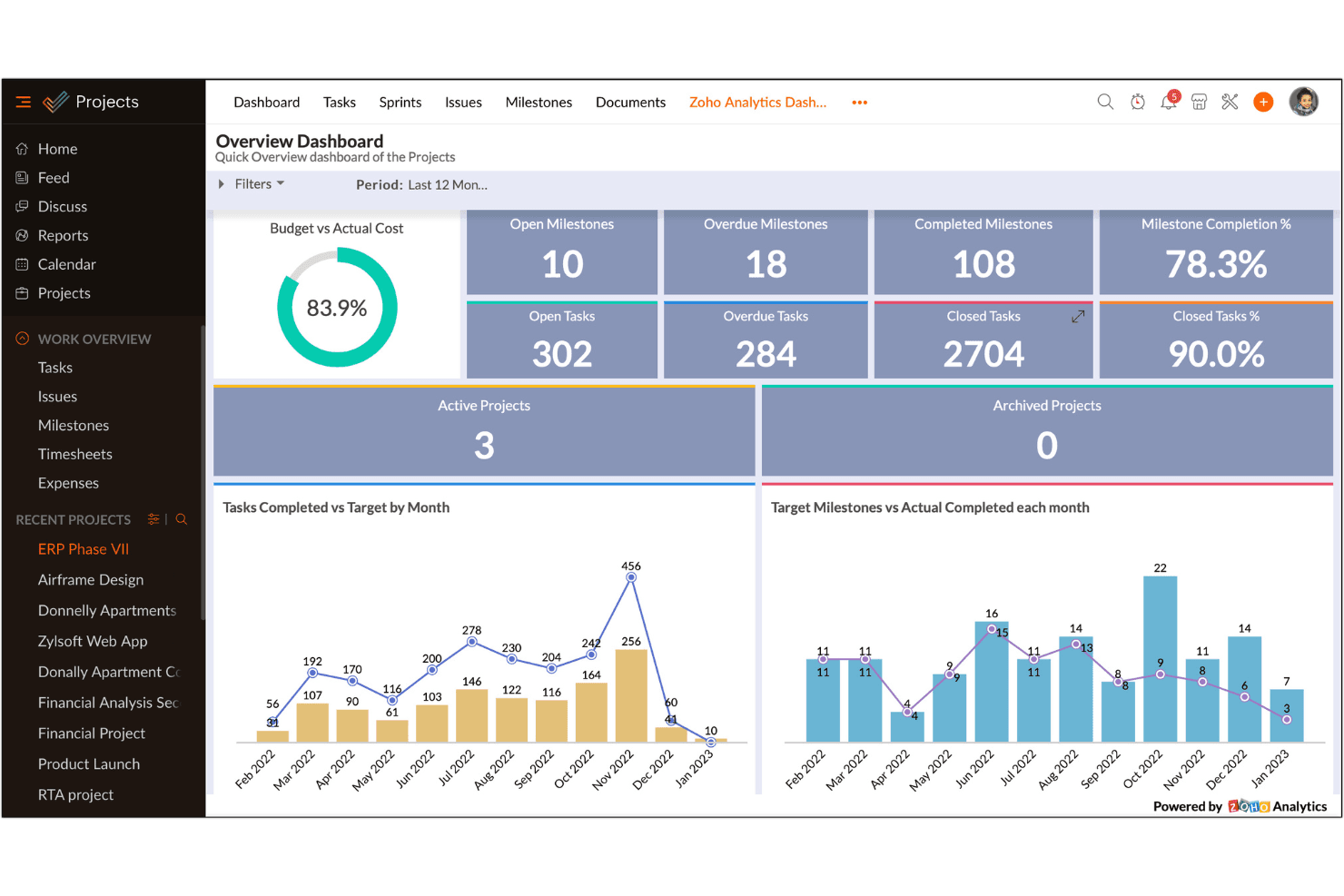
Zoho Projects centralizes task, milestone, and budget tracking in one dashboard. Zoho Projects helps IT teams coordinate infrastructure upgrades, system changes, and cross-functional initiatives by keeping tasks, schedules, dependencies, and project updates in one workspace.
Who Is Zoho Projects Best For?
Zoho Projects suits IT teams that need customizable workflows and fields to match their internal project tracking processes.
Why I Picked Zoho Projects
I picked Zoho Projects because its customizable workflows and fields can match how IT teams manage infrastructure changes. I can track details such as affected systems and maintenance windows, then tailor task stages for review, approval, implementation, and validation. That lets me map project tracking to the change process my team already follows.
Zoho Projects Key Features
- Gantt charts: View project tasks, timelines, and dependencies on a chart.
- Time tracking: Log work hours against tasks and projects.
- Issue tracking: Record, assign, and track project issues.
- Task dependencies: Link tasks to define their execution order.
Zoho Projects Integrations
Zoho Projects offers native integrations across the Zoho and Microsoft ecosystems, plus Google Calendar, Google Tasks, Dropbox, Box, GitHub, Bitbucket, GitLab, Zendesk, and Slack. It also connects with Zapier and provides an API for custom integrations.
Pros and Cons
Pros:
- Dependencies and Gantt clarify maintenance sequencing
- Blueprints automate multi-stage approval workflows
- Custom fields capture system and change details
Cons:
- Advanced report customization remains limited
- Mobile app trails desktop functionality
Learn more about Zoho Projects: Best for integrated issue tracking
- Free plan + demo available
- Pricing upon request
Visit WebsiteCustomer Rating:4/5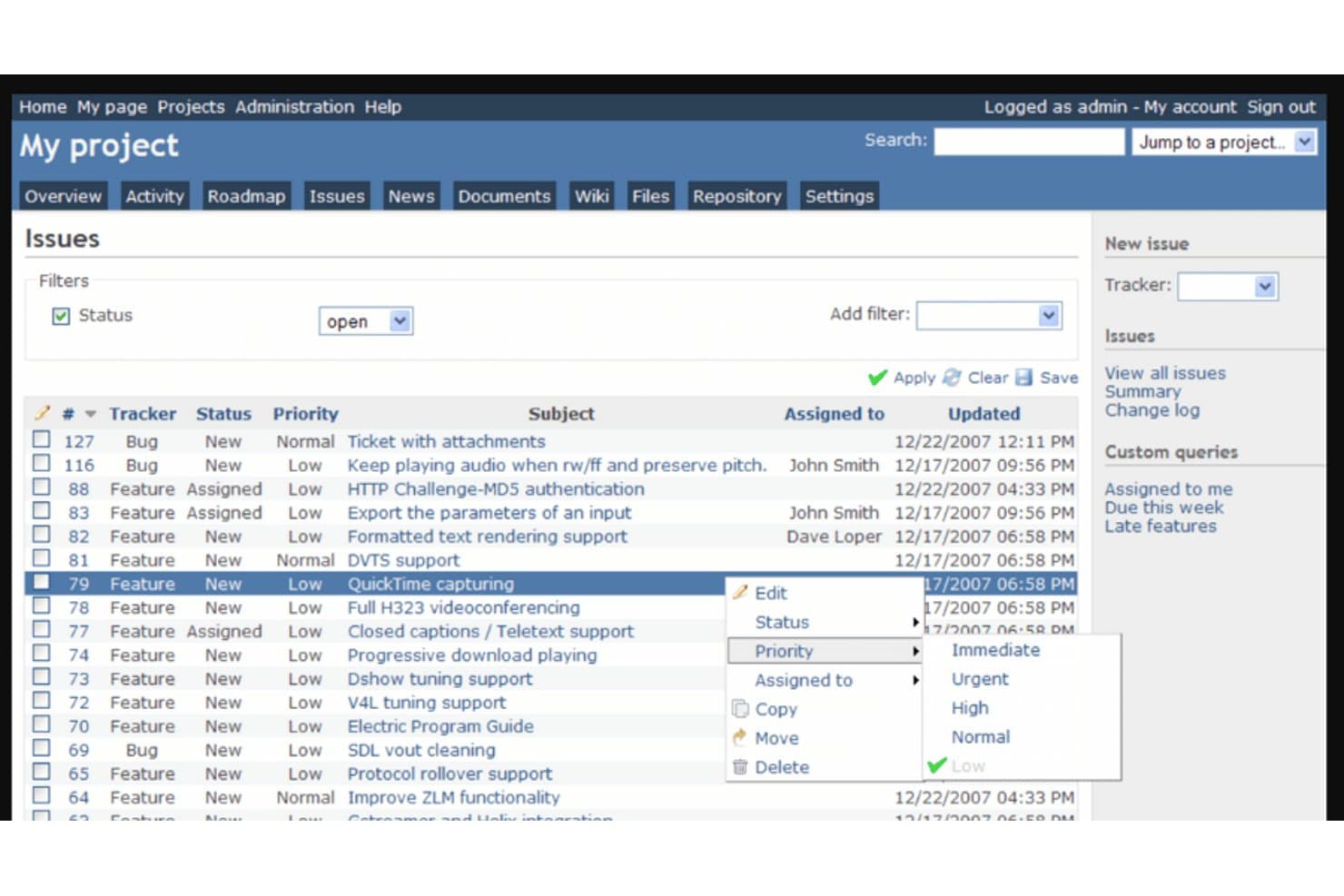
Redmine lets users manage and prioritize issues with right-click context menus. Redmine is an open-source project management platform for IT and development teams that want to organize projects, adapt workflows, and manage work on infrastructure or software initiatives.
Who Is Redmine Best For?
Redmine suits IT and development teams that need issue tracking tied to project plans and workflows.
Why I Picked Redmine
I picked Redmine for “Best for integrated issue tracking” because it ties issues to project plans and versions, making it a practical Jira alternative for IT work. I use its configurable workflows and issue relationships to track incidents, dependencies, and fixes within the same project.
Redmine Key Features
- Gantt charts: View project tasks and schedules on a timeline.
- Time tracking: Log time against projects and individual tasks.
- Project wiki: Create and edit shared documentation within a project.
- Role-based access control: Set permissions for users by role and project.
Redmine Integrations
Redmine has built-in repository integration with Git, Subversion, CVS, Mercurial, and Bazaar, and a REST API for custom integrations. GitLab can also link to Redmine as an external issue tracker.
Pros and Cons
Pros:
- Self-hosting gives teams control over deployment
- Custom workflows fit infrastructure ticket lifecycles
- Issues connect to project plans and versions
Cons:
- Agile sprint planning trails Jira
- Dated interface slows ticket triage
Learn more about Redmine: Best for visual Kanban organization within small teams
- Free plan + Free trial available
- From $5/user/month (billed annually)
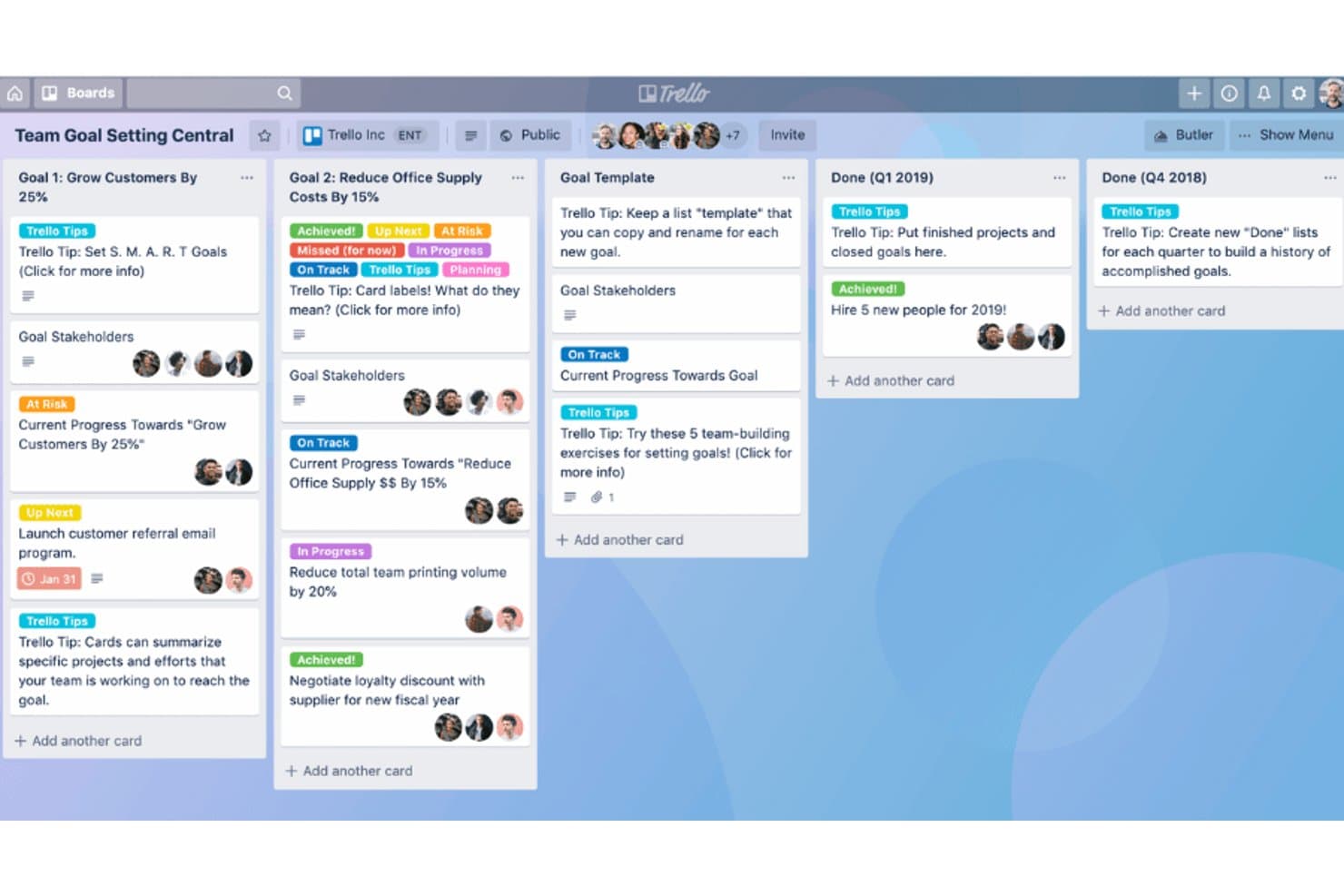
Trello organizes team goals into visual boards with progress tracking. Trello is a project management tool for small IT teams that need to coordinate maintenance work, track requests, and keep project responsibilities clear without Jira’s more structured issue-management setup.
Who Is Trello Best For?
IT team leads who want a visual Kanban board to make task ownership and work-in-progress easy to see.
Why I Picked Trello
I picked Trello as a Jira alternative because it’s Best for visual Kanban organization within small teams. Boards with lists and cards let me track IT requests from intake through completion. I use labels and member assignments to flag work types and clarify ownership without Jira’s more structured issue-management setup.
Trello Key Features
- Butler automation: Create rules and buttons to automate actions on cards.
- Checklists: Add steps to a card and track each item’s completion.
- Due dates: Set deadlines on cards and mark them complete.
- Power-Ups: Add integrations and extra features to a board.
Trello Integrations
Trello offers 200+ Power-Up integrations, including Slack, Google Drive, and Salesforce, and connects with Zapier. It also provides a REST API for custom integrations.
Pros and Cons
Pros:
- Butler rules automate routine card updates
- Card assignments clarify ownership across small teams
- Board-and-card flow makes request stages visible
Cons:
- No native task dependencies for linked work
- Crowded boards hide older requests
Learn more about Trello: Best for versatile project management and time tracking
- Free plan + trial + demo available
- From $12/user/month
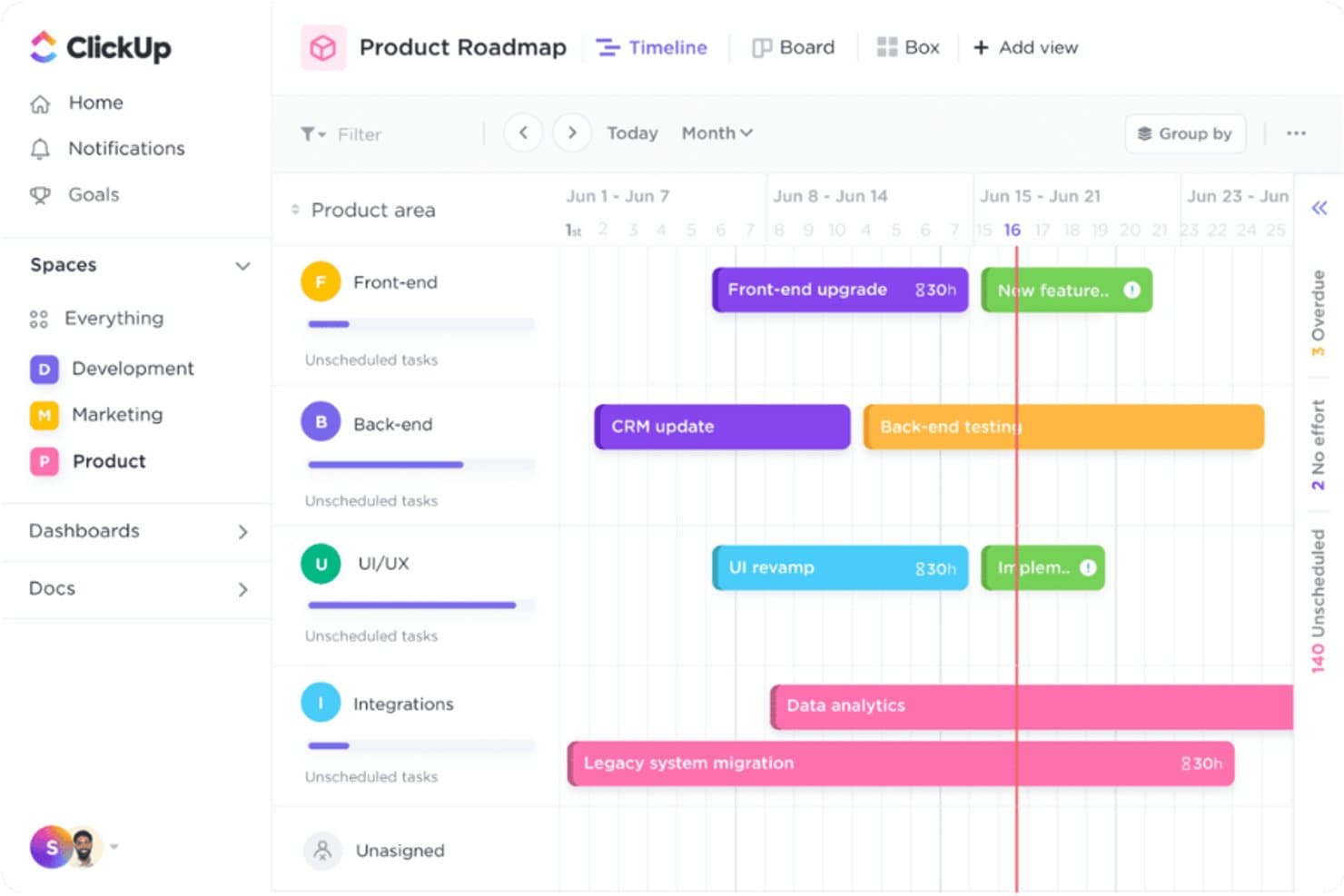
ClickUp lets users visualize project timelines across product teams. ClickUp is a work management platform for IT and cross-functional teams that need to coordinate projects, track operational work, and keep plans and responsibilities visible in one workspace.
Who Is ClickUp Best For?
IT project managers who need to coordinate infrastructure work and track time across projects and support tasks.
Why I Picked ClickUp
I picked ClickUp as a Jira alternative for its “Best for versatile project management and time tracking” focus. I can log time directly against infrastructure rollout tasks and support work, then review timesheets and reports to understand where the team’s hours go.
ClickUp Key Features
- Task views: Switch between List, Board, Calendar, and Gantt views.
- Custom statuses: Define workflow stages for infrastructure and support tasks.
- Task dependencies: Link tasks to show which work must happen first.
- Automations: Set rules to assign tasks or update statuses automatically.
ClickUp Integrations
ClickUp lists native integrations with GitHub, GitLab, Bitbucket, Slack, Microsoft Teams, Sentry, Zendesk, Google Drive, Harvest, and Clockify. It also supports Zapier and offers a public API for custom integrations.
Pros and Cons
Pros:
- Custom statuses and dependencies map infrastructure work
- Multiple task views suit varied workflows
- Built-in time tracking ties hours to tasks
Cons:
- Users report lag during navigation
- Workspace configuration can become hard to manage
Learn more about ClickUp: Best for workspace flexibility and coordination
- Free plan + trial available
- From $10/user/month
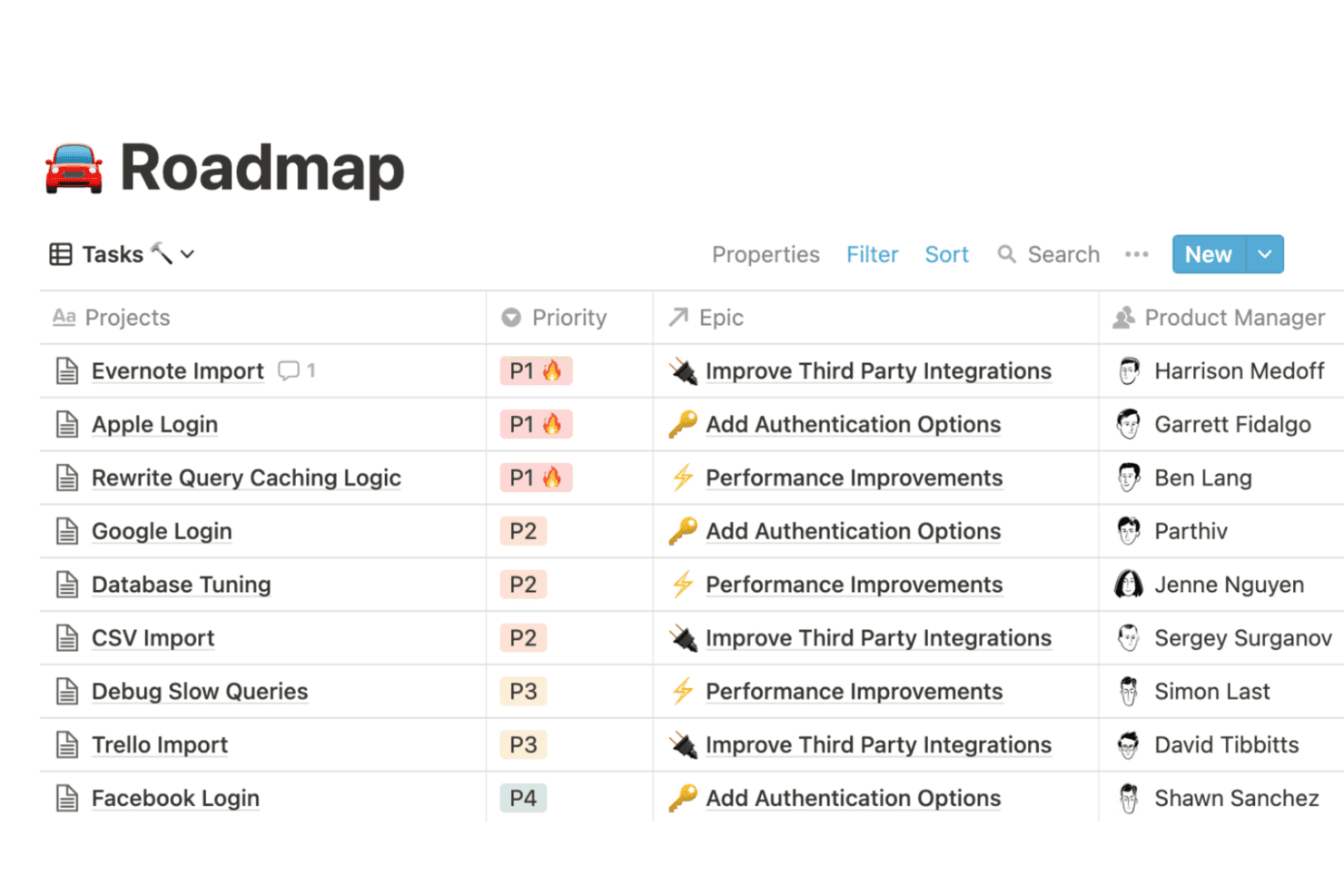
Notion organizes project tasks by priority, epic, and owner in a table view. Notion gives IT teams a shared workspace for project plans, documentation, and task tracking, helping keep operational work visible and reduce scattered updates.
Who Is Notion Best For?
IT teams that want to shape their own documentation and coordination workflows instead of adopting a rigid, predefined system.
Why I Picked Notion
I picked Notion as a Jira alternative for workspace flexibility and coordination. I use its databases with board and table views to track infrastructure projects, then link tasks to pages with technical notes and runbooks. That keeps project status and operational context together, while teams can shape workflows around their own processes.
Notion Key Features
- Timeline view: Plot project items across dates to see schedules and overlaps.
- Task dependencies: Mark tasks that must finish before others can begin.
- Sub-items: Break larger tasks into smaller, nested work items.
- Reminders: Set date-based alerts on tasks and project pages.
Notion Integrations
Notion’s official Connections catalog includes Slack, GitHub, Google Drive, Microsoft Teams, and Jira, with connection types including API integrations and AI connectors. Notion also connects with Zapier and provides an API for custom integrations.
Pros and Cons
Pros:
- Board, timeline, and table views support planning
- Tasks and runbooks share connected pages
- Configurable databases adapt to team workflows
Cons:
- Reporting lacks depth for delivery oversight
- Complex task workflows require manual setup
Learn more about Notion: Best for team coordination with visual task management
- Free plan + trial + demo available
- From $10.99/user/month (billed annually)
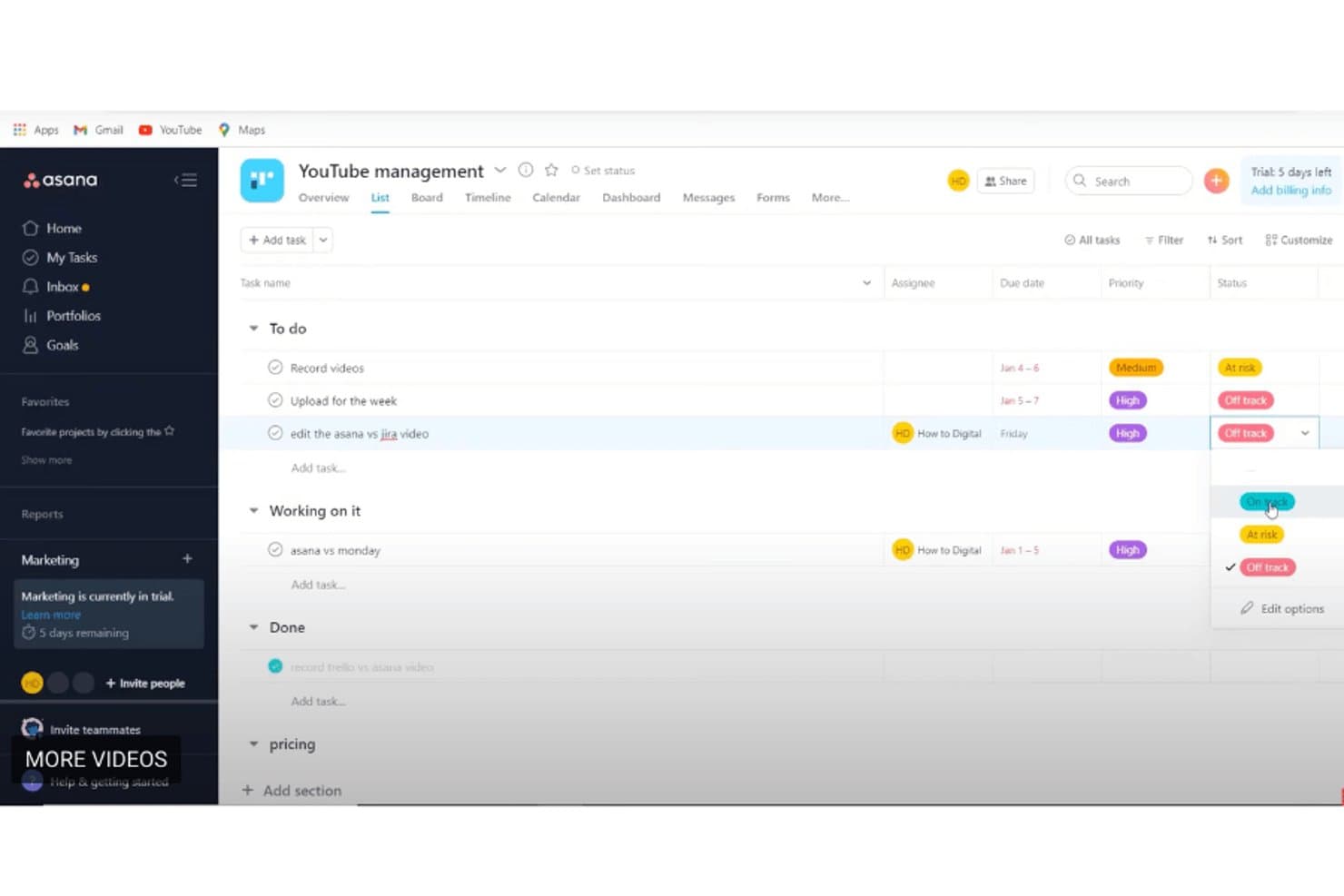
Asana organizes tasks by status with priority labels and due dates. Asana is a project management platform for IT and cross-functional teams that need to coordinate work, track dependencies, and keep requests and initiatives moving across departments.
Who Is Asana Best For?
Asana suits IT and operations teams that need to assign cross-functional work, track dependencies, and keep project requests visible.
Why I Picked Asana
I picked Asana, best for team coordination with visual task management, because its board view makes cross-functional IT requests easy to track by status. I use task dependencies and Timeline to see how infrastructure work affects linked projects and deadlines.
Asana Key Features
- Forms: Create request forms that turn submissions into Asana tasks.
- Rules: Set triggers and actions to automate routine task updates.
- Custom fields: Add fields to track details such as priority, owner, or system.
- Portfolios: Group projects and review their status from one view.
Asana Integrations
Asana’s integration directory lists connections with Slack, Microsoft Teams, Google Drive, Gmail, Outlook, Jira Cloud, ServiceNow, GitHub, Google Sheets, and Salesforce. Asana also connects with Zapier and provides an API for custom integrations.
Pros and Cons
Pros:
- Forms and rules standardize incoming requests
- Dependencies connect infrastructure work to deadlines
- Board views make cross-team status visible
Cons:
- Tasks support only one assignee
- No native sprint features for engineering teams
Learn more about Asana: Best for bug tracking in software development
- Free plan available
- Pricing upon request
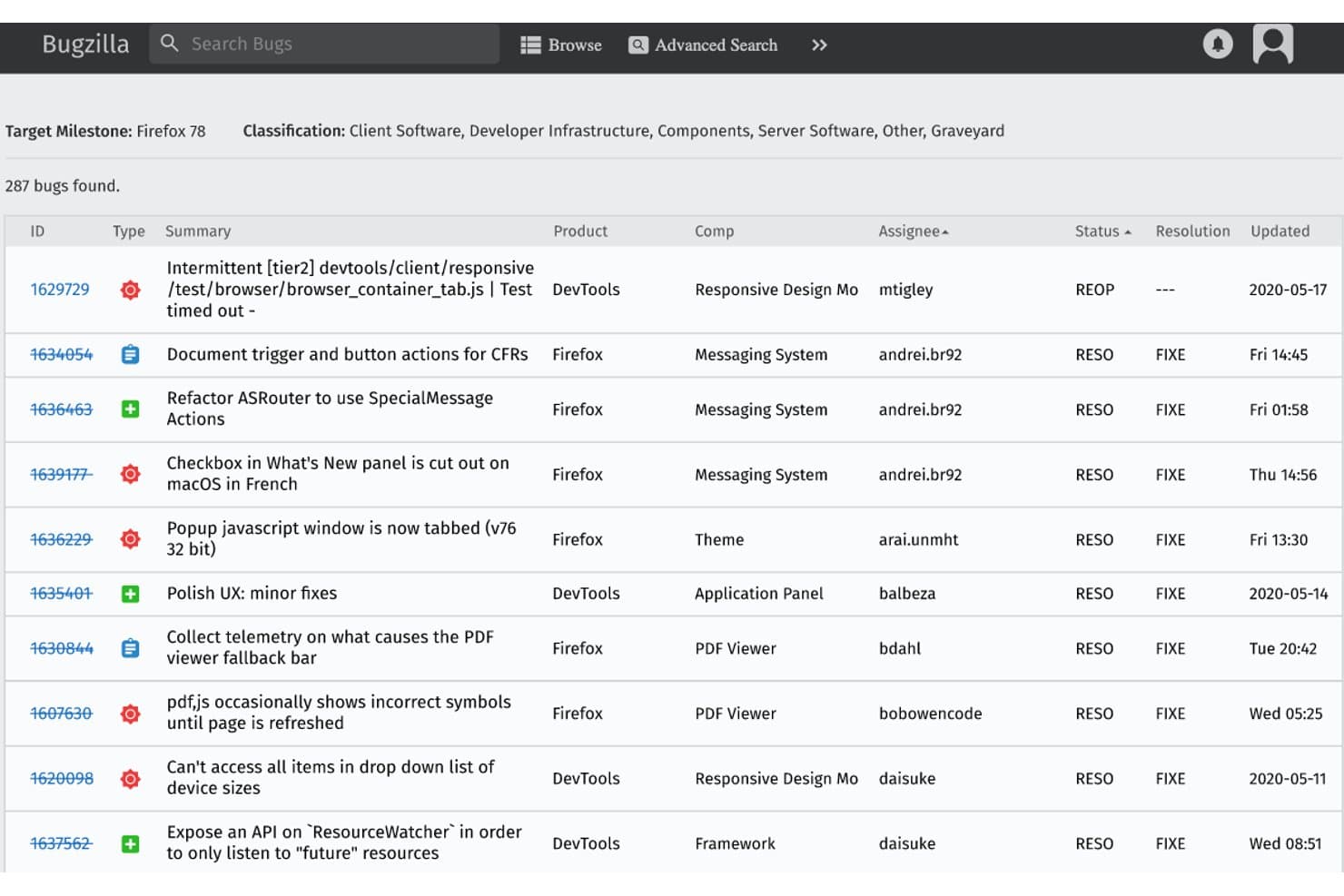
Bugzilla displays a filterable bug list with status and assignee details. Bugzilla is an open-source issue-tracking system for software teams that need to organize defect reports, assign follow-up work, and keep development issues from getting lost across releases.
Who Is Bugzilla Best For?
Bugzilla suits software development teams that need a dedicated tool to triage, assign, and track defects across releases.
Why I Picked Bugzilla
Bugzilla earns a place among my Jira alternatives for its focused defect workflow: it’s Best for bug tracking in software development. I value its bug dependencies and advanced search, which help developers connect related defects and find open issues by release, status, or assignee. Custom fields let teams capture details needed to reproduce and route each report.
Bugzilla Key Features
- Email notifications: Configure alerts for changes to bugs you follow.
- Time tracking: Record estimated, remaining, and work hours on bugs.
- Bug voting: Let users vote for bugs they want addressed.
- Reports and charts: Create reports and charts from bug data.
Bugzilla Integrations
Bugzilla provides a REST API for custom integrations, including creating, searching, and updating bugs. Native integrations with specific third-party tools aren’t clearly documented.
Pros and Cons
Pros:
- Custom fields capture reproduction details
- Saved filters and alerts support triage
- Advanced search quickly locates matching defects
Cons:
- Limited sprint and epic planning
- Dated interface feels behind Jira
Learn more about Bugzilla: Best for Kanban-style tracking and automation
- Free trial available
- From $8.50/user/month (billed annually)
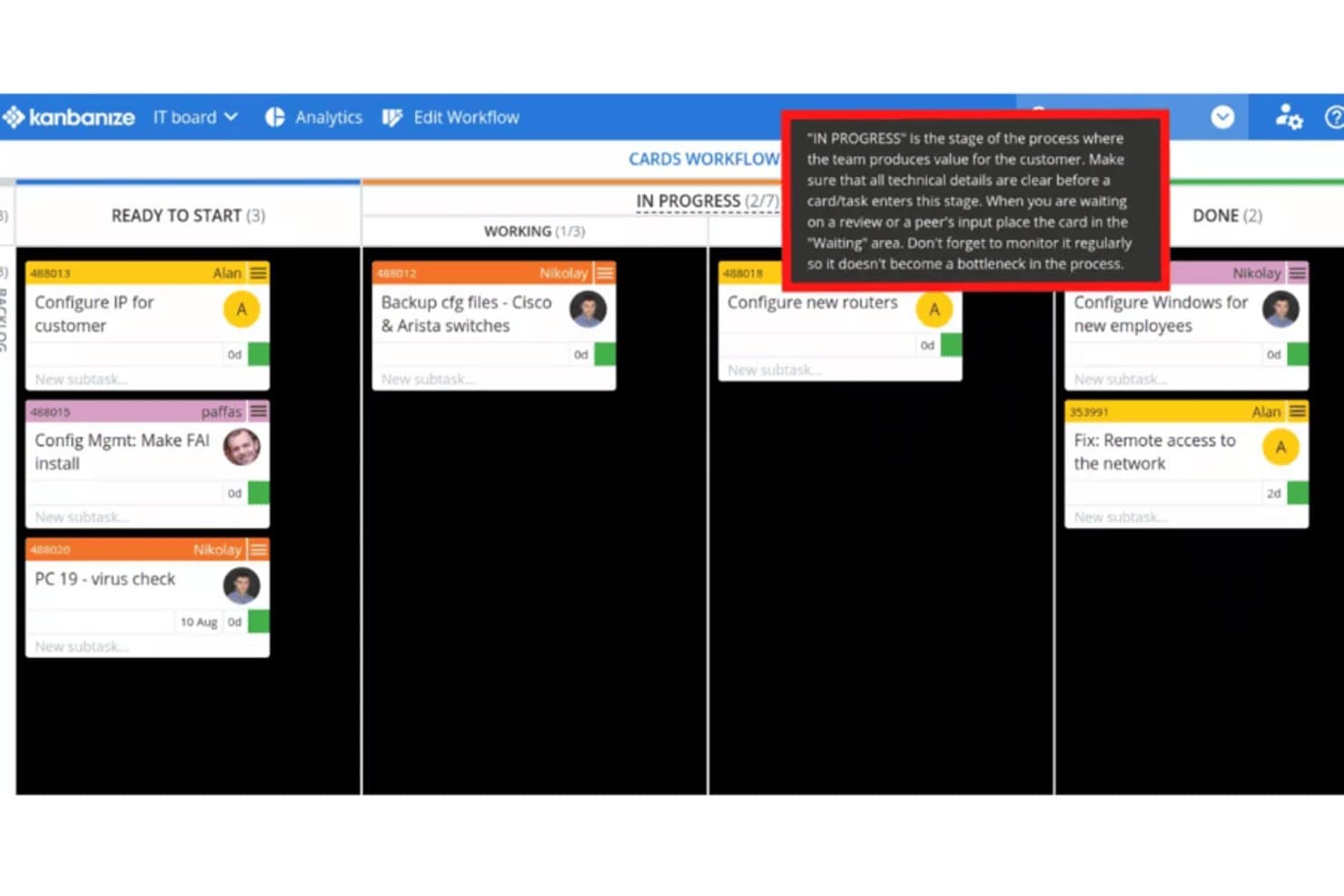
Kanbanize guides teams through workflow stages with inline tips. Kanbanize gives IT and operations teams a project management platform for coordinating requests, dependencies, and delivery priorities across complex, cross-functional work.
Who Is Kanbanize Best For?
IT and operations teams that need Kanban boards and automated workflows to manage work across departments will find Kanbanize a practical fit.
Why I Picked Kanbanize
I picked Kanbanize for Best Jira Alternatives Reviewed because it’s Best for Kanban-style tracking and automation. Customizable boards and linked workflows make cross-team dependencies visible, while business rules can automatically create, move, or update cards when conditions are met.
Kanbanize Key Features
- WIP limits : Set maximum work-item counts for workflow stages.
- Analytics reports : Review cycle time, throughput, and workflow bottlenecks.
- Timeline view : See project schedules and milestones over time.
- Integrations : Connect Jira and Azure DevOps work with Kanbanize.
Kanbanize Integrations
Kanbanize (now Businessmap) documents integrations with Jira, Azure Repos, GitHub, GitLab, Bitbucket, Power BI, Tableau, Looker Studio, Okta, and Microsoft Power Automate; it also connects with Zapier and offers a REST API for custom integrations.
Pros and Cons
Pros:
- Business rules automate card updates across workflows
- Linked initiatives make cross-team dependencies visible
- WIP limits and flow analytics surface bottlenecks
Cons:
- Dense boards and configuration can confuse teams
- Report design limits deeper analysis
Learn more about Kanbanize: Best for prioritizing changes in Agile teams
- Not available
- Pricing upon request
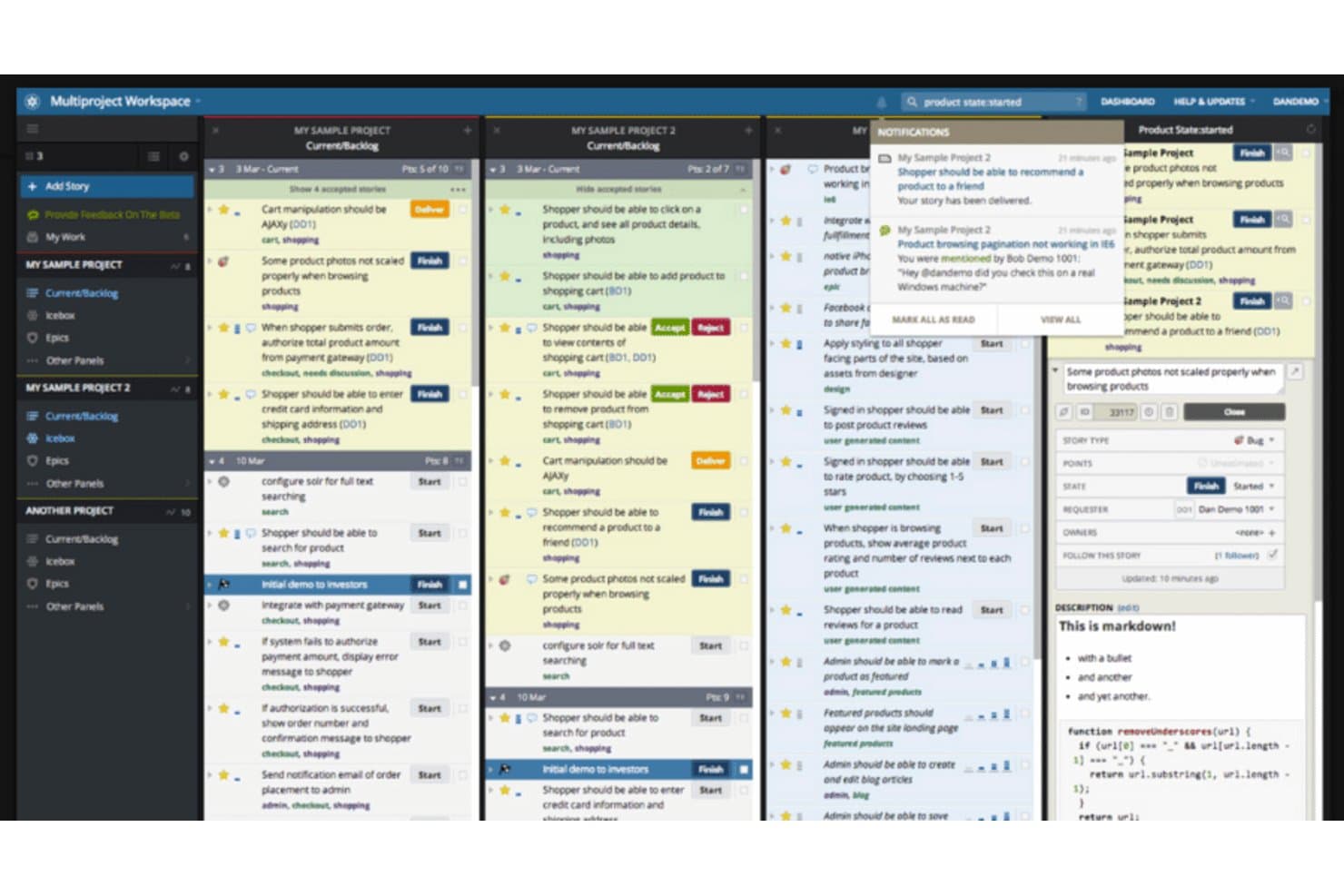
Pivotal Tracker lets users manage stories across multiple projects simultaneously. Built for software teams that want a focused alternative to Jira, Pivotal Tracker organizes Agile development work into stories and makes project progress easier to follow.
Who Is Pivotal Tracker Best For?
Pivotal Tracker fits software product teams that want developers and product leads to coordinate iteration work around user stories.
Why I Picked Pivotal Tracker
I picked Pivotal Tracker as a Jira alternative because its story backlog helps teams reprioritize changing work. It’s Best for prioritizing changes in Agile teams: product leads can rank stories, then use velocity-based iteration planning to match upcoming work to team capacity.
Pivotal Tracker Key Features
- Epics: Group related stories under larger initiatives and track their progress.
- Labels: Tag stories with custom categories and filter the project by label.
- GitHub integration: Link commits and pull requests to related stories.
- Story comments: Discuss work and share updates directly on individual stories.
Pivotal Tracker Integrations
Pivotal Tracker offers a native GitHub integration that links commits and pull requests to stories. It also supports Zapier and provides an API for custom integrations.
Pros and Cons
Pros:
- Comments keep work discussions beside stories
- Velocity forecasts help size upcoming iterations
- Story ranking adapts as priorities change
Cons:
- Fixed workflow restricts non-Agile processes
- Custom reporting options remain limited
Learn more about Pivotal Tracker: Best for dynamic collaboration across project types
- Free plan + 14-day free trial available
- From $9/user/month (billed annually)
Visit WebsiteCustomer Rating:4.6/5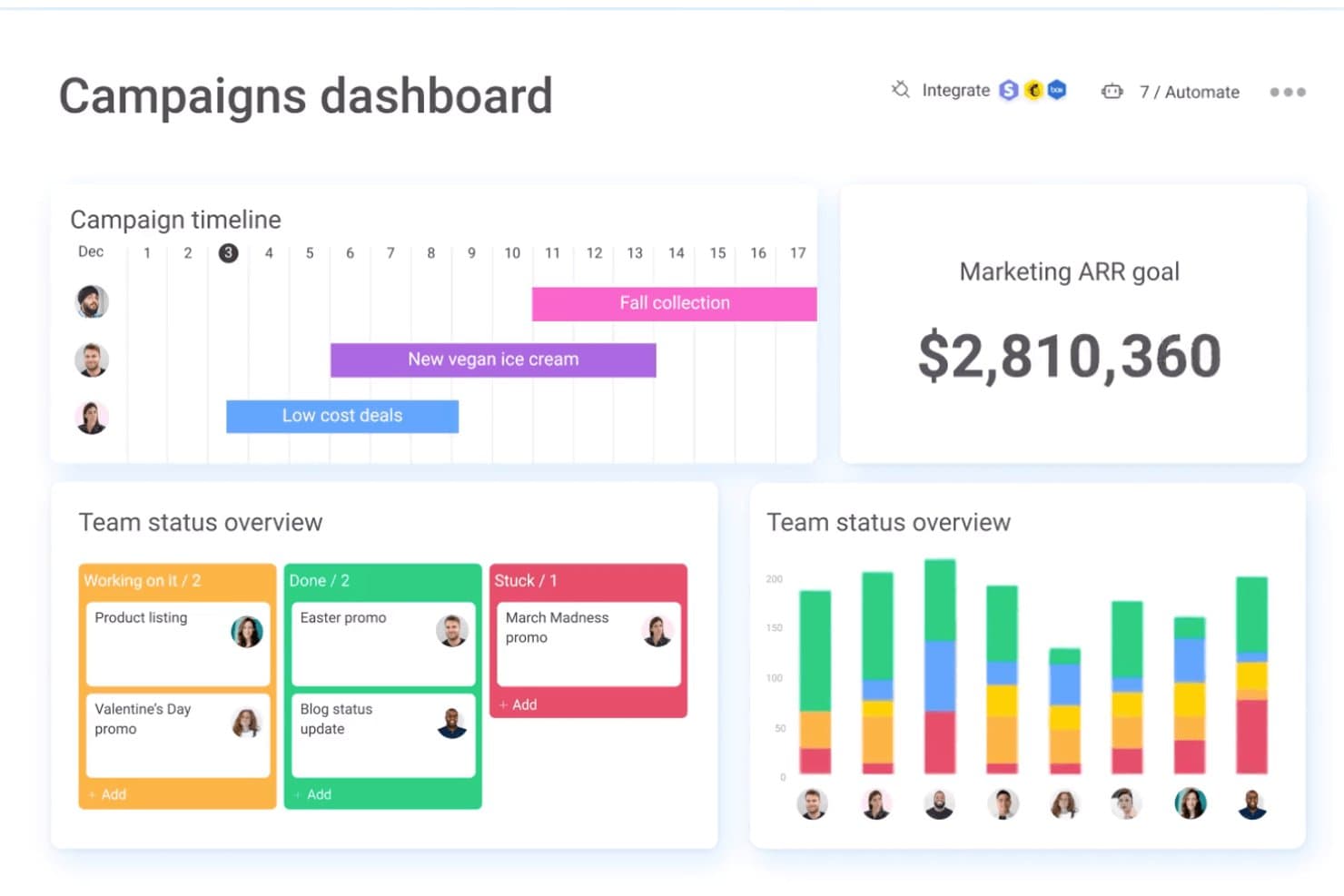
monday.com centralizes campaign timelines, team status, and ARR goals in one dashboard. monday AI Workspace gives IT and operations teams configurable project boards, automations, and AI tools to coordinate cross-functional work, clarify ownership, and keep changing initiatives visible.
Who Is monday AI Workspace Best For?
IT teams coordinating varied infrastructure, support, and cross-functional projects will value monday AI Workspace’s flexible collaboration tools.
Why I Picked monday AI Workspace
I picked monday AI Workspace as a Jira alternative because its “Best for dynamic collaboration across project types” focus suits changing IT work. I use configurable boards to track infrastructure changes, support requests, and cross-team projects with clear owners and statuses. Automations can notify stakeholders when work changes, while AI tools support coordination across boards.
monday AI Workspace Key Features
- Gantt charts: View project timelines, milestones, and task dependencies.
- Dependency tracking: Link related tasks and choose how schedule changes affect them.
- Workload view: See team members’ assigned work and capacity.
- WorkForms: Collect project requests from internal or external stakeholders.
monday AI Workspace Integrations
monday.com lists 850+ integrations and apps, including GitHub, GitLab, Slack, Microsoft Teams, Google Calendar, Outlook, Salesforce, HubSpot, and Zendesk, with additional partner-built apps in its marketplace. It supports Zapier and provides APIs and SDKs for custom integrations.
Pros and Cons
Pros:
- Templates support quick cross-functional workflow setup
- Task ownership stays visible across project views
- Cross-team workflows adapt beyond software sprints
Cons:
- Complex boards need upfront structure and maintenance
- Agile issue tracking lacks Jira’s engineering depth
Learn more about monday AI Workspace:
Outras alternativas ao Jira
Eis algumas alternativas adicionais ao Jira que não entraram na minha lista resumida, mas que vale a pena conhecer:
- 11SmartsheetBest for spreadsheet-like project management
- 12WrikeBest for comprehensive, high-security project management
- 13Jama SoftwareBest for live requirements traceability
- 14BasecampBest for simplifying communication and collaboration for remote teams
- 15Planview LeanKitBest for streamlining workflows for lean enterprise teams
- 16ProofHubBest for simple project management for small to mid-sized teams
- 17BacklogBest for combining project management with bug tracking
- 18SpiraTeamBest for integrated Application Lifecycle Management (ALM) for software testing
- 19Rally SoftwareBest for enterprise-scale Agile project management
- 20ActiveCollabBest for small business and solopreneur task management
- 21GitLabBest for integrated DevOps lifecycle management for software developers
- 22Azure DevOpsBest for end-to-end development solutions in the Microsoft ecosystem
How I Evaluate Jira Alternatives
I split my evaluation into baseline requirements—like sprint boards, custom workflows, and Git integrations—and differentiators that separate a good fit from the right one.
Core Functionality (Table Stakes For This List)
When I'm selecting tools for my list, I rank each one on a scale from 0 (does not offer the functionality) to 5 (excels in this area) for each core functionality listed below. Then, I calculate the tool's total score into a percentage. Each tool needs to achieve a minimum total score of 65% to be considered for inclusion.
- Issue & Bug Tracking: I check whether you can create, assign, and prioritize issues with custom fields and statuses that map to real dev cycles like QA handoffs and release tagging.
- Agile Project Management: Sprint planning, backlog grooming, and Kanban boards all need to be present so teams can run Scrum or Kanban without bolting on extra tools.
- Custom Workflows: Each tool gets evaluated on how far you can tailor statuses, transitions, and rules per project—like separate flows for frontend vs. backend teams.
- Developer Tool Integrations: I look for native connections to GitHub, GitLab, Bitbucket, and CI/CD pipelines that link commits and PRs directly to issues.
- Roadmapping & Reporting: Burndown charts, velocity tracking, and timeline views should be built in so engineering managers can report on progress without exporting data.
- Permissions & Access Control: Role-based permissions and project-level access matter, especially when contractors, QA, and internal teams share the same workspace.
Once I have a list of tools that meet this criteria, I consider what sets each platform apart.
Differentiating Factors (What Sets Vendors Apart)
Here's how I compare and contrast different vendors:
Standout Features
Built-in automation is a big differentiator—I look for tools that let you trigger assignments, status changes, and notifications based on issue events without writing scripts. Hierarchical work structures also matter when engineering managers need to connect high-level initiatives down to individual sub-tasks across multiple teams. For orgs where dev and IT ops share a platform, an integrated ITSM or helpdesk module can eliminate the gap between incident tickets and development work.
Beyond Features
Migration support is the first thing I evaluate—switching from Jira mid-project is risky, so I check whether a tool offers native Jira importers that preserve issue history, attachments, and workflow mappings. Security and compliance also weigh heavily; I look for SOC 2 Type II certification, SSO, and SCIM provisioning since most engineering teams operate under strict access policies. Pricing transparency matters too, especially whether essential Agile features stay accessible as your team scales past the free tier.
Porque procurar uma alternativa ao Jira?
Inicialmente concebido para o desenvolvimento de software, o Jira evoluiu para uma solução abrangente de gestão de projetos.
Embora seja conhecido pelos seus pontos fortes na gestão ágil de projetos, o Jira é uma ferramenta versátil. Foi concebido para gerir tarefas e fluxos de trabalho e acompanhar o progresso dos projetos, independentemente da metodologia utilizada.
Embora o Jira tenha certamente as suas vantagens, não é uma solução universal. Pode ser algo difícil de dominar e a sua interface pouco convencional não é particularmente intuitiva.
Se a sua empresa estiver numa trajetória de crescimento, o preço poderá fazê-lo reconsiderar a escolha, sobretudo porque pode disparar até aos $12,000 por ano para equipas maiores.
O Jira é uma escolha popular entre equipas de desenvolvimento de software, mas poderá ser um pouco excessivo para profissionais independentes ou especialistas não técnicos.
Principais funcionalidades do Jira
Eis algumas das principais funcionalidades do Jira, para o ajudar a comparar as ofertas das soluções alternativas:
- Quadros ágeis: Pode utilizar quadros Kanban e Scrum para gerir e acompanhar visualmente os fluxos de trabalho da sua equipa.
- Gestão do backlog: A sua equipa pode organizar e definir prioridades para as tarefas num espaço de backlog dedicado.
- Fluxos de trabalho personalizados: Pode conceber fluxos de trabalho que correspondam às fases e aos processos específicos dos projetos da sua equipa.
- Acompanhamento de problemas: Pode criar, atribuir e acompanhar tarefas, erros e pedidos num único local.
- Modelos de projeto: A sua equipa pode começar mais rapidamente com modelos integrados para diferentes tipos de projeto.
- Regras de automatização: Pode reduzir as tarefas repetitivas configurando automatizações simples do tipo se isto, então aquilo.
- Pesquisa avançada: Pode utilizar filtros e consultas para encontrar rapidamente problemas, tarefas ou atualizações específicos.
- Relatórios e painéis: Tem acesso a relatórios e gráficos visuais que ajudam a sua equipa a acompanhar o progresso e a identificar estrangulamentos.
- Permissões e funções: Pode controlar quem vê e edita cada elemento através de permissões de utilizador detalhadas.
- Integrações de terceiros: Pode ligar o Jira a ferramentas como o Slack, o GitHub e o Confluence para o adaptar ao fluxo de trabalho existente da sua equipa.