

Uma alternativa sólida ao DBeaver oferece uma ampla compatibilidade com bases de dados, ferramentas de consulta flexíveis e uma experiência de utilização que suporta tanto a gestão de rotina como a resolução de problemas complexos. Embora o DBeaver seja uma ferramenta popular de gestão de bases de dados de código aberto, muitas equipas avaliam ferramentas de bases de dados de código aberto e comerciais quando procuram alternativas.
Dependendo do seu fluxo de trabalho, poderá precisar de um suporte mais robusto para plataformas de bases de dados específicas, de funcionalidades de edição de SQL mais avançadas ou de um tipo diferente de interface para gerir várias bases de dados. Alguns programadores preferem clientes SQL leves, enquanto outros procuram um ambiente de desenvolvimento integrado de bases de dados completo, com automatização avançada, conceção de esquemas ou ferramentas de análise de desempenho.
Esta lista inclui uma combinação de alternativas ao DBeaver de código aberto e comerciais, ajudando-o a comparar diferentes ferramentas de gestão de bases de dados com base na compatibilidade, facilidade de utilização e profundidade das funcionalidades, para que possa encontrar a melhor opção para o seu fluxo de trabalho.
O que é o DBeaver?
O DBeaver é uma ferramenta de gestão de bases de dados de código aberto que suporta uma ampla variedade de bases de dados relacionais e não relacionais. Disponibiliza uma interface unificada para ligar a bases de dados, executar consultas e geri-las, incluindo bases de dados como MySQL, PostgreSQL, Oracle, SQL Server e muitas outras.
O DBeaver é popular entre administradores de bases de dados, programadores e analistas graças ao seu suporte multiplataforma, ao construtor visual de consultas e às funcionalidades que simplificam as tarefas rotineiras de bases de dados.
Tabela de comparação das alternativas ao DBeaver
Esta tabela de comparação resume os detalhes de preços das minhas principais escolhas de alternativas ao DBeaver:
| Tool | Best For | Trial Info | Price | ||
|---|---|---|---|---|---|
| 1 | Best for multi-engine schema compare and sync | Free trial available | From $749.95/year (billed annually) | Website | |
| 2 | Best for intuitive user interface design | Free trial available | From $79/month | Website | |
| 3 | Best for intelligent code completion | 30-day free trial + free plan + free demo available | From $10.90/month (billed annually) | Website | |
| 4 | Best with Microsoft SQL Server integration | Free plan available | Free to use | Website | |
| 5 | Best for lightweight MySQL management | Free plan available | Free to use | Website | |
| 6 | Best for visual schema design | Free plan available | From $19.6/user/month | Website | |
| 7 | Best for plugin extensibility | Free plan available | Free | Website | |
| 8 | Best for database automation features | Free trial available | Pricing upon request | Website | |
| 9 | Best for cross-platform database management | 14-day free trial | From $1,599/user (perpetual license) | Website | |
| 10 | Best for collaborative SQL editing | Free plan available and 14-day free trial | From $9/user/month (billed annually) | Website |


Why Trust Our Software Recommendations
6,700+
Reviews
20
Industry experts
16+
Evaluation factors
14
Years
Our team has been testing and reviewing software since 2012. As tech leaders ourselves, we know how difficult—and important—it is to choose the right software.
For this guide, we evaluated tools using hands-on testing and independent research, scoring tools using our selection criteria.
Our reviews reflect our human editorial judgment, not a sales pitch.
Expert reviewers:
- Paulo Gardini MiguelTech Director
 Tim FisherVP of AI
 Gabriel RosasTech Lead & Software Architect
 Christhian GruhnTech Lead & Platform Architect

Análise das melhores alternativas ao DBeaver
Abaixo encontram-se os meus resumos detalhados das melhores alternativas ao DBeaver que entraram na minha lista restrita. As minhas análises apresentam uma perspetiva detalhada sobre as funcionalidades, capacidades e melhores casos de utilização de cada ferramenta, para o ajudar a encontrar a melhor opção para si.
 Best for multi-engine schema compare and sync
- Free trial available
- From $749.95/year (billed annually)
Visit WebsiteCustomer Rating:4.7/5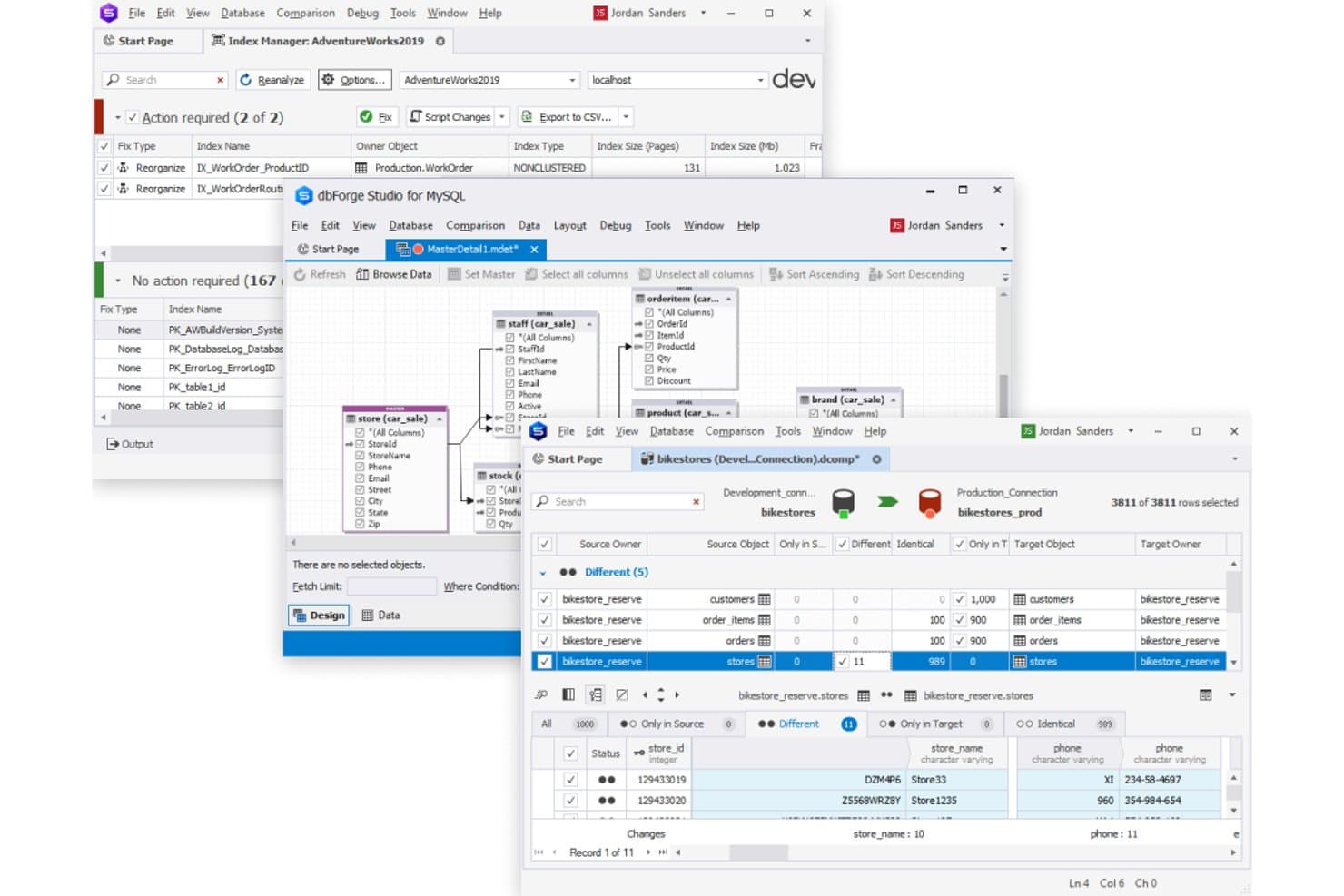
dbForge Edge lets users manage databases across multiple tools in one suite. dbForge Edge is a Windows desktop IDE that bundles four database studios into one interface, giving DBAs and developers a unified environment for SQL Server, MySQL, Oracle, and PostgreSQL—covering everything from query building and debugging to schema migration and AI-assisted SQL generation.
Who Is dbForge Edge Best For?
dbForge Edge is a strong fit for DBAs and backend developers who work across SQL Server, MySQL, Oracle, and PostgreSQL and need deep schema management tools in a single Windows environment.
Why I Picked dbForge Edge
I picked dbForge Edge as one of the best because its schema compare and sync tooling works across all four supported engines, SQL Server, MySQL, Oracle, and PostgreSQL, in a single interface. When I need to reconcile schema drift between a staging and production database, Edge generates a sync script with customizable exclusions and an HTML diff report, without switching tools. I also appreciate that the CLI support lets me automate those comparisons on a schedule, which is a gap in DBeaver's native feature set.
dbForge Edge Key Features
- AI query assistance: A built-in AI Assistant converts natural language to SQL, optimizes queries, and explains errors across all four supported engines.
- Visual query builder: A drag-and-drop query designer lets you build SELECT, INSERT, UPDATE, and DELETE statements visually, with subquery and expression support on SQL Server, MySQL, and PostgreSQL.
- Test data generator: A dedicated tool generates realistic test datasets across all four engines, with CLI support for scripting and automation workflows.
- Query profiler: A built-in profiler tracks query execution history, compares runs, and surfaces performance bottlenecks across SQL Server, MySQL, Oracle, and PostgreSQL.
dbForge Edge Integrations
dbForge Edge offers native integrations with Git, GitHub, SVN, Google Sheets, and ODBC sources. It connects to 30+ databases and services, including SQL Server, MySQL, Oracle, PostgreSQL, Amazon RDS, and Azure SQL, and major cloud data warehouses such as Amazon Redshift, Azure Synapse Analytics, Microsoft Fabric Data Warehouse, and AnalyticDB.
Pros and Cons
Pros:
- Connects to major cloud data warehouses
- Query editing and debugging tools earn reviewer praise
- One interface covers four relational engines
- Four-engine schema comparisons simplify drift checks
Cons:
- No NoSQL database support
- Windows-only app complicates mixed-OS teams
Learn more about dbForge Edge: Best for intuitive user interface design
- Free trial available
- From $79/month
Visit WebsiteCustomer Rating:4.5/5
TablePlus shows MySQL tables with side navigation and searchable records If you’re looking for a database management tool with a focus on speed and simplicity, TablePlus is worth considering. It’s designed for IT specialists and developers who want a clean, modern interface for managing multiple databases without extra clutter. TablePlus stands apart from DBeaver and most open-source options by prioritizing intuitive navigation and quick access to essential features, making it easier to handle routine database tasks.
Why TablePlus Is a Good DBeaver Alternative
For IT teams who want a database management tool that feels fast and visually streamlined, TablePlus is a strong option. I picked it because its interface is designed to minimize distractions, with customizable tabs and a focus mode that helps you zero in on the task at hand. TablePlus also offers inline editing and instant result previews, so you can make changes and see outcomes without extra steps. These features make it appealing for users who value a clean workspace and efficient workflows over the more complex, multi-pane layouts found in DBeaver.
TablePlus Key Features
Some other features that make TablePlus appealing include:
- Multi-Database Support: Connect to and manage MySQL, PostgreSQL, SQLite, SQL Server, and more from a single app.
- Built-In SSH and TLS Encryption: Secure your database connections with integrated SSH and TLS support.
- Advanced Filtering and Search: Quickly locate tables, records, or queries using powerful search and filter tools.
- Plugin System: Extend TablePlus functionality with a growing library of user-contributed plugins.
TablePlus Integrations
Integrations include MySQL, PostgreSQL, Microsoft SQL Server, SQLite, Redis, MariaDB, Amazon Redshift, MongoDB, CockroachDB, and Oracle.
Pros and Cons
Pros:
- Secure connections with built-in SSH and TLS encryption
- Supports multiple relational databases from a single workspace
- User-friendly interface designed for fast database navigation
Cons:
- Plugin ecosystem smaller than many database management tools
- Limited database modeling and ER diagram functionality
Learn more about TablePlus: Best for intelligent code completion
- 30-day free trial + free plan + free demo available
- From $10.90/month (billed annually)

DataGrip provides smart SQL autocomplete and structured query results. Developed by JetBrains, DataGrip is a database management tool built for IT specialists and developers who want advanced code assistance. It stands out from DBeaver and other open-source options by offering intelligent code completion, context-aware suggestions, and on-the-fly analysis for SQL queries. DataGrip is especially useful for teams that need to write, refactor, and troubleshoot complex database code across multiple platforms.
Why DataGrip Is a Good DBeaver Alternative
If you’re looking for a database management tool that excels at code completion, DataGrip is worth a close look. I picked it because its intelligent code completion engine understands database structure and context, offering precise suggestions as you write SQL. DataGrip also highlights errors in real time and provides quick fixes, which help reduce mistakes and speed up query development. These features make it a strong choice for IT specialists who want to write and maintain complex SQL code with fewer interruptions.
DataGrip Key Features
Some other features that make DataGrip appealing include:
- Version Control Integration: Connect directly with Git, Mercurial, and other version control systems from within the interface.
- Customizable Data Views: Create and save custom table views to organize and analyze data more efficiently.
- Multiple Database Support: Manage MySQL, PostgreSQL, Oracle, SQL Server, and other databases in one workspace.
- Schema Navigation: Quickly jump between tables, views, and procedures using an intuitive navigation panel.
DataGrip Integrations
Integrations include PostgreSQL, MySQL, Oracle, Microsoft SQL Server, MongoDB, Redis, Azure SQL, Amazon Redshift, Amazon DynamoDB, and SQLite.
Pros and Cons
Pros:
- Native integration with version control workflows
- Real-time query error detection and refactoring tools
- Intelligent SQL code completion based on database structure
Cons:
- Requires a paid license with no free tier
- Higher system resource usage than lightweight SQL clients
Learn more about DataGrip: Best with Microsoft SQL Server integration
- Free plan available
- Free to use

Microsoft SQL Server Management Studio shows an interactive schema diagram with related tables and columns For IT teams working heavily with Microsoft SQL Server, SQL Server Management Studio (SSMS) offers a purpose-built environment for managing, configuring, and developing on SQL Server databases. Unlike DBeaver and other open-source tools, SSMS provides deep integration with Microsoft’s database ecosystem, including features for advanced security, performance tuning, and automation. It’s especially useful for database administrators and developers who need direct access to SQL Server-specific tools and workflows.
Why Microsoft SQL Server Management Studio Is a Good DBeaver Alternative
When you need a tool that’s tightly integrated with Microsoft SQL Server, SQL Server Management Studio stands out. I picked it because it offers direct access to advanced SQL Server features like agent job management, database mirroring, and built-in performance tuning tools.
SSMS also supports scripting and automation through SQL Server Agent and PowerShell, which is valuable for IT specialists managing large or complex SQL Server environments. These capabilities make it a strong choice for teams who want to leverage the full power of Microsoft’s database platform.
Microsoft SQL Server Management Studio Key Features
Some other features that make SSMS valuable for database professionals include:
- Graphical Query Designer: Build and visualize complex queries without writing SQL manually.
- Database Diagramming: Create and edit database diagrams to map out schema relationships.
- Export and Import Wizards: Move data between SQL Server and other sources using step-by-step wizards.
- Integrated Security Management: Configure and manage user roles, permissions, and security policies directly within the tool.
Microsoft SQL Server Management Studio Integrations
Integrations include SQL Server, Azure SQL Database, Azure SQL Managed Instance, SQL database in Microsoft Fabric, Azure Synapse Analytics, Azure Data Studio, PowerShell, Visual Studio, Active Directory, and Microsoft Purview.
Pros and Cons
Pros:
- Free database management tool for SQL Server environments
- Builin query optimization and performance monitoring toolst-
- Deep integration with Microsoft SQL Server management features
Cons:
- Interface feels dated compared with modern database tools
- Limited support for non-Microsoft database systems
Learn more about Microsoft SQL Server Management Studio (SSMS):

HeidiSQL provides batch table tools for backups, maintenance, and exports HeidiSQL stands out for IT specialists and database administrators who want a lightweight, no-frills solution for managing MySQL and MariaDB databases. It’s especially useful for teams that need fast connections, simple data exports, and direct query execution without the overhead of larger tools like DBeaver. HeidiSQL’s focus on speed and minimal resource usage makes it a practical choice for those working with smaller databases or on resource-constrained systems.
Why HeidiSQL Is a Good DBeaver Alternative
If you’re looking for a tool that keeps things lightweight and focused, HeidiSQL is a strong choice for MySQL management. I picked it because it launches quickly, uses minimal system resources, and provides direct access to MySQL and MariaDB databases without extra overhead.
Features like batch data export, direct table editing, and fast query execution make it ideal for IT specialists who want to get in and out of their databases efficiently. For teams that don’t need the multi-database support or advanced visualization tools of DBeaver, HeidiSQL’s streamlined approach is a practical fit.
HeidiSQL Key Features
Some other features that make HeidiSQL appealing include:
- Session Manager: Organize and save connection settings for multiple servers in one place.
- User Privilege Editor: Manage database user accounts and permissions through a graphical interface.
- Import and Export Tools: Move data between SQL files, CSV, and other formats with built-in wizards.
- Custom Query Snippets: Save and reuse frequently used SQL code snippets for faster query writing.
HeidiSQL Integrations
Integrations include MySQL, MariaDB, Microsoft SQL Server, PostgreSQL, SQLite, Interbase, and Firebird.
Pros and Cons
Pros:
- Fast data import, export, and table editing for relational databases
- Open-source SQL client for managing MySQL and MariaDB databases
- Lightweight database management tool with minimal system requirements
Cons:
- Limited support for NoSQL database platforms
- Windows-only SQL client with no native macOS or Linux version
Learn more about HeidiSQL: Best for visual schema design
- Free plan available
- From $19.6/user/month
Visit WebsiteCustomer Rating:1/5
DbSchema shows a visual ER diagram with tables, columns, and relationships If your team needs advanced visual schema design capabilities, DbSchema offers a unique approach to database modeling and management. It’s especially useful for IT specialists and data architects who want to design, document, and deploy complex database structures visually across multiple platforms. Unlike DBeaver and other open-source tools, DbSchema emphasizes interactive diagrams and collaborative schema management, making it easier to handle large or distributed databases.
Why DbSchema Is a Good DBeaver Alternative
For teams that prioritize visual schema design, DbSchema brings a set of features that go beyond what DBeaver offers. I picked it because its interactive ER diagrams let you design, document, and modify database structures visually, even before connecting to a live database.
DbSchema also supports schema synchronization and versioning, which helps manage changes across distributed environments. These capabilities make it a strong fit for IT specialists who need to collaborate on complex database projects and maintain clear documentation.
DbSchema Key Features
In addition to its visual schema design strengths, I also found these features worth noting:
- Relational Data Explorer: Browse and edit data across related tables using an interactive interface.
- SQL Editor with Autocomplete: Write and execute SQL queries with syntax highlighting and code completion.
- Data Generator: Create sample data sets for testing and development directly within the tool.
- Offline Schema Design: Design and modify database schemas without needing a live database connection.
DbSchema Integrations
Integrations include MySQL, PostgreSQL, MongoDB, SQL Server, Oracle, SQLite, Amazon Redshift, Google BigQuery, Snowflake, and Cassandra.
Pros and Cons
Pros:
- Schema synchronization tools for managing database changes across environments
- Database management tool supporting relational and NoSQL database platforms
- Visual schema design tool for modeling and documenting relational databases
Cons:
- Interface less modern than some database management tools
- Requires paid licensing for full functionality
Learn more about DbSchema:

SQuirreL SQL lets users configure JDBC drivers to connect to databases SQuirreL SQL is a strong fit for IT teams and database professionals who want a highly customizable, open-source SQL client. Its plugin-based architecture lets you tailor the tool to specific workflows, database types, or advanced features that aren’t available out of the box in DBeaver. If you need a flexible environment that adapts to unique or evolving database management needs, SQuirreL SQL offers a level of extensibility that stands out.
Why SQuirreL SQL Is a Good DBeaver Alternative
For teams that want to shape their database management tool around specific needs, SQuirreL SQL’s plugin extensibility is a major advantage. I picked it because you can add or remove plugins to support new database types, advanced scripting, or custom workflow enhancements as your environment changes. The built-in plugin manager makes it easy to discover, install, and update extensions without manual configuration. If you’re looking for a tool that grows and adapts with your database landscape, SQuirreL SQL’s modular approach is hard to match.
SQuirreL SQL Key Features
In addition to its extensible plugin system, I also found these features worth noting:
- SQL Editor with Syntax Highlighting: Write and edit SQL queries with color-coded syntax for better readability.
- Session Graphs: Visualize database sessions and their relationships through built-in graphing tools.
- Bookmark Manager: Save and organize frequently used SQL statements for quick access.
- Table Data Editor: Edit table contents directly within the interface without running manual queries.
SQuirreL SQL Integrations
Integrations include MySQL, PostgreSQL, Oracle, Microsoft SQL Server, SQLite, Firebird, Sybase, DB2, HSQLDB, and Apache Derby.
Pros and Cons
Pros:
- Open-source SQL client with an active developer community
- Database management tool supporting multiple relational databases through JDBC
- Customizable SQL client with extensible plugin architecture
Cons:
- Limited built-in schema design and visualization features
- Interface design feels outdated compared with modern database tools
Learn more about SQuirrel SQL:

Toad provides a PL/SQL editor with syntax highlighting and object navigation Toad stands out for IT specialists and database administrators who need advanced automation in their database management workflows. Unlike most open-source tools, Toad offers built-in automation for routine tasks, code reviews, and performance optimization. If your team manages complex or high-volume environments, Toad’s automation features can help reduce manual effort and improve consistency.
Why Toad Is a Good DBeaver Alternative
If you’re looking for a database management tool that prioritizes automation, Toad is worth considering. I picked Toad because it lets you schedule and automate repetitive tasks like database backups, code analysis, and data comparisons directly within the platform.
Its automation designer feature allows you to build and manage complex workflows without manual intervention. For teams that want to minimize manual database maintenance and enforce consistent processes, Toad’s automation capabilities set it apart from most open-source options.
Toad Key Features
Some other features that stood out to me include:
- Code Debugger: Step through stored procedures and scripts to identify and resolve errors.
- Schema Compare: Compare and synchronize database schemas across different environments.
- SQL Optimization Tools: Analyze and tune SQL queries for better performance.
- Data Modeling: Design and visualize database structures with built-in modeling tools.
Toad Integrations
Integrations include Oracle, IBM DB2, Microsoft SQL Server, MySQL, PostgreSQL, SAP ASE, Amazon Redshift, Snowflake, MongoDB, and SQLite.
Pros and Cons
Pros:
- Schema comparison features for managing database changes
- Advanced debugging and SQL query performance optimization tools
- Database management tool with automation for repetitive database tasks
Cons:
- Higher system resource usage in large database environments
- Pricing requires a direct vendor inquiry
Learn more about Toad: Best for cross-platform database management
- 14-day free trial
- From $1,599/user (perpetual license)

Navicat Premium shows detailed table data with rows, metadata, and comments For IT teams managing multiple database types across different platforms, Navicat Premium offers a unified workspace for connecting to and working with diverse databases. Unlike DBeaver and most open-source tools, it supports simultaneous connections to MySQL, PostgreSQL, Oracle, SQL Server, and more within a single interface. This makes it especially useful for organizations juggling hybrid or multi-cloud environments and needing to streamline cross-database operations.
Why Navicat Premium Is a Good DBeaver Alternative
Navicat Premium stands out for teams that need to manage multiple database types from a single application. I picked it because it lets you connect to and work with MySQL, PostgreSQL, Oracle, SQL Server, and more at the same time, all within one interface.
Its cross-platform design means you can run it on Windows, macOS, or Linux without losing functionality. This makes it a strong choice for IT specialists who need to coordinate data and workflows across hybrid or multi-cloud environments.
Navicat Premium Key Features
Some other features that set Navicat Premium apart include:
- Data Modeling Tool: Design and visualize database structures using an integrated ER diagram editor.
- Automated Backup and Scheduling: Set up recurring database backups and automate routine maintenance tasks.
- Data Synchronization: Compare and synchronize data across different databases or servers.
- SQL Code Snippet Library: Store and reuse frequently used SQL code snippets for faster query building.
Navicat Premium Integrations
Integrations include MySQL, PostgreSQL, SQL Server, Oracle, SQLite, MariaDB, MongoDB, Redis, Snowflake, and Amazon RDS.
Pros and Cons
Pros:
- Data synchronization tools for managing multi-database environments
- Built-in ER diagram designer and data modeling features
- Cross-platform database management tool supporting multiple database types
Cons:
- Closed-source platform with limited community customization
- High licensing cost compared with many DBeaver alternatives
Learn more about Navicat Premium: Best for collaborative SQL editing
- Free plan available and 14-day free trial
- From $9/user/month (billed annually)

Beekeeper Studio lets users edit table data via right-click cell actions Beekeeper Studio is an open-source database management tool designed for teams that need real-time collaboration on SQL queries. It stands out with built-in features for sharing queries and editing sessions, making it a strong choice for data teams and developers who work together on database projects. If you’re looking for a tool that prioritizes collaborative workflows over solo database management, Beekeeper Studio offers a unique approach compared to DBeaver.
Why Beekeeper Studio Is a Good DBeaver Alternative
What sets Beekeeper Studio apart from DBeaver is its focus on collaborative SQL editing. I picked it for teams that need to share queries and work together in real time, which is something DBeaver doesn’t natively support. Features like live query sharing and session-based editing make it easy for multiple users to contribute to the same database project. This approach helps teams avoid version conflicts and keeps everyone on the same page during database development.
Beekeeper Studio Key Features
Some other features in Beekeeper Studio make it a flexible choice for database professionals:
- Tab-Based Query Editor: Work on multiple queries at once using a tabbed interface that keeps your workspace organized.
- Connection Encryption: Secure your database connections with built-in SSL and SSH tunneling options.
- Cross-Platform Support: Run Beekeeper Studio on Windows, macOS, and Linux without compatibility issues.
- Table Data Editing: Edit table data directly in the interface, with support for inline editing and bulk updates.
Beekeeper Studio Integrations
Integrations include MySQL, PostgreSQL, SQLite, SQL Server, MongoDB, Oracle, MariaDB, Amazon Redshift, Google BigQuery, and Redis.
Pros and Cons
Pros:
- User-friendly interface for managing queries and editing table data
- Open-source database management tool with active GitHub community development
- Query sharing and streamlined team workflows
Cons:
- Limited ER diagram and visual schema design capabilities
- Fewer advanced database administration features than some DBeaver alternatives
Learn more about Beekeeper Studio:
Outras alternativas ao DBeaver
Eis algumas alternativas adicionais ao DBeaver que não entraram na minha lista restrita, mas que ainda vale a pena conhecer:
- 11DbGateBest with multi-database connections
- 12SQL Workbench/JBest for scriptable SQL workflows
- 13DbVisualizerBest for advanced visual query building
- 14DatabricksBest for unified analytics on big data
- 15Oracle SQL DeveloperBest for Oracle database development
- 16Google Cloud SQLBest with managed cloud database hosting
- 17BytebaseBest for integrated database change workflows
- 18pgAdminBest for extensive PostgreSQL administration
- 19Sequel AceBest for native macOS MySQL management
- 20KyligenceBest for OLAP acceleration on large datasets
How I Evaluate DBeaver Alternatives
I evaluate these tools in two layers: baseline requirements every option must clear—multi-database support, SSH tunneling, schema browsing—and differentiators that set the best apart.
Core Functionality (Table Stakes For This List)
When I'm selecting tools for my list, I rank each one on a scale from 0 (does not offer the functionality) to 5 (excels in this area) for each core functionality listed below. Then, I calculate the tool's total score into a percentage. Each tool needs to achieve a minimum total score of 75% to be considered for inclusion.
- Multi-Database Support: I check how many engines a tool covers—from PostgreSQL and MySQL to MongoDB, Snowflake, and Redshift—so you can work across your full stack.
- SQL Editor With IntelliSense: A good SQL editor needs context-aware autocomplete, syntax highlighting, and formatting. I look at how well it handles complex queries across different SQL dialects.
- Data Browsing and Editing: I evaluate whether you can filter, sort, and edit table data directly in a grid view—useful when you need to spot-check records or fix a bad row quickly.
- Schema and ERD Visualization: Being able to browse object trees and generate ER diagrams matters when you're onboarding onto unfamiliar databases or auditing table relationships.
- Data Import/Export Capabilities: I look for support across common formats like CSV, JSON, SQL, and XML, plus cross-database transfer for tasks like migrating data between staging and production.
- Secure Connection Management: Tools should support SSH tunneling, SSL/TLS, and encrypted credential storage. I evaluate how each tool handles saved connections across multiple environments.
Once I have a list of tools that meet this criteria, I consider what sets each platform apart.
Differentiating Factors (What Sets Vendors Apart)
Here's how I compare and contrast different vendors:
Standout Features
AI query assistance is a major differentiator—I look at whether a tool can generate SQL from natural language or suggest optimizations, which saves real time when you're writing complex joins across unfamiliar schemas. Team collaboration features also matter, especially shared query libraries and connection sharing, since most database work involves handoffs between developers and DBAs. For distributed teams, I evaluate whether a tool offers cloud-native or browser-based access so engineers can connect without local installs.
Beyond Features
Licensing matters a lot in this space. I check whether a tool offers a free or open-source tier, since many DBAs and developers need immediate access without procurement delays. Deployment flexibility is another key factor—some teams need on-premise or self-hosted installs to meet internal security policies, while others prefer SaaS. I also evaluate ecosystem integrations, particularly with Git for version-controlled schema changes and CI/CD pipelines, since database management rarely lives in isolation from your broader DevOps workflow.
Por que procurar uma alternativa ao DBeaver?
Embora o DBeaver seja uma ferramenta competente de gestão de bases de dados de código aberto, não é adequado para todos os fluxos de trabalho. Algumas equipas preferem um cliente SQL ou ambiente de desenvolvimento integrado diferente, dependendo das bases de dados com que trabalham, da sua infraestrutura ou do tipo de tarefas de gestão de bases de dados que executam.
Poderá estar à procura de uma alternativa ao DBeaver porque:
- Precisa de scripts avançados, automação ou fluxos de trabalho SQL através da linha de comandos
- Pretende um ambiente de desenvolvimento SQL mais leve e com menos requisitos de sistema
- Prefere uma aplicação de ambiente de trabalho nativa para macOS ou Linux
- Precisa de um suporte mais sólido para bases de dados específicas, como MSSQL, Postgres ou Oracle
- A sua equipa depende de uma interface de gestão de bases de dados baseada na Web para acesso remoto
- Pretende um cliente de base de dados especializado para a interface de desenvolvimento
- Precisa de ferramentas que se integrem com fluxos de trabalho orientados por API ou ambientes DBaaS
Algumas equipas também preferem ferramentas com uma forte edição comunitária ou um ecossistema de código aberto, enquanto outras dão prioridade a ambientes de desenvolvimento SQL orientados para empresas.
Se algum destes cenários lhe parece familiar, explorar alternativas pode ajudá-lo a encontrar uma ferramenta de gestão de bases de dados que se adeque melhor ao seu fluxo de trabalho, à sua infraestrutura ou ao seu ambiente de desenvolvimento preferido.
Principais funcionalidades do DBeaver
Eis algumas das principais funcionalidades do DBeaver, para o ajudar a comparar as ofertas de soluções alternativas:
- Gestão de ligações a várias bases de dados
- Diagrama ER visual e estruturador de esquemas
- Editor SQL com realce de sintaxe e preenchimento automático
- Importação e exportação de dados em vários formatos
- Edição e filtragem de dados de tabelas
- Ferramentas integradas de administração de bases de dados
- Suporte para bases de dados compatíveis com JDBC
- Visualização avançada de dados e criação de gráficos
- Histórico de execução de SQL e marcadores de consultas
- Arquitetura de extensões para expandir a funcionalidade