

JustCall-beoordeling: voordelen, nadelen, functies en prijzen
JustCall blinkt uit dankzij de eenvoudige integratie en uitgebreide functies voor callcenters en beheer, waardoor het een sterke kandidaat is onder softwareoplossingen voor IT-helpdesks en cloudtelefoonsysteemplatforms.

We review tools independently, and commissions help fund our testing. See our transparency policy, our methodology, or suggest a tool.
JustCall is an IT helpdesk software built around voice and SMS, designed for support teams that handle customer interactions primarily over phone and text channels. I'd consider it if your team needs call routing, local number provisioning, and SMS workflows without stitching together separate tools. Where JustCall pulls ahead of Aircall is in its broader messaging support—including WhatsApp and MMS—making it a stronger pick if your team needs multi-channel coverage that goes beyond voice.
JustCall Evaluation Summary
4.1/5
- From $29/user/month (billed annually)
- 14-day free trial
Waarom u onze softwareaanbevelingen kunt vertrouwen
6,700+
Reviews
20
Industry experts
16+
Evaluation factors
14
Years
Ons team test en beoordeelt software sinds 2012. Als technologieleiders weten we zelf hoe moeilijk — en belangrijk — het is om de juiste software te kiezen.
Voor deze gids hebben we tools geëvalueerd met behulp van praktijktests en onafhankelijk onderzoek, waarbij we tools beoordeeden aan de hand van onze selectiecriteria.
Onze reviews weerspiegelen ons menselijke redactionele oordeel, geen verkooppraatje.
Deskundige beoordelaars:
- Paulo Gardini MiguelTechnisch directeur
 Tim FisherVP AI
 Gabriel RosasTech Lead & software-architect
 Christhian GruhnTech Lead & platformarchitect

JustCall Overview
In my opinion, JustCall is a solid IT help-desk software and business tool, especially for teams wanting to optimize and manage call quality. Its standout features, such as seamless integration, call monitoring capabilities, real-time analytics, and responsive customer support, make it a reliable choice. However, the pricing may be a bit steep for small businesses, and the interface could be more intuitive. Compared to competitors such as Aircall, RingCentral, and Dialpad, JustCall offers a straightforward onboarding process but falls short in offering extensive integration options. It's best suited for midsize to large enterprises that prioritize call handling efficiency, call scoring, and can invest in its comprehensive functions.
Pros
- It offers efficient call management features, such as automatic call routing and auto dialer support.
- Onboarding is straightforward and quick.
- Customer support is responsive and helpful, according to user reviews.
Cons
- The interface may feel a bit clunky for new users.
- Your team may find the learning curve steeper than expected.
- Some advanced features could be more intuitive to use.
Is JustCall Right For Your Needs?
Who Would be a Good Fit for JustCall?
JustCall is a business phone system solution that is ideal for customer support teams in industries such as e-commerce, healthcare, and finance. If your business handles a high volume of phone calls and needs efficient management, JustCall's functionalities, including IVR, automatic call routing, and automated workflows, are ideal. It's great for teams that value quick onboarding, real-time call monitoring, and responsive customer support. Your team will find it especially useful if integrating with existing CRM systems, Zapier, and outreach tools is a priority.
- E-Commerce TeamsYour e-commerce team will benefit from JustCall's call management to handle customer inquiries efficiently through bulk SMS and text messages.
- Healthcare ProvidersJustCall supports healthcare providers with its secure call options and phone number management, simplifying patient communication.
- Finance DepartmentsFinance departments will find JustCall's call logging and tracking features crucial for managing client interactions.
- Midsize EnterprisesMidsize enterprises needing reliable customer support can rely on JustCall's easy onboarding, scalable cloud phone system, and excellent support.
- Customer Service RolesCustomer service teams will appreciate JustCall's efficient call routing, live call tracking, and sentiment analysis capabilities.
- Sales TeamsSales teams can leverage JustCall's CRM integration, sales dialer, predictive dialer, and outbound calling tools to simplify communication and follow-up processes.
Who Would be a Bad Fit for JustCall?
JustCall may not be the best choice for small startups with limited budgets, as its pricing can be a bit steep. If your team doesn't rely heavily on call management or if your business primarily communicates through channels other than voice options, JustCall's capabilities may not be fully utilized. Additionally, if you need a highly intuitive interface with a minimal learning curve, you may find JustCall's setup less appealing.
- Small StartupsYour small startup may find JustCall's pricing too high for limited call volume needs.
- Tech-Heavy IndustriesTech-heavy industries relying on text and chat support won't fully benefit from JustCall's call-centric features.
- FreelancersFreelancers with minimal call management needs will find JustCall's capabilities excessive.
- Nonprofit OrganizationsNonprofits with tight budgets may struggle with JustCall's costs compared to simpler alternatives.
- Educational InstitutionsEducational institutions that don't require extensive call handling may not need JustCall's features.
- Remote TeamsRemote teams relying on digital communication platforms such as Slack may not make full use of JustCall's voice features.
Our Review Methodology
How We Test & Score Tools
We’ve spent years building, refining, and improving our software testing and scoring system. The rubric is designed to capture the nuances of software selection and what makes a tool effective, focusing on critical aspects of the decision-making process.
Below, you can see exactly how our testing and scoring works across seven criteria. It allows us to provide an unbiased evaluation of the software based on core functionality, standout features, ease of use, onboarding, customer support, integrations, customer reviews, and value for money.
Core Functionality (25% of final scoring)
The starting point of our evaluation is always the core functionality of the tool. Does it have the basic features and functions that a user would expect to see? Are any of those core features locked to higher-tiered pricing plans? At its core, we expect a tool to stand up against the baseline capabilities of its competitors.
Standout Features (25% of final scoring)
Next, we evaluate uncommon standout features that go above and beyond the core functionality typically found in tools of its kind. A high score reflects specialized or unique features that make the product faster, more efficient, or offer additional value to the user.
We also evaluate how easy it is to integrate with other tools typically found in the tech stack to expand the functionality and utility of the software. Tools offering plentiful native integrations, 3rd party connections, and API access to build custom integrations score best.
Ease of Use (10% of final scoring)
We consider how quick and easy it is to execute the tasks defined in the core functionality using the tool. High scoring software is well designed, intuitive to use, offers mobile apps, provides templates, and makes relatively complex tasks seem simple.
Onboarding (10% of final scoring)
We know how important rapid team adoption is for a new platform, so we evaluate how easy it is to learn and use a tool with minimal training. We evaluate how quickly a team member can get set up and start using the tool with no experience. High scoring solutions indicate little or no support is required.
Customer Support (10% of final scoring)
We review how quick and easy it is to get unstuck and find help by phone, live chat, or knowledge base. Tools and companies that provide real-time support score best, while chatbots score worst.
Customer Reviews (10% of final scoring)
Beyond our own testing and evaluation, we consider the net promoter score from current and past customers. We review their likelihood, given the option, to choose the tool again for the core functionality. A high scoring software reflects a high net promoter score from current or past customers.
Value for Money (10% of final scoring)
Lastly, in consideration of all the other criteria, we review the average price of entry level plans against the core features and consider the value of the other evaluation criteria. Software that delivers more, for less, will score higher.
Core Features
Call Management: JustCall offers efficient call routing and management to keep your team's communication organized, ensuring that your customers reach the right representative quickly.
Automated Workflows: You can set up automated call workflows to save time and reduce manual errors, simplifying your team's processes.
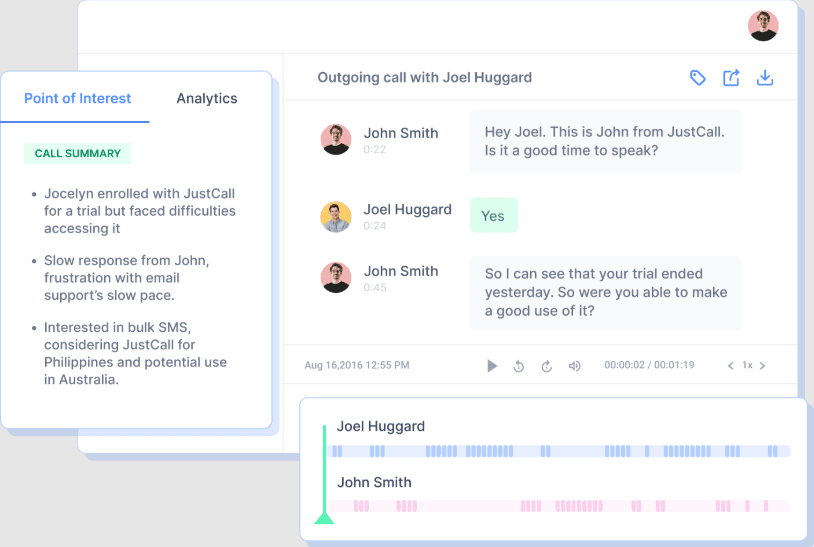
Call Recording: Record calls for quality assurance and training purposes. This helps you maintain high service standards and review interactions easily.
SMS Capabilities: Send and receive texts directly from the platform. It expands your communication options and is great for quick updates and notifications.
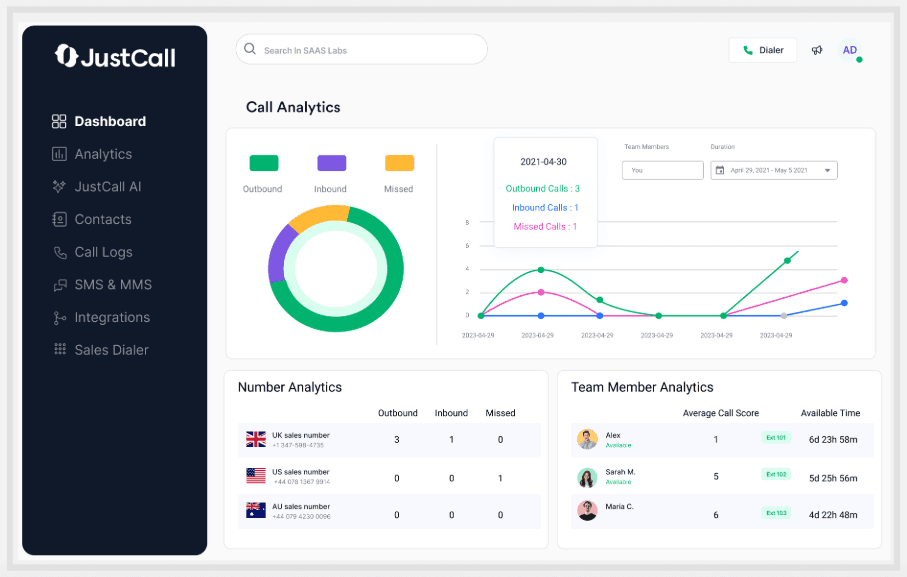
Call Analytics: Access detailed call analytics to track performance and identify trends. It gives you insights into your team's efficiency and customer interactions.
Voicemail Transcription: Voicemails are automatically transcribed, letting you read messages at your convenience, which saves time and ensures nothing is missed.
Ease of Use
JustCall is fairly user-friendly, but it does come with a bit of a learning curve for new users. Your team may find the interface less intuitive compared to other options. However, once familiar, the platform's call management and SMS capabilities make daily operations more efficient. The onboarding process is straightforward, which helps your team get up and running quickly despite the initial adjustment period.

Integrations
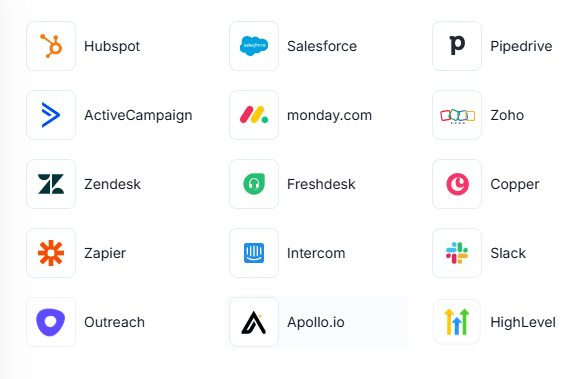
JustCall integrates with Zendesk, Zoho CRM, Salesforce, HubSpot, ActiveCampaign, Slack, Intercom, Help Scout, Pipedrive, and monday.com.
It also offers an API for custom integrations and connects with third-party integration tools.
JustCall Specs
- Analytics: Yes
- API: No
- Auto Dialer: Yes
- Automatic Call Distribution: Yes
- Batch Permissions & Access: No
- Calendar Management: No
- Call Disposition: Yes
- Call Logging: Yes
- Call Monitoring: Yes
- Call Recording: Yes
- Call Scripting: No
- Call Tracking: Yes
- Chat: Yes
- Click-to-Dial: Yes
- Comparative Reporting: No
- Contact Management: Yes
- Contact Sharing: Yes
- Custom Data Forms: No
- Customer Management: No
- Dashboard: Yes
- Data Export: No
- Data Import: No
- Data Visualization: No
- Email Integration: Yes
- Escalation Management: No
- External Integrations: Yes
- Interactive Voice Response: Yes
- Lead Management: No
- Lead Scoring: Yes
- Marketing Automation: No
- Multi-User: Yes
- Notifications: Yes
- Scheduling: Yes
- Softphone: No
- Supplier Management: No


