

Recensione di Oracle Hybrid Cloud 2026: Vantaggi, Svantaggi, Caratteristiche e Prezzi

Recensiamo gli strumenti in modo indipendente e le commissioni ci aiutano a finanziare i nostri test. Consulta la nostra politica sulla trasparenza, la nostra metodologia, oppure suggerisci uno strumento.
Oracle Hybrid Cloud is a cloud computing platform for organizations that need to bridge on-premises infrastructure with public cloud resources. For IT teams managing complex environments, Oracle Hybrid Cloud offers unified management, strong security controls, and deep integration with Oracle applications.
In this review, you’ll find a breakdown of Oracle Hybrid Cloud’s features, pricing, pros and cons, and the types of use cases where it delivers the most value.
Oracle Hybrid Cloud Evaluation Summary

4.6/5
- Pricing upon request
- Free plan available
Perché fidarsi dei nostri consigli sui software
6,700+
Reviews
20
Industry experts
16+
Evaluation factors
14
Years
Il nostro team testa e recensisce software dal 2012. In quanto leader tecnologici noi stessi, sappiamo quanto sia difficile — e importante — scegliere il software giusto.
Per questa guida, abbiamo valutato gli strumenti attraverso test praticie ricerche indipendenti, assegnando un punteggio agli strumenti in base ai nostri criteri di selezione.
Le nostre recensioni riflettono il nostro giudizio editoriale umano, non un discorso di vendita.
Revisori esperti:
- Paulo Gardini MiguelDirettore tecnico
 Tim FisherVP dell'IA
 Gabriel RosasTech Lead e architetto software
 Christhian GruhnTech Lead e architetto della piattaforma

Oracle Hybrid Cloud Overview
If you’re judging cloud computing platforms on integration with existing Oracle workloads, Oracle Hybrid Cloud is a top pick. Its unified management, strong security, and flexible deployment options make it a smart choice for enterprises with complex hybrid needs. Pricing can be less transparent than some competitors, and the interface may feel dense for new users, but support and onboarding resources are solid.
I’d suggest Oracle Hybrid Cloud is best for organizations prioritizing Oracle application compatibility and needing to balance on-premises and cloud resources—especially in regulated or data-sensitive environments.
Pros
- Unified monitoring across on-premises and cloud resources.
- Flexible deployment for regulatory and data residency needs.
- Deep integration with Oracle databases and applications.
Cons
- Advanced features may require specialized Oracle expertise.
- Limited third-party ecosystem compared to some competitors.
- Pricing structure can be complex and less transparent.
Is Oracle Hybrid Cloud Right For Your Needs?
Who Would be a Good Fit for Oracle Hybrid Cloud?
Oracle Hybrid Cloud is a strong choice for organizations that need to integrate on-premises systems with cloud resources, especially when Oracle applications are central to their operations. Enterprises in regulated industries, large-scale IT departments, and global businesses with strict data residency requirements will find its hybrid deployment and unified management especially valuable.
Teams that rely on Oracle databases or need to modernize legacy Oracle workloads can take advantage of its deep compatibility and security features.
- Oracle-Centric BusinessesDelivers seamless integration with existing Oracle databases and applications.
- IT Operations TeamsProvides centralized monitoring and automation for hybrid environments.
- Government AgenciesOffers secure, on-premises options for confidential workloads and data.
- Large EnterprisesHandles complex, multi-region infrastructure with unified management tools.
- Healthcare ProvidersSupports sensitive data handling and regulatory requirements for patient information.
- Financial ServicesMeets strict compliance and data residency needs with hybrid deployment.
Who Would be a Bad Fit for Oracle Hybrid Cloud?
Oracle Hybrid Cloud isn’t ideal for organizations that want a broad third-party ecosystem, need simple pricing, or don’t rely on Oracle technologies. Smaller businesses, startups, and teams focused on open-source or non-Oracle stacks may find it less appealing.
If your workloads are cloud-native or you need rapid, low-cost scaling, other platforms may be a better match.
- Open-Source FocusedNot optimized for teams prioritizing open-source stacks and tools.
- Retail SMBsLimited value for businesses without legacy Oracle systems or compliance needs.
- Creative AgenciesDoesn’t prioritize rapid deployment or low-cost, short-term projects.
- DevOps-First TeamsFewer native tools for cloud-native, containerized, or serverless workflows.
- Non-Oracle WorkloadsLacks deep integration for non-Oracle databases and applications.
- Small StartupsPricing and complexity are overkill for limited infrastructure needs.
La Nostra Metodologia di Recensione
Come Testiamo e Valutiamo gli Strumenti
Abbiamo trascorso anni a costruire, perfezionare e migliorare il nostro sistema di testing e valutazione del software. Il nostro schema è progettato per cogliere le sfumature della selezione software e cosa rende efficace uno strumento, focalizzandosi sugli aspetti critici del processo decisionale.
Di seguito, puoi vedere esattamente come funziona il nostro testing e punteggio su sette criteri. Ci permette di offrire una valutazione imparziale del software basata su funzionalità principali, caratteristiche distintive, facilità d’uso, onboarding, assistenza clienti, integrazioni, recensioni dei clienti e rapporto qualità-prezzo.
Funzionalità Principali (25% del punteggio finale)
Il punto di partenza della nostra valutazione è sempre la funzionalità principale dello strumento. Ha le funzioni e caratteristiche base che ci si aspetta? Alcune di queste caratteristiche sono limitate ai piani tariffari superiori? Fondamentalmente, ci aspettiamo che uno strumento regga il confronto rispetto alle capacità di base dei concorrenti.
Caratteristiche Distintive (25% del punteggio finale)
Successivamente, valutiamo le caratteristiche distintive e non comuni che vanno oltre la funzionalità base tipicamente trovata negli strumenti di questa categoria. Un punteggio alto riflette funzionalità specializzate o uniche che rendono il prodotto più veloce, efficiente o offrono ulteriore valore all’utente.
Valutiamo inoltre quanto sia semplice integrare altri strumenti tipicamente utilizzati nell’infrastruttura tecnologica per espandere la funzionalità e l’utilità del software. Gli strumenti che offrono numerose integrazioni native, connessioni di terze parti e accesso API per creare integrazioni personalizzate ottengono i punteggi migliori.
Facilità d’Uso (10% del punteggio finale)
Consideriamo quanto sia rapido e semplice svolgere i compiti definiti nella funzionalità principale utilizzando lo strumento. Il software con punteggio alto è ben progettato, intuitivo da usare, offre app mobili, fornisce modelli e rende semplici attività relativamente complesse.
Onboarding (10% del punteggio finale)
Sappiamo quanto sia importante l’adozione rapida da parte del team per una nuova piattaforma, quindi valutiamo quanto sia facile imparare e utilizzare uno strumento con formazione minima. Valutiamo quanto velocemente un membro del team possa iniziare a usare lo strumento anche senza esperienza. Soluzioni con punteggio alto indicano che sono richiesti pochi o nessun supporto.
Assistenza Clienti (10% del punteggio finale)
Esaminiamo quanto sia veloce e facile ricevere assistenza e risolvere problemi tramite telefono, live chat o knowledge base. Gli strumenti e le aziende che garantiscono supporto in tempo reale ottengono il miglior punteggio, mentre i chatbot ottengono il peggiore.
Recensioni dei Clienti (10% del punteggio finale)
Oltre ai nostri test e valutazioni, prendiamo in considerazione il net promoter score dei clienti attuali e passati. Valutiamo la probabilità che, data la scelta, selezionerebbero nuovamente lo strumento per la funzionalità principale. Un software con punteggio alto riflette un alto net promoter score da parte dei clienti attuali o passati.
Rapporto Qualità-Prezzo (10% del punteggio finale)
Infine, considerando tutti gli altri criteri, analizziamo il prezzo medio dei piani base rispetto alle funzionalità principali e consideriamo il valore degli altri criteri di valutazione. Il software che offre di più a meno otterrà un punteggio più alto.
Core Features
Oracle Cloud Infrastructure (OCI) Integration
Connects on-premises and cloud resources for unified management. Lets you move workloads between environments without rearchitecting.
Autonomous Database
Automates patching, tuning, and scaling for Oracle databases. Reduces manual database administration and downtime risks.
Cloud@Customer Deployment
Brings Oracle Cloud services directly to your data center. Supports regulatory and data residency requirements without sacrificing cloud capabilities.
Unified Monitoring and Management
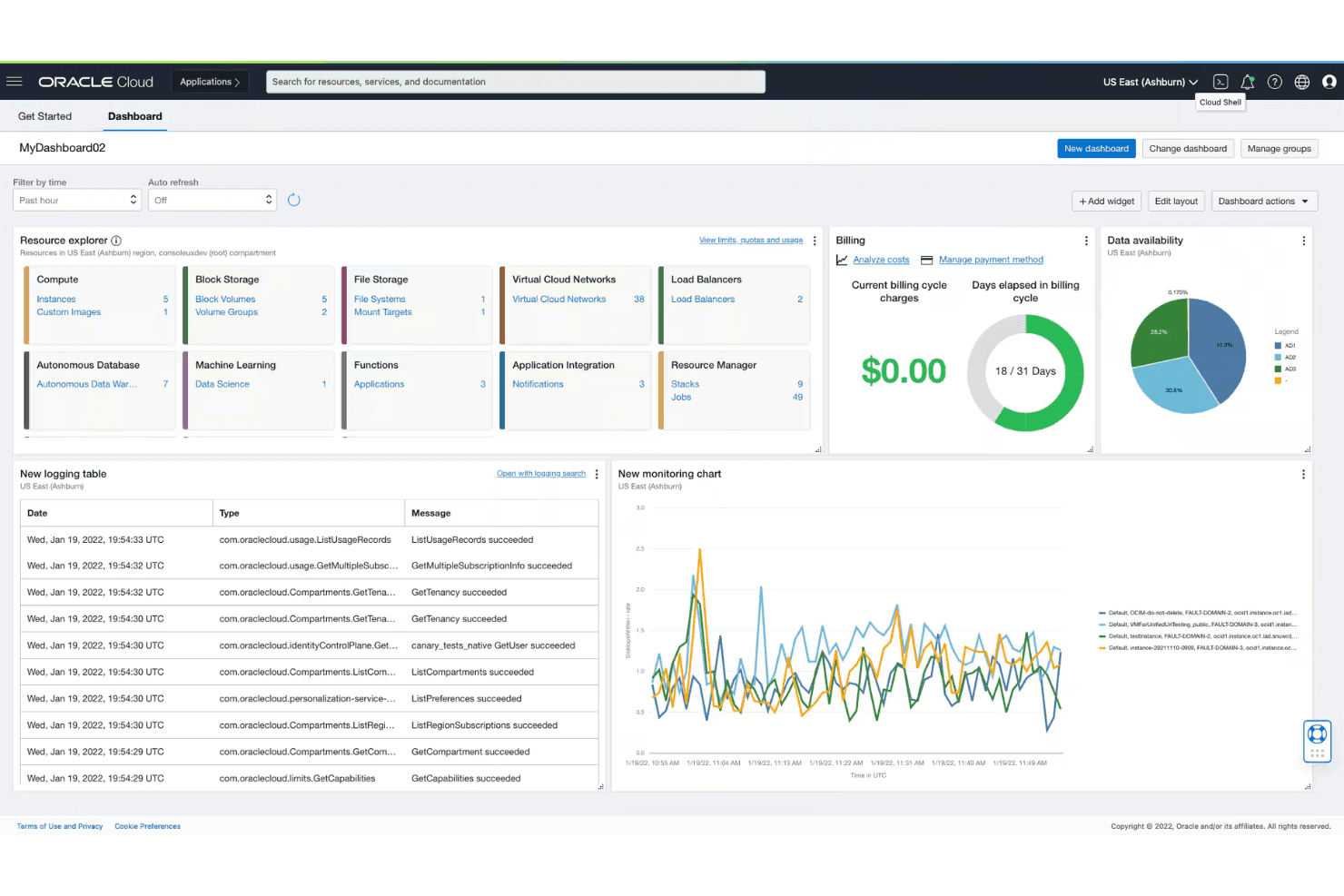
Centralizes visibility across hybrid and multi-cloud environments. Enables real-time monitoring, alerting, and automation from a single dashboard.
Advanced Security Controls
Offers encryption, identity management, and compliance tools built-in. Protects sensitive data and supports industry-specific regulations.
Disaster Recovery and Backup
Provides automated backup and failover for critical workloads. Minimizes downtime and data loss with built-in recovery options.

Ease of Use
Oracle Hybrid Cloud’s interface is feature-rich but can feel overwhelming, especially for teams new to Oracle’s ecosystem. Many users mention that setup and navigation require specialized knowledge, particularly when configuring hybrid deployments or advanced security. However, once you’re familiar with the platform, unified dashboards and automation tools make ongoing management straightforward.
Experienced Oracle admins will find it efficient, but newcomers should expect a steeper learning curve.
Integrations
Oracle Hybrid Cloud integrates with Oracle E-Business Suite, Oracle Fusion Financials, Oracle Data Safe, Oracle Identity Cloud Service, Oracle Cloud VMware Solution, Oracle Cloud Observability and Management, Oracle Cloud Infrastructure FastConnect, Exadata Cloud@Customer, Oracle Cloud@Customer, and Roving Edge Infrastructure, among others.
Oracle Hybrid Cloud also offers a robust API and supports connections with third-party integration tools.

Oracle Hybrid Cloud Specs
- 2-Factor Authentication: No
- Anti-Virus: No
- API: Yes
- Bug Tracking: No
- Dashboard: Yes
- Data Export: Yes
- Data Import: Yes
- Data Visualization: Yes
- Email Integration: No
- External Integrations: Yes
- File Sharing: No
- File Transfer: No
- Firewall: No
- Google Apps Integration: No
- Inventory Tracking: Yes
- Malware Protection: No
- Multi-User: Yes
- Network Device Performance Monitoring: No
- Network Traffic Monitoring: No
- Network Visualization: No
- Notifications: Yes
- Project Management: No
- Scheduling: Yes
- Third-Party Plugins/Add-Ons: No


