

Recensione di F5 Silverline: Pro, Contro, Caratteristiche e Prezzi

Recensiamo gli strumenti in modo indipendente e le commissioni ci aiutano a finanziare i nostri test. Consulta la nostra politica sulla trasparenza, la nostra metodologia, oppure suggerisci uno strumento.
F5 Silverline is a cloud-based DDoS protection software built for enterprises that need always-on traffic scrubbing across volumetric, protocol, and application-layer attacks. It's worth considering if your team needs 24/7 SOC support backed by dedicated F5 security experts—not just automated mitigation rules. Compared to Cloudflare, which leans heavily on self-service configuration, F5 Silverline pairs its scrubbing infrastructure with hands-on incident response, making it a stronger fit for organizations that need expert involvement during an active attack.
F5 Silverline Evaluation Summary
5/5
- Pricing upon request
- Free trial available
Perché fidarsi dei nostri consigli sui software
6,700+
Reviews
20
Industry experts
16+
Evaluation factors
14
Years
Il nostro team testa e recensisce software dal 2012. In quanto leader tecnologici noi stessi, sappiamo quanto sia difficile — e importante — scegliere il software giusto.
Per questa guida, abbiamo valutato gli strumenti attraverso test praticie ricerche indipendenti, assegnando un punteggio agli strumenti in base ai nostri criteri di selezione.
Le nostre recensioni riflettono il nostro giudizio editoriale umano, non un discorso di vendita.
Revisori esperti:
- Paulo Gardini MiguelDirettore tecnico
 Tim FisherVP dell'IA
 Gabriel RosasTech Lead e architetto software
 Christhian GruhnTech Lead e architetto della piattaforma

F5 Silverline Overview
In my opinion, F5 Silverline is a solid choice for businesses needing strong DDoS protection without breaking the bank. It excels with its standout features and offers good value for money, though the onboarding process and customer support could use some improvement. Compared to alternatives like Cloudflare, Imperva, and Akamai, F5 Silverline is better suited for organizations that prefer managed security services over self-managed in-house solutions. If your team requires extensive customer support or easy onboarding, you might want to weigh other options. Overall, it’s a reliable platform for those who prioritize security features.
Pros
- It provides strong protection against DDoS attacks.
- You get reliable threat detection capabilities.
- The platform offers excellent scalability for growing businesses.
Cons
- Onboarding can be a bit complex for new users.
- Customer support isn't always prompt.
- The interface may take some time to get used to.
Is F5 Silverline Right For Your Needs?
Who Would be a Good Fit for F5 Silverline?
F5 Silverline is a great fit for e-commerce sites and financial institutions needing constant protection from DDoS attacks. These businesses can't afford downtime, and F5 Silverline's strong threat detection ensures their operations stay secure. IT departments in large organizations that require scalable security solutions will find it valuable, as it adapts to growing demands. Its robust features cater well to industries where security is a priority, like healthcare and government sectors, ensuring sensitive data stays protected.
- E-commerce SitesF5 Silverline provides strong DDoS protection, ensuring your online store remains accessible to customers.
- Financial InstitutionsIts reliable threat detection helps protect sensitive financial data from potential breaches.
- Large EnterprisesThe platform's scalability supports growing security needs as your company expands.
- Healthcare ProvidersF5 Silverline ensures patient data stays secure from cyber threats, keeping your operations compliant.
- Government AgenciesThe platform's robust features protect sensitive information, crucial for national security.
- IT DepartmentsYour team benefits from strong security measures that safeguard critical back-end systems and infrastructure.
Who Would be a Bad Fit for F5 Silverline?
F5 Silverline isn't ideal for small businesses with limited IT resources, as its onboarding can be complex and support might not be timely. Startups needing quick deployment may find the platform's setup cumbersome. Teams requiring extensive customer assistance might struggle with the less responsive support. Additionally, businesses that prioritize ease of use over advanced features may find the interface challenging. If you’re in an industry where immediate customer support is crucial, this might not be the best choice.
- Small BusinessesThe complex onboarding process may overwhelm your limited IT resources.
- StartupsF5 Silverline's setup can be cumbersome, delaying your quick deployment needs.
- Non-Technical TeamsThe platform's interface isn't the easiest to navigate, which could frustrate your team.
- Customer Support-Dependent OrganizationsIf you rely heavily on immediate support, F5 Silverline's responsiveness might not meet your needs.
- Budget-Conscious CompaniesThe platform may not provide the cost-effectiveness you're looking for, considering the support and onboarding challenges.
- Quick Deployment NeedsIf you need immediate setup, F5 Silverline's onboarding might slow you down.
La Nostra Metodologia di Recensione
Come Testiamo e Valutiamo gli Strumenti
Abbiamo trascorso anni a costruire, perfezionare e migliorare il nostro sistema di testing e valutazione del software. Il nostro schema è progettato per cogliere le sfumature della selezione software e cosa rende efficace uno strumento, focalizzandosi sugli aspetti critici del processo decisionale.
Di seguito, puoi vedere esattamente come funziona il nostro testing e punteggio su sette criteri. Ci permette di offrire una valutazione imparziale del software basata su funzionalità principali, caratteristiche distintive, facilità d’uso, onboarding, assistenza clienti, integrazioni, recensioni dei clienti e rapporto qualità-prezzo.
Funzionalità Principali (25% del punteggio finale)
Il punto di partenza della nostra valutazione è sempre la funzionalità principale dello strumento. Ha le funzioni e caratteristiche base che ci si aspetta? Alcune di queste caratteristiche sono limitate ai piani tariffari superiori? Fondamentalmente, ci aspettiamo che uno strumento regga il confronto rispetto alle capacità di base dei concorrenti.
Caratteristiche Distintive (25% del punteggio finale)
Successivamente, valutiamo le caratteristiche distintive e non comuni che vanno oltre la funzionalità base tipicamente trovata negli strumenti di questa categoria. Un punteggio alto riflette funzionalità specializzate o uniche che rendono il prodotto più veloce, efficiente o offrono ulteriore valore all’utente.
Valutiamo inoltre quanto sia semplice integrare altri strumenti tipicamente utilizzati nell’infrastruttura tecnologica per espandere la funzionalità e l’utilità del software. Gli strumenti che offrono numerose integrazioni native, connessioni di terze parti e accesso API per creare integrazioni personalizzate ottengono i punteggi migliori.
Facilità d’Uso (10% del punteggio finale)
Consideriamo quanto sia rapido e semplice svolgere i compiti definiti nella funzionalità principale utilizzando lo strumento. Il software con punteggio alto è ben progettato, intuitivo da usare, offre app mobili, fornisce modelli e rende semplici attività relativamente complesse.
Onboarding (10% del punteggio finale)
Sappiamo quanto sia importante l’adozione rapida da parte del team per una nuova piattaforma, quindi valutiamo quanto sia facile imparare e utilizzare uno strumento con formazione minima. Valutiamo quanto velocemente un membro del team possa iniziare a usare lo strumento anche senza esperienza. Soluzioni con punteggio alto indicano che sono richiesti pochi o nessun supporto.
Assistenza Clienti (10% del punteggio finale)
Esaminiamo quanto sia veloce e facile ricevere assistenza e risolvere problemi tramite telefono, live chat o knowledge base. Gli strumenti e le aziende che garantiscono supporto in tempo reale ottengono il miglior punteggio, mentre i chatbot ottengono il peggiore.
Recensioni dei Clienti (10% del punteggio finale)
Oltre ai nostri test e valutazioni, prendiamo in considerazione il net promoter score dei clienti attuali e passati. Valutiamo la probabilità che, data la scelta, selezionerebbero nuovamente lo strumento per la funzionalità principale. Un software con punteggio alto riflette un alto net promoter score da parte dei clienti attuali o passati.
Rapporto Qualità-Prezzo (10% del punteggio finale)
Infine, considerando tutti gli altri criteri, analizziamo il prezzo medio dei piani base rispetto alle funzionalità principali e consideriamo il valore degli altri criteri di valutazione. Il software che offre di più a meno otterrà un punteggio più alto.
Core Features
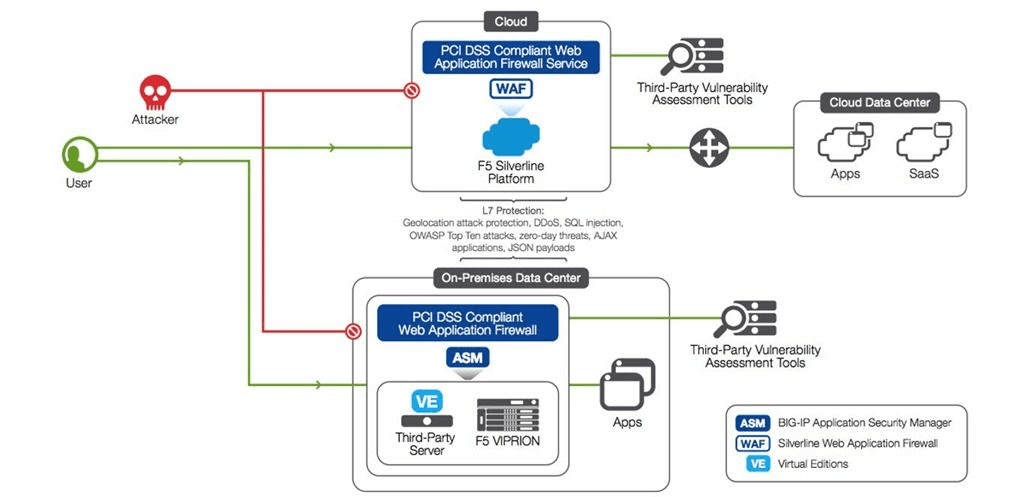
DDoS Protection: F5 Silverline shields your network from DDoS attacks, keeping your services online and operational. It automatically detects and mitigates threats, ensuring your business stays secure.
Threat Detection: The platform identifies potential security threats in real time, helping protect applications, networks, and critical endpoints before breaches occur.
Scalability: As your business grows, F5 Silverline scales with you, adapting to increased security demands. You won't need to worry about outgrowing your protection.
Traffic Management: It efficiently manages your network traffic, including DNS routing and load balancing, optimizing performance and reducing latency. This ensures your users have a smooth experience.
SSL Offloading: F5 Silverline handles SSL encryption tasks, freeing up your servers for other processes. This improves your system's overall efficiency.
Web Application Firewall (WAF): Protects your web applications and provides API protection from threats like SQL injection and cross-site scripting. Your team can focus on development, knowing security is handled.
Ease of Use
F5 Silverline offers a comprehensive set of features, but its interface can be challenging for new users. The onboarding process is not the smoothest, which might slow down your team's initial setup. While the platform provides excellent security capabilities, it requires some time to fully understand its functionalities. If your team is willing to invest the effort to learn, the security benefits are substantial. However, if ease and speed are your top priorities, this may not be the best fit.
Integrations
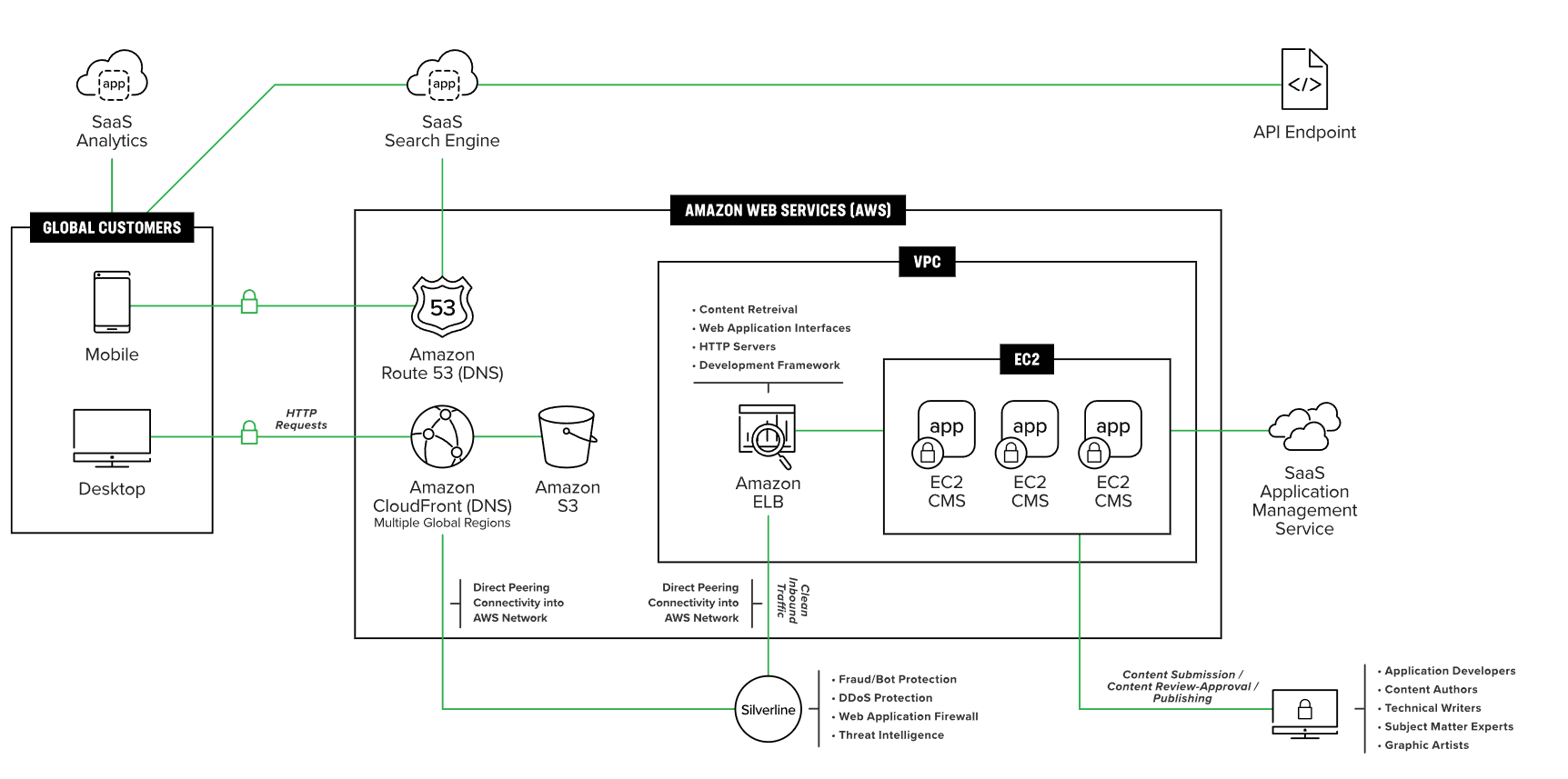
F5 Silverline integrates with AWS, Azure, Google Cloud, Equinix, ServiceNow, Palo Alto Networks, IBM QRadar, VMware, Red Hat Openshift and Fortinet.
F5 Silverline also provides an API for automation and can connect with third-party tools via connectors (e.g., SIEM or security platforms) rather than Zapier-style apps.
F5 Silverline Specs
- 2-Factor Authentication: No
- Access Management: Yes
- Anti-Virus: No
- API: Yes
- Audit Trail: Yes
- Bug Tracking: No
- Calendar Management: No
- Customer Management: No
- Dashboard: Yes
- Data Export: No
- Data Import: Yes
- Data Visualization: Yes
- Email Integration: No
- External Integrations: Yes
- File Sharing: No
- File Transfer: No
- Firewall: Yes
- Google Apps Integration: Yes
- Inventory Tracking: No
- Malware Protection: No
- Multi-User: Yes
- Network Device Performance Monitoring: No
- Network Traffic Monitoring: Yes
- Network Visualization: Yes
- Notifications: Yes
- Project Management: No
- Remote Access: No
- Risk Assessment: No
- SAP Integration: No
- Scheduling: No
- Software Integration: Yes
- Third-Party Plugins/Add-Ons: No
- Ticket Management: No


