

Recensione CloudTest: Pro, Contro, Funzionalità e Prezzi
CloudTest si distingue per le sue capacità di test rapidi e l'interfaccia intuitiva, che lo rendono unico tra gli strumenti di test cloud.

Recensiamo gli strumenti in modo indipendente e le commissioni ci aiutano a finanziare i nostri test. Consulta la nostra politica sulla trasparenza, la nostra metodologia, oppure suggerisci uno strumento.
CloudTest is a load and performance testing platform in the cloud testing tools space. It's built for simulating high-volume traffic against web and mobile applications. I'd look at it when your team needs to verify how an application performs under peak load before a major launch. If you're comparing it to BlazeMeter, CloudTest is a stronger choice for teams in the Akamai ecosystem. Built-in access to CDN and delivery analytics gives your results more operational context.
CloudTest Evaluation Summary
5/5
- Pricing upon request
- Free demo
Perché fidarsi dei nostri consigli sui software
6,700+
Reviews
20
Industry experts
16+
Evaluation factors
14
Years
Il nostro team testa e recensisce software dal 2012. In quanto leader tecnologici noi stessi, sappiamo quanto sia difficile — e importante — scegliere il software giusto.
Per questa guida, abbiamo valutato gli strumenti attraverso test praticie ricerche indipendenti, assegnando un punteggio agli strumenti in base ai nostri criteri di selezione.
Le nostre recensioni riflettono il nostro giudizio editoriale umano, non un discorso di vendita.
Revisori esperti:
- Paulo Gardini MiguelDirettore tecnico
 Tim FisherVP dell'IA
 Gabriel RosasTech Lead e architetto software
 Christhian GruhnTech Lead e architetto della piattaforma

CloudTest Overview
In my opinion, CloudTest is a reliable choice for businesses needing detailed performance testing, particularly for large-scale applications. Its standout feature is the ability to simulate high user loads effectively, which is crucial for sectors like e-commerce and finance. While its onboarding process could be smoother, the platform's robust features and value for money make up for it. Compared to competitors, CloudTest excels in load testing but might not be as intuitive for new users. It’s best suited for tech-savvy teams that can leverage its full potential.
Pros
- CloudTest handles large-scale user simulations effectively.
- Its interface provides detailed performance data and insights.
- You can set up global load distribution for comprehensive testing.
Cons
- The onboarding process could be smoother for new users.
- Some users find the interface less intuitive than competitors.
- Customer support response times may not meet your expectations.
Is CloudTest Right For Your Needs?
Who Would be a Good Fit for CloudTest?
CloudTest is ideal for large enterprises and tech teams that need to simulate high user loads and distribute tests globally. If your team works in industries like e-commerce or finance, CloudTest’s detailed performance insights will help manage application performance under heavy traffic. Its capabilities in handling massive scale testing make it a strong choice for organizations that prioritize robust testing environments.
- E-commerce PlatformsCloudTest simulates high traffic, ensuring your site performs well during peak shopping times.
- Financial ServicesIt helps your team test applications for stability under heavy user loads, crucial for financial transactions.
- Large EnterprisesCloudTest’s ability to handle global load distribution makes it suitable for large-scale operations.
- IT DepartmentsYour IT team can benefit from CloudTest’s detailed performance data to fine-tune applications.
- QA TeamsCloudTest’s functionalities support thorough testing processes, providing insights that improve application quality.
- Software DevelopersDevelopers can use CloudTest to identify performance bottlenecks in web and mobile app workflows, helping improve application reliability before release.
Who Would be a Bad Fit for CloudTest?
CloudTest may not be suitable for small businesses or teams with limited technical expertise due to its complex setup and onboarding process. If your team is new to cloud testing tools or lacks the resources to manage detailed performance testing, you might find CloudTest’s interface less intuitive compared to simpler alternatives. It's not ideal for those who need quick, straightforward testing solutions without a steep learning curve.
- Small StartupsCloudTest’s complex setup isn't ideal for startups needing quick and easy testing solutions.
- Non-Technical TeamsYour team might struggle with CloudTest’s interface if you lack technical expertise.
- FreelancersCloudTest’s detailed features are overkill for individual developers working on small projects.
- Education SectorSchools often need simpler tools; CloudTest might be too advanced for educational testing needs.
- Local BusinessesLocal businesses with minimal web traffic may not benefit from CloudTest’s high-scale testing capabilities.
- Marketing TeamsMarketing teams typically don’t require the in-depth performance data that CloudTest provides.
La Nostra Metodologia di Recensione
Come Testiamo e Valutiamo gli Strumenti
Abbiamo trascorso anni a costruire, perfezionare e migliorare il nostro sistema di testing e valutazione del software. Il nostro schema è progettato per cogliere le sfumature della selezione software e cosa rende efficace uno strumento, focalizzandosi sugli aspetti critici del processo decisionale.
Di seguito, puoi vedere esattamente come funziona il nostro testing e punteggio su sette criteri. Ci permette di offrire una valutazione imparziale del software basata su funzionalità principali, caratteristiche distintive, facilità d’uso, onboarding, assistenza clienti, integrazioni, recensioni dei clienti e rapporto qualità-prezzo.
Funzionalità Principali (25% del punteggio finale)
Il punto di partenza della nostra valutazione è sempre la funzionalità principale dello strumento. Ha le funzioni e caratteristiche base che ci si aspetta? Alcune di queste caratteristiche sono limitate ai piani tariffari superiori? Fondamentalmente, ci aspettiamo che uno strumento regga il confronto rispetto alle capacità di base dei concorrenti.
Caratteristiche Distintive (25% del punteggio finale)
Successivamente, valutiamo le caratteristiche distintive e non comuni che vanno oltre la funzionalità base tipicamente trovata negli strumenti di questa categoria. Un punteggio alto riflette funzionalità specializzate o uniche che rendono il prodotto più veloce, efficiente o offrono ulteriore valore all’utente.
Valutiamo inoltre quanto sia semplice integrare altri strumenti tipicamente utilizzati nell’infrastruttura tecnologica per espandere la funzionalità e l’utilità del software. Gli strumenti che offrono numerose integrazioni native, connessioni di terze parti e accesso API per creare integrazioni personalizzate ottengono i punteggi migliori.
Facilità d’Uso (10% del punteggio finale)
Consideriamo quanto sia rapido e semplice svolgere i compiti definiti nella funzionalità principale utilizzando lo strumento. Il software con punteggio alto è ben progettato, intuitivo da usare, offre app mobili, fornisce modelli e rende semplici attività relativamente complesse.
Onboarding (10% del punteggio finale)
Sappiamo quanto sia importante l’adozione rapida da parte del team per una nuova piattaforma, quindi valutiamo quanto sia facile imparare e utilizzare uno strumento con formazione minima. Valutiamo quanto velocemente un membro del team possa iniziare a usare lo strumento anche senza esperienza. Soluzioni con punteggio alto indicano che sono richiesti pochi o nessun supporto.
Assistenza Clienti (10% del punteggio finale)
Esaminiamo quanto sia veloce e facile ricevere assistenza e risolvere problemi tramite telefono, live chat o knowledge base. Gli strumenti e le aziende che garantiscono supporto in tempo reale ottengono il miglior punteggio, mentre i chatbot ottengono il peggiore.
Recensioni dei Clienti (10% del punteggio finale)
Oltre ai nostri test e valutazioni, prendiamo in considerazione il net promoter score dei clienti attuali e passati. Valutiamo la probabilità che, data la scelta, selezionerebbero nuovamente lo strumento per la funzionalità principale. Un software con punteggio alto riflette un alto net promoter score da parte dei clienti attuali o passati.
Rapporto Qualità-Prezzo (10% del punteggio finale)
Infine, considerando tutti gli altri criteri, analizziamo il prezzo medio dei piani base rispetto alle funzionalità principali e consideriamo il valore degli altri criteri di valutazione. Il software che offre di più a meno otterrà un punteggio più alto.
Core Features
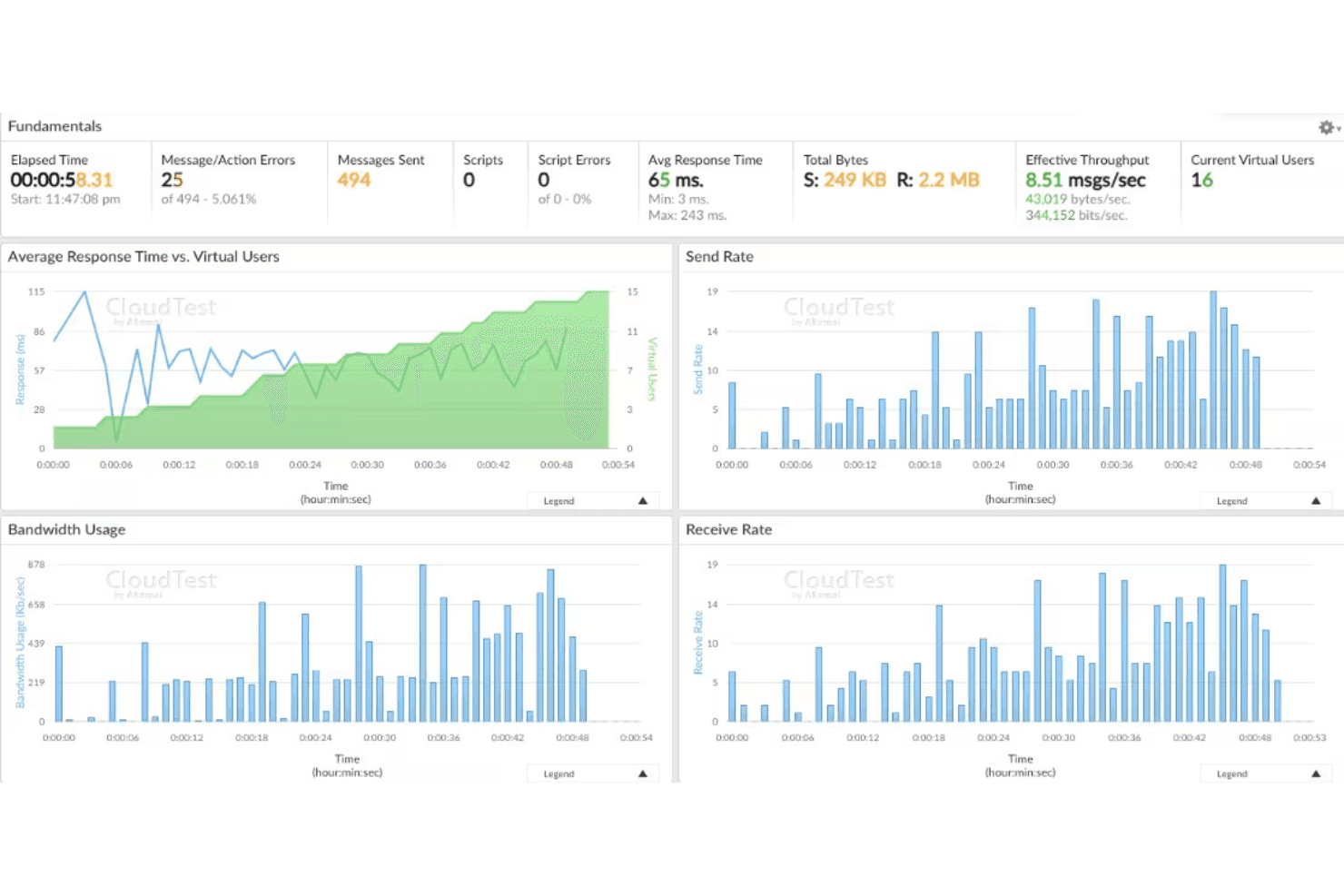
Load Testing: CloudTest simulates thousands of virtual users to stress test your application’s performance under heavy traffic. This helps your team identify potential bottlenecks before they become issues.
Performance Monitoring: It offers detailed analytics on application performance, giving you insights into response times and system behavior. You can use this data to optimize your application's efficiency.
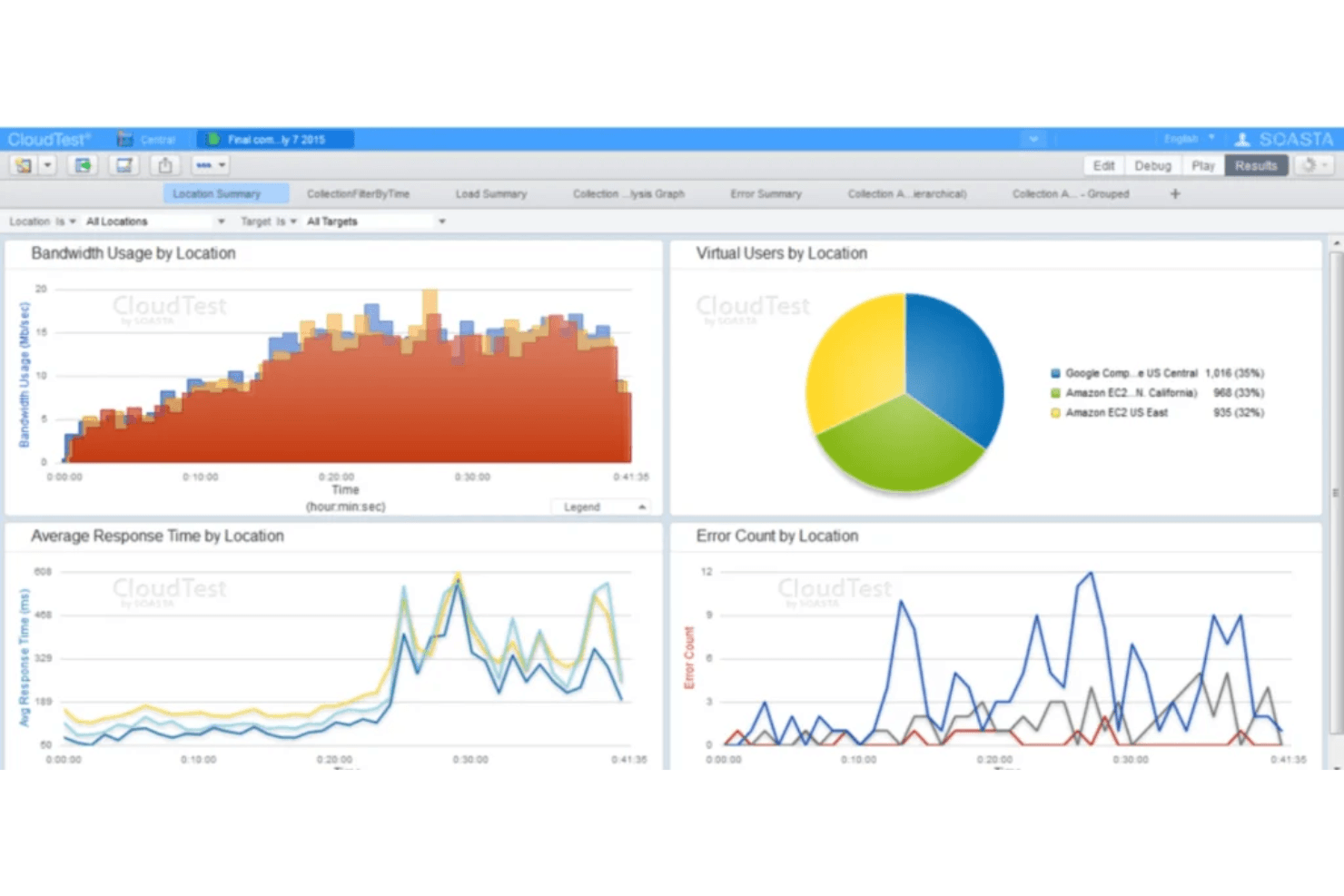
Global Load Distribution: CloudTest lets you distribute load tests across different geographies, ensuring your application performs well worldwide. This is crucial for businesses targeting international markets.
Real-Time Analytics: You can access real-time performance data during your tests, allowing immediate adjustments. This feature helps your team react quickly to any performance issues.
User Behavior Simulation: CloudTest mimics real user interactions, providing a more accurate assessment of your application's performance. This helps your team understand how users experience your application.
Scalability: CloudTest can scale testing environments while accounting for load balancing behavior, ensuring your infrastructure performs reliably as traffic increases.
Ease of Use
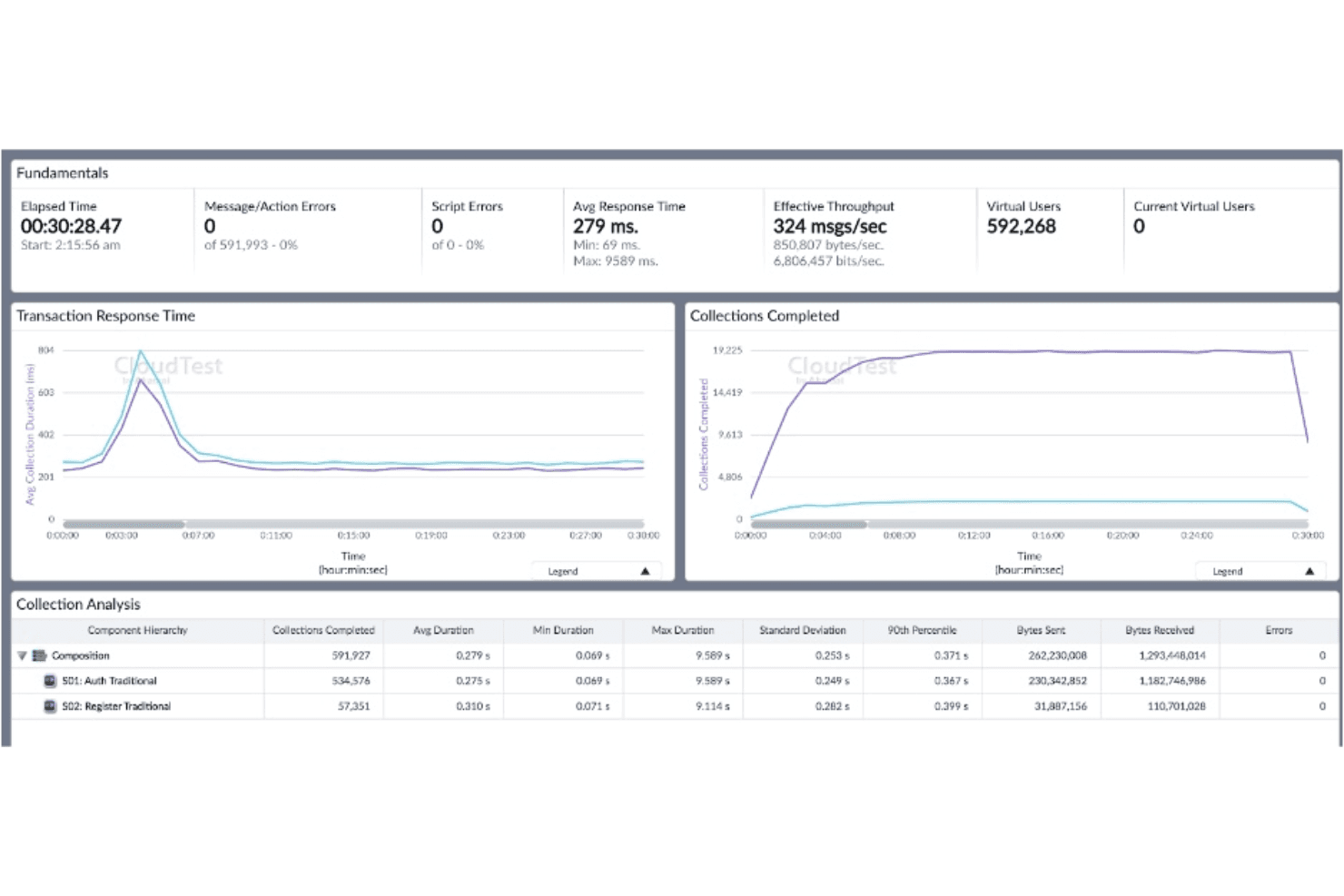
CloudTest’s user interface can be challenging for those unfamiliar with cloud testing tools, as it requires a learning curve due to its complex features. However, once your team gets the hang of it, the platform offers powerful functionalities like real-time analytics and detailed scenario creation. These capabilities provide value but might initially overwhelm new users. If your team is tech-savvy, you'll find CloudTest’s features worth the effort to master.
Integrations
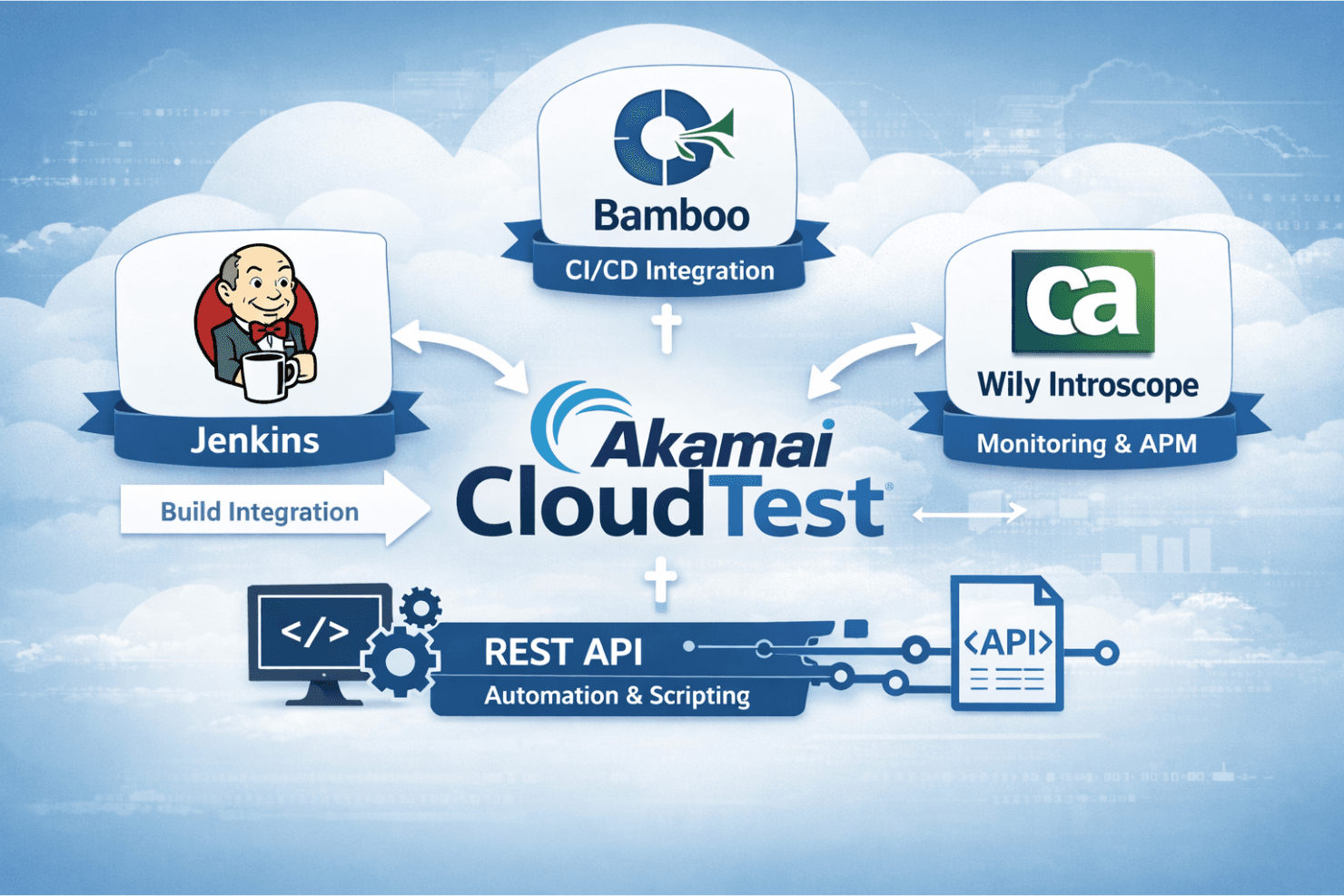
Cloudtest integrates natively with Jenkins, Bamboo, and CA Wily Introscope, and offers a plugin that ties into build systems like Jenkins so you can run compositions and manage test environments.
Cloudtest also has a REST API for automation and scripting, but there’s no indication it connects directly with third-party tools like Zapier.
CloudTest Specs
- A/B Testing: No
- API: No
- Automated Testing: No
- Browser Compatibility Testing: No
- Bug Tracking: No
- Calendar Management: No
- CI/CD Integration: No
- Dashboard: No
- Data Export: No
- Data Import: No
- Data Visualization: No
- Developer Tools: No
- External Integrations: No
- History/Version Control: No
- Manual Testing: No
- Multi-User: No
- Notifications: No
- Performance Testing: No
- Regression Testing: No
- Scheduling: No
- Status Notifications: No
- Third-Party Plugins/Add-Ons: No


