

I 10 migliori strumenti gratuiti per la gestione dei requisiti recensiti nel 2026

Selezione dei migliori strumenti gratuiti per la gestione dei requisiti


Orientarsi tra gli strumenti per la gestione dei requisiti può essere difficile con un budget limitato. Se hai un budget ristretto, hai bisogno di una soluzione gratuita che aiuti il tuo team a rimanere organizzato, documentare chiaramente i requisiti e mantenere i progetti in linea senza aggiungere nuovi costi.
Gli strumenti gratuiti per la gestione dei requisiti offrono modalità strutturate per acquisire i requisiti, mantenere la tracciabilità e collaborare con il tuo team. Lo strumento giusto riduce la confusione, aiuta a evitare requisiti mancanti e mantiene tutti allineati durante l'intero ciclo di vita del progetto.
In questa guida ho recensito una selezione di strumenti gratuiti e con prova gratuita per aiutarti a capire cosa offre ciascuna opzione e in cosa differiscono. Che tu stia cercando qualcosa di semplice per un piccolo team o uno strumento più specializzato per il lavoro tecnico, l'elenco qui sotto ti aiuterà a restringere la scelta delle opzioni migliori per le tue esigenze.
Perché fidarsi dei nostri consigli sui software
Il nostro team testa e recensisce software dal 2012. In quanto leader tecnologici noi stessi, sappiamo quanto sia difficile — e importante — scegliere il software giusto.
Per questa guida, abbiamo valutato gli strumenti attraverso test praticie ricerche indipendenti, assegnando un punteggio agli strumenti in base ai nostri criteri di selezione.
Le nostre recensioni riflettono il nostro giudizio editoriale umano, non un discorso di vendita.
Revisori esperti:
Tabella comparativa degli strumenti gratuiti per la gestione dei requisiti
Ecco i costi base di ciascuno degli strumenti inclusi nella mia selezione:
| Tool | Best For | Trial Info | Price | ||
|---|---|---|---|---|---|
| 1 | Ideale per la visualizzazione delle timeline di progetto | Piano gratuito disponibile | Da $7,25/utente/mese (fatturato annualmente) | Website | |
| 2 | Ideale per l'integrazione con il tracciamento delle segnalazioni | Piano gratuito per sempre disponibile | Gratuito | Website | |
| 3 | Ideale per progetti open-source | Demo gratuita disponibile | Piano gratuito per sempre | Website | |
| 4 | Ideale per l'integrazione con .NET | Not available | Piano gratuito per sempre | Website | |
| 5 | Ideale per utenti Eclipse | Not available | Piano gratuito per sempre | Website | |
| 6 | Ideale per l'architettura aziendale | Not available | Piano gratuito per sempre | Website | |
| 7 | Ideale per il testing di accettazione Agile | Not available | Piano gratuito per sempre | Website | |
| 8 | Ideale per la collaborazione in piccoli team | Prova gratuita di 14 giorni | Da $510/utente/anno (fatturato annualmente) | Website | |
| 9 | Ideale per la mappatura delle dipendenze dei dati | Prova gratuita e demo disponibili | Prezzo su richiesta | Website | |
| 10 | Ideale per i requisiti di sicurezza | Not available | Piano gratuito per sempre | Website |
Recensioni dei migliori strumenti gratuiti per la gestione dei requisiti
Di seguito trovi i miei riepiloghi dettagliati dei migliori strumenti gratuiti per la gestione dei requisiti inclusi nella mia selezione. Le mie recensioni offrono un’analisi approfondita delle caratteristiche principali, dei pro e dei contro, delle integrazioni e dei casi d’uso ideali di ciascuno strumento, aiutandoti a trovare quello più adatto a te. Sebbene alcuni di questi strumenti offrano una versione completamente gratuita, altri offrono un periodo di prova gratuito. In ciascuna recensione ho aggiunto una nota su ciò che è gratuito.

Ideale per la visualizzazione delle timeline di progetto

OpenProject è un software di gestione progetti progettato per team e project manager. Offre funzionalità per pianificare, monitorare e collaborare sui progetti, concentrandosi sulla visualizzazione delle linee temporali.
Perché ho scelto OpenProject: OpenProject non è un sistema completo di gestione dei requisiti nella sua Community Edition gratuita, ma fa un ottimo lavoro nel supportare i team che tengono traccia di requisiti leggeri. La sua timeline visiva, i diagrammi di Gantt e gli strumenti di roadmapping aiutano i team a pianificare e monitorare il lavoro relativo ai requisiti, anche quando le funzionalità dedicate alla gestione dei requisiti sono disponibili solo nei livelli a pagamento.
È una scelta pratica per i team che già utilizzano OpenProject per la gestione dei progetti e che desiderano un unico ambiente per coordinare le attività legate ai requisiti.
Funzionalità principali e integrazioni:
Le funzionalità includono bacheche Agile che consentono al tuo team di gestire le attività. Lo strumento offre anche il monitoraggio del tempo, aiutandoti a tenere traccia della durata delle attività. Inoltre, OpenProject dispone di funzionalità di budgeting per supportare la pianificazione finanziaria dei tuoi progetti.
Le integrazioni includono GitHub, GitLab, Jenkins, JIRA, Redmine, Slack, Microsoft Teams, Asana, Trello ed Excel.
Cosa è gratuito?
OpenProject offre un piano gratuito per sempre con accesso alle funzionalità di base, ma limita alcune funzionalità avanzate e le opzioni di supporto.
Pros and Cons
Pros:
- Eccellente visualizzazione delle timeline
- Fornisce il monitoraggio del tempo
- Supporta le funzionalità di budgeting
Cons:
- Richiede tempo per imparare ad utilizzarlo
- Supporto di base nel piano gratuito

Redmine
Ideale per l'integrazione con il tracciamento delle segnalazioni
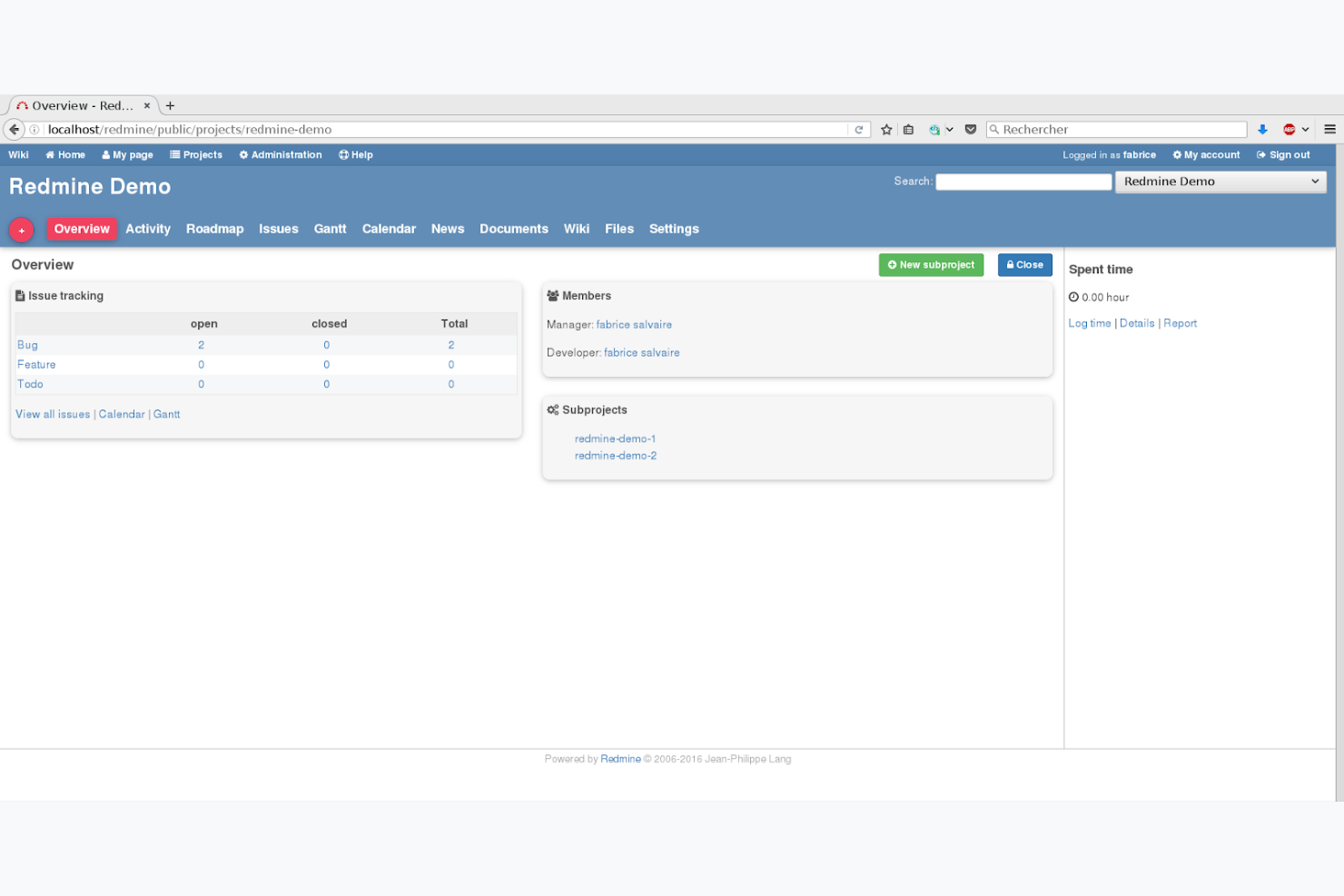
Redmine è uno strumento open-source per la gestione dei progetti, progettato per team e sviluppatori. Supporta il monitoraggio dei progetti, la gestione delle segnalazioni e la collaborazione, aiutando i team a rimanere organizzati ed efficienti.
Perché ho scelto Redmine: Redmine è un'altra opzione che non è uno strumento tradizionale di gestione dei requisiti, ma i team utilizzano i suoi tipi di issue, i campi personalizzati e i flussi di lavoro per archiviare e monitorare elementi correlati ai requisiti. Il suo punto di forza sta nell'aiutare i team a collegare compiti simili a requisiti a segnalazioni, milestone e attività di controllo del codice sorgente.
Per i team che già utilizzano Redmine per lo sviluppo o il tracciamento delle segnalazioni, adattarlo per una gestione dei requisiti leggera può essere un modo senza costi per centralizzare le informazioni di progetto.
Funzionalità e integrazioni principali:
Le funzionalità includono la rilevazione dei tempi, che aiuta il team a monitorare il tempo impiegato su compiti e progetti. Redmine offre anche il controllo degli accessi basato sui ruoli, permettendo di gestire permessi e accessi all'interno del team. Inoltre, supporta campi personalizzati, consentendo di adattare il software alle esigenze specifiche dei vostri progetti.
Le integrazioni includono Git, SVN, CVS, Bazaar, Mercurial, Darcs, Bitbucket, GitHub e Jenkins.
Cosa è gratuito?
Redmine offre un piano gratuito per sempre, senza restrizioni su utenti o funzionalità, rendendolo accessibile a team di qualsiasi dimensione.
Pros and Cons
Pros:
- Supporta progetti multipli
- Offre controllo accessi basato sui ruoli
- Fornisce campi personalizzati
Cons:
- Interfaccia datata
- Richiede configurazioni avanzate


OSRMT è uno strumento open-source per la gestione dei requisiti progettato per sviluppatori software. Aiuta a definire e gestire i requisiti software durante tutto il ciclo di vita dello sviluppo del prodotto.
Perché ho scelto OSRMT: OSRMT è uno dei pochi strumenti open-source creati per il tracciamento dei requisiti end-to-end. Supporta la tracciabilità lungo l'intero ciclo di vita, risultando interessante per i team che preferiscono ambienti self-hosted o personalizzabili. Essendo completamente open-source, i team possono estenderlo o adattarlo al proprio flusso di lavoro di sviluppo senza vincoli di licenza.
Caratteristiche principali & integrazioni:
Le funzionalità includono la tracciabilità completa del ciclo di vita dello sviluppo software, permettendo di seguire i requisiti dalla fase di progettazione iniziale fino ai test. La configurabilità dello strumento consente di adattarlo alle necessità specifiche del tuo progetto. Inoltre, la natura open-source di OSRMT significa che puoi modificare lo strumento in base al tuo processo di sviluppo.
Le integrazioni comprendono GitHub, Jenkins, Eclipse, Subversion e Bugzilla.
Cosa è gratuito?
OSRMT offre un piano gratuito per sempre senza limiti di utenti, ma richiede installazione e gestione autonomi.
Pros and Cons
Pros:
- Nessun limite di utenti
- Traccia l'intero ciclo di vita dello sviluppo
- Hosting autonomo gratuito
Cons:
- Richiede configurazione autonoma
- Nessun hosting cloud


Concordion.Net è un framework di testing ideato per sviluppatori e tester .NET. Facilita la creazione di specifiche eseguibili, colmando il divario tra documentazione e test negli ambienti .NET.
Perché ho scelto Concordion.Net: Concordion.Net estende l'approccio Concordion all'ecosistema .NET, permettendo ai team di esprimere i criteri di accettazione come specifiche eseguibili leggibili dalle persone. Anche se non si occupa direttamente della gestione dei requisiti, alcuni team utilizzano questi documenti 'viventi' per catturare e validare l'intento dei requisiti.
Questo rende Concordion.Net indicato per i team .NET che desiderano un collegamento stretto tra l'intento dei requisiti e l'esecuzione automatizzata dei test.
Caratteristiche principali e integrazioni:
Caratteristiche includono la possibilità di scrivere specifiche in linguaggio naturale, rendendo la documentazione dei test più facile da leggere e mantenere. Concordion.Net supporta la documentazione in tempo reale, mantenendo i test allineati ai requisiti più aggiornati del progetto. Inoltre, offre estensibilità, consentendo di ampliare le sue funzionalità secondo le proprie necessità.
Integrazioni includono NUnit, SpecFlow, Visual Studio, Jenkins, TeamCity, Azure DevOps, GitHub Actions, Bitbucket Pipelines e Travis CI.
Cosa è gratuito?
Concordion.Net offre un piano gratuito per sempre che consente l'accesso a tutte le funzionalità principali, senza limiti di utenti o di tempo.
Pros and Cons
Pros:
- Supporta specifiche eseguibili
- Favorisce una comunicazione chiara
- Offre documentazione in tempo reale
Cons:
- Richiede competenze .NET
- Non gestisce direttamente i requisiti


ProR (Eclipse RMF) è uno strumento open-source per la gestione dei requisiti utilizzato principalmente da sviluppatori software e ingegneri. Facilita la gestione e il monitoraggio dei requisiti all'interno dell'ambiente di sviluppo Eclipse.
Perché ho scelto ProR (Eclipse RMF): ProR è una scelta adatta per i team di sviluppo che già utilizzano Eclipse perché consente di lavorare con i requisiti nello stesso ambiente in cui si gestisce il codice e gli strumenti di modellazione. Il suo editor strutturato dei requisiti supporta ReqIF, rendendolo utile per lo scambio di requisiti tra organizzazioni o strumenti.
Questa stretta integrazione con i flussi di lavoro Eclipse lo rende pratico per i team di ingegneria che vogliono una soluzione RM gratuita ed estensibile senza adottare una piattaforma separata.
Funzionalità e integrazioni principali:
Le funzionalità includono la funzionalità drag-and-drop che semplifica la gestione dei requisiti. ProR supporta viste personalizzabili, consentendo di adattare la visualizzazione delle informazioni alle esigenze del progetto. Inoltre, offre controllo di versione, aiutando a tenere traccia delle modifiche ai requisiti nel tempo.
Le integrazioni comprendono Eclipse IDE, Git, SVN, Jenkins, Jira, Bugzilla, Redmine, Trac e GitHub.
Cosa è gratuito?
ProR (Eclipse RMF) offre un piano gratuito per sempre con accesso completo alle sue funzionalità principali, ma richiede un ambiente Eclipse per funzionare.
Pros and Cons
Pros:
- Supporta la modellazione dei requisiti
- Offre funzionalità drag-and-drop
- Include il controllo di versione
Cons:
- Opzioni di supporto limitate
- Richiede competenze tecniche


Archi è uno strumento di modellazione open-source per architetti aziendali e pianificatori. Aiuta gli utenti a creare modelli ArchiMate per visualizzare e gestire i progetti architetturali.
Perché ho scelto Archi: Archi non è un tradizionale strumento di gestione dei requisiti, ma è utile per i team che trattano gli elementi architetturali come “requisiti” strutturati all'interno di un lavoro di progettazione di sistema più ampio. Il suo supporto alla modellazione ArchiMate consente ai team di esprimere vincoli, relazioni e regole di business in modo grafico, andando a completare o informare la definizione dei requisiti.
Per i team che effettuano una pianificazione fortemente orientata all’architettura, Archi offre un modo gratuito per mantenere modelli visivi che supportano la discussione sui requisiti, senza dover ricorrere a una piattaforma RM completa.
Funzionalità e integrazioni principali:
Le funzionalità includono un linguaggio di scripting integrato che permette al tuo team di automatizzare le attività ripetitive. Archi offre anche una funzione canvas per la creazione libera di diagrammi, consentendo di personalizzare i layout in base alle esigenze del progetto. Inoltre, fornisce la validazione dei modelli per assicurare che i tuoi progetti architetturali rispettino gli standard di settore.
Le integrazioni includono GitHub, GitLab, Google Drive, Dropbox, OneDrive e SharePoint.
Cosa è gratuito?
Archi offre un piano gratuito per sempre con accesso alle sue principali funzionalità di modellazione, senza limiti di utenti o di tempo.
Pros and Cons
Pros:
- Offre scripting per l'automazione
- Include la validazione dei modelli
- Diagrammi liberi disponibili
Cons:
- La configurazione iniziale può richiedere tempo
- Le funzionalità avanzate richiedono personalizzazione


Concordion è un framework di testing open-source progettato per sviluppatori e tester. Supporta il testing di accettazione Agile consentendo agli utenti di scrivere specifiche eseguibili in italiano semplice.
Perché ho scelto Concordion: Concordion non è uno strumento di gestione dei requisiti, ma il suo formato di specifica eseguibile supporta i team che documentano i criteri di accettazione come una forma leggera di requisiti. I team che praticano lo sviluppo guidato dal comportamento o basato sulle specifiche possono utilizzare Concordion per validare i requisiti tramite test di accettazione automatizzati.
È un'opzione utile nei casi in cui requisiti, documentazione e test sono strettamente collegati, anche se non gestisce i requisiti in senso tradizionale.
Funzionalità principali e integrazioni:
Le funzionalità includono una sintassi in italiano semplice che rende facile per il tuo team scrivere e comprendere le specifiche. Concordion supporta la documentazione dinamica, assicurando che i risultati dei test siano sempre aggiornati insieme alla documentazione del progetto. Lo strumento offre anche estendibilità, consentendo di personalizzare e ampliare le sue capacità per adattarsi alle esigenze di testing.
Le integrazioni includono JUnit, Maven, Gradle, Ant, IntelliJ IDEA, Eclipse e NetBeans.
Cosa è gratuito?
Concordion offre un piano gratuito per sempre con accesso a tutte le funzionalità principali di testing, senza limiti di utenti o di tempo.
Pros and Cons
Pros:
- Supporta il testing Agile
- Fornisce documentazione dinamica
- Framework estensibile
Cons:
- Opzioni di supporto limitate
- Configurazione autonoma necessaria


ReqView è uno strumento di gestione dei requisiti progettato per ingegneri hardware e software. Aiuta a gestire requisiti, rischi e test assicurando la conformità agli standard critici di sicurezza.
Perché ho scelto ReqView: ReqView offre un piano gratuito utilizzabile per piccoli team che necessitano di una documentazione strutturata dei requisiti e della tracciabilità di base senza dover adottare uno strumento aziendale complesso. La versione gratuita supporta gerarchie dei requisiti, gestione dei documenti e connessione al controllo delle versioni, rendendolo adatto a progetti in cui la tracciabilità è importante ma il team non richiede automazioni avanzate.
Funzionalità e integrazioni principali:
Funzionalità includono modelli personalizzabili che ti permettono di adattare i documenti alle esigenze del tuo progetto. Puoi facilmente gestire requisiti, rischi e test per garantire la conformità agli standard di settore. Lo strumento offre anche tracciabilità end-to-end, aiutando il tuo team a tracciare le modifiche e mantenere l'integrità del progetto.
Integrazioni includono Jira, Sparx Systems Enterprise Architect, Git, Subversion e Microsoft Word.
Cosa è gratuito?
ReqView offre un piano gratuito a tempo indeterminato con limitazioni su funzionalità come la modifica dei documenti e il numero di attributi personalizzati.
Pros and Cons
Pros:
- Permette una collegazione strutturata dei requisiti
- Modelli personalizzabili
- Tracciabilità end-to-end
Cons:
- Limitato a un solo documento
- Richiede il rinnovo manuale della licenza

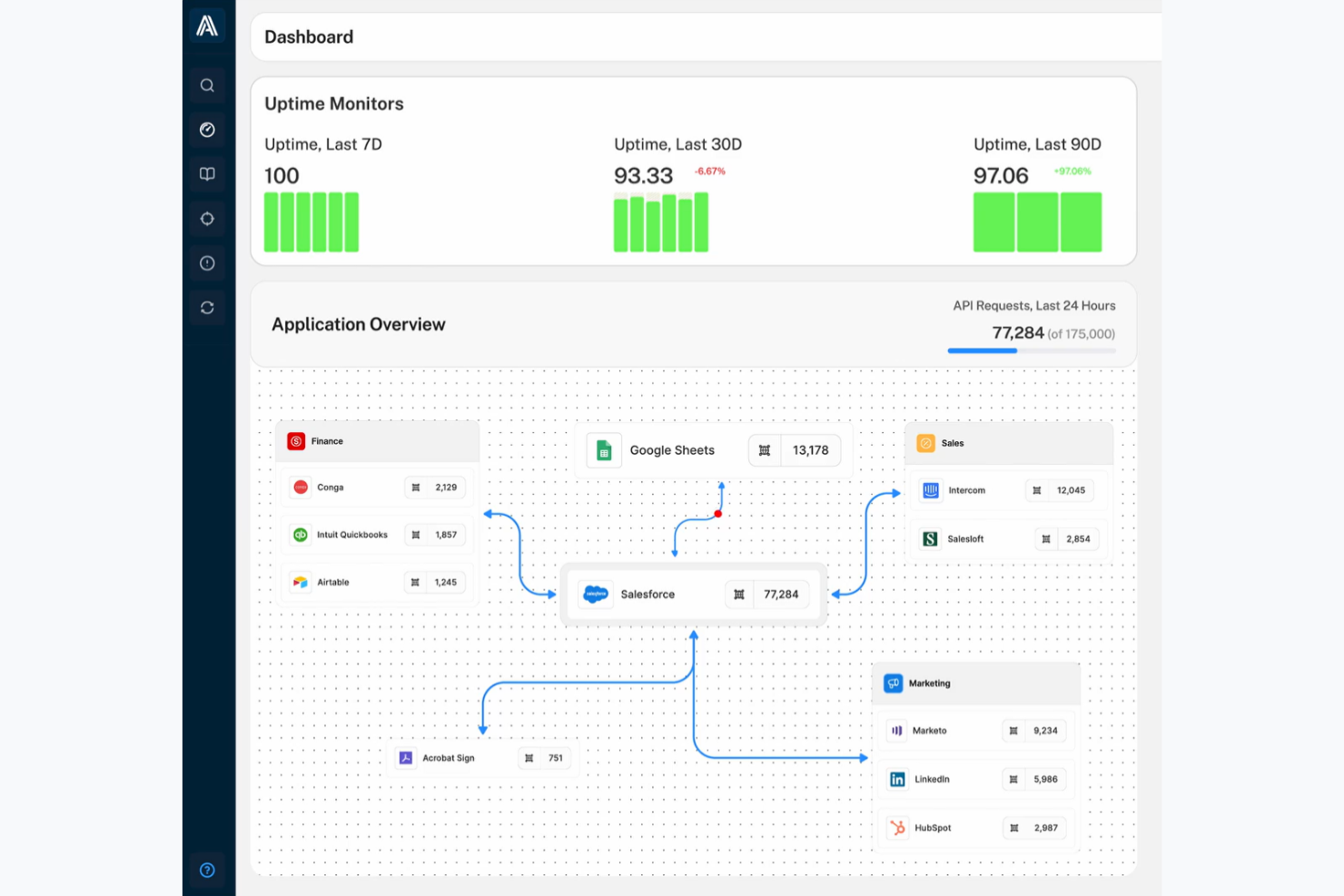
Arovy è uno strumento di data governance rivolto principalmente alle aziende che utilizzano Salesforce. Potenzia l'efficacia dell'IA grazie a funzionalità come l'analisi dell'impatto e la classificazione dei dati.
Perché ho scelto Arovy: Arovy è prima di tutto una piattaforma di data governance e non un tradizionale strumento di gestione dei requisiti. Tuttavia, è utile per i team che devono visualizzare le dipendenze tra i sistemi. Le sue funzionalità di analisi dell'impatto e visualizzazione della provenienza dei dati aiutano i team che considerano le relazioni tra dati a livello di sistema come 'requisiti' per le applicazioni a valle.
Per le organizzazioni che ruotano attorno a Salesforce, Arovy rappresenta quindi un modo per mappare, rivedere e validare le dipendenze a monte che influenzano le decisioni sui requisiti, anche se non si tratta di una vera soluzione RM.
Caratteristiche e integrazioni principali:
Le caratteristiche includono il tracciamento delle modifiche, che aiuta il team a monitorare gli aggiornamenti nei vari progetti. Il sistema di rilevamento delle minacce permette di identificare in modo proattivo i rischi e adottare misure correttive. Inoltre, Arovy supporta il monitoraggio della sicurezza delle applicazioni per mantenere sicuri i tuoi dati.
Le integrazioni comprendono Salesforce, Slack, Microsoft Teams, Google Workspace e GitHub.
Cosa è gratuito?
Arovy offre una prova gratuita a tempo limitato con accesso alle funzionalità principali; alcune funzionalità avanzate potrebbero essere soggette a restrizioni.
Pros and Cons
Pros:
- Mappatura visiva dei requisiti
- Analisi avanzata dell'impatto
- Rilevamento proattivo delle minacce
Cons:
- Funzionalità avanzate limitate
- Richiede integrazione con Salesforce


CAIRIS è uno strumento progettato per l'ingegneria dei requisiti di sicurezza, utilizzato da analisti della sicurezza e sviluppatori. Supporta la modellazione di concetti di sicurezza e valutazioni del rischio per migliorare la sicurezza dei progetti.
Perché ho scelto CAIRIS: CAIRIS è ottimo per modellare e gestire i requisiti di sicurezza, risultando prezioso quando i progetti devono integrare la modellazione delle minacce nelle fasi iniziali. Permette ai team di raccogliere in un unico luogo personas, compiti, vulnerabilità e rischi, traducendo così la ricerca sulla sicurezza in requisiti strutturati.
Questa attenzione all'ingegneria della sicurezza lo rende una valida opzione, anche se la sua interfaccia e i flussi di lavoro richiedono una certa familiarità tecnica.
Caratteristiche e integrazioni distintive:
Le funzionalità includono la modellazione delle personas, che aiuta il tuo team a comprendere le interazioni degli utenti e le potenziali minacce alla sicurezza. Lo strumento supporta l'analisi dei compiti per valutare e migliorare i processi di sicurezza. Inoltre, CAIRIS offre la modellazione delle minacce, consentendo di identificare e mitigare efficacemente i rischi.
Integrazioni includono GitHub, GitLab, JIRA e Slack.
Cosa è gratuito?
CAIRIS offre un piano gratuito per sempre con accesso alle sue funzionalità principali di sicurezza, ma alcune funzionalità avanzate potrebbero essere limitate.
Pros and Cons
Pros:
- Include la modellazione dei rischi tramite API
- Offre la modellazione delle personas
- Supporta l'analisi dei compiti
Cons:
- Richiede competenze tecniche
- Richiede auto-gestione
Altri strumenti per la gestione dei requisiti
Ecco alcune ulteriori opzioni di strumenti per la gestione dei requisiti che offrono anch’essi piani o prove gratuite. Sebbene questi strumenti non siano entrati nella mia selezione, vale comunque la pena consultarli:


Come valuto i migliori strumenti gratuiti per la gestione dei requisiti
Divido la mia valutazione tra criteri di base—come tracciabilità e controllo di versione—e fattori differenzianti che distinguono strumenti realizzati per veri flussi di lavoro di sviluppo da semplici sostituti dei fogli di calcolo.
Funzionalità di base (Requisiti minimi per questa lista)
Quando seleziono gli strumenti per la mia lista, valuto ciascuno su una scala da 0 (funzionalità assente) a 5 (eccelle in quest'area) per ciascuna funzionalità fondamentale elencata qui sotto. Successivamente, calcolo il punteggio totale dello strumento come percentuale. Ogni strumento deve raggiungere un punteggio totale minimo del 65% per essere preso in considerazione.
- Repository dei requisiti: Ricerco un archivio strutturato con attributi personalizzabili, raggruppamento gerarchico e filtri—così i team possono organizzare centinaia di specifiche per modulo, priorità o release senza perdersi.
- Collegamenti di tracciabilità: Ogni strumento dovrebbe permettere di collegare i requisiti ad artefatti successivi come casi di test o user story, facilitando l’identificazione di eventuali lacune di copertura prima della chiusura di uno sprint.
- Controllo di versione e audit trail: Verifico se la cronologia delle modifiche include attribuzione dell’utente e possibilità di rollback, importante quando più analisti modificano i criteri di accettazione su progetti sovrapposti.
- Collaborazione e flussi di revisione: Gli strumenti ricevono un punteggio più alto se gli stakeholder possono commentare direttamente, segnalare approvazioni e ricevere notifiche—invece di dover ricorrere a email esterne per coordinare le approvazioni.
- Piano gratuito reale: Valuto se il piano gratuito supporta un uso effettivo mantenendo le funzionalità base, e non solo una prova di 14 giorni che ti blocca prima che termini il primo ciclo di revisione.
- Import/Export e integrazioni: La compatibilità con formati come CSV ed Excel, oltre alle integrazioni con strumenti come Jira o Azure DevOps, determina quanto bene una piattaforma si integra nel flusso di lavoro di sviluppo esistente.
Dopo aver selezionato gli strumenti che soddisfano questi criteri, considero cosa differenzia ciascuna piattaforma.
Fattori distintivi (Cosa distingue i vendor)
Ecco come confronto e metto a confronto i vari fornitori:
Funzionalità distintive
Funzionalità di baseline e branching sono importanti quando il team gestisce requisiti su rilasci paralleli o varianti di prodotto. Cerco strumenti che consentano di creare snapshot di un insieme di requisiti in una milestone, per poi ramificarli nello sprint successivo senza perdere l’originale. Librerie di requisiti riutilizzabili fanno risparmiare tempo—specialmente per i team che ripetono specifiche simili su progetti diversi, come gli standard di sicurezza delle API o criteri di accessibilità. Per ambienti regolamentati, valuto se uno strumento offre template pronti per la conformità già mappati su standard come IEC 62304 o ISO 26262.
Oltre le funzionalità
La trasparenza del piano gratuito è sempre un aspetto che valuto con attenzione—alcuni strumenti impongono limiti sul numero di requisiti o progetti, che scopri solo a rollout in corso. Anche la sicurezza e i controlli sugli accessi hanno un peso, soprattutto permessi basati sui ruoli e log di audit per i team che sviluppano software regolamentato. Considero anche la strada di aggiornamento. Uno strumento che obbliga a una migrazione completa dei dati quando si supera il piano gratuito introduce rischi inutili, perciò verifico se i fornitori permettono di scalare verso i piani a pagamento mantenendo workspace e cronologia intatti.
Come scegliere uno strumento gratuito per la gestione dei requisiti
Gli elenchi complessi di funzionalità e le strutture dei prezzi possono rendere difficile capire cosa si ottiene realmente dagli strumenti gratuiti per la gestione dei requisiti. Per aiutarti a rimanere concentrato mentre porti avanti il processo di selezione del software, ecco alcuni fattori da tenere presenti:
| Fattore | Cosa considerare |
|---|---|
| Portata dell'offerta gratuita | Verifica cosa è incluso nel piano gratuito. Assicurati che copra le funzionalità essenziali di cui il tuo team ha bisogno, senza costi nascosti o limitazioni significative. |
| Scalabilità | Valuta se lo strumento può crescere insieme al tuo team. Cerca opzioni che consentano aggiornamenti semplici con l'espansione del progetto o del team. |
| Integrazioni | Assicurati che lo strumento si integri con gli altri software che utilizzi. Potrebbero essere inclusi strumenti di gestione dei progetti, piattaforme di comunicazione o software di sviluppo. |
| Facilità d'uso | Valuta se lo strumento è intuitivo per il tuo team. Un'interfaccia facile da navigare, con una curva di apprendimento minima, è fondamentale. |
| Collaborazione | Cerca funzionalità che facilitino il lavoro di squadra, come documenti condivisi o aggiornamenti in tempo reale. Questo aiuta a mantenere tutti aggiornati. |
| Personalizzazione | Determina se puoi adattare lo strumento alle tue esigenze. I campi personalizzati o i modelli possono essere utili per requisiti specifici del progetto. |
| Assistenza | Considera il livello di assistenza disponibile. L'accesso a tutorial, domande frequenti o forum della comunità può essere prezioso quando si verificano problemi. |
| Sicurezza | Valuta le misure di sicurezza adottate. Per i progetti sensibili, assicurati che lo strumento sia conforme agli standard necessari di protezione dei dati. |
Cosa sono gli strumenti gratuiti per la gestione dei requisiti?
Gli strumenti per la gestione dei requisiti sono prodotti che aiutano i team a definire, gestire e monitorare i requisiti dei progetti. In genere offrono piani gratuiti o periodi di prova, con funzionalità principali disponibili senza costi. Questi strumenti sono comunemente utilizzati da project manager, sviluppatori e analisti aziendali per garantire che gli obiettivi del progetto vengano raggiunti in modo efficiente. Offrono valore organizzando e mantenendo chiari i requisiti del progetto, facilitando la comunicazione e riducendo gli errori. Funzionalità come il monitoraggio dei requisiti, la gestione della tracciabilità e gli strumenti di collaborazione aiutano a garantire l'allineamento del progetto e il coordinamento del team.
Funzionalità
Passiamo in rassegna le funzionalità comunemente presenti negli strumenti per la gestione dei requisiti e vediamo quali sono generalmente incluse nei piani gratuiti rispetto a quelli a pagamento.
Funzionalità tipiche degli strumenti gratuiti per la gestione dei requisiti
- Monitoraggio dei requisiti: consente di monitorare e aggiornare i requisiti del progetto, assicurando che tutti i membri del team siano allineati.
- Gestione della tracciabilità: aiuta a collegare i requisiti alle loro origini e a monitorare le modifiche, mantenendo la coerenza durante tutto il ciclo di vita del progetto.
- Strumenti di collaborazione: facilitano la comunicazione e la condivisione delle informazioni tra i membri del team, promuovendo il lavoro di squadra e l'efficienza.
- Gestione dei documenti: organizza i documenti del progetto e garantisce un facile accesso e recupero quando necessario.
- Reportistica di base: fornisce report semplici per offrire informazioni sull'avanzamento del progetto e sullo stato dei requisiti.
Funzionalità tipiche degli strumenti a pagamento per la gestione dei requisiti
- Analisi avanzate: offrono un'analisi approfondita dei dati del progetto, aiutando i team a prendere decisioni informate e a ottimizzare i processi.
- Modelli personalizzabili: consentono di creare modelli adatti alle esigenze specifiche del progetto e di migliorare l'efficienza.
- Notifiche automatiche: inviano avvisi per gli aggiornamenti o le modifiche ai requisiti, mantenendo i membri del team informati in tempo reale.
- Integrazione con strumenti esterni: si collegano ad altri software, come strumenti di gestione dei progetti o di sviluppo, migliorando i flussi di lavoro e la condivisione dei dati.
- Controllo degli accessi basato sui ruoli: gestisce le autorizzazioni degli utenti e garantisce che le informazioni sensibili siano accessibili solo al personale autorizzato.
Vantaggi
L'implementazione di strumenti gratuiti per la gestione dei requisiti offre diversi vantaggi al team e all'azienda. Eccone alcuni:
- Risparmio sui costi: i piani gratuiti consentono al team di gestire i requisiti senza oneri finanziari, rendendoli ideali per startup o piccole imprese.
- Maggiore allineamento del team: le visualizzazioni condivise dei requisiti aiutano i team a rimanere coordinati nelle diverse fasi del progetto, riducendo incomprensioni e rielaborazioni.
- Recupero più semplice delle informazioni: i documenti dei requisiti e i collegamenti organizzati aiutano i team a trovare rapidamente i dettagli necessari man mano che i progetti diventano più complessi.
- Maggiore visibilità: il monitoraggio dei requisiti e la reportistica di base forniscono informazioni sull'avanzamento del progetto, aiutando il team a rimanere in linea con gli obiettivi.
- Scalabilità: molti strumenti gratuiti offrono la possibilità di passare a un piano superiore con la crescita del team, garantendo che lo strumento continui a soddisfare le esigenze.
- Accessibilità: gli strumenti gratuiti basati sul Web sono accessibili ovunque, consentendo ai membri del team di lavorare da remoto o in mobilità.
- Flessibilità: le funzionalità personalizzabili dei piani gratuiti consentono di adattare lo strumento ai requisiti specifici del progetto, offrendo soluzioni personalizzate.
Costi & prezzi
Mi rendo conto che sei arrivato a questo articolo cercando le migliori opzioni di strumenti per la gestione dei requisiti disponibili gratuitamente. Tuttavia, poiché i piani gratuiti offrono solo funzionalità limitate, è probabile che in futuro dovrai passare a un piano superiore.
La tabella seguente riassume i piani comuni, i relativi prezzi medi e le funzionalità tipicamente incluse nelle soluzioni per la gestione dei requisiti:
Tabella comparativa dei piani per gli strumenti di gestione dei requisiti
| Tipo di piano | Prezzo medio | Funzionalità comuni |
|---|---|---|
| Piano gratuito | $0 | Monitoraggio di base dei requisiti, gestione dei documenti e strumenti di collaborazione. |
| Piano personale | $5-$20/utente/mese | Reportistica avanzata, opzioni di personalizzazione e integrazione con altri strumenti. |
| Piano aziendale | $25-$50/utente/mese | Gestione di più progetti, funzionalità di sicurezza avanzate e supporto prioritario. |
| Piano per grandi aziende | $60-$150/utente/mese | Sicurezza per grandi aziende, controlli amministrativi, flussi di lavoro personalizzati, supporto dedicato. |
Domande frequenti sugli strumenti gratuiti per la gestione dei requisiti
Ecco alcune risposte alle domande più frequenti sugli strumenti gratuiti per la gestione dei requisiti:
Quali sono i limiti degli strumenti gratuiti per la gestione dei requisiti?
Gli strumenti gratuiti per la gestione dei requisiti presentano spesso limitazioni come funzionalità ridotte, spazio di archiviazione limitato o un limite al numero di utenti o progetti. Alcuni non dispongono inoltre di opzioni avanzate come dashboard per la tracciabilità dei requisiti o reportistica metrica più approfondita, a meno che non si effettui l’aggiornamento. Sebbene offrano funzioni di base, potresti trovare le opzioni avanzate bloccate nei piani a pagamento. Valuta se la versione gratuita soddisfa le esigenze del tuo team, soprattutto se gestisci casi di test complessi o collabori con più parti interessate.
Gli strumenti gratuiti per la gestione dei requisiti possono integrarsi con altri software?
Sì, molti strumenti gratuiti per la gestione dei requisiti offrono integrazioni di base con software diffusi, come strumenti di gestione dei progetti e di comunicazione. Alcuni si collegano persino a piattaforme come ClickUp, strumenti Scrum o repository del codice sorgente. Tuttavia, la gamma di integrazioni potrebbe essere più limitata rispetto alle versioni a pagamento. Verifica che lo strumento gratuito si integri con il software che il tuo team utilizza già, in particolare se lavori in ambienti Linux o coordini la raccolta dei requisiti tra più team.
Quanto sono sicuri gli strumenti gratuiti per la gestione dei requisiti?
La sicurezza può variare tra gli strumenti gratuiti. Sebbene alcuni possano offrire crittografia di base e controlli di accesso sicuri, potrebbero non garantire lo stesso livello di protezione delle piattaforme a pagamento. Questo è importante se il tuo team gestisce dati sensibili in locale o utilizza strumenti collegati ai processi ALM. Valuta le misure di sicurezza di qualsiasi strumento che prendi in considerazione, soprattutto se gestisci dati sensibili.
In che modo gli strumenti gratuiti per la gestione dei requisiti supportano la collaborazione?
Gli strumenti gratuiti includono spesso funzionalità di collaborazione di base come documenti condivisi, commenti e assegnazione delle attività. Queste funzionalità aiutano il team a comunicare e lavorare insieme, anche se non sono avanzate quanto quelle dei piani a pagamento. Alcuni strumenti supportano anche funzionalità di gestione delle versioni, come il mantenimento di una linea di base, che può essere utile quando più collaboratori aggiornano i requisiti in progetti diversi. Considera il livello di collaborazione di cui il tuo team ha bisogno quando scegli uno strumento.
Esistono strumenti gratuiti per la gestione dei requisiti adatti ai team numerosi?
Alcuni strumenti gratuiti possono supportare team numerosi, ma potrebbero presentare limitazioni nelle funzionalità o nel supporto. Ad esempio, gli strumenti progettati per la gestione dei requisiti aziendali potrebbero richiedere piani a pagamento per garantire scalabilità o controlli amministrativi aggiuntivi. Se il tuo team è numeroso, assicurati che lo strumento possa gestire il numero di utenti e progetti previsto. Questo aspetto diventa importante quando devi gestire grandi volumi di dati, come pannelli di controllo o documentazione strutturata dei requisiti.
Come posso garantire una transizione fluida a uno strumento gratuito per la gestione dei requisiti?
Per garantire una transizione fluida, cerca strumenti che offrano risorse per l’inserimento, come tutorial, guide o supporto della community. Le opzioni che forniscono flussi di lavoro strutturati per la gestione dei test o consentono di monitorare con precisione le modifiche alla linea di base possono ridurre le difficoltà durante la migrazione. Queste risorse possono aiutare il team ad adattarsi rapidamente al nuovo sistema, riducendo al minimo le interruzioni e massimizzando la produttività, anche se strumenti come Visure o altri fanno parte del processo di valutazione. Le soluzioni che aiutano a semplificare la configurazione e l’importazione dei dati sono utili durante l’inserimento.