

Zoho Sprints Review: Pros, Cons, Features and Pricing Explained
I’ve put Zoho Sprints through its paces—if you want agile tools that actually adapt to your workflow (not the other way around), you’ll want to see what sets it apart in 2026.

We review tools independently, and commissions help fund our testing. See our transparency policy, our methodology, or suggest a tool.
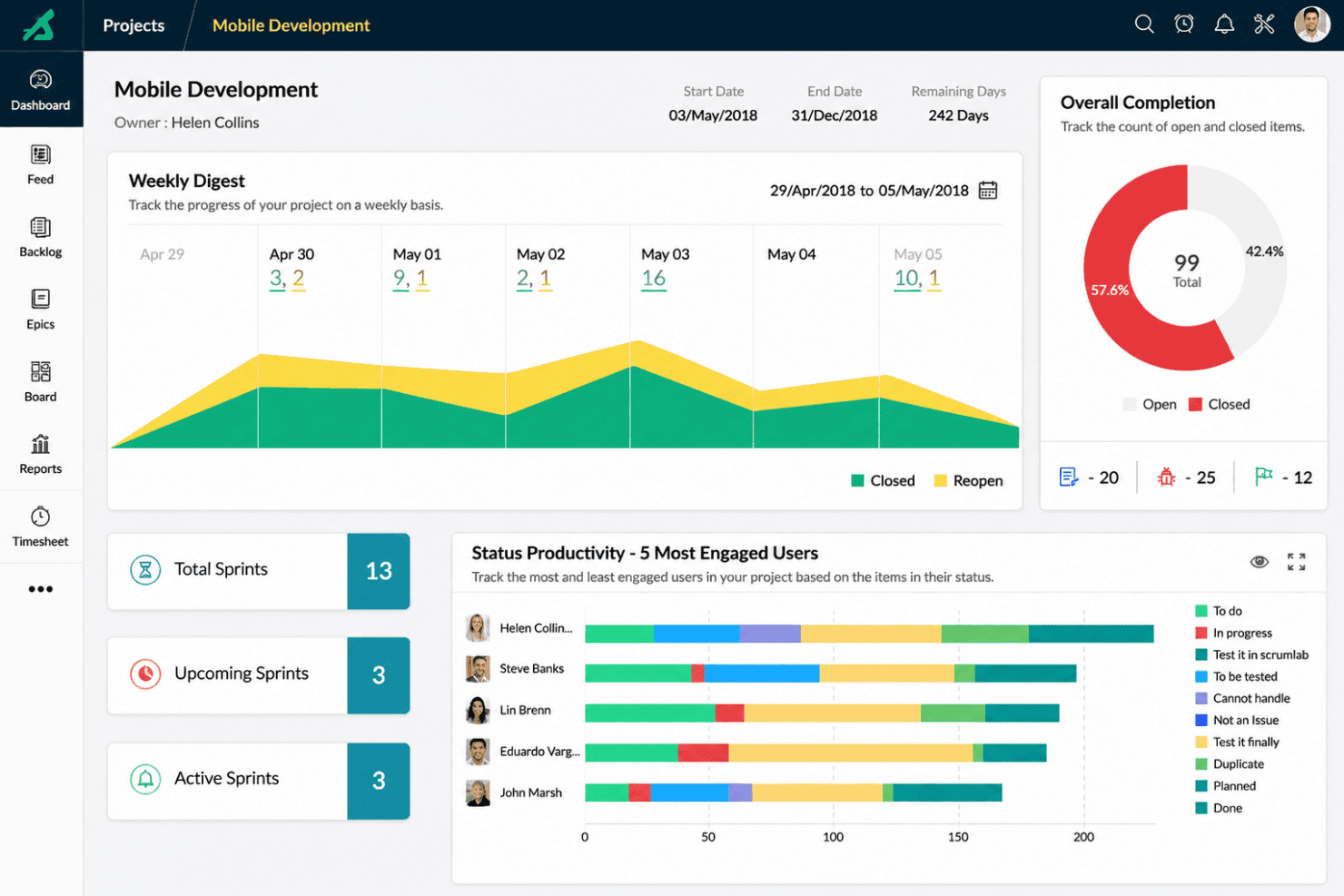
Zoho Sprints is an agile software development tool built around scrum—giving development teams a dedicated space for sprint planning, backlog management, and velocity tracking. It's worth a close look if your team wants to move away from Jira but doesn't want to deal with its configuration overhead and licensing costs. Zoho Sprints keeps things lean without stripping out the features that matter for sprint-based delivery.
Zoho Sprints Evaluation Summary
4.4/5
- From $1/user/month (billed annually)
- Free plan available
Why Trust Our Software Recommendations
6,700+
Reviews
20
Industry experts
16+
Evaluation factors
14
Years
Our team has been testing and reviewing software since 2012. As tech leaders ourselves, we know how difficult—and important—it is to choose the right software.
For this guide, we evaluated tools using hands-on testing and independent research, scoring tools using our selection criteria.
Our reviews reflect our human editorial judgment, not a sales pitch.
Expert reviewers:
- Paulo Gardini MiguelTech Director
 Tim FisherVP of AI
 Gabriel RosasTech Lead & Software Architect
 Christhian GruhnTech Lead & Platform Architect

Zoho Sprints Overview
When judging Zoho Sprints, I think its clean user interface, simple onboarding, and flexible boards make it easy to choose for agile teams new to agile project management. The pricing is fair for the features you get, and the integrations cover most needs, though deeper dev tool integrations would help. Compared to options like Trello or Asana, I find Zoho Sprints outperforms in usability and core functionality but can underperform on advanced customization. I’d recommend selecting it for small to mid-sized teams or organizations adopting agile methodologies, prioritizing clarity and fast adoption over niche configuration.
Pros
- Sprint planning and backlog management are straightforward for teams.
- Customizable scrum boards support unique team workflows well.
- Built-in reports and notifications help track progress and flag bottlenecks in real-time.
Cons
- Mobile app features are limited compared to desktop.
- Notifications lack granular controls, making it hard to tune alerts without noise.
- Advanced permissions are less flexible for large agile organizations.


Our Review Methodology
How We Test & Score Tools
We’ve spent years building, refining, and improving our software testing and scoring system. The rubric is designed to capture the nuances of software selection and what makes a tool effective, focusing on critical aspects of the decision-making process.
Below, you can see exactly how our testing and scoring works across seven criteria. It allows us to provide an unbiased evaluation of the software based on core functionality, standout features, ease of use, onboarding, customer support, integrations, customer reviews, and value for money.
Core Functionality (25% of final scoring)
The starting point of our evaluation is always the core functionality of the tool. Does it have the basic features and functions that a user would expect to see? Are any of those core features locked to higher-tiered pricing plans? At its core, we expect a tool to stand up against the baseline capabilities of its competitors.
Standout Features (25% of final scoring)
Next, we evaluate uncommon standout features that go above and beyond the core functionality typically found in tools of its kind. A high score reflects specialized or unique features that make the product faster, more efficient, or offer additional value to the user.
We also evaluate how easy it is to integrate with other tools typically found in the tech stack to expand the functionality and utility of the software. Tools offering plentiful native integrations, 3rd party connections, and API access to build custom integrations score best.
Ease of Use (10% of final scoring)
We consider how quick and easy it is to execute the tasks defined in the core functionality using the tool. High scoring software is well designed, intuitive to use, offers mobile apps, provides templates, and makes relatively complex tasks seem simple.
Onboarding (10% of final scoring)
We know how important rapid team adoption is for a new platform, so we evaluate how easy it is to learn and use a tool with minimal training. We evaluate how quickly a team member can get set up and start using the tool with no experience. High scoring solutions indicate little or no support is required.
Customer Support (10% of final scoring)
We review how quick and easy it is to get unstuck and find help by phone, live chat, or knowledge base. Tools and companies that provide real-time support score best, while chatbots score worst.
Customer Reviews (10% of final scoring)
Beyond our own testing and evaluation, we consider the net promoter score from current and past customers. We review their likelihood, given the option, to choose the tool again for the core functionality. A high scoring software reflects a high net promoter score from current or past customers.
Value for Money (10% of final scoring)
Lastly, in consideration of all the other criteria, we review the average price of entry level plans against the core features and consider the value of the other evaluation criteria. Software that delivers more, for less, will score higher.
Core Features
Scrum Boards
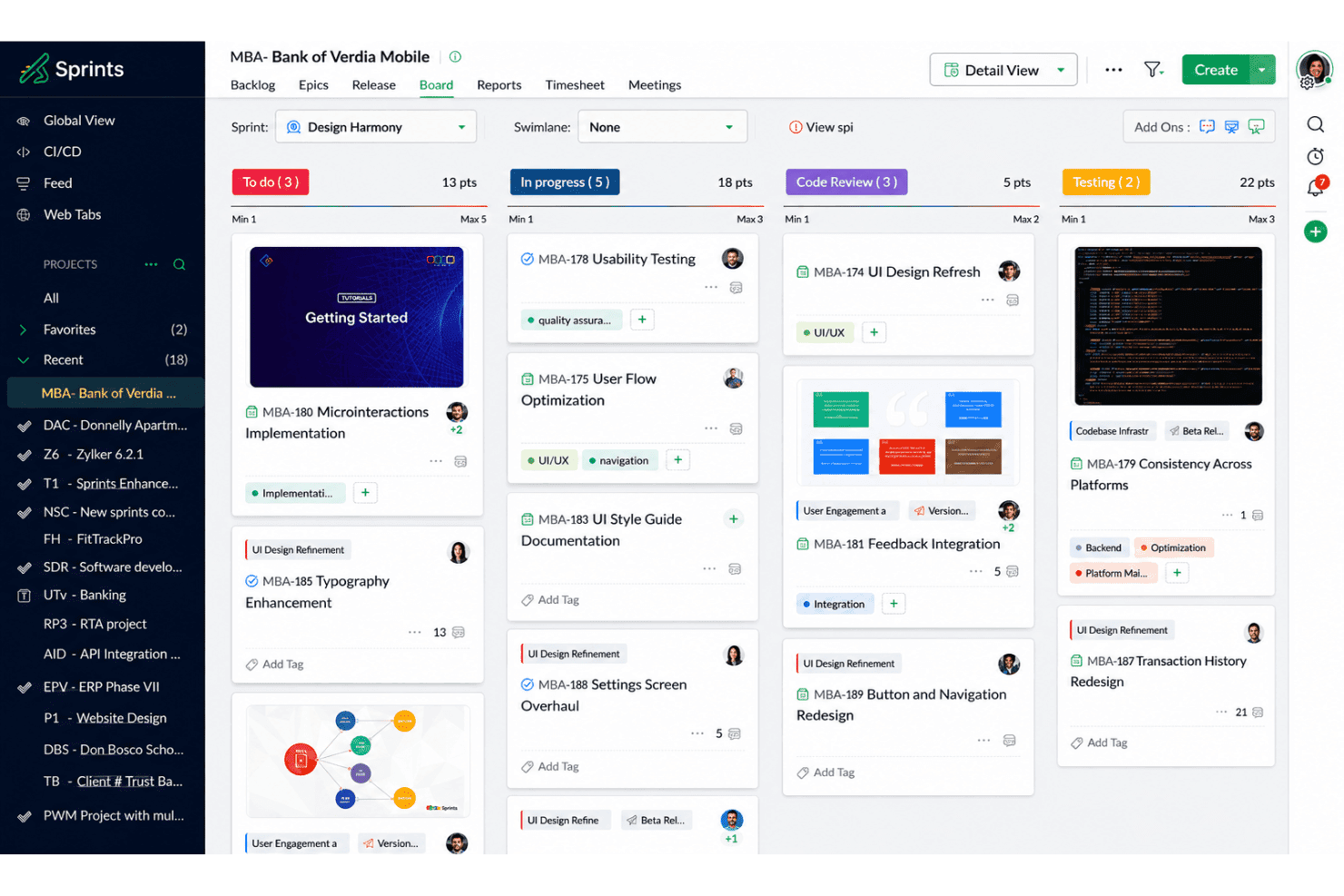
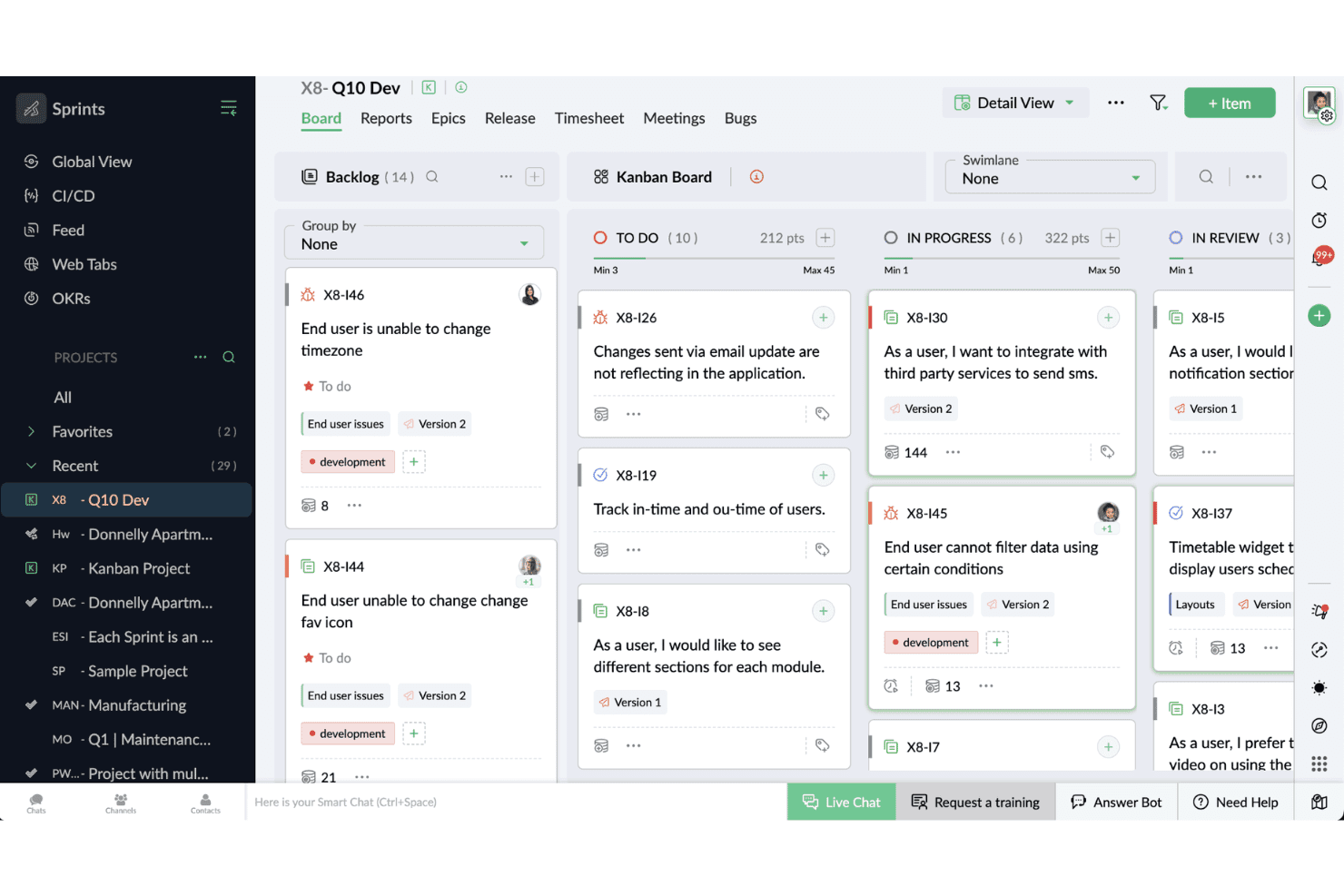
Task management is visual—arrange cards across custom columns to track all in-progress work. Teams get real-time visibility into work in progress and catch bottlenecks at a glance.
Backlog Management
Prioritize, sort, and refine user stories in a drag-and-drop list. This keeps planned work organized for agile development and ready for sprints.
Sprint Planning
Set sprint goals, enable automation for recurring tasks, and assign work in one place. Sprints can be adjusted mid-cycle—enabling prioritization of urgent work as needs evolve.
Timesheet Tracking
Log effort and time for each task with built-in timesheets. Managers review progress and spot under- or over-utilization easily.
Velocity Charts
Track team speed with automatic velocity and burndown charts. Teams compare past sprints using burnup alongside burndown data to better estimate future workload.
Custom Workflows
Tailor fields, statuses, and board layouts to suit product management or development team needs.Scrum teams control how their process flows from start to finish.
Ease of Use
Zoho Sprints stands out for its user-friendly navigation and drag-and-drop boards, which let teams adapt quickly without lengthy onboarding. I’ve noticed that even new users can easily manage backlogs, sprints, and reports thanks to its clean, logical layout. The mobile app is less robust, but for web use, the simplicity wins out for busy tech teams looking to avoid unnecessary complexity.
Integrations
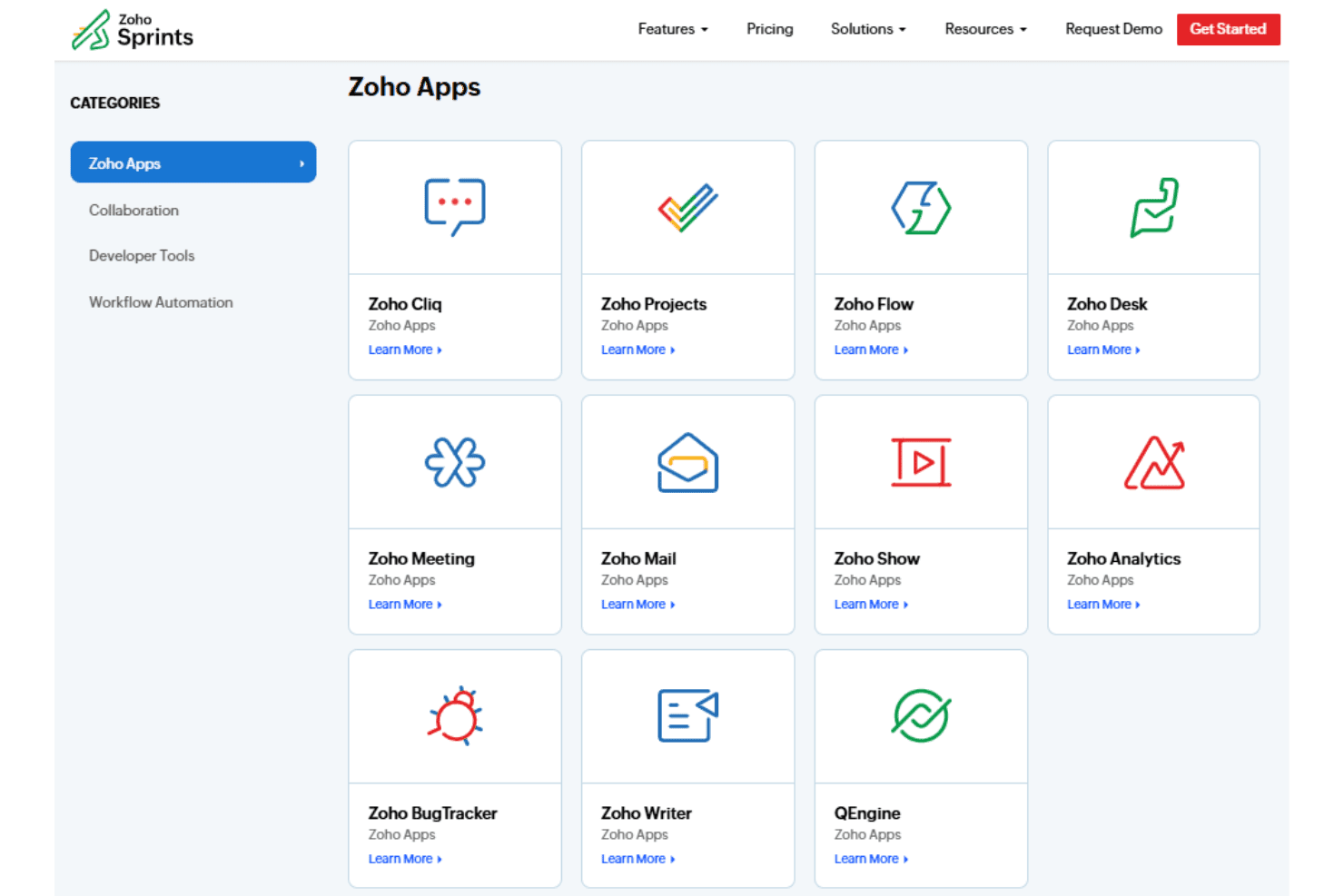
Zoho Sprints integrates with Zoho Cliq, Zoho Projects, Zoho Flow, Zoho Desk, Zoho Analytics, Microsoft Teams, Google Workspace, Jira, GitHub, and GitLab, among others.
Zoho Sprints also provides a REST API and supports third-party integration tools such as Zapier.
New Product Updates from Zoho Sprints
Zoho Sprints Expands Forms With Location Tracking and Custom Modules
Zoho Sprints now includes a location field that captures latitude and longitude coordinates through creation forms. Public forms are also supported in custom modules, allowing users to create records directly within those modules. Highlights include:
- Location Field: Capture latitude and longitude coordinates through creation forms.
- Location Context: Add site-specific location information to created records.
- Public Forms: Use public forms with custom modules.
- Custom Module Records: Let users create records directly in custom modules through public forms.
Visit Zoho Sprints’ official site for more details.
Zoho Sprints Adds Dashboard View for Custom Modules
Zoho Sprints now provides a Dashboard view for custom modules, turning module records into visual charts and tables. This makes custom data easier to review and analyze. Highlights include:
- Dashboard View: Adds a visual reporting option for custom modules.
- Charts: Displays custom module data in graphical formats.
- Tables: Organizes custom records for easier review.
- Custom Module Insights: Helps teams analyze information stored in custom modules.
Visit Zoho Sprints’ official site for more details.
 Opens new window
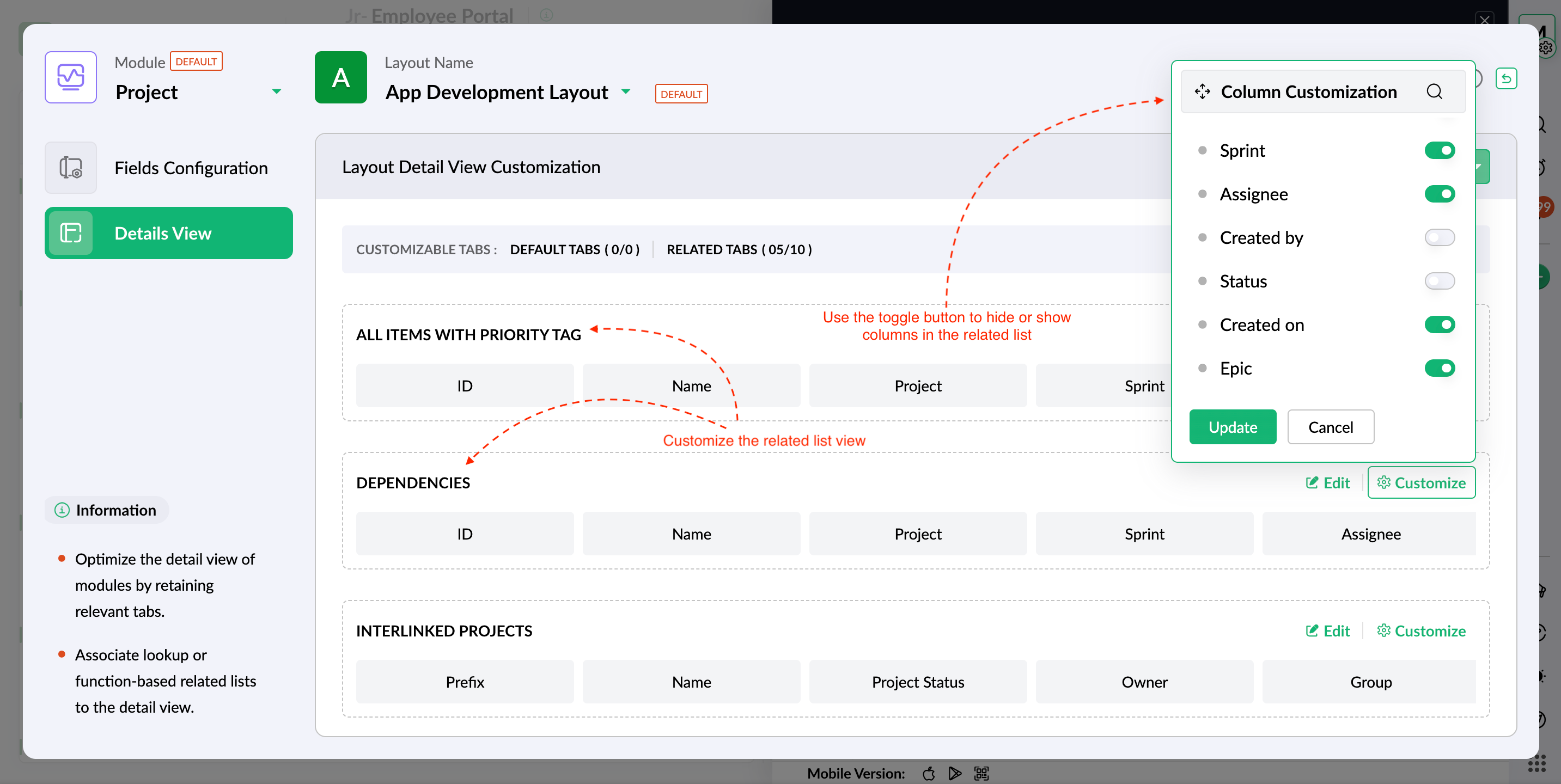
Zoho Sprints Expands Layout Customization and Rules
Zoho Sprints now lets admins control tabs, related lists, and column visibility in module detail views while applying Layout Rules to Objectives and Key Results. These updates improve layout consistency and help ensure required information is completed. Highlights include:
- Detail View Layouts: Lets admins choose which tabs appear in individual module views.
- Related Lists: Supports adding new related lists and linking existing ones to detail views.
- Column Visibility: Controls which columns appear in associated related lists.
- Layout Rules for Objectives: Enforces required information when entering Objective data.
- Layout Rules for Key Results: Applies the same structured data-entry controls to Key Results.
Visit Zoho Sprints’ official site for more details.
 Opens new window
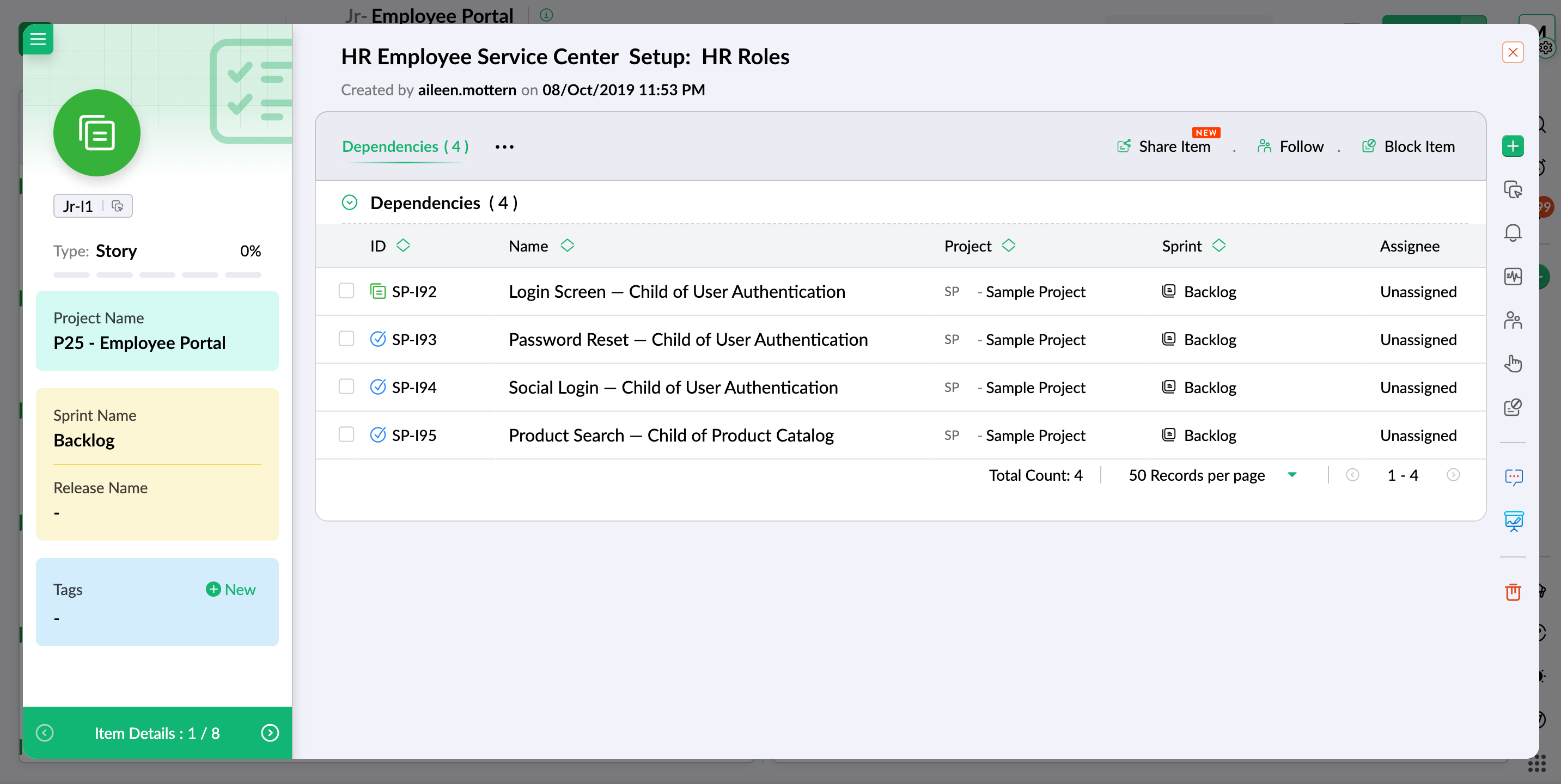
Zoho Sprints Introduces Related Lists for Cross-Module Data
Zoho Sprints now includes related lists, making it easier to bring connected information together and consume cross-module data in one place. This improves visibility across your workspace and helps teams move faster with better context. Highlights include:
- Related Lists: Brings connected data together in one view.
- Module Lookups: Links and displays data across modules within the workspace.
- Custom Function Lookups: Pulls related data from outside the workspace.
- Cross-Module Visibility: Makes connected information easier to access and review.
Visit Zoho Sprints’ official site for more details.
 Opens new window
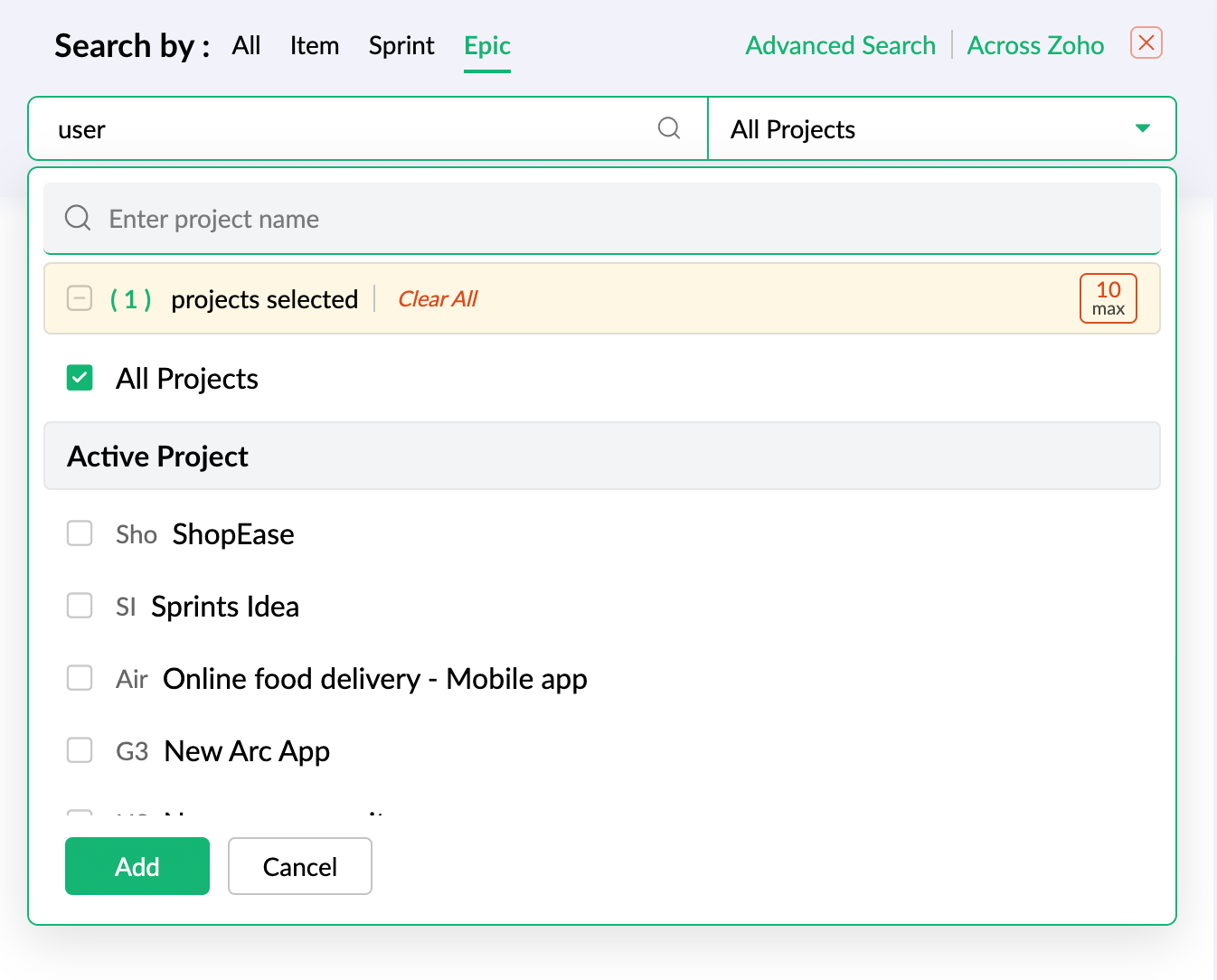
Zoho Sprints Adds Epic Search to Global Search
Zoho Sprints adds epic search by name, number, and tag to Global Search and Advanced Search. This helps users find epics across all projects or narrow results to specific projects. Highlights include:
- Epic Search: Lets users find epics by name, number, or tag.
- Project Scope Controls: Supports searching across all projects or selected projects.
- Advanced Search Support: Extends the same epic search capability to Advanced Search.
Visit Zoho Sprints’ official site for more details.
 Opens new window
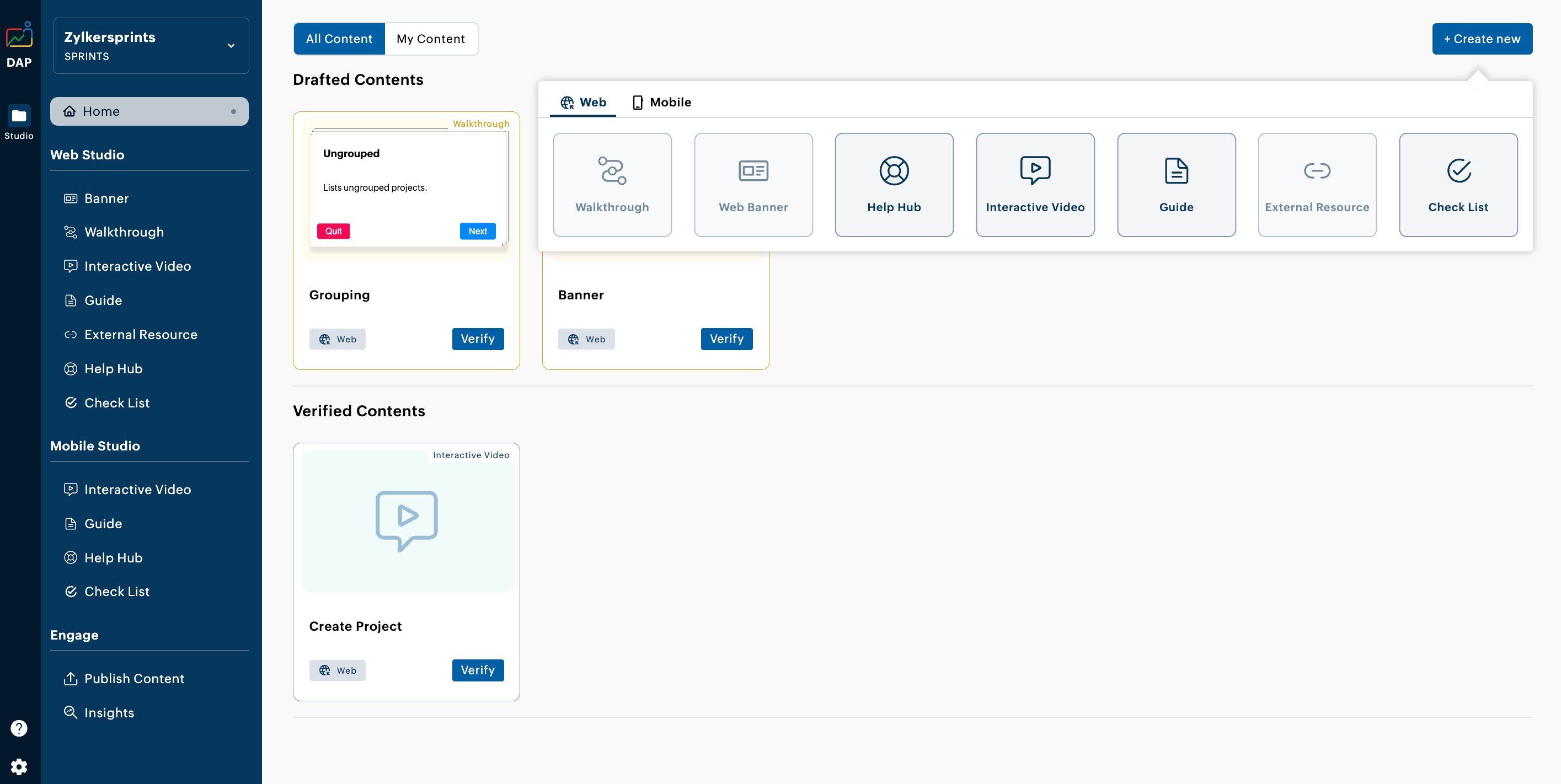
Zoho Sprints Adds Zoho DAP Integration for User Onboarding
Zoho Sprints adds support for Zoho Digital Adoption Platform, letting admins create in-product onboarding content such as banners, walkthroughs, and help videos. The integration helps teams guide new users through Zoho Sprints without relying on separate onboarding materials. Highlights include:
- In-Product Banners: Lets admins surface onboarding messages directly inside Zoho Sprints.
- Walkthroughs: Provides guided in-product steps to help users learn workflows.
- Help Videos: Adds embedded video guidance for faster onboarding and training.
Visit Zoho Sprints’ official site for more details.
 Opens new window
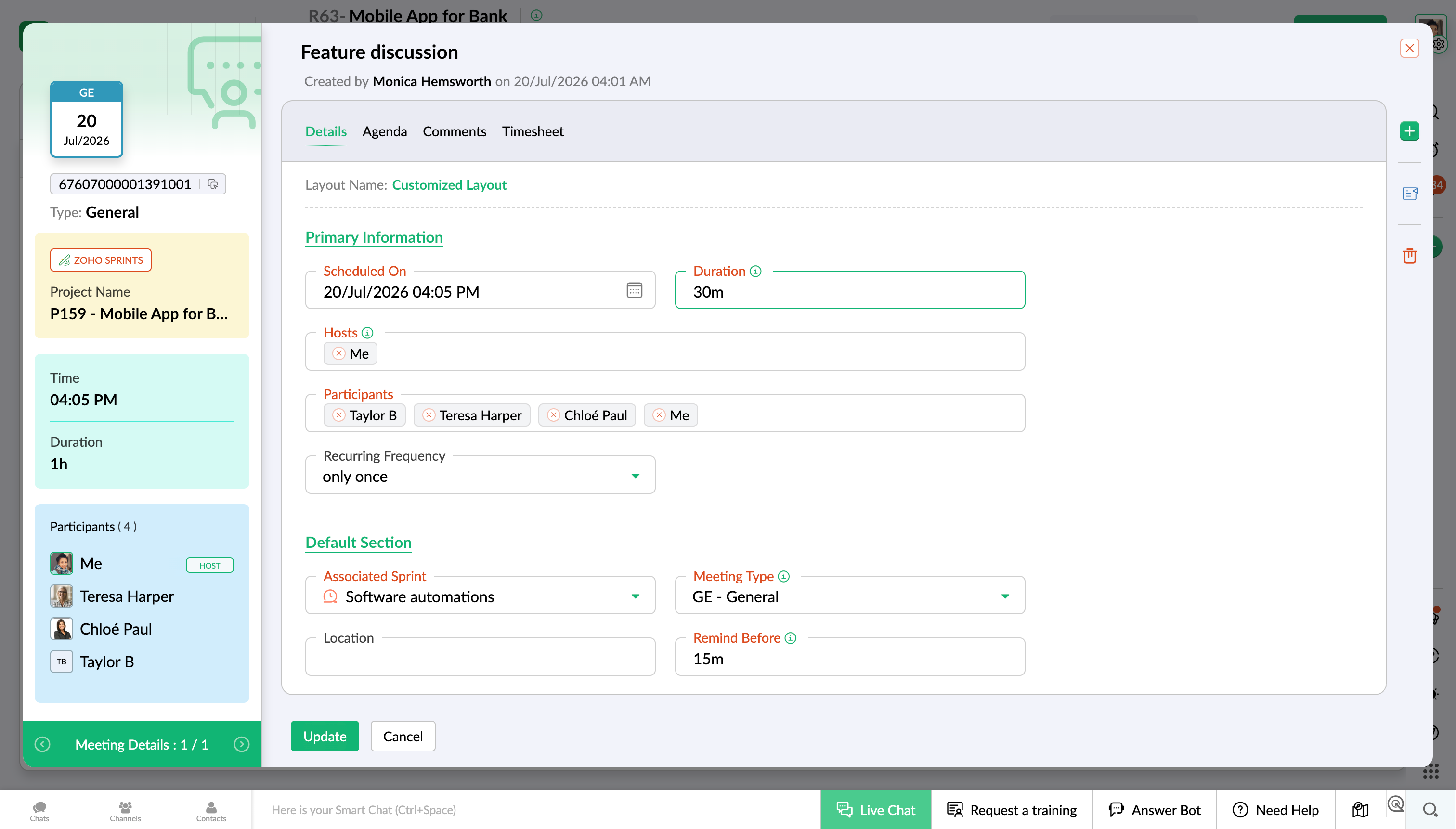
Zoho Sprints Adds Built-In Meeting Hosting
Zoho Sprints now supports hosting meetings directly within the product, so teams can plan and run discussions without switching tools. This streamlines collaboration and makes it easier to choose the right meeting format for each situation.Highlights include:
- Built-In Meeting Provider: Host meetings directly in Zoho Sprints without using external meeting services.
- Online Meetings: Start and manage virtual meetings within the platform.
- Offline Meetings: Schedule and track in-person meetings using the built-in meeting provider.
Visit Zoho Sprints' official site for more details.
 Opens new window
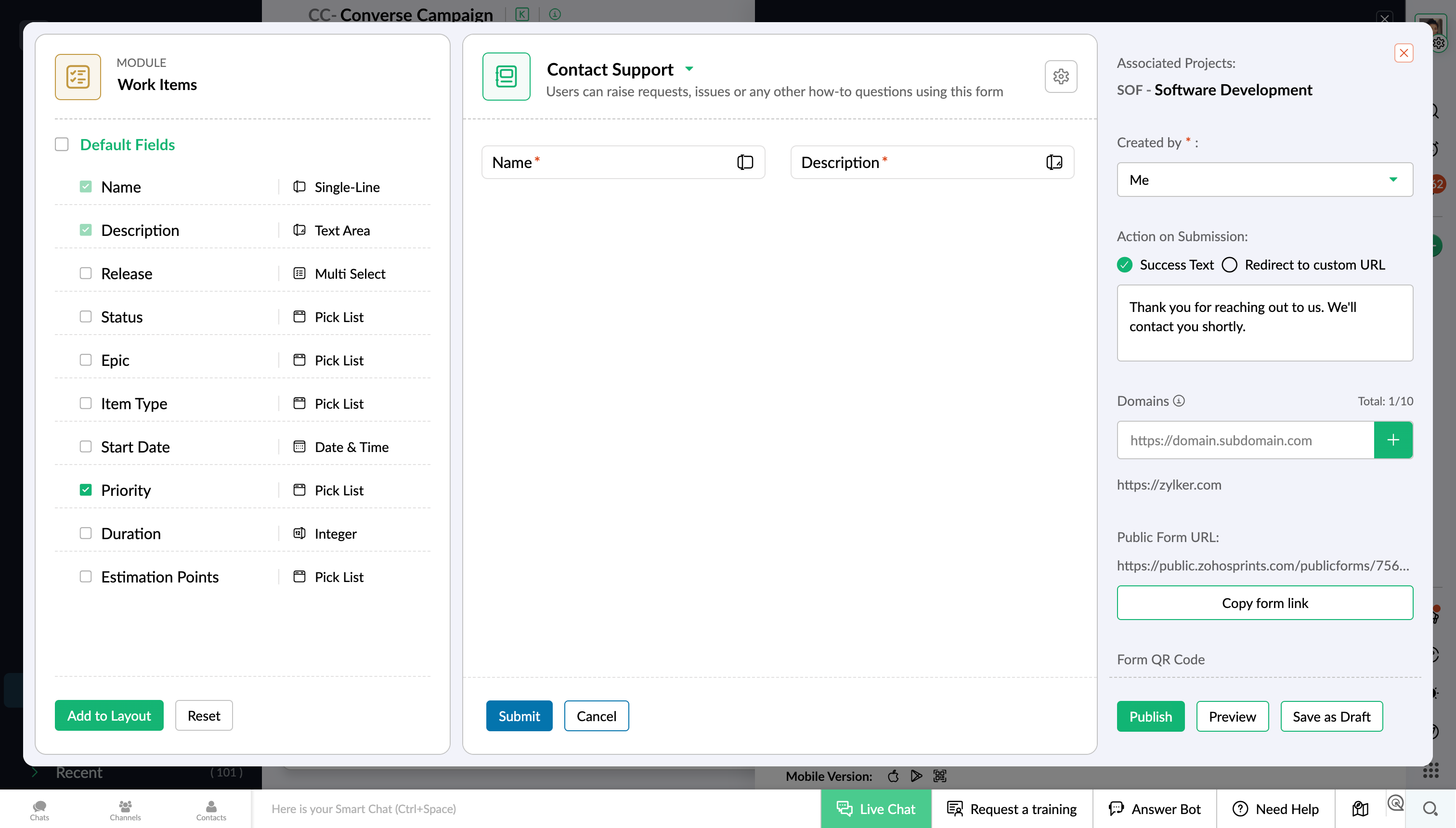
Zoho Sprints Adds Shareable Forms for Work Item Collection
Zoho Sprints now offers shareable forms that let teams collect work items from anyone through a public URL or embedded website form. Every submission is automatically converted into a work item, making it easier to capture, track, and prioritize incoming requests. Highlights include:
- Shareable Forms: Collect feature requests, issues, customer feedback, and other work items from external contributors.
- Public URL and Embed Support: Share forms through a public link or embed them directly on a website.
- Automatic Work Item Creation: Converts every form submission into a work item for seamless tracking and prioritization.
Visit Zoho Sprints' official site for more details.
Zoho Sprints Adds Weekly Timesheet Logs in Global View
Zoho Sprints adds weekly timesheet logging to Global View, enabling users to create multiple time log entries through the Timesheet type's Add button. The update simplifies weekly time tracking by allowing teams to log hours more efficiently from a single location. Highlights include:
- Weekly Timesheet Logs: Add multiple time log entries for the week in one action.
- Global View Access: Create weekly logs directly from the Timesheet type in Global View.
- Faster Time Entry: Reduce repetitive manual logging with a streamlined weekly workflow.
Visit Zoho Sprints' official site for more details.
 Opens new window
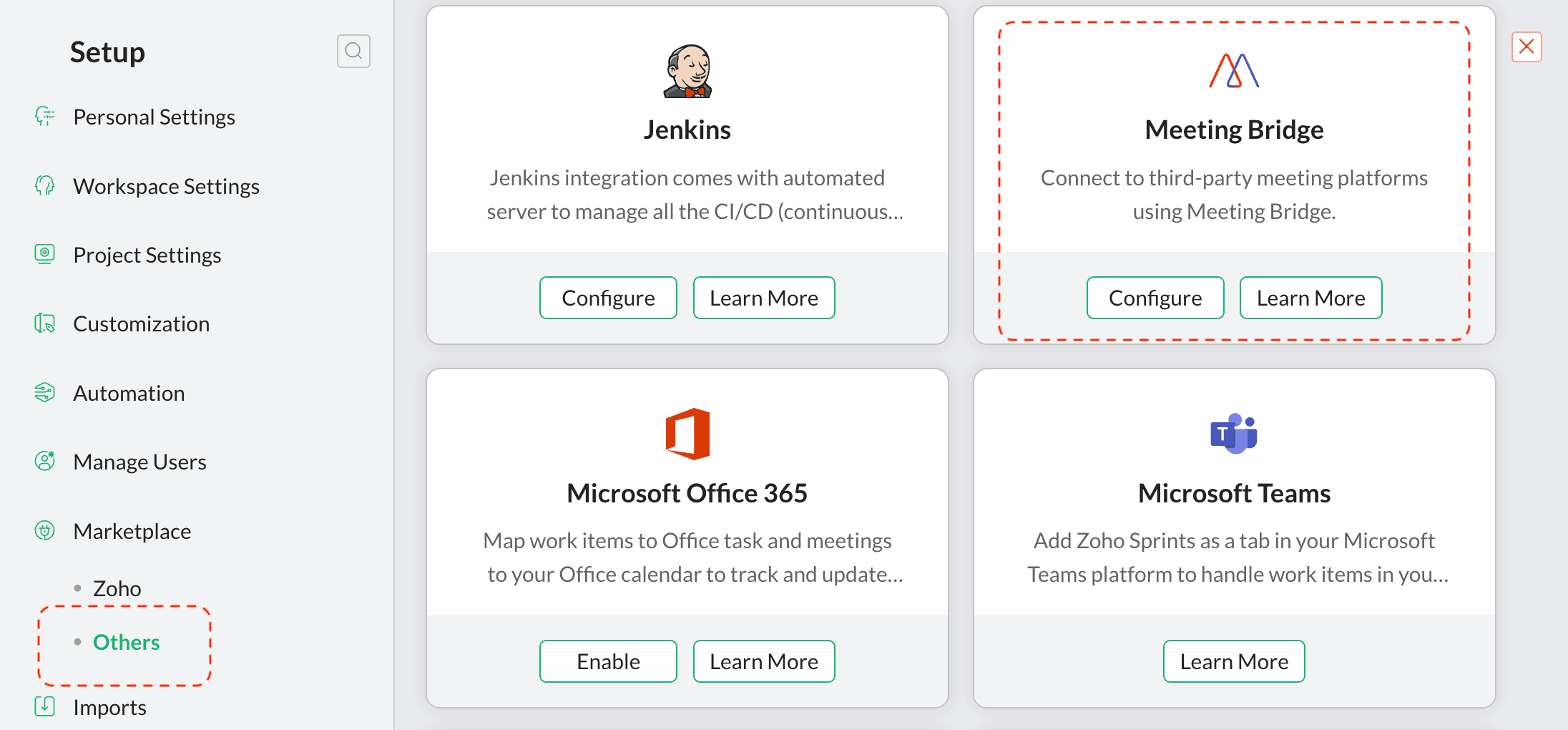
Zoho Sprints Adds Google Meet Support in MeetingBridge
Zoho Sprints added Google Meet support in MeetingBridge to help teams manage online meetings from their workspace. This update allows users to create, schedule, and launch Google Meet sessions without switching between platforms.
Visit Zoho Sprints’ official site for more details.
Zoho Sprints Specs
- API: Yes
- Approval Workflows: Yes
- Batch Permissions & Access: No
- Budgeting: Yes
- Calendar Management: Yes
- Contact Management: No
- Contact Sharing: No
- Custom Reports: Yes
- Customer Management: No
- Dashboard: Yes
- Dashboards: No
- Data Export: Yes
- Data Import: Yes
- Data Visualization: Yes
- Document Management: No
- Expense Tracking: Yes
- External Integrations: Yes
- Gantt Charts: No
- Multi-User: Yes
- Notifications: Yes
- Process Modeling: No
- Project Management: Yes
- Resource Management: Yes
- Risk Assessment: Yes
- Roadmapping: No
- Scheduling: Yes
- Task Scheduling/Tracking: Yes
- Third-Party Plugins/Add-Ons: Yes
- Travel Management: No
- Workflow Management: Yes