

Honeycomb-arvostelu 2026: hyvät ja huonot puolet, ominaisuudet ja hinnoittelu
Honeycomb erottuu edukseen reaaliaikaisella havaittavuudella ja perusteellisella vianmäärityksellä, mikä tekee siitä ihanteellisen monimutkaisiin järjestelmiin, mutta yksinkertaisempiin valvontatarpeisiin se voi olla ylimitoitettu.

We review tools independently, and commissions help fund our testing. See our transparency policy, our methodology, or suggest a tool.
Honeycomb is a cloud infrastructure monitoring tool built for engineering teams that need deep observability into distributed systems and microservices. It's a strong fit when you need to query high-cardinality event data to pinpoint production issues fast. If you're weighing it against Datadog, I'd say Honeycomb wins on query depth—you can slice event data by any combination of fields in real time, rather than relying on pre-built dashboards to surface what went wrong.
Honeycomb Evaluation Summary

4.6/5
- From $130/month
- Free plan + demo available
Miksi luottaa ohjelmistosuosituksiimme
6,700+
Reviews
20
Industry experts
16+
Evaluation factors
14
Years
Tiimimme on testannut ja arvioinut ohjelmistoja vuodesta 2012 lähtien. Teknologiajohtajina tiedämme itse, kuinka vaikeaa — ja tärkeää — oikean ohjelmiston valitseminen on.
Tätä opasta varten arvioimme työkaluja käytännön testauksen ja itsenäisen tutkimuksen avulla, pisteyttäen työkalut valintakriteeriemme perusteella.
Arvostelumme perustuvat inhimilliseen toimitukselliseen harkintaamme, eivät myyntipuheeseen.
Asiantuntija-arvioijat:
- Paulo Gardini MiguelTech Director
 Tim FisherVP of AI
 Gabriel RosasTech Lead & Software Architect
 Christhian GruhnTech Lead & Platform Architect

Honeycomb Overview
When judging infrastructure monitoring tools, Honeycomb stands out for its event-based observability, intuitive query builder, and fast, interactive UI. Its pricing is transparent and scales well for teams needing granular insights. While onboarding can be complex for those new to observability, the documentation and support are strong. Integrations cover most modern stacks, but legacy environments may require extra setup.
If you’re selecting a tool for debugging distributed systems or high-cardinality data, Honeycomb often outperforms others. It’s best suited for teams prioritizing deep system visibility over basic uptime checks.
Pros
- Transparent pricing with unlimited custom metrics included
- Real-time event-based observability with fast query speeds
- Excels at high-cardinality querying for complex environments
Cons
- Onboarding is complex for teams new to observability
- Dashboards and insights can feel unintuitive to some users
- Less effective for traditional uptime monitoring use cases
Is Honeycomb Right For Your Needs?
Who Would be a Good Fit for Honeycomb?
Honeycomb is best suited for organizations with complex, distributed systems that require deep observability and rapid debugging. Teams in industries where high-cardinality data and real-time analysis are essential will find Honeycomb’s event-based approach and flexible querying especially valuable.
It’s a strong choice for modern engineering teams, especially those running microservices or cloud-native architectures, who need to quickly pinpoint issues and understand system behavior under load.
- Site Reliability EngineeringSREs benefit from Honeycomb’s ability to correlate events and metrics for proactive monitoring.
- E-commerce PlatformsDetailed tracing helps identify transaction bottlenecks and performance anomalies.
- Cloud-Native StartupsHoneycomb’s observability model fits dynamic, containerized, and serverless environments.
- DevOps TeamsFast drill-down and flexible queries enable root cause analysis during deployments.
- Fintech CompaniesReal-time event analysis supports compliance and rapid incident response in regulated environments.
- SaaS ProvidersHoneycomb’s high-cardinality querying helps SaaS teams trace user-specific issues across distributed services.
Who Would be a Bad Fit for Honeycomb?
Honeycomb is less suitable for organizations with simple infrastructure, traditional monitoring needs, or limited technical resources. Teams that primarily need basic uptime checks, legacy system support, or straightforward dashboards may find Honeycomb’s advanced features unnecessary or difficult to leverage.
Smaller businesses or non-technical departments may also struggle with the onboarding and ongoing management requirements.
- Marketing DepartmentsHoneycomb’s focus on infrastructure observability doesn’t align with marketing analytics needs.
- Manufacturing OperationsReal-time event tracing is less relevant for static, on-premise environments.
- Managed Service ProvidersTraditional uptime and SLA monitoring are not Honeycomb’s primary strengths.
- Non-Technical TeamsThe interface and query model require technical expertise to use effectively.
- Legacy IT DepartmentsLimited support for older, monolithic systems makes integration challenging.
- Small BusinessesHoneycomb’s advanced observability features are excessive for basic monitoring needs.
Our Review Methodology
How We Test & Score Tools
We’ve spent years building, refining, and improving our software testing and scoring system. The rubric is designed to capture the nuances of software selection and what makes a tool effective, focusing on critical aspects of the decision-making process.
Below, you can see exactly how our testing and scoring works across seven criteria. It allows us to provide an unbiased evaluation of the software based on core functionality, standout features, ease of use, onboarding, customer support, integrations, customer reviews, and value for money.
Core Functionality (25% of final scoring)
The starting point of our evaluation is always the core functionality of the tool. Does it have the basic features and functions that a user would expect to see? Are any of those core features locked to higher-tiered pricing plans? At its core, we expect a tool to stand up against the baseline capabilities of its competitors.
Standout Features (25% of final scoring)
Next, we evaluate uncommon standout features that go above and beyond the core functionality typically found in tools of its kind. A high score reflects specialized or unique features that make the product faster, more efficient, or offer additional value to the user.
We also evaluate how easy it is to integrate with other tools typically found in the tech stack to expand the functionality and utility of the software. Tools offering plentiful native integrations, 3rd party connections, and API access to build custom integrations score best.
Ease of Use (10% of final scoring)
We consider how quick and easy it is to execute the tasks defined in the core functionality using the tool. High scoring software is well designed, intuitive to use, offers mobile apps, provides templates, and makes relatively complex tasks seem simple.
Onboarding (10% of final scoring)
We know how important rapid team adoption is for a new platform, so we evaluate how easy it is to learn and use a tool with minimal training. We evaluate how quickly a team member can get set up and start using the tool with no experience. High scoring solutions indicate little or no support is required.
Customer Support (10% of final scoring)
We review how quick and easy it is to get unstuck and find help by phone, live chat, or knowledge base. Tools and companies that provide real-time support score best, while chatbots score worst.
Customer Reviews (10% of final scoring)
Beyond our own testing and evaluation, we consider the net promoter score from current and past customers. We review their likelihood, given the option, to choose the tool again for the core functionality. A high scoring software reflects a high net promoter score from current or past customers.
Value for Money (10% of final scoring)
Lastly, in consideration of all the other criteria, we review the average price of entry level plans against the core features and consider the value of the other evaluation criteria. Software that delivers more, for less, will score higher.
Core Features
Distributed Tracing
Track requests as they move through microservices, visualizing dependencies and latency at each step. This helps teams quickly identify bottlenecks and failure points.
High-Cardinality Querying
Run queries on millions of unique fields, such as user IDs or session tokens, without performance loss. This enables granular troubleshooting and deep system analysis.
Real-Time Event Analysis
Access and analyze telemetry data within seconds of ingestion for immediate feedback. Engineers can investigate incidents as they happen, not after the fact.
BubbleUp Root Cause Analysis
Automatically surface outliers and anomalies in your data with BubbleUp. This feature highlights what’s different about problematic events, speeding up investigations.
Service Map Visualization
See a live map of service dependencies and interactions across your infrastructure. This makes it easier to understand system architecture and pinpoint affected components.
SLO-Based Monitoring
Define and track service level objectives (SLOs) directly in Honeycomb. Teams can monitor reliability targets and get alerted when performance drifts from expectations.

Ease of Use
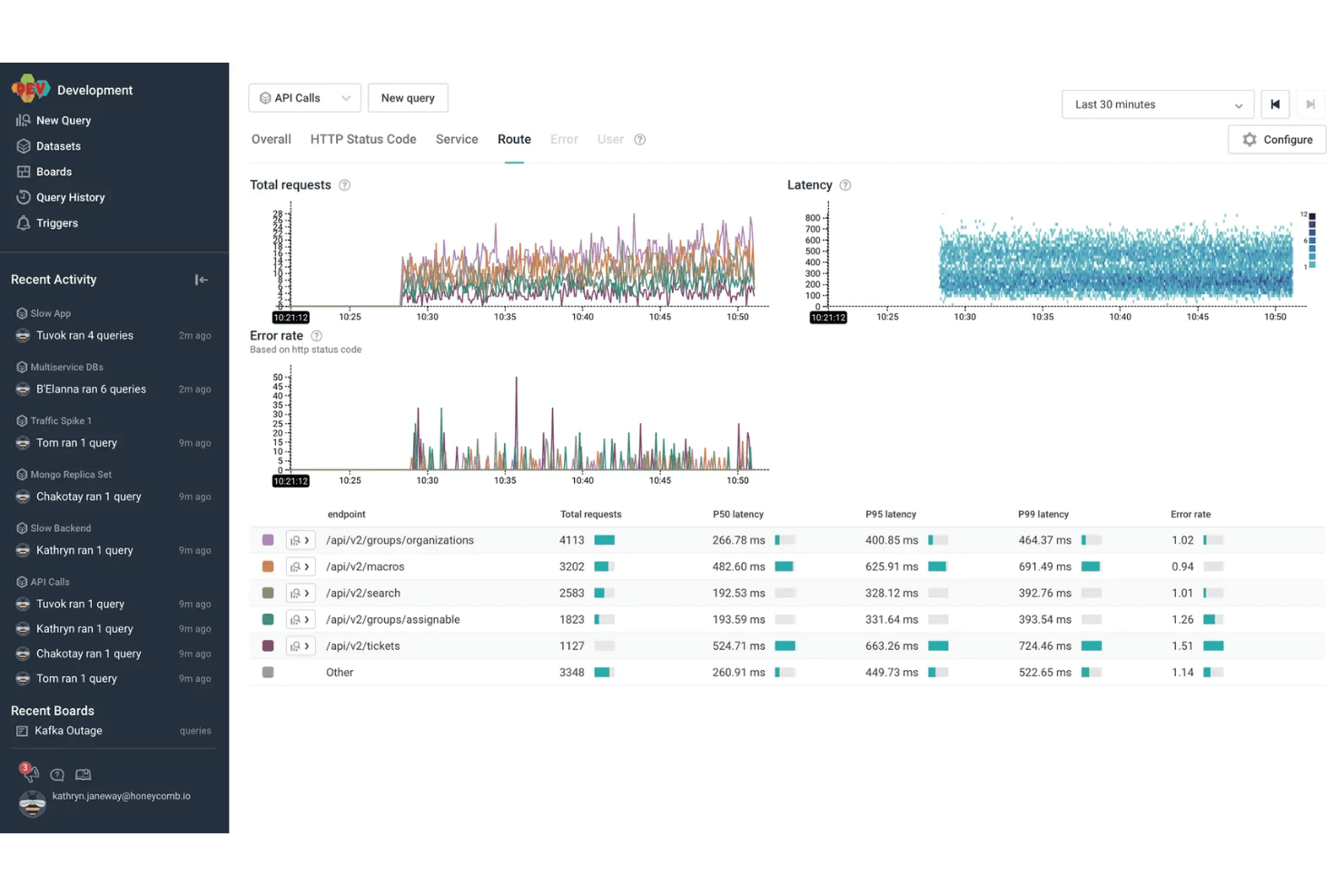
Honeycomb offers a modern, responsive interface with powerful querying and visualization tools, but its usability depends on your team’s technical expertise. Many users praise the speed and flexibility of its query builder, yet some find the learning curve steep, especially for those new to observability concepts.
The documentation and in-app guidance help, but teams without experience in distributed tracing or event-based monitoring may need extra ramp-up time to unlock Honeycomb’s full value.
Integrations
Honeycomb integrates with AWS Lambda, Slack, PagerDuty, Terraform, MySQL, Prometheus, ServiceNow, AWS CloudWatch, GitHub Actions, and Amazon Kinesis, among others.
Honeycomb also offers a robust API and supports connections with third-party integration tools for custom workflows and data ingestion.

Honeycomb Specs
- AI Integration: Yes
- API: Yes
- Automated Testing: No
- Browser Compatibility Testing: No
- Bug Tracking: Yes
- Code Review: No
- Custom Reports: Yes
- Data Export: Yes
- Data Import: Yes
- Developer Tools: Yes
- External Integrations: Yes
- Malware Protection: No
- Multi-User: Yes
- Notifications: Yes
- Performance Testing: Yes
- Process Reporting: Yes
- Static Analysis: No
- Status Notifications: Yes
- Workflow Management: No


