
Testing teams across the industry are under constant pressure to ship faster and do it all with fewer resources and tighter deadlines. While most QA teams know their field well, they often lack the time and resources to create, fix, and keep up with growing automation tests, leading to long test times, repeated delays, and late releases.
To address these challenges, teams are turning to {{deeplink:3489:[KaneAI]:kane_ai_features}}, the world's first GenAI-native testing agent, built to accelerate test creation, reduce dependency on automation specialists, and give every tester, whether non-technical or seasoned automation engineer, the ability to build and run advanced test suites using nothing more than plain, everyday language.
Overview Of KaneAI
KaneAI by {{deeplink:3489:[TestMu AI]:kane_ai_article}} (formerly LambdaTest) is a GenAI-native testing agent that lets teams plan, write, and update tests using simple natural language. Instead of writing long scripts or learning complex tools, teams can describe what they want to test in plain English, and KaneAI turns that into working test cases. This makes it easier for both technical and non-technical team members to take part in testing.
KaneAI is multimodal by design. It can take text prompts, Jira and Azure DevOps tickets, PRDs, PDFs, images, audio, videos, and spreadsheets, then turn that input into structured, automated test cases. It can also test every layer of an application, including UI, API, database, accessibility, visual UI, and performance.
It is built for fast-moving quality engineering teams that need quick results without slowing down development. KaneAI works closely with TestMu AI offerings, covering test planning, execution, orchestration, and reporting in one connected flow. Teams do not have to switch between multiple tools, which keeps the testing process clear and organized.
That flow now extends past the web app itself. TestMu AI has grown KaneAI into a wider testing layer that includes Kane CLI for terminal and CI-based browser automation and {{deeplink:3489:[Agent Testing for validating AI chatbots]:agent_testing}}, voice assistants, and phone agents. Both are covered in detail later in this article.
Challenges In Traditional Test Automation
Traditional test automation follows a fixed approach in which every step is written beforehand. Tests rely on predefined paths, fixed locators, and expected outputs. This setup works only when the application behaves the same way every time, which is rarely the case in real scenarios. In actual use, user flows change, data keeps updating, and UI changes happen frequently. For this reason, maintaining these tests becomes difficult and time-consuming.
Here are the common challenges teams face while using traditional test automation:
- High Technical Barrier to Entry: Traditional automation needs programming knowledge and a clear understanding of complex frameworks. Even when no-code tools are used, teams still need to learn tool-specific logic, setup steps, and testing structures before they can start. Because of this, only developers and experienced testers usually create and maintain automation scripts. This limits how much the rest of the team can contribute. It also slows down the process, as work depends on a few skilled people, which can create bottlenecks in testing.
- Fragile Test Architecture: Most traditional tests break when the application changes, because they depend on fixed element locators and predefined test paths. Even small updates in the UI can cause tests to fail, which creates extra work for the team. When teams run many tests across different devices, this problem grows quickly. They have to keep fixing and updating tests again and again. Eventually, this becomes difficult to manage, as teams end up managing two complex systems: the application itself and the automation that validates it.
- Difficult to Scale: As applications become more complex, traditional automation starts slowing things down. What once worked with a few simple tests no longer holds up when features increase and systems grow in size. Earlier, a small set of tests was enough to release new features. Now, teams need dedicated time and people to write and maintain scripts. As more features are added, the number of tests also increases rapidly, which makes it harder to manage and scale testing smoothly.
- High Test Upkeep Effort: Traditional automation scripts are tightly linked to the application’s structure, so even small changes in the UI or user flow can break existing tests. When elements or identifiers change, scripts stop working and require updates. So, teams end up spending a lot of time fixing these unreliable tests instead of writing new ones. This repeated effort increases workload and slows down the overall testing process.
How KaneAI Is Revolutionizing Test Automation
What if your testing process did not start with scripts or tools, but with a simple conversation about what needs to be tested, where complete test cases are created, and kept aligned with your product as it grows?
Well, that’s KaneAI for you, a GenAI-native testing agent built for high-speed engineering teams. It uses natural language to plan, write, and update test cases without relying on manual scripting.
- From Conversation to Test Case, Instantly: KaneAI removes the gap between what a tester wants to check and what actually gets automated. You simply provide plain test descriptions, and KaneAI converts them into fully working automated test scripts, bringing a new level of precision to the testing process. Anyone on the team, whether a developer, a QA engineer, or a product manager, can describe a scenario in plain words and watch it turn into a real, runnable test without writing a single line of code.
- Tests That Fix Themselves When the UI Changes: Most automation breaks the moment a button moves or a label changes, but KaneAI handles this on its own. Its self-healing capability detects changes in the application and automatically updates test scripts, so UI shifts no longer slow down development cycles. Tests adapt on their own, cutting down both maintenance work and release time, so teams spend less time fixing old tests and more time building new ones.
- A Testing Agent That Works Across Your Entire Workflow: KaneAI does not sit outside your tools; it works right inside the platforms your team already uses every day. Teams can generate tests from Jira, Azure DevOps, Slack, or GitHub just by tagging KaneAI, and every test change is tracked through smart versioning for cleaner management. A developer can raise a concern in Slack, tag KaneAI, and have a test ready without ever switching tabs or opening a separate testing tool.
- Faster Debugging With Instant Root Cause Analysis: When a test fails, finding out why used to mean going through logs line by line, but KaneAI changes that completely. KaneAI’s real-time Root Cause Analysis gives instant insights into test failures, cutting troubleshooting time and speeding up issue resolution for faster software releases. Teams can quickly see what went wrong and where, so fixes happen faster and releases do not get delayed.
- Runs at Scale, Across Every Browser and Device: A test that only works on one browser or one device is not a complete test, and KaneAI makes sure nothing gets missed. Tests run 70% faster with HyperExecute, covering over 3,000+ browser & OS and 10,000+ device combinations, giving teams broad coverage across browsers, devices, and operating systems. Whether your users are on Chrome, Safari, Android, or iOS, KaneAI makes sure the product works the same way for all of them.
- Code or No Code, the Choice Is Yours: KaneAI does not force teams into one way of working; it adapts to however each person on the team is most comfortable. KaneAI lets you work on tests in either natural language or code, and changes made in one format are automatically synced with the other, making it easy to keep tests consistent and up to date. Teams can also export test scripts across all major frameworks and programming languages, including Selenium, Cypress, and Playwright, so it fits into any existing tech stack without much setup.
- Enterprise-Ready from Day One: KaneAI is built to meet enterprise organizational standards out of the box, with SSO, RBAC, audit logs, and compliance controls. Combined with SLA-backed performance and enterprise-grade security, this allows teams to manage access, integrate with their existing identity providers, and run KaneAI within strict governance requirements without custom work.
What Are the Core Capabilities of KaneAI
Let’s look at the core features of KaneAI and how they simplify the testing process.
- Intelligent Test Generation: Effortless test creation and evolution using Natural Language Processing (NLP). Simply converse with KaneAI as you would with your team, and it will automate your test cases for you.
- Multimodal Test Authoring: KaneAI accepts text prompts, Jira and Azure DevOps tickets, PRDs, PDFs, images, audio, videos, and spreadsheets, then converts them into structured test cases. Teams can feed real product artifacts directly into KaneAI without translating them into a separate testing format first.
- Intelligent Test Planner: By inputting high-level testing goals, KaneAI builds a detailed, automated test plan, making sure teams get full test coverage while saving time. This keeps tests connected to what the project actually needs, making the testing process more strategic and focused.
- Full-stack test coverage: KaneAI tests every layer of the application, including UI, APIs, databases, accessibility, visual UI, and performance. Teams can validate APIs alongside UI flows in one strategy, plug KaneAI into their databases to generate tests from real queries, and ship inclusive experiences without slowing the release cycle.
- Multi-Language Code Export: KaneAI lets you export test scripts into different frameworks and languages, so you can continue using your current setup without changes. It works with tools like Selenium, Cypress, and Playwright. Teams can also choose testing frameworks such as JUnit, TestNG, NUnit, and Cucumber, which means they can work across different environments without restrictions.
- Sophisticated Testing Capabilities: KaneAI supports complex workflows across all major programming languages and frameworks. Complex conditions and assertions can be written in plain words, simplifying advanced testing workflows without needing deep coding expertise.
- Auto Bug Detection and Healing: KaneAI automatically detects bugs during test generation and execution, and its built-in auto-heal capabilities fix broken steps when changes occur in the application.
- Seamless Integration: Tests can be generated from Jira, Azure DevOps, Slack, or GitHub just by tagging KaneAI, with test changes tracked through smart versioning for better management. KaneAI can also raise tickets in Jira or Azure DevOps directly from identified failures, so QA stays in sync with development without switching platforms.
- Smart Show-Me Mode: With Show-Me Mode, teams can simply perform actions while KaneAI converts those steps into automated tests using clear instructions. It watches each action and builds the test flow directly from it, which reduces manual effort and keeps tests stable.
- Two-Way Test Editing: KaneAI lets teams work on tests in either natural language or code, and changes made in one format are automatically synced with the other, making it easy to keep tests consistent and up to date across different formats.
- Smart Versioning Support: KaneAI tracks every test change with separate versions, making test updates safe and organized. Teams can go back to any earlier version if something breaks after an update.
- Effortless Bug Reproduction: KaneAI lets teams fix issues by manually interacting with, editing, or removing the failing step, making the debugging process much more manageable. Teams can zero in on exactly where something went wrong and deal with it directly, without digging through layers of logs or scripts.
How to Use KaneAI?
Getting started with KaneAI is simple. There is no complex setup, no long onboarding, and no need to write a single line of code before running a test.
This is a simple walk-through that explains how everything works, using a real example of testing a flight booking flow on Skyscanner.
- Access KaneAI from TestMu AI: Log in to the TestMu AI platform. In the left sidebar of the main dashboard, click the KaneAI option. This will open the KaneAI section and display its available options.

- Open the Agent Workspace: After clicking on KaneAI, you will see multiple options such as Agent, Sessions, Modules, Databases, and Variables. From these, click on Agent. This will open the KaneAI workspace, where you can start writing prompts and creating tests.

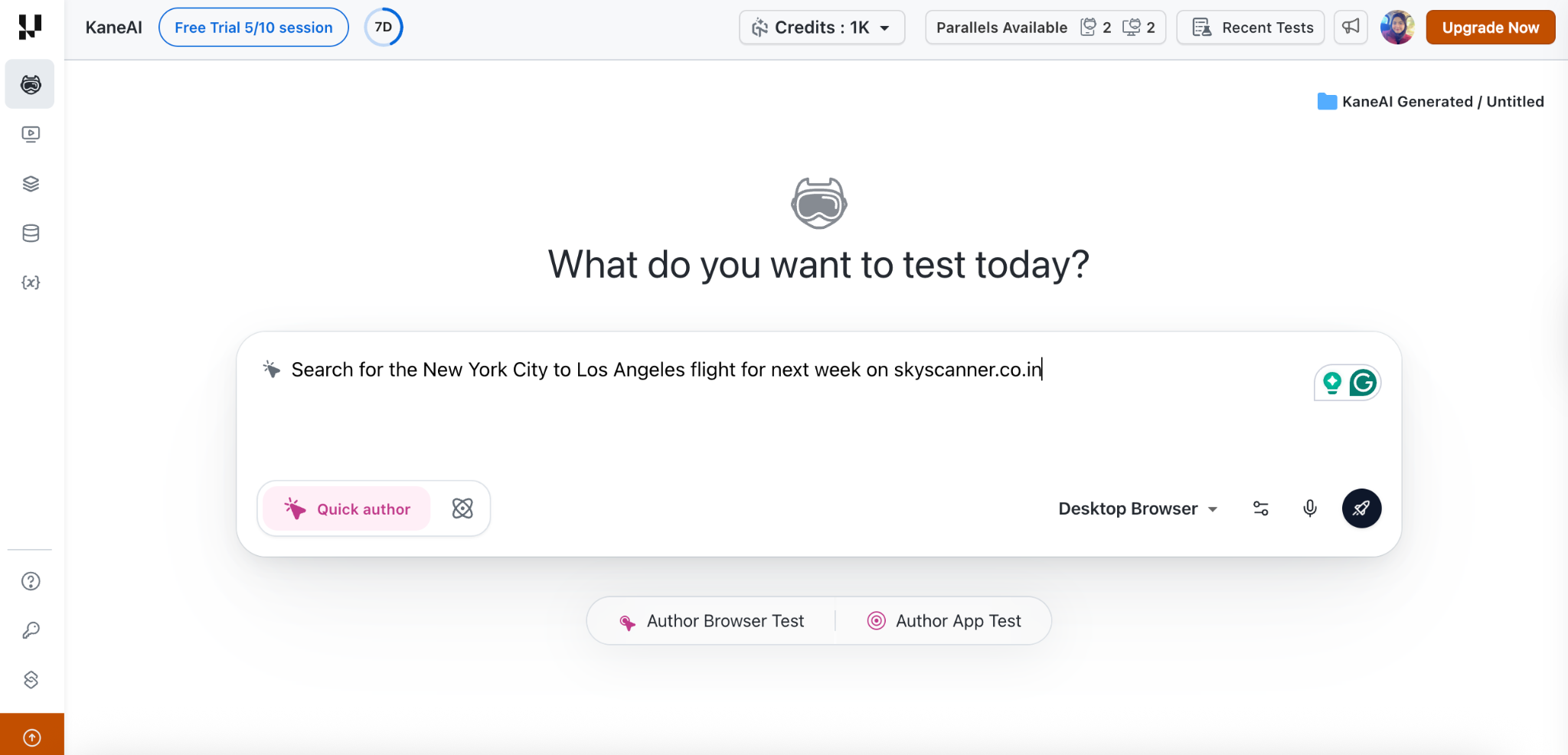
- Describe the Test in Plain Language: Once you are inside the KaneAI Agent screen, type your test objective in simple English.
For this example, the prompt is: “Search for the New York City to Los Angeles flight for next week on skyscanner.co.in and pick the lowest fare.” After that, click on the execute icon to continue.
- Review and Approve the Test Plan: KaneAI reads your input and creates a test plan instantly. A box appears showing what it understood from your instruction. Review the steps, then click on Approve to proceed.

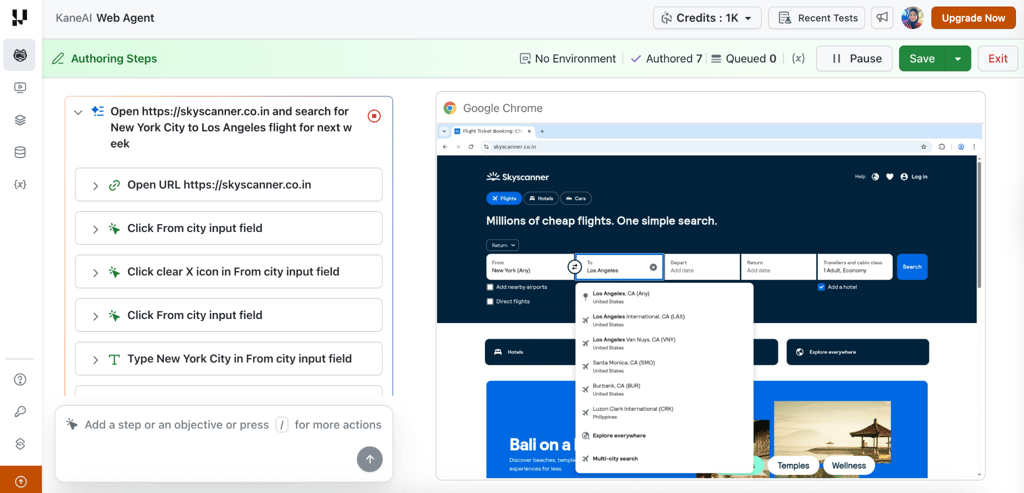
- Watch KaneAI Execute the Test: After approval, KaneAI opens a live browser session and starts running the test automatically. On one side, you can see each step being executed in real time, such as opening the website, selecting cities, and entering details. All of this happens automatically, exactly the way a real user would interact with the website, without anyone writing a single line of code.
- Save and Name the Test: Once the test is complete, click on Finish Test. You will get an option to select a folder and give your test a name. The test is then saved and becomes available in the Test Manager, where you can view steps, generated code, and execution history.
Bringing KaneAI to the Terminal With Kane CLI
KaneAI started inside the browser, but a lot of modern work happens in the terminal, the IDE, and the CI pipeline. To meet teams where they already build, TestMu AI launched Kane CLI, a terminal-native browser automation tool that runs the same checks from the command line.
{{deeplink:3489:[Kane CLI]:kane_cli}} is built for two audiences at once: human developers and AI coding agents. This matters because AI coding tools now write and fix code faster than any QA team can click through flows by hand. Every feature shipped from a prompt is a feature that nobody has actually verified yet. Kane CLI closes that gap between code that gets generated and code that gets confirmed working in a real browser.
You describe what should happen in plain English, for example, "log in as an admin, open the billing page, and confirm the plan shows Enterprise," and Kane CLI drives a real Chrome browser to do it, then returns a clear pass or fail. There are no selectors, no brittle scripts, and no custom domain-specific language to maintain.
Here is how Kane CLI fits into a modern workflow:
- Install and Run in Minutes: Kane CLI installs through npm (npm install -g @testmuai/kane-cli) or Homebrew. After a quick login, a single command runs an end-to-end flow against any URL, with a real browser result in under two minutes.
- Built for AI Coding Agents: Tools like Claude Code, Codex CLI, Cursor, and Gemini CLI can invoke Kane CLI directly to test and verify web UIs on your behalf. In agent mode, Kane CLI returns structured machine-readable output, so an agent can run a browser check, read the result, and decide whether more fixes are needed.
- Three Ways to Run: Use it as an interactive session in your terminal, as a headless one-shot command for CI pipelines, or as an agent-callable step inside a larger automated workflow. Switching between visible and headless mode does not require changing a single line.
- Resilient by Default: Auto-heal, smart waiting, and dynamic querying are built in, so flows hold up when the UI shifts instead of breaking on the first change.
- Synced With KaneAI: Kane CLI shares the same automation engine as KaneAI. Runs triggered from the CLI are uploaded to the KaneAI dashboard, so you still get replay, step-by-step logs, and test case management alongside the tests you authored on the web.
Kane CLI supports secrets and variables for parameterized flows, custom profiles and authenticated sessions for stateful tests, shareable test evidence links, native Playwright exports for teams that want to drop into code, and an Ask tool that loops a human in to handle OTPs or CAPTCHAs. It also introduces Test.md, an agent-native test format that captures any session as replayable markdown with imports, variables, and replay support.
Kane CLI is free to install. Local runs are free, and cloud runs on the TestMu AI grid are billed against your TestMu AI plan in the same way as any other KaneAI session.
Conclusion
The next phase of software testing belongs to teams that stop spending time on script maintenance and start focusing on what actually matters: building better products and catching real issues faster.
KaneAI makes that shift possible. By combining the speed of AI with the clarity of plain language, it gives every team member, technical or not, the ability to create, run, and manage tests that adapt and stay aligned with every release. And with Kane CLI bringing that same engine to the terminal and CI, and Agent Testing extending coverage to chatbots, voice assistants, and phone agents, TestMu AI now spans both the software your team builds and the AI agents inside it.
With KaneAI and TestMu AI, teams can bring that balance into their delivery pipeline and build a testing process that moves as fast as the product it is built to protect.